Deal Tracking Software in 2026: How to Pick the Right One
Most deal tracking tools fail for the same reason: reps stop updating them. Here's how to evaluate pipeline software on data hygiene, forecasting, and real cost — not feature lists.
TL;DR
- Deal tracking software is only as good as the data reps actually enter — pick for adoption friction first, feature count second.
- The three things that matter: stage definitions tied to buyer actions, automatic activity capture, and forecast math you can audit.
- Full-suite platforms (Salesforce, HubSpot) cost 3–10x more per seat than focused pipeline tools (Pipedrive, Close) and take months longer to roll out.
- Budget for the data layer, not just the software. A CRM full of bounced contacts and missing decision-makers produces confident, wrong forecasts.
- Small teams should start with a $15–$50/seat tool plus a verified contact source, and only graduate to enterprise suites when reporting complexity forces it.
What is deal tracking software?#
Deal tracking software records every open opportunity, the stage it sits in, its value, its close date, and what happened last. Think of it as an air traffic control tower for revenue: each deal is a plane, each stage is an altitude band, and the job of the system is to tell you which aircraft are circling, which are cleared to land, and which have quietly fallen off radar.
Technically it's a subset of CRM functionality — the opportunity object plus the pipeline view, reporting, and automation wrapped around it. Some vendors sell it as a standalone product. Most bundle it into a broader CRM, and the pipeline module is the part reps actually touch daily.
The distinction matters when you're buying. A full CRM asks you to manage contacts, companies, tickets, marketing, and quotes. A deal tracker asks you to manage deals. If your team has 6 reps and no marketing automation needs, paying for the former to use the latter is how software budgets bloat.
Why do most deal tracking rollouts fail?#
They fail on input, not output. The dashboards work fine. The data feeding them doesn't.
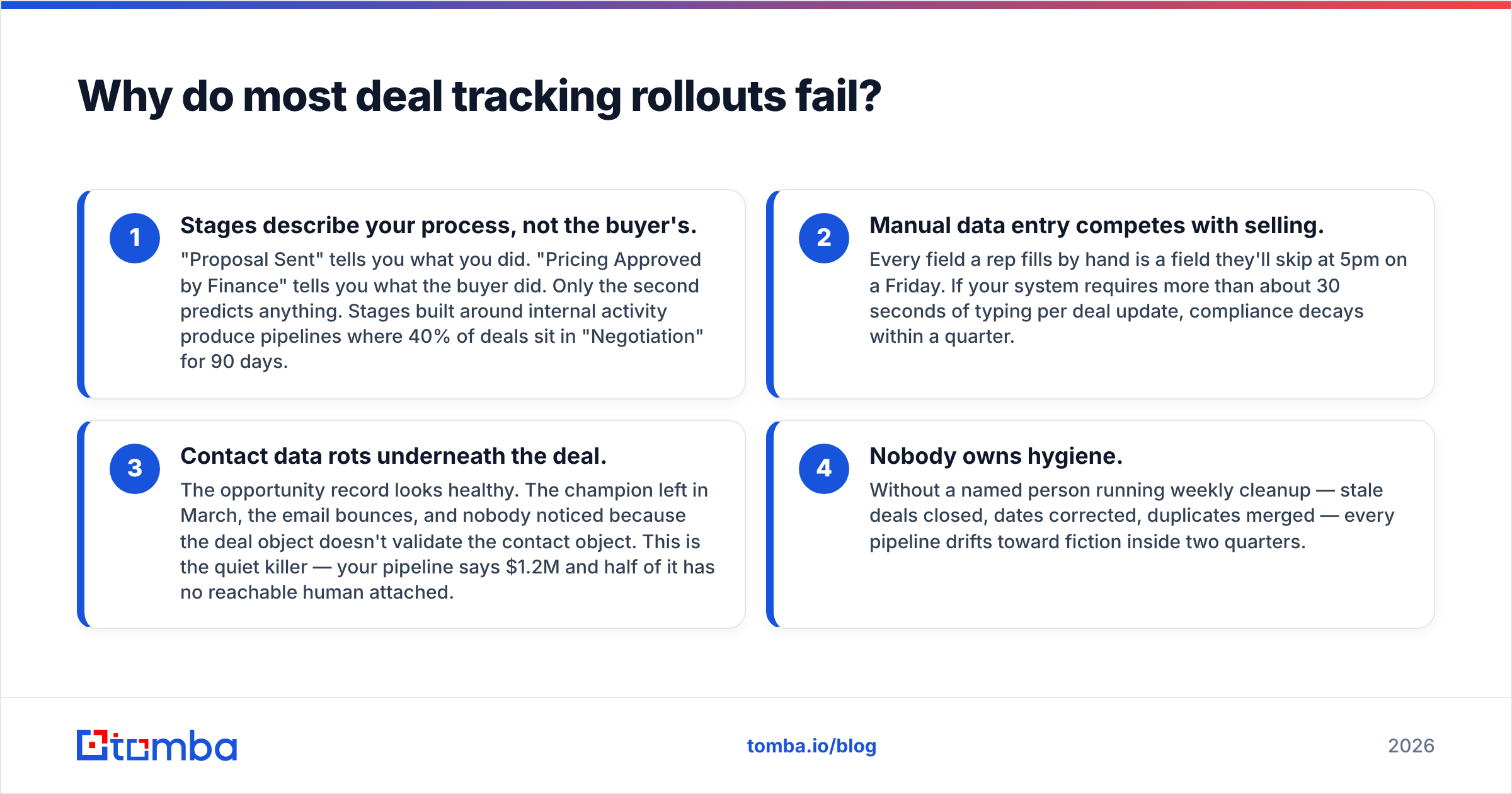
Four failure patterns show up repeatedly:
- Stages describe your process, not the buyer's. "Proposal Sent" tells you what you did. "Pricing Approved by Finance" tells you what the buyer did. Only the second predicts anything. Stages built around internal activity produce pipelines where 40% of deals sit in "Negotiation" for 90 days.
- Manual data entry competes with selling. Every field a rep fills by hand is a field they'll skip at 5pm on a Friday. If your system requires more than about 30 seconds of typing per deal update, compliance decays within a quarter.
- Contact data rots underneath the deal. The opportunity record looks healthy. The champion left in March, the email bounces, and nobody noticed because the deal object doesn't validate the contact object. This is the quiet killer — your pipeline says $1.2M and half of it has no reachable human attached.
- Nobody owns hygiene. Without a named person running weekly cleanup — stale deals closed, dates corrected, duplicates merged — every pipeline drifts toward fiction inside two quarters.
The fix for #3 is structural: connect your deal records to a contact source that re-verifies. Running your CRM contacts through an email verifier on a monthly cadence catches departures before they become ghost deals.
What features actually matter in deal tracking software?#
Ignore the feature matrix on the vendor site. Here's the shortlist that changes outcomes, ranked by impact:
- Automatic activity capture — emails, calls, and meetings logged to the deal without the rep clicking anything. This single capability determines whether your data survives month three.
- Auditable forecast math — you need to see why the system says $840K, which deals it weighted, and what happens if you change one probability. Black-box AI forecasts get overridden by managers and then ignored.
- Stage rot alerts — a deal that hasn't moved in 21 days should surface itself, not wait for a QBR.
- Custom fields without admin tickets — if adding a "Procurement Contact" field requires a certified admin and a two-week queue, your process will never adapt.
- Bi-directional email sync — one-way sync means reps live in Gmail and the CRM sees half the conversation.
- Native enrichment or a clean API — deal records should be able to pull company size, funding, and verified contact details without a manual research step. Tools with a documented email finder API let you close that loop in your own workflow.
Everything else — gamification leaderboards, AI sentiment scores, quote builders — is nice, and none of it fixes a pipeline nobody updates.
How do the main deal tracking tools compare?#
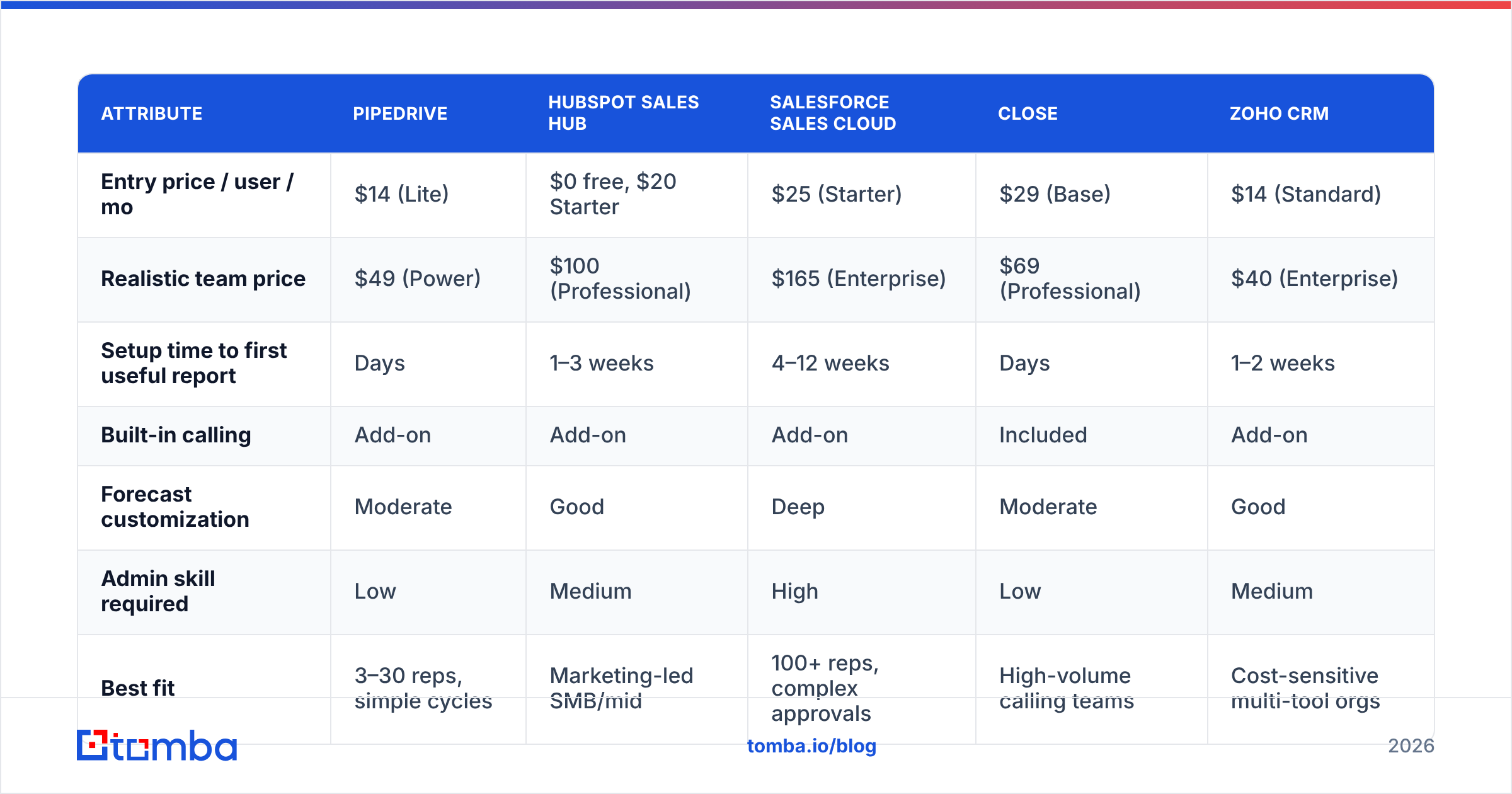
Pricing below reflects publicly listed annual-billing rates as of mid-2026. Verify current numbers before you sign; vendors change tiers frequently.
| Attribute | Pipedrive | HubSpot Sales Hub | Salesforce Sales Cloud | Close | Zoho CRM |
|---|---|---|---|---|---|
| Entry price / user / mo | $14 (Lite) | $0 free, $20 Starter | $25 (Starter) | $29 (Base) | $14 (Standard) |
| Realistic team price | $49 (Power) | $100 (Professional) | $165 (Enterprise) | $69 (Professional) | $40 (Enterprise) |
| Setup time to first useful report | Days | 1–3 weeks | 4–12 weeks | Days | 1–2 weeks |
| Built-in calling | Add-on | Add-on | Add-on | Included | Add-on |
| Forecast customization | Moderate | Good | Deep | Moderate | Good |
| Admin skill required | Low | Medium | High | Low | Medium |
| Best fit | 3–30 reps, simple cycles | Marketing-led SMB/mid | 100+ reps, complex approvals | High-volume calling teams | Cost-sensitive multi-tool orgs |
Three honest takeaways from that table:
Salesforce is not overpriced for what it does — it's overpriced for what most teams use. If you need territory hierarchies, CPQ, and revenue recognition tied to finance, nothing else comes close. If you need to know which 40 deals are open, you're buying a container ship to cross a river.
HubSpot's free tier is genuinely usable for deal tracking up to a point, and that point is when you want reporting granularity. The jump from Starter to Professional is the steepest cliff in the category.
Pipedrive and Close win on adoption, which is the metric that actually determines ROI. Reps use them because the interface is a pipeline, not a database.
Is a dedicated deal tracker better than a full CRM?#
Depends on how many systems you can afford to keep honest.
Choose a focused deal tracker when: your sales cycle is under 90 days, you have fewer than 30 reps, marketing runs on a separate stack, and your reporting needs stop at pipeline-by-stage and win rate.
Choose a full CRM suite when: you need marketing attribution tied to opportunities, multiple business units share accounts, compliance requires field-level audit trails, or your revenue operations team is building custom objects.
The trap is buying suite capability in anticipation of scale you haven't reached. Migration from Pipedrive to Salesforce at 40 reps is a two-month project. Running Salesforce badly for three years while you grow to 40 reps costs more — in seat licenses, admin salary, and rep hours — than that migration ever will.

How do you set up deal stages that predict revenue?#
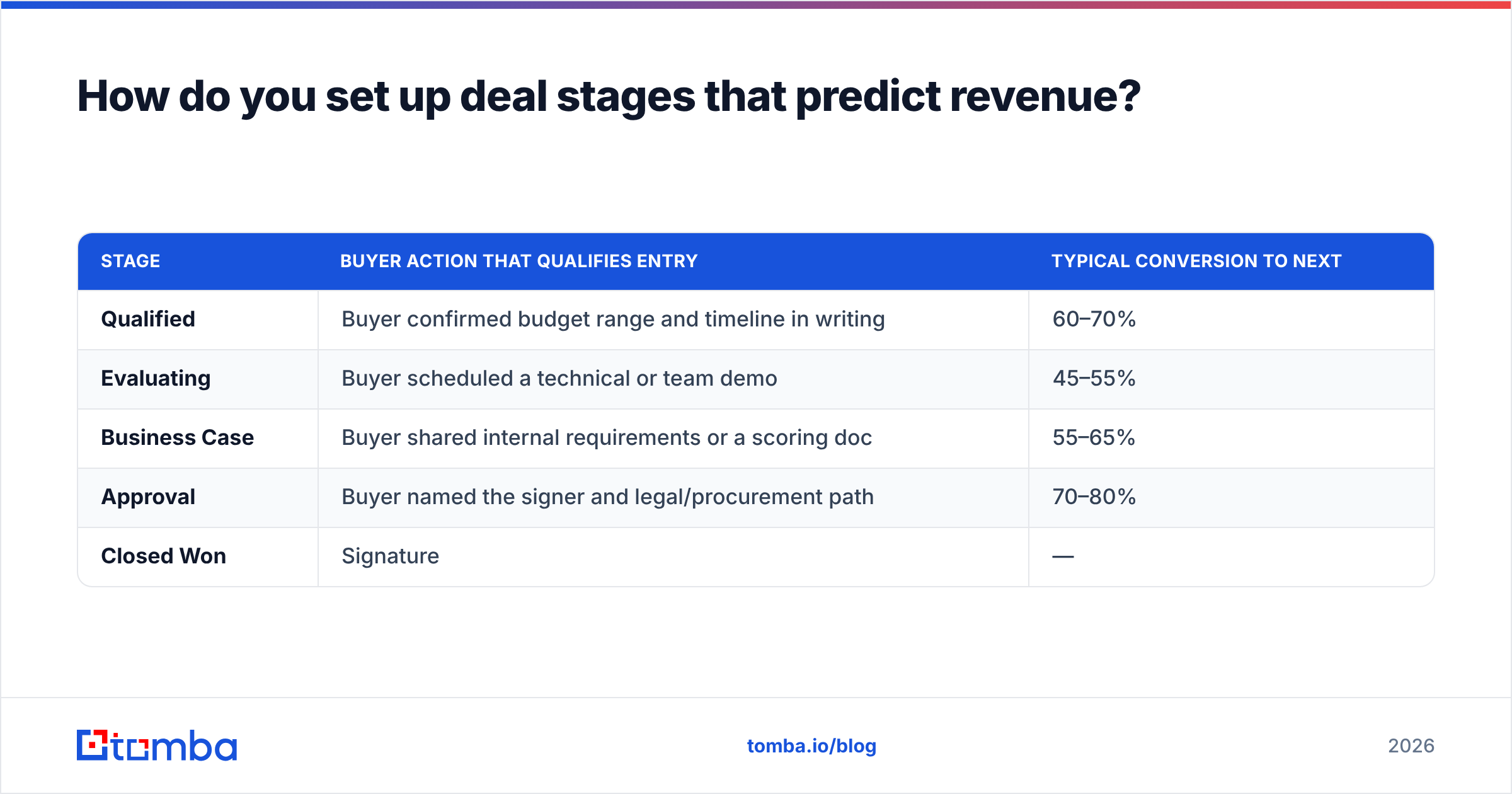
Write each stage as something the buyer did, with an exit criterion a manager can verify without asking the rep.
A workable five-stage structure for B2B software:
| Stage | Buyer action that qualifies entry | Typical conversion to next |
|---|---|---|
| Qualified | Buyer confirmed budget range and timeline in writing | 60–70% |
| Evaluating | Buyer scheduled a technical or team demo | 45–55% |
| Business Case | Buyer shared internal requirements or a scoring doc | 55–65% |
| Approval | Buyer named the signer and legal/procurement path | 70–80% |
| Closed Won | Signature | — |
Two rules keep this honest. First, deals only move forward on buyer evidence — a rep's optimism is not an event. Second, publish your actual stage-to-stage conversion rates every quarter and use those for weighted forecasting rather than the default 25/50/75/90 probabilities every CRM ships with. Those defaults are placeholders, and treating them as data is how forecasts miss by 30%.
For measuring the top of the funnel feeding these stages, track response rate alongside stage conversion. A pipeline problem at stage one is usually a targeting or data problem, not a closing problem.
What does deal tracking software really cost?#
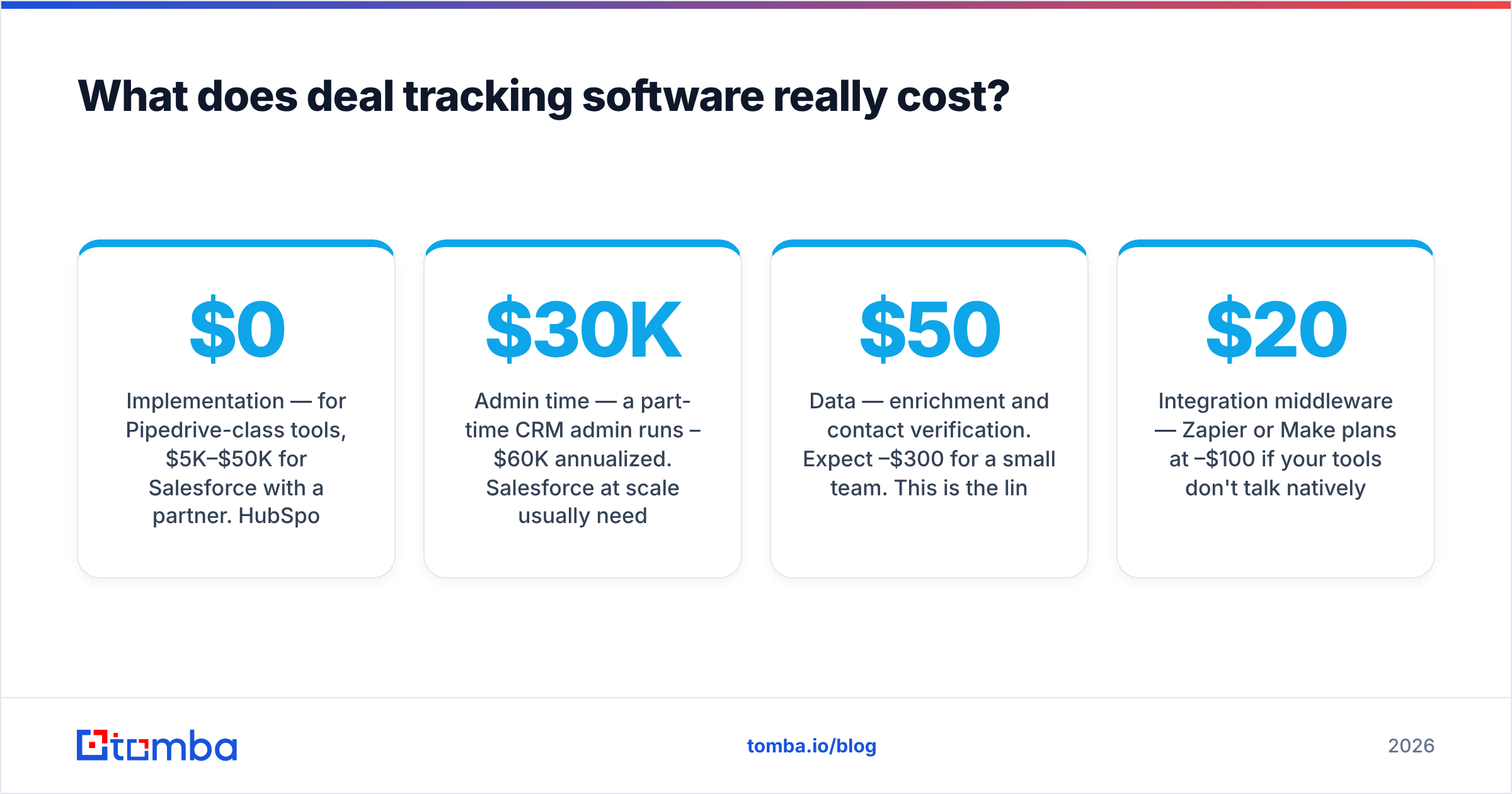
The sticker price is roughly half of it. Budget these too:
- Implementation — $0 for Pipedrive-class tools, $5K–$50K for Salesforce with a partner. HubSpot charges a mandatory onboarding fee on Professional and above.
- Admin time — a part-time CRM admin runs $30K–$60K annualized. Salesforce at scale usually needs a full-time one.
- Data — enrichment and contact verification. Expect $50–$300/month for a small team. This is the line item people skip and then wonder why their pipeline is full of unreachable contacts.
- Integration middleware — Zapier or Make plans at $20–$100/month if your tools don't talk natively.
- Migration — moving 10,000 deal records with history is a week of somebody's life, minimum.
A 10-rep team running Pipedrive Power realistically spends about $490/month on software, plus $100–$200 on data tooling, plus a fraction of an ops person. The same team on Salesforce Enterprise spends $1,650/month plus implementation plus a dedicated admin — call it $4,000/month all-in, all for the same 200 open deals.
Compare that to the data side: a Tomba Starter plan at $49/month covers contact discovery and verification for a team that size, and it's the input that determines whether any of the $4,000 in CRM spend produces accurate forecasts.
How do you keep deal data clean once it's live?#
Run these on a schedule and hygiene stops being a heroic quarterly cleanup:
- Weekly: close deals with a past close date and no activity in 30 days. Don't debate them — closed-lost with a reason code, and reopen if the buyer resurfaces.
- Monthly: re-verify primary contact emails on all open deals. Bounces flag departed champions faster than any relationship-health AI.
- Monthly: dedupe. Two reps working the same account under different company spellings is the most common source of inflated pipeline.
- Quarterly: recalculate stage conversion rates from closed data and update forecast weights.
- Quarterly: audit required fields. Any field with under 60% fill rate is either unnecessary or badly placed — remove it or move it into the stage-gate.
For teams doing this at volume, batch-processing the contact side through a bulk email finder is faster than checking records one by one, and it keeps the deal object anchored to a human who still works there.
Outside references worth reading before you commit: G2's CRM category grid for peer-reviewed vendor comparison, HubSpot's sales pipeline documentation for stage-design mechanics, and Salesforce's opportunity management docs if you're evaluating the enterprise end.
Which deal tracking setup should you choose?#
Match the tool to your constraint, not your ambition:
- Under 10 reps, transactional sales: Pipedrive Lite or Close Base. Ship in a week, revisit in a year.
- 10–40 reps, marketing-influenced pipeline: HubSpot Sales Hub Professional if you're already on HubSpot marketing; Pipedrive Power otherwise.
- High-volume outbound with heavy calling: Close, because the dialer and the pipeline are the same product.
- 40+ reps, multi-product, approval workflows: Salesforce, and hire the admin before you buy the licenses.
- Cost-constrained, technically capable team: Zoho CRM Enterprise plus API-driven enrichment.
Whichever you pick, the deciding variable stays the same: whether the contacts inside those deals are real, current, and reachable. A pipeline view is a rendering of your data quality — no interface fixes a bad input.
Get the contact data your pipeline is built on#
Deal tracking software tells you what's happening to your opportunities. It can't tell you whether the people attached to them still work there, or help you find the second and third stakeholders you need when your champion goes quiet.
That's the job of Tomba Email Finder. Point it at a company domain and get verified, current professional email addresses for the decision-makers on the deal — with confidence scoring, so you know what you're working with before you send. The free tier covers 25 searches a month; Starter is $49/mo when you're ready to run it across the whole pipeline. Plug it into your CRM through the integrations or the API, and stop forecasting against contacts who left last spring.
Related guides#
// get started
Find, verify and enrich your first contacts today
Start on the free plan with 25 searches a month, then scale when your team is ready.
Free plan · No credit card required · GDPR & CCPA
// about the author