Dealroom vs GetProspect 2026: Which B2B Data Tool Wins?
Dealroom maps funding rounds. GetProspect finds inboxes. The two get compared constantly, and most teams end up buying the wrong one. Here's the honest breakdown: coverage, pricing, and where a dedicated email finder beats both.
Dealroom vs GetProspect is a common short list, and it is the wrong one. One tool maps funding rounds. The other finds work emails. Below is what each one does, what it costs, and which one fits your team.
TL;DR
- Dealroom and GetProspect are not rivals. Dealroom tracks companies, funding, and investors. GetProspect finds people and their work emails.
- Pick Dealroom for market maps, investor research, and startup sourcing by stage or sector.
- Pick GetProspect to build a cold email list from LinkedIn at a set price per contact.
- Price is the sharp split. GetProspect starts near $49 per month. Dealroom is quote only, on a yearly deal.
- If your real problem is bounced email, neither tool is built for that. A finder plus a checker (Tomba is free to start, then $49/mo) does the job for less.
What are Dealroom and GetProspect?#
They solve two different problems. Both just happen to use the word "database".
Dealroom.co is an Amsterdam firm that tracks startups, investors, funding rounds, and deals. Its buyers are VC funds, corp dev teams, state agencies, and consultants. Say a fund wants every seed-stage climate startup that raised in Europe last year. Dealroom is the tool they open. It maps companies first. People data comes second.
GetProspect is a B2B contact database and email finder built for LinkedIn. You add a Chrome plug-in, run a search, and export names with work emails. It also has its own search, with filters for job title, company size, industry, place, and tech stack. Its buyers are sales reps, recruiters, agencies, and founders.
So the real question in Dealroom vs GetProspect is not which one is better. It is which layer you need. One tells you which firms matter. The other tells you how to reach the people inside them.
Dealroom vs GetProspect: head-to-head#
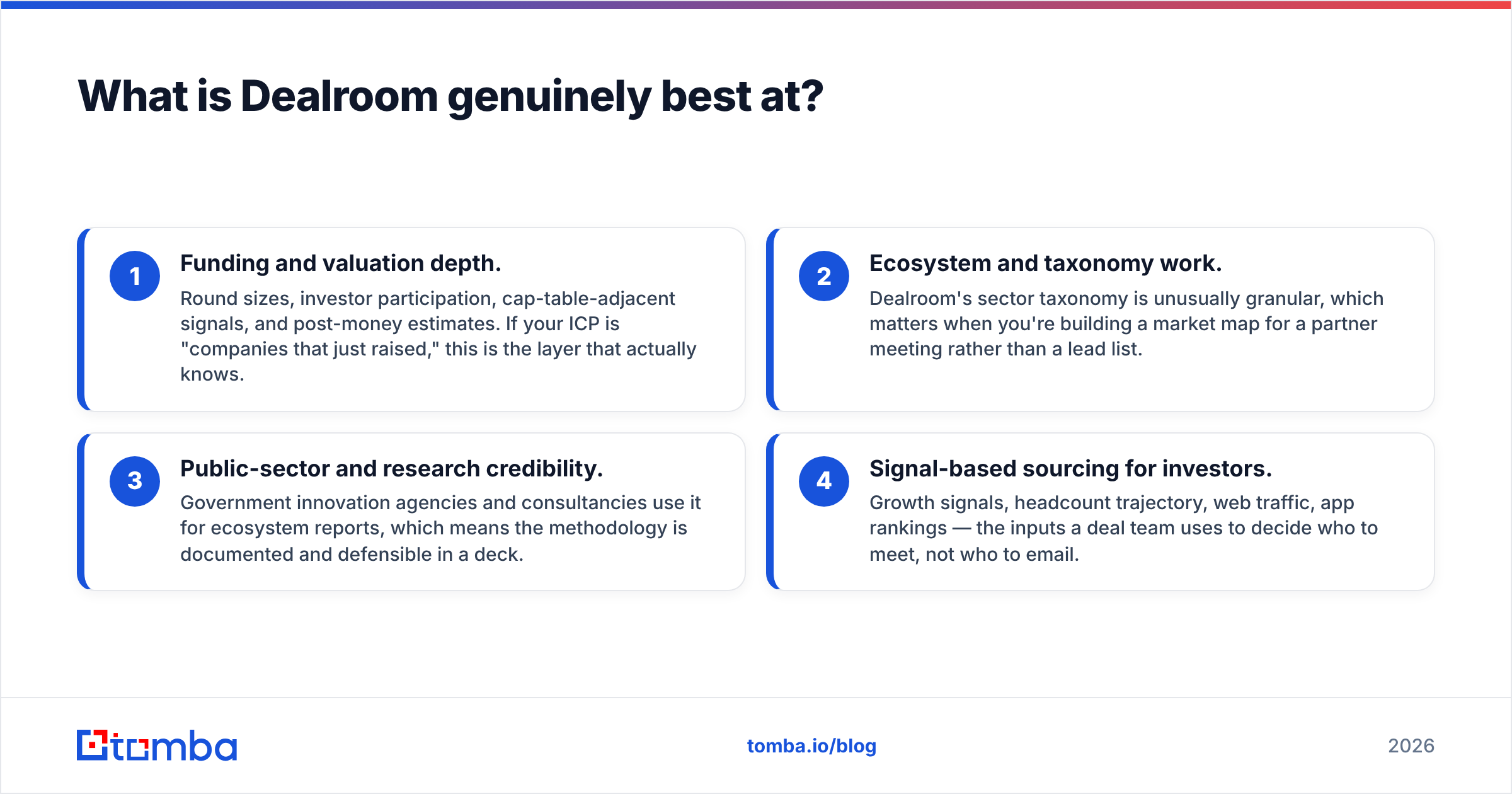
| Dimension | Dealroom | GetProspect |
|---|---|---|
| Main use | Market maps, funding and investor data | Work emails for cold outreach |
| Record type | Company, investor, funding round | Person |
| Emails | Few, and not the focus | Core product, checks included |
| LinkedIn plug-in | No | Yes, for LinkedIn and Sales Navigator |
| Key filters | Stage, value, investor, sector | Title, seniority, size, industry, place |
| Pricing | Quote only, yearly deals | Self-serve tiers, credit based |
| Free access | Public profiles only | Free plan with a small email quota |
| API | Yes, top tier | Yes, on paid plans |
| Typical buyer | VC, corp dev, market researcher | Rep, recruiter, agency, founder |
| Weak spot | Not built for bulk outreach | Light on funding and market data |
Read that table twice before you look at price. Teams often buy a market tool, find the contact data thin, then buy a second tool anyway. The flip side is just as common. A founder buys GetProspect, then asks why they cannot filter by "raised a Series A this year".
What is Dealroom best at?#
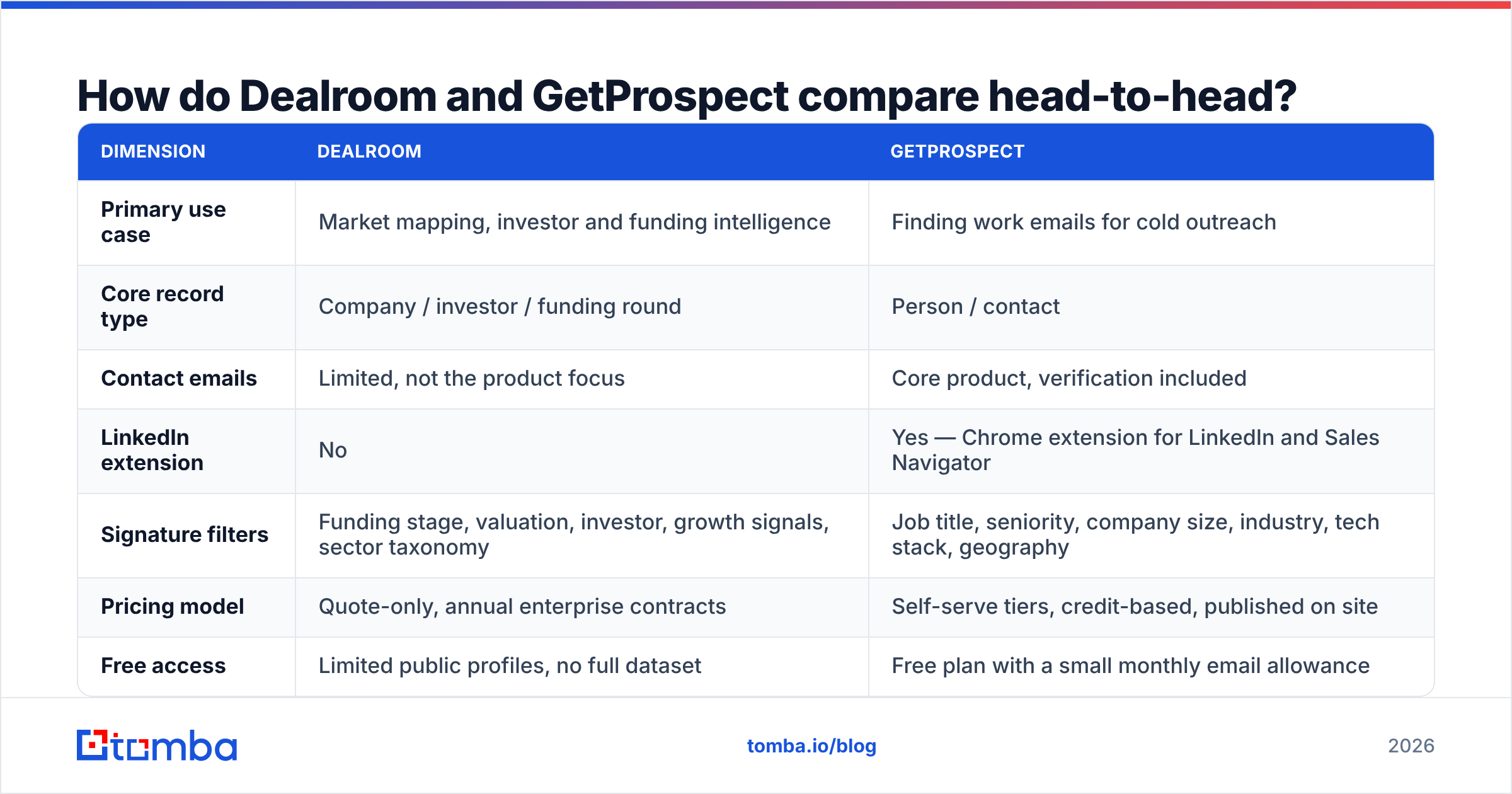
Four things. None of them is cold email.
- Funding depth. Round sizes, who invested, and value estimates. If you target firms that just raised, this layer knows.
- Sector maps. Dealroom sorts firms into fine-grained sectors. That helps when you build a market map for a meeting, not a lead list.
- Research you can cite. State agencies and consultants use it for reports, so the method is written down and easy to defend in a deck.
- Signals for deal teams. Head count, web traffic, app ranks. These point to who to meet, not who to email.
If that is your week, Dealroom is a fair buy. GetProspect will not replace it. Read the vendor site and current G2 reviews first. Since pricing is quote only, a trial means a sales call, not a credit card.
What is GetProspect best at?#
GetProspect wins on the speed of list building.
- LinkedIn to CSV in minutes. Run a search, click the plug-in, export the rows. That flow is why most people buy it.
- Clear cost per contact. Credits map to contacts, so you can model cost per lead. Quote-based tools leave you guessing.
- Built-in checks. Each email comes with a status. That cuts, but does not end, the need for a clean-up pass.
- A free tier that helps. You can test the data on your niche before you pay. Most big data vendors do not offer that.
Where it gets thin: the data leans on LinkedIn. Sell to plant managers, local resellers, or small firms outside the English-speaking world, and hit rates drop. That is true of any LinkedIn-based source, not just this one. It is still the gap that costs you the most.
Dealroom vs GetProspect pricing in 2026#
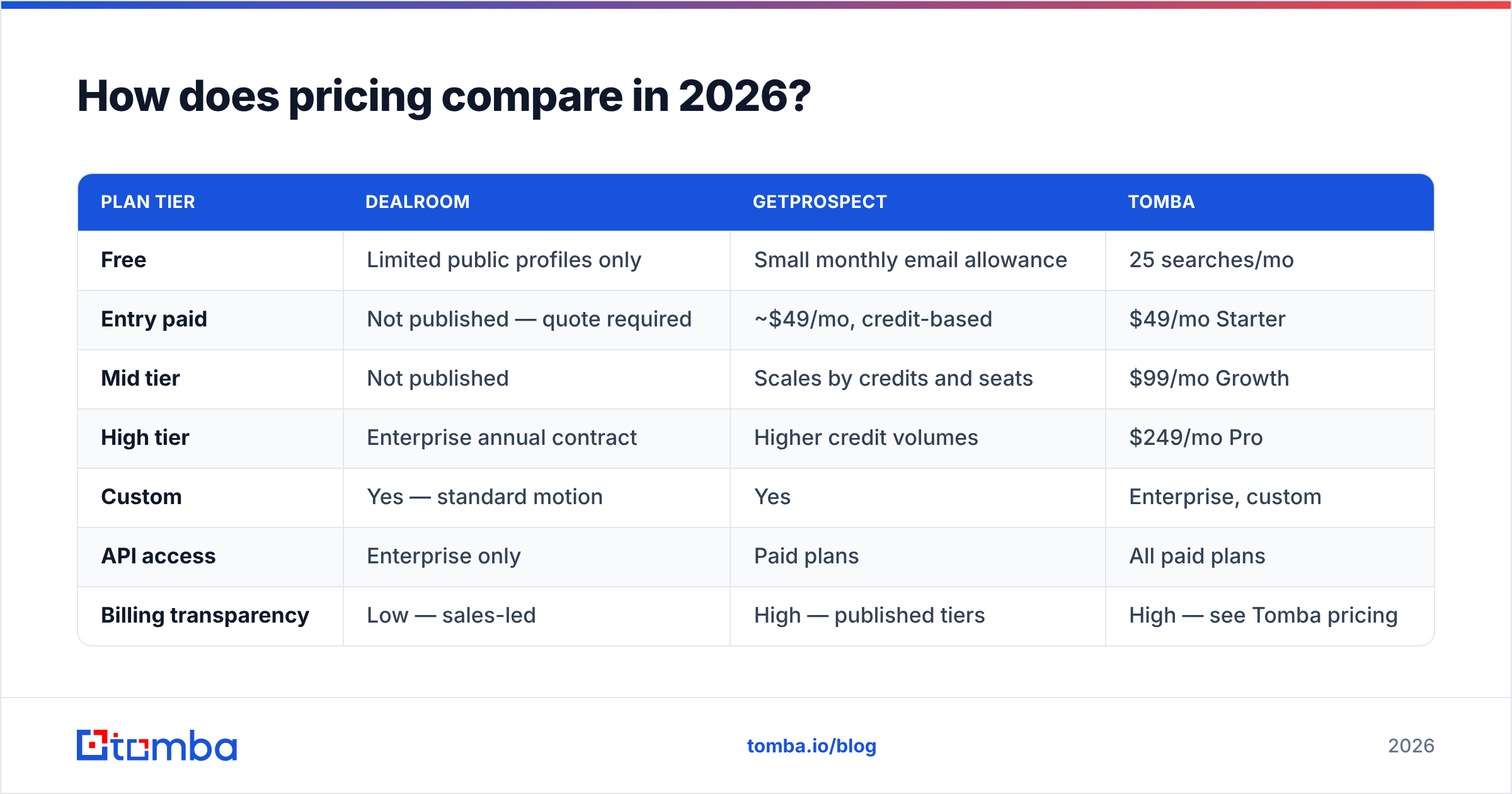
| Plan tier | Dealroom | GetProspect | Tomba |
|---|---|---|---|
| Free | Public profiles only | Small monthly email quota | 25 searches/mo |
| Entry paid | Not published, quote only | ~$49/mo, credit based | $49/mo Starter |
| Mid tier | Not published | Scales by credits and seats | $99/mo Growth |
| High tier | Yearly enterprise deal | Higher credit volumes | $249/mo Pro |
| Custom | Yes, the standard route | Yes | Enterprise, custom |
| API access | Top tier only | Paid plans | All paid plans |
| Price clarity | Low, sales led | High, tiers on site | High, see Tomba pricing |
Two honest notes. First, prices change, so treat the GetProspect figure as a guide and check their site. Second, quote-only pricing is normal for research tools. What you pay there tracks seat count and data scope. Still, you cannot price it in a day. For small teams, that alone rules it out.
Seat count matters more than the sticker price. Research tools charge per user, so a team of five adds up fast. Contact tools charge per credit, so cost tracks volume instead. Model your own use before you compare the two numbers.
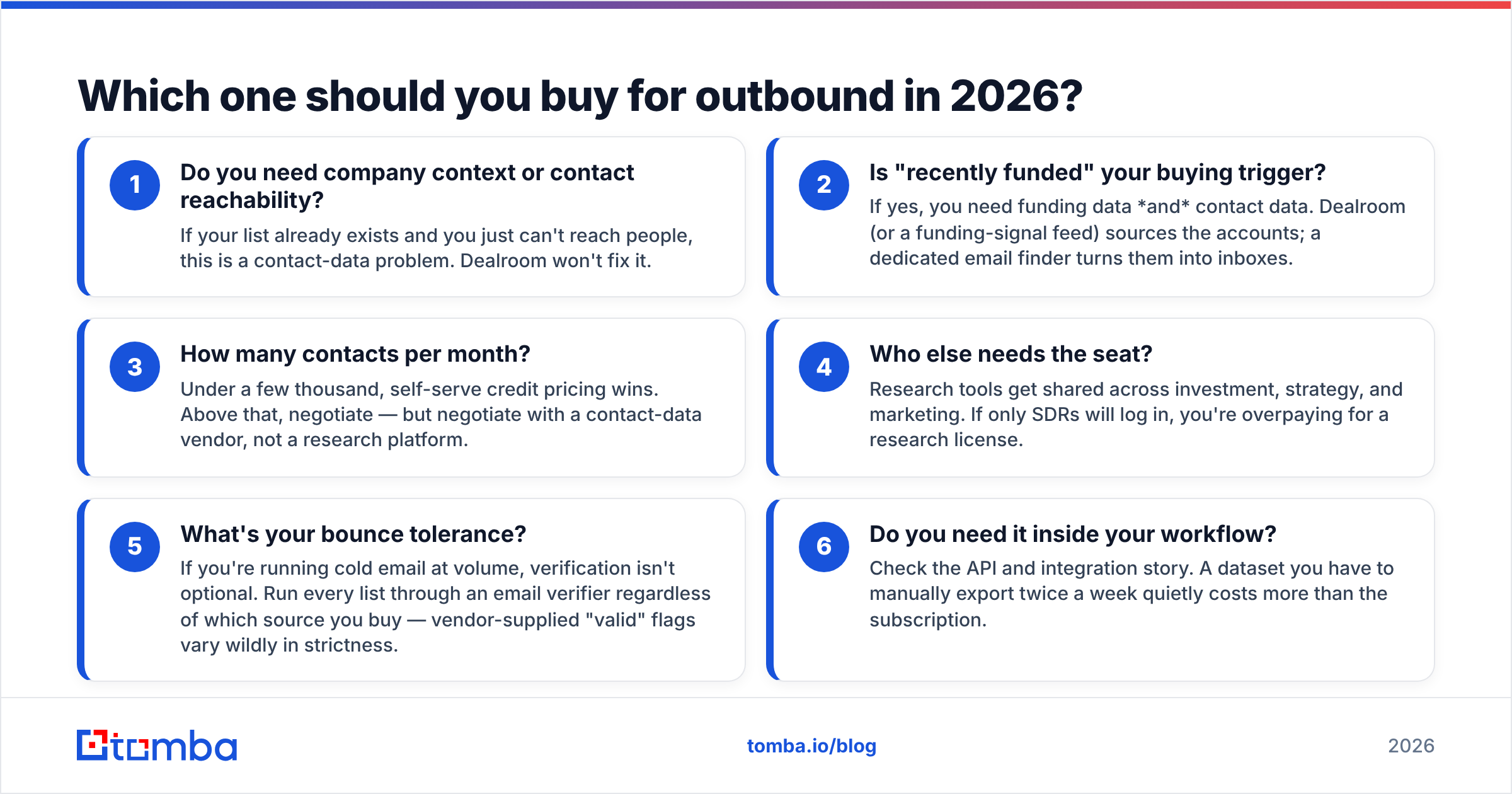
Which one should you buy for outbound?#
Start with what is broken:
- Do you need firm context, or a way to reach people? If your list exists and you cannot reach anyone, that is a contact data problem. Dealroom will not fix it.
- Is "just raised" your trigger? Then you need both halves. Dealroom sources the accounts. A dedicated email finder turns them into inboxes.
- How many contacts per month? Under a few thousand, self-serve credits win. Above that, deal with a contact vendor, not a research one.
Then check the practical side:
- Who else needs a seat? Research tools get shared with strategy and marketing. If only reps log in, you pay too much.
- What bounce rate can you live with? At volume, checks are not optional. Run every list through an email verifier, whatever the source.
- Does it fit your flow? Check the API and the links to your stack. A tool you export by hand each week costs more than it looks.
Where does each tool fall short?#
Dealroom, for sales teams. It is not built to export contacts in bulk. The price fits a research budget, not a sales one. There is no LinkedIn plug-in for one-click work. And the funding data that makes it strong is data most reps never use.
GetProspect. Coverage tracks LinkedIn use. Long-tail trades, junior roles, and some regions come back blank. Catch-all domains are a pain across the whole field. Such a server accepts every address, so it tells you nothing about one mailbox. If much of your market sits behind catch-all, use a catch-all verifier instead of a green check mark from a bulk export.
The shared gap. Neither tool owns inbox placement. A correct address is step one. Landing in the inbox also takes set-up, a clean sending record, and steady volume. Good data cuts bounces, which guards your sender reputation. It is not a plan on its own.
Can one stack replace both?#
Half of it, yes.
You cannot copy Dealroom's funding data with an email finder. Nobody should claim you can. If you must know who led a Series B, and at what price, buy the research tool.
You can copy the contact half, and often beat it. A finder plus a checker pulls from many sources, not one network. That tends to win on the long tail. It also plugs into the account list you already built. The shape looks like this:
- Source accounts from your funding tool, your CRM, or a market map.
- Find people by domain. Domain search returns staff plus the firm's email pattern, which makes bulk work steady.
- Add detail such as job title and firm size with data enrichment, so your emails have something to use.
- Check every address before you send.
- Automate it with the Tomba API or a Sheets link, so nobody exports files by hand.
That stack costs a set amount each month, and no sales call is needed. It also keeps your research budget apart from your outbound budget. Both are easier to defend at renewal.
Dealroom vs GetProspect: the verdict#
Investor, corp dev, or market research? Buy Dealroom. GetProspect is not in the race here, and the funding depth is worth the sales call.
Sales rep, recruiter, or founder working from LinkedIn? GetProspect is a fair, well-priced pick with a free tier you can test today. Budget for a checking pass. Do not expect market context.
Doing both jobs on one budget? Buy the research tool only if funding data really drives your outreach. Pair it with a dedicated email layer instead of stretching either tool past its design.
The trap in Dealroom vs GetProspect is treating it as one choice. Firm data and contact data are two products with two price models. Every quarter, someone renews the wrong one because the demo looked good.
Want to fix just the contact half? Start with the Tomba Email Finder. You get 25 free searches a month, no card. Test hit rates against your current tool first. Paid plans start at $49 per month, and every tier includes API access.
Related guides#
Ready to find emails that actually work?
Join 150,000+ professionals who stopped guessing and started sending. Free credits on signup — no credit card required.
Get the Tomba newsletter
Practical outbound tactics and product updates — once every two weeks.
About the author