Dealroom vs Leadsforge: Which B2B Data Tool Wins in 2026?
One tool maps private-market companies for investors and researchers. The other spins up AI-generated lead lists for outbound. Here is where each actually earns its price — and where you still need a dedicated email layer.
Dealroom vs Leadsforge comes down to one question. Are you mapping a market, or building a send list? Each tool is good at one of those jobs, not both.
TL;DR
- The two tools solve different problems. Dealroom is a private-market database for investors, corp-dev teams, and economic-development agencies. Leadsforge is an AI lead-list builder for SDRs who want a contact CSV in minutes.
- Pick Dealroom if your question is "which companies exist in this space, who funded them, and how fast are they growing?"
- Pick Leadsforge if your question is "give me 500 people who match this persona so I can email them tomorrow."
- Neither one is a contact-accuracy specialist. Both hand you emails as a by-product, not as a core product. That is why teams on either tool bolt on a verification layer.
- The cheapest working stack is usually hybrid. Use a discovery tool for targeting. Add a purpose-built email finder for contact resolution and verification.
What are Dealroom and Leadsforge, actually?#
Both vendors sell "B2B data." That phrase hides two very different jobs.
Dealroom is a private-market intelligence platform. It tracks startups, scale-ups, funding rounds, investors, valuations, and market trends. Coverage is deepest in Europe and keeps widening. Its buyers are venture funds screening deal flow, corporates mapping acquisition targets, and government agencies benchmarking their tech ecosystems. The unit of value is a company profile with growth signal attached: funding history, headcount trend, investor lineup, and market taxonomy.
Leadsforge sits at the other end. It is a chat-first, AI lead-list builder. You describe the persona in plain words — "marketing directors at 50–200 person SaaS companies in the UK" — and it returns a contact list with emails. The unit of value is a row you can drop into a sequencer.
That gap predicts where each tool lets you down. Dealroom will not hand you a clean, deliverable outbound list. Leadsforge will not tell you that a company just raised a Series B, or that it is quietly shrinking.

Dealroom vs Leadsforge: how do they compare feature by feature?#
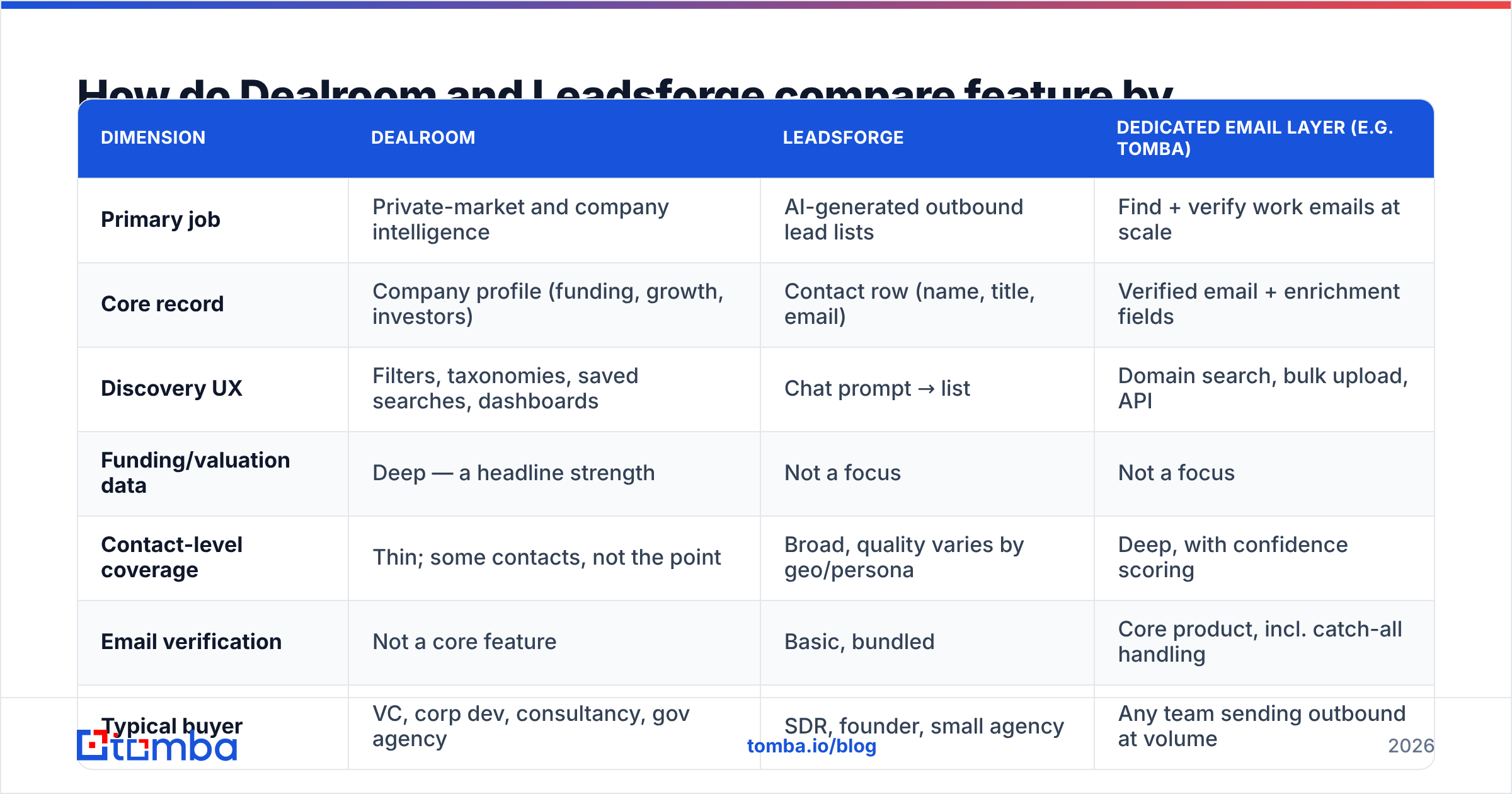
Here is the honest side-by-side. Pricing for both is mostly quote-based, and it moves. Treat the figures below as directional. Confirm them on each vendor's site before you budget.
| Dimension | Dealroom | Leadsforge | Dedicated email layer (e.g. Tomba) |
|---|---|---|---|
| Primary job | Private-market and company intelligence | AI-generated outbound lead lists | Find + verify work emails at scale |
| Core record | Company profile (funding, growth, investors) | Contact row (name, title, email) | Verified email + enrichment fields |
| Discovery UX | Filters, taxonomies, saved searches, dashboards | Chat prompt → list | Domain search, bulk upload, API |
| Funding/valuation data | Deep — a headline strength | Not a focus | Not a focus |
| Contact-level coverage | Thin; some contacts, not the point | Broad, quality varies by geo/persona | Deep, with confidence scoring |
| Email verification | Not a core feature | Basic, bundled | Core product, incl. catch-all handling |
| Typical buyer | VC, corp dev, consultancy, gov agency | SDR, founder, small agency | Any team sending outbound at volume |
| Pricing model | Annual seat/licence, quote-based, enterprise-tier | Credit/subscription, SMB-friendly | Free tier, then $49–$249/mo published |
| API access | Yes, on higher tiers | Limited | Yes, on all paid tiers |
| Best for | Market mapping and TAM analysis | Fast list generation | Contact accuracy and deliverability |
The pattern is easy to see once it is laid out. Dealroom is packaged like research infrastructure. Leadsforge is packaged like a sales productivity tool. Neither is built for the boring job that carries the most weight: making sure the email you send actually lands.
When is Dealroom the right choice?#
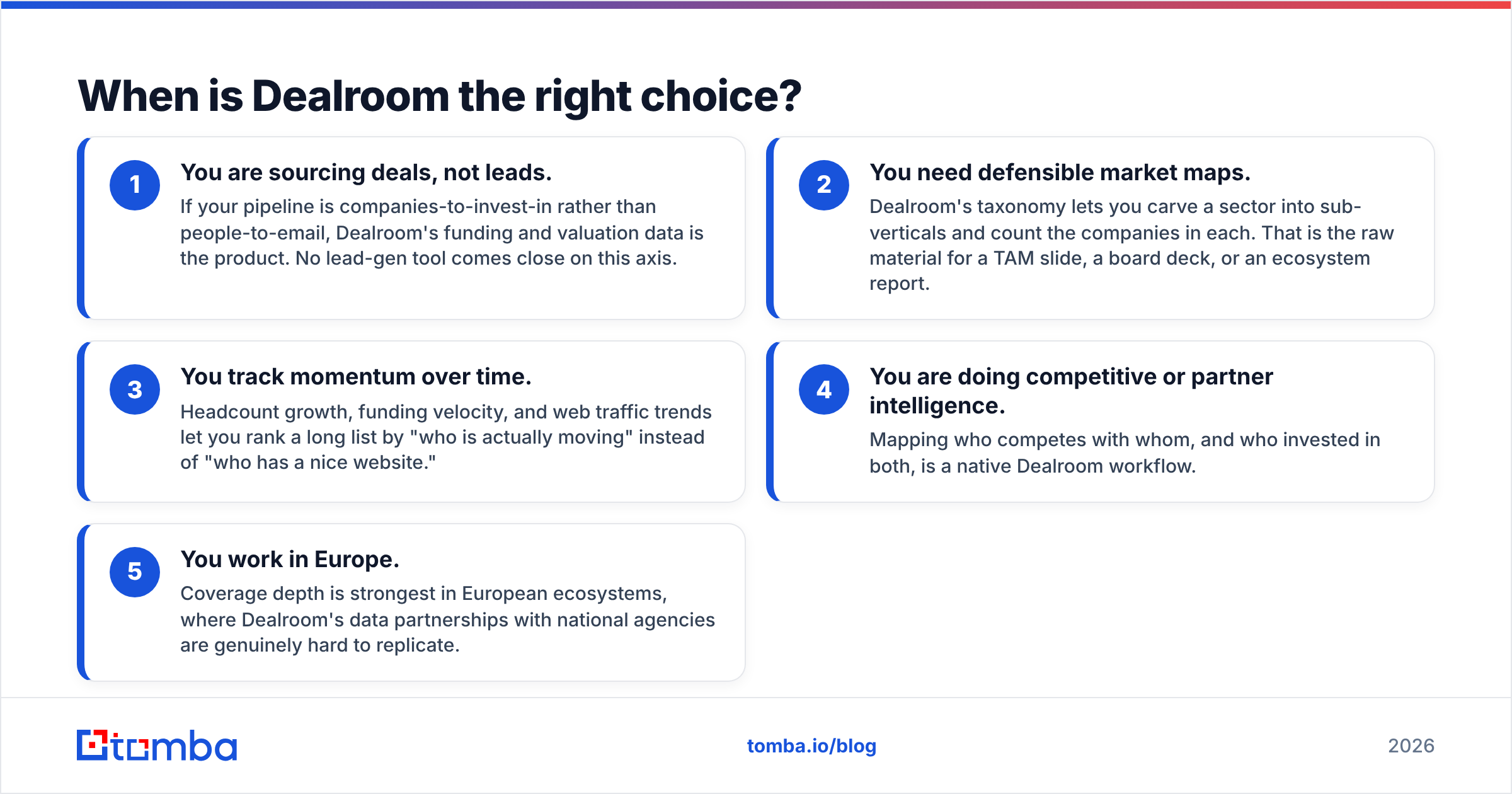
Dealroom earns its licence fee in five situations:
- You are sourcing deals, not leads. Your pipeline is companies to invest in, not people to email. Here the funding and valuation data is the product. No lead-gen tool comes close.
- You need market maps you can defend. Dealroom's taxonomy lets you split a sector into sub-verticals and count the companies in each. That is the raw material for a TAM slide, a board deck, or an ecosystem report.
- You track momentum over time. Headcount growth, funding pace, and web traffic trends rank a long list by who is actually moving. That beats ranking by who has a nice website.
- You do competitive or partner research. Mapping who competes with whom, and who backed both, is a native Dealroom workflow.
- You work in Europe. Coverage is strongest there. Dealroom's data partnerships with national agencies are hard to copy.
One thing breaks down for revenue teams: contact data. You will find 200 great-fit companies. Then you will notice you have no idea who the VP of Engineering is, or how to reach them. A domain search step fills that gap. Take the domains Dealroom surfaced, pull the people and the email patterns, and move on.
When is Leadsforge the better fit?#
Leadsforge is built for speed. It suits people who do not want to learn a filter UI. Its strengths:
- Plain-language targeting. Describing an ICP in one sentence is faster than clicking fifteen dropdowns. That helps founders who do outbound between other jobs.
- Time to first list. Minutes, not a procurement cycle. There is no annual contract gate for a small team testing a channel.
- Bundled contact data. Emails come attached. You are not stitching three tools together on day one.
- Low commitment. Credit-based pricing means a failed test costs you a month, not a year.
The trade-offs are just as predictable. AI-built lists are only as good as the database under them. Ask for a niche persona in a small market and you get rows that look fine but are not. Stale titles. People who left. Addresses guessed from a pattern. User reviews on G2 tell the same story across this whole category. The list-building feels great; the bounce rate is what bites.
That is not a Leadsforge flaw. It is structural. Any tool that guesses addresses from patterns, with no live check, will produce some duds. Those duds land in your bounce column.
Why does email accuracy decide the winner more than features do?#
Because deliverability is a cliff, not a slope.
Mailbox providers judge your sending domain on aggregate signals. Hard bounces are one of the loudest. Send a list with 15% bad addresses and you do not lose 15% of your replies. You put your whole domain's sender reputation at risk, which drags down the other 85% too. Google and Yahoo wrote this into their bulk-sender rules. Complaint and authentication limits are enforced, and repeat offenders get filtered rather than warned. Microsoft's sender guidance says the same thing in other words.
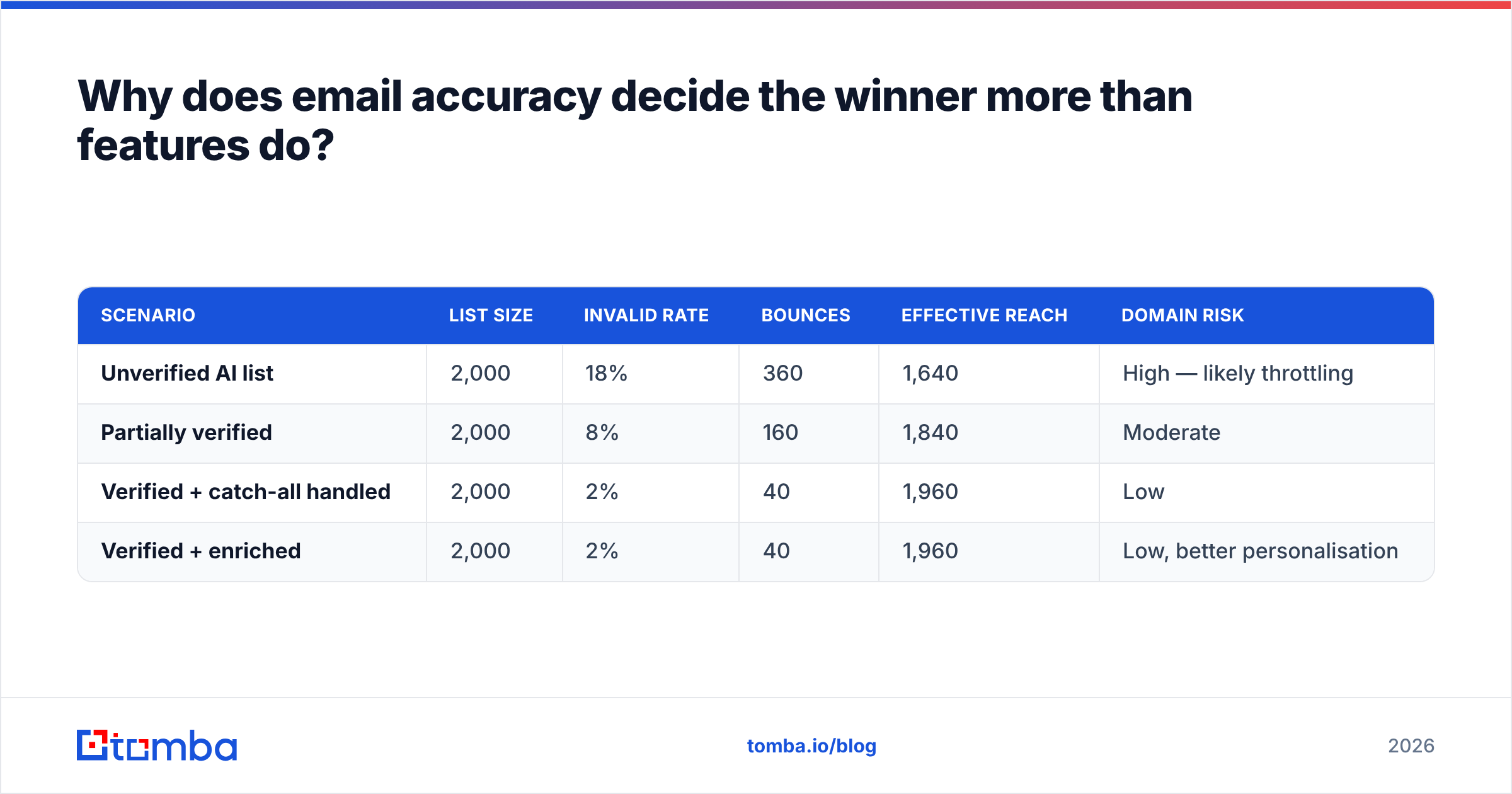
Run the numbers on a modest campaign:
| Scenario | List size | Invalid rate | Bounces | Effective reach | Domain risk |
|---|---|---|---|---|---|
| Unverified AI list | 2,000 | 18% | 360 | 1,640 | High — likely throttling |
| Partially verified | 2,000 | 8% | 160 | 1,840 | Moderate |
| Verified + catch-all handled | 2,000 | 2% | 40 | 1,960 | Low |
| Verified + enriched | 2,000 | 2% | 40 | 1,960 | Low, better personalisation |
The gap between row one and row four is not 320 extra emails. It is the gap between a domain you can keep using and one you have to warm up again. A dedicated email verifier costs a fraction of either licence. It removes the biggest failure point in the stack.

What does a realistic stack look like for each use case?#
Stop asking "Dealroom or Leadsforge." Ask which layer each tool covers. Every outbound or research motion has three layers. Buying two tools for the same layer is how budgets get wasted.
- Discovery layer — which accounts matter? Dealroom wins for funded, private-market, and ecosystem work. Leadsforge does a lighter version of this by prompt.
- Contact layer — who do I reach, and at what address? Leadsforge covers this natively, but quality varies. Dealroom barely covers it at all.
- Verification and enrichment layer — will this send land, and what do I know about the person? Neither tool treats this as its core product. Teams under-buy here, then blame the other two layers.
Three concrete setups:
- Investor / corp-dev team: Dealroom for sourcing and market maps. Then the Tomba API to resolve founder and operator contacts from those domains. Then your CRM. You pay Dealroom for signal, not for inboxes.
- Early-stage SDR team: Leadsforge for fast lists. Then a verification pass before anything enters the sequencer. That pass is the cheapest insurance in the stack.
- Lean founder-led outbound: Skip both. Build a target list by hand from a market map you trust. Run bulk email finding against those domains. Put the savings into better copy. Under roughly 1,000 prospects a month, this beats a general platform on cost and accuracy.
How do the costs actually compare over a year?#
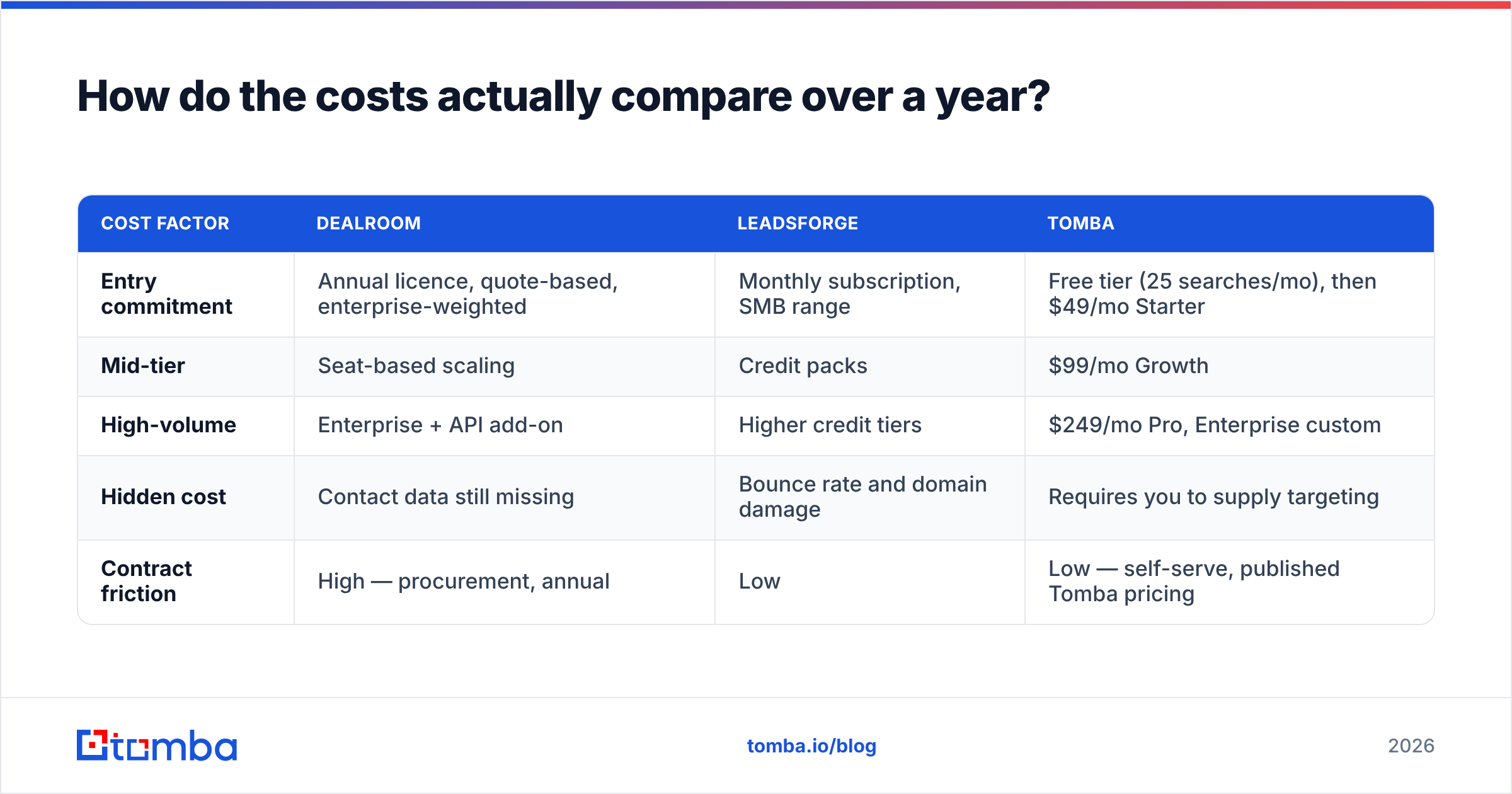
Sticker price misleads here. The tools sell different things in different amounts. What matters is cost per usable, deliverable contact.
| Cost factor | Dealroom | Leadsforge | Tomba |
|---|---|---|---|
| Entry commitment | Annual licence, quote-based, enterprise-weighted | Monthly subscription, SMB range | Free tier (25 searches/mo), then $49/mo Starter |
| Mid-tier | Seat-based scaling | Credit packs | $99/mo Growth |
| High-volume | Enterprise + API add-on | Higher credit tiers | $249/mo Pro, Enterprise custom |
| Hidden cost | Contact data still missing | Bounce rate and domain damage | Requires you to supply targeting |
| Contract friction | High — procurement, annual | Low | Low — self-serve, published Tomba pricing |
Read the hidden-cost row twice. With Dealroom, you buy world-class company data and still cannot send an email. With Leadsforge, you can send at once, and some of those sends quietly hurt your domain. A verification layer fixes the second problem and completes the first. That is why it appears in both stacks above.
Which should you choose in 2026?#
Choose Dealroom if your output is analysis: deal screening, market maps, ecosystem reports, competitive landscapes. Nothing in the AI-lead-list category replaces it. Using it as an outbound tool will frustrate everyone.
Choose Leadsforge if your output is sent emails. It fits small teams with a mainstream ICP — SaaS, agencies, e-commerce in major English-speaking markets — where speed beats depth. Just budget for a verification step before your first send.
Choose neither as your only tool. The Dealroom vs Leadsforge debate hides the real mistake: expecting one platform to do discovery, contacts, and deliverability equally well. The vendors that are great at company intelligence are not the ones that are great at finding and checking a person's work address. The reverse is true too. Buy each layer from a vendor that treats it as their main business.
So if your targeting is already sorted — from Dealroom, from a hand-built list, or from scraped domains — the missing piece is contact data you can trust. Tomba Email Finder turns a domain or a name into a verified, confidence-scored work email. It handles catch-alls, bulk jobs, and has an API that drops into your current stack. Start free at 25 searches a month. Move to Starter at $49/mo when your volume justifies it. And stop paying for bounces you could have caught before they left your outbox.
Related guides#
Ready to find emails that actually work?
Join 150,000+ professionals who stopped guessing and started sending. Free credits on signup — no credit card required.
Get the Tomba newsletter
Practical outbound tactics and product updates — once every two weeks.
About the author