DeBounce vs SMARTe (2026): Which B2B Email Tool Wins?
DeBounce cleans lists you already have. SMARTe sells you contacts you don't. Here's how the two actually compare on pricing, accuracy, data coverage, and which one belongs in your 2026 outbound stack.
TL;DR
- They are not the same category. DeBounce is a bulk email verification service. SMARTe is a B2B contact and account data platform. Comparing them head-to-head only makes sense if you're deciding where your next data dollar goes.
- DeBounce wins on price per record. Credit-based, no seat minimums, credits that don't expire on the pay-as-you-go plan. If you already have a list, it's one of the cheapest ways to clean it.
- SMARTe wins on coverage. Mobile numbers, firmographics, intent-style filters, and a Chrome extension for LinkedIn sourcing. It's a prospecting tool, not a hygiene tool — and it's priced like one (annual, seat-based, quote-only).
- Most teams need both jobs done, which is why a single platform that finds and verifies — Tomba, for example — often costs less than stitching a data vendor to a verifier.
- Quick rule: buying lists or scraping LinkedIn → you need a finder. Sitting on a 200k-row CRM with a 12% bounce rate → you need a verifier. Doing outbound at scale → you need both, ideally behind one API.
What are DeBounce and SMARTe, exactly?#
Start here, because half the confusion in the DeBounce vs SMARTe comparison comes from treating them as competitors when they solve different problems.
DeBounce is an email list validation service founded in 2018. You upload a CSV, or hit the API, and it returns a status per address: deliverable, invalid, accept-all, disposable, role-based, or unknown. It also strips duplicates, flags syntax errors, and offers a free daily quota for small checks. It does not find email addresses. It has no database of contacts. It's a hygiene layer.
SMARTe is a go-to-market data platform. It sells access to a B2B contact database — work emails, direct dials, mobile numbers, job titles, company firmographics — with a Chrome extension that pulls contacts off LinkedIn and pushes them into Salesforce or HubSpot. It emphasises international coverage (EMEA and APAC, not just North America) and GDPR/CCPA compliance posture. It's a sourcing layer.
So the honest framing: DeBounce cleans what you have. SMARTe gives you what you don't. If you're evaluating both in the same quarter, you're probably asking a budget question, not a feature question.
How do DeBounce and SMARTe compare on core features?#
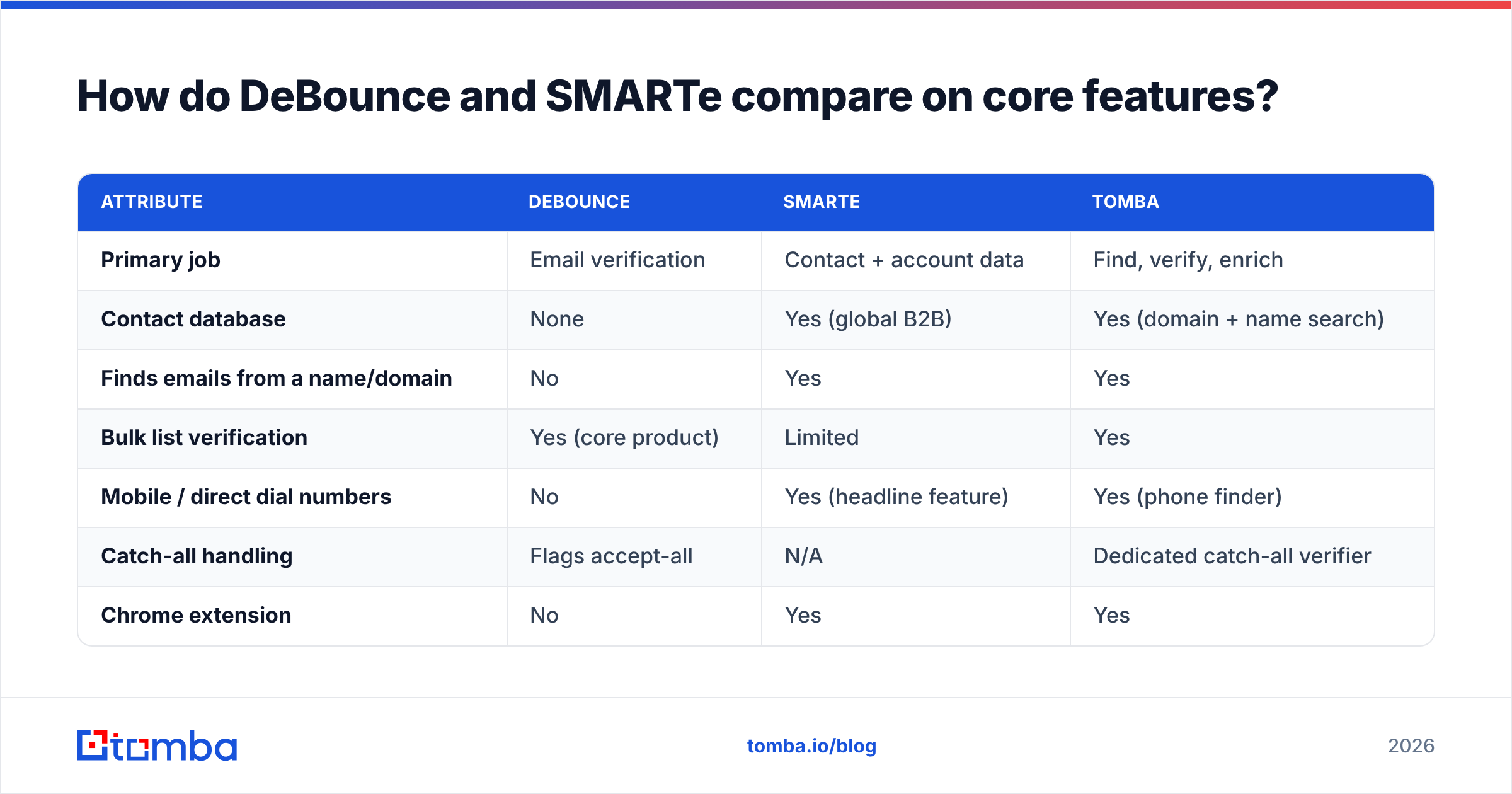
Here's the side-by-side on the attributes that actually change your workflow.
| Attribute | DeBounce | SMARTe | Tomba |
|---|---|---|---|
| Primary job | Email verification | Contact + account data | Find, verify, enrich |
| Contact database | None | Yes (global B2B) | Yes (domain + name search) |
| Finds emails from a name/domain | No | Yes | Yes |
| Bulk list verification | Yes (core product) | Limited | Yes |
| Mobile / direct dial numbers | No | Yes (headline feature) | Yes (phone finder) |
| Catch-all handling | Flags accept-all | N/A | Dedicated catch-all verifier |
| Chrome extension | No | Yes | Yes |
| Public pricing | Yes | No — quote only | Yes |
| Free tier | Free daily checks | Demo/trial by request | 25 searches/mo |
| API | REST, documented | REST, enterprise-tier | REST + CLI + MCP |
| Typical buyer | Email marketers, ESP users | SDR teams, RevOps | Both |
Two things jump out. First, SMARTe hides pricing behind a demo request, which is normal for seat-based GTM data vendors but painful if you're a three-person team trying to compare unit economics on a Tuesday afternoon. Second, DeBounce has no discovery capability at all — which is fine, as long as you're not expecting it to replace a prospecting tool.

What does each one cost in 2026?#
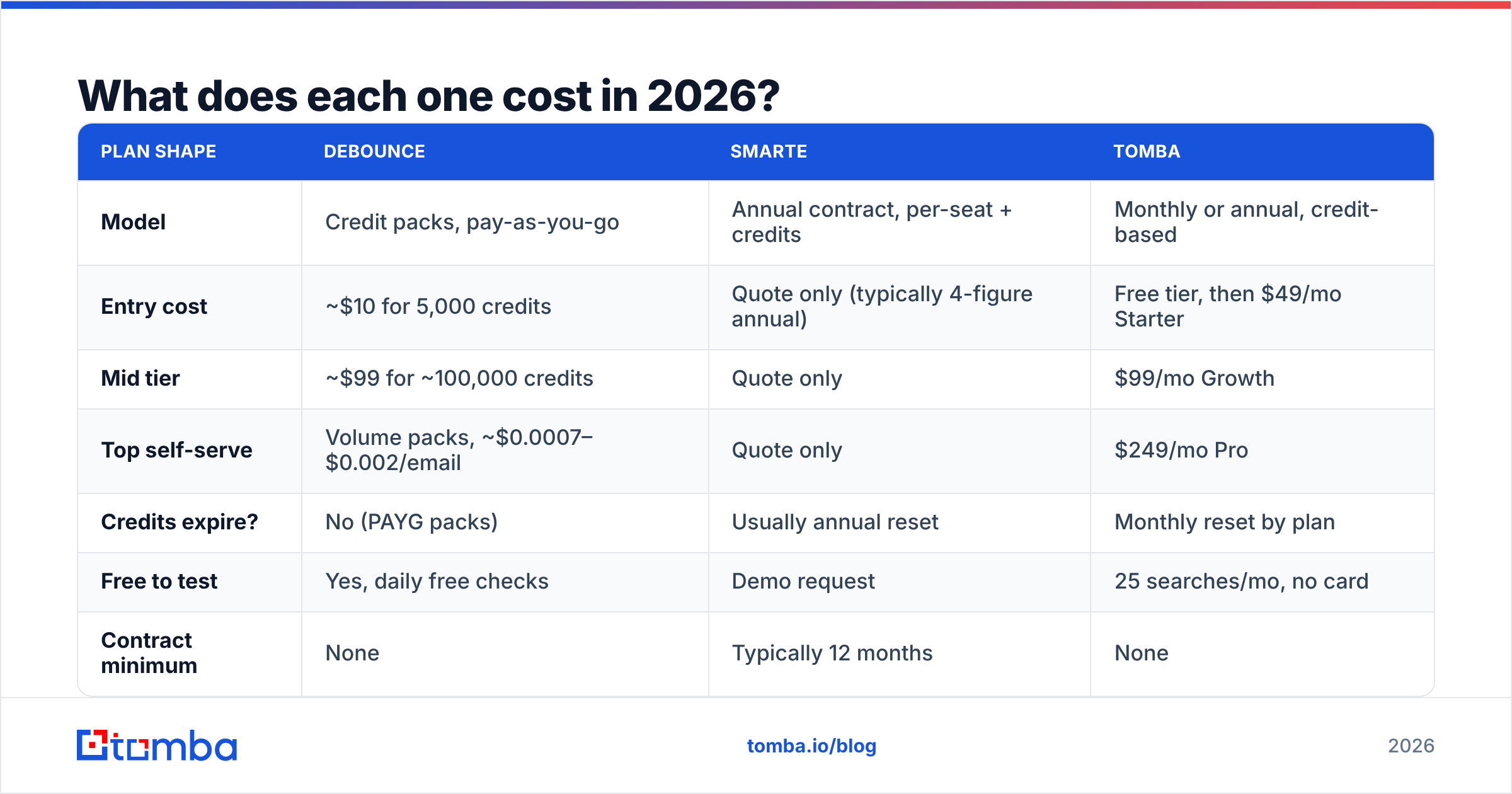
Pricing shapes are as different as the products. DeBounce publishes rates; SMARTe does not. What follows reflects publicly listed information at the time of writing — always confirm current numbers on the vendor's own pricing page before you commit.
| Plan shape | DeBounce | SMARTe | Tomba |
|---|---|---|---|
| Model | Credit packs, pay-as-you-go | Annual contract, per-seat + credits | Monthly or annual, credit-based |
| Entry cost | ~$10 for 5,000 credits | Quote only (typically 4-figure annual) | Free tier, then $49/mo Starter |
| Mid tier | ~$99 for ~100,000 credits | Quote only | $99/mo Growth |
| Top self-serve | Volume packs, ~$0.0007–$0.002/email | Quote only | $249/mo Pro |
| Credits expire? | No (PAYG packs) | Usually annual reset | Monthly reset by plan |
| Free to test | Yes, daily free checks | Demo request | 25 searches/mo, no card |
| Contract minimum | None | Typically 12 months | None |
The practical read: DeBounce is the cheapest way to answer "is this address real?" at scale, and nothing in this comparison beats it on raw cost-per-verification. SMARTe is not competing on that axis at all — you're paying for records that didn't exist in your CRM yesterday, plus mobile numbers, which carry a much higher acquisition cost than emails.
If your budget question is "should I spend $99 on DeBounce credits or $99 on SMARTe," it's not a real comparison — $99 doesn't buy a SMARTe seat. The real question is whether your bottleneck is list quality or list existence.
You can sanity-check that with a five-minute audit: pull 500 rows from your CRM, run them through a free email checker, and count the invalids. Above 8% invalid and your problem is hygiene. Below 3% and your problem is volume.
How accurate is each tool, really?#
Accuracy means two different things here, and vendors love to blur them.
For a verifier like DeBounce, accuracy is: of the addresses you marked "deliverable," what percentage actually accepted mail? DeBounce publicly claims very high accuracy on its verification results, and independent reviews on G2 generally back up that it performs well on standard mailbox checks. Where every verifier — DeBounce included — gets fuzzy is catch-all domains, which accept everything at the SMTP layer and tell you nothing. DeBounce flags these as "accept-all" and hands the risk back to you.
For a data provider like SMARTe, accuracy is: of the contacts in the database, what percentage are current, correctly attributed, and still employed there? That's a different failure mode. A perfectly valid mailbox belonging to someone who left in 2024 passes every verifier on earth and still wastes your sequence slot.

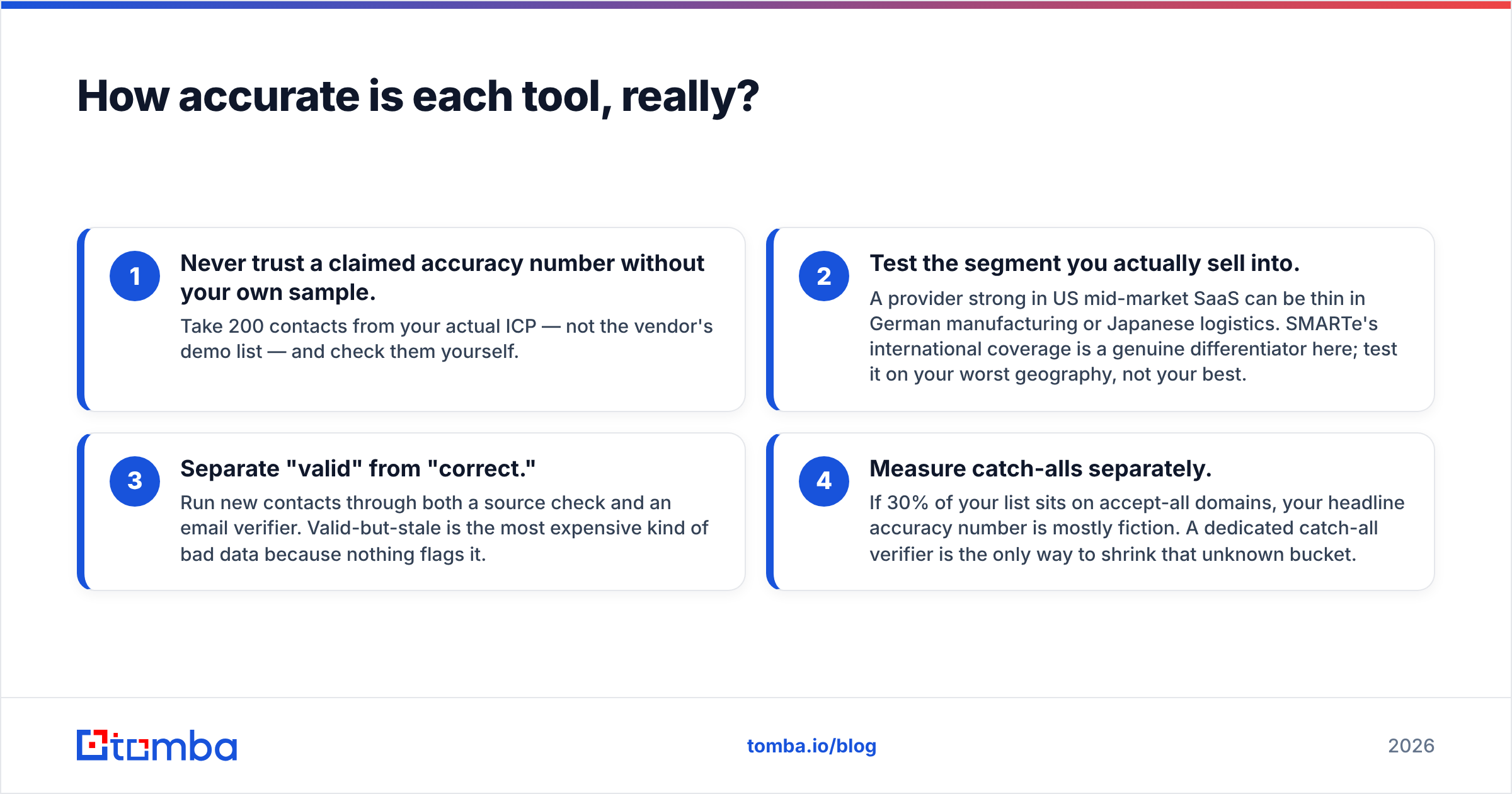
Three accuracy rules that survive any vendor pitch:
- Never trust a claimed accuracy number without your own sample. Take 200 contacts from your actual ICP — not the vendor's demo list — and check them yourself.
- Test the segment you actually sell into. A provider strong in US mid-market SaaS can be thin in German manufacturing or Japanese logistics. SMARTe's international coverage is a genuine differentiator here; test it on your worst geography, not your best.
- Separate "valid" from "correct." Run new contacts through both a source check and an email verifier. Valid-but-stale is the most expensive kind of bad data because nothing flags it.
- Measure catch-alls separately. If 30% of your list sits on accept-all domains, your headline accuracy number is mostly fiction. A dedicated catch-all verifier is the only way to shrink that unknown bucket.
Which one fits your workflow?#
Pick based on where the work actually stalls:
- You bought or inherited a list. DeBounce, clearly. Cheap, fast, no contract, and it will pay for itself the first time it stops you from torching a sending domain. Pair it with an SPF checker before your first send.
- You're an SDR team sourcing net-new accounts in EMEA/APAC. SMARTe earns its seat price here. Mobile coverage outside North America is genuinely hard to buy, and the LinkedIn extension keeps reps in one motion.
- You run inbound-heavy motion with a big CRM. Verification plus enrichment beats new-contact acquisition. Look at data enrichment to fill missing fields on records you already own.
- You're a founder doing outbound solo. Neither, initially. You need find-and-verify in one place, at a price that doesn't require a procurement cycle.
- You're building a product on top of contact data. API quality and rate limits matter more than UI. Compare docs before you compare features — a clean email finder API removes weeks of integration work.
- You're consolidating vendors. Count seats, credits, and the engineering hours spent reconciling two record schemas. That third number is usually the largest and never appears in a pricing comparison.
Where does Tomba fit between them?#
Neutrally stated: Tomba overlaps with both, and beats neither at its single specialty.
DeBounce will verify a 500,000-row list cheaper than almost anyone. SMARTe has mobile-number depth that a search-first email platform doesn't try to match. What Tomba does is collapse the two jobs into one billing relationship and one schema — domain search to find every public address at a company, pattern detection to construct the likely address for a named person, verification on the same call, and phone lookup alongside it.

That matters most for teams under about 50 reps, where the overhead of running two vendors — two contracts, two credit systems, two dedupe passes — costs more than the marginal accuracy of a specialist. Above that, specialists start to win again, and a big enterprise buying SMARTe seats plus DeBounce credits plus a sequencer is making a perfectly rational choice.

Where Tomba is honestly weaker: it's not an intent-data platform, it doesn't do account-based scoring, and it won't replace a full GTM suite. If your evaluation criteria include buying-signal intelligence, SMARTe's category is the right one to shop in and Tomba isn't in it.
What about compliance and data sourcing?#
This is the section most comparison posts skip, and it's the one that gets companies fined.
DeBounce's compliance surface is small by design. It processes addresses you already hold; it doesn't sell you personal data. Your obligation is the standard one — a lawful basis for holding the list in the first place, and a data processing agreement with the verifier.
SMARTe's surface is larger, because contact-data vendors under GDPR are controllers of personal data they compiled without the subject's direct relationship. SMARTe markets itself on compliance readiness, and asks buyers to review its documentation for regional specifics. Ask for it in writing during the demo, specifically: sourcing methodology, subject-access-request handling, and suppression list mechanics. Any vendor that hedges on those three should be off your shortlist regardless of coverage numbers.
Whichever vendor you pick, keep your own audit trail. Note where each record came from and when — data sourcing transparency is the difference between a two-hour DSAR response and a two-week fire drill. HubSpot's guide to GDPR for sales teams is a reasonable starting point if you're building the policy from scratch.
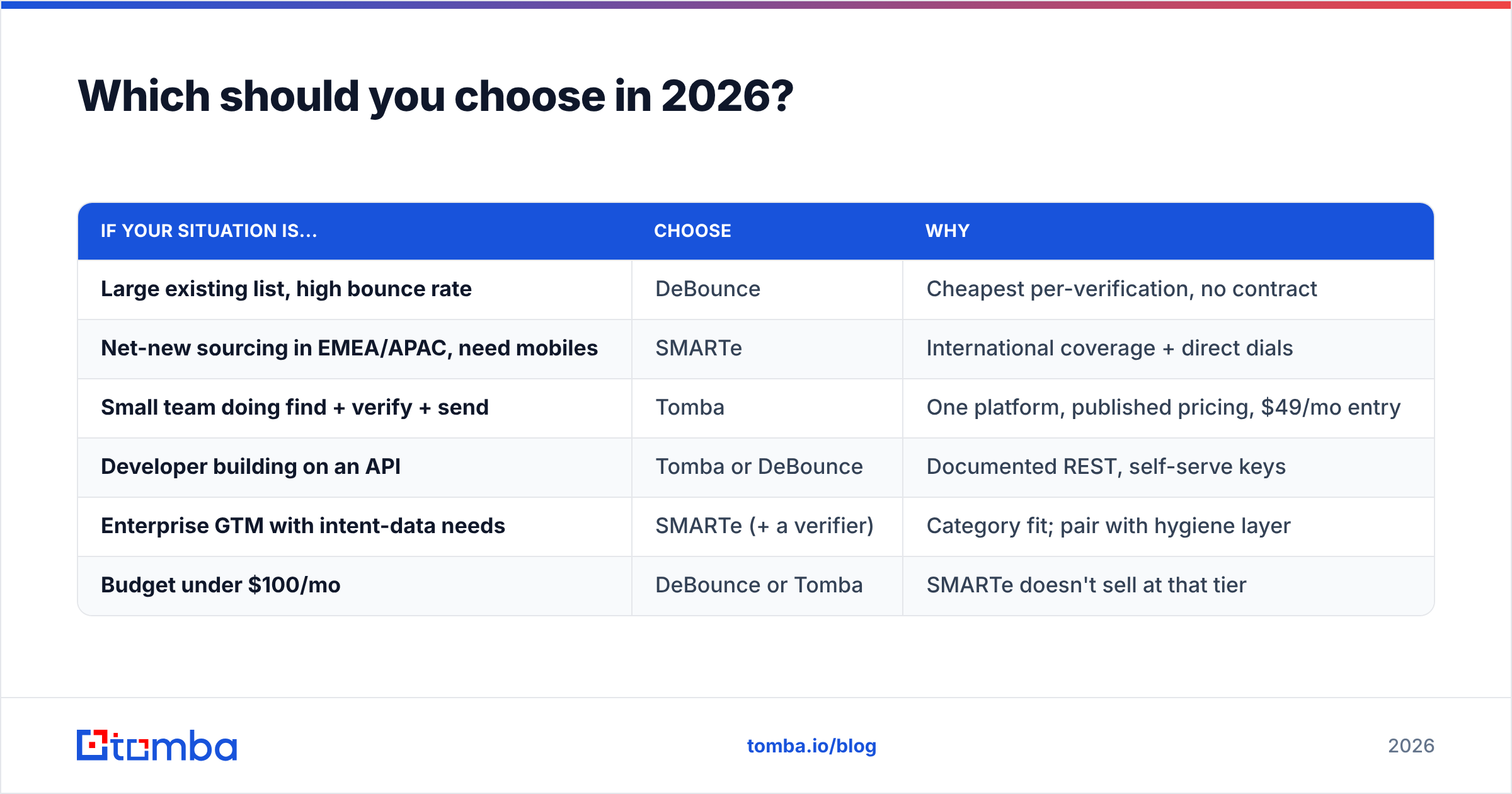
Which should you choose in 2026?#
| If your situation is... | Choose | Why |
|---|---|---|
| Large existing list, high bounce rate | DeBounce | Cheapest per-verification, no contract |
| Net-new sourcing in EMEA/APAC, need mobiles | SMARTe | International coverage + direct dials |
| Small team doing find + verify + send | Tomba | One platform, published pricing, $49/mo entry |
| Developer building on an API | Tomba or DeBounce | Documented REST, self-serve keys |
| Enterprise GTM with intent-data needs | SMARTe (+ a verifier) | Category fit; pair with hygiene layer |
| Budget under $100/mo | DeBounce or Tomba | SMARTe doesn't sell at that tier |
The uncomfortable truth about DeBounce vs SMARTe: for most readers, this isn't an either/or. It's a sequencing question. Buy the thing that unblocks your current bottleneck, prove ROI on it in one quarter, then buy the second thing. Teams that buy both on day one usually end up under-using the expensive one.
And if the answer is "I need both jobs done and I'd rather not run two vendors" — that's the case where a combined platform wins on total cost, not on any single feature.
How do you test all three in one afternoon?#
Skip the demo calls for the first pass. Do this instead:
- Export 300 real contacts from your CRM — your actual ICP, mixed geographies.
- Run them through DeBounce's free daily quota and record the invalid rate.
- Take 50 company domains from that same list and run domain search on each to see how many contacts you're missing entirely.
- Book the SMARTe demo only if step 3 shows a real coverage gap, and bring your 50 domains to the call.
- Compare cost-per-usable-contact, not cost-per-credit. Usable means valid, current, and in-ICP.
That sequence takes about ninety minutes and replaces three weeks of vendor calls.
Ready to test the find-and-verify side yourself? Start with the Tomba Email Finder — 25 free searches a month, no card, and verification runs on the same request so you're not exporting a CSV just to clean it. If it doesn't beat your current stack on cost-per-usable-contact, you've lost an afternoon and learned exactly which vendor to sign. Check Tomba pricing when you're ready to scale past the free tier.
Related guides#
Ready to find emails that actually work?
Join 150,000+ professionals who stopped guessing and started sending. Free credits on signup — no credit card required.
Get the Tomba newsletter
Practical outbound tactics and product updates — once every two weeks.
About the author