Easy Email Verification vs Salesbot: Honest 2026 Comparison
One tool cleans the list you already have. The other works the pipeline. Here's an honest look at Easy Email Verification vs Salesbot — what each actually does, what it costs, and which one you should buy first.
TL;DR
- Easy Email Verification and Salesbot are not really competitors. One is list hygiene (does this mailbox exist?), the other is pipeline automation (can a bot work this lead for me?). Comparing them head-to-head only makes sense once you accept they sit at different points in the funnel.
- If your bounce rate is above 3%, buy verification first. A sales bot pointed at a dirty list burns your sending domain faster than it books meetings.
- Verification is cheap and commoditised — expect fractions of a cent per email. Bot/automation tooling is seat-priced and an order of magnitude more expensive per month.
- Neither tool finds contacts. If you're paying for a bot to work leads you don't have yet, you're missing the middle layer: sourcing and enriching the contact in the first place.
- Best-fit stack for most B2B teams under 50 reps: a finder + verifier that share one credit pool, then automation on top — not three vendors with three billing cycles.
What are Easy Email Verification and Salesbot?#
Short version: Easy Email Verification checks whether an address is real. Salesbot tries to move a lead forward without a human touching it.
Easy Email Verification sits in the email validation category — the same shelf as ZeroBounce, NeverBounce, Bouncer and Debounce. You upload a CSV or hit an API, and it returns a status per address: valid, invalid, catch-all/accept-all, role-based, disposable, or unknown. Under the hood, every tool in this category does roughly the same four things: syntax parsing, MX record lookup, SMTP handshake, and a reputation/disposable-domain check against a maintained blocklist. The differences between vendors show up at the margins — how they treat catch-all domains, how aggressively they retry greylisted servers, and how honest they are about the "unknown" bucket.
Salesbot belongs to a different category entirely: conversational sales automation. The name is used by more than one vendor (Kommo ships a feature literally called Salesbot; several standalone AI SDR products use the same word), so before you compare anything, confirm which product you're actually evaluating. Broadly, a sales bot handles inbound chat, qualifies leads against rules you define, books meetings on a calendar, and pushes the resulting record into a CRM. Some now generate outbound sequence copy too.
That difference matters more than any feature checklist. Verification is a data quality purchase. A sales bot is a labour substitution purchase. You can need both. You almost never need to choose between them on the same day.
Why do these two tools get compared at all?#
Because they show up in the same budget line and the same search results. A founder types "how do I stop wasting time on bad leads" and gets both categories back. The overlap is real but narrow, and it lives in three places:
- Both claim to improve outbound efficiency. Verification does it by removing dead weight before send. A bot does it by removing human hours after send. Same KPI, opposite mechanism.
- Both touch CRM hygiene. A verifier flags rotten records; a bot writes new ones. If they're not coordinated, the bot happily re-creates the junk the verifier just cleaned.
- Both get sold as "deliverability" products. Only one of them actually is. A bot has no effect on your sender reputation except to increase volume — which, on an unverified list, makes things worse.
The honest framing: verification is infrastructure, a bot is leverage. Leverage applied to a broken foundation multiplies the breakage.
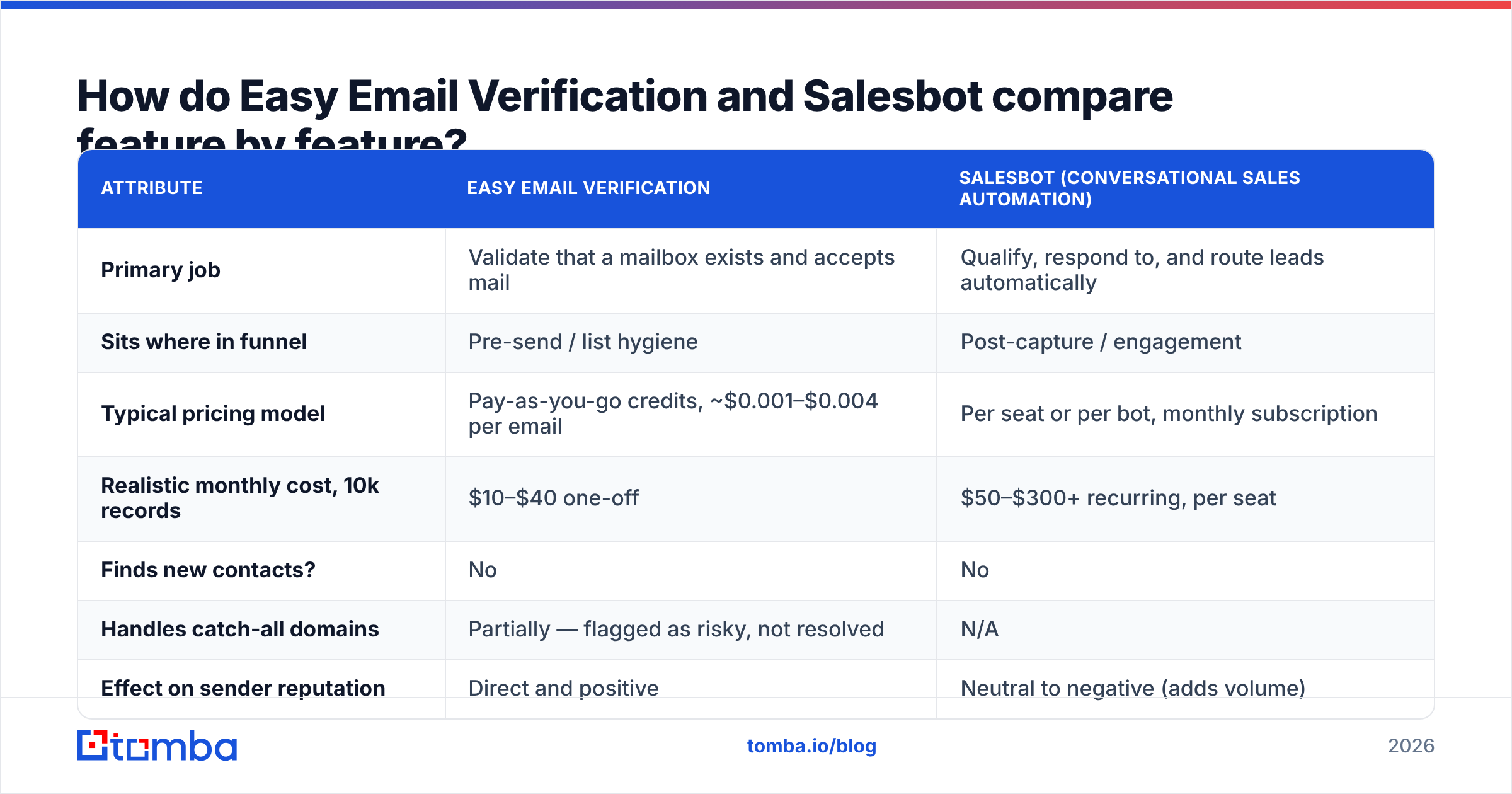
How do Easy Email Verification and Salesbot compare feature by feature?#
Here's the practical side-by-side. Figures reflect typical category behaviour and published vendor tiers at the time of writing — always confirm current pricing on the vendor's own page before you commit.
| Attribute | Easy Email Verification | Salesbot (conversational sales automation) |
|---|---|---|
| Primary job | Validate that a mailbox exists and accepts mail | Qualify, respond to, and route leads automatically |
| Sits where in funnel | Pre-send / list hygiene | Post-capture / engagement |
| Typical pricing model | Pay-as-you-go credits, ~$0.001–$0.004 per email | Per seat or per bot, monthly subscription |
| Realistic monthly cost, 10k records | $10–$40 one-off | $50–$300+ recurring, per seat |
| Finds new contacts? | No | No |
| Handles catch-all domains | Partially — flagged as risky, not resolved | N/A |
| Effect on sender reputation | Direct and positive | Neutral to negative (adds volume) |
| API available | Yes | Usually, on higher tiers |
| Time to value | Minutes — upload, clean, send | Days to weeks — needs flows, rules, training |
| Fails when | Catch-all-heavy TLDs, greylisting servers | Complex deals, non-English leads, edge-case intents |
Read that table with one question in mind: which row is currently costing you money? If it's "bounce rate", the verifier wins on cost-per-outcome by a wide margin. If it's "inbound leads sitting unanswered for six hours", the bot wins and it isn't close.
Which one actually improves deliverability?#
Verification does. A bot does not. This is the section where the comparison stops being symmetrical.
Google and Yahoo's bulk sender requirements pushed hard-bounce tolerance into the open — the published guidance from Google makes spam-rate thresholds explicit, and mailbox providers treat repeated invalid-recipient errors as a signal that you're sending to a purchased or stale list. A bounce message is not a neutral event; enough of them and your domain gets throttled before your copy ever gets read.
The mechanics of what a verifier catches, in the order they cost you the most:
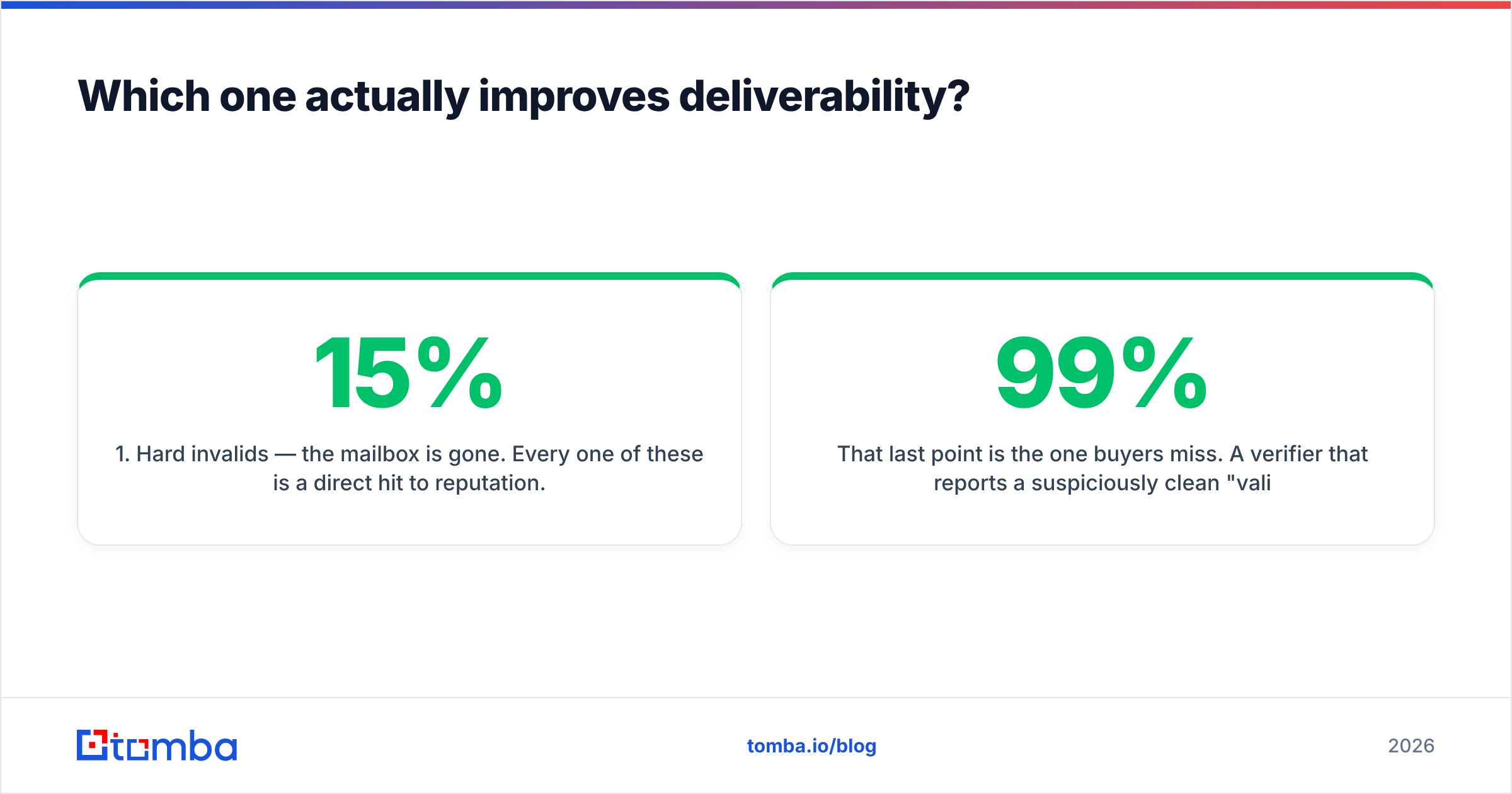
- Hard invalids — the mailbox is gone. Every one of these is a direct hit to reputation. Typical cleanup on a 12-month-old list: 8–15% of records.
- Role addresses — info@, sales@, support@. Deliverable, but they skew your open rate and often route to a shared inbox nobody owns. Segment, don't necessarily delete.
- Disposable domains — throwaway inboxes from form fills. Pure noise in your engagement metrics.
- Catch-all / accept-all domains — the server accepts everything, so SMTP can't tell you anything. This is where verification vendors diverge most, and where a dedicated catch-all verifier earns its keep instead of dumping the record into an "unknown" bucket you'll never look at again.
- Greylisted or temporarily deferred servers — a slow no. Good tools retry; cheap ones mark them invalid and quietly delete perfectly good contacts.
That last point is the one buyers miss. A verifier that reports a suspiciously clean 99% "valid" rate is often just calling unknowns valid. A verifier that reports 40% invalid on a list you trust is probably failing the retry logic. Ask any vendor — Easy Email Verification included — for their unknown-rate on catch-all-heavy domains before you buy credits in bulk.
Where does each tool break down?#
Easy Email Verification's limits:
- It can only judge addresses you already have. It has no opinion on whether that address belongs to the right person at the right company.
- Catch-all domains — common across enterprise, education, and much of EMEA — return an honest shrug. Depending on your ICP, that can be 20–30% of your list stuck in limbo.
- Verification decays. An address verified in January is a guess by July. Roughly 2–3% of B2B addresses go stale per month as people change jobs, which means verification is a subscription behaviour, not a one-time cleanup.
- Standalone verifiers mean a second vendor, a second API key, and a second credit pool to reconcile.
Salesbot's limits:
- Garbage in, confident garbage out. A bot will happily send a personalised sequence to a bounced address 47 times.
- Setup cost is real. Flows, qualification rules, fallback intents, CRM field mapping — budget weeks, not an afternoon.
- Buyers increasingly recognise bot-written outreach. The G2 sales automation category reviews are full of teams reporting reply-rate decay after the novelty period.
- Seat pricing scales with your team, not your results. A verifier's cost scales with your list, which is the metric you actually control.
Which should you buy first?#
Buy verification first. Every time. Here's the decision path:
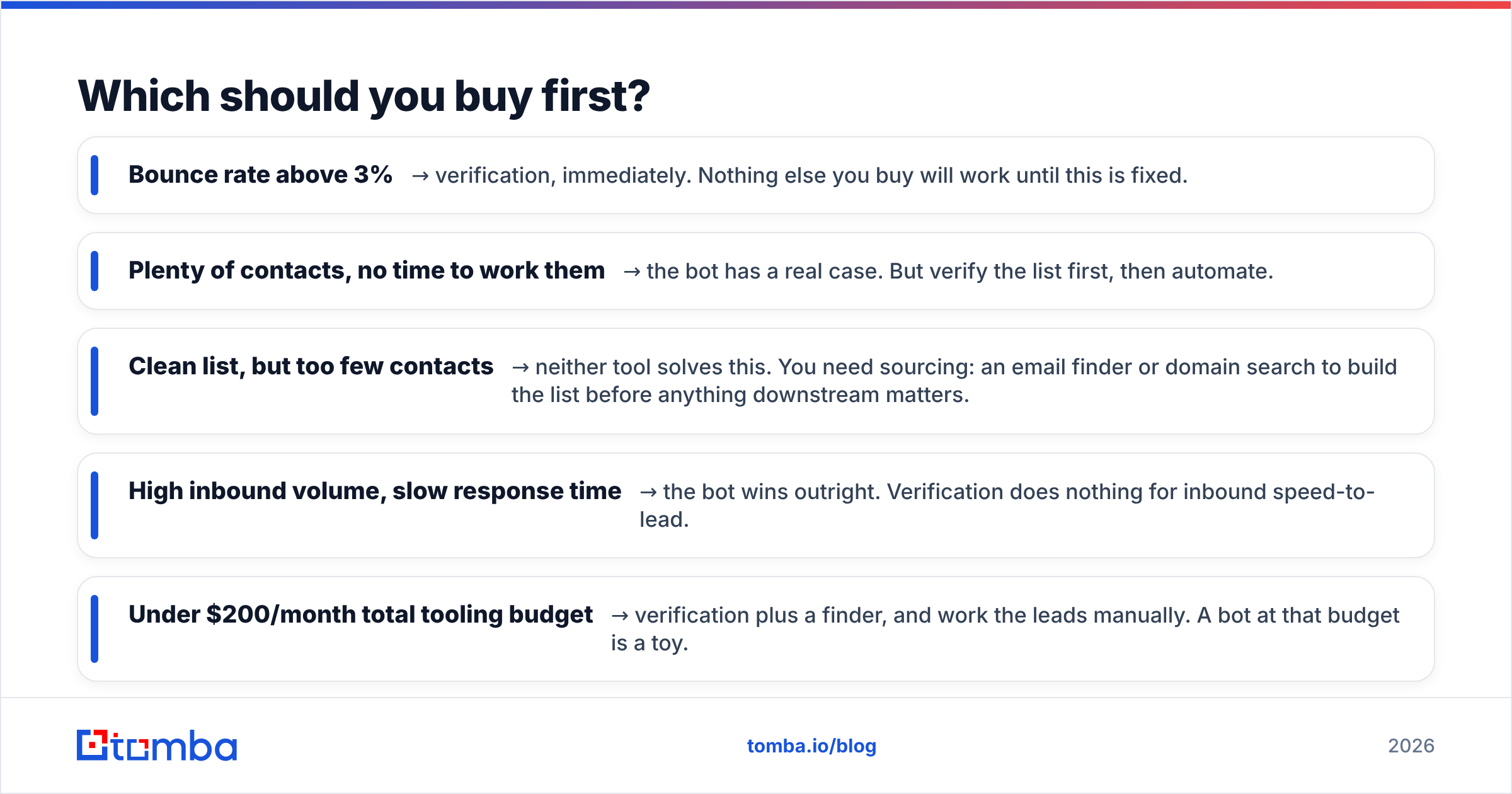
- Bounce rate above 3% → verification, immediately. Nothing else you buy will work until this is fixed.
- Plenty of contacts, no time to work them → the bot has a real case. But verify the list first, then automate.
- Clean list, but too few contacts → neither tool solves this. You need sourcing: an email finder or domain search to build the list before anything downstream matters.
- High inbound volume, slow response time → the bot wins outright. Verification does nothing for inbound speed-to-lead.
- Under $200/month total tooling budget → verification plus a finder, and work the leads manually. A bot at that budget is a toy.
The order matters because of compounding. Clean data makes automation cheaper (fewer wasted sends, fewer wasted seats). Automation does not make dirty data cleaner.
How does Tomba compare to running both separately?#
The gap in the Easy Email Verification vs Salesbot debate is that neither one gets you a contact. That's the layer most teams under-buy, and it's where a combined finder-plus-verifier changes the maths.
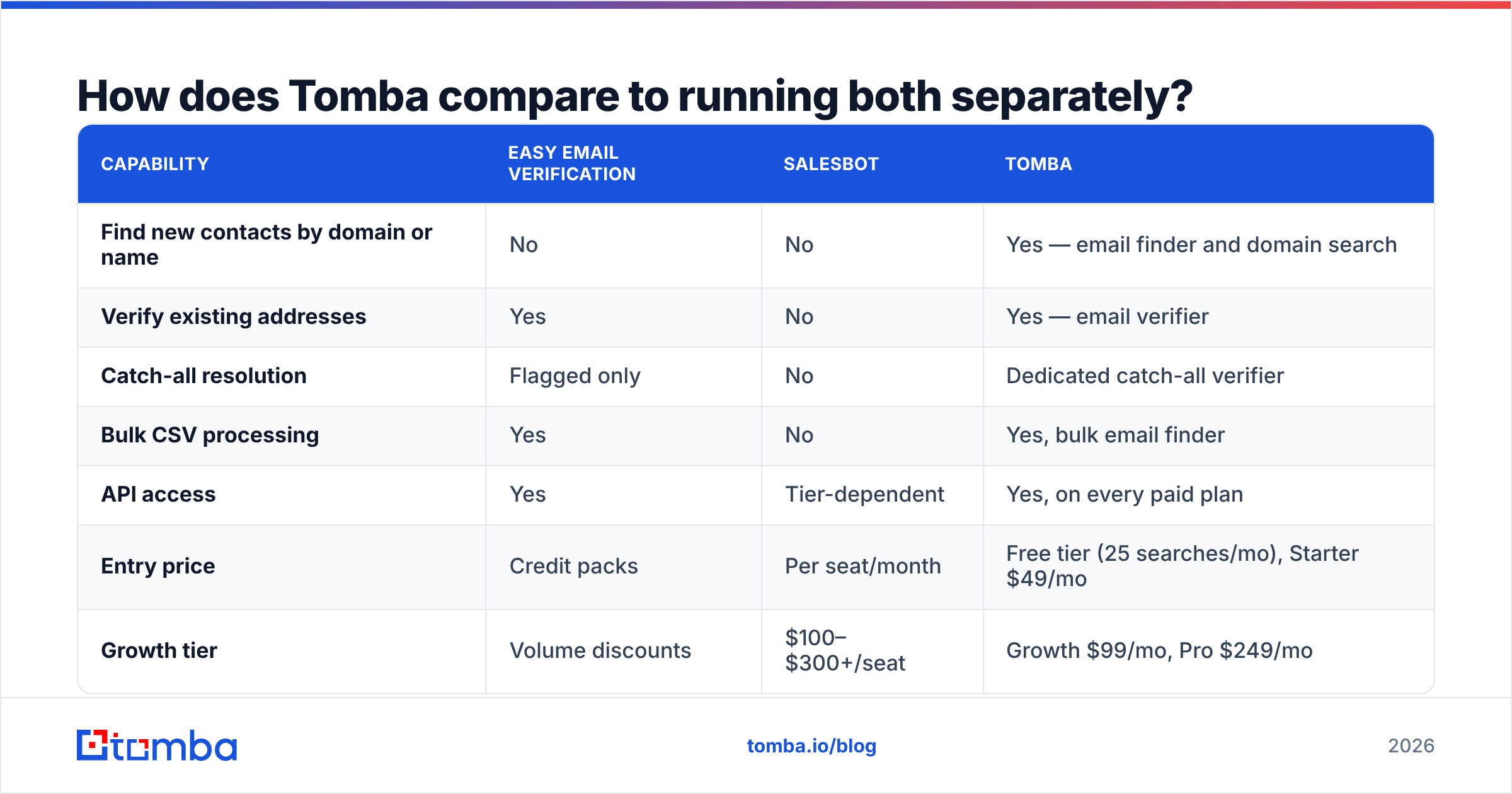
| Capability | Easy Email Verification | Salesbot | Tomba |
|---|---|---|---|
| Find new contacts by domain or name | No | No | Yes — email finder and domain search |
| Verify existing addresses | Yes | No | Yes — email verifier |
| Catch-all resolution | Flagged only | No | Dedicated catch-all verifier |
| Bulk CSV processing | Yes | No | Yes, bulk email finder |
| API access | Yes | Tier-dependent | Yes, on every paid plan |
| Entry price | Credit packs | Per seat/month | Free tier (25 searches/mo), Starter $49/mo |
| Growth tier | Volume discounts | $100–$300+/seat | Growth $99/mo, Pro $249/mo |
| Automation / sequences | No | Yes | No — integrates with your sender |
Tomba is not a sales bot and doesn't pretend to be. It sits one step earlier: source the contact, verify it, enrich it, then hand it to whatever automation layer you prefer. The Tomba API and native integrations with HubSpot, Salesforce, Pipedrive and Zapier mean the bot you already pay for gets fed clean records instead of scraped guesses. Full Tomba pricing is public — Free, Starter $49/mo, Growth $99/mo, Pro $249/mo, Enterprise custom — and finding and verifying draw from the same credit pool, which removes the two-vendor reconciliation problem entirely.
If your requirement is a pre-built list rather than self-serve lookup, providers like BookYourData cover that need well and are a reasonable complement rather than a substitute — buying a static list and verifying it before import is a perfectly sound workflow.
What does a sane 2026 stack look like?#
Three layers, in this order:
- Source — find the contacts that match your ICP. Domain search for named accounts, LinkedIn-based lookup for individuals, data enrichment to fill in title, company size, and phone.
- Verify — validate before every campaign, not once per quarter. Re-verify anything older than 90 days. Route catch-alls to a separate, lower-risk sending segment rather than deleting or blasting them.
- Engage — this is where a Salesbot-class tool or a sequencer belongs. By the time a record reaches this layer it should be verified, enriched, and deduplicated.
Teams that invert this order — automation first, data quality later — end up paying for seats that send to nobody. Teams that get the order right often find they need fewer seats than they budgeted, because the reply rate on a clean, well-targeted list does more work than any extra volume ever will. HubSpot's research on outbound benchmarks has said the same thing for years, in slightly nicer language.
Frequently asked questions#
Is Easy Email Verification enough on its own? For list hygiene, yes. For growth, no — it can't add a single new contact to your database.
Can a sales bot replace an SDR? It can replace the first 20% of an SDR's job (triage, scheduling, FAQ handling). Discovery and qualification on complex deals still need a human.
How often should I re-verify? Before every major campaign, and at minimum every 90 days. B2B data decays at roughly 2–3% per month.
Do I need both? Only if you have both problems: a dirty list and an unanswered inbound queue. Most teams have one, not two.
The bottom line#
Easy Email Verification vs Salesbot isn't a fair fight because it isn't the same fight. Verification protects the asset you already own. A sales bot buys back time you're currently spending by hand. Both are legitimate; only one is urgent when your bounce rate is climbing.
The layer neither one covers — actually finding the right person's address in the first place — is usually the cheapest fix available. Start with the Tomba Email Finder on the free tier: 25 searches a month, verification included, no card. Run it against ten target accounts, verify the results, and compare the bounce rate to whatever your current list is doing. If the numbers move, upgrade at $49/mo and build the automation layer on top of data you can actually trust.
Related guides#
Ready to find emails that actually work?
Join 150,000+ professionals who stopped guessing and started sending. Free credits on signup — no credit card required.
Get the Tomba newsletter
Practical outbound tactics and product updates — once every two weeks.
About the author