eGrabber vs LeadzenAI: Honest 2026 Comparison and Verdict
One is a desktop scraper with a per-seat annual license. The other is an AI-first cloud platform built for Indian and global B2B data. Here is how eGrabber and LeadzenAI actually compare on accuracy, cost, and workflow fit in 2026.
eGrabber vs LeadzenAI comes down to one choice: a desktop tool you run yourself, or a cloud database you search. Both find B2B emails. They do it in very different ways, and they bill in very different ways. Here is how the two stack up in 2026.
TL;DR
eGrabber is a Windows desktop suite (LeadGrabber Pro, eMail-Prospector). You buy an annual per-seat license. It works best when you already have a name list to enrich at your desk.
LeadzenAI is a cloud, AI-first prospecting platform. Coverage is strongest in India and decent worldwide. Credit-based plans start far cheaper than eGrabber.
Neither is a good API-first pick. If you want email lookups inside a CRM, a workflow tool, or your own product, both feel like the wrong shape.
Accuracy drives the real cost. A 15% bounce rate damages your sender reputation. That costs more than the price gap between these two tools.
Our pick: LeadzenAI for lean teams and India-heavy targeting. eGrabber for desktop research desks with existing name lists. When deliverability matters more than a UI, use a dedicated email finder plus a verifier.
What are eGrabber and LeadzenAI, exactly?#
Both tools solve the same problem. They use completely different architectures. That one difference explains almost everything else you will notice.
eGrabber launched in the late 1990s. Its flagship products are LeadGrabber Pro and eMail-Prospector. Both install on Windows and run on your own machine. You paste in a LinkedIn search, a directory page, or a sheet of names and companies. The software then adds business emails and phone numbers. It does that by guessing likely address patterns and testing them live. Think of it as a stubborn research assistant sitting at your desk. It has no huge database to query, so it works out each contact on demand. Details are on the eGrabber site.
LeadzenAI (leadzen.ai) follows the newer model. It is a browser app with a searchable contact and company database, AI lead scoring, intent-style signals, a Chrome extension, and bulk enrichment. It was built India-first. That matters more than most comparison posts admit. If your ICP includes Indian SaaS, IT services, manufacturing, or D2C firms, its coverage beats most US-centric databases. Its own product pages are at leadzen.ai.
The short version: eGrabber is a finder. It computes an answer for each contact. LeadzenAI is a database plus finder. It looks the contact up first, then fills the gaps. That split predicts where each tool wins.
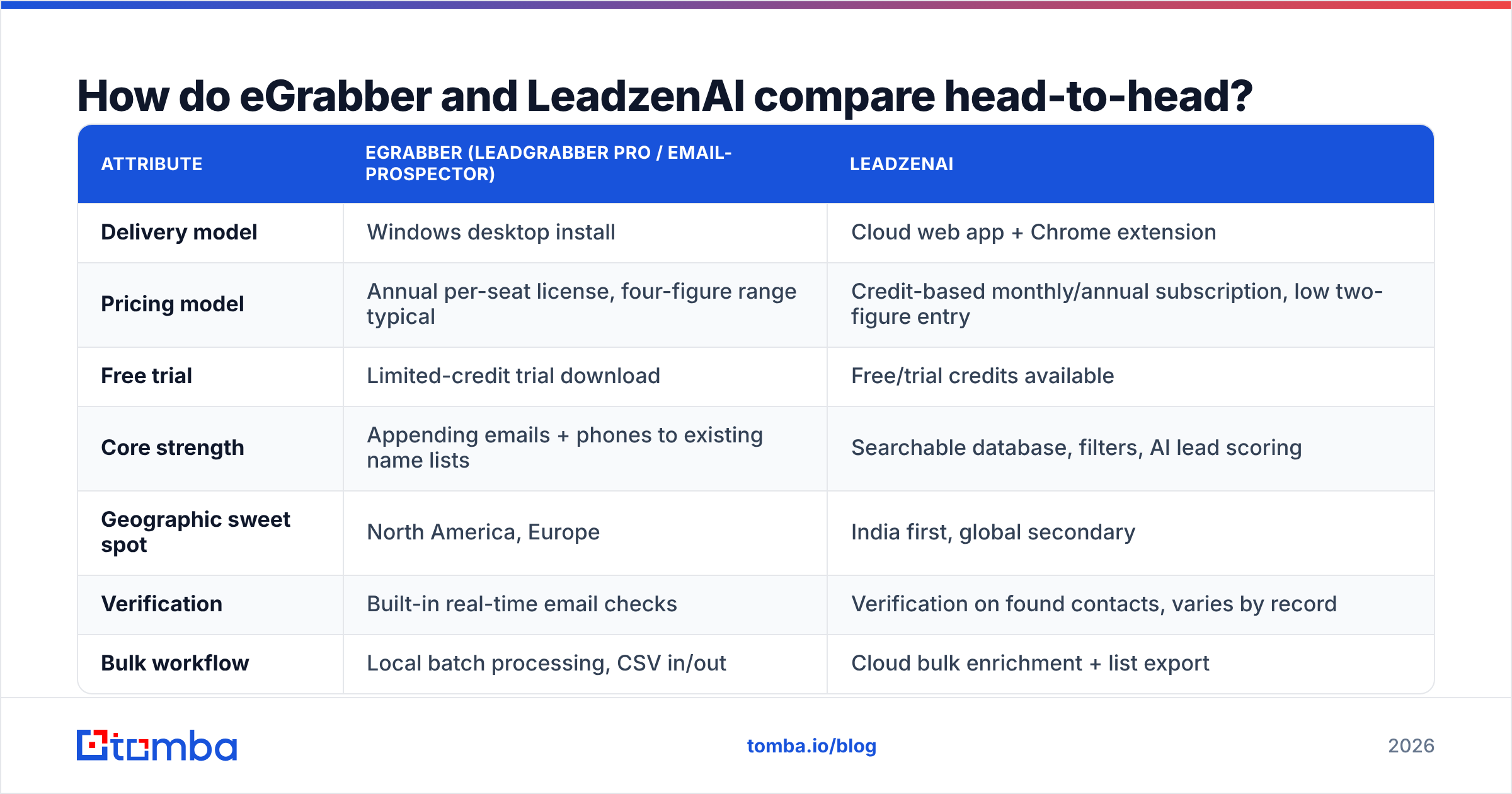
eGrabber vs LeadzenAI: how do they compare head-to-head?#
Here is the practical breakdown. Treat pricing as directional. Both vendors negotiate, and eGrabber quotes by product edition and seat count. Check their pricing pages before you set a budget.
| Attribute | eGrabber (LeadGrabber Pro / eMail-Prospector) | LeadzenAI |
|---|---|---|
| Delivery model | Windows desktop install | Cloud web app + Chrome extension |
| Pricing model | Annual per-seat license, four-figure range typical | Credit-based monthly/annual subscription, low two-figure entry |
| Free trial | Limited-credit trial download | Free/trial credits available |
| Core strength | Appending emails + phones to existing name lists | Searchable database, filters, AI lead scoring |
| Geographic sweet spot | North America, Europe | India first, global secondary |
| Verification | Built-in real-time email checks | Verification on found contacts, varies by record |
| Bulk workflow | Local batch processing, CSV in/out | Cloud bulk enrichment + list export |
| API access | Limited / not the primary interface | Available on higher plans |
| Team collaboration | Weak — files live on one machine | Native, shared lists and workspaces |
| Best for | Enterprise researchers, staffing/recruiting desks | SDR teams, agencies, India-focused GTM |
The row that costs teams the most money is delivery model. A desktop tool means one seat, one machine, one set of local CSVs. If three SDRs need the same enriched list, you buy three licenses or email spreadsheets around. That is a real operational tax. It never shows up on a pricing page.
How accurate is the data from each tool?#
Accuracy is where cheap tools get expensive. Say one list is 80% deliverable and another is 95%. Those two are not roughly the same. The first one damages your sender reputation and drags down every campaign you run for the next month.

Some honest notes from working with both categories:
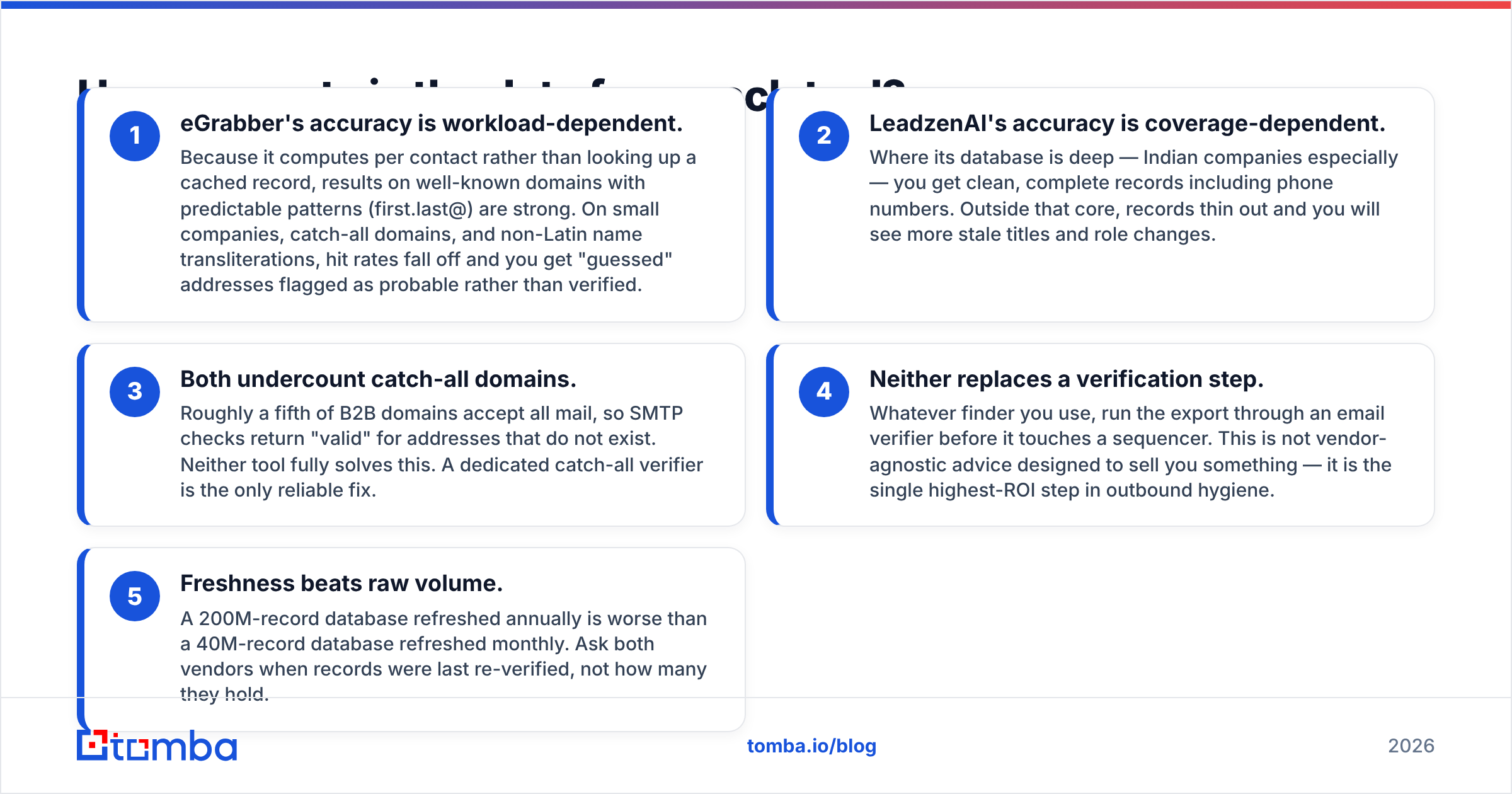
- eGrabber's accuracy depends on the workload. It computes each contact instead of reading a cached record. On well-known domains with clear patterns (first.last@), results are strong. On small firms, catch-all domains, and transliterated names, hit rates drop. You then get guessed addresses marked probable rather than verified.
- LeadzenAI's accuracy depends on coverage. Where the database is deep — Indian companies above all — records come back clean and complete, phone numbers included. Outside that core, records thin out. Expect more stale titles and role changes.
- Both undercount catch-all domains. About a fifth of B2B domains accept all mail. SMTP checks then return valid for addresses that do not exist. Neither tool fully solves this. A dedicated catch-all verifier is the only reliable fix.
- Neither replaces a verification step. Run every export through an email verifier before it touches a sequencer. This is not advice designed to sell you something. It is the single highest-ROI step in outbound hygiene.
- Freshness beats raw volume. A 200M-record database refreshed once a year is worse than a 40M-record database refreshed monthly. Ask each vendor when records were last re-checked, not how many they hold.
For a neutral read on how each tool performs, G2's lead intelligence category beats either vendor's own case studies. You can filter reviews by company size and see who is complaining about what.
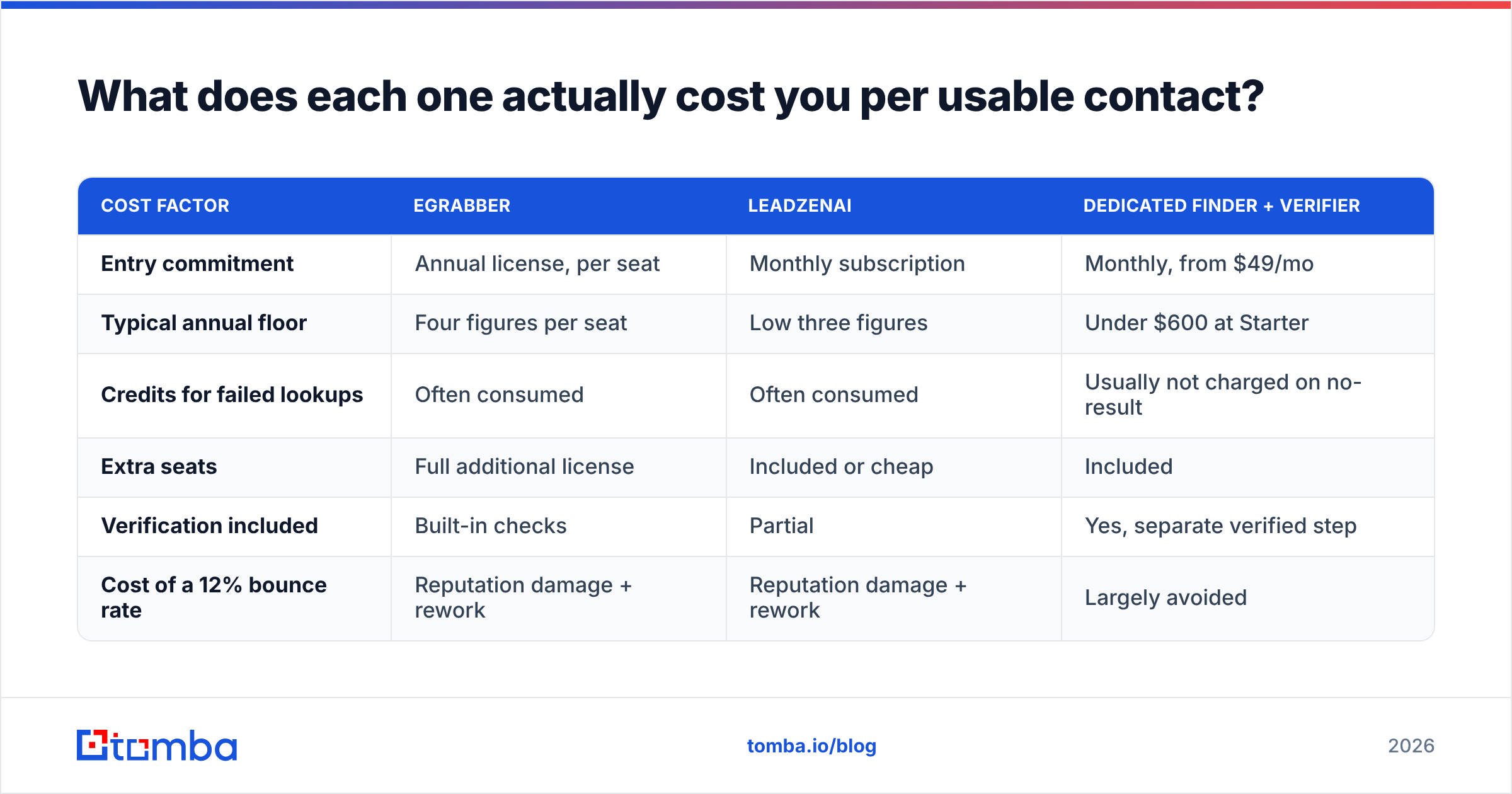
What does each one actually cost you per usable contact?#
Sticker price is the wrong metric. The number that matters is cost per contact that turns into a delivered email.
| Cost factor | eGrabber | LeadzenAI | Dedicated finder + verifier |
|---|---|---|---|
| Entry commitment | Annual license, per seat | Monthly subscription | Monthly, from $49/mo |
| Typical annual floor | Four figures per seat | Low three figures | Under $600 at Starter |
| Credits for failed lookups | Often consumed | Often consumed | Usually not charged on no-result |
| Extra seats | Full additional license | Included or cheap | Included |
| Verification included | Built-in checks | Partial | Yes, separate verified step |
| Cost of a 12% bounce rate | Reputation damage + rework | Reputation damage + rework | Largely avoided |
Run the numbers for your own team. Say eGrabber costs ten times LeadzenAI's entry plan. If it returns 25% more usable addresses on your ICP, it can still be the cheaper choice — for a two-person research desk. For a five-SDR team burning through 3,000 lookups a month, the per-seat model stops making sense fast.
One more line item people forget: time. Desktop tools need someone at that desktop. A cloud tool with an email finder API can run the lookup at 3am, the moment a new lead hits your CRM. That gap is worth more than most license fees.
Which workflows genuinely favour eGrabber?#
Be fair to the older tool. It is not obsolete, it is specialised.
- Recruiting and staffing desks. You have candidate names from LinkedIn and need personal and work contact details. eGrabber's append model is built for exactly this.
- List cleanup projects. You inherited a 40,000-row sheet with names and companies but no emails. Local batch processing chews through it without per-credit anxiety on some license tiers.
- Compliance-sensitive environments. Data processing happens on your machine, not in a vendor cloud. Some legal teams care about this a lot.
- Long-tail companies with no database coverage. The target has 12 employees and no one has ever indexed it. Computing the address beats querying a database that has never heard of the company.
If none of those four describe your week, eGrabber is probably overkill.
Which workflows favour LeadzenAI?#
- India-centred GTM. This is the strongest single reason to pick it. Coverage of Indian decision-makers, mobile numbers included, beats most Western alternatives.
- Search-first prospecting. You have no name list. You have a filter ("Head of Growth, Series A SaaS, Bengaluru"). Database tools answer that. Append tools cannot.
- Small teams that need shared lists. Cloud-native sharing versus emailing CSVs is not a close contest.
- Budget-constrained pilots. You can test LeadzenAI for a month for less than the tax on an eGrabber license.

Where do both tools fall short?#
Every comparison post pretends there are only two options. There are not. Both of these tools also share the same three structural gaps.
Gap one: API-first integration. Your real need may be simple: when a lead enters HubSpot without an email, find one. Neither tool is the natural fit for that. It is an API problem. Check a HubSpot integration path before you buy a UI you will barely open.
Gap two: verification depth. Both run basic SMTP-level checks. Neither treats catch-all resolution, role-account detection, and disposable-domain filtering as a first-class product. If your domain reputation is already fragile, that gap is the whole ballgame. Read HubSpot's guidance on email deliverability for why bounce rate compounds.
Gap three: pricing transparency. Neither publishes a plain "here is what 5,000 lookups costs" table you can compare without a sales call.

One more option worth knowing: BookYourData sells verified lists pay-as-you-go. It publishes clearer per-record pricing than either tool here. Different model, but genuinely useful for one-off list purchases.
eGrabber vs LeadzenAI: which should you choose in 2026?#
Conclusion first, reasoning second.
Choose LeadzenAI if your ICP includes India, you prospect by filter rather than by name list, more than two people need the data, or your budget cannot absorb a four-figure annual seat.
Choose eGrabber if you run a recruiting or research desk, you already have name-and-company lists to append, local processing matters for compliance, or your targets are long-tail companies no database covers.
Choose neither if what you really need is programmatic, high-accuracy email finding inside an existing workflow. That is a third category. Forcing either tool into it produces expensive frustration.
For that third case the checklist is short. Does the tool return a confidence score? Does it charge you for failed lookups? Does it verify catch-all domains? Does it have a real API and CLI? Can you test it without a sales call? Tomba answers yes to all five. Tomba pricing starts free at 25 searches a month, then $49/mo at Starter, $99/mo at Growth, and $249/mo at Pro. You can also see where the data comes from before you commit. For batch work, the bulk email finder handles CSVs without a per-seat license.
How should you test any of these before buying?#
Run the same controlled test on every candidate. It takes an afternoon and saves a year of regret.
- Build a 100-row golden list of contacts whose emails you have already confirmed. Include catch-all domains, small companies, and at least 20 non-US records.
- Run all candidates blind on the same list, on the same day.
- Score three numbers: hit rate (found anything), accuracy (matched your known-good address), and false-confidence rate (returned valid for an address you know is dead). Vendors never volunteer that third number.
- Verify every output through an independent verifier. Then you are measuring the finder, not the sequencer.
- Divide total cost by accurate hits. That is your real cost per contact. Compare that number, not the monthly fee.
Teams that run this test almost always change their shortlist. The tool that looked cheapest per credit often turns out to be the most expensive per usable contact.
Ready to test a finder that publishes its numbers?#
You want a list your sequencer will not bounce. Start with the tool built for that job. Tomba Email Finder returns confidence-scored professional addresses by name, domain, or company. It does not bill you for empty results, and it pairs with catch-all verification so your bounce rate stays where it belongs. Run it against your golden list next to eGrabber and LeadzenAI. The 25 free searches are enough to see the difference, and no sales call is required.
Related guides#
Ready to find emails that actually work?
Join 150,000+ professionals who stopped guessing and started sending. Free credits on signup — no credit card required.
Get the Tomba newsletter
Practical outbound tactics and product updates — once every two weeks.
About the author