Elisiontec DialShree Alternatives: 9 Better Dialers for 2026
DialShree is a solid, low-cost contact center suite — but it is not the only option. Here are nine Elisiontec DialShree alternatives compared on pricing, dialer types, CRM depth, and the data quality that actually decides your connect rate.
TL;DR
- DialShree (by Elision Technolab) is a low-cost, feature-dense contact center suite with predictive, progressive, and preview dialing — its strength is price and on-premise flexibility, not modern CX tooling or self-serve onboarding.
- Teams usually leave for three reasons: they want a true cloud CCaaS with native CRM integrations, they want faster support and self-serve setup, or they want AI features (real-time transcription, coaching, sentiment).
- Best overall cloud replacement: Five9 or Genesys Cloud CX for enterprise, CloudTalk or JustCall for SMB sales teams, VICIdial if you actually want free and self-hosted.
- Switching dialers rarely fixes a bad connect rate. Bad phone data does more damage than a bad dialer — validate and enrich your list before you migrate anything.
- Budget realistically: cloud contact center seats run roughly $25–$229 per user per month depending on tier, and per-minute telephony is almost always billed separately.
What is Elisiontec DialShree?#
DialShree is a unified contact center solution built by Elision Technolab, an Indian software vendor that has been shipping VoIP and telephony products since 2010. It bundles an ACD, IVR, predictive/progressive/preview dialers, call recording, real-time dashboards, WhatsApp and email channels, and a light CRM into one system that can be deployed on-premise, on your own cloud instance, or as a hosted service.
Its appeal is straightforward: you get a lot of contact-center surface area for a fraction of what Genesys or Five9 charge, and you can run it on your own infrastructure. That matters for BPOs, collections agencies, and outbound teams in cost-sensitive markets where per-seat CCaaS pricing simply does not pencil out.
The trade-offs are equally straightforward. Pricing is quote-based rather than published. Implementation typically involves the vendor rather than a credit card and a Tuesday afternoon. Native integrations with Salesforce, HubSpot, or a modern sales engagement stack are thinner than what US/EU-first vendors ship. And the AI layer — live transcription, automated QA scoring, conversation intelligence — lags the category leaders.
None of that makes DialShree a bad product. It makes it a specific product. The question is whether your team is the team it was built for.
Why do teams look for DialShree alternatives?#
From migration conversations and public review threads on G2, the same five triggers come up repeatedly:
- You need self-serve speed. Sales teams that want to be dialing this week, not after a scoping call and a deployment window, gravitate to CloudTalk, JustCall, or Aircall.
- Your CRM is the system of record. If every call must log automatically to HubSpot or Salesforce with bidirectional sync, you want a dialer built around that integration, not one that bolts it on.
- You want AI in the loop. Real-time transcription, objection detection, automated scorecards, and coaching summaries are now table stakes at the mid-market tier.
- Compliance geography changed. Selling into the US means TCPA, STIR/SHAKEN attestation, and branded caller ID. Selling into the EU means data residency. Vendors with local carrier relationships handle this far more cleanly.
- You outgrew it — or under-grew it. Enterprises hit ceilings on WFM, omnichannel routing, and reporting. Five-person teams find the whole thing heavier than they need.
How should you evaluate a DialShree alternative?#
Do not start with the feature grid. Start with these six questions, in this order:
- What dialer mode do you actually need? Predictive dialing only pays off above roughly 8–10 concurrent agents on the same campaign. Below that, power or progressive dialing gets you better connect quality without the abandonment risk. Read the Wikipedia primer on predictive dialers if you are choosing between modes for the first time.
- Where does the call data land? If the answer is "in the dialer," you have built a second system of record. Pick a tool whose CRM sync is native and bidirectional, not a nightly CSV.
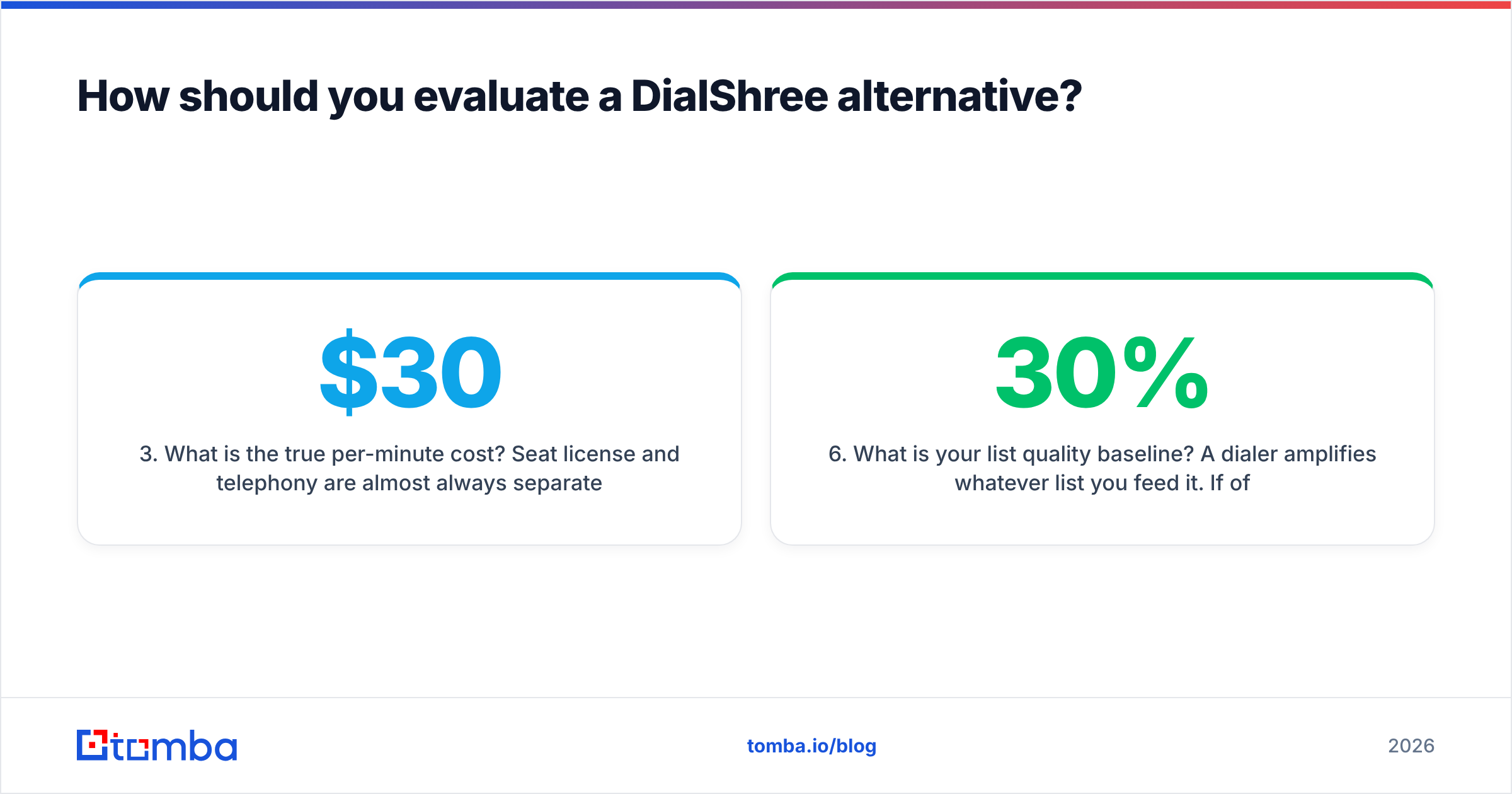
- What is the true per-minute cost? Seat license and telephony are almost always separate line items. A $30 seat with $0.02/min outbound in the US costs more than a $50 seat with bundled minutes once each rep dials 300 minutes a day.
- How does it handle caller reputation? Spam labeling kills outbound faster than any script problem. Ask specifically about number rotation, local presence, branded caller ID, and STIR/SHAKEN attestation level.
- Can it be deployed where you need it? On-premise and single-tenant cloud are DialShree strengths. Most cloud-native alternatives are multi-tenant only — if that is a compliance blocker, your shortlist narrows to 3CX, VICIdial, and enterprise Genesys deployments.
- What is your list quality baseline? A dialer amplifies whatever list you feed it. If 30% of your numbers are wrong, a faster dialer just reaches the wrong people faster.
That last point is the one teams skip, and it is the one that most often explains why a migration "did not work."
What are the best Elisiontec DialShree alternatives in 2026?#
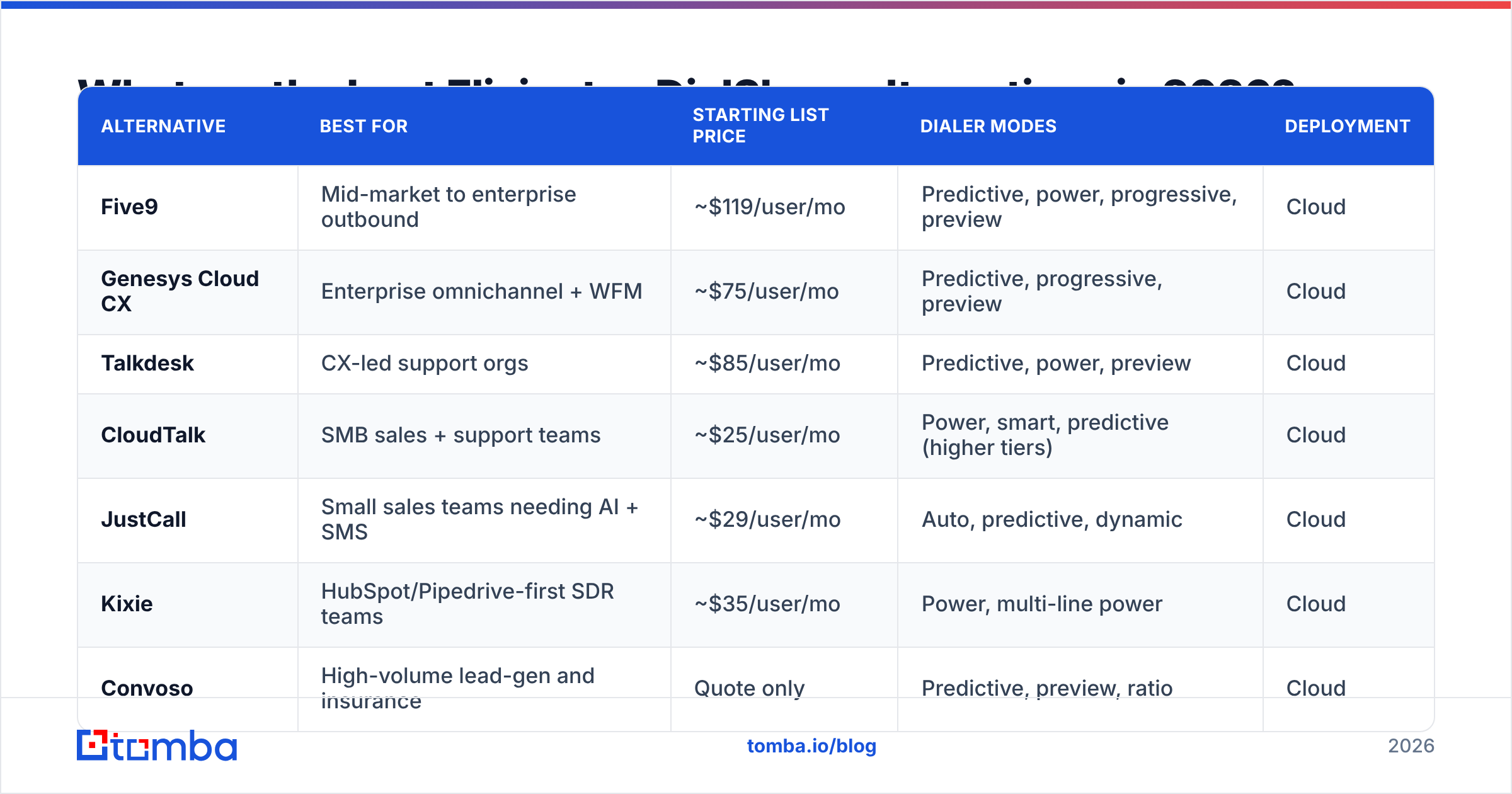
Here is the shortlist, grouped by who each tool actually serves.
| Alternative | Best for | Starting list price | Dialer modes | Deployment |
|---|---|---|---|---|
| Five9 | Mid-market to enterprise outbound | ~$119/user/mo | Predictive, power, progressive, preview | Cloud |
| Genesys Cloud CX | Enterprise omnichannel + WFM | ~$75/user/mo | Predictive, progressive, preview | Cloud |
| Talkdesk | CX-led support orgs | ~$85/user/mo | Predictive, power, preview | Cloud |
| CloudTalk | SMB sales + support teams | ~$25/user/mo | Power, smart, predictive (higher tiers) | Cloud |
| JustCall | Small sales teams needing AI + SMS | ~$29/user/mo | Auto, predictive, dynamic | Cloud |
| Kixie | HubSpot/Pipedrive-first SDR teams | ~$35/user/mo | Power, multi-line power | Cloud |
| Convoso | High-volume lead-gen and insurance | Quote only | Predictive, preview, ratio | Cloud |
| 3CX | Cost-controlled PBX + basic contact center | Free tier, then per-system | Basic queue/callback | Self-host or cloud |
| VICIdial | Technical teams wanting zero license cost | $0 software | Predictive, ratio, manual | Self-host |
List prices reflect publicly advertised annual-plan starting tiers in early 2026 and exclude telephony usage. Always confirm current pricing directly with the vendor.
Five9 — the default enterprise outbound swap#
Five9 is the most common upgrade path for teams that need serious outbound volume with real compliance tooling. You get all four dialer modes, TCPA-safe manual-touch dialing, workforce management, and an AI layer (Agent Assist, transcription, summaries) that is genuinely useful rather than a demo feature. Expect a real implementation project and a per-seat cost roughly 3–5x what a self-hosted DialShree deployment runs.
Pick it if: you have 25+ outbound agents, US/EU compliance requirements, and budget approval. Skip it if: you are under 15 seats or want month-to-month flexibility.
Genesys Cloud CX — the omnichannel enterprise standard#
Genesys wins when voice is one channel among six. Routing, WFM, quality management, and reporting are the deepest in the category, and the CX 1/2/3 tier structure lets you start at voice-only and expand. The cost of that depth is configuration complexity — plan for an admin who owns the platform.
Pick it if: you run blended inbound/outbound across voice, chat, email, and social. Skip it if: you are a pure outbound SDR team; you will pay for a lot you never touch.
Talkdesk — support-heavy CX with fast deployment#
Talkdesk sits between Five9 and the SMB tools: enterprise-grade reliability, faster time-to-value, and a strong AI/self-service story. Its outbound dialer is competent but not its center of gravity — this is a support-first platform that also dials.
Pick it if: inbound service quality matters as much as outbound throughput.
CloudTalk — the pragmatic SMB replacement#
CloudTalk is the tool most former DialShree users on small teams land on. Setup is same-day, international numbers are available in 160+ countries, and the CRM integrations (HubSpot, Pipedrive, Salesforce, Zendesk) are native and reliable. Predictive dialing lives on higher tiers, so price your plan against the mode you actually need.
Pick it if: 5–50 agents, mostly outbound, no appetite for an implementation project.
JustCall — AI features at an SMB price#

JustCall packs conversation intelligence, SMS/WhatsApp campaigns, and a sales dialer into a per-seat price that starts under $30. The AI add-ons are priced separately, which is worth modeling before you commit. Quality is strong for teams under 30 seats.
Pick it if: you want AI coaching and multichannel outreach without an enterprise contract.
Kixie — for teams that live inside their CRM#
Kixie's multi-line power dialer plus deep HubSpot and Pipedrive integration makes it the pick for SDR teams whose entire workflow is CRM-native. It is not a full contact center — no WFM, limited inbound routing — but for connect-rate-obsessed outbound teams it is efficient.
Convoso — high-volume lead generation#

Convoso is purpose-built for the highest-intensity outbound verticals: insurance, home services, education. Answer-rate optimization, caller-ID reputation management, and aggressive dialing ratios are the whole product. Pricing is quote-only and lands in the enterprise range.
3CX and VICIdial — the self-hosted options#
If what you liked about DialShree was owning the deployment, these are your like-for-like swaps. VICIdial is open-source, genuinely free as software, and runs serious predictive campaigns — but you are now operating Asterisk, and you need someone in-house who can. 3CX gives you a modern PBX with queues and callbacks at a fraction of CCaaS pricing, though its outbound dialer capabilities are thin.
Pick either if: you have Linux/telephony skills on staff and per-seat pricing is the deal-breaker.
How much does switching actually cost?#
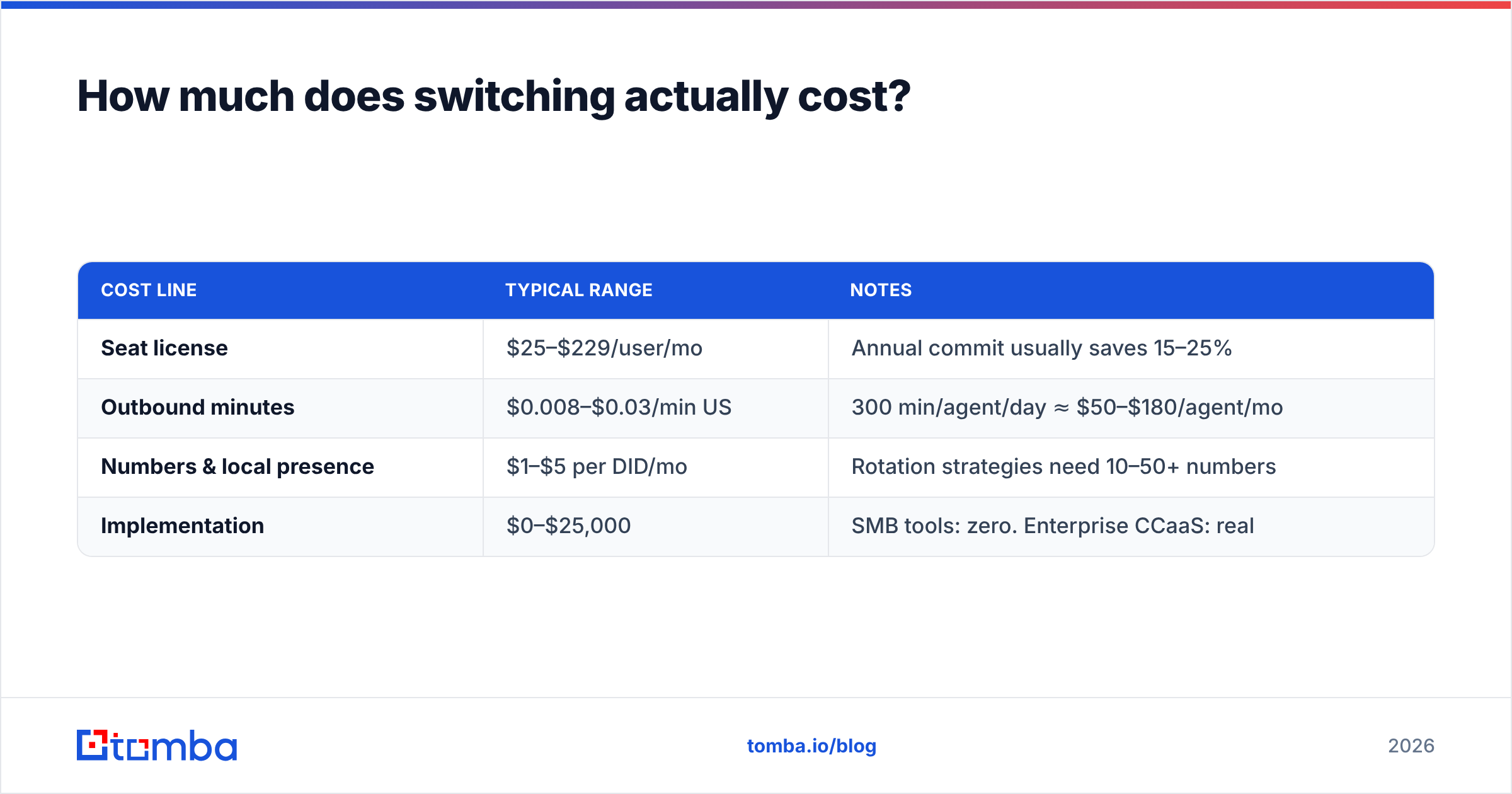
Seat license is the number vendors advertise. It is rarely the number you pay. Model all four lines:
| Cost line | Typical range | Notes |
|---|---|---|
| Seat license | $25–$229/user/mo | Annual commit usually saves 15–25% |
| Outbound minutes | $0.008–$0.03/min US | 300 min/agent/day ≈ $50–$180/agent/mo |
| Numbers & local presence | $1–$5 per DID/mo | Rotation strategies need 10–50+ numbers |
| Implementation | $0–$25,000 | SMB tools: zero. Enterprise CCaaS: real |
A 20-agent team on a $30 seat with heavy dialing frequently lands closer to $150–$200 all-in per agent per month. Run that math before you sign, not after.
Does a better dialer actually fix your connect rate?#
Usually not on its own. The three inputs to connect rate are number accuracy, caller reputation, and timing — and only the second is really a dialer feature.
Standard B2B contact databases decay at roughly 22–30% per year as people change roles and companies restructure. If your list is 18 months stale, a meaningful share of every dialing session is spent on disconnected lines and wrong contacts. Predictive dialing does not fix that; it burns through the bad records faster and drags your answer rate down with it, which then triggers spam labeling, which then hurts the good numbers too.
The fix sequence is boring but effective:
- Validate before you dial. Run the list through a phone validator to strip disconnected, invalid, and mistyped numbers, and to separate mobile from landline (which matters for compliance).
- Fill the gaps. Records missing a direct line get routed through a phone finder rather than dialing the switchboard and hoping.
- Enrich the whole record. Title, company size, and current employer status drive both segmentation and script relevance — data enrichment turns a name-and-number row into a callable lead.
- Sync it back to the CRM. Whatever dialer you choose, your CRM has to hold the truth, or you will be repeating this exercise in six months.
Teams that clean the list first routinely see connect-rate improvements that exceed anything a dialer swap delivers — and then the dialer swap compounds on top of it.
Which alternative should you choose?#
Short version:
- Enterprise outbound, US/EU compliance, 25+ agents: Five9.
- Enterprise omnichannel with WFM: Genesys Cloud CX.
- Support-led CX with fast rollout: Talkdesk.
- SMB sales team, 5–50 agents, same-day setup: CloudTalk.
- AI coaching and multichannel on a small budget: JustCall.
- CRM-native SDR pods: Kixie.
- Maximum outbound volume, lead-gen verticals: Convoso.
- You want to keep owning the stack: VICIdial or 3CX.
And if the honest answer is that DialShree does everything you need at a price nobody else matches — stay. Migration cost is real, and "cloud-native" is not a business outcome. Move when a specific, named limitation is costing you specific, measurable revenue.
What should you do before you migrate?#
Give yourself a two-week window. Export your current contact list, measure your true connect rate and right-party-contact rate as a baseline, then clean the data and re-measure on the existing system. That gives you a clean read on how much of your problem is tooling and how much is data — and it makes the vendor demo far more honest, because you will be testing dialers against a list you trust.
Then run a paid pilot with two finalists on the same list, same script, same hours, same agents. Two weeks of real dialing beats two months of feature comparisons.
Before you pay for a new dialer, fix the list feeding it. Tomba's Email Finder — alongside its phone finder, verifier, and enrichment tools — gives outbound teams verified contact data so every dial and every follow-up email reaches a real person. Start free with 25 searches a month, or check Tomba pricing at $49/mo for Starter, $99/mo for Growth, and $249/mo for Pro. Clean data first, better dialer second — in that order, both investments actually pay.
Related guides#
Ready to find emails that actually work?
Join 150,000+ professionals who stopped guessing and started sending. Free credits on signup — no credit card required.
Get the Tomba newsletter
Practical outbound tactics and product updates — once every two weeks.
About the author