Email Address Directory: How to Find Business Emails in 2026
An email address directory is only as good as the day its data was collected. Here's how static lists, live lookup APIs, and hybrid databases actually compare on accuracy, coverage, cost, and legal risk.
TL;DR
- An email address directory is any searchable collection of contact records — from a free public staff page to a paid B2B database with tens of millions of rows.
- The three types behave very differently: static lists decay fastest, live lookup tools query at the moment you ask, hybrid databases blend a stored index with on-demand verification.
- B2B contact data decays roughly 22–30% per year as people change jobs. A directory sold as "verified" in January is measurably worse by December.
- Judge a directory on four things only: match rate on your ICP, bounce rate after verification, refund/credit policy on bad rows, and whether it exposes an API.
- For most teams the cheapest correct answer is a live lookup layered on a verifier — not a one-time CSV purchase.
What is an email address directory?#
An email address directory is a searchable index that maps people or companies to their contact details. That's the whole definition. Everything else — accuracy, freshness, price, legality — comes down to how the index was built and when it was last touched.
Think of it like a phone book versus a phone. A printed phone book was accurate the day it was printed and slowly rotted from there. A phone lets you dial and find out right now whether the line still works. Most of the confusion buyers have about directories comes from treating a phone book like a phone.
Directories show up in four practical shapes:
- Public directories — a university faculty page, a chamber of commerce member list, a conference speaker roster. Free, narrow, often outdated, but useful for niche verticals nobody has scraped yet.
- Company-owned directories — the internal staff list behind a corporate intranet. Not available to you, but it's the ground truth every commercial vendor is trying to approximate.
- Commercial B2B databases — tens of millions of pre-collected records sold by seat or by credit. This is what most people mean when they say "email address directory."
- Live lookup services — no browsing a list at all. You supply a name and a domain, the service resolves and verifies an address in real time.
The email address itself hasn't changed since RFC 5321. What changed is that the mapping between a human and their address now breaks constantly, because job tenure keeps shrinking and companies keep migrating mail providers.
What are the different types of email address directories?#
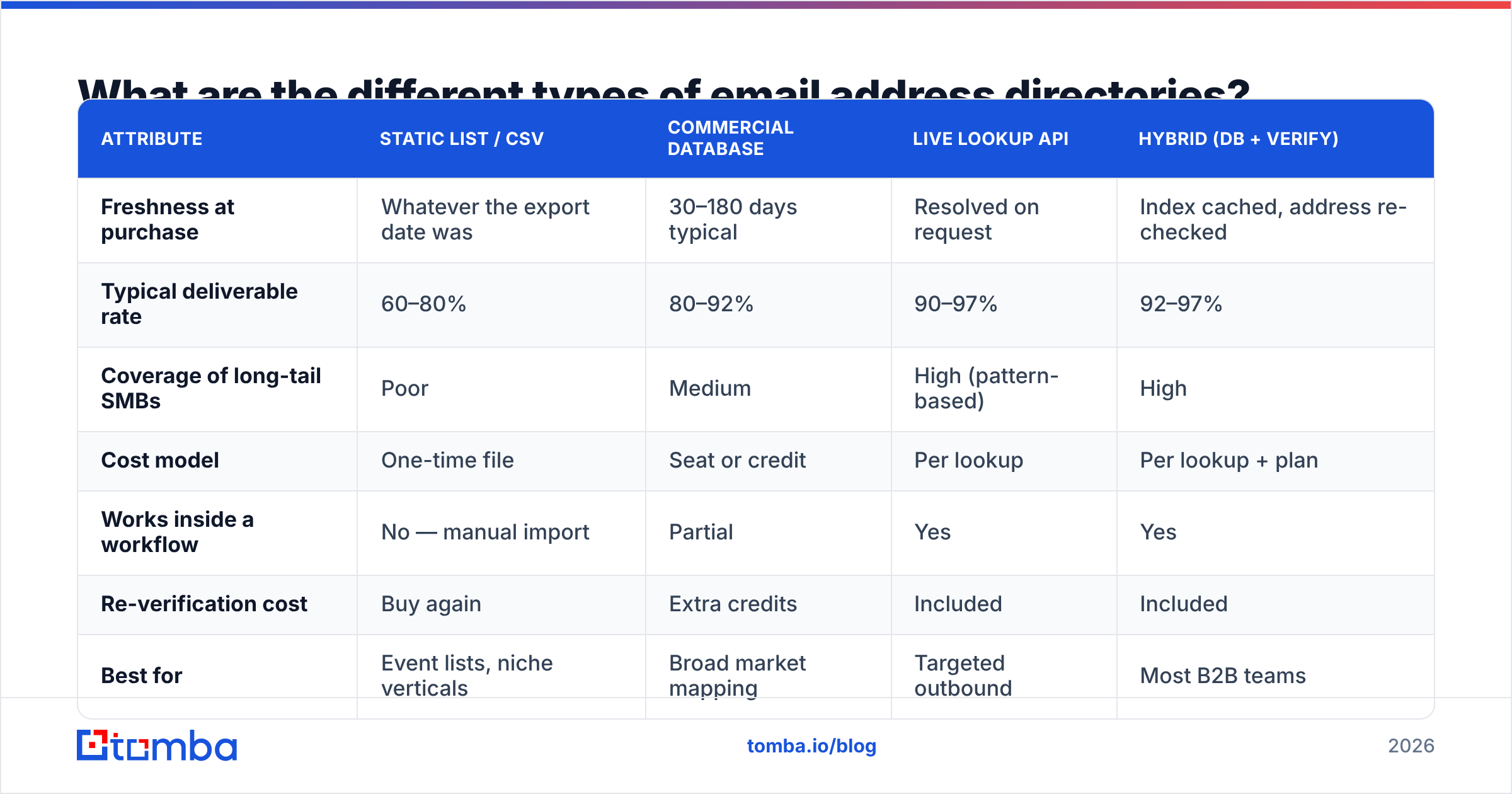
Here's the honest trade-off table. There is no single winner — there's a right pick per use case.
| Attribute | Static list / CSV | Commercial database | Live lookup API | Hybrid (DB + verify) |
|---|---|---|---|---|
| Freshness at purchase | Whatever the export date was | 30–180 days typical | Resolved on request | Index cached, address re-checked |
| Typical deliverable rate | 60–80% | 80–92% | 90–97% | 92–97% |
| Coverage of long-tail SMBs | Poor | Medium | High (pattern-based) | High |
| Cost model | One-time file | Seat or credit | Per lookup | Per lookup + plan |
| Works inside a workflow | No — manual import | Partial | Yes | Yes |
| Re-verification cost | Buy again | Extra credits | Included | Included |
| Best for | Event lists, niche verticals | Broad market mapping | Targeted outbound | Most B2B teams |
The critical row is the last one in the middle: re-verification cost. A CSV that looked cheap at $0.02 per record stops being cheap when you re-buy it twice a year to keep it usable. That's the hidden subscription inside every "one-time" list.
How accurate is email address directory data in 2026?#
Accuracy claims in this category are close to meaningless unless you know what's being measured. Three numbers get conflated constantly:
- Coverage / match rate — of 1,000 target contacts you asked for, how many came back with any address? Vendors love this number.
- Deliverability / bounce rate — of the addresses returned, how many actually accept mail? This is the number your sending domain cares about.
- Person-accuracy — is the address the right person's current work address, or a former employee's alias still catching mail? Almost nobody measures this, and it's where role-based and catch-all addresses quietly wreck reply rates.
A directory can hit 95% coverage and still be terrible: it returns info@ for half the rows, those addresses technically accept mail, so the bounce rate looks fine, and your reply rate is zero.

The practical test is a 100-row bake-off. Pull 100 contacts you already know are correct — current customers, closed-won accounts, colleagues at partner companies. Run them through each directory. Score coverage, then run the results through an email verifier and score deliverability. It costs an afternoon and it beats every G2 badge on the vendor's homepage.
Two behaviours to watch for during that test:
- Catch-all domains. Roughly one in five business domains accepts every address at the SMTP layer, so a naive verifier marks garbage as valid. You need a dedicated catch-all verifier or a confidence score, not a binary valid/invalid.
- Pattern guessing dressed up as data. Some directories return
first.last@domain.comwith no evidence behind it. That guess is right maybe 60% of the time and is indistinguishable from a sourced record unless the vendor exposes a confidence score and the source.

How do the main email address directory options compare?#
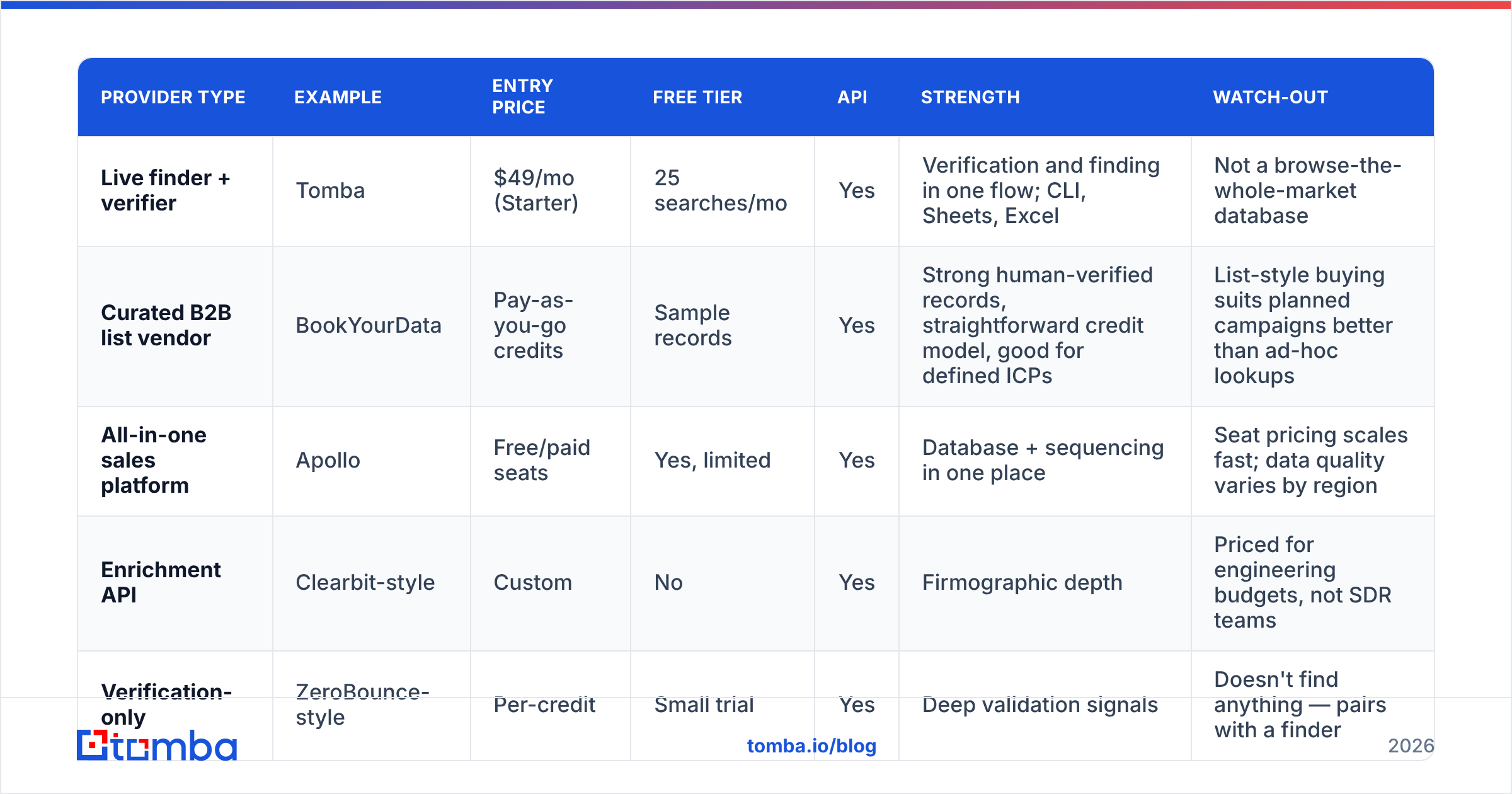
Here's how the major categories of provider stack up on the things that actually determine cost per meeting. Prices are entry-level published rates and move often — check each vendor before you commit.
| Provider type | Example | Entry price | Free tier | API | Strength | Watch-out |
|---|---|---|---|---|---|---|
| Live finder + verifier | Tomba | $49/mo (Starter) | 25 searches/mo | Yes | Verification and finding in one flow; CLI, Sheets, Excel | Not a browse-the-whole-market database |
| Curated B2B list vendor | BookYourData | Pay-as-you-go credits | Sample records | Yes | Strong human-verified records, straightforward credit model, good for defined ICPs | List-style buying suits planned campaigns better than ad-hoc lookups |
| All-in-one sales platform | Apollo | Free/paid seats | Yes, limited | Yes | Database + sequencing in one place | Seat pricing scales fast; data quality varies by region |
| Enrichment API | Clearbit-style | Custom | No | Yes | Firmographic depth | Priced for engineering budgets, not SDR teams |
| Verification-only | ZeroBounce-style | Per-credit | Small trial | Yes | Deep validation signals | Doesn't find anything — pairs with a finder |
A note on the middle row: list vendors like BookYourData and live finders are not really competitors. If you know exactly which 5,000 job titles in which 3 industries you want and you want them today, a curated list is the faster path. If your targets arrive one at a time — from inbound signups, from a scraped conference page, from a rep's LinkedIn session — a live lookup wins because you never pay for records you don't use.

If you want a peer-graded starting shortlist rather than vendor marketing, the G2 lead intelligence category is a reasonable filter — just sort by recent reviews, not overall score, since data quality changes faster than review averages do.
What should you check before paying for directory access?#
Run this list before any contract. It takes an hour and it has killed more bad purchases than any feature comparison.
- Match rate on your ICP, not theirs. A vendor with 200M records may hold almost nothing for German industrial SMBs or LATAM fintech. Test your actual segment.
- Bounce guarantee and credit policy. Ask: "If a returned address hard-bounces, do I get the credit back?" A vendor confident in its data says yes automatically. Get it in the contract, not the sales call.
- Refresh cadence. How often is a record re-checked? "Continuously" is a marketing word. Ask for the median age of records in your segment.
- API access on the entry plan. Many vendors gate the API behind an enterprise tier, which means your entry-plan test never resembles production. Confirm the email finder API is available at the price you're actually going to pay.
- Source transparency. Where did the record come from? Vendors that publish data sources are easier to defend to a legal team than ones that say "proprietary."
- Export and lock-in. Can you export enriched records, or does leaving the tool mean losing the work? Check before, not during, renewal.
How do you build your own email address directory?#
For most teams the right answer isn't buying a directory — it's assembling one against a defined target list. The process:
Step 1 — Define the account list first. Firmographics before people. 300 well-chosen accounts beat 30,000 random ones, and everything downstream gets cheaper.
Step 2 — Map the domain. For each account, run a domain search to pull known addresses and, more importantly, the company's email pattern. Once you know a company uses f.last@, you can resolve every future contact there at near-zero marginal cost.
Step 3 — Resolve named people. Feed name + domain into an email finder for the specific decision-makers you identified. This is where per-lookup pricing beats bulk lists: you only pay for people you'll actually contact.
Step 4 — Verify before sending, every time. Even a fresh find should pass through verification. Keep hard bounces under 2% or your sender reputation starts absorbing damage that takes weeks to undo.
Step 5 — Enrich and store. Push the result into your CRM with the source, confidence score, and date. That timestamp is what lets you re-verify selectively instead of re-buying everything.
Step 6 — Re-check on a schedule. Quarterly re-verification of your active list costs a fraction of a new purchase. Use bulk verify rather than doing it row by row.
Is using an email address directory legal?#
Short answer: yes in most B2B contexts, with conditions that vary by jurisdiction — and none of this is legal advice.
- United States (CAN-SPAM). Commercial email to business addresses is permitted without prior consent, provided you identify yourself, include a physical address, and honour opt-outs promptly. Buying or using a directory is not itself the problem; how you send is.
- EU/UK (GDPR + ePrivacy). Business contact data can be processed under legitimate interest, but you owe a documented balancing test, transparency about where the data came from, and a working path to object or be erased. Corporate role addresses sit on firmer ground than personal-looking ones.
- Canada (CASL). Stricter. Implied consent typically requires an existing business relationship or a conspicuously published business address relevant to the recipient's role.
Practical implication: pick a directory that can tell you the provenance of each record. When a recipient invokes their rights, "we don't know where it came from" is the answer that turns a routine request into a problem. Vendors that publish sourcing and offer deletion on request make compliance mechanical instead of stressful.
What does an email address directory actually cost?#
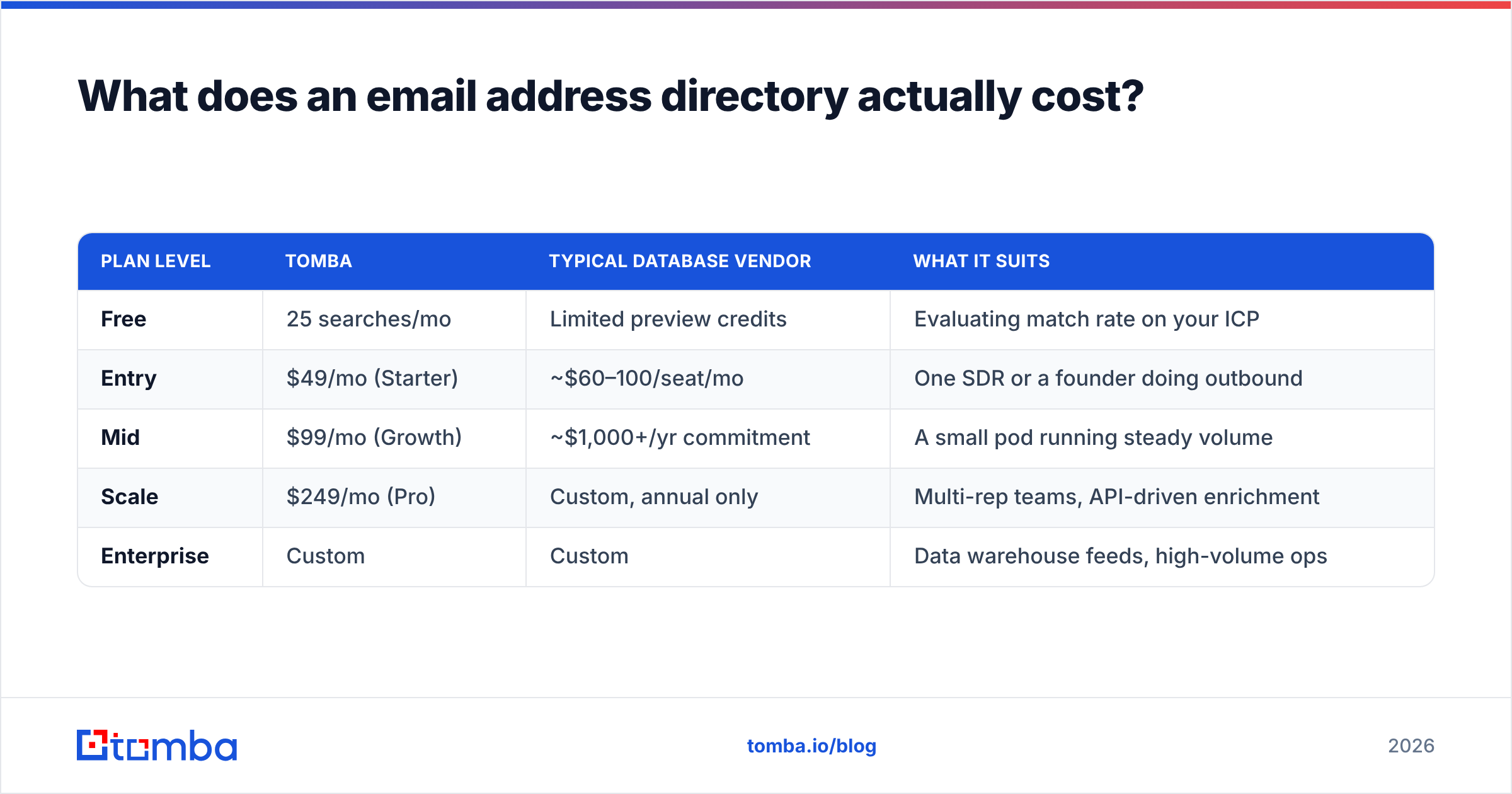
Compare on cost per usable address, not sticker price. A $0.01 record with a 65% deliverable rate costs more per usable contact than a $0.04 record at 95%, before you count the reputation damage from the bounces.
| Plan level | Tomba | Typical database vendor | What it suits |
|---|---|---|---|
| Free | 25 searches/mo | Limited preview credits | Evaluating match rate on your ICP |
| Entry | $49/mo (Starter) | ~$60–100/seat/mo | One SDR or a founder doing outbound |
| Mid | $99/mo (Growth) | ~$1,000+/yr commitment | A small pod running steady volume |
| Scale | $249/mo (Pro) | Custom, annual only | Multi-rep teams, API-driven enrichment |
| Enterprise | Custom | Custom | Data warehouse feeds, high-volume ops |
Full Tomba pricing is published per tier, which is worth noting only because a surprising share of this category still hides pricing behind a demo request. If you can't see a price, assume it's annual-commitment territory.
One more cost nobody budgets: integration time. A directory that lives only in a web UI forces manual export-import cycles forever. One that ships a Chrome extension, a Sheets add-on, and a documented API absorbs into your existing workflow in an afternoon. That difference is worth more than a few cents per record.
Which option should you choose?#
- You need 5,000 contacts in a well-defined segment, this quarter. A curated list vendor is the efficient buy. Verify everything on arrival regardless of what the vendor promises.
- You need contacts one at a time as opportunities appear. Live lookup. You'll spend a fraction of the list price and your data will always be same-day fresh.
- You're enriching inbound signups programmatically. API-first, with verification in the same call. Don't build a two-vendor pipeline for this.
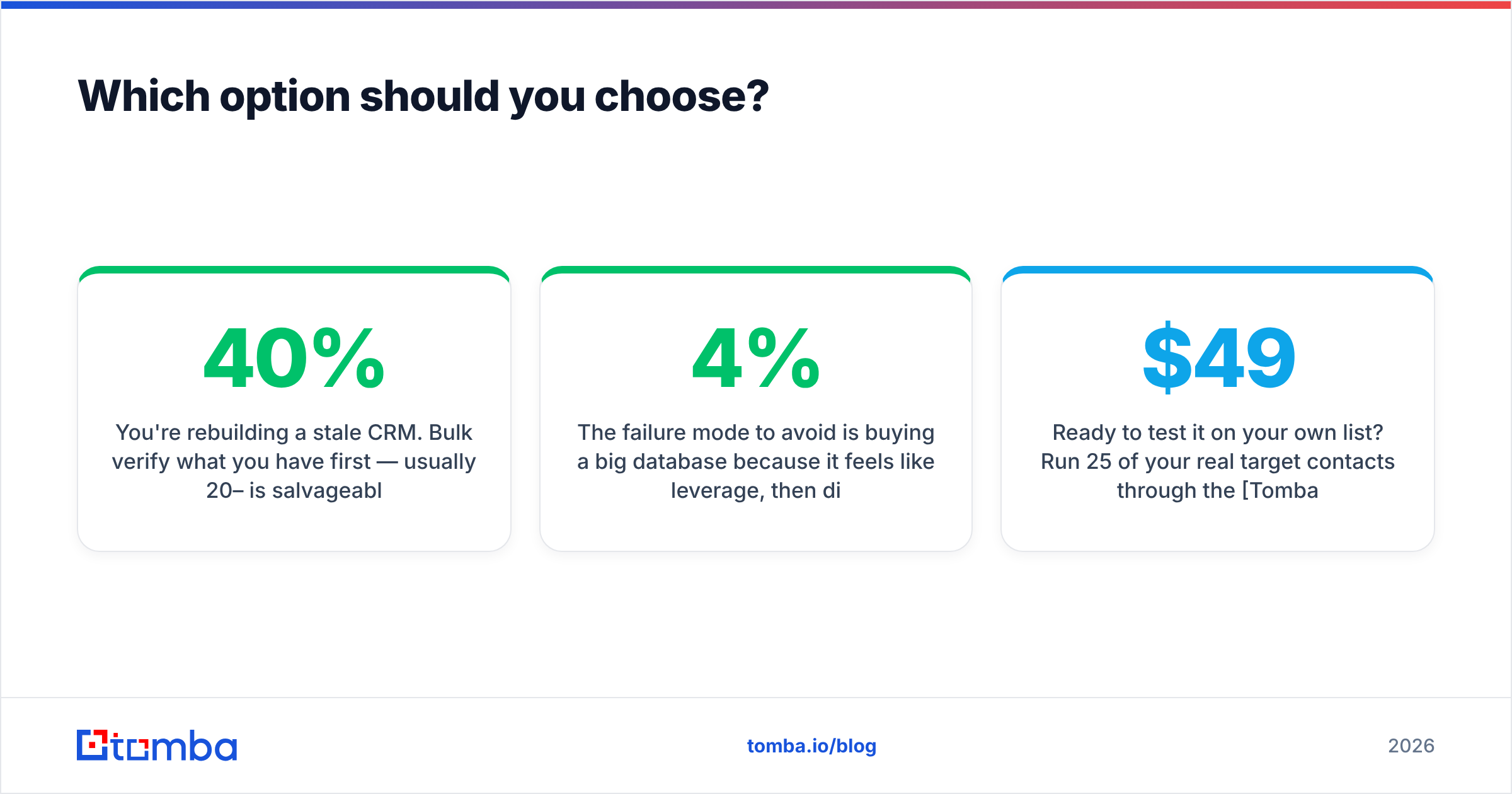
- You're rebuilding a stale CRM. Bulk verify what you have first — usually 20–40% is salvageable — then find replacements only for the rows that failed.
The failure mode to avoid is buying a big database because it feels like leverage, then discovering your team uses 4% of it and half of what they touch has bounced.
Ready to test it on your own list? Run 25 of your real target contacts through the Tomba Email Finder on the free tier — no card, no sales call. Score coverage and bounce rate against whatever directory you're using today, and let the two numbers decide. If the results hold up, the $49/mo Starter plan covers a full SDR's monthly volume, and the same credits work across finding, verification, and enrichment.
Related guides#
Ready to find emails that actually work?
Join 150,000+ professionals who stopped guessing and started sending. Free credits on signup — no credit card required.
Get the Tomba newsletter
Practical outbound tactics and product updates — once every two weeks.
About the author