Email and Phone Number Finder Tools: What Works in 2026
Most tools that promise both an email and a phone number nail one and fake the other. Here's how dual-channel contact data actually gets sourced, what accuracy to expect, and how to price it honestly.
TL;DR
- An email and phone number finder is really two databases wearing one interface: email data built from crawled and verified web sources, and phone data assembled from opt-in forms, partner networks, and telecom-adjacent files. They age at completely different speeds.
- Expect strong email accuracy (85–97% deliverable on verified results) and much weaker phone accuracy. Direct-dial and mobile coverage is usually the number that gets quietly rounded up in marketing copy.
- Coverage matters more than accuracy percentages. A tool with 95% accuracy on 20% of your list is worse than one with 88% accuracy on 70%.
- Credit models decide your real cost. Per-seat pricing punishes small teams; pay-as-you-go and pooled credits are friendlier when phone lookups burn 5–10 credits each.
- Never treat a returned phone number as dial-ready. Validate line type and country before you hand it to a dialer, or you inherit compliance risk you didn't budget for.
What is an email and phone number finder?#
An email and phone number finder is a tool that takes a thin input — a name plus a company, a domain, a LinkedIn URL — and returns the contact channels attached to that person. In practice it's a lookup layer sitting on top of two very different data supply chains that most vendors present as one product.
The email side is mostly deterministic. Company email patterns are discoverable (first.last@, flast@, first@), and a candidate address can be tested against the receiving mail server before it's ever handed to you. That's why a good email verifier can tell you with high confidence whether an address will bounce.
The phone side is probabilistic. There is no SMTP handshake for a mobile number. Nobody can ping a phone to confirm "yes, this is Sarah in RevOps" without actually calling it. So phone data is assembled from historical opt-ins, form fills, contributed address books, business filings, and licensed partner files — then scored by how many independent sources agree.
That asymmetry explains almost every complaint you'll read in review sites about "great emails, garbage numbers."
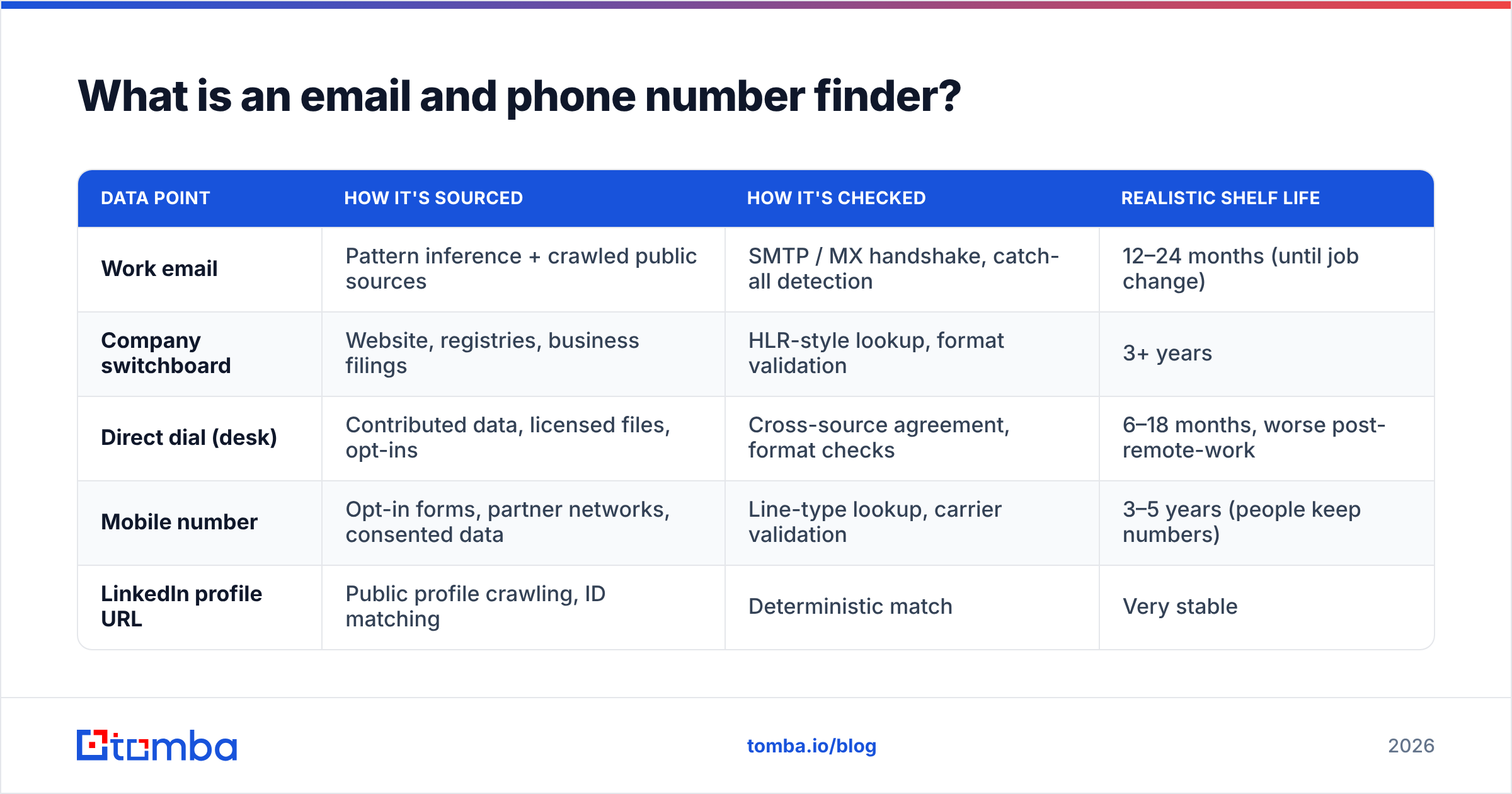
| Data point | How it's sourced | How it's checked | Realistic shelf life |
|---|---|---|---|
| Work email | Pattern inference + crawled public sources | SMTP / MX handshake, catch-all detection | 12–24 months (until job change) |
| Company switchboard | Website, registries, business filings | HLR-style lookup, format validation | 3+ years |
| Direct dial (desk) | Contributed data, licensed files, opt-ins | Cross-source agreement, format checks | 6–18 months, worse post-remote-work |
| Mobile number | Opt-in forms, partner networks, consented data | Line-type lookup, carrier validation | 3–5 years (people keep numbers) |
| LinkedIn profile URL | Public profile crawling, ID matching | Deterministic match | Very stable |
Note the strange inversion: mobile numbers are the most durable data point on that list and the hardest to obtain. Desk phones are the opposite — easy to guess, increasingly useless.
Why bother with both channels instead of just email?#
Because reply rates on email-only sequences have been sliding for years while phone connect rates held roughly flat. The multichannel argument isn't that calling is better; it's that the same prospect responds to different channels depending on seniority, region, and how buried their inbox is.
Four things change when you add a validated phone number to a contact record:
- Sequence completion improves. A five-email sequence with two call attempts and a LinkedIn touch gives you six chances at attention instead of five identical ones. Response rate lifts come from channel variety more than from copy tweaks.
- Speed-to-lead becomes possible. Inbound demo requests that get a call within five minutes convert dramatically better than ones that get an email the next morning. You cannot do that without a number on file.
- You can qualify faster. A 90-second call kills a bad-fit lead that would otherwise eat four weeks of follow-up.
- Enterprise deals need it. Above VP level, gatekeepers and executive assistants are the reality. A switchboard plus a name gets further than a cold email into a filtered inbox.

The caveat: a phone number is a legal object in a way an email address mostly isn't. In the US, autodialed and pre-recorded calls to mobiles fall under the Telephone Consumer Protection Act, and DNC scrubbing is not optional. In the EU and UK, B2B calls to individuals are personal-data processing under GDPR. Budget for compliance tooling, not just data.
How accurate is an email and phone number finder, really?#
Split the question. Ask any vendor two separate numbers and watch what happens.
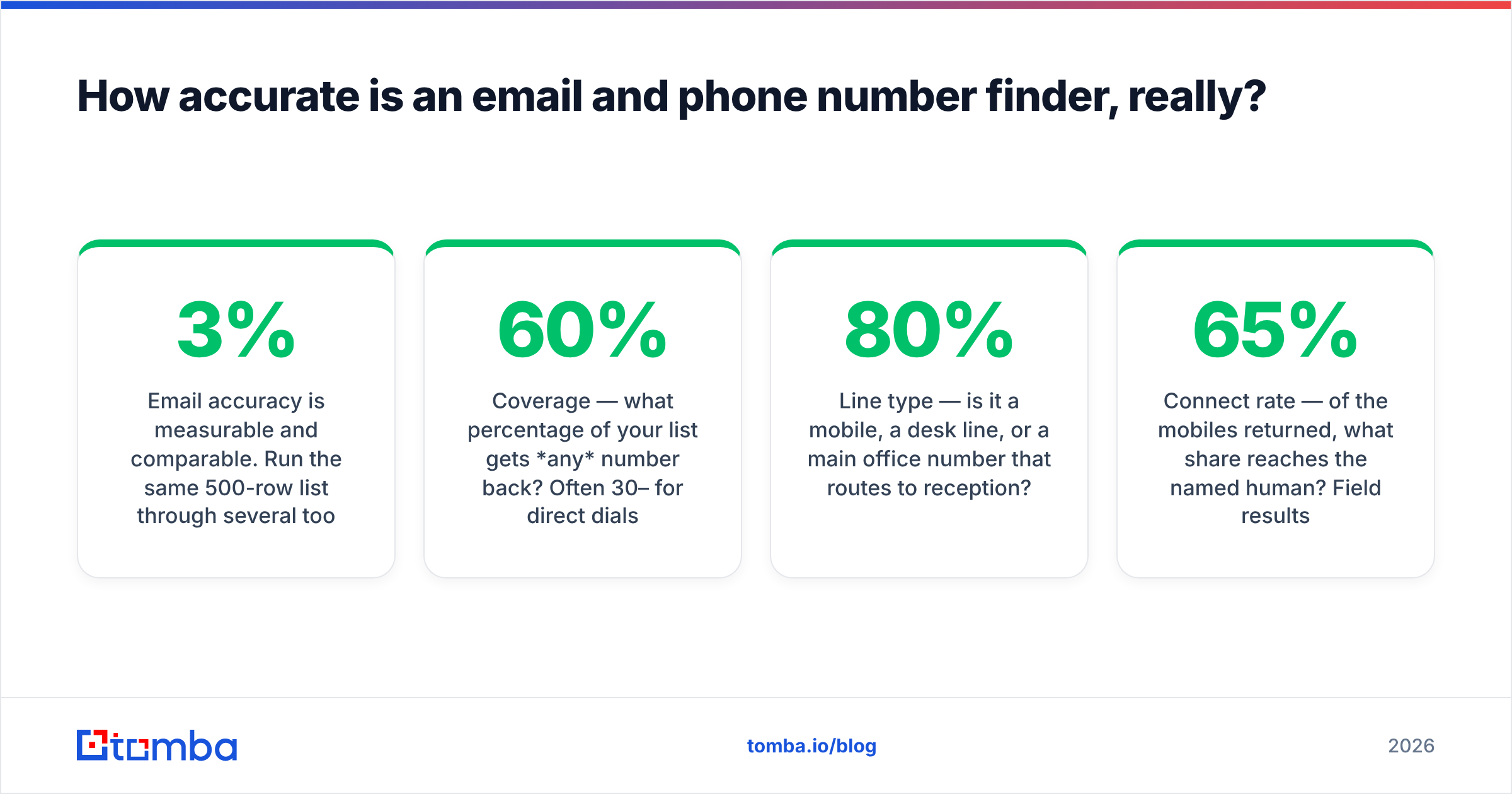
Email accuracy is measurable and comparable. Run the same 500-row list through several tools, send to the results, and count hard bounces. Anything under 3% bounce on verified-only results is solid. Tools that return "risky" or "accept-all" results without labeling them will inflate their hit rate and wreck your sender reputation.

Phone accuracy needs three sub-questions, and vendors love to answer only the flattering one:
- Coverage — what percentage of your list gets any number back? Often 30–60% for direct dials, higher for switchboards.
- Line type — is it a mobile, a desk line, or a main office number that routes to reception? A tool reporting 80% "phone coverage" where two-thirds are switchboards is not giving you 80% direct dials.
- Connect rate — of the mobiles returned, what share reaches the named human? Field results in the 40–65% range are typical for good providers. Anyone claiming 90%+ connect rate is measuring something else.
Test methodology that actually works: pull 200 contacts you already have verified numbers for (past customers, closed-won accounts, opted-in webinar registrants), strip the phone column, run the list through each candidate tool, and score matches against your known-good column. This measures both coverage and correctness on your ICP rather than the vendor's demo list.
Also check what happens on catch-all domains. Roughly a fifth of business domains accept everything at the SMTP layer, which makes standard verification useless. A dedicated catch-all verifier is the difference between a labeled "unknown" and a silent bounce three weeks later.
Which email and phone number finder should you actually shortlist?#
There is no single winner, because these tools optimize for different jobs. Below is how the main categories compare on the attributes that change outcomes. Verify current pricing on each vendor's own page before you commit — list prices move often.
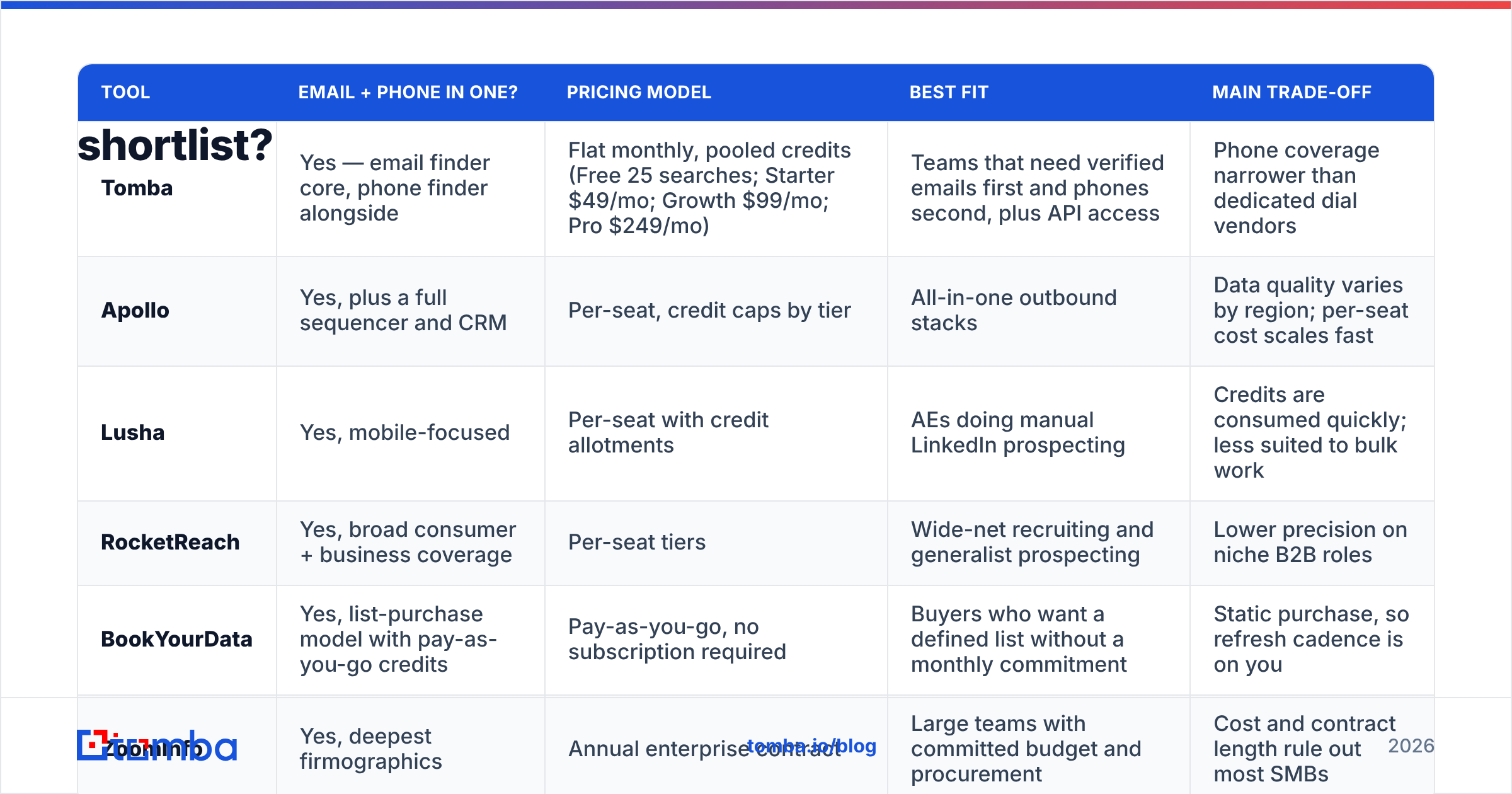
| Tool | Email + phone in one? | Pricing model | Best fit | Main trade-off |
|---|---|---|---|---|
| Tomba | Yes — email finder core, phone finder alongside | Flat monthly, pooled credits (Free 25 searches; Starter $49/mo; Growth $99/mo; Pro $249/mo) | Teams that need verified emails first and phones second, plus API access | Phone coverage narrower than dedicated dial vendors |
| Apollo | Yes, plus a full sequencer and CRM | Per-seat, credit caps by tier | All-in-one outbound stacks | Data quality varies by region; per-seat cost scales fast |
| Lusha | Yes, mobile-focused | Per-seat with credit allotments | AEs doing manual LinkedIn prospecting | Credits are consumed quickly; less suited to bulk work |
| RocketReach | Yes, broad consumer + business coverage | Per-seat tiers | Wide-net recruiting and generalist prospecting | Lower precision on niche B2B roles |
| BookYourData | Yes, list-purchase model with pay-as-you-go credits | Pay-as-you-go, no subscription required | Buyers who want a defined list without a monthly commitment | Static purchase, so refresh cadence is on you |
| ZoomInfo | Yes, deepest firmographics | Annual enterprise contract | Large teams with committed budget and procurement | Cost and contract length rule out most SMBs |

Two patterns show up repeatedly in buying committees. First, teams over-index on database size — "260 million contacts" tells you nothing about whether your 3,000 target accounts are covered. Second, they under-weight API and workflow access, then discover the data they bought can't reach their CRM without manual CSV surgery.
Cross-check your shortlist against real reviews on G2's lead intelligence category and filter to companies your size. A tool that delights 2,000-seat orgs frequently frustrates five-person teams, and vice versa.
What does a dual-channel finder actually cost?#
The sticker price is rarely the real price. Three multipliers matter:
- Credit weighting. Email lookups often cost 1 credit. Phone lookups commonly cost 5–10. A "10,000 credit" plan can mean 10,000 emails or 1,000 mobiles.
- Seats vs. pool. Per-seat pricing means a five-person team pays 5x for capacity one person could have used. Pooled credits on a flat plan are usually cheaper below ten users.
- Failed lookups. Ask explicitly: are you charged when no result is returned? Good vendors don't charge for misses. Some do.
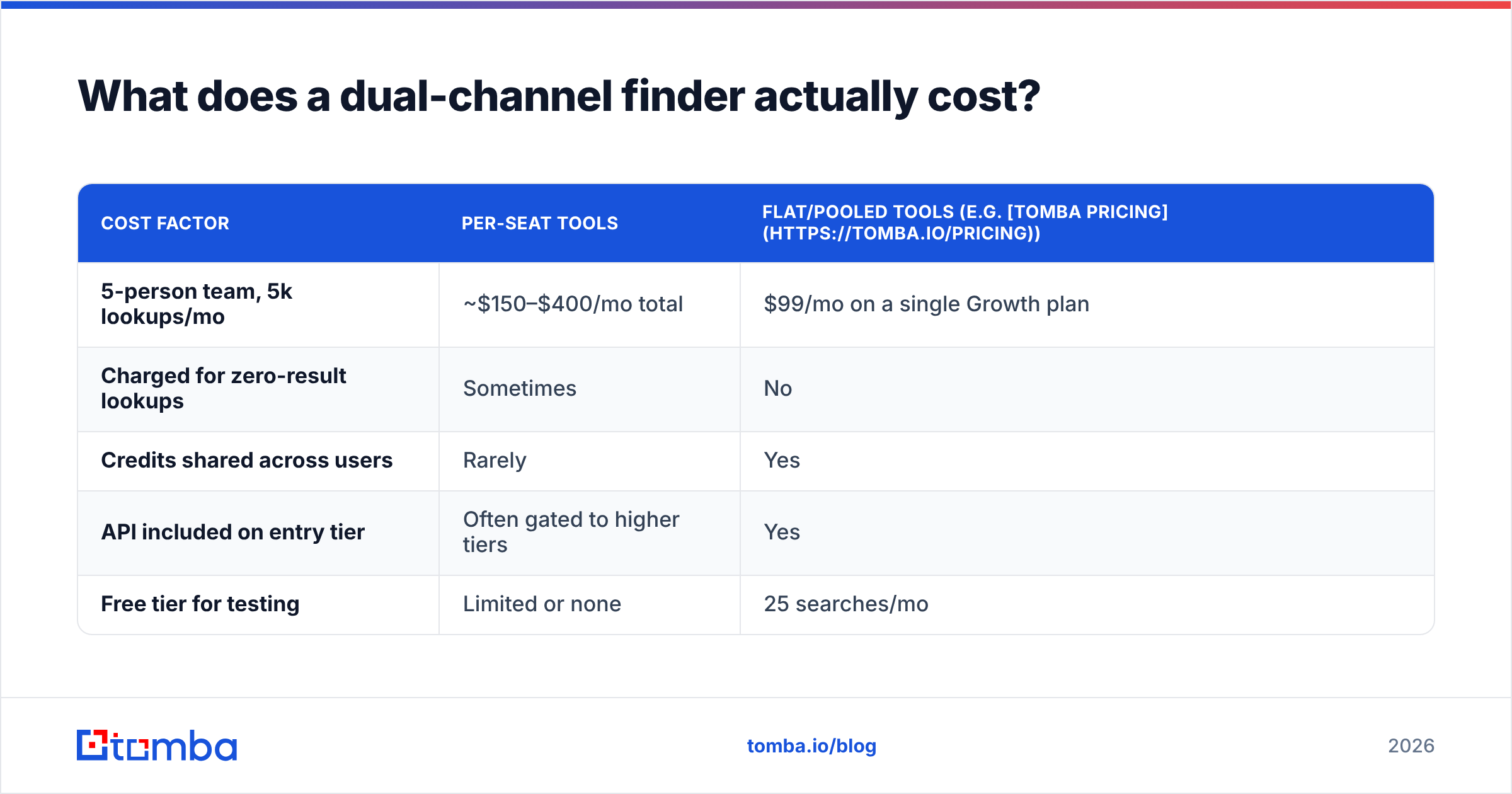
| Cost factor | Per-seat tools | Flat/pooled tools (e.g. Tomba pricing) |
|---|---|---|
| 5-person team, 5k lookups/mo | ~$150–$400/mo total | $99/mo on a single Growth plan |
| Charged for zero-result lookups | Sometimes | No |
| Credits shared across users | Rarely | Yes |
| API included on entry tier | Often gated to higher tiers | Yes |
| Free tier for testing | Limited or none | 25 searches/mo |
Run the math on your actual monthly volume, not the volume you aspire to. Most teams overbuy credits by 3–4x in month one and never touch the ceiling.
How do you build a workflow that keeps the data clean?#
Finding contacts is the easy half. Keeping the record trustworthy for the six months it sits in your CRM is where teams lose money.
- Start from accounts, not people. Use a domain search to map who exists at a target company and what the email pattern is, then narrow to roles. Working person-by-person from a scraped list wastes credits on people who left.
- Verify email before enrichment. There's no point buying a phone number for a contact whose email already bounces — that record is stale across the board. Verification is the cheap gate before the expensive lookup.
- Validate the number, don't trust it. Run every returned number through a phone validator for line type, country, and format. Mobile vs. landline changes both your dialing strategy and your compliance obligations.
- Enrich once, then maintain. Add job title, company size, and tech stack via data enrichment at import, then re-check the segment quarterly rather than re-buying the whole list.
- Push to the CRM automatically. Manual CSV imports create duplicates, and duplicates destroy attribution. Wire it through your CRM's native connector or a HubSpot integration so the enriched record lands where reps work. HubSpot's own sales tooling documentation is a good reference for field mapping conventions.
- Suppress before you send. DNC lists, existing customers, open opportunities, and anyone who asked you to stop. This is one query, and skipping it is how teams end up in legal review.
For anything above a few hundred records, do this in batch. A bulk email finder run plus a validation pass on the output is minutes of work; the same job done row-by-row in a browser extension is a full afternoon.
What mistakes ruin dual-channel contact data?#
Treating switchboards as direct dials. If your connect rate collapsed after a data purchase, check the line-type breakdown before blaming the reps.
Ignoring job-change churn. Roughly 20–25% of B2B contacts change roles annually. A list bought in January is measurably worse by July whether or not anyone touched it. Set a refresh cadence.
Sending to unverified addresses to "test" the data. Bounces damage email deliverability at the domain level, and that damage outlives the campaign. Verify first, always.
Buying on database size. Ask for a coverage test on 200 of your accounts. Any vendor confident in their data will run it.
No single source of truth. Three tools, three exports, three spreadsheets, and nobody knows which number is current. Pick one enrichment path into the CRM and enforce it.
Skipping the API. If the data can't flow programmatically, someone on your team is a human ETL pipeline. The Tomba API and equivalents exist precisely so that lookup, verification, and CRM write-back happen without a person in the loop.
So is a combined email and phone number finder worth it?#
Yes, with a clear-eyed expectation: you are buying excellent email data and useful phone data, not two equally good datasets. Anyone promising otherwise is selling.
The practical setup for most teams under 50 people: one flat-rate tool that does verified email finding well, exposes phone lookup on the same credit pool, and has an API you can automate against. Add a specialist dial provider later, only if your outbound motion proves it needs one — and only after you've measured connect rates on real calls rather than on a vendor's slide.
Start by testing coverage on your own account list before you sign anything. The Tomba Email Finder has a free tier with 25 searches per month, which is enough to check email accuracy and phone coverage against contacts you already know are good. If the hit rate holds on your ICP, Starter at $49/mo gets you pooled credits and full API access — and if it doesn't, you've learned that for free instead of after a twelve-month contract.
Related guides#
// get started
Find, verify and enrich your first contacts today
Start on the free plan with 25 searches a month, then scale when your team is ready.
Free plan · No credit card required · GDPR & CCPA
// about the author