Email Check vs ZoomInfo: Verification and Data Compared
ZoomInfo sells a sales intelligence database. An email check tool sells deliverability. They solve different problems, and paying $15,000/year for the wrong one is a common mistake. Here's the honest breakdown.
TL;DR
- An email check tool and ZoomInfo are not competitors — one validates whether an address will bounce, the other sells a contact database with firmographic and intent layers.
- ZoomInfo's typical annual contract lands in the $15,000–$40,000 range with a 12-month minimum. A dedicated verification stack costs $49–$249/month.
- ZoomInfo's stated email accuracy is strong on paper but decays fast on job-change-heavy segments; verification is still required before you send.
- If your problem is "my bounce rate is 9%", buy verification. If your problem is "I don't know who to call at 4,000 mid-market manufacturers", buy a database.
- Most teams under 50 reps get further with a per-credit email finder plus a verifier than with a six-figure intelligence suite they use at 20% capacity.
What does "email check vs ZoomInfo" actually mean?#
The comparison gets searched constantly, and it's usually a symptom of the same underlying confusion: someone has a list problem and isn't sure whether they need better data or cleaner data. Those are different purchases.
An email check — email verification — is a validation process. You hand it an address, it runs syntax checks, DNS and MX lookups, a mailbox-level SMTP handshake, disposable-domain and role-account detection, and returns a verdict: valid, invalid, catch-all, or risky. It creates no new contacts. It only tells you whether the ones you have will land.
ZoomInfo is a B2B sales intelligence platform. It sells access to a contact and company database — around 100M+ business contacts by its own marketing — plus org charts, technographics, intent signals from Bidstream and its acquired properties, and a workflow layer that pushes records into your CRM. Verification is a feature inside it, not the product.
So the honest framing: verification is a quality gate. ZoomInfo is a supply source. You can need both, but you almost never need to choose one as a substitute for the other.
How do the two approaches compare on cost and scope?#
Here's the structural difference laid out. Note that ZoomInfo does not publish pricing; figures below reflect widely reported ranges from user reviews on G2 and Capterra, not an official rate card.
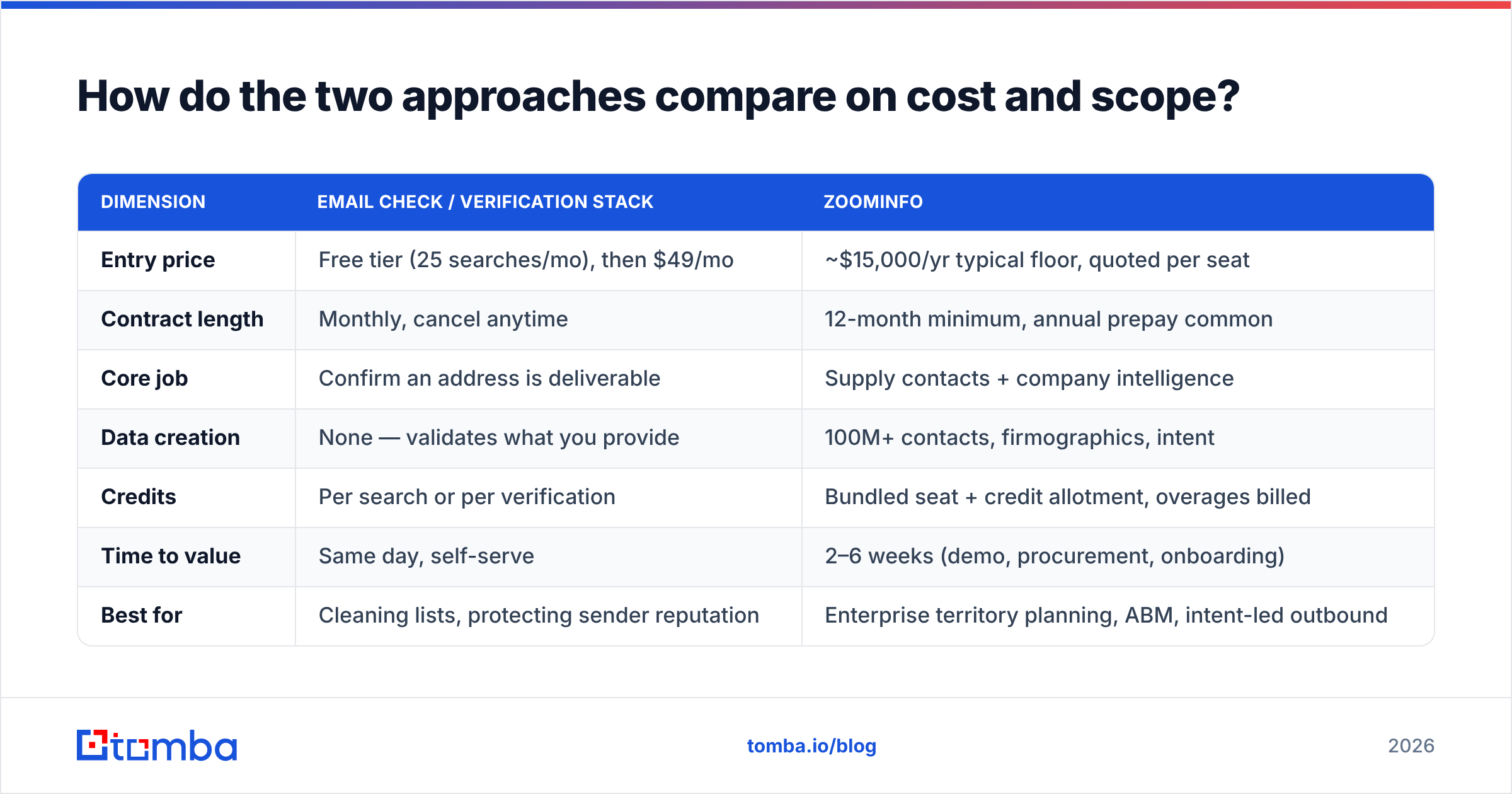
| Dimension | Email check / verification stack | ZoomInfo |
|---|---|---|
| Entry price | Free tier (25 searches/mo), then $49/mo | ~$15,000/yr typical floor, quoted per seat |
| Contract length | Monthly, cancel anytime | 12-month minimum, annual prepay common |
| Core job | Confirm an address is deliverable | Supply contacts + company intelligence |
| Data creation | None — validates what you provide | 100M+ contacts, firmographics, intent |
| Credits | Per search or per verification | Bundled seat + credit allotment, overages billed |
| Time to value | Same day, self-serve | 2–6 weeks (demo, procurement, onboarding) |
| Best for | Cleaning lists, protecting sender reputation | Enterprise territory planning, ABM, intent-led outbound |
| Typical buyer | Founder, growth lead, SDR manager | RevOps at 100+ headcount |
| Exit cost | Stop paying | Locked until renewal, auto-renew clauses common |
The credit model is where most disappointment starts. ZoomInfo bundles a fixed credit allotment per seat per year. Burn it in month four and you're negotiating an overage mid-contract, from a weak position. Per-credit verification tools have no such cliff — you pay for what you consume and stop when you stop.

Is ZoomInfo's email data accurate enough to skip verification?#
No — and this isn't a knock on ZoomInfo specifically. It's true of every database on the market, including Tomba's.
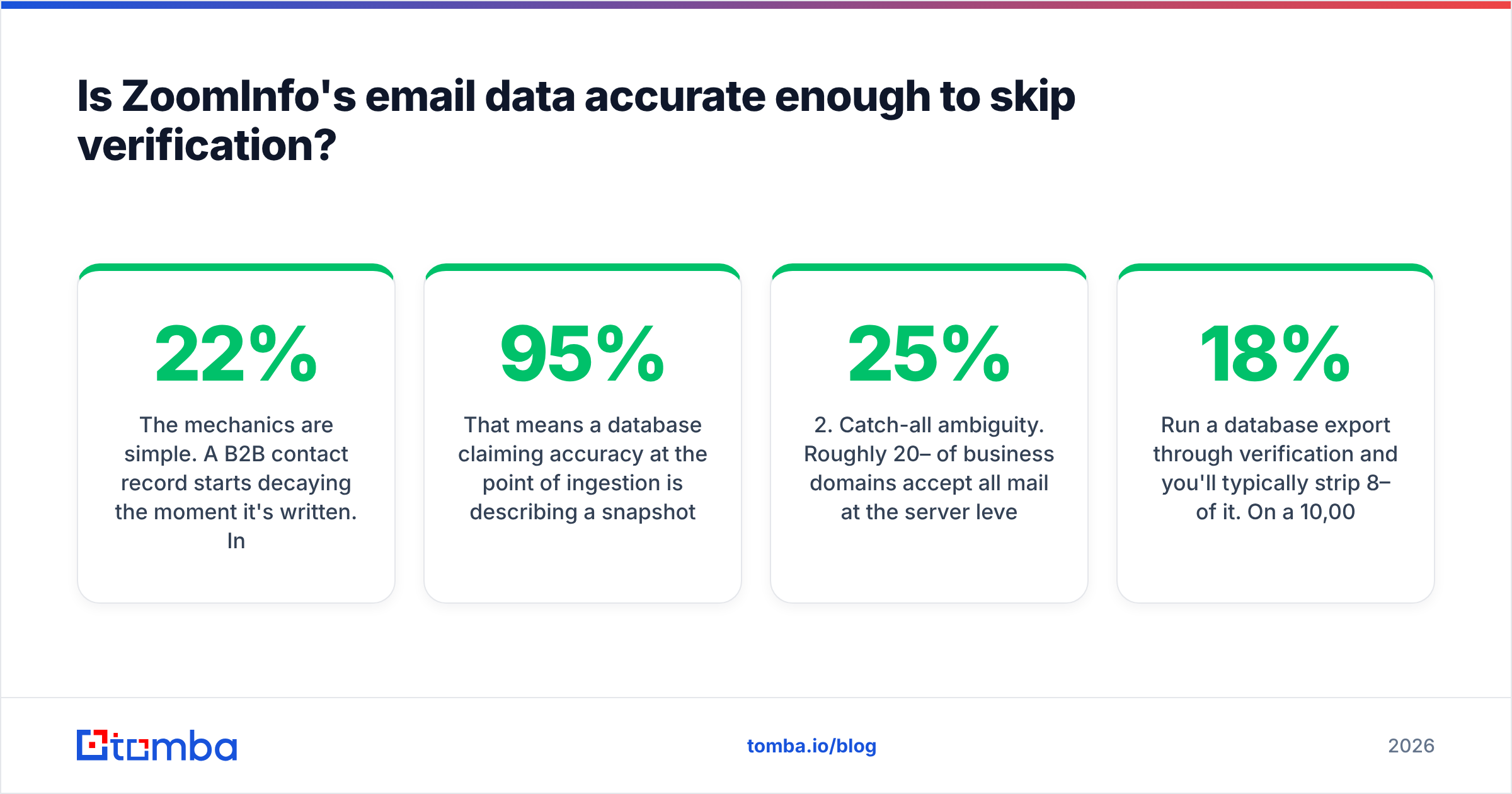
The mechanics are simple. A B2B contact record starts decaying the moment it's written. Industry consensus, echoed in HubSpot's research on database decay, puts annual B2B data degradation somewhere between 22% and 30%. People change jobs, companies get acquired, mail servers get reconfigured, aliases get retired.
That means a database claiming 95% accuracy at the point of ingestion is describing a snapshot, not a guarantee about the record you export eight months into your contract. The claim and your actual inbox placement are separated by however long that record has been sitting.

There are three failure modes verification catches that a database export will not:
- Silent decay. The record was correct at ingestion and is now a hard bounce. Nothing in the export flags this.
- Catch-all ambiguity. Roughly 20–25% of business domains accept all mail at the server level, so a standard SMTP probe returns "accepted" for addresses that don't exist. You need a catch-all verifier that layers pattern confidence and historical signal on top of the handshake.
- Role and shared accounts.
info@,sales@,support@are technically valid and commercially useless. They inflate your list size and depress your reply rate.
Run a database export through verification and you'll typically strip 8–18% of it. On a 10,000-contact export that's 800–1,800 sends you didn't waste, and — more importantly — a bounce rate that stays under the 2% threshold where Google and Microsoft start throttling you. If you want the mechanics of that threshold, our primer on email deliverability covers how mailbox providers weight bounce signals against sender reputation.
What does an email check actually test?#
If you've only ever seen a green checkmark in a UI, here's what sits underneath it. Understanding the layers matters because vendors cut corners at different ones, and the cheap tools usually stop at step three.
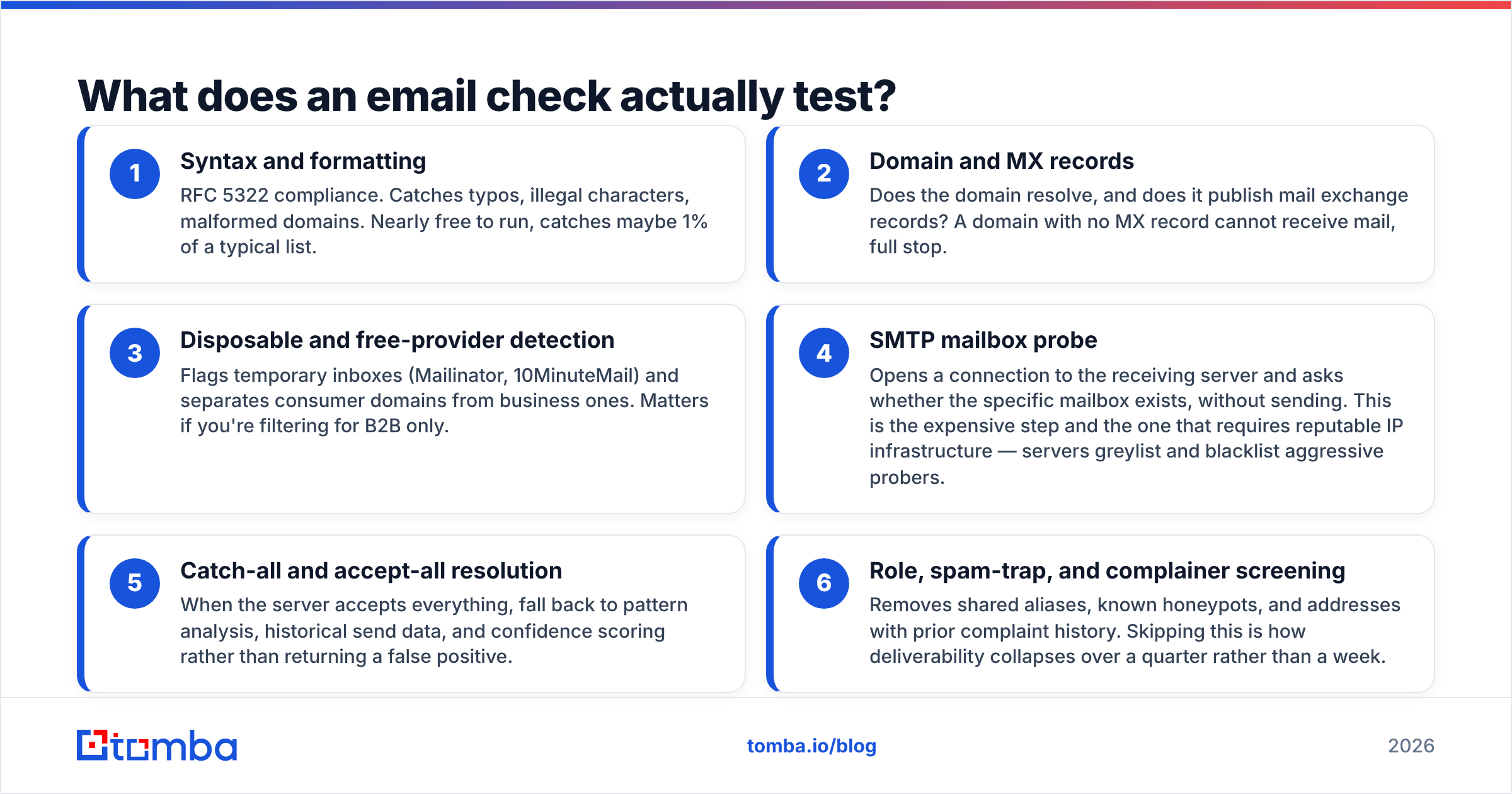
- Syntax and formatting — RFC 5322 compliance. Catches typos, illegal characters, malformed domains. Nearly free to run, catches maybe 1% of a typical list.
- Domain and MX records — Does the domain resolve, and does it publish mail exchange records? A domain with no MX record cannot receive mail, full stop.
- Disposable and free-provider detection — Flags temporary inboxes (Mailinator, 10MinuteMail) and separates consumer domains from business ones. Matters if you're filtering for B2B only.
- SMTP mailbox probe — Opens a connection to the receiving server and asks whether the specific mailbox exists, without sending. This is the expensive step and the one that requires reputable IP infrastructure — servers greylist and blacklist aggressive probers.
- Catch-all and accept-all resolution — When the server accepts everything, fall back to pattern analysis, historical send data, and confidence scoring rather than returning a false positive.
- Role, spam-trap, and complainer screening — Removes shared aliases, known honeypots, and addresses with prior complaint history. Skipping this is how deliverability collapses over a quarter rather than a week.
A quick sanity test before you buy anything: take 100 addresses you already know the outcome for, run them through a free email checker, and compare verdicts against your real bounce log. Vendors quote their own accuracy. Your list is the only benchmark that binds.
Who should buy ZoomInfo anyway?#
Being fair to a serious product: there are teams for whom ZoomInfo is clearly the right call, and the "just use a cheap email finder" advice is wrong for them.
Buy ZoomInfo if:
- You need org charts and reporting lines. Mapping a 12-person buying committee at an enterprise account is something ZoomInfo genuinely does better than point tools.
- Intent data drives your motion. If your ABM program routes accounts based on surge signals, that's an intelligence-platform feature, not a verification feature.
- You have RevOps headcount to operate it. The platform rewards configuration — territory rules, scoring, CRM sync hygiene. Without someone owning it, seat utilization craters and you renew on a contract you use at a fraction of capacity.
- Procurement prefers one big vendor. Real consideration at enterprise scale. Consolidating five tools into one MSA has genuine administrative value.
Skip it if you're a founder-led team, an agency running campaigns for clients on variable volume, or a 5-rep SDR pod that mainly needs verified addresses for accounts you've already identified. In those cases you're buying an intelligence layer to solve a contact-lookup problem, at roughly 20x the cost.
What does the alternative stack look like?#
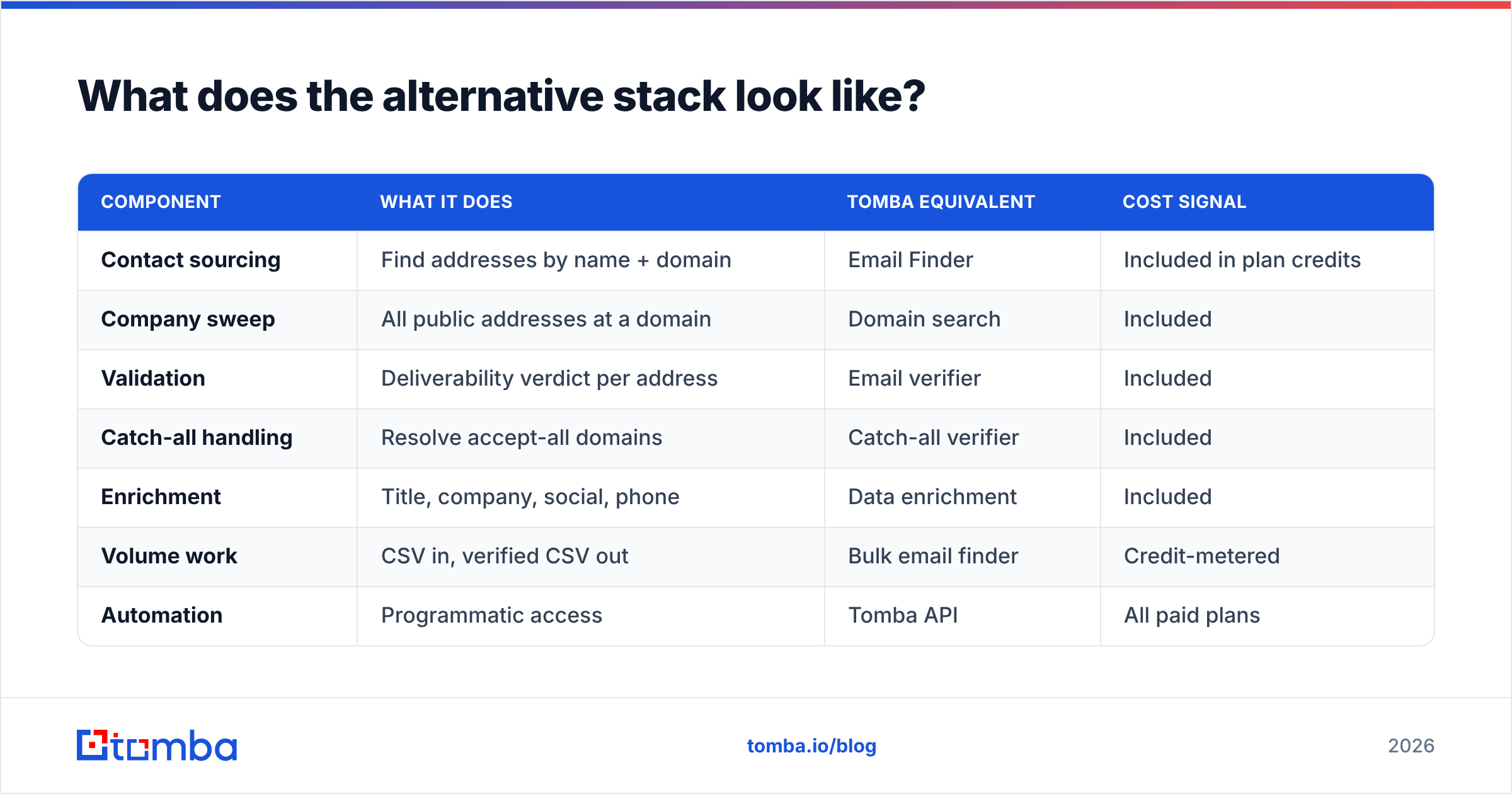
The unbundled approach: source contacts with a finder, validate with a verifier, enrich only the records that survive.
| Component | What it does | Tomba equivalent | Cost signal |
|---|---|---|---|
| Contact sourcing | Find addresses by name + domain | Email Finder | Included in plan credits |
| Company sweep | All public addresses at a domain | Domain search | Included |
| Validation | Deliverability verdict per address | Email verifier | Included |
| Catch-all handling | Resolve accept-all domains | Catch-all verifier | Included |
| Enrichment | Title, company, social, phone | Data enrichment | Included |
| Volume work | CSV in, verified CSV out | Bulk email finder | Credit-metered |
| Automation | Programmatic access | Tomba API | All paid plans |
Tomba pricing runs a free tier at 25 searches/month, Starter at $49/mo, Growth at $99/mo, Pro at $249/mo, and custom Enterprise. A team on Growth spends roughly $1,200 a year — about 8% of a conservative ZoomInfo floor. That gap is the honest crux of the decision: what does the extra $13,800 buy you, and will you use it?
For some teams the answer is genuinely yes. For most teams under 50 people, it isn't, and the money goes further split between data volume and a sending tool.
Worth naming the middle ground too: providers like BookYourData sell pay-as-you-go verified B2B lists with no annual commitment, which suits teams that want database-style coverage without enterprise procurement. Different shape of purchase again — list acquisition rather than either lookup or intelligence.

How do you decide in one sitting?#
Answer three questions honestly.
1. Do you know who you want to reach? If yes — you have a named account list, an ICP, a conference attendee export — you have a lookup problem. A finder plus verifier solves it. If no, and you need the platform to tell you which 3,000 companies to target based on technographics and intent, that's a database purchase.
2. What's your current bounce rate? Above 3% and climbing, verification is the urgent fix regardless of where the data came from. No amount of additional contacts helps a domain that's already being throttled. Check whether the damage has spread with a blacklist checker before you buy anything.
3. Will you use the intelligence layer? Be blunt about this. Intent data, org charts, and scoring models require someone to operationalize them. If nobody owns that, you're paying for dashboards.
A practical sequencing that works for most teams: start unbundled. Run 90 days on a finder-plus-verifier stack, measure your actual verified-contact consumption and reply rate, then take real numbers into a ZoomInfo negotiation if you still need coverage you can't get otherwise. You'll negotiate better with usage data than with a projection, and you may find you never place the call.
What's the verdict?#
They're not substitutes, so there's no single winner — but there is a default. Verification first, database second. Clean data you already have before you buy more, because bad data at higher volume is just a faster way to burn a sending domain.
ZoomInfo earns its price at enterprises with dedicated RevOps, ABM programs running on intent, and buying committees complex enough to need org charts. That's a real segment and the product serves it well. It's a poor fit for teams whose actual constraint is "I have 2,000 target accounts and need working email addresses for them."
And regardless of which side you land on, verification isn't optional. Every database — ZoomInfo, Apollo, Tomba, all of them — ships records that have decayed since ingestion. The only question is whether you catch them before or after your bounce rate tells the mailbox providers you're careless.
Start with the cheap half of the decision. Run your existing list through the Tomba Email Finder and verifier on the free tier — 25 searches, no card — and see how much of your current data survives. If the survival rate is above 95%, your problem isn't data quality and you can go evaluate intelligence platforms with a clear head. If it's below 90%, you just found the cheapest revenue fix available to you this quarter.
Related guides#
Ready to find emails that actually work?
Join 150,000+ professionals who stopped guessing and started sending. Free credits on signup — no credit card required.
Get the Tomba newsletter
Practical outbound tactics and product updates — once every two weeks.
About the author