Email Hippo vs LeadRocks (2026): Which B2B Tool Wins?
Email Hippo verifies addresses you already have. LeadRocks sells you contacts you don't. Here's an honest breakdown of what each tool does well, where both leave gaps, and which one belongs in your 2026 outbound stack.
Email Hippo vs LeadRocks is an odd match-up. One tool checks the emails you already own. The other sells you emails you don't. Here is what each one does, where each one fails, and which belongs in your 2026 outbound stack.
TL;DR
- Email Hippo and LeadRocks are not real rivals. Email Hippo is a verification and email-risk engine. LeadRocks is a B2B contact database you pull records out of.
- Pick Email Hippo if you already own a list — signups, CRM exports, a bought file — and you need to know which addresses are safe to mail.
- Pick LeadRocks if you have no list at all. It sells cheap, LinkedIn-sourced contacts with emails and phone numbers attached.
- Neither one covers the full loop: find the right person at a target domain, prove the address works, and push it into your CRM.
- Want that loop in one place? A finder-plus-verifier like Tomba (free tier, then $49/mo) usually beats paying for a database and a credit pack.
What are Email Hippo and LeadRocks, exactly?#
Email Hippo is a UK-based email verification company. It does three jobs. It cleans bulk lists in a web app. It checks addresses in real time through an API, right on your signup form. And it scores an address for fraud risk, not just for bounces. The company has done this for over a decade, and the depth shows. It looks past "does the mailbox exist" into domain age, throwaway providers, and reputation.
Email Hippo will not hand you an address you don't already have. There is no prospecting database, no "find the head of marketing at acme.com" button, no contact records. You bring the emails. It tells you which ones are real.
LeadRocks sits at the other end. It is a B2B contact database. The company claims well over 100 million records with emails, phone numbers, job titles, and LinkedIn profiles. You can search by title, company, industry, or place. You can paste a list of LinkedIn URLs and get contact details back. You can upload a CSV to fill in the gaps. Lifetime deals made it popular, so you see it in a lot of solo-founder and agency stacks built on a budget.
LeadRocks does not do deep checks. Records carry a simple validity flag. That is not the same as a verification engine. If you want SMTP-level proof before a send, you still need a second tool.

How accurate is each tool in practice?#
Accuracy means two different things here. Mixing them up is the most common mistake in this match-up.
For Email Hippo, accuracy means verdict accuracy. When it says an address is deliverable, does the mail land? Top-tier tools, this one included, land in the mid-to-high 90s on clean domains. The gap shows up on the hard cases. Catch-all domains accept everything at the SMTP layer. Greylisting servers stall. Microsoft 365 now blocks a lot of probes. Any vendor that claims near-perfect accuracy on catch-all domains is overselling. The honest answer is a score, not a yes or no.
For LeadRocks, accuracy means record accuracy. Is this the person's current work email, at their current job, with their current title? Stored records go stale fast. B2B contact data rots at roughly 2–3% a month as people change jobs, and that adds up over a year. LeadRocks leans on LinkedIn-style sources, which helps with job moves. But the emails on those profiles are often guessed from a pattern, not observed. Guessed addresses are the ones that most need a check.

Run a LeadRocks export through Email Hippo and you will lose a slice of it. That is not a knock on either tool. It is what happens when a sourcing product meets a checking product. The real question is whether you should pay twice for one job.
Email Hippo vs LeadRocks: the head-to-head comparison#
Here is the honest side-by-side. Prices reflect published plans today and they move often. Check both vendor pages before you buy.
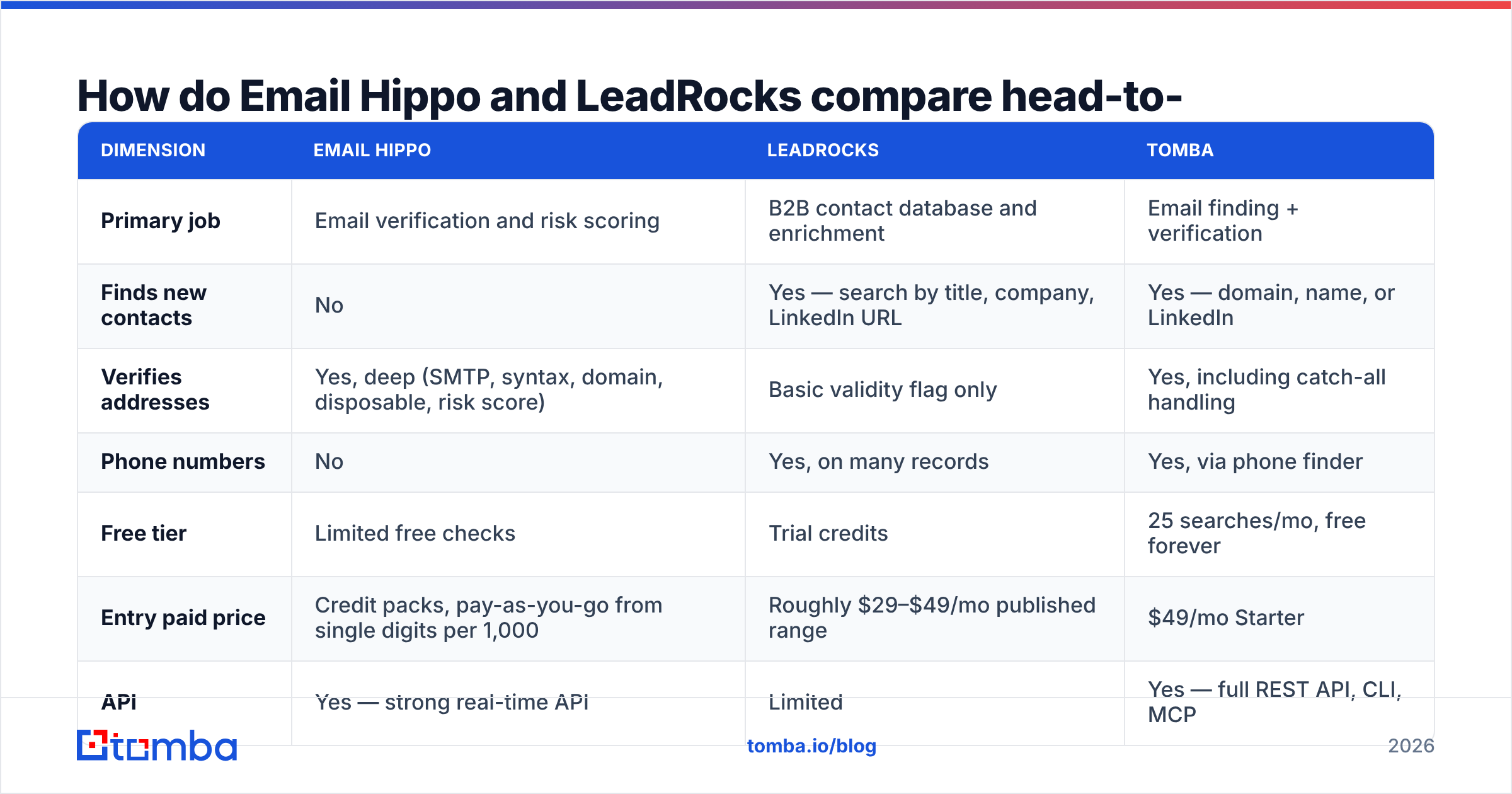
| Dimension | Email Hippo | LeadRocks | Tomba |
|---|---|---|---|
| Primary job | Email verification and risk scoring | B2B contact database and enrichment | Email finding + verification |
| Finds new contacts | No | Yes — search by title, company, LinkedIn URL | Yes — domain, name, or LinkedIn |
| Verifies addresses | Yes, deep (SMTP, syntax, domain, disposable, risk score) | Basic validity flag only | Yes, including catch-all handling |
| Phone numbers | No | Yes, on many records | Yes, via phone finder |
| Free tier | Limited free checks | Trial credits | 25 searches/mo, free forever |
| Entry paid price | Credit packs, pay-as-you-go from single digits per 1,000 | Roughly $29–$49/mo published range | $49/mo Starter |
| API | Yes — strong real-time API | Limited | Yes — full REST API, CLI, MCP |
| Bulk CSV workflow | Yes | Yes | Yes |
| Chrome extension | No | Yes | Yes |
| Best for | Cleaning lists you already own | Building a cheap first list | Running find → verify → CRM in one place |

Read that table as a split of jobs, not a scoreboard. Email Hippo wins every verify row, because that is its whole product. LeadRocks wins every sourcing row for the same reason. The third column is the interesting one. Do you need two vendors at all?
What does Email Hippo actually do well?#
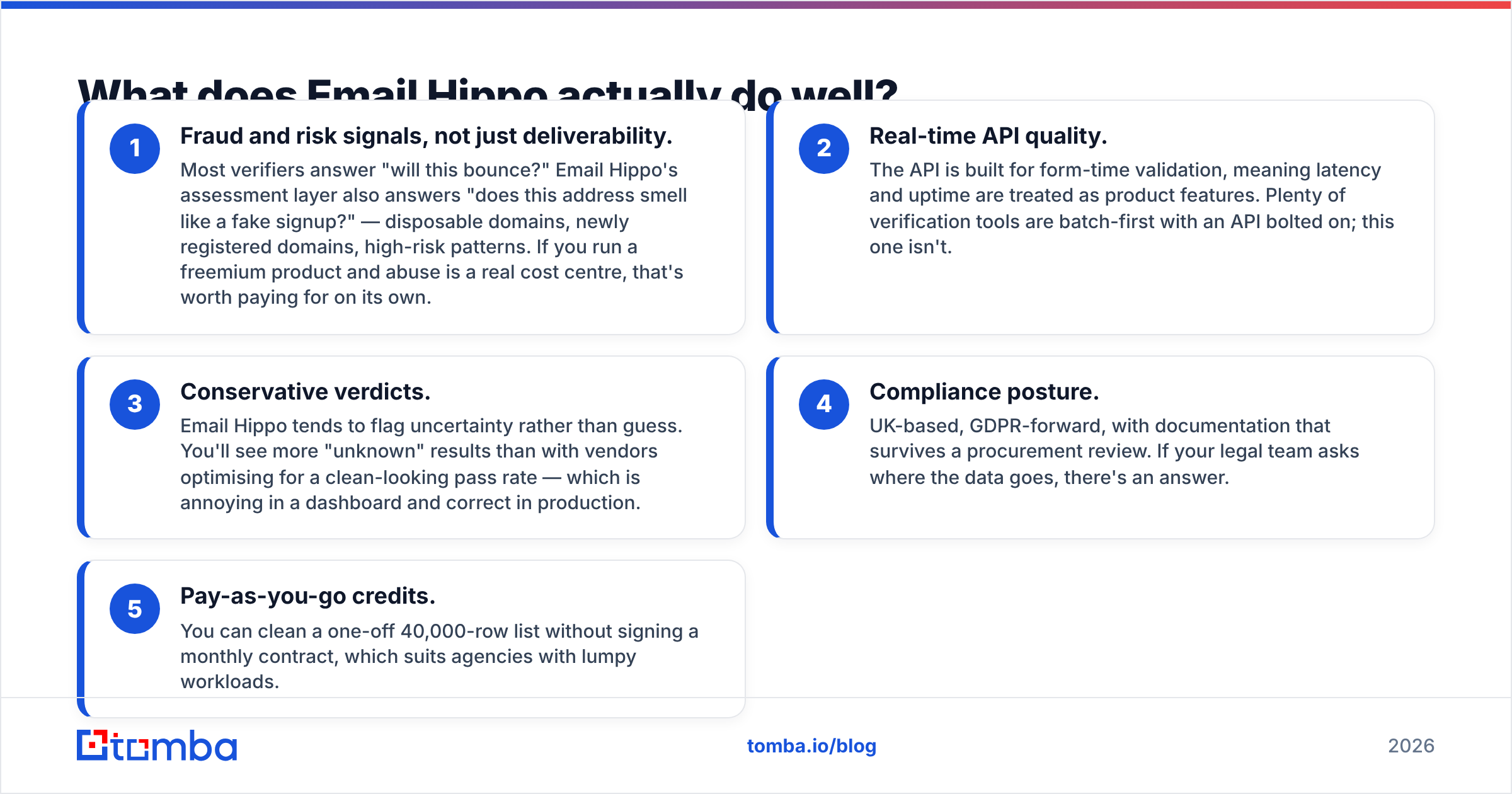
- Fraud signals, not just bounces. Most tools answer "will this bounce?" Email Hippo also answers "does this look like a fake signup?" It flags throwaway domains, brand-new domains, and risky patterns. If abuse costs you real money, that alone can pay for the tool.
- A true real-time API. It is built for form-time checks, so speed and uptime are treated as features. Many rivals are batch tools with an API bolted on.
- Careful verdicts. Email Hippo flags doubt instead of guessing. You will see more "unknown" results. That is annoying in a dashboard and right in production.
- A clean compliance story. UK-based, GDPR-forward, with docs that survive a legal review. If your lawyers ask where the data goes, there is an answer.
- Pay as you go. Clean a one-off 40,000-row list with no monthly contract. Agencies with lumpy workloads like that.
Where does Email Hippo fall short?#
Sourcing is the obvious gap. If your problem is "I need 500 CMOs at Series B SaaS firms," Email Hippo does nothing for you. You need a database, a scraper, or an email finder first.
Catch-all domains are the second gap. Email Hippo handles them as honestly as anyone. But honest here means "we cannot be sure." On a list that is 30% catch-all — normal in enterprise B2B — you are left with a big unknown pile and a call to make. A dedicated catch-all verifier closes part of that gap. It layers pattern confidence and past sends on top of the SMTP result.
Cost stacking is the third. Credits are cheap per check. But add a database and a sequencer, and your all-in cost per contact climbs fast.
What does LeadRocks actually do well?#
- Price per record. For teams that came up on lifetime deals, LeadRocks is far cheaper per contact than the big data vendors. That is the whole pitch, and it is a real one.
- LinkedIn URL enrichment. Paste a list of profile URLs, get emails and phones back. If you prospect on LinkedIn — Sales Navigator lists, event lists, group members — this is the fastest path from profile to contact.
- Phone coverage. Direct dials come with a fair share of records, which is rare at this price.
- Simple UI. No onboarding call, no rollout project. Search, filter, export, done.
- Bulk CSV top-ups. Upload the file you already have and fill the gaps. That often beats searching the database cold.
Where does LeadRocks fall short?#
Checking depth is the headline flaw. A flag on a stored record is not the same as an SMTP check made right before you send. Export 2,000 contacts and mail them with no email verifier step, and you are betting your domain. In 2026 the Google and Yahoo bulk sender rules are in full force. A 5% bounce rate is not a rounding error. It is a deliverability incident.
Coverage is patchy by region and segment. Like most LinkedIn-derived databases, LeadRocks leans toward North America and toward people who keep their profiles live. Sell into DACH manufacturing or the public sector and you will find fewer records than the headline count suggests.
Then there is the API. LeadRocks is an app you log into, not a data layer you build on. If you want every new CRM record enriched on its own, you will hit that wall fast. Compare it with a documented email finder API, a CLI, and an integrations layer, where enrichment runs as a background job.

What does each one cost in 2026?#
The only fair way to compare cost is per usable, verified contact in your sequencer.
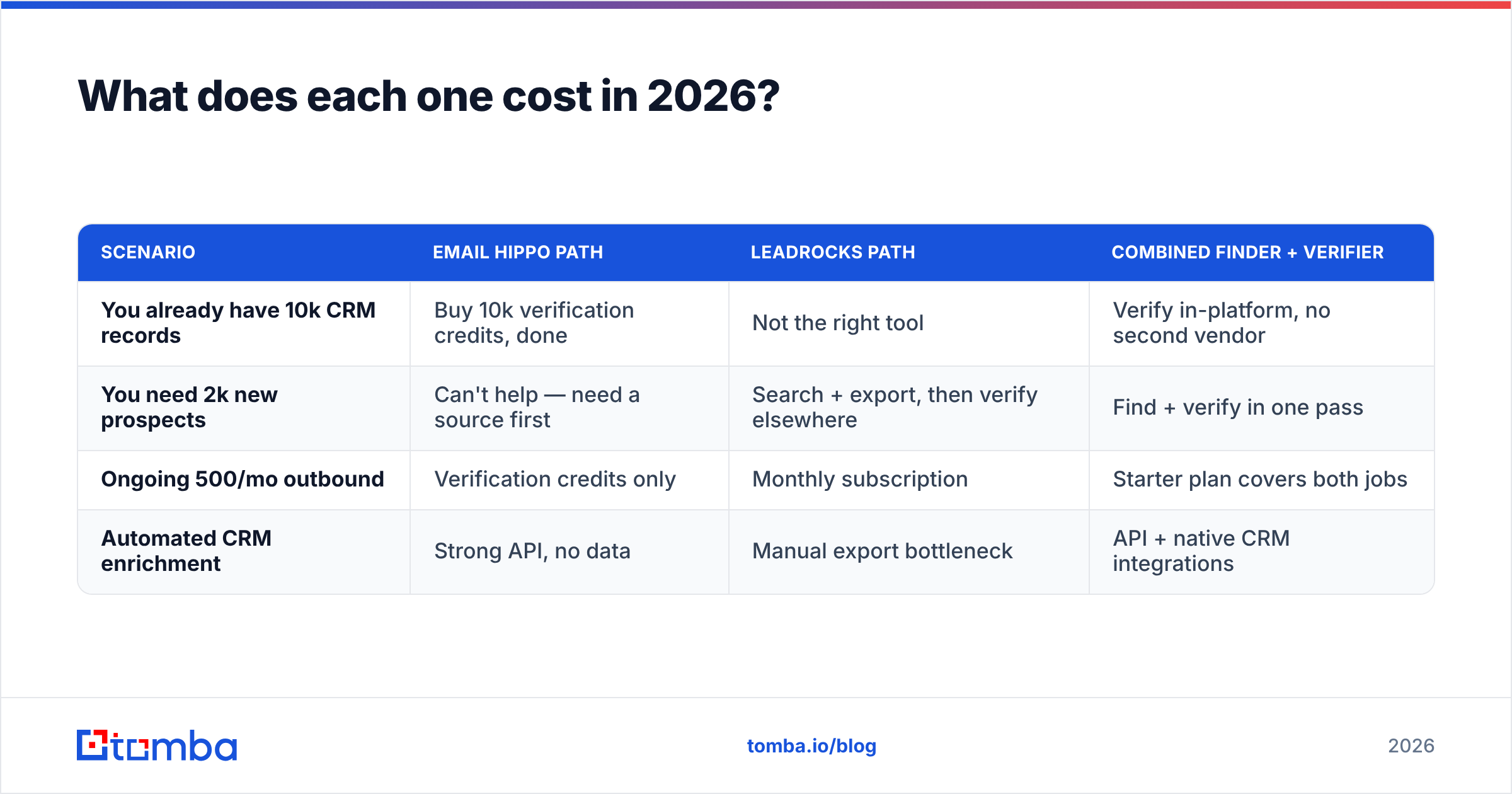
| Scenario | Email Hippo path | LeadRocks path | Combined finder + verifier |
|---|---|---|---|
| You already have 10k CRM records | Buy 10k verification credits, done | Not the right tool | Verify in-platform, no second vendor |
| You need 2k new prospects | Can't help — need a source first | Search + export, then verify elsewhere | Find + verify in one pass |
| Ongoing 500/mo outbound | Verification credits only | Monthly subscription | Starter plan covers both jobs |
| Automated CRM enrichment | Strong API, no data | Manual export bottleneck | API + native CRM integrations |
The pattern is clear enough. Email Hippo alone pays off only if sourcing is already solved. LeadRocks alone pays off only if you send without checking, and nobody serious does. Run both and you get two vendors, two credit systems, and a CSV in the middle.
For reference, Tomba pricing opens with a free tier of 25 searches a month. Paid plans run $49/mo Starter, $99/mo Growth, and $249/mo Pro. All of them cover finding, checking, domain search, and enrichment from one credit pool. Whether that beats a two-vendor stack depends on your volume mix. For most teams sending a few thousand emails a month, one platform wins on price and on hassle.
Which one should you actually pick?#
Choose Email Hippo if: you check signups in real time. Or you handle fraud-prone registrations. Or you hold a big list that needs a one-off clean. Or your legal team wants a UK/EU processor with a paper trail.
Choose LeadRocks if: you have no list, a tight budget, and a LinkedIn-first motion. Just plan to run a verify step after every export.
Choose neither if: the handoff between the two is your real bottleneck. That is the common case. If you export from one tool and import into another every week, you are paying for a chore, not a product.
Look at nearby options too. For pre-verified, list-purchase buying, BookYourData is well regarded and backs its records with accuracy guarantees. For list hygiene at volume, most verifiers land within a few points of each other. Catch-all handling and API design set them apart, not headline accuracy claims. G2's email verification category is a fine place to sanity-check user sentiment first.
Can you replace both with one tool?#
Usually, yes. It holds if your volume is small to mid, and if you need B2B emails and phones rather than deep firmographics.
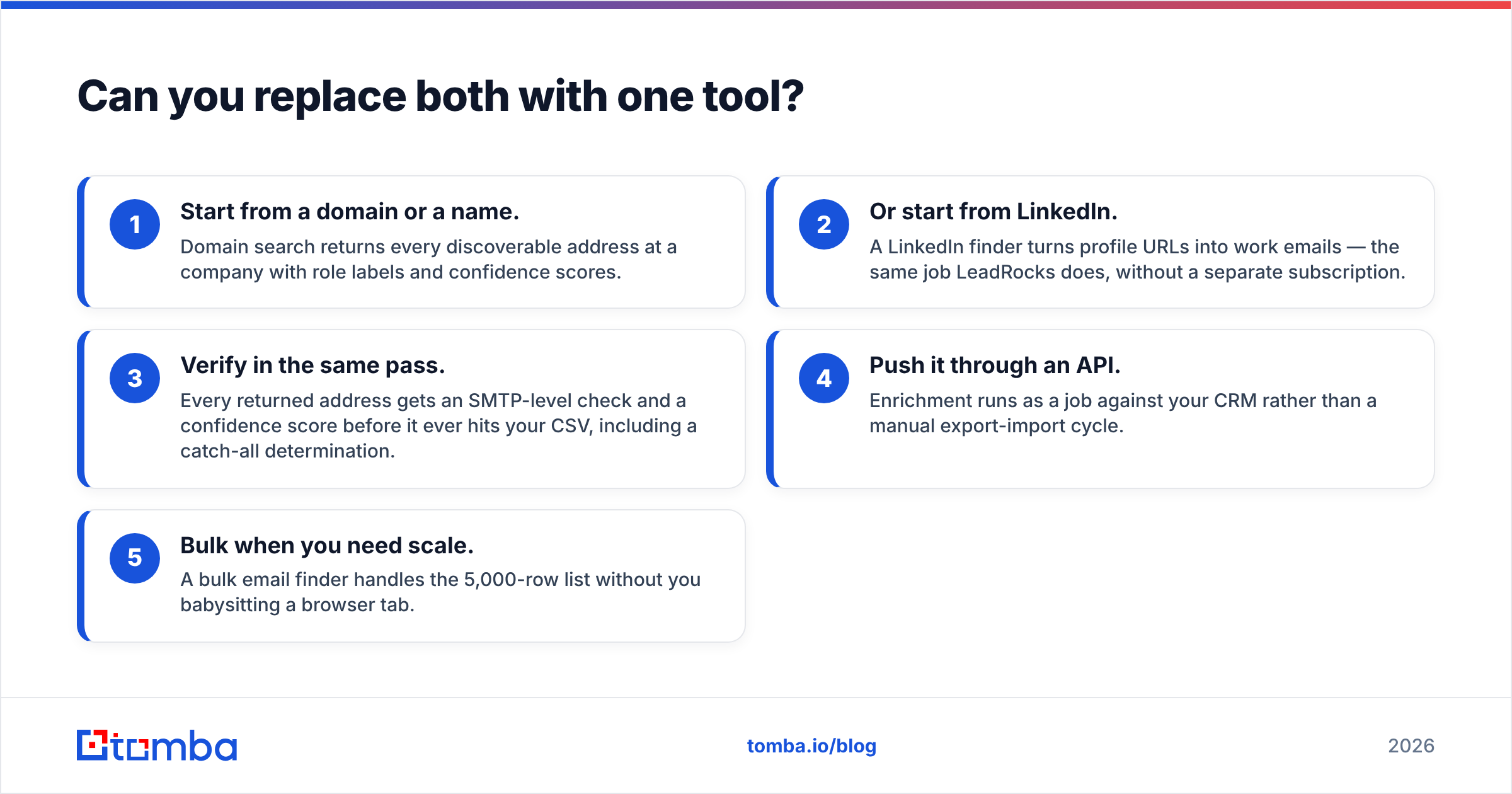
The workflow that replaces the two-vendor stack looks like this:
- Start from a domain or a name. Domain search returns every address it can find at a company, with role labels and scores.
- Or start from LinkedIn. A LinkedIn finder turns profile URLs into work emails. That is the LeadRocks job, with no second bill.
- Verify in the same pass. Each address gets an SMTP check and a score before it hits your CSV, catch-all cases included.
- Push it through an API. Enrichment runs as a job on your CRM, not a manual export and import.
- Bulk when you need scale. A bulk email finder chews through a 5,000-row list on its own.
For most teams, Email Hippo vs LeadRocks is the wrong frame. Both tools are good at their one job. The question is where the friction sits in your week. If you spend more time moving files than picking targets, merging tools is the bigger win.
Ready to skip the two-vendor shuffle?#
Your real job is finding the right person and trusting the address. Start with the Tomba Email Finder. Search by domain, name, or LinkedIn profile. Get a verified result with a score in the same call. Push it into HubSpot, Salesforce, Sheets, or your own stack through the API. The free tier gives you 25 searches a month. Test it on a list where you already know the answers — that is how you should judge any tool here, this one included.
Related guides#
Ready to find emails that actually work?
Join 150,000+ professionals who stopped guessing and started sending. Free credits on signup — no credit card required.
Get the Tomba newsletter
Practical outbound tactics and product updates — once every two weeks.
About the author