EmailBison vs GrowMeOrganic: Full 2026 Comparison Guide
EmailBison is a sending engine. GrowMeOrganic is an all-in-one lead-gen suite. They overlap less than the marketing suggests — here's which one fits your outbound stack, and where both leave a gap.
EmailBison vs GrowMeOrganic is a common shortlist. The two tools do different jobs. One sends mail. The other finds leads. Here is how they split, and which one fits your stack.
TL;DR
- EmailBison vs GrowMeOrganic is not a like-for-like fight. EmailBison sends and times cold email. GrowMeOrganic finds leads and adds basic outreach.
- Pick EmailBison if your list is already good. Its edge is send volume, inbox health, and white-label resale.
- Pick GrowMeOrganic if you want one cheap plan. It finds contacts, pulls LinkedIn data, and runs simple sequences.
- Neither one is a data firm. EmailBison ships no contact list. GrowMeOrganic bundles one, but the quality swings.
- The 2026 pattern is simple. Feed clean, checked data into the sender you like. That is where a tool like Tomba fits.
EmailBison vs GrowMeOrganic: what are they?#
Think of outbound as a restaurant. EmailBison is the kitchen. It gives you burners, vents, and timing. GrowMeOrganic is a meal-kit box. Food and recipe card arrive as one. It is easy. You just don't pick the supplier.
EmailBison began as cold email plumbing. It sells high send limits and many mailboxes. You also get inbox rotation, warmup, and a sequence builder. Agencies buy it for one reason: white label. You point your own domain at it. You brand it as yours. Then you sell seats to clients. There is no built-in prospect list. You bring your own.
GrowMeOrganic goes the other way. One flat plan covers a lot. You get a claimed 575M+ contact database, a LinkedIn and Sales Navigator scraper, email finding and checks, drip campaigns, and a Chrome add-on. The pitch is "unlimited, one low price." That reads well on a spreadsheet. It reads worse in your bounce logs.
So the real EmailBison vs GrowMeOrganic question is not "which tool is better." Ask this instead: do you need a better sender, or cheaper lists? Those are two different problems. Buy the wrong one and you lose a quarter.
EmailBison vs GrowMeOrganic: feature by feature#
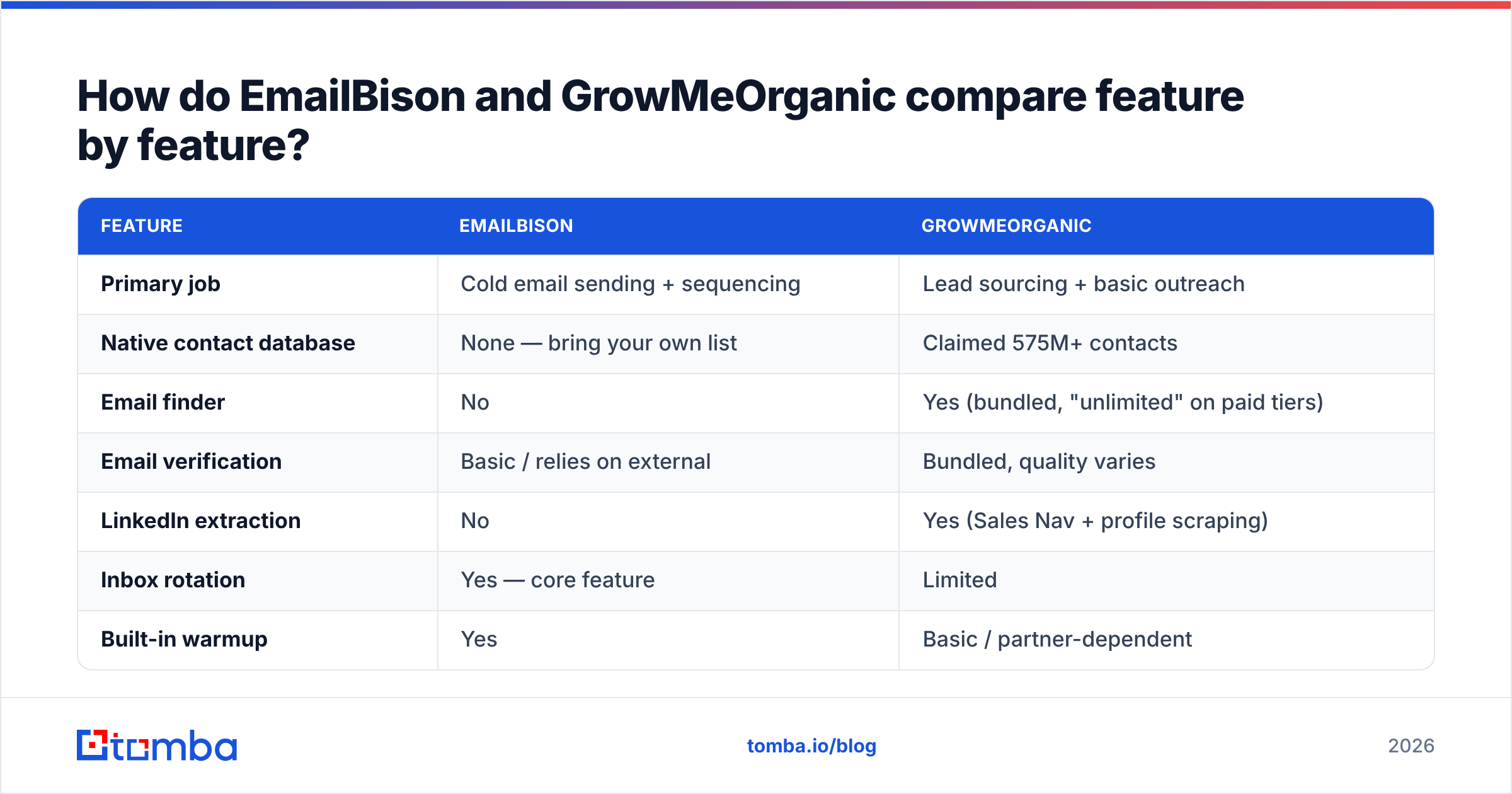
| Feature | EmailBison | GrowMeOrganic |
|---|---|---|
| Primary job | Cold email sending + sequencing | Lead sourcing + basic outreach |
| Native contact database | None — bring your own list | Claimed 575M+ contacts |
| Email finder | No | Yes (bundled, "unlimited" on paid tiers) |
| Email verification | Basic / relies on external | Bundled, quality varies |
| LinkedIn extraction | No | Yes (Sales Nav + profile scraping) |
| Inbox rotation | Yes — core feature | Limited |
| Built-in warmup | Yes | Basic / partner-dependent |
| White-label / reseller mode | Yes — main differentiator | No |
| Multichannel (LinkedIn + email) | Email-first | Email + LinkedIn touches |
| API access | Yes | Yes, on higher tiers |
| Best fit | Agencies, high-volume senders | Solo founders, small teams, budget buyers |
The table makes the split clear. EmailBison wins each row about sending mail. GrowMeOrganic wins each row about getting contacts. Neither wins both.
One caveat. Both firms change plans and limits often. Here, "unlimited" tends to mean "unlimited until we cap you." Check the live plan page before you sign a yearly deal. Read fresh reviews on G2 too, not a 2024 blog post.
EmailBison vs GrowMeOrganic: which has better lead data?#
GrowMeOrganic, by default. EmailBison gives you none. But "better than nothing" is a low bar. This is where most buyers get burned.
Bundled lists carry a built-in flaw. Data is a cost for these firms, not a product. Their margin comes from the plan fee. So the safe move is to buy a big list once and resell access. Re-checking it each month is not the safe move. You see the result in five ways.
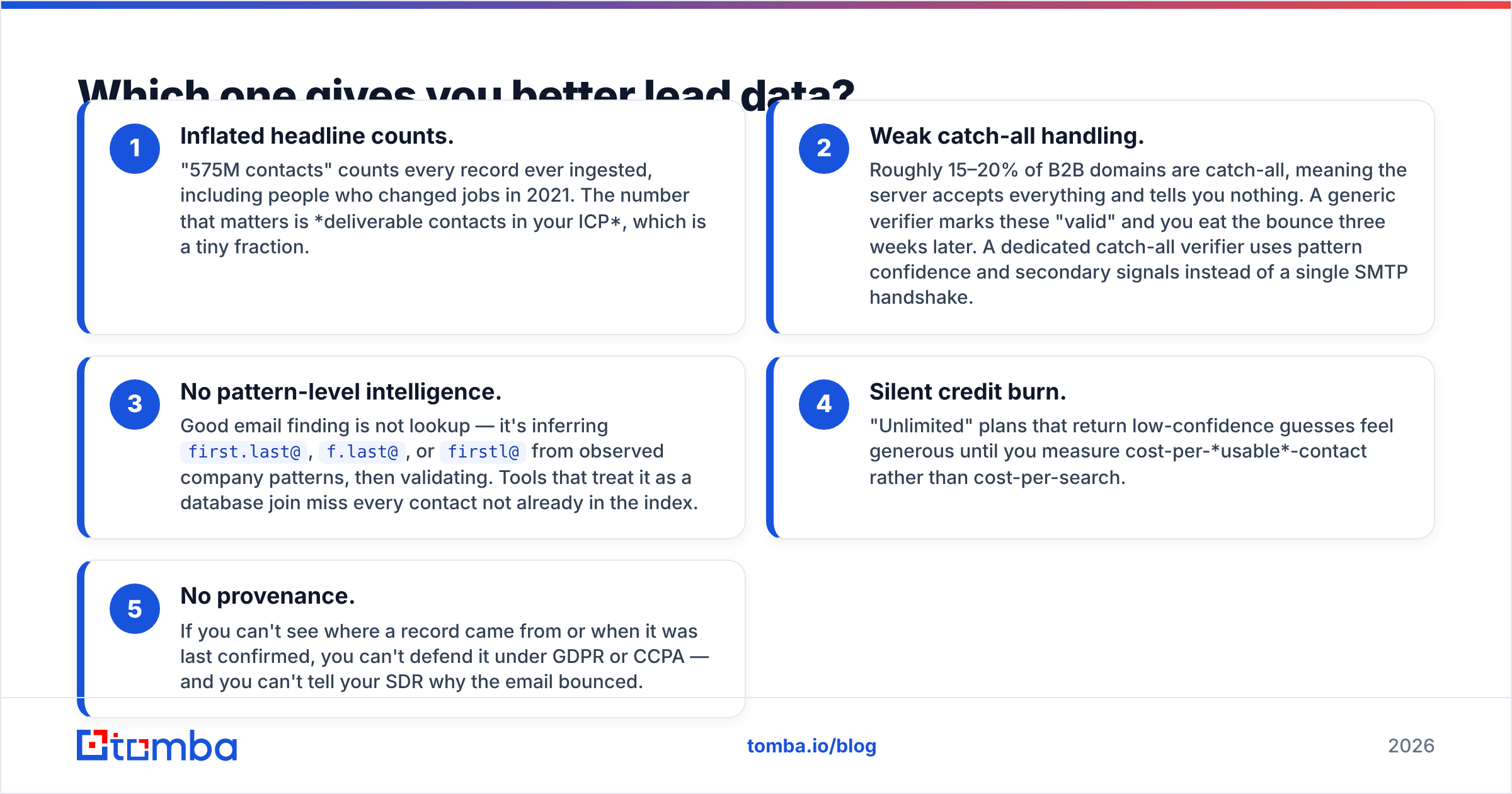
- Inflated counts. "575M contacts" counts every record ever added, including people who moved jobs in 2021. What matters is live contacts in your market — a far smaller set.
- Weak catch-all handling. Roughly 15–20% of B2B domains accept every address and tell you nothing. A generic checker marks these "valid," and you eat the bounce later. A catch-all verifier uses pattern confidence instead.
- No pattern smarts. Good email finding is not a lookup. You infer
first.last@orf.last@from a company's known pattern, then test it. - Quiet credit burn. "Unlimited" plans hand back low-confidence guesses. Measure cost per usable contact, not cost per search.
- No proof of origin. If you cannot see where a record came from, you cannot defend it under GDPR. You also cannot tell a rep why the email bounced.
Teams that care about reply rate use a data layer built for the job. Run a real email finder and email verifier before import. That lifts your numbers more than any change of sender. Tomba lists its data sources in the open. Hold every vendor to that bar.
EmailBison vs GrowMeOrganic: which lands in the inbox?#
EmailBison, clearly. That is what it was built for.
Three things set your inbox rate. You control all three before you press send: auth records, list hygiene, and a slow ramp. Google and Yahoo now demand SPF, DKIM, and DMARC. Spam gripes above 0.3% get you capped fast. Use Google's own sender guidelines as your source, not a vendor blog.
Where EmailBison earns its price:
- Inbox rotation across many mailboxes. No single domain carries the whole send.
- Warmup that ramps slowly. You do not jump to 200 a day on day one.
- Health data per mailbox. Pull a hot domain out of the pool early, before it drags the rest down.
GrowMeOrganic can send campaigns. But sending is a side feature there, not the core. At 50 mails a day from one mailbox, that is fine. At 2,000 a day across 40 mailboxes, the gap is wide.
List quality is the bigger lever. Bounces burn sender reputation faster than anything else. No amount of rotation saves a list that is 15% dead. Check first. Send second. Run an SPF checker on each sending domain before campaign one.

EmailBison vs GrowMeOrganic: how does pricing compare?#
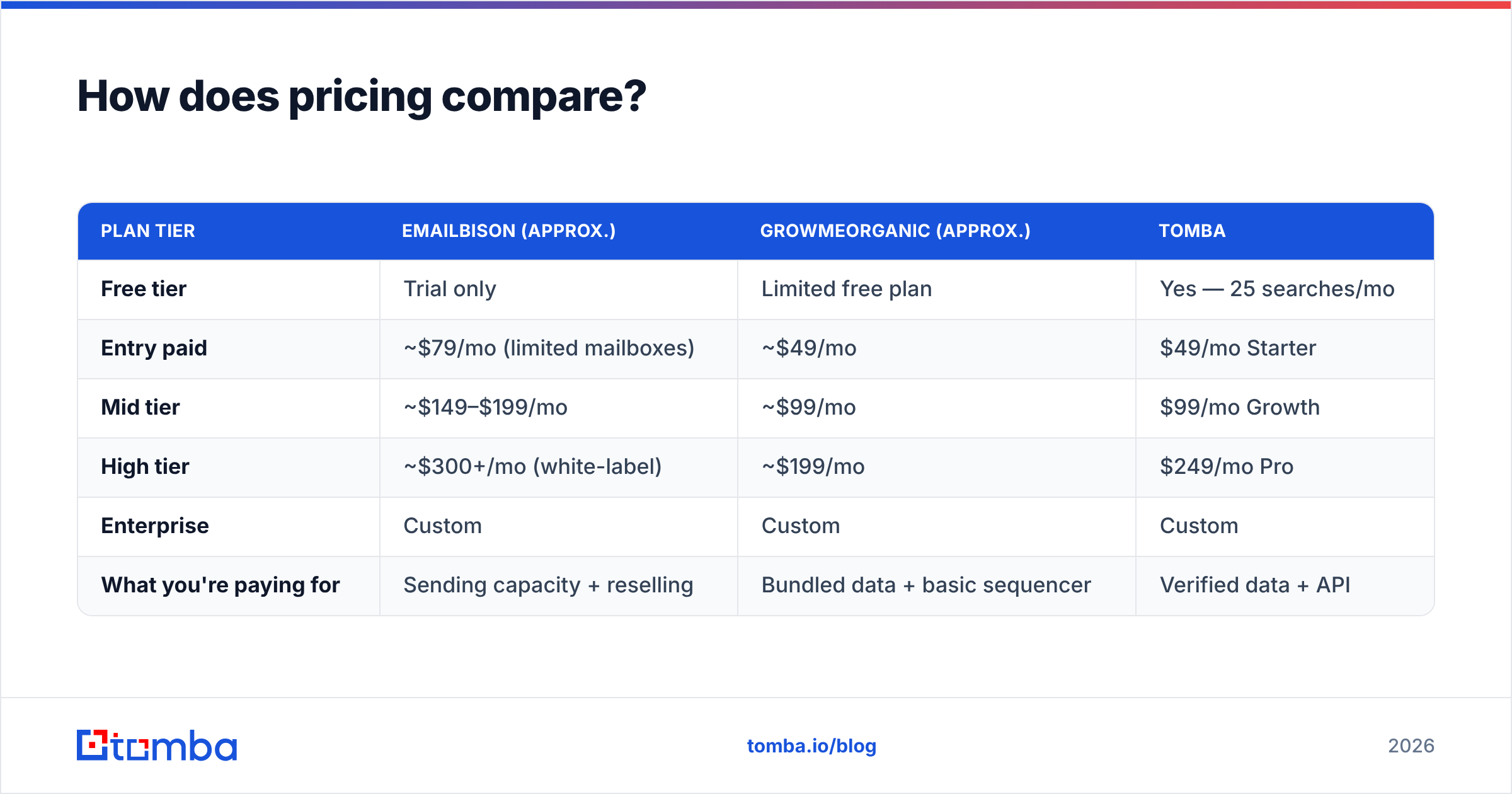
Both firms move list prices often. Both push yearly deals hard. Treat these numbers as a guide. Check the vendor page before you buy.
| Plan tier | EmailBison (approx.) | GrowMeOrganic (approx.) | Tomba |
|---|---|---|---|
| Free tier | Trial only | Limited free plan | Yes — 25 searches/mo |
| Entry paid | ~$79/mo (limited mailboxes) | ~$49/mo | $49/mo Starter |
| Mid tier | ~$149–$199/mo | ~$99/mo | $99/mo Growth |
| High tier | ~$300+/mo (white-label) | ~$199/mo | $249/mo Pro |
| Enterprise | Custom | Custom | Custom |
| What you're paying for | Sending capacity + reselling | Bundled data + basic sequencer | Verified data + API |
Read the table by job, not by price. EmailBison's $300 tier and GrowMeOrganic's $199 tier are not rival offers. One is an agency resale licence. The other is a data-plus-outreach bundle for a small team.
The trap is to assume the cheap bundle stays cheap. Say the finder returns 1,000 emails and 780 land. Your true cost per usable contact is 28% higher than the sticker. That is before the damage from 220 bounces. Read Tomba pricing per checked contact and the math often flips.
Who should choose EmailBison?#
The EmailBison vs GrowMeOrganic split gets easy here. Pick EmailBison if two or more of these fit:
- You run an agency and want to resell cold email under your own brand. White label is the strongest reason to buy.
- Your cap is send volume, not list building. You buy data already and just need steady output across dozens of mailboxes.
- You need health data per mailbox, so you can spot a hot domain and pull it early.
- You are leaving a sequencer that capped you or charged per seat. Weigh it against an Instantly alternative shortlist first.
Do not buy it and wait for a contact list. There is none. Budget for data on the side.
Who should choose GrowMeOrganic?#
Pick GrowMeOrganic if:
- You are a solo founder or a team of two to five. You want one line on the card, not four.
- LinkedIn is your main source. You want scraping and outreach in one place.
- Your volume is modest. Under a few hundred sends a day, the light sending layer is fine.
- You are testing a market. You need rough lists fast, and you will clean them before you send.
One honest caveat: budget for a check pass on top. Push the raw exports through a bulk verify run before import. It costs far less than a burnt domain. It is the best-value step in the whole stack.
Is there a third option — build the stack yourself?#
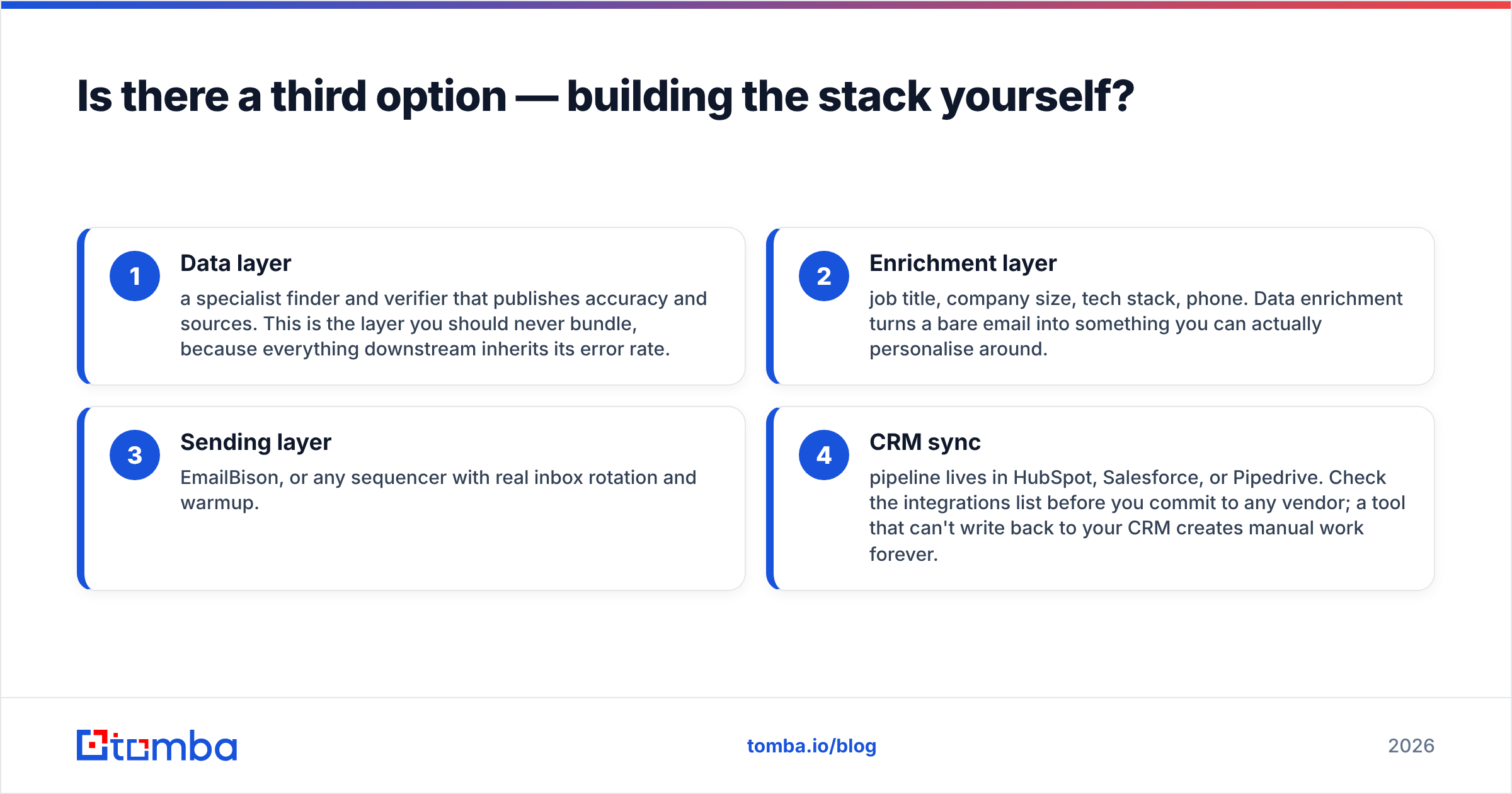
Yes. Most teams at real volume end up here. The all-in-one promise breaks at scale. Past the EmailBison vs GrowMeOrganic choice sits a mix-and-match stack:
- Data layer. A finder and verifier that publish accuracy and sources. Never bundle this part. Everything below it inherits its error rate.
- Enrich layer. Job title, company size, tech stack, phone. Data enrichment turns a bare email into something you can write around.
- Send layer. EmailBison, or any sequencer with real inbox rotation and warmup.
- CRM sync. Your pipeline lives in HubSpot, Salesforce, or Pipedrive. Check the integrations list first. A tool that cannot write back to your CRM makes manual work forever.
The cost worry is real but often overblown. Three focused tools at $49–$99 each land near one "unlimited" plan. You get a better inbox rate. You can also swap any piece without moving the whole setup.
Building it in code? The Tomba API finds and checks an address in one call. Clean data lands at import, not in a batch job someone forgets.
What should you do next?#
Run a bake-off, not a spec review. Take 200 real contacts from your market. Push them through GrowMeOrganic's finder. Then push them through a dedicated finder. Check both sets with the same tool. Compare live rate and cost per usable contact. The winner shows up in an afternoon. The test costs less than one month of the wrong plan.
Then settle the sending question on its own. The EmailBison vs GrowMeOrganic answer turns on the job you are hiring for. Sending at real volume, or running an agency? EmailBison is a fair pick, and white label has no match here. Small and email-first? The GrowMeOrganic bundle is fine. Just do not let its bundled data set your bounce rate.
Fix the data layer first. Start free with the Tomba Email Finder. You get 25 searches a month, no card. Run it head to head against your current list source. Check both sets. Compare live rates. Let the numbers pick your stack. Paid plans start at $49/mo. The same data feeds EmailBison, GrowMeOrganic, or whatever you plug in next.
Related guides#
Ready to find emails that actually work?
Join 150,000+ professionals who stopped guessing and started sending. Free credits on signup — no credit card required.
Get the Tomba newsletter
Practical outbound tactics and product updates — once every two weeks.
About the author