EmailListValidation vs ListKit: Which Should You Use in 2026?
One cleans the list you already have. The other sells you the list. Here's an honest breakdown of EmailListValidation vs ListKit on pricing, data quality, and where each one quietly fails.
Short answer on EmailListValidation vs ListKit: one cleans the list you already have, the other sells you a new one.
TL;DR
- These two tools are not really competitors. EmailListValidation is a bulk email verifier — you bring a list, it tells you what is deliverable.
- ListKit is a B2B contact database. It hands you the list in the first place.
- Bounce rate at 9% and Google throttling you? A verifier is the cheap fix. Pay-as-you-go credits cost a few dollars per thousand addresses.
- No leads to email at all? ListKit fits better. You get contacts, phone numbers, and intent signals on a monthly plan, paid whether you export or not.
Most outbound teams need both jobs done. That is where the math gets interesting.
- Two subscriptions cost more than one. A single vendor that finds, verifies, and enriches from one credit pool usually wins.
- Our pick for teams under 50 seats: run discovery and verification through one API. Keep a second verifier for high-stakes list imports.
What are EmailListValidation and ListKit, actually?#
Two different products solving opposite halves of the same problem.
EmailListValidation is a list-hygiene service. You upload a CSV or call the API. It runs syntax checks, MX record lookups, and disposable-domain detection. It flags role accounts and pings each mailbox over SMTP. Out comes a scored file: valid, invalid, unknown, catch-all.
That is the whole product, and it has been for years. It does not find anyone. It has no opinion about who you should contact.
ListKit came out of the cold-email agency world, and it shows. It is a prospecting database. Filter by title, industry, headcount, tech stack, and intent signals. Then export verified emails and mobile numbers into your sequencer. Verification comes bundled as a promise ("triple-verified"). It is not a standalone tool you can point at a messy CRM export.
So the honest way to frame emaillistvalidation vs listkit is not "which one is better." It is "which job are you behind on?"

How do the two compare feature by feature?#
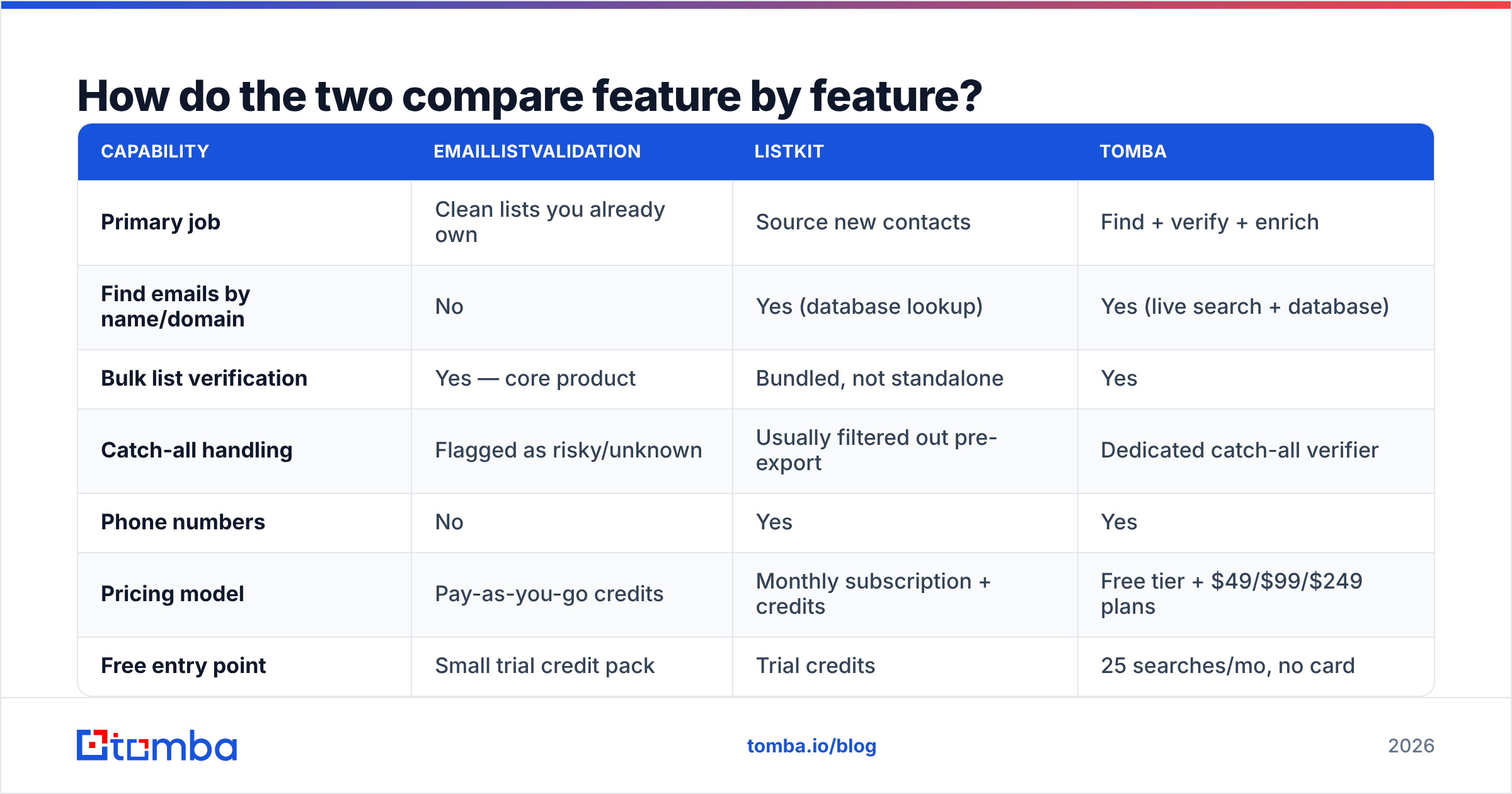
Here is the side-by-side for EmailListValidation vs ListKit. The third column shows a combined finder-and-verifier stack, so you can see what one vendor covers.
| Capability | EmailListValidation | ListKit | Tomba |
|---|---|---|---|
| Primary job | Clean lists you already own | Source new contacts | Find + verify + enrich |
| Find emails by name/domain | No | Yes (database lookup) | Yes (live search + database) |
| Bulk list verification | Yes — core product | Bundled, not standalone | Yes |
| Catch-all handling | Flagged as risky/unknown | Usually filtered out pre-export | Dedicated catch-all verifier |
| Phone numbers | No | Yes | Yes |
| Pricing model | Pay-as-you-go credits | Monthly subscription + credits | Free tier + $49/$99/$249 plans |
| Free entry point | Small trial credit pack | Trial credits | 25 searches/mo, no card |
| API | Yes | Yes | Yes, plus CLI, Sheets, Excel |
| Best for | Deliverability cleanup | Cold-email agencies, SDR teams | Teams that need both jobs on one bill |
The row that decides most purchases is the pricing model. Credit packs that never expire suit spiky work: a quarterly database scrub, a pre-campaign cleanup.
Subscriptions suit steady prospecting. If you pull new contacts every week, the seat cost pays for itself.
Which one is better for cold email deliverability?#
EmailListValidation, if you already have the addresses.
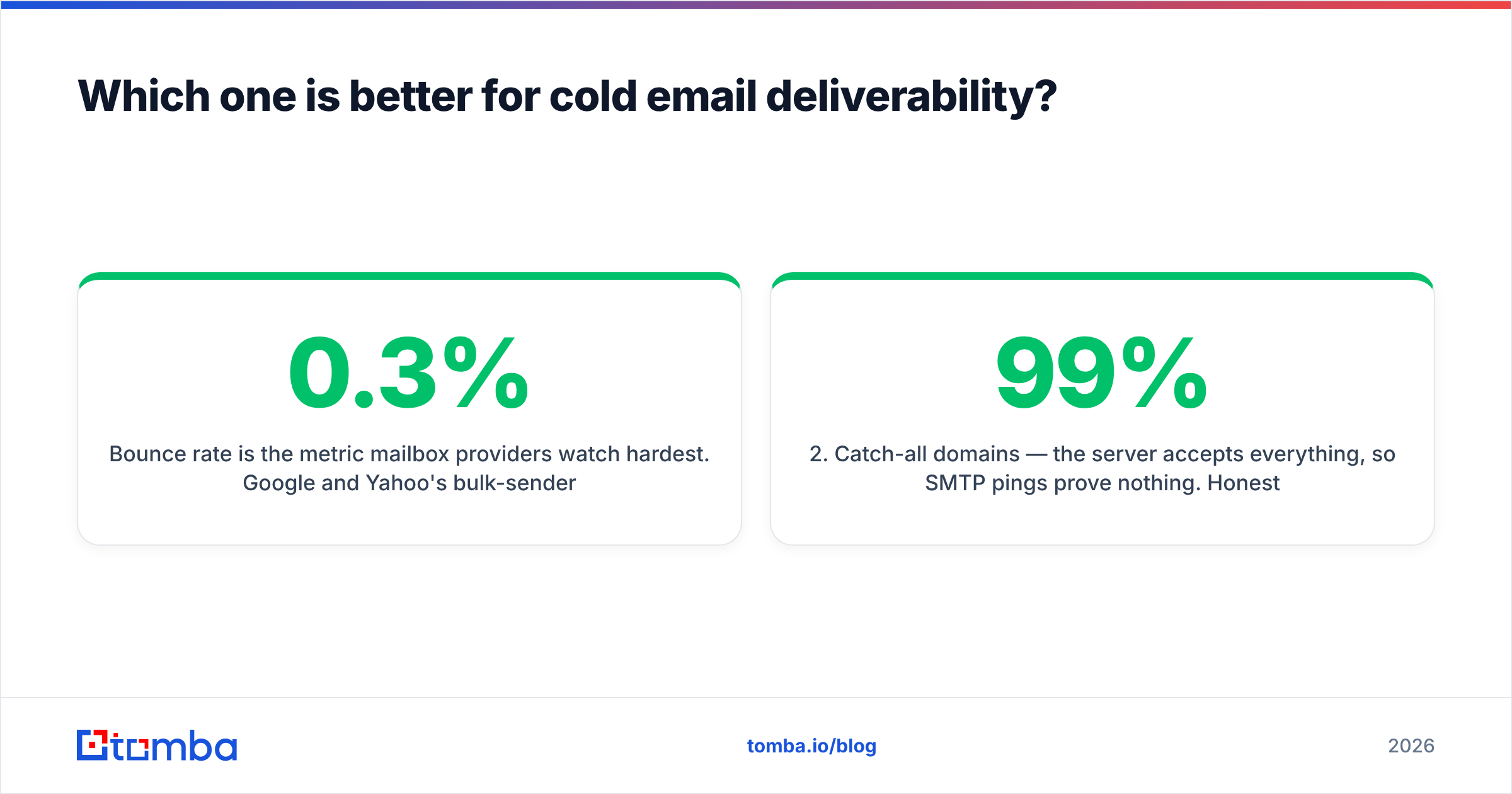
Bounce rate is the metric mailbox providers watch hardest. Google and Yahoo now expect spam complaints under roughly 0.3%. You want bounces under 2%. A verifier exists to drag that number down before you hit send.
But vendors gloss over one thing: verification quality is not the same on every domain. Four cases behave very differently.
- Standard mailboxes on Google Workspace or Microsoft 365. Most verifiers agree here. Accuracy is high and you can trust the verdict.
- Catch-all domains. The server accepts every address, so an SMTP ping proves nothing. Honest tools return "unknown" or "risky." Others return "valid" and pad their pass rate. A 99% valid claim on a catch-all-heavy list is a number, not a result.
- Greylisting and tarpitting servers. They reply slowly or vaguely on purpose. A verifier either retries (slow but right) or gives up (fast but wrong).
- Role accounts. info@, sales@, support@. They deliver fine, but they rarely buy and often complain. Good tools flag them separately so you can decide.
Ask any vendor how they handle cases two and three. The answer tells you more than an accuracy badge.
Tomba splits this out on purpose with a catch-all verifier. Unclear results stay unclear instead of being folded into one pass/fail score. "Unknown" is useful information when you are deciding between email and LinkedIn.

Which one is better for building a prospect list?#
ListKit, plainly. EmailListValidation does not compete here.
ListKit sells speed to first campaign. You set an ICP in the filters, export a few thousand contacts, and drop them into Instantly or Smartlead. You are live the same afternoon. For agencies running many client campaigns, that beats scraping a list and verifying it later.
Three trade-offs to weigh first:
- Freshness beats size. Every vendor advertises hundreds of millions of records. What matters is how many were refreshed in the last 90 days. Job changes run 20–25% a year in tech sales, so a two-year-old record is close to a coin flip.
- Subscription lock-in. Credits usually reset every month. Two slow months and you have paid for exports you never made.
- Everyone else has the same list. A shared database means your prospect heard the same pitch from four rivals.
Live signals fix that last one. A job post, a funding round, a conference page, an author byline — each points to contacts nobody else has queued up. That is the case for pairing database pulls with domain search or an author finder.
One more thing to check: export limits. The per-day and per-plan caps matter more than the monthly credit total.
What does each one cost in 2026?#
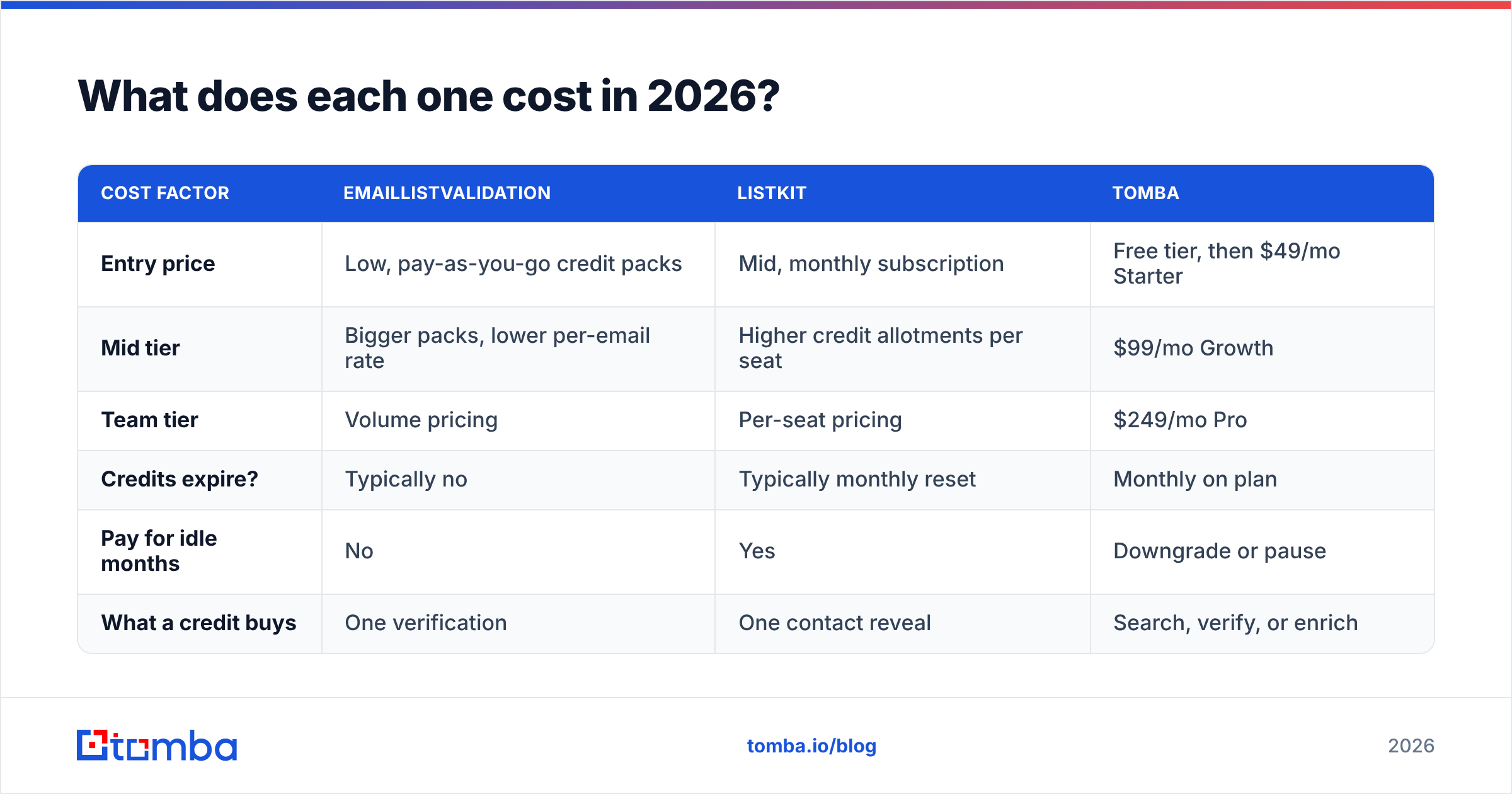
Prices move, so check each vendor's page before you buy. The shape of the pricing is what you are really choosing between.
| Cost factor | EmailListValidation | ListKit | Tomba |
|---|---|---|---|
| Entry price | Low, pay-as-you-go credit packs | Mid, monthly subscription | Free tier, then $49/mo Starter |
| Mid tier | Bigger packs, lower per-email rate | Higher credit allotments per seat | $99/mo Growth |
| Team tier | Volume pricing | Per-seat pricing | $249/mo Pro |
| Credits expire? | Typically no | Typically monthly reset | Monthly on plan |
| Pay for idle months | No | Yes | Downgrade or pause |
| What a credit buys | One verification | One contact reveal | Search, verify, or enrich |
Two rules help when you compare EmailListValidation vs ListKit or any pair like them.
Rule one: measure cost per usable contact, not cost per credit. Say tool A charges $0.02 per check but returns 40% "unknown" on your list. Your real cost per deliverable address is far above the sticker price. Run the same 500-contact sample through both tools and count what you would actually send to.
Rule two: count the tools you are replacing. A verifier, a database, an enrichment vendor, and a phone-number provider are four bills and four integrations. Putting search, verification, and enrichment on one credit pool is where the savings show up. That is the logic behind Tomba's pricing.

Where does each tool fall short?#
Neither one is a complete outbound stack. Both have gaps worth knowing before you commit a quarter's budget.
EmailListValidation's limits:
- No discovery. If a contact is not already in your CRM, the tool cannot help.
- No enrichment. You get a verdict, not a job title, company size, or LinkedIn URL.
- Catch-all results land in a grey bucket. You still have to make the call.
- The UI is plain. It was built for operators, not for reps.
ListKit's limits:
- You inherit whatever the data partnerships supply. When a source slips, your list quality slips, and bounce reports are how you find out.
- "Verified at export" is a point-in-time claim. A contact verified in January and exported in June has aged six months.
- It is weak on your own data: inbound form fills, event scans, an old CRM import. That is a verifier's job.
- Subscription pricing punishes stop-start usage.
Either way, keep a second opinion for high-stakes imports. Running a bought list through an independent email verifier costs a few dollars. It has saved plenty of teams from a domain reputation hit that takes weeks to undo.

How should you actually decide?#
Match the tool to your bottleneck, not to the review scores.
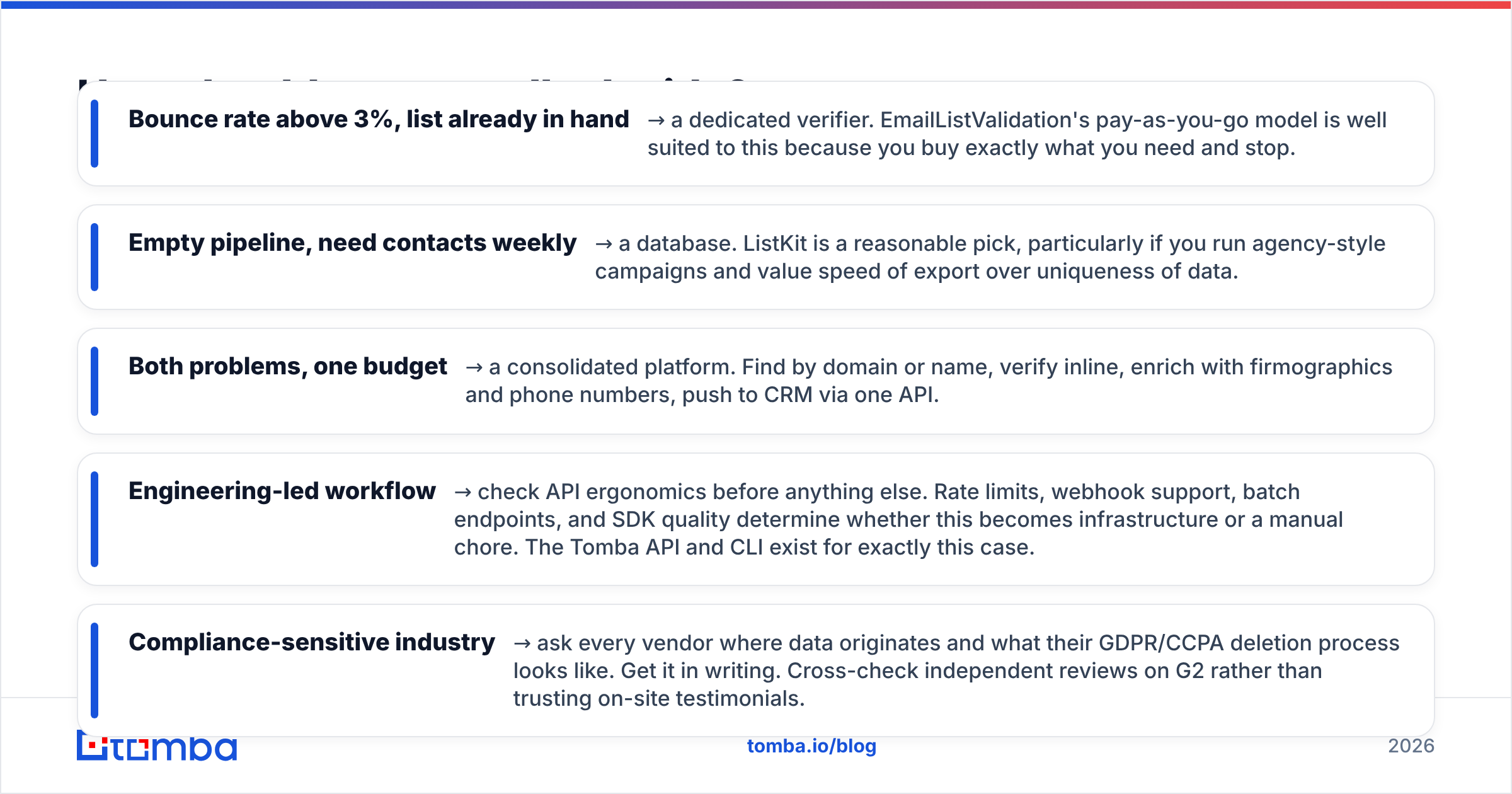
- Bounce rate above 3%, list already in hand → buy a verifier. EmailListValidation's pay-as-you-go model fits, because you buy what you need and then stop.
- Empty pipeline, contacts needed weekly → buy a database. ListKit is a fair pick for agency-style campaigns where export speed beats data uniqueness.
- Both problems, one budget → buy a platform. Find by domain or name, verify inline, enrich, then push to CRM through one API.
Two more cases decide themselves:
- Engineering-led workflow → check the API first. Rate limits, webhooks, batch endpoints, and SDK quality decide whether this becomes infrastructure or a chore. The Tomba API and CLI exist for that.
- Compliance-sensitive industry → ask where the data comes from and how deletion requests work. Get it in writing. Cross-check reviews on G2 instead of on-site testimonials.
Then run a sanity test before you sign. Take 100 contacts you know are correct: current colleagues, past customers, people you emailed this month. Push them through each trial. Count false negatives as harshly as false positives. A verifier that is too aggressive quietly deletes good pipeline, and the bounce rate still looks great.
What's the verdict on EmailListValidation vs ListKit?#
EmailListValidation wins on list hygiene. ListKit wins on list creation. A head-to-head only makes sense once you know which problem costs you more.
If your emails land but replies stay flat, you have a targeting and copy problem. A database may help; a verifier will not. If your emails bounce or hit spam, clean the list first. New contacts cannot fix a damaged sending domain.
And if you need both jobs done every month, two vendors is the expensive path. One credit pool for search, verification, and enrichment keeps the math simple and the data consistent.
Try it on your own ICP. Run 25 free searches through the Tomba Email Finder — no card needed. Compare the hit rate and confidence scores against the list you use today. Find the contact, verify it in the same call, then push it to HubSpot, Pipedrive, or Sheets. If the numbers hold up on your accounts, plans start at $49/mo, and you can drop the second subscription.
Related guides#
Ready to find emails that actually work?
Join 150,000+ professionals who stopped guessing and started sending. Free credits on signup — no credit card required.
Get the Tomba newsletter
Practical outbound tactics and product updates — once every two weeks.
About the author