EmailListValidation vs Seamless.AI: Which One Do You Need?
One cleans the list you already have. The other builds a list from scratch. Here's an honest breakdown of pricing, accuracy, data coverage, and which tool actually belongs in your outbound stack in 2026.
EmailListValidation vs Seamless.AI is the wrong fight to pick. One tool cleans a list you own. The other builds a list from nothing. Here is what each one does, what each one costs, and which one your outbound stack needs.
TL;DR
- EmailListValidation vs Seamless.AI is not a like-for-like matchup. One is a bulk email verifier. The other is a B2B contact database with AI-guessed emails. Treating them as rivals is the most common buying mistake.
- Got a list already — scraped, pulled from a CRM, bought, or handed down? Then the verifier is the cheap, focused way to scrub it before you send.
- Got no list at all? Then a verifier does nothing for you. Seamless.AI, or any email finder, is what fills the top of the funnel.
- Seamless.AI has one weak spot. Its AI-built emails often need a second-pass check, so you pay twice for the same contact.
- One tool that finds and checks in a single flow — like Tomba at $49/mo — beats bolting two vendors together.
EmailListValidation vs Seamless.AI: what does each tool do?#
Think of it like a kitchen. EmailListValidation is the sink where you wash your greens. Seamless.AI is the trip to the shop. You need both to eat. But a new sink does not help when the fridge is bare.
EmailListValidation is a bulk check service. You upload a CSV of emails. It runs syntax tests, DNS and MX lookups, throw-away domain checks, role-account flags, and SMTP handshakes. Then it hands back each address as valid, invalid, catch-all, or unknown. It finds nothing on its own. It holds no data on people. It only judges what you feed it.
Seamless.AI is a sales prospecting tool. You search by title, trade, company size, or tech stack. It gives back contact records: names, job titles, firm data, phone numbers, and emails. Here is the bit most reviews skip. A big share of those emails are guessed, not sourced. The engine builds each one from known company patterns. Then it scores its own hunch. That is fast, and it scales. But the output is a guess, not a proven mailbox.
That one gap explains almost every gripe you will read about either tool on G2.

EmailListValidation vs Seamless.AI: the head-to-head table#
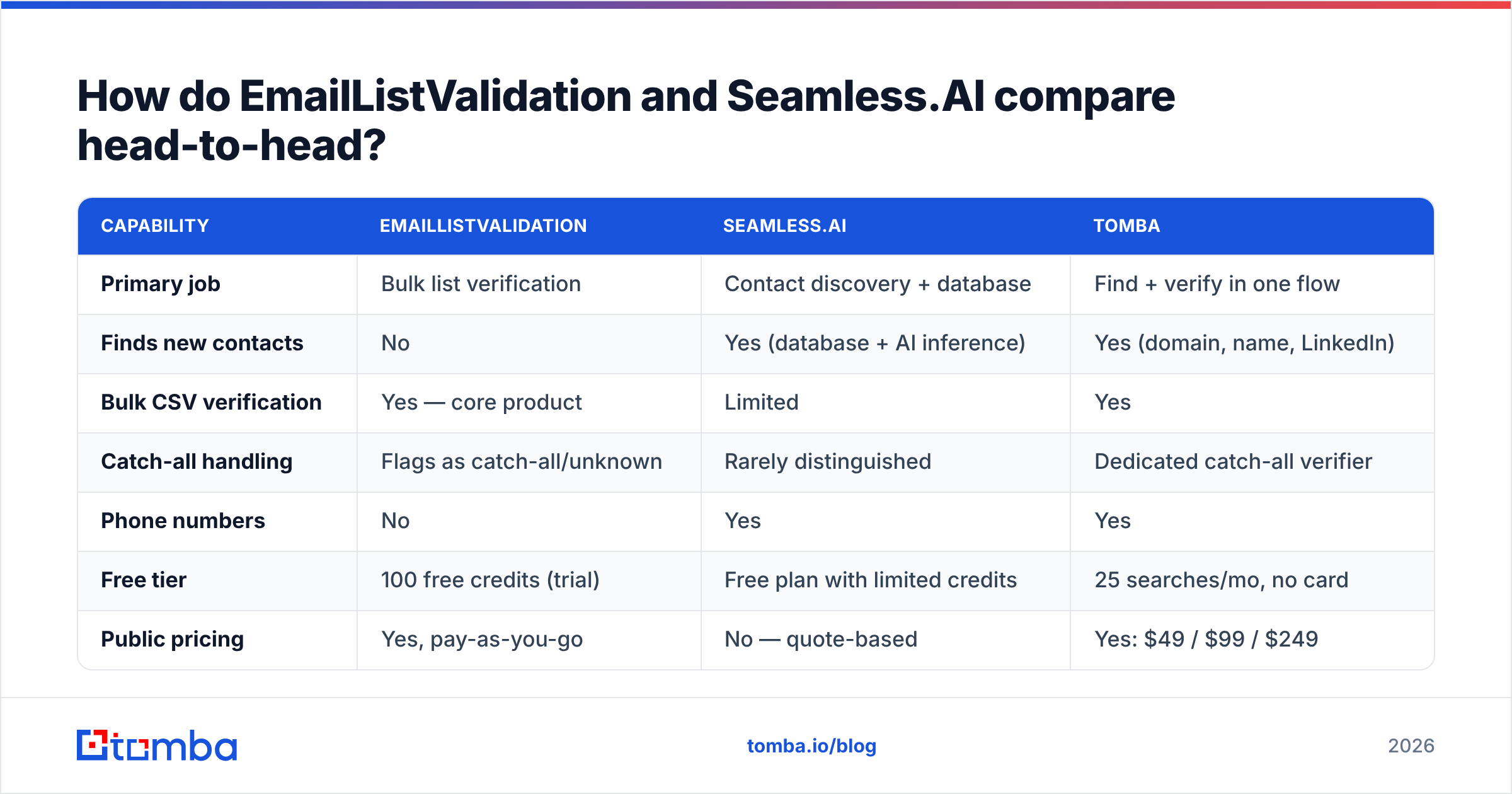
Here is the honest side-by-side. Note how few rows are real overlaps. That is the point.
| Capability | EmailListValidation | Seamless.AI | Tomba |
|---|---|---|---|
| Primary job | Bulk list verification | Contact discovery + database | Find + verify in one flow |
| Finds new contacts | No | Yes (database + AI inference) | Yes (domain, name, LinkedIn) |
| Bulk CSV verification | Yes — core product | Limited | Yes |
| Catch-all handling | Flags as catch-all/unknown | Rarely distinguished | Dedicated catch-all verifier |
| Phone numbers | No | Yes | Yes |
| Free tier | 100 free credits (trial) | Free plan with limited credits | 25 searches/mo, no card |
| Public pricing | Yes, pay-as-you-go | No — quote-based | Yes: $49 / $99 / $249 |
| API access | Yes | Yes (higher tiers) | Yes, all paid plans |
| Contract pressure | Low, credits don't force annual | Annual contracts commonly reported | Monthly, cancel anytime |
| Best for | Cleaning an existing list | Building a list from zero | Teams that need both |

One row decides most deals: "public pricing." EmailListValidation posts its rates. Tomba posts its rates. Seamless.AI sends you to a sales call. Buyers say the quoted price moves with seat count and haggling. If you need to buy fast, that wait is a real cost.
EmailListValidation vs Seamless.AI: which tool has better data?#
The word "accurate" means a different thing for each one.
For the verifier, it means verdict quality. Does it mark a dead mailbox as invalid? Its SMTP tests hold up well on normal mail servers. Like every verifier, it gets fuzzy on catch-all domains. Those servers say yes to all mail and tell you nothing. So the tool returns "catch-all" or "unknown" and leaves the call to you. On a B2B list, catch-alls can be 15-25% of rows. A tool that punts on all of them leaves a quarter of your list in limbo.
For Seamless.AI, it means source quality. Some emails are built from patterns, so bounce rates swing by segment. Big firms with tidy firstname.lastname formats do fine. Mid-market, non-US, and freshly renamed firms do much worse. Many users push Seamless exports through a second tool. That is why EmailListValidation vs Seamless.AI is the wrong framing. Plenty of teams run both.

Here is the takeaway. Test your own bounce rate on a 500-row sample first. Then spend. Vendor accuracy claims are marketing numbers from their own test sets, and no one audits them. A tool that tells a true catch-all verification result apart from a lazy "unknown" beats a bigger headline number.
EmailListValidation vs Seamless.AI pricing: what does each cost in 2026?#
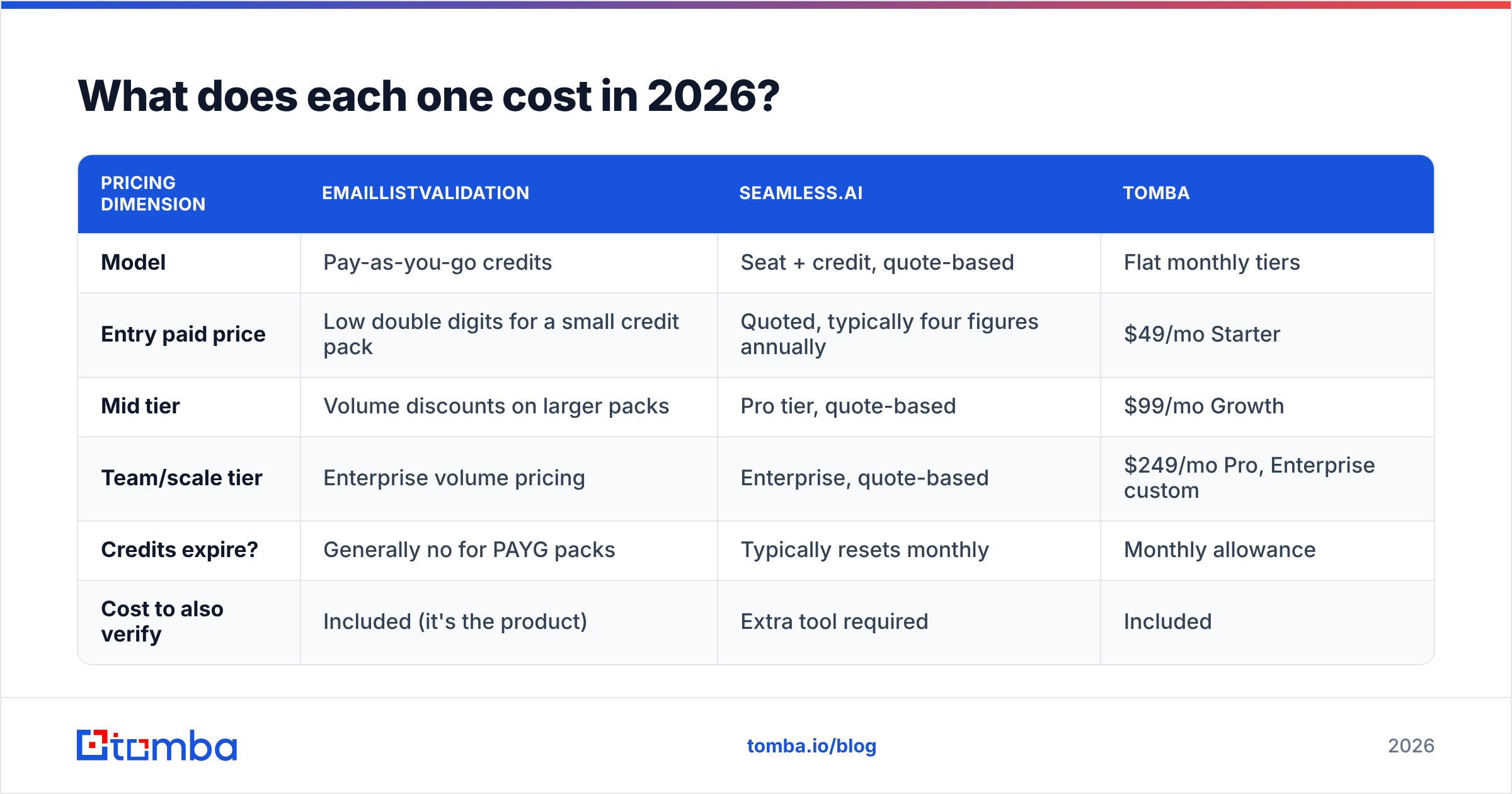
The two models differ so much that a per-month view misleads. Here is the shape of each one.
| Pricing dimension | EmailListValidation | Seamless.AI | Tomba |
|---|---|---|---|
| Model | Pay-as-you-go credits | Seat + credit, quote-based | Flat monthly tiers |
| Entry paid price | Low double digits for a small credit pack | Quoted, typically four figures annually | $49/mo Starter |
| Mid tier | Volume discounts on larger packs | Pro tier, quote-based | $99/mo Growth |
| Team/scale tier | Enterprise volume pricing | Enterprise, quote-based | $249/mo Pro, Enterprise custom |
| Credits expire? | Generally no for PAYG packs | Typically resets monthly | Monthly allowance |
| Cost to also verify | Included (it's the product) | Extra tool required | Included |
Two things stand out. First, credit expiry is a hidden cost. A monthly reset hurts teams with lumpy campaigns. In any month you skip, you still burn the credits. Credits that roll over suit agencies and lone consultants far better.
Second, look at the "cost to also verify" row. Say the Seamless.AI output needs a second pass. Your true cost per usable contact is the Seamless credit, plus the check, plus the rows you bin. If one in five found emails fails, your real price per live contact is 25% above the sticker.
Now compare that with one vendor. Tomba pricing covers both jobs in one plan. No merge step, no two invoices, no CSV shuttling between tabs.
When should you pick EmailListValidation?#
Pick it when the list exists and the only gap is hygiene. Clear cases:
- You inherited a stale list. A 40,000-row CRM export from 2023 has rotted by a quarter or more. People switch jobs. Firms fold. Old aliases die. A bulk check is the cheap way to save it.
- You are moving to a new ESP. Mailchimp and Klaviyo punish accounts that import dirty lists. Scrub first. Do not wait until your sender score tanks.
- You bought a list and do not trust it. Bought data bounces more than any other source in B2B. A check is not optional here.
- You want a one-off, not a plan. Pay-as-you-go credits let you spend $30 once and walk away. Seat-based tools cannot match that.
- You already like your finder. Bolt a check onto the search tool you use today.
What it will never do is hand you one new contact. Say your problem is "I need 2,000 CMOs at Series B SaaS firms." Then you are in the wrong aisle.
When should you pick Seamless.AI?#
Pick it when you need volume and you have the discipline to check the data after.
It fits SDR teams who run heavy outbound into US mid-market and large accounts. Coverage is best there. Tidy email patterns also make the guesswork fairly safe. The Chrome extension is quick. Phone coverage is a real edge, and that counts if you call first and email second.
Where it strains: markets outside the US, small firms with odd email formats, and any team that treats a raw export as send-ready. It is also the harder tool to quit. Annual deals and quoted prices mean you cannot drop a tier for one slow quarter. If that worries you, weigh a Seamless.AI alternative on month-to-month terms first.

Is there a third option that does both?#
Yes. For most teams under 50 seats it is the better call. You may not need to settle the EmailListValidation vs Seamless.AI debate at all.
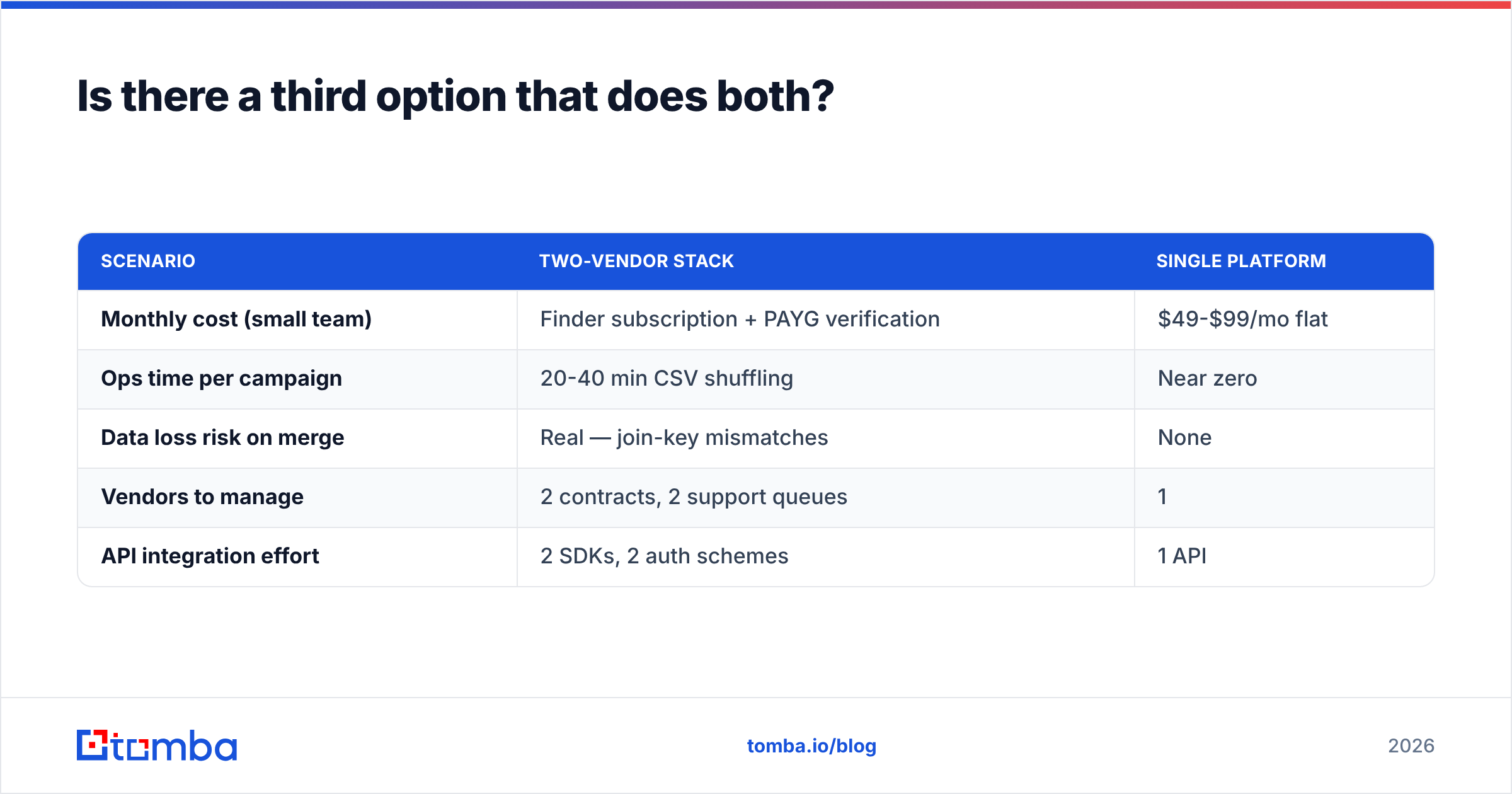
The two-vendor stack costs more than the extra bill. You export a CSV. You upload it to the other tool. You wait for a batch job. Then you download the file, merge on email, strip dupes, and push to your sequencer. That is 20-40 minutes of grunt work per campaign, every campaign. Rows go missing in the merge too.
One platform cuts that whole step. Tomba's email finder pulls emails by domain, name, or firm. The check runs inline before the row hits your export. So the file you download is clean on arrival. If you just need to clean a list you own, the email verifier covers the same ground, catch-all flags included.
Here is the math for a team that needs both jobs done:
| Scenario | Two-vendor stack | Single platform |
|---|---|---|
| Monthly cost (small team) | Finder subscription + PAYG verification | $49-$99/mo flat |
| Ops time per campaign | 20-40 min CSV shuffling | Near zero |
| Data loss risk on merge | Real — join-key mismatches | None |
| Vendors to manage | 2 contracts, 2 support queues | 1 |
| API integration effort | 2 SDKs, 2 auth schemes | 1 API |
None of this makes EmailListValidation a bad buy. It does one job well and prices it in the open. That is more than much of this field can claim. So the real question in EmailListValidation vs Seamless.AI is simple. Do you want to own the glue between two tools, or hand that job off?
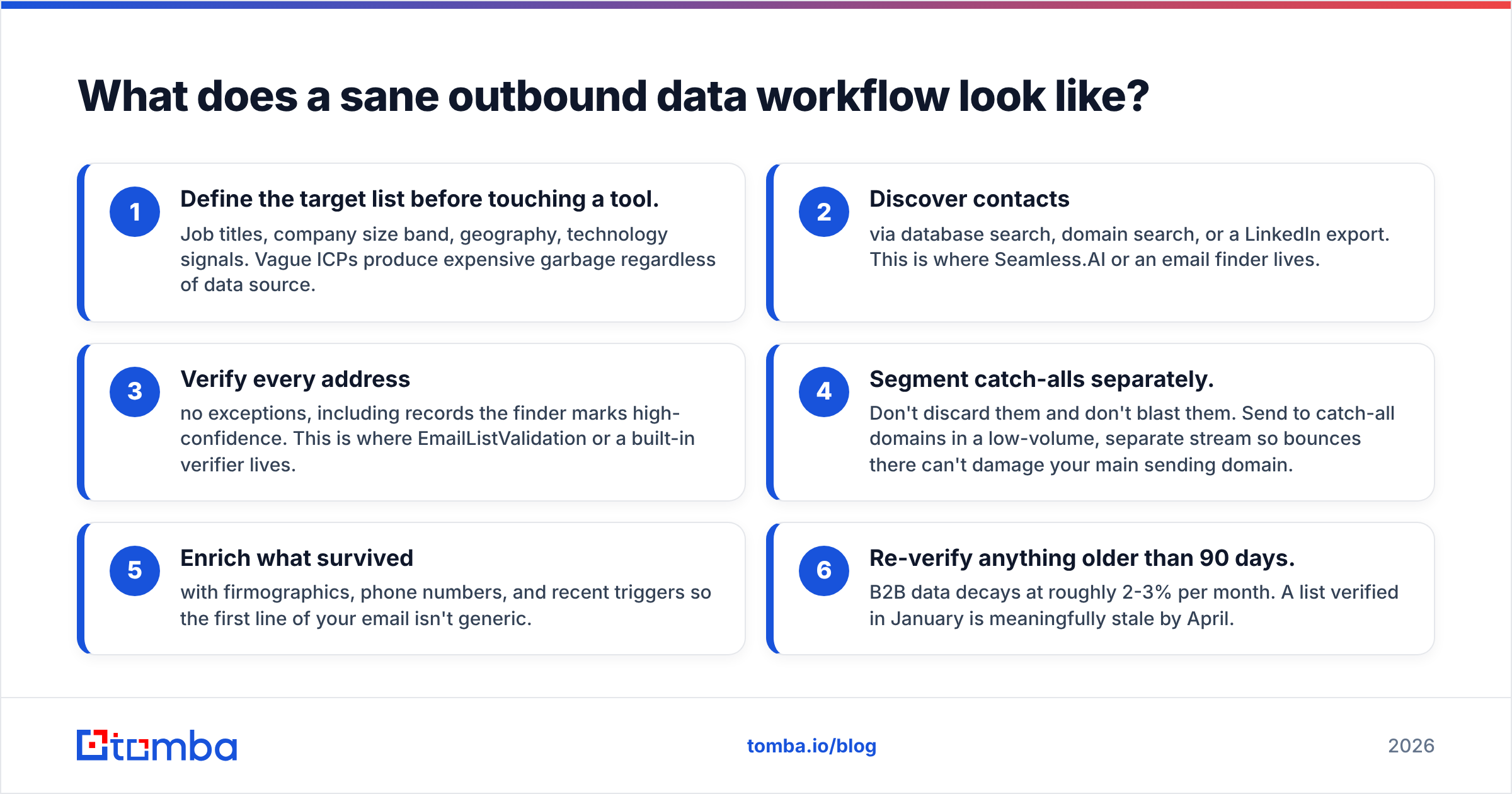
What does a sane outbound data workflow look like?#
Whichever vendors you land on, keep this order:
- Define the target list before you touch a tool. Job titles, firm size, place, tech signals. A vague ICP burns cash on bad data from any source.
- Find the contacts through a search by database, domain, or LinkedIn export. This is where Seamless.AI or an email finder sits.
- Check every address. No exceptions. Not even the rows your finder flags as high-confidence. This is where a verifier sits.
- Keep catch-alls apart. Do not bin them. Do not blast them. Mail them in a small, slow stream, so bad sends cannot harm your main domain.
- Enrich what lives with firm data, phone numbers, and fresh triggers. Then your first line is not generic.
- Re-check anything older than 90 days. B2B data rots at 2-3% a month. A list you cleaned in January is stale by April.
Skip step 3 and your cold email will flop. That is the top reason campaigns fail, and it is the cheapest one to fix. A bounce rate above 3% puts your domain at risk with Google and Microsoft. That harm takes weeks to undo.
EmailListValidation vs Seamless.AI: so which one wins?#
Neither, because they answer different questions. Pick EmailListValidation if you have a list and no budget for a platform. Pick Seamless.AI if you have budget, a US-heavy ICP, and a check step in place. Pick neither if you want a repeatable outbound motion and no two-tool pipeline to babysit.
For that last group — most B2B teams under 50 seats — start with the Tomba Email Finder. The free tier gives you 25 searches a month with no card. So you can test it on real accounts before you spend a cent. Paid plans start at $49/mo. You get search, checks, catch-all flags, and API access in one plan. One bill, one build, and a list that is clean before it hits your sequencer.
Related guides#
Ready to find emails that actually work?
Join 150,000+ professionals who stopped guessing and started sending. Free credits on signup — no credit card required.
Get the Tomba newsletter
Practical outbound tactics and product updates — once every two weeks.
About the author