EmailListVerify vs UpLead: Verifier vs B2B Data (2026)
EmailListVerify cleans lists you already have. UpLead sells you contacts you don't. Here's an honest breakdown of pricing, accuracy, and which one belongs in your 2026 outbound stack — or whether you need a third option instead.
TL;DR
- These two tools do not compete. EmailListVerify is a bulk email verification engine; UpLead is a B2B contact database you buy leads from. Comparing them is like comparing a water filter to a well.
- If you already have a list — scraped, exported from a CRM, inherited from a previous rep — EmailListVerify is the cheaper, faster fix. Pay-as-you-go credits, no subscription required.
- If you have no list and need net-new contacts filtered by industry, headcount, tech stack, or intent, UpLead is the relevant tool. It costs meaningfully more per contact and works on a monthly credit subscription.
- Most teams that buy one end up needing the other. The real question is whether you want two vendors, two bills, and two APIs — or one platform that finds and verifies.
- Our take: use EmailListVerify for one-off list hygiene, UpLead for firmographic prospecting, and a combined finder+verifier when you want a single credit pool and a single API key.
What is EmailListVerify and what does it actually do?#
EmailListVerify is a bulk email validation service. You upload a CSV, it runs each address through a validation stack, and it hands you back a file sorted into buckets: valid, invalid, catch-all (also called accept-all), disposable, role-based, and unknown.
The validation stack is roughly what you'd expect from a mature verifier:
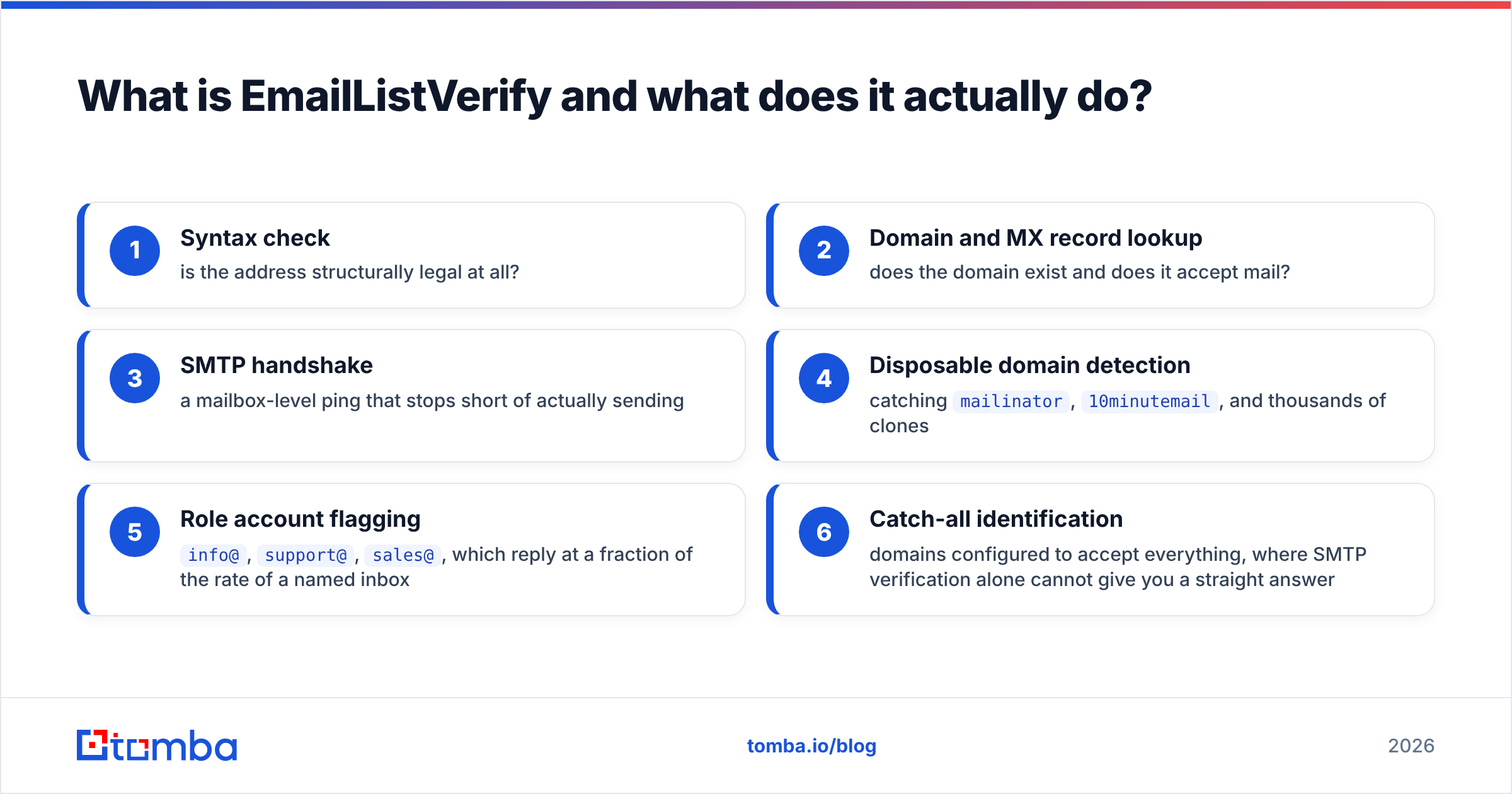
- Syntax check — is the address structurally legal at all?
- Domain and MX record lookup — does the domain exist and does it accept mail?
- SMTP handshake — a mailbox-level ping that stops short of actually sending
- Disposable domain detection — catching
mailinator,10minutemail, and thousands of clones - Role account flagging —
info@,support@,sales@, which reply at a fraction of the rate of a named inbox - Catch-all identification — domains configured to accept everything, where SMTP verification alone cannot give you a straight answer
That's the whole product. There's no search interface, no company filters, no "show me VPs of Engineering at 200-person fintechs." You bring the addresses. EmailListVerify tells you which ones will bounce.
It's used most often in three situations: cleaning a list before a cold campaign, scrubbing a stale marketing database before migrating ESPs, and running real-time validation on signup forms via API so junk never enters the database in the first place.
What is UpLead and how is it different?#
UpLead is a prospecting database. It sells access to a repository of B2B contact and company records — reportedly in the tens of millions — that you search with filters rather than upload.
The filter set is the actual product. You narrow by industry, employee count, revenue band, location, job title, seniority, department, and technology used (their tech-install data is a genuinely useful differentiator for anyone selling into a specific stack). You get back a list of people with emails, sometimes direct dials, and LinkedIn URLs. You spend a credit per contact revealed.
UpLead's headline claim is real-time verification at the moment of reveal — the address is checked before the credit is deducted, and they publish a 95%+ accuracy target. That matters, because the alternative model (static databases that decay quietly) is how you end up with a 20% bounce rate on a list you paid for last quarter.
So the framing that gets people into trouble is "EmailListVerify vs UpLead, which is better?" The honest answer is that one is a filter and one is a source. What you're really choosing between is cleaning a list you have and buying a list you don't.

How do EmailListVerify and UpLead compare feature by feature?#
Here's the head-to-head on the dimensions that actually change your workflow.
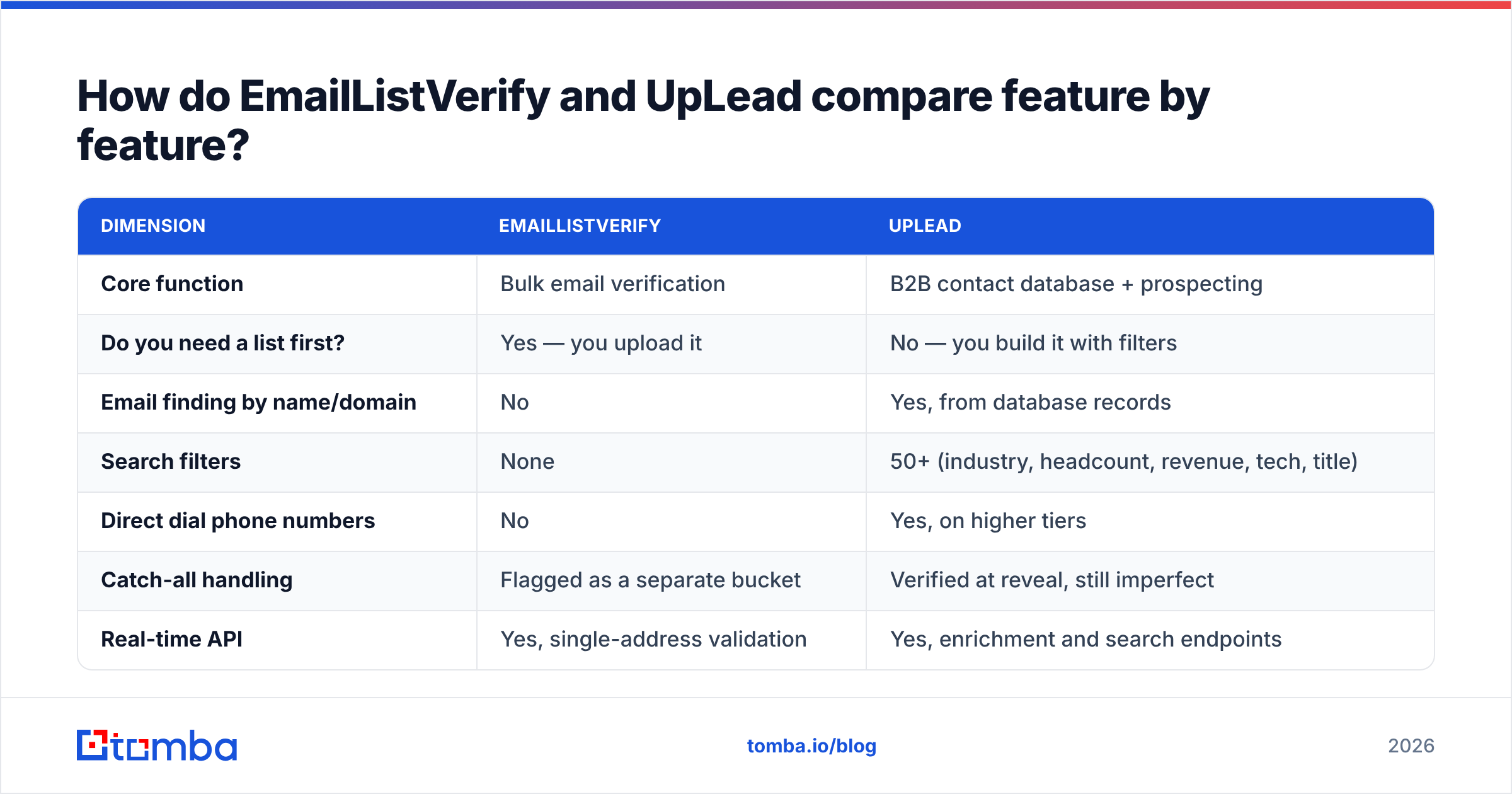
| Dimension | EmailListVerify | UpLead |
|---|---|---|
| Core function | Bulk email verification | B2B contact database + prospecting |
| Do you need a list first? | Yes — you upload it | No — you build it with filters |
| Email finding by name/domain | No | Yes, from database records |
| Search filters | None | 50+ (industry, headcount, revenue, tech, title) |
| Direct dial phone numbers | No | Yes, on higher tiers |
| Catch-all handling | Flagged as a separate bucket | Verified at reveal, still imperfect |
| Real-time API | Yes, single-address validation | Yes, enrichment and search endpoints |
| CRM integrations | Limited (mostly ESP-adjacent) | Salesforce, HubSpot, Pipedrive, Zapier, Outreach |
| Pricing model | Pay-as-you-go credits or monthly | Monthly/annual subscription with credit cap |
| Free option | Small free trial credit batch | Limited free trial credits |
| Best for | List hygiene, deliverability protection | Net-new outbound prospecting |
| Weakest at | Anything that isn't verification | Cost per contact at low volume |
The pattern is clear once it's laid out: there is exactly one overlapping cell — both touch email validity — and it's the cell where UpLead does the least specialized work and EmailListVerify does the most.
Which one is more accurate — and does that question even make sense?#
Accuracy means two different things here, and conflating them is how teams end up disappointed.
For EmailListVerify, accuracy means: of the addresses it marks "valid," how many actually deliver? Good bulk verifiers land in the 95–98% range on ordinary corporate domains. The number degrades sharply on catch-all domains, which now cover a large share of enterprise mail, and on providers that have hardened against SMTP probing. Microsoft 365 in particular has spent years making mailbox-level verification unreliable, which is why every verifier on the market has a growing "unknown" bucket. Anyone claiming 99%+ across the board on 2026 infrastructure is measuring something narrower than your real list.
For UpLead, accuracy means something closer to: of the contacts I pulled, how many are still at that company in that role with that address? That's a data-freshness problem, not an SMTP problem. A perfectly deliverable address belonging to someone who left eight months ago is technically valid and commercially useless.

Two practical consequences:
- Verifying a database export doesn't fix staleness. If you pull 2,000 contacts from any provider and run them through a verifier, you'll catch the hard bounces. You won't catch the job changers whose company still forwards their mail.
- Buying "pre-verified" data doesn't remove the need for verification. Reveal-time checks are a snapshot. If your sequence launches three weeks after the export, re-verify. It costs cents and protects your sender reputation, which costs months to rebuild.
The teams with the lowest bounce rates aren't the ones who found the single most accurate vendor. They're the ones who re-verify immediately before send, every time, regardless of where the data came from.
How does pricing compare for EmailListVerify vs UpLead?#
Pricing is where the two diverge most sharply, and where the "which is cheaper" question finally has a real answer — it depends entirely on whether you're paying per check or per contact.
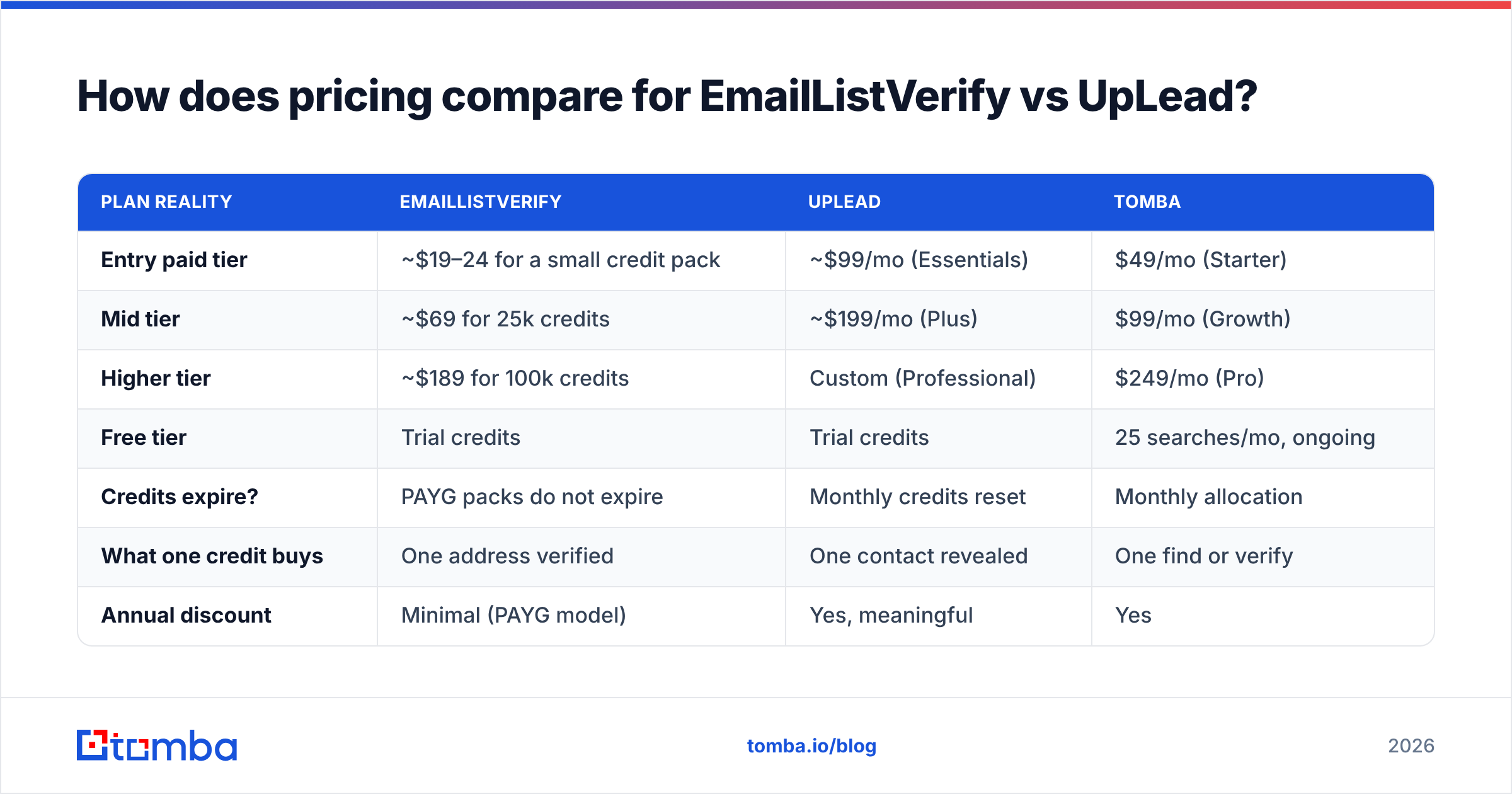
| Plan reality | EmailListVerify | UpLead | Tomba |
|---|---|---|---|
| Entry paid tier | ~$19–24 for a small credit pack | ~$99/mo (Essentials) | $49/mo (Starter) |
| Mid tier | ~$69 for 25k credits | ~$199/mo (Plus) | $99/mo (Growth) |
| Higher tier | ~$189 for 100k credits | Custom (Professional) | $249/mo (Pro) |
| Free tier | Trial credits | Trial credits | 25 searches/mo, ongoing |
| Credits expire? | PAYG packs do not expire | Monthly credits reset | Monthly allocation |
| What one credit buys | One address verified | One contact revealed | One find or verify |
| Annual discount | Minimal (PAYG model) | Yes, meaningful | Yes |
Prices are list rates at the time of writing and change often — check EmailListVerify's pricing and UpLead's pricing directly, and Tomba pricing for current numbers.
The structural difference matters more than the absolute figures:
- EmailListVerify's pay-as-you-go credits don't expire. If you clean a list twice a year, you buy a pack, use half, and come back in six months. There is no subscription pressure. For sporadic hygiene work, this is the cheapest model on the market.
- UpLead's credits reset monthly. If you don't use them, they're gone. That's fine for a full-time SDR pulling lists weekly; it's expensive for a founder who prospects in bursts.
- Cost per usable contact is the metric that matters. A $99/mo plan with 170 credits is roughly $0.58 per revealed contact. If 15% are stale or bounce, your real cost per usable contact is closer to $0.68. Verification credits at fractions of a cent are noise by comparison — which is precisely why you should never skip them.
Who should choose EmailListVerify?#
Pick EmailListVerify if most of these describe you:
- You already have the data. Trade show badge scans, webinar registrations, a CRM you inherited, a scraped list from a partner site. The names exist; you just don't trust them.
- Your volume is lumpy. You clean 40,000 addresses in March and nothing until October. Non-expiring credits fit that shape better than any subscription.
- Deliverability is your acute pain. Your bounce rate crossed 4%, Google Postmaster is showing yellow, and you need the problem gone this week.
- You need form-level validation. Real-time API on signup forms is a genuinely strong use case — stop bad addresses at the door rather than cleaning them up later.
- You don't need firmographics. You're not filtering by headcount or tech stack; you just need to know which addresses are alive.
Where it falls short: it will never help you find a person you don't already know about, and its catch-all handling — like every SMTP-based verifier — leaves a chunk of your list in an ambiguous state. If catch-all domains are a large share of your TAM, pair it with a dedicated catch-all verifier rather than writing those contacts off.
Who should choose UpLead?#
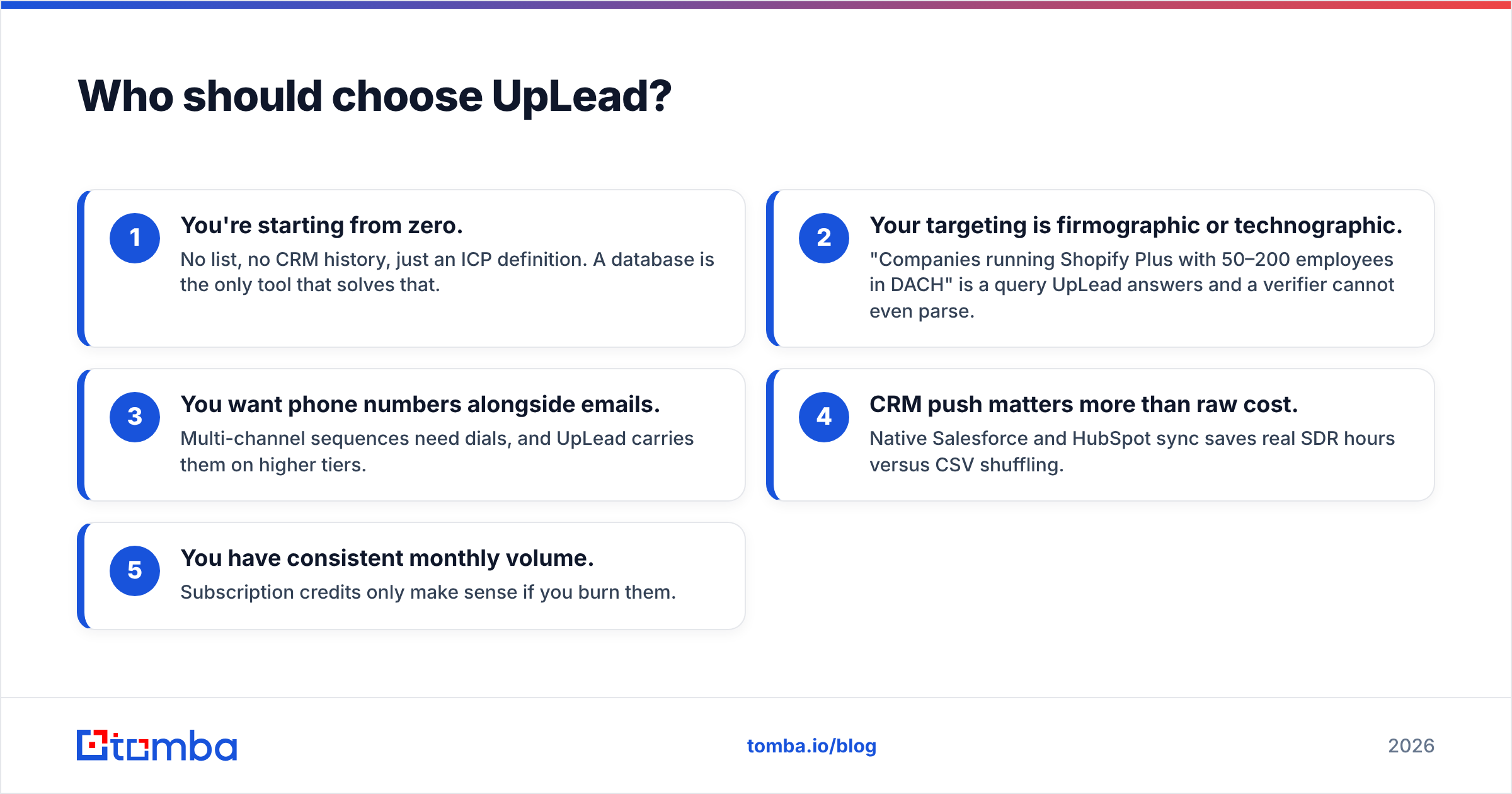
Pick UpLead if:
- You're starting from zero. No list, no CRM history, just an ICP definition. A database is the only tool that solves that.
- Your targeting is firmographic or technographic. "Companies running Shopify Plus with 50–200 employees in DACH" is a query UpLead answers and a verifier cannot even parse.
- You want phone numbers alongside emails. Multi-channel sequences need dials, and UpLead carries them on higher tiers.
- CRM push matters more than raw cost. Native Salesforce and HubSpot sync saves real SDR hours versus CSV shuffling.
- You have consistent monthly volume. Subscription credits only make sense if you burn them.
Where it falls short: cost per contact is high relative to a dedicated finder, the credit cap creates artificial scarcity mid-month, and coverage — like every database — is deep in North American mid-market tech and thinner elsewhere. Check coverage in your specific geography before committing to an annual term. G2 reviews are useful here because reviewers tend to name their region.

Is there a third option that covers both jobs?#
Yes, and it's worth naming honestly rather than pretending the EmailListVerify/UpLead binary is complete.
The gap both tools leave is the middle: you know who you want to reach — you have a name and a company, from LinkedIn, a conference agenda, a podcast guest list, a funding announcement — but you have neither their address nor a reason to buy an entire database subscription.
That's what an email finder does. You give it a name and a domain; it returns the address with a confidence score and the sources it was found in. Combine it with a domain search to pull every published address at a company, and you've replaced the "buy a list" step with "find exactly the people you researched."
Where a combined platform beats a two-vendor setup:
- One credit pool. Finding and verifying draw from the same balance, so you're not forecasting two separate burn rates.
- One API. A single key for find, verify, and enrich instead of stitching two vendors into your pipeline with different auth schemes and rate limits.
- Verification happens inline. Every address returned is already checked, so there's no export-reimport-reexport dance between tools.
- Bulk workflows in one place. Upload a CSV of names and domains, get back verified addresses — see bulk email finder.
- Lower entry cost. $49/mo versus a $99/mo database subscription, with a free tier that persists rather than expiring after a trial.
Where a combined platform doesn't beat them: if you need pure firmographic discovery at scale with intent signals and tech-install filters, a dedicated database like UpLead is still the right tool. And if you're verifying millions of addresses a year and nothing else, a specialist bulk verifier's per-credit economics will win. Tools like BookYourData occupy a similar niche with a pay-as-you-go database model that some teams prefer to subscriptions — worth a look if credit expiry is your main objection to UpLead.

What does a sensible 2026 stack actually look like?#
Here's the sequence that produces the lowest bounce rate for the least money, regardless of which vendors you pick:
- Define the ICP precisely before you touch a tool. Vague targeting is what makes people buy 10,000 contacts and use 400.
- Source contacts by the cheapest route that fits. Known targets → email finder. Unknown targets matching firmographic filters → database.
- Verify immediately before send, not at export. Even "pre-verified" data. Use an email verifier as the last step in the pipeline, not the first.
- Segment catch-alls separately. Don't discard them and don't blast them. Send to them from a secondary domain and measure separately.
- Suppress and re-suppress. Feed bounces back into a suppression list that every tool in the stack reads. Most bounce problems are repeat offenders.
- Re-verify anything older than 30 days. B2B data decays at roughly 2–3% per month. A 90-day-old list is measurably worse than a fresh one.
Skip step 3 and the quality of steps 1, 2, 4, 5, and 6 stops mattering.
So which one wins?#
Neither, because they're not in the same race — and any comparison post that declares a single winner is selling you something.
- Have a list, need it clean? EmailListVerify. Cheapest path, no subscription, credits that wait for you.
- Have no list, need firmographic targeting? UpLead. The filters and CRM sync earn their price if you use the credits.
- Know who you want but not their address? Neither. You want a finder with verification built in, which is the gap both of these products leave wide open.
If that third description is you, start with Tomba's Email Finder. The free tier gives you 25 searches a month with no card, Starter is $49/mo, and every address comes back already verified with a confidence score and its sources — so you're not paying two vendors, reconciling two credit balances, and re-uploading CSVs between them just to send one clean campaign.
Related guides#
Ready to find emails that actually work?
Join 150,000+ professionals who stopped guessing and started sending. Free credits on signup — no credit card required.
Get the Tomba newsletter
Practical outbound tactics and product updates — once every two weeks.
About the author