EmailOversight vs LeadIQ: Which B2B Email Tool Wins in 2026?
EmailOversight cleans lists. LeadIQ builds them. They get compared constantly, but they solve opposite halves of the outbound pipeline — here is the honest breakdown of pricing, accuracy, and which one your team actually needs.
EmailOversight vs LeadIQ is a matchup most buyers get wrong. One tool cleans the list you already own. The other builds a list you don't have yet. Here is the short version.
TL;DR
- They are not direct competitors. EmailOversight cleans and checks lists. LeadIQ finds new contacts.
- Pick EmailOversight if a bought or inherited list bounces at 12%. You need spam-trap and complainer checks before you send.
- Pick LeadIQ if your pipeline is empty and your reps live inside LinkedIn Sales Navigator all day.
- The pricing models don't line up. EmailOversight sells credits. LeadIQ sells seats. Comparing "$X vs $Y" is how teams overspend.
- Many teams buy both — or one tool that finds and verifies. That third path usually costs less.
Why compare EmailOversight vs LeadIQ at all?#
Both tools rank for "improve email deliverability" and "better B2B contact data." Both promise fewer bounces. The similarity stops there.
EmailOversight takes an address you already own. It runs that address through several checks. Then it returns a verdict: deliverable, undeliverable, catch-all, spam trap, known complainer, or disposable. It also sells append services. Give it a name and a company, and it hands back an email.
LeadIQ sits in your browser. A rep opens a LinkedIn profile and clicks the extension. LeadIQ grabs the work email and phone. One more click pushes the contact into the CRM or sequencer. It adds job-change tracking and an AI writing assistant called Scribe.
So the honest framing for EmailOversight vs LeadIQ is this: acquisition versus hygiene. Score them on one card and you will pick the wrong one.
What does EmailOversight actually do?#
EmailOversight sells multi-method validation. It does not lean on a single SMTP ping. Each address runs through a stack of checks and gets matched against private lists.
Here is what comes back:
- Syntax and domain checks — broken addresses, dead MX records, parked domains.
- Mailbox-level checks — an SMTP handshake confirms the inbox exists, when the server allows it.
- Spam trap detection — the real differentiator. Traps get sending domains blocked, and cheap tools miss them.
- Complainer and litigator flags — people who hit "report spam," or who file CAN-SPAM claims.
- Real-time API and bulk upload — check at form submit, or drop in a CSV of 400,000 rows.
- Email append — send partial records, get contact data back. This is the part that overlaps with LeadIQ.
Where it fits: ESP migrations, waking up a two-year-old list, cleaning a bought database, or guarding a warmed domain before a big send. Skip this step and it gets expensive.
Where it fails: net-new prospecting. EmailOversight tells you whether j.chen@acme.com is safe to mail. It will not tell you that Acme just hired a VP named J. Chen.
What does LeadIQ actually do?#
LeadIQ is built for the SDR workflow. It is also opinionated about how that workflow should run.
- Capture from LinkedIn — the Chrome extension is the heart of the product. Select 25 profiles, capture them all, done.
- CRM and sequencer sync — Salesforce, HubSpot, Outreach, and Salesloft. It spots duplicates before the record lands, which RevOps teams love.
- Scribe — AI writes the first email using the prospect's profile, posts, and company signals.
- Job-change tracking — it flags when a tracked contact moves. That move is one of the best outbound triggers in B2B.
- Checks on capture — LeadIQ tests emails as they are grabbed. That is why people file it under verification tools.
Where it fits: outbound teams of 3–50 reps who prospect by hand, in the browser. The per-seat price tells you the buyer.
Where it fails: bulk list work, API-first jobs, and marketing-side cleanup. It is also not a full B2B database you can query by firmographics the way Apollo or ZoomInfo are.
EmailOversight vs LeadIQ: the head-to-head table#
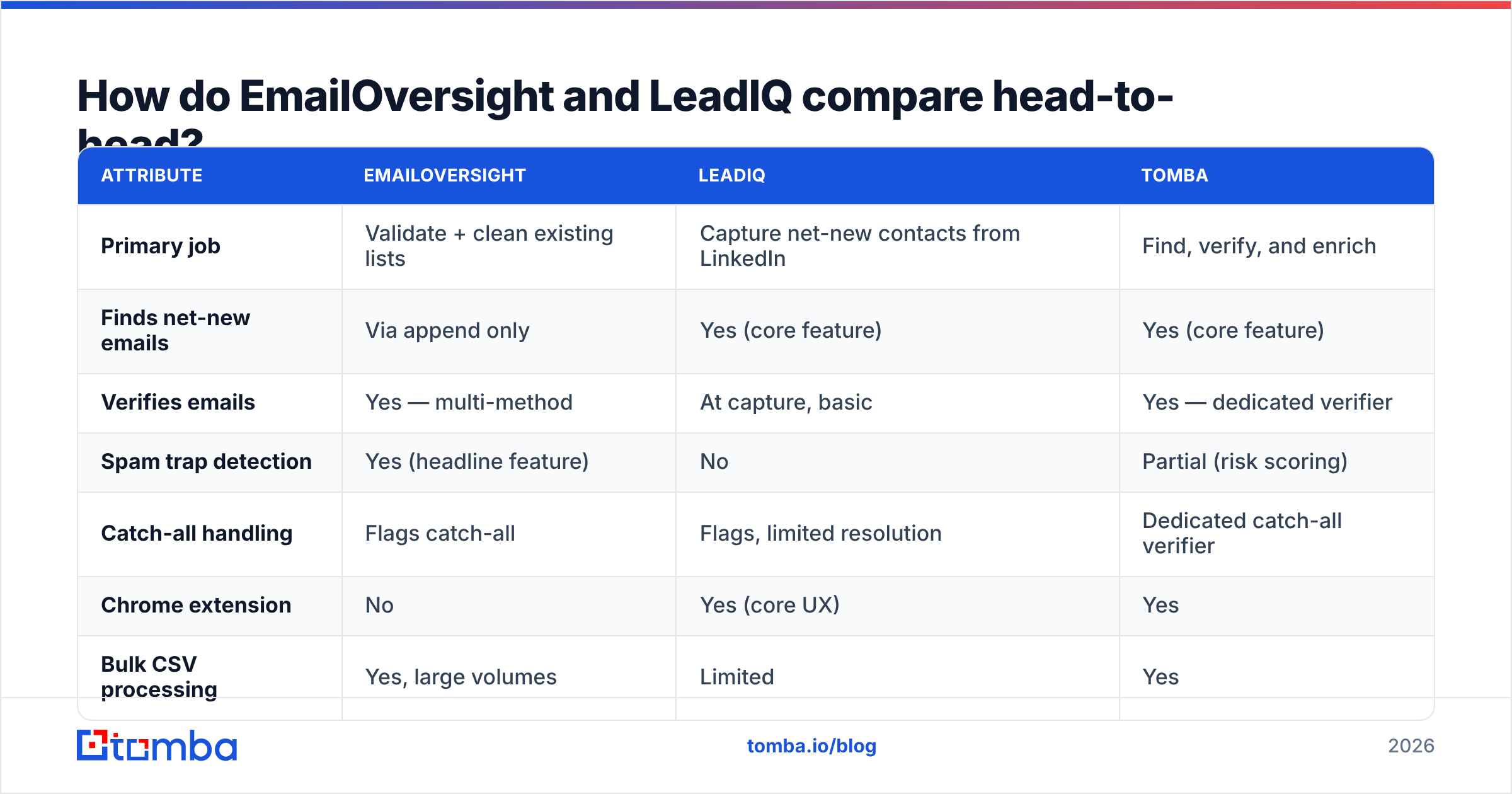
Here is the side by side. Tomba is included as a reference point, since it spans both jobs.

| Attribute | EmailOversight | LeadIQ | Tomba |
|---|---|---|---|
| Primary job | Validate + clean existing lists | Capture net-new contacts from LinkedIn | Find, verify, and enrich |
| Finds net-new emails | Via append only | Yes (core feature) | Yes (core feature) |
| Verifies emails | Yes — multi-method | At capture, basic | Yes — dedicated verifier |
| Spam trap detection | Yes (headline feature) | No | Partial (risk scoring) |
| Catch-all handling | Flags catch-all | Flags, limited resolution | Dedicated catch-all verifier |
| Chrome extension | No | Yes (core UX) | Yes |
| Bulk CSV processing | Yes, large volumes | Limited | Yes |
| Public API | Yes | Yes (higher tiers) | Yes, on every paid plan |
| Job-change alerts | No | Yes | No |
| AI email writing | No | Yes (Scribe) | Via free tools |
| Pricing model | Credit / pay-as-you-go | Per seat, annual | Credit, monthly or annual |
| Free tier | Trial credits | Limited free plan | 25 searches/mo, no card |
| Best for | Marketing ops, ESP hygiene | SDR teams in LinkedIn | Founders, agencies, dev teams |
Read that table as three different answers, not a leaderboard. The two tools only collide on one row: "finds net-new emails." Even there, EmailOversight's append is a batch job, while LeadIQ's capture is a live click.
Which one is more accurate?#
That is the wrong question. Ask it better: accurate at what?
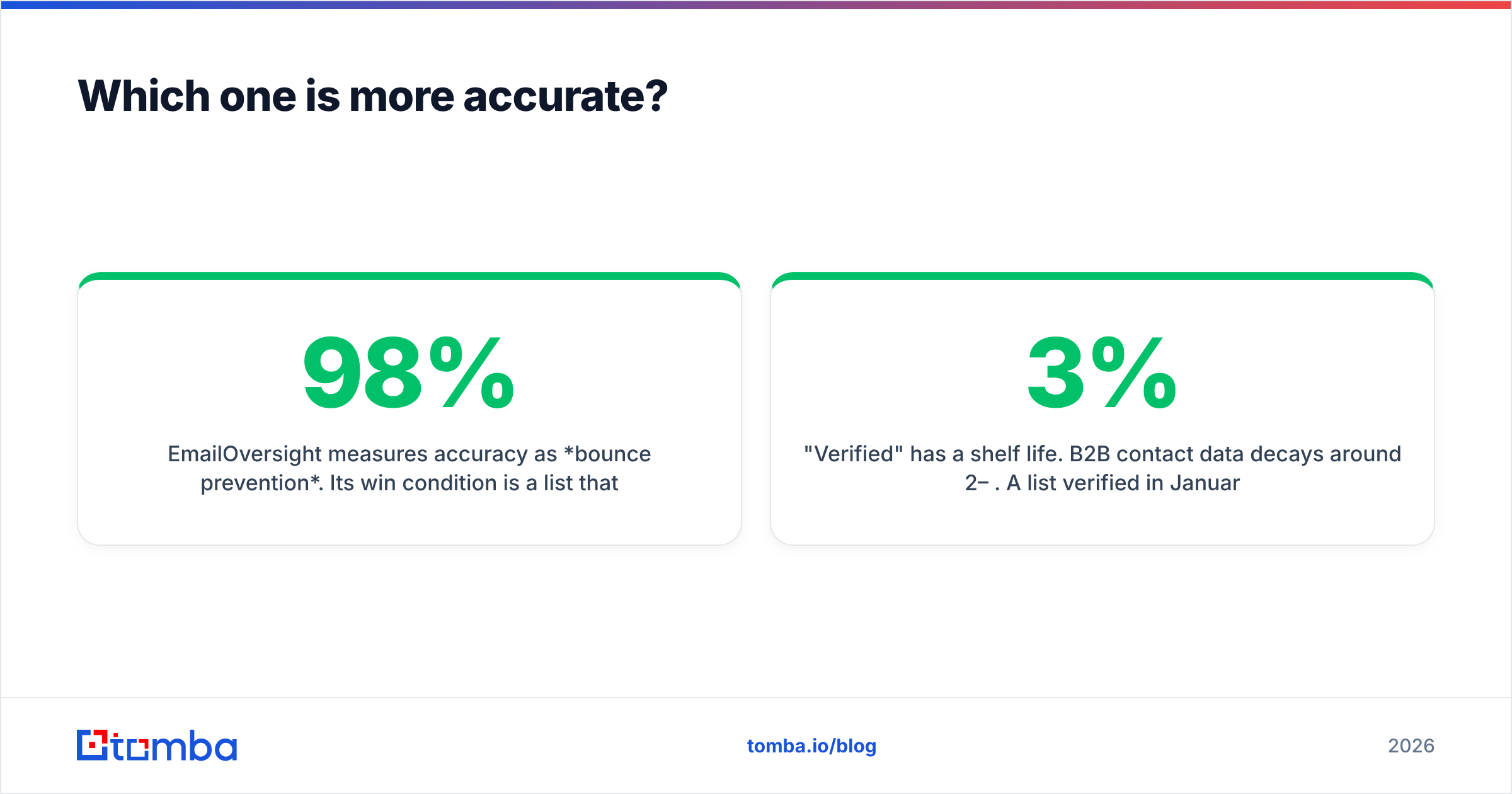
EmailOversight counts accuracy as bounce prevention. It wins when a list sends at 98% delivery with zero traps. Vendors in this category claim 97–99% on clear verdicts. On messy B2B data the honest range is high-90s, and much fuzzier on catch-all domains. Most corporate mailboxes sit on those domains.
LeadIQ counts accuracy as coverage plus a correct email at capture. It wins when a rep clicks a profile, an email shows up, and a human reads it. Coverage swings a lot by region and company size. It is strong on US mid-market tech and weaker on European SMBs. Check recent reviews on G2 before you sign an annual deal.

Three things nobody tells you about accuracy claims:
- Catch-all domains break every benchmark. About a third of B2B domains accept all mail. No tool can confirm the mailbox by handshake alone. If you sell to enterprise, use a catch-all verifier instead of a yes-or-no verdict.
- "Verified" has a shelf life. B2B data decays 2–3% a month. A list checked in January is worse by April. That is why job-change alerts and re-checks both exist.
- The sample picks the winner. A test on Fortune 500 domains ranks tools one way. A test on 20-person agencies ranks them another way. Test 200 rows of your own ICP first.
How much do EmailOversight and LeadIQ cost?#
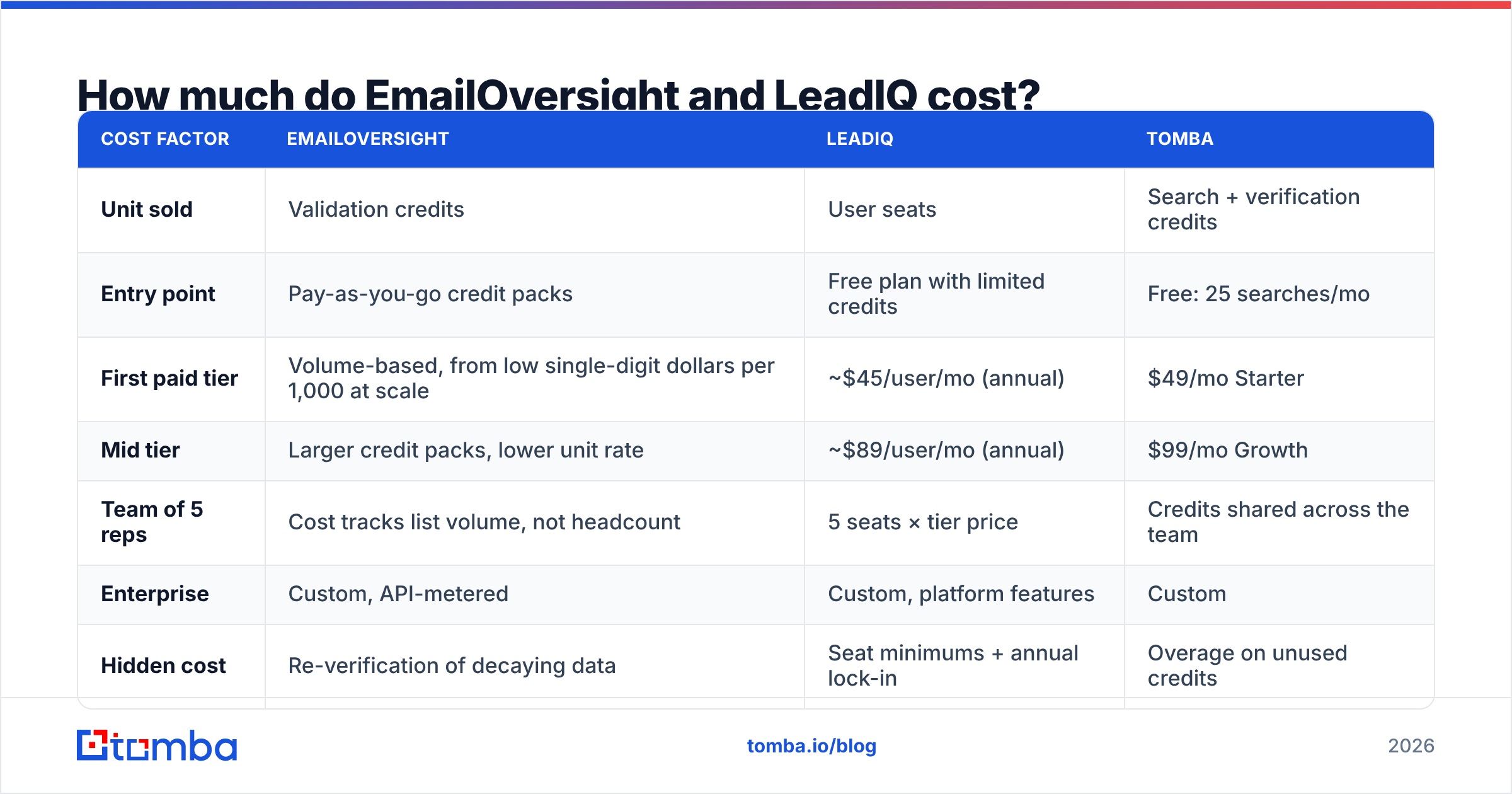
The EmailOversight vs LeadIQ price debate confuses people because the units do not match. The figures below are public list prices at the time of writing. Always confirm on the vendor's own page, since tiers and seat minimums move.
| Cost factor | EmailOversight | LeadIQ | Tomba |
|---|---|---|---|
| Unit sold | Validation credits | User seats | Search + verification credits |
| Entry point | Pay-as-you-go credit packs | Free plan with limited credits | Free: 25 searches/mo |
| First paid tier | Volume-based, from low single-digit dollars per 1,000 at scale | ~$45/user/mo (annual) | $49/mo Starter |
| Mid tier | Larger credit packs, lower unit rate | ~$89/user/mo (annual) | $99/mo Growth |
| Team of 5 reps | Cost tracks list volume, not headcount | 5 seats × tier price | Credits shared across the team |
| Enterprise | Custom, API-metered | Custom, platform features | Custom |
| Hidden cost | Re-verification of decaying data | Seat minimums + annual lock-in | Overage on unused credits |
The takeaway is short. EmailOversight's cost tracks data volume. LeadIQ's cost tracks headcount. Two people cleaning 500k records will find EmailOversight pricey and LeadIQ cheap. Ten reps grabbing 300 contacts each will see the reverse. Model your real volume first. If a per-seat contract is on the table, our guide to LeadIQ alternatives covers credit-based options.

Which should you pick for your situation?#
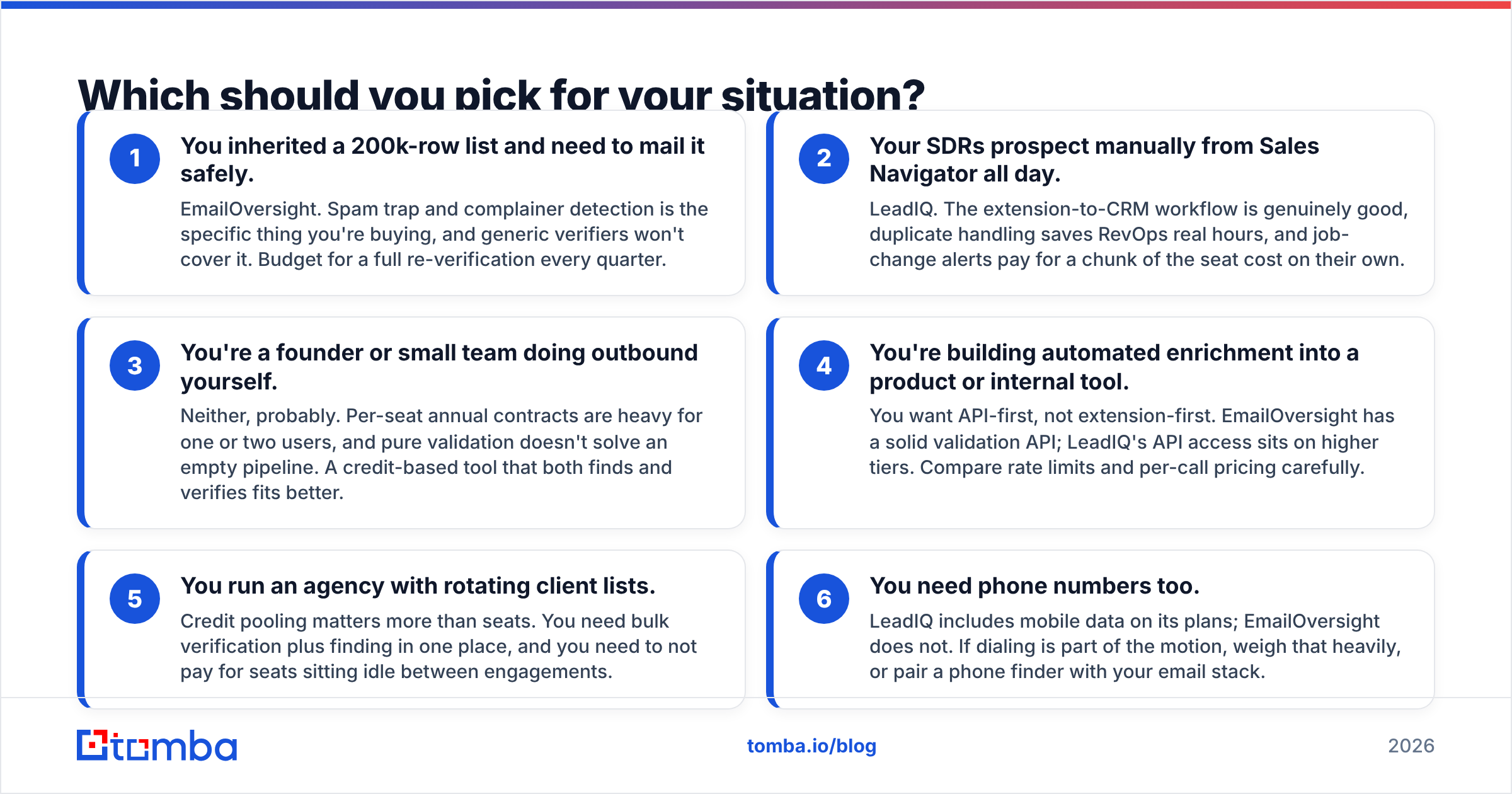
Match yourself to one of these six profiles. The first three are the common ones:
- You inherited a 200k-row list and need to mail it safely. Pick EmailOversight. Trap and complainer detection is the thing you are buying. Budget for a fresh check every quarter.
- Your SDRs prospect from Sales Navigator all day. Pick LeadIQ. The extension-to-CRM flow is good, duplicate handling saves RevOps hours, and job-change alerts cover part of the seat cost.
- You are a founder or a small team doing outbound yourself. Probably neither. Annual seat deals are heavy for one or two users. A credit-based tool that finds and checks fits better.
The last three profiles are where the EmailOversight vs LeadIQ choice breaks down:
- You are building enrichment into a product. You want API-first, not extension-first. EmailOversight has a solid API. LeadIQ keeps API access on higher tiers. Compare rate limits and per-call cost.
- You run an agency with rotating client lists. Credit pooling beats seats. You need bulk verification and finding in one place, without paying for idle seats.
- You need phone numbers too. LeadIQ includes mobile data. EmailOversight does not. If you dial, weigh that heavily, or add a phone finder to your stack.
Can one tool replace both?#
Partly. Not at the extremes, though.
Say you need litigator lists and pristine trap files at huge send volumes. A specialist like EmailOversight does something a finder-plus-verifier will not match. Say you need a rep-facing LinkedIn flow with job-change alerts. Then LeadIQ's interface is the product.
The middle of the market is different. Teams sending a few thousand cold emails a month need new contacts that do not bounce. That is where the EmailOversight vs LeadIQ debate stops paying off, and stacking two vendors turns wasteful. Tomba fills that gap. The email finder resolves an address from a name and domain. The email verifier confirms it before it enters your sequencer. Both run off one credit pool, on one bill.
That combination handles the two things that matter. You stop mailing addresses that do not exist. You stop mailing the same dead record twice. Read how email deliverability gets scored if you want the mechanics. Sender reputation adds up over time, and one bad send takes weeks to undo. HubSpot's email marketing resources are a fair neutral primer.
What's the verdict on EmailOversight vs LeadIQ?#
There is no single winner. The two tools answer different questions. EmailOversight wins on list hygiene, trap protection, and volume pricing. LeadIQ wins on rep workflow, capture speed, and clean CRM entry. Forced to choose blind, use one tiebreaker: do you have a list problem or a pipeline problem?
If the answer is "both, and I don't want two contracts," start with a tool that covers finding and checking in one credit pool. The Tomba Email Finder does that. Search by domain, name, or company. Verify every result before it hits your sequencer. Export straight to your CRM. The free plan gives you 25 searches a month with no card, so you can test it on your own list before either vendor gets a signature. See full Tomba pricing to model credit math against a per-seat quote.
Related guides#
Ready to find emails that actually work?
Join 150,000+ professionals who stopped guessing and started sending. Free credits on signup — no credit card required.
Get the Tomba newsletter
Practical outbound tactics and product updates — once every two weeks.
About the author