EmailOversight vs OneMoreLead: Which B2B Data Tool Wins?
One cleans the list you already have. The other sells you a new one. Here's an honest, use-case-by-use-case breakdown of EmailOversight vs OneMoreLead — plus what neither of them does well.
EmailOversight vs OneMoreLead is a strange matchup. One tool cleans the list you already own. The other sells you a brand-new one. Here's where each one fits — and where neither one helps.
TL;DR
- They aren't the same category. EmailOversight validates and cleans lists. OneMoreLead sells you B2B contact records. The comparison only matters when you're deciding where your next $500 of data budget goes.
- Pick EmailOversight if you already have lists — CRM, webinar, scraper, old database — and your bounce rate is embarrassing.
- Pick OneMoreLead if you have no list at all and want thousands of cheap B2B contacts fast.
- Neither is a true email finder. Neither one takes "Sarah Chen, VP Marketing, Acme Corp" and returns her verified work email through an API.
- The realistic 2026 stack is a finder plus a verifier in one pass. A database is the backup, not the engine.
What are EmailOversight and OneMoreLead?#
EmailOversight is an email hygiene company. You feed it a list by CSV, API, or integration. It runs each address through a stack of checks: syntax, MX records, SMTP handshake, disposable domains, role accounts, spam traps, and known complainers. Then it returns a status per address — valid, invalid, accept-all, or unknown. It also offers email append: send a postal record or a name, and it tries to attach an email.
Its real specialty is the part most verifiers gloss over: spam traps and complainers. Say you mail an old purchased list into Gmail and Outlook. A single pristine trap can tank your sending domain for weeks. EmailOversight sells itself as the layer that catches those before you hit send.
OneMoreLead sits on the other side of the transaction. It's a B2B contact database — tens of millions of business records with names, titles, company, industry, size, and contact details. You filter, build a list, and export it. The pitch is volume and price. You get a large targeted list for a flat monthly fee instead of per-credit rates.
So one company assumes you already have data and want it cleaner. The other assumes you have nothing. That split drives every recommendation below.

EmailOversight vs OneMoreLead: how do they compare head-to-head?#
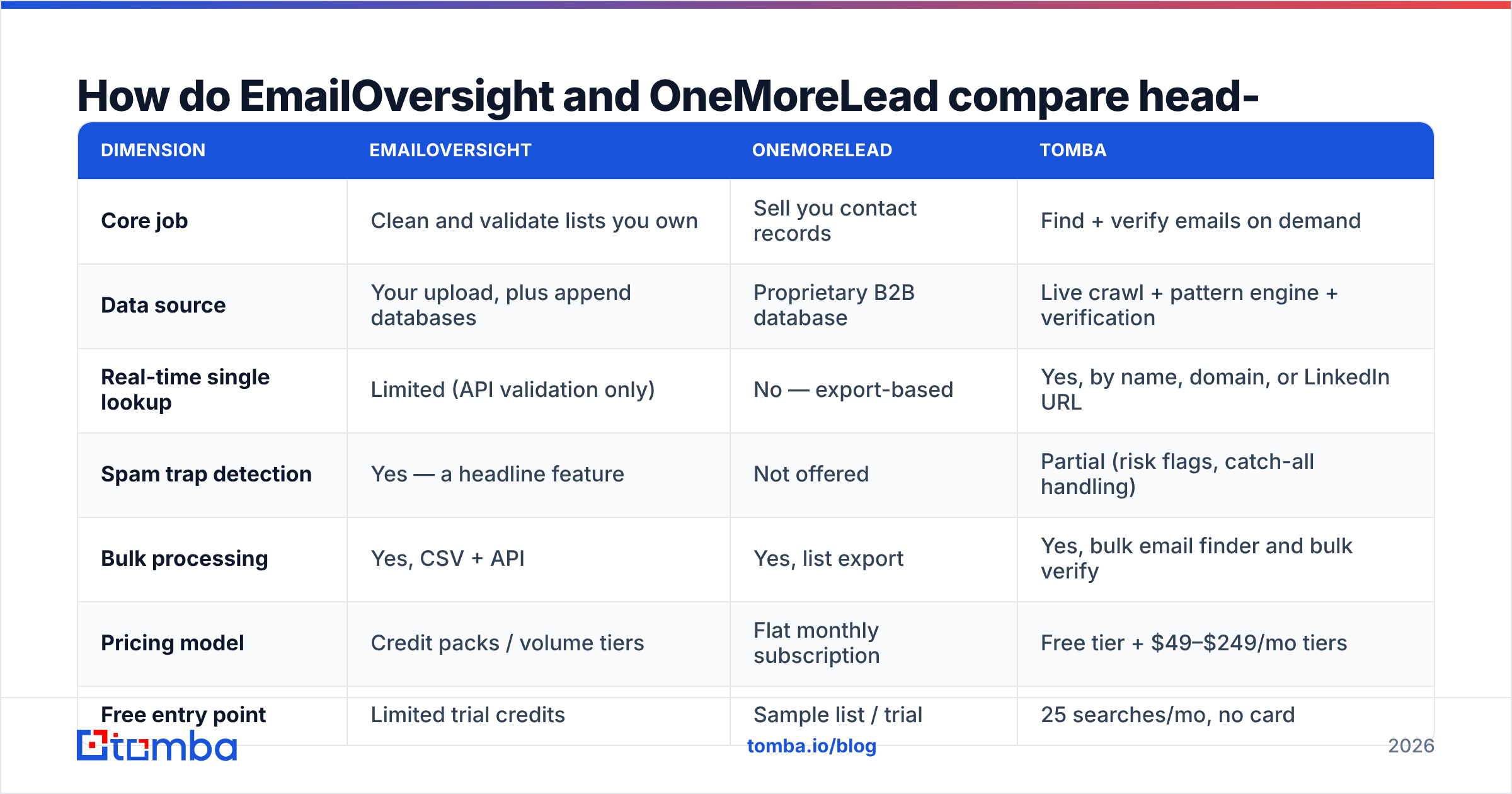
| Dimension | EmailOversight | OneMoreLead | Tomba |
|---|---|---|---|
| Core job | Clean and validate lists you own | Sell you contact records | Find + verify emails on demand |
| Data source | Your upload, plus append databases | Proprietary B2B database | Live crawl + pattern engine + verification |
| Real-time single lookup | Limited (API validation only) | No — export-based | Yes, by name, domain, or LinkedIn URL |
| Spam trap detection | Yes — a headline feature | Not offered | Partial (risk flags, catch-all handling) |
| Bulk processing | Yes, CSV + API | Yes, list export | Yes, bulk email finder and bulk verify |
| Pricing model | Credit packs / volume tiers | Flat monthly subscription | Free tier + $49–$249/mo tiers |
| Free entry point | Limited trial credits | Sample list / trial | 25 searches/mo, no card |
| Best for | Deliverability teams with legacy lists | Cold outbound on a tight budget | SDRs and RevOps building lists continuously |
The pattern here is worth sitting with. These two tools solve sequential problems. OneMoreLead hands you a list. Something like EmailOversight then has to clean it before it's safe to mail. Buying both means paying twice for one outcome: a deliverable, targeted list.
What does EmailOversight actually do well?#
Four things stand out. All four are deliverability-flavored rather than prospecting-flavored:
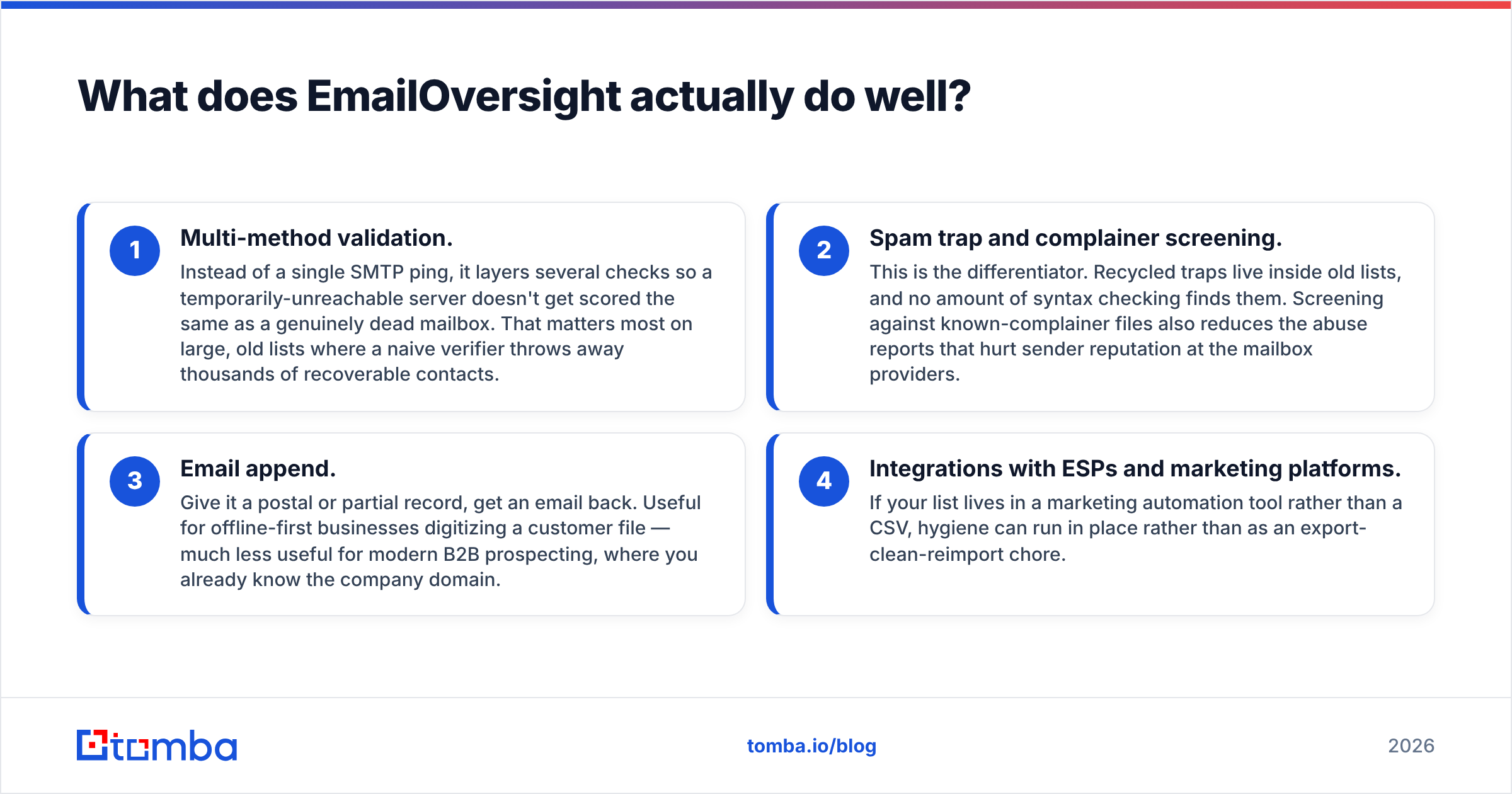
- Multi-method validation. It layers several checks instead of firing a single SMTP ping. A server that is briefly unreachable doesn't get scored like a dead mailbox. That matters most on large, old lists, where a naive verifier throws away thousands of recoverable contacts.
- Spam trap and complainer screening. This is the differentiator. Recycled traps hide inside old lists, and syntax checking never finds them. Screening against known-complainer files also cuts the abuse reports that hurt sender reputation at the mailbox providers.
- Email append. Give it a postal or partial record, get an email back. It's useful for offline-first businesses digitizing a customer file. It's much less useful for modern B2B prospecting, where you already know the company domain.
- Integrations with ESPs and marketing platforms. If your list lives in a marketing automation tool, hygiene can run in place. No export-clean-reimport chore.
Where it falls short: it doesn't generate net-new prospects. If your problem is "I don't know who to email," EmailOversight has nothing for you. It's also priced and packaged for volume hygiene. Small teams verifying a few hundred addresses a month often find the minimums awkward.
What does OneMoreLead actually do well?#
OneMoreLead's appeal is straightforward: cost per contact. A small agency or a founder-led sales team can pull tens of thousands of filtered B2B records for a flat monthly fee. That beats enterprise data pricing for the same volume.
It's also genuinely simple. Filter by industry, title, company size, location. Export. Load into your sequencer. There's no credit math, no API keys, no engineering time. For a team that needs to start sending this week, that's a real advantage.
The trade-off is the one every static database carries: decay. B2B contact data rots at roughly 25–30% per year. People change jobs, companies rebrand, domains migrate.
A record that was accurate eighteen months ago may now bounce. Worse, it may point at a recycled address that has become a trap. That's why nearly every database buyer ends up paying a second vendor for verification — the exact EmailOversight-shaped hole in the workflow.
Independent user reviews on sites like G2 show the same pattern across budget databases. Buyers like the price and the volume. They split on accuracy in specific segments. Read the reviews for your industry, not the aggregate score.
How accurate is each one, really?#
Accuracy means two different things here. Conflating them is the most common buyer mistake.
For EmailOversight, accuracy means classification accuracy. When it says "valid," how often is that address really deliverable? Serious verifiers land in the high-90s on clean test sets. The number to watch is the unknown rate — how many addresses it refuses to classify, usually because of catch-all domains. A verifier that returns 20% unknowns quietly pushes the decision back to you.
For OneMoreLead, accuracy means source accuracy. What share of exported records are current, correctly attributed, and mailable today? That depends on refresh cadence, not verification technology. No amount of SMTP checking fixes a person who left the company in 2024.

Catch-all domains make both models uncomfortable. A catch-all server accepts every address, so a standard SMTP check can't tell a real mailbox from a typo. That's why a dedicated catch-all verifier matters. Roughly a fifth of B2B domains are set up this way. Treating all of them as "risky, don't send" throws away a real slice of your market.
Run a practical test before you buy either tool. Take 200 contacts you already know are good and run them through. Measure three numbers: valid rate, unknown rate, and false-valid rate. For the last one, send a real campaign and count hard bounces. Vendor-published accuracy figures are marketing. Your own 200-row test is evidence.
What do they cost in 2026?#
Both vendors adjust pricing regularly. Treat the shape of the model as the signal, not any specific figure. Check each vendor's current page before you commit.
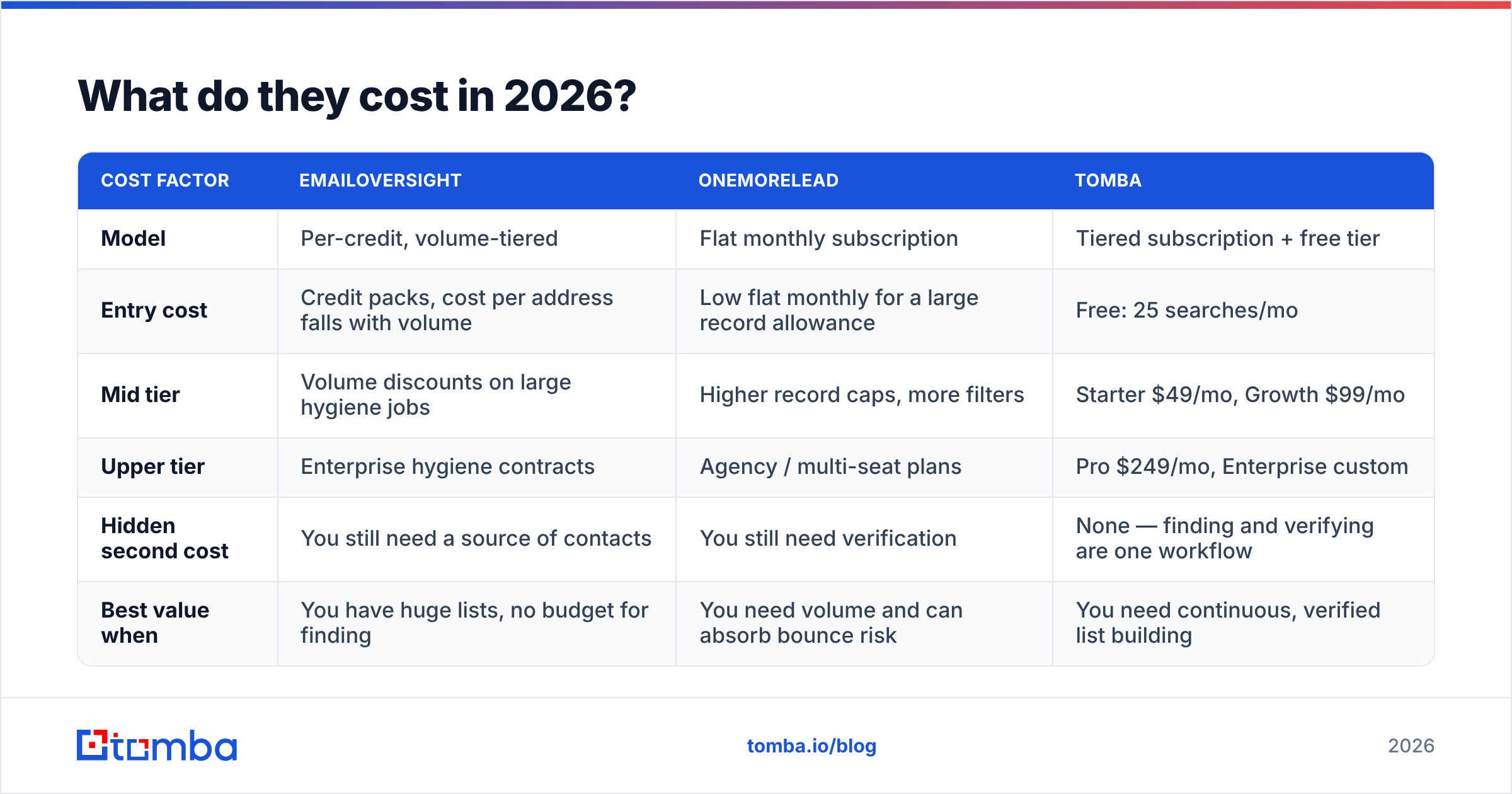
| Cost factor | EmailOversight | OneMoreLead | Tomba |
|---|---|---|---|
| Model | Per-credit, volume-tiered | Flat monthly subscription | Tiered subscription + free tier |
| Entry cost | Credit packs, cost per address falls with volume | Low flat monthly for a large record allowance | Free: 25 searches/mo |
| Mid tier | Volume discounts on large hygiene jobs | Higher record caps, more filters | Starter $49/mo, Growth $99/mo |
| Upper tier | Enterprise hygiene contracts | Agency / multi-seat plans | Pro $249/mo, Enterprise custom |
| Hidden second cost | You still need a source of contacts | You still need verification | None — finding and verifying are one workflow |
| Best value when | You have huge lists, no budget for finding | You need volume and can absorb bounce risk | You need continuous, verified list building |
That "hidden second cost" row is the whole argument. Buy a database, then pay a verifier to clean it, and your real cost per usable contact is the sum of both. It usually runs higher than teams budget for, because verification removes 15–35% of a purchased list before you send a single email.
Compare that against transparent Tomba pricing, where verification is part of the find rather than a separate invoice.

Which one should you pick for your use case?#
- You have a five-year-old CRM with 80,000 contacts and no idea what's live. EmailOversight. This is the exact job it was built for. The spam-trap screening alone justifies the spend before you re-engage a dormant list.
- You're a two-person agency that needs 5,000 targeted contacts by Friday and has $100. OneMoreLead. Accept that you'll need to verify the export, and budget for that.
- You need to find one specific person's email, right now, inside your workflow. Neither. Use a real email finder that takes a name and a domain and returns a verified address in under a second.
- You're building lists continuously as an SDR team. Neither alone. You need the finder-plus-verifier loop running inside your sequencer, CRM, or spreadsheet — not a monthly export-and-clean ritual.
- You're running enrichment on inbound signups. A database lookup plus a data enrichment API beats both. You need a real-time response, not batch processing.
Where does Tomba fit between these two?#
Tomba collapses the two-vendor workflow into one. Give it a domain, and domain search returns the people and email patterns behind it. Give it a name and a company, and it returns a specific address. Every result arrives with a verification status attached. No second tool, no second bill.
That's a different shape from both products here. EmailOversight beats Tomba on pure list hygiene at massive scale and on trap screening. If your only job is cleaning a 2-million-row file, it's the specialist. OneMoreLead is cheaper than Tomba if raw record count is the only metric you care about and you can eat the bounce risk.
Most B2B teams aren't doing either job in isolation. They run a loop: find a target account, identify the right people, get verified contact details, push to CRM, repeat. Tomba's free tier gives 25 searches a month with no card. Starter runs $49/mo, Growth $99/mo, and Pro $249/mo. The same engine powers the Tomba API, a Chrome extension, Google Sheets, and Excel, so it lives where the work already happens.

What's the verdict?#
EmailOversight wins on hygiene depth. OneMoreLead wins on cost per record. Neither wins the job most sales teams actually have.
So the honest answer to EmailOversight vs OneMoreLead depends on which fire you're fighting. Own a large, aging list with a deliverability problem? EmailOversight is the right specialist, and you should buy it without much agonizing. Have no list, no budget, and a deadline? OneMoreLead gets you moving — just don't mail the export raw.
Your problem may be the ongoing one: new accounts every week, new contacts inside them, and a bounce rate you can't let drift above 2%. In that case, one tool that finds and verifies in the same step costs less. It also breaks less often than stitching a database vendor to a hygiene vendor with a spreadsheet in between.
Run the 200-contact test on all three. Measure valid rate, unknown rate, and actual hard bounces on a real send. Whichever tool wins that test on your segment is the right answer, whatever any comparison post says.
Ready to stop paying two vendors for one outcome? Start with the Tomba Email Finder — 25 free searches a month, no credit card, every result verified before it reaches you. Run your next 25 target accounts through it. Then compare the deliverable-contact count against whatever you pay for today. If it doesn't beat your current stack, you've lost ten minutes.
Related guides#
Ready to find emails that actually work?
Join 150,000+ professionals who stopped guessing and started sending. Free credits on signup — no credit card required.
Get the Tomba newsletter
Practical outbound tactics and product updates — once every two weeks.
About the author