EmailOversight vs Zintlr: Which B2B Email Tool Wins in 2026?
EmailOversight cleans and appends lists; Zintlr finds new contacts and reads buyer personality. They solve opposite halves of the same problem — here is which one your outbound stack actually needs.
EmailOversight vs Zintlr is a comparison of two tools that do opposite jobs. One cleans the list you already have. The other builds the list you do not have yet.
TL;DR
- They are not really competitors. EmailOversight is a list-hygiene and data-append platform. Zintlr is a B2B contact database with prospecting and personality-intelligence layers. Buying one and expecting the other's job is the most common mistake here.
- Pick EmailOversight if you already own a large list — CRM exports, form fills, purchased data — and your problem is bounces, spam traps, and missing fields.
- Pick Zintlr if your problem is an empty pipeline and you need net-new contacts, phone numbers, and intent-style context to write a first touch.
- Neither is a full stack on its own. Zintlr users still need independent verification before sending. EmailOversight users still need a source of new contacts.
- If you want find + verify in one bill, a combined provider like Tomba covers discovery, verification, and enrichment through one API and one credit pool starting at $49/mo.
What is EmailOversight and what does it actually do?#
EmailOversight is a data quality platform. Its core product is email verification. It runs each address through several checks — syntax, domain, MX, SMTP — instead of a single SMTP ping. It also flags spam traps and known complainers. Around that sit email append, reverse append, list cleaning, and a live API that checks addresses as people type them into your forms.
The pitch is defensive: keep bad addresses out of your sending tools. That matters more than it used to. Google and Yahoo now hold bulk senders to stricter rules. A spam complaint rate above 0.3% can throttle a whole sending domain. Hard bounces above roughly 2% get an email account flagged fast.
Where EmailOversight stands out is the categories it returns. Most verifiers give you valid, invalid, catch-all, unknown. EmailOversight adds flags like known complainers, litigators, and trap addresses. Those records do not bounce. They quietly poison your sender reputation instead.
What it does not do: it will not build you a prospect list from scratch. Append needs an identifier you already have — a name, a domain, a postal record. No identifier, no output.
What is Zintlr and who is it built for?#
Zintlr sits on the opposite side of the workflow. It is a B2B prospecting database. You get contact records, company details, direct dial numbers, and a browser extension. The extension pulls contacts while you browse LinkedIn or a company site.
Its signature feature is "personality intelligence". Zintlr guesses how a prospect likes to communicate — analytical, driver, expressive, and so on. Reps then tailor tone and pitch. Does that lift your reply rate? Nobody has proved it. The models read public signals, not a real assessment. Even so, no verification vendor offers anything like it.
Zintlr is sold to SDR teams and to founders doing their own outbound. The job it does is offensive: fill an empty list.
Here is the honest split between the two products:
- Direction of data flow. EmailOversight takes a record you already have and improves it. Zintlr hands you a record you did not have.
- Primary buyer. EmailOversight is bought by marketing ops, email marketers, and deliverability owners. Zintlr is bought by sales teams and founders.
- Failure mode when you skip it. Skip EmailOversight and you get bounces, blocklists, and a burned domain. Skip Zintlr and you have nothing to send.
- Depth vs breadth. EmailOversight goes deep on one field, the email address. Zintlr goes broad across many fields: email, phone, title, company, persona.
- Verification stance. Verification is EmailOversight's whole product. For Zintlr it is a feature bolted onto a database. Useful, but not the thing the company is built around.
- Compliance surface. Both handle personal data. Both put the GDPR and CCPA burden on you as the sender. Neither one gives you a lawful basis for outreach.
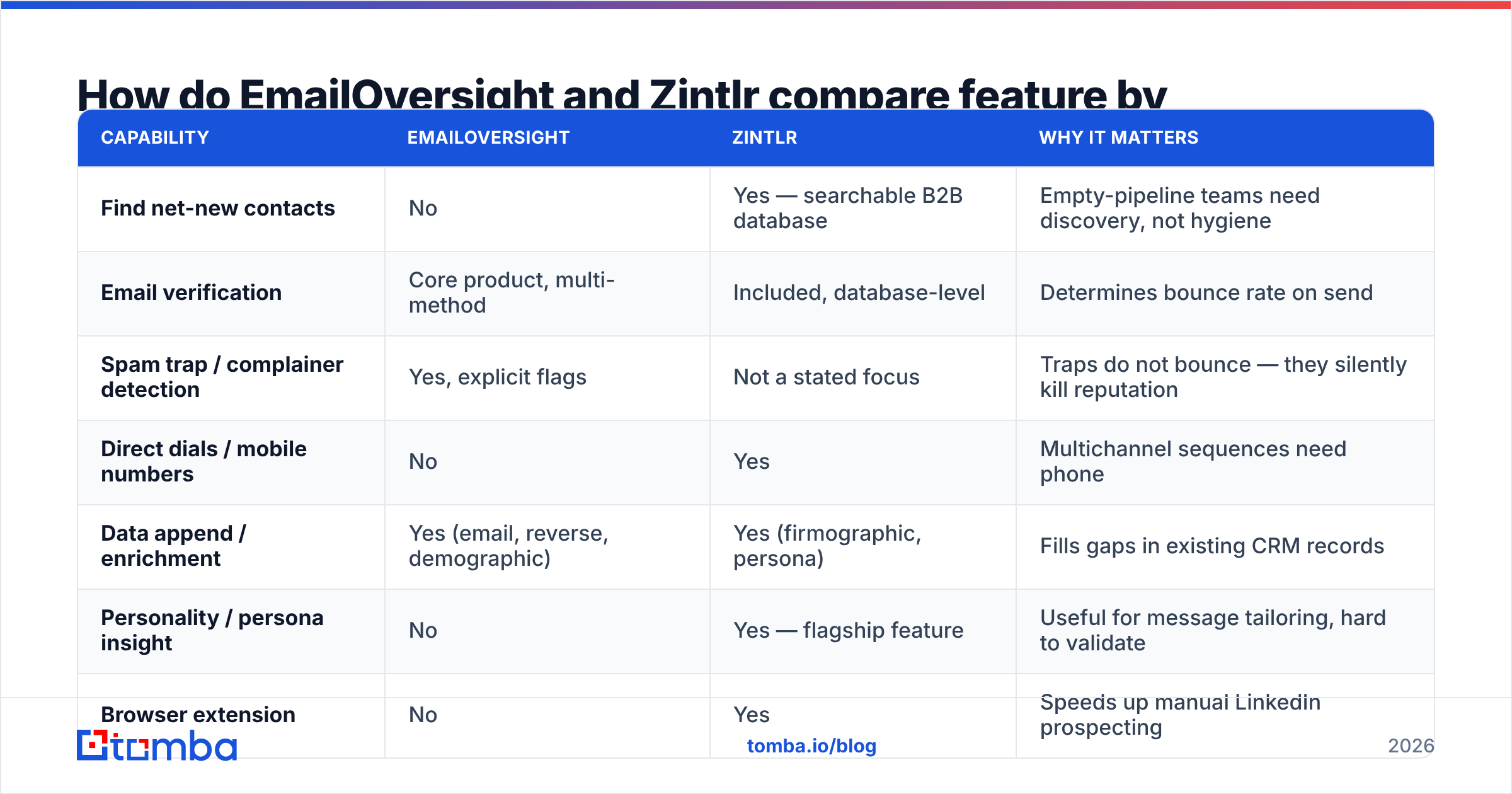
EmailOversight vs Zintlr: how do the features compare?#
| Capability | EmailOversight | Zintlr | Why it matters |
|---|---|---|---|
| Find net-new contacts | No | Yes — searchable B2B database | Empty-pipeline teams need discovery, not hygiene |
| Email verification | Core product, multi-method | Included, database-level | Determines bounce rate on send |
| Spam trap / complainer detection | Yes, explicit flags | Not a stated focus | Traps do not bounce — they silently kill reputation |
| Direct dials / mobile numbers | No | Yes | Multichannel sequences need phone |
| Data append / enrichment | Yes (email, reverse, demographic) | Yes (firmographic, persona) | Fills gaps in existing CRM records |
| Personality / persona insight | No | Yes — flagship feature | Useful for message tailoring, hard to validate |
| Browser extension | No | Yes | Speeds up manual LinkedIn prospecting |
| Real-time API | Yes — form validation | Yes | Blocks junk at point of capture |
| Best-fit team | Email marketing / RevOps | SDR / founder-led sales | Buy for the job you actually have |
The pattern is clear. There is almost no overlap in the columns that matter. Score these two tools on one shared metric and you are measuring the wrong thing.

Which tool gives you better data accuracy?#
The wrong question is "who is more accurate." The right question is "accurate at what."
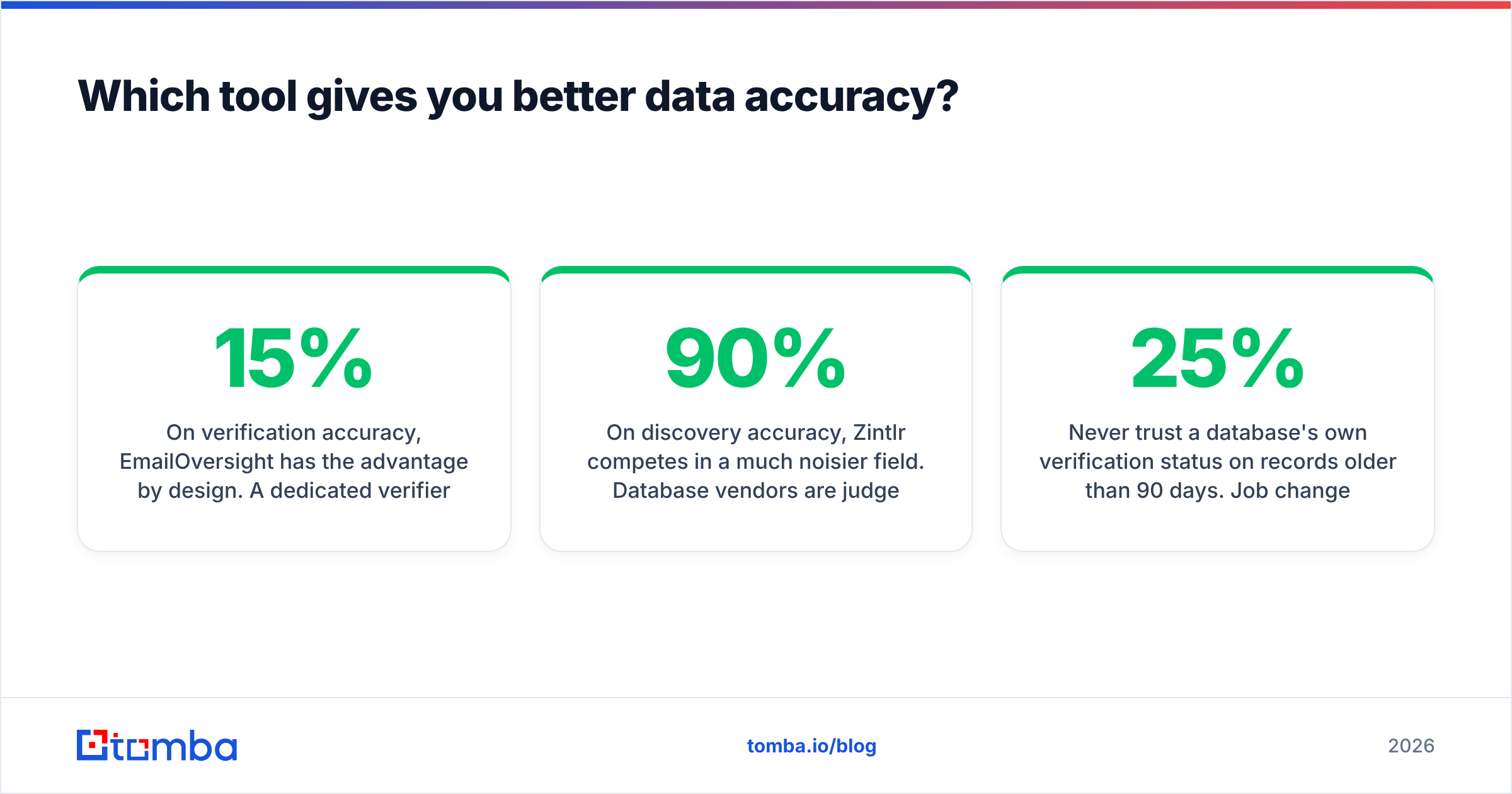
On verification accuracy, EmailOversight has the advantage by design. A dedicated verifier gets paid to be right about one thing: is this address real. Its layered checks catch cases a basic SMTP ping misses. Independent tests show the same shape every time. On clearly good and clearly bad addresses, every serious vendor scores well. The gap opens on the hard 10–15%: catch-all domains, role accounts, aged records, and traps. That is where a purpose-built verifier earns its price.
On discovery accuracy, Zintlr competes in a much noisier field. Database vendors are judged on two numbers, and those numbers pull against each other. Coverage is how much of your target list comes back with a contact. Precision is how much of that comes back deliverable. Vendors advertise the first. They stay quiet about the second. A 90% hit rate at 70% deliverability is worse than a 60% hit rate at 96% deliverability. You just do not find out until your bounce report lands.

Two practical rules apply no matter which vendor you sign with:
- Never trust a database's own verification status on records older than 90 days. Roughly 20–25% of B2B contacts change jobs each year. A record verified in January is a coin flip by autumn.
- Always run a second, independent verification pass before a cold send. If your finder and your verifier are the same engine, you are grading your own homework. Running a separate email verifier over a bought or scraped list is the cheapest insurance in outbound.
EmailOversight vs Zintlr pricing: what does each one cost?#
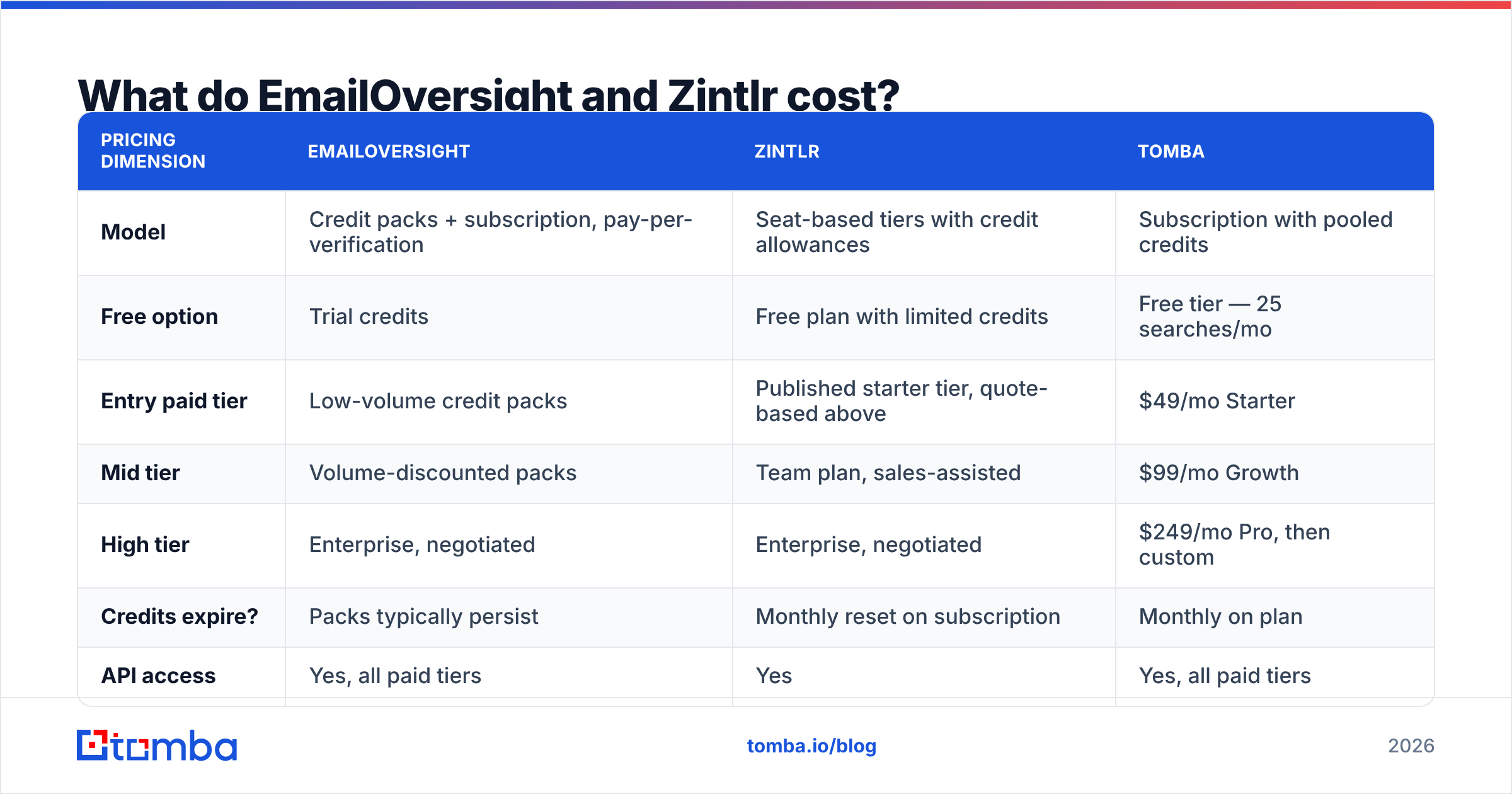
Both vendors move their pricing around. Both hide the higher tiers behind a sales call. So read the table below as the shape of each model, then confirm the numbers on the vendor's own page before you budget.
| Pricing dimension | EmailOversight | Zintlr | Tomba |
|---|---|---|---|
| Model | Credit packs + subscription, pay-per-verification | Seat-based tiers with credit allowances | Subscription with pooled credits |
| Free option | Trial credits | Free plan with limited credits | Free tier — 25 searches/mo |
| Entry paid tier | Low-volume credit packs | Published starter tier, quote-based above | $49/mo Starter |
| Mid tier | Volume-discounted packs | Team plan, sales-assisted | $99/mo Growth |
| High tier | Enterprise, negotiated | Enterprise, negotiated | $249/mo Pro, then custom |
| Credits expire? | Packs typically persist | Monthly reset on subscription | Monthly on plan |
| API access | Yes, all paid tiers | Yes | Yes, all paid tiers |
The economics differ in one important way. Verification costs you per record, so the bill tracks your list size. Clean a 500k list and you pay for 500k checks. Prospecting databases charge for access plus a credit ceiling. Heavy users hit a wall. Light users pay for shelf space they never touch.
Do the math on your own volume before you compare headline prices. A team that pulls 2,000 new contacts a month and verifies 40,000 CRM records lands nowhere near a team that pulls 20,000 contacts and verifies none. Compare the Tomba pricing tiers on the same basis: cost per usable, deliverable contact, not cost per credit.
Should you use EmailOversight or Zintlr for cold outreach?#
If cold outbound is the goal, here is the decision in plain terms.
Choose Zintlr when:
- You have no list and no first-party data to append against.
- Your motion is multichannel and you need phone numbers alongside email.
- Reps prospect by hand inside LinkedIn, so a browser extension saves real time.
- You want persona context to shape the first line of a message.
Choose EmailOversight when:
- You already have volume — years of CRM records, event lists, inbound signups.
- Bounce rate, complaint rate, or a blocklist incident is the current fire.
- You capture emails on web forms and want junk rejected at the door.
- Compliance or ESP pressure requires documented list hygiene.
Choose both when you run serious volume and can justify two line items: Zintlr for acquisition, EmailOversight as the quality gate before send.
Choose one combined provider when the overhead of two vendors costs more than it saves. Two contracts, two credit systems, two APIs, and two support queues eat engineering time. That is the case for most teams under 20 reps.
Where does Tomba fit in this comparison?#
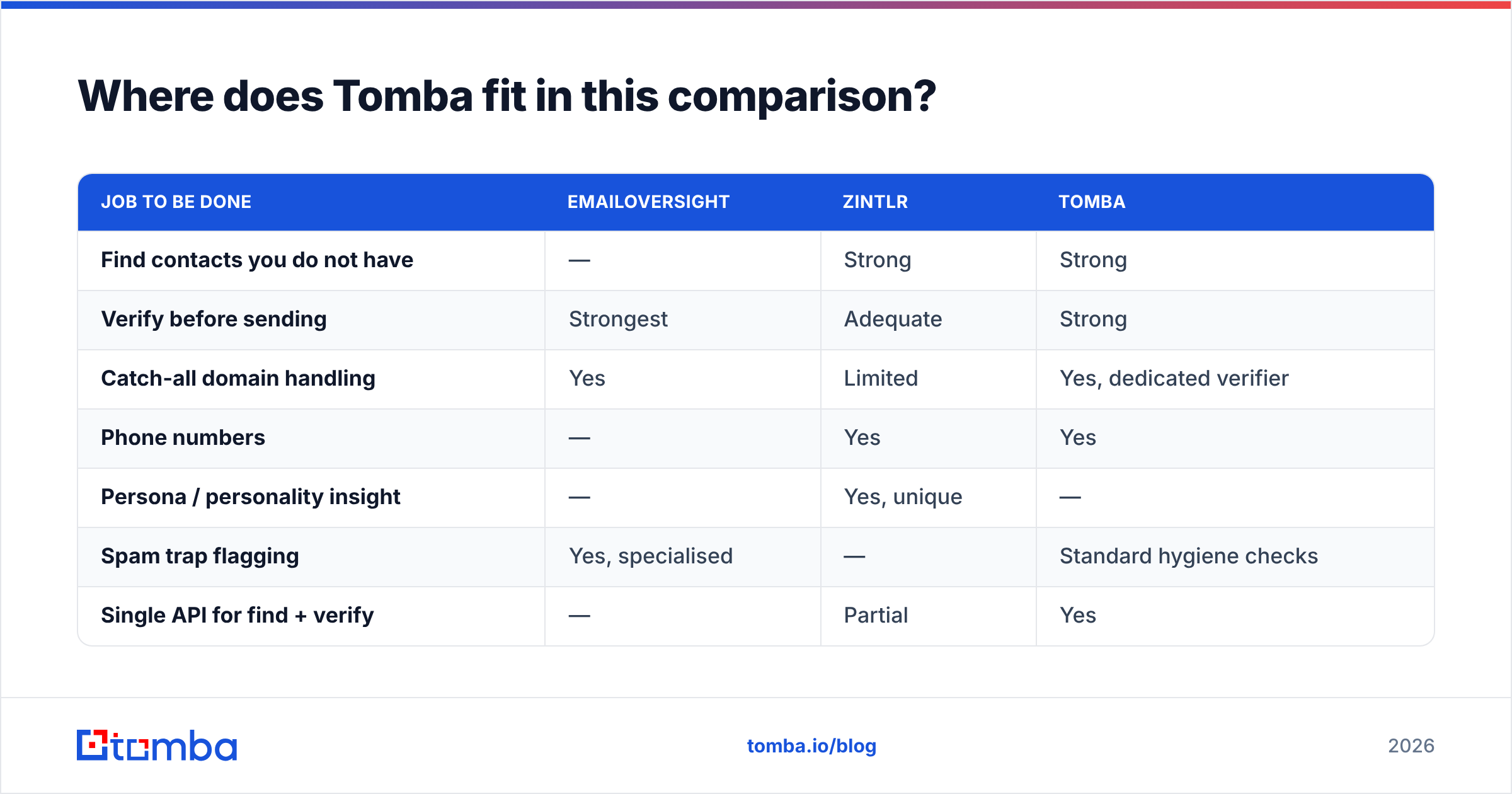
Tomba sits in the middle on purpose: discovery and verification in one system, priced as one subscription.
The email finder turns a name and a domain into a work email address. It returns a confidence score and the sources behind it. Domain search sweeps a company for every published address and spots the pattern in use. Verification runs on the same platform. You never export a CSV to a second vendor and re-import the results. Around that sit data enrichment, a catch-all verifier for the domains most tools return as "unknown", and a phone finder for multichannel plays.
| Job to be done | EmailOversight | Zintlr | Tomba |
|---|---|---|---|
| Find contacts you do not have | — | Strong | Strong |
| Verify before sending | Strongest | Adequate | Strong |
| Catch-all domain handling | Yes | Limited | Yes, dedicated verifier |
| Phone numbers | — | Yes | Yes |
| Persona / personality insight | — | Yes, unique | — |
| Spam trap flagging | Yes, specialised | — | Standard hygiene checks |
| Single API for find + verify | — | Partial | Yes |
| Free entry point | Trial | Free plan | 25 searches/mo, no card |
Read that honestly. EmailOversight wins on verification depth. Say your whole job is protecting a high-volume sending program, and you have the budget for a specialist. Then a dedicated hygiene vendor with trap and complainer data is the stronger tool. Zintlr wins on persona insight. No email-finder vendor, Tomba included, offers a comparable communication-style layer.
Tomba wins on consolidation: one credit pool, one API, one bill for the find-and-verify loop most outbound teams run every day.

How should you actually test these tools?#
Do not judge either tool on a demo list. Vendors tune those for the easy domains. Run this instead:
- Build a 200-record truth set from your own closed-won and closed-lost accounts, where you already know the right address.
- Run the same 200 through each vendor with identical inputs — same names, same domains, same day.
- Score coverage and precision separately. Coverage is how many came back with something. Precision is how many of those match your known-good value.
- Send a throwaway warm-up campaign to the results from a subdomain you can afford to burn. Record the real bounce rate. That number is the only one that matters.
- Log cost per verified, deliverable contact. Not per credit. Not per seat. This is the number to put in the budget request.
Most teams find that the vendor with the best marketing page is not the vendor with the best precision on their segment. A tool can dominate on US SaaS mid-market and still collapse on European manufacturing or on companies under 20 employees. There is no universal winner. There is only a winner for your target market.

Want a wider view? Cross-check the vendor reviews on G2 before you sign an annual contract. Buyers there rate each platform on support, ease of use, and data quality. Weight the reviews from companies your size, and discount anything older than a year.
Frequently asked questions#
Is Zintlr a replacement for a dedicated email verifier? No. Its verification is a database feature, not a hygiene product. If you send at volume, keep an independent verification pass in the workflow — from EmailOversight, Tomba, or another specialist.
Can EmailOversight build a prospect list? Not from nothing. Append needs an identifier you already hold. If your list is empty, you need a discovery tool first.
Which is cheaper? That depends on your ratio of new contacts to existing records. High-volume list cleaning favours per-record verification pricing. Heavy prospecting favours a subscription with a generous credit allowance.
Do I need all three tools? Rarely. Most teams under 20 reps get further by putting find and verify with one provider. Add a specialist only when a specific problem — trap-heavy lists, persona-driven messaging — justifies the second contract.
The bottom line#
The EmailOversight vs Zintlr choice is not a head-to-head at all. They answer different questions. One protects a sending program you already run. The other builds the list you do not have. Comparing them on a single score is a category error. Buy for the job in front of you.
If the job is the everyday one — find the right person at the right company, confirm the address is real, and send without torching your domain — start with the Tomba Email Finder. The free tier gives you 25 searches a month with no card. That is enough to run the 200-record truth-set test above against your own accounts before you spend a cent. Paid plans start at $49/mo with find, verify, and enrich on one credit pool and one API key.
Related guides#
Ready to find emails that actually work?
Join 150,000+ professionals who stopped guessing and started sending. Free credits on signup — no credit card required.
Get the Tomba newsletter
Practical outbound tactics and product updates — once every two weeks.
About the author