EmailValidation.io vs LeadIQ: Which One Do You Actually Need?
EmailValidation.io verifies addresses you already have. LeadIQ finds contacts you don't. Here's how the two compare on pricing, accuracy, API limits, and which one your outbound stack actually needs first.
EmailValidation.io vs LeadIQ is a common search, but it is not a fair fight. One tool cleans the emails you own. The other finds emails you do not have yet.
TL;DR
- EmailValidation.io and LeadIQ are not rivals. One grades addresses you already hold. The other sources new contacts.
- Pick EmailValidation.io if your problem is bounces. It is a cheap, fast API check for lists, forms, and stale CRM data.
- Pick LeadIQ if your problem is pipeline. Your reps work in LinkedIn Sales Navigator and push contacts into Salesforce, Outreach, or Salesloft.
- Costs run in opposite ways. Email checks are priced per address and get cheap in bulk. LeadIQ charges per seat, so cost tracks headcount.
- Most teams buy both. That is why one tool that finds and checks is often the cheaper third option.
What problem does each tool actually solve?#
Think of your outbound list as a wedding guest list. LeadIQ helps you decide who to invite. It pulls names, titles, and companies from a room you cannot see. EmailValidation.io is the postal worker. It tells you which addresses will get a letter before you pay for stamps.
Mixing the two costs money. Some teams buy an email checker and wonder why the pipeline is empty. Others buy a sales tool, blast the list, and watch their domain reputation drop. Nobody checked if half those mailboxes still work.
EmailValidation.io (emailvalidation.io) is a developer-first email checker. You send an address. It returns a clear verdict: valid format, MX records, SMTP result, throwaway domain, role account, free provider, and a score. There is a REST API, a bulk upload path, and a free tier. It does not find anything. It grades.
LeadIQ (leadiq.com) is a B2B contact data platform. The core tool is a Chrome extension. A rep opens a LinkedIn profile, clicks capture, and LeadIQ pushes the contact into the CRM. You get a work email and often a mobile number. It adds Scribe, an AI writing helper, and it tracks job changes. It does light checks, but checking is not the product.
So the honest way to frame EmailValidation.io vs LeadIQ is simple. Which half of the problem is bleeding you right now?

EmailValidation.io vs LeadIQ: how do they compare?#
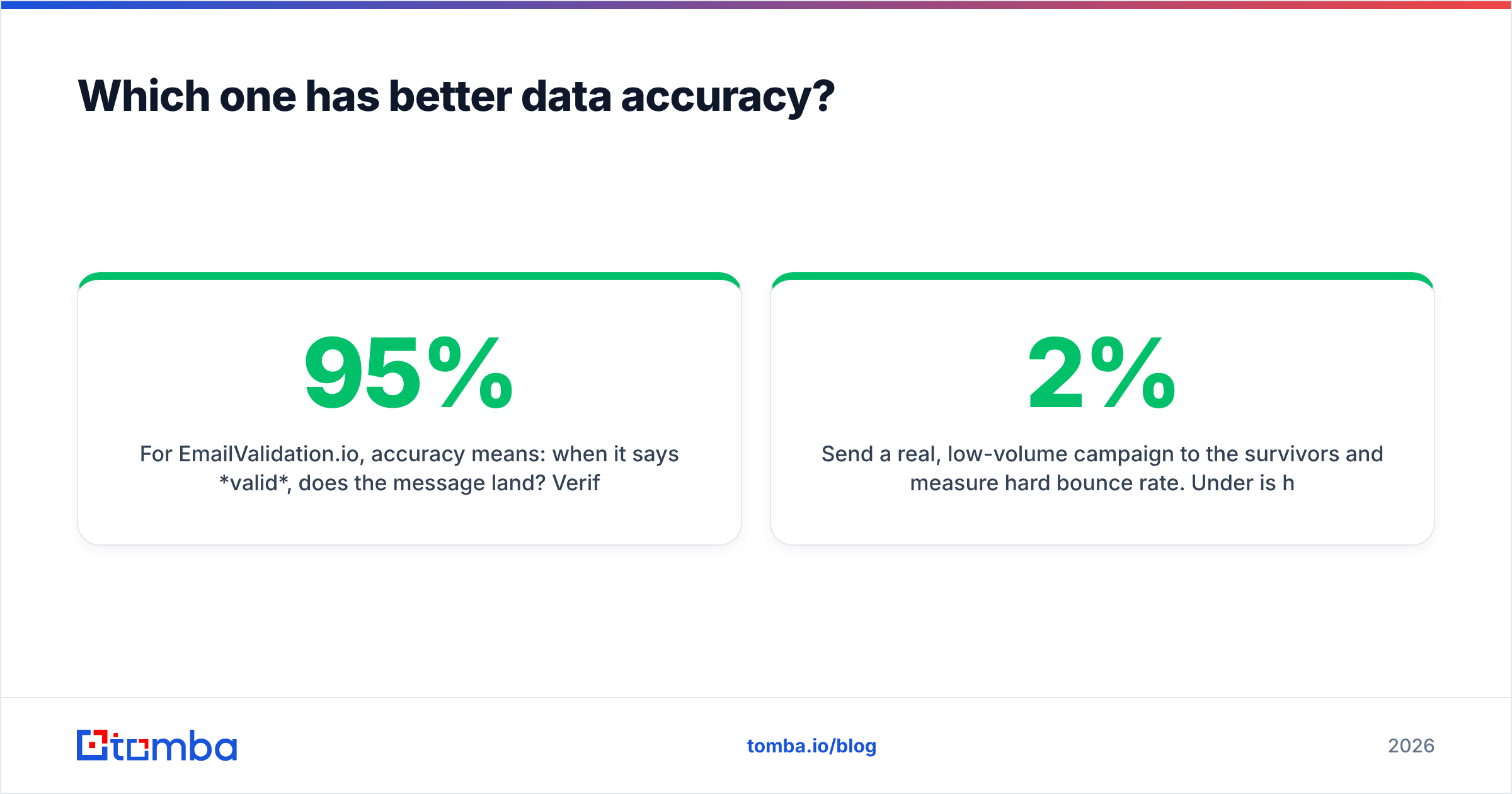
| Dimension | EmailValidation.io | LeadIQ | Tomba |
|---|---|---|---|
| Main job | Checks emails you own | Finds new contacts | Finds and checks |
| Finds new emails | No | Yes | Yes |
| Phone numbers | No | Yes | Yes |
| Check depth | Syntax, MX, SMTP, role | Light checks on new data | Syntax, MX, SMTP, catch-all |
| How you use it | API, bulk upload | Extension, web app, CRM sync | API, extension, Sheets, bulk |
| Pricing shape | Per address | Per seat plus credits | Per credit, flat plans |
| Free tier | Yes | Yes | Yes, 25 searches |
| Entry plan | Low tens per month | About $39 to $75 per user | $49/mo Starter |
| Best for | Forms, list cleanup | SDR teams on LinkedIn | Teams that need both |
| Weak spot | Finds nothing | Cost tracks headcount | Fewer sequencer tools |
Vendor pricing shifts often. Treat these numbers as a starting point. Check the live pricing page and recent G2 reviews before you sign an annual deal.
Which one has better data accuracy?#
They measure different things. So "accuracy" means two numbers here, not one.
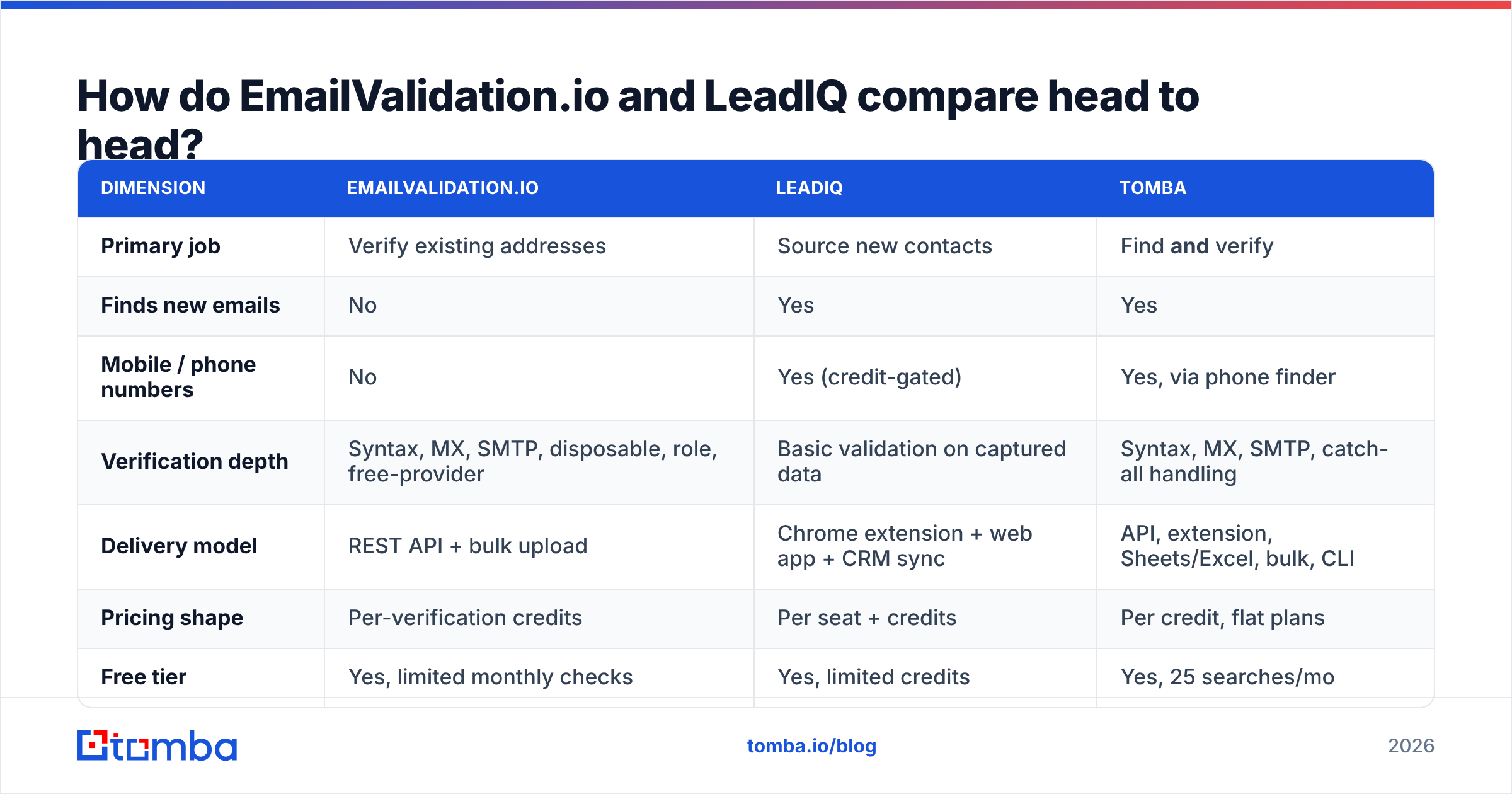
For EmailValidation.io, accuracy asks one question. When it says valid, does the mail land? Tools in this class get standard mailboxes right about 95% of the time. The failures are structural, not vendor flaws:
- Catch-all domains. The server accepts every address, so no tool can prove one mailbox exists. You get an "accept-all" verdict. A catch-all verifier narrows the guess with pattern data instead.
- Rate limits. Microsoft 365 and Google Workspace throttle heavy SMTP probing. Tools that push too hard get blocked and start returning unknowns.
- Staff who just left. The mailbox still accepts mail for 30 to 90 days. Valid, but dead in practice.
- Aliases.
sales@accepts mail, but it lands in a shared inbox nobody reads. Role flags help. They do not fix intent.
For LeadIQ, accuracy asks a different question. Is this the right person's current work email? Contact tools are graded on coverage and on precision. Coverage is how much of your list returns anything. Precision is how much of that is correct. Every vendor quotes both. None quote them the same way. The only number that counts comes from your own test list.
The real test takes an afternoon:
- Build a 100-row control list from your true ICP. Mix company sizes and regions.
- Run it through each tool. Record the hit rate, not just "it returned something."
- Check every address with a neutral third party. Do not grade a vendor with its own answer key.
- Send a small, real campaign to the survivors. Watch the hard bounce rate. Under 2% is healthy. Over 5% is a problem.
Only that last step gives you a number you can defend. The rest is a proxy. For quick spot checks, the free email checker handles one address at a time.
Is LeadIQ worth the seat pricing?#
It depends on one thing. Do your reps live in LinkedIn?
LeadIQ charges per seat and adds credits on top. Public plans start near $39 to $75 per user each month on annual billing. A top plan adds CRM sync, record enrichment, and job-change tracking. There is a free plan for testing.
The math works when:
- You have five or more full-time SDRs who source in Sales Navigator.
- You run Outreach, Salesloft, or Salesforce and want capture to sequence in two clicks.
- Mobile numbers change your motion. You really call and email, not just tick a box.
- Job-change alerts drive real plays. A champion who moves accounts is a strong trigger.
The math breaks when:
- Half your seats are managers who prospect twice a quarter. They still cost a full seat.
- You source by company, not by person. You know the 400 firms you want and need every role, which is a domain search job.
- You need data inside a product or a workflow. Seat-priced, extension-first tools make poor API backbones.
That last point traps a lot of RevOps teams. You buy LeadIQ for the reps. Then marketing needs form enrichment and product needs a lookup endpoint. Neither one fits a per-seat license. Now you price a second contract.

What does a complete stack actually cost?#
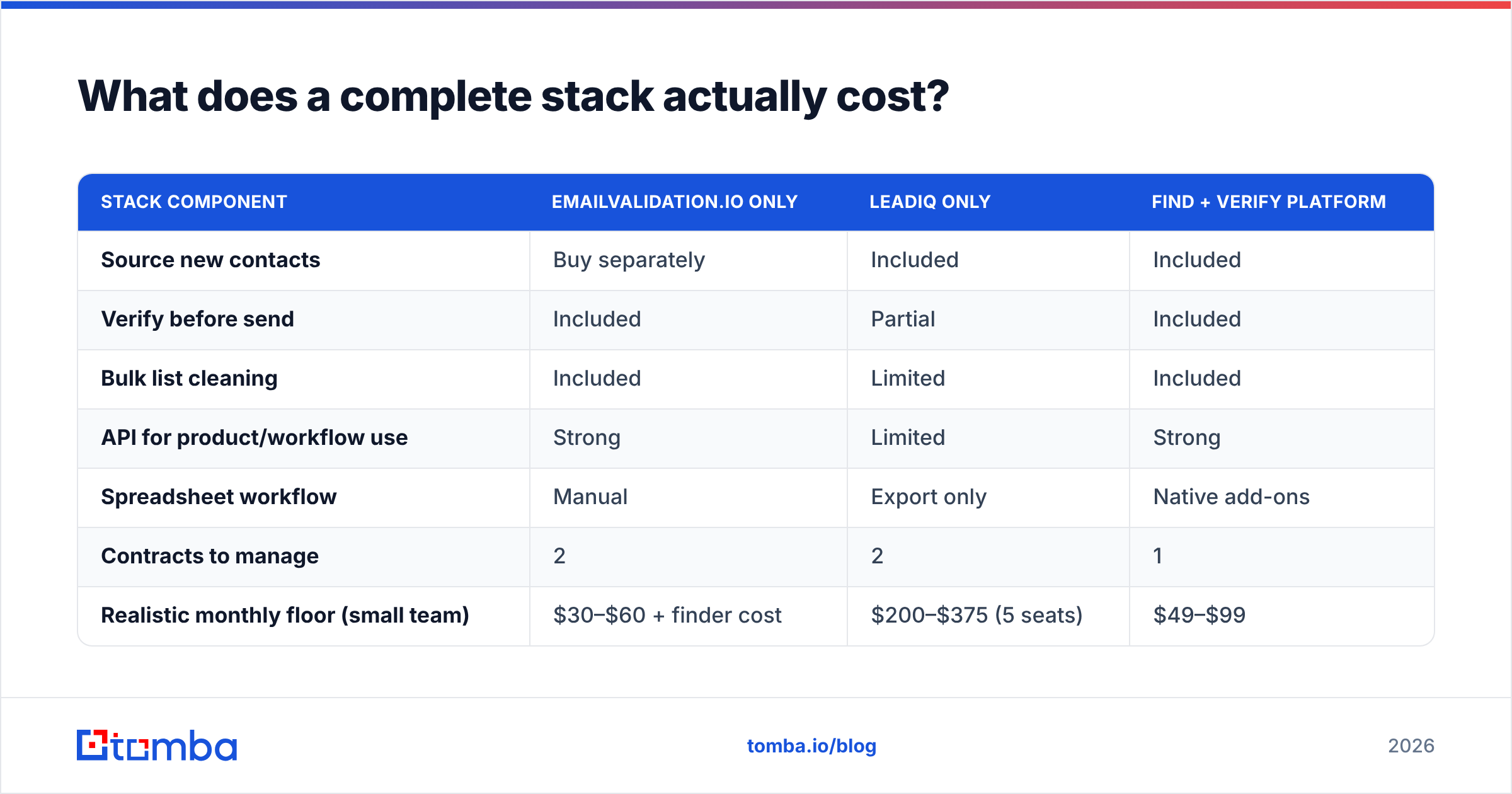
Here is the part the charts leave out. Neither tool alone takes you from empty CRM to booked meeting.
| Stack need | EmailValidation.io only | LeadIQ only | Find and check tool |
|---|---|---|---|
| Source new contacts | Buy it apart | Included | Included |
| Check before you send | Included | Partial | Included |
| Bulk list cleanup | Included | Limited | Included |
| API for your product | Strong | Limited | Strong |
| Spreadsheet workflow | Manual | Export only | Native add-ons |
| Contracts to manage | 2 | 2 | 1 |
| Monthly floor, small team | $30 to $60 plus finder | $200 to $375 for 5 seats | $49 to $99 |
The two-tool path is not wrong. Plenty of mature teams pair a sales platform with a dedicated checking API. At high volume, that focus pays off. But under about ten reps, you pay a tax. Two vendors. Two bills. Two support queues. One manual export step that someone forgets on a Friday.
This is where one tool earns its keep. Tomba pricing starts free at 25 searches a month. Starter is $49/mo, Growth is $99/mo, and Pro is $249/mo. The email finder, email verifier, domain search, catch-all handling, and phone lookup share one credit pool. One contract covers both jobs. The Tomba API serves your reps, your forms, and your product.
To be fair, one tool is not a sequencer. If your team lives in LinkedIn and needs one-click push into Outreach with mobile numbers, LeadIQ's extension is the better rep experience. Buy the workflow you will actually use.
EmailValidation.io vs LeadIQ: how should you choose?#
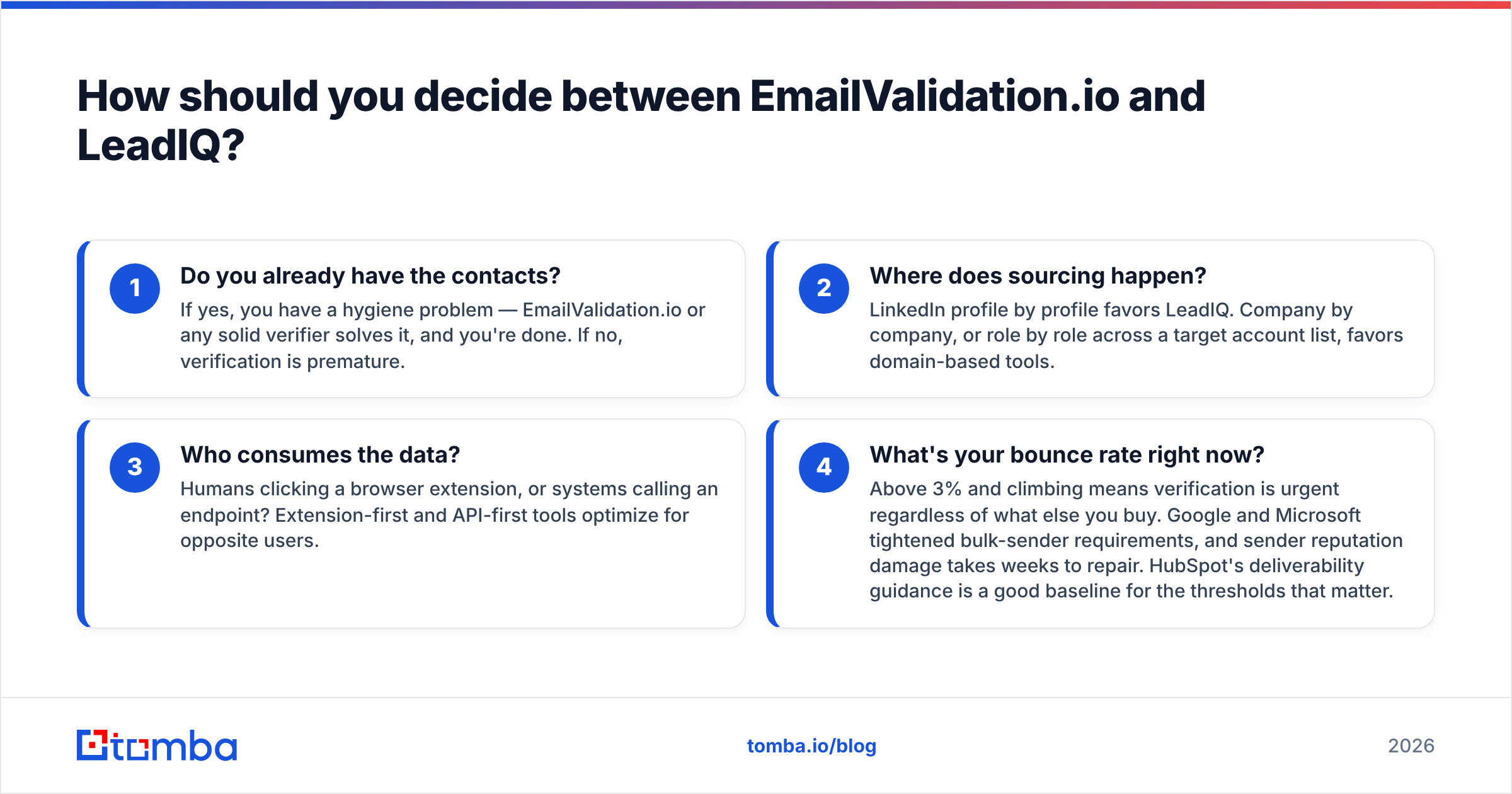
Answer four questions in order. The choice makes itself.
- Do you already have the contacts? If yes, you have a hygiene problem, and any solid checker fixes it. If no, checking is early.
- Where does sourcing happen? Profile by profile favors LeadIQ. Company by company favors domain tools.
- Who uses the data? People clicking an extension, or systems calling an endpoint? The two tool types serve opposite users.
- What is your bounce rate today? Above 3% and rising means checking is urgent. Google and Microsoft tightened bulk sender rules, and sender reputation takes weeks to repair. HubSpot's deliverability guidance sets a good baseline.
Run one more test before you commit. Check your hard accounts, not the easy ones. Everyone finds contacts at a 5,000-person SaaS firm. The real test is a 40-person maker in a small market. Run twenty of those through each free tier. It is the fastest signal you can get, and it costs nothing.
The bottom line#
EmailValidation.io is a good email checker. LeadIQ is a good prospecting tool for LinkedIn-first SDR teams. They complete each other. Framing EmailValidation.io vs LeadIQ as a duel usually means you have not yet named the problem that costs you meetings.
If you are building a stack and do not want two contracts for one job, start with the Tomba Email Finder. Find the address. Check it in the same pass. Push it where it needs to go. Spend the rest on the campaign. The free tier gives you 25 searches to test on your own list. That is the only benchmark that ever mattered.
Related guides#
Ready to find emails that actually work?
Join 150,000+ professionals who stopped guessing and started sending. Free credits on signup — no credit card required.
Get the Tomba newsletter
Practical outbound tactics and product updates — once every two weeks.
About the author