EngageBay Pricing 2026: Reviews, Pros and Cons Explained
EngageBay sells an all-in-one CRM at a fraction of HubSpot's price. Here is what the tiers actually cost per seat, what reviewers complain about, and when a leaner stack beats the bundle.
TL;DR
- EngageBay is an all-in-one CRM, marketing automation, and helpdesk suite priced per user, per month — roughly $13 (Basic), $60 (Growth), and $110 (Pro) at monthly billing, with steep discounts for annual and biennial commitments.
- The free plan is unusually generous for a CRM (multiple users, basic email marketing, live chat), which is why EngageBay wins so many "HubSpot is too expensive" searches.
- Reviews are consistently positive on price and support, and consistently critical on UI polish, email template editing, reporting depth, and integration coverage.
- The real cost trap is not the sticker price — it is contact-count tiers inside each plan and the per-seat multiplier once your team passes five people.
- EngageBay does not give you contact data. You still need a source of verified work emails and phone numbers, which is where a dedicated email finder sits alongside it rather than inside it.
What is EngageBay, and who is it actually for?#
EngageBay is a bundled go-to-market suite: CRM and deal pipelines, email marketing and automation, landing pages and forms, live chat, and a ticketing helpdesk — sold as one subscription instead of four. The company positions itself explicitly as the affordable alternative to HubSpot, and the official product pages lean hard into that comparison.
The buyer profile is narrow and consistent: a team of 2 to 25 people that needs marketing automation and a CRM to talk to each other, has no RevOps hire, and cannot justify four-figure monthly software bills. Agencies, bootstrapped SaaS, professional services firms, and small e-commerce operators dominate the reviewer base on G2.
Who it is not for: enterprise sales orgs with complex territory rules, teams that live in a specific CRM ecosystem already, and anyone whose primary bottleneck is data acquisition rather than data organisation. EngageBay is a container. It does not fill itself.
You can split the suite into three "bays" and buy only what you need:
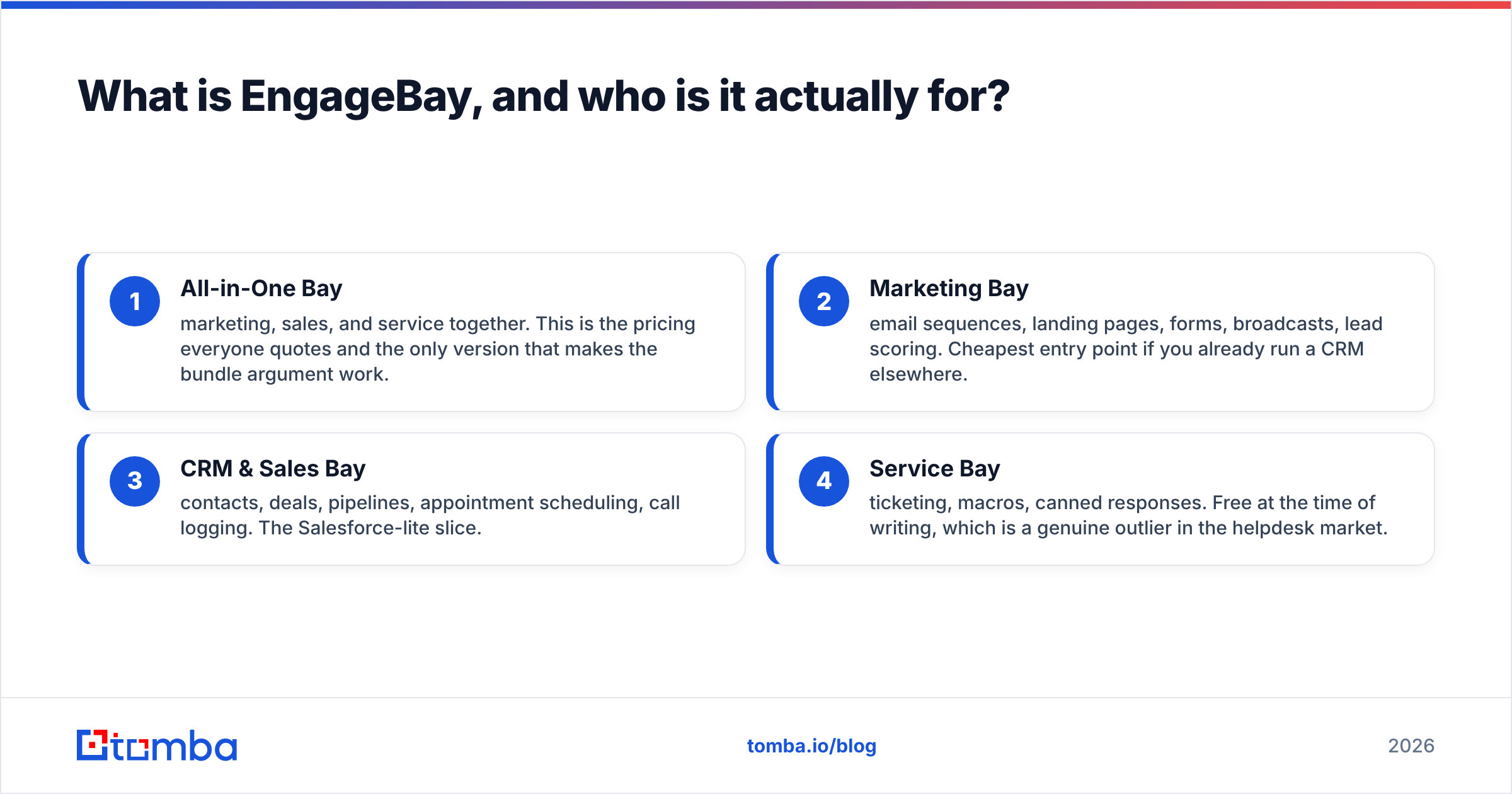
- All-in-One Bay — marketing, sales, and service together. This is the pricing everyone quotes and the only version that makes the bundle argument work.
- Marketing Bay — email sequences, landing pages, forms, broadcasts, lead scoring. Cheapest entry point if you already run a CRM elsewhere.
- CRM & Sales Bay — contacts, deals, pipelines, appointment scheduling, call logging. The Salesforce-lite slice.
- Service Bay — ticketing, macros, canned responses. Free at the time of writing, which is a genuine outlier in the helpdesk market.

How much does EngageBay pricing actually cost in 2026?#
Short answer: between $0 and roughly $110 per user per month, and the spread inside that range is driven by billing commitment more than by feature tier.
EngageBay lists three paid tiers on the All-in-One plan plus a free tier. Prices below reflect published list rates at the time of writing — vendors move these, so verify against the live pricing page before you budget.
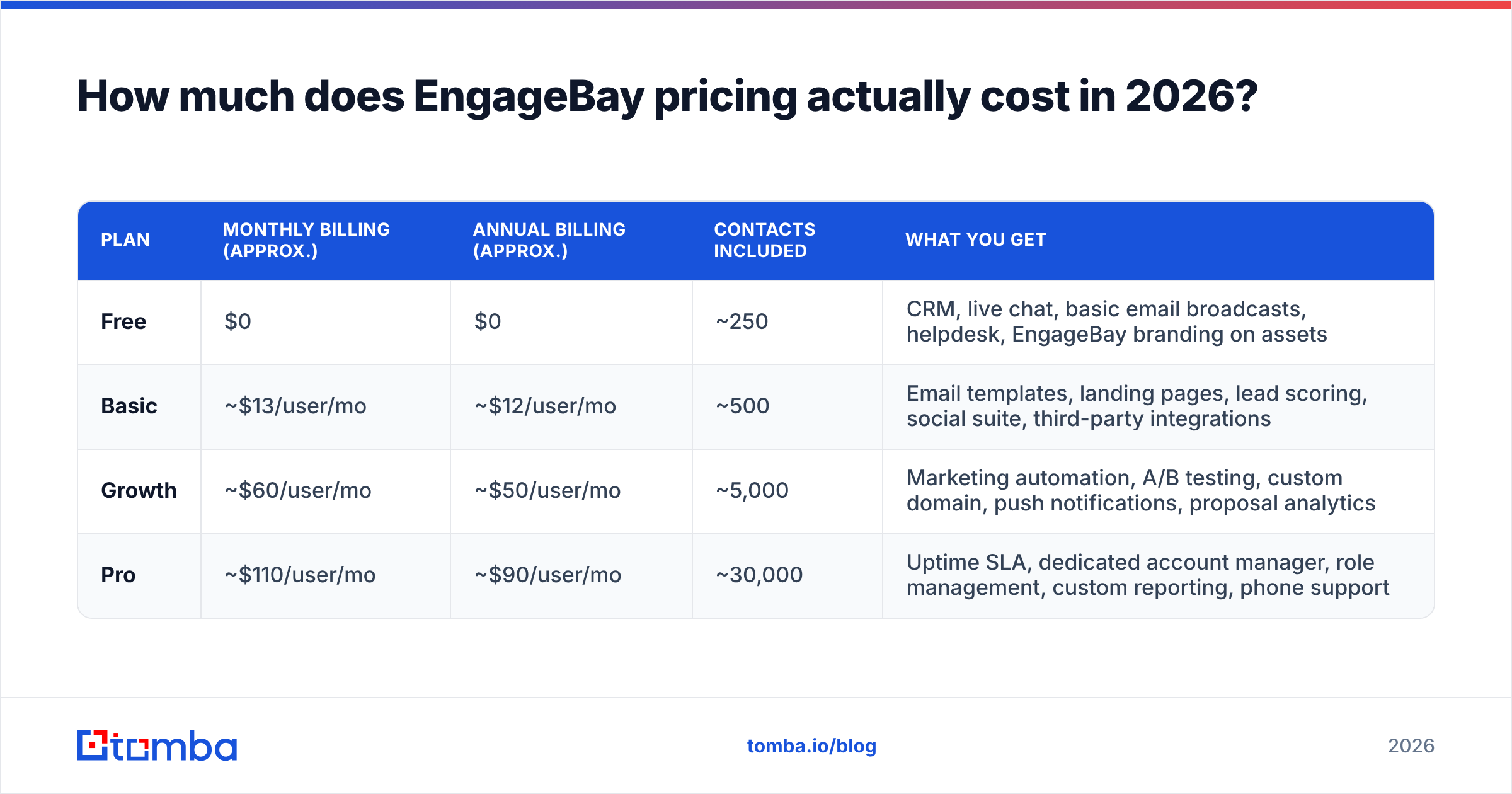
| Plan | Monthly billing (approx.) | Annual billing (approx.) | Contacts included | What you get |
|---|---|---|---|---|
| Free | $0 | $0 | ~250 | CRM, live chat, basic email broadcasts, helpdesk, EngageBay branding on assets |
| Basic | ~$13/user/mo | ~$12/user/mo | ~500 | Email templates, landing pages, lead scoring, social suite, third-party integrations |
| Growth | ~$60/user/mo | ~$50/user/mo | ~5,000 | Marketing automation, A/B testing, custom domain, push notifications, proposal analytics |
| Pro | ~$110/user/mo | ~$90/user/mo | ~30,000 | Uptime SLA, dedicated account manager, role management, custom reporting, phone support |
Three things that table hides, and that show up in every honest EngageBay review:
Contacts, not seats, are the real ceiling. Each tier bundles a contact allowance. Cross it and you either upgrade the tier or buy a contact add-on — and a marketing database grows faster than a headcount does. A four-person team on Basic can blow past 500 contacts in a single trade-show import.
Biennial billing is where the headline discounts live. EngageBay pushes a two-year prepay that can shave 25–30% off the annual rate. That is real money, and it is also a two-year bet on a product you have used for a week.
Per-user pricing compounds. At Growth, five seats is roughly $250–$300/month. Ten seats is $500–$600. The "cheaper than HubSpot" argument is strongest at three seats and weakest at fifteen.
What do EngageBay reviews say about the pros and cons?#
The review corpus on G2 and Capterra is unusually consistent, which makes it easy to summarise honestly.
What reviewers praise#
- Price-to-feature ratio. This is the single most repeated line. Teams migrating off HubSpot Marketing Hub or Mailchimp + Pipedrive report cutting their stack cost by 50–80%.
- Human support. Live chat and email support get named positively far more often than is typical for a low-cost SaaS. Several reviewers mention onboarding calls included at tiers where competitors charge for them.
- Breadth on the free plan. Multiple users, a working CRM, and a helpdesk at $0 is more than most freemium CRMs allow.
- Speed to first campaign. The automation builder is simple enough that a non-technical marketer can ship a three-step nurture sequence the same day.
What reviewers criticise#
- UI feels dated. Recurring complaint. It works, it is not delightful, and dense screens (deal views, list filters) get called clunky.
- Email template editor is limiting. The drag-and-drop builder frustrates anyone used to a modern editor. Custom HTML is the common workaround.
- Reporting depth. Attribution and multi-touch reporting lag well behind HubSpot and Salesforce. Custom reports only arrive at Pro.
- Integration catalogue is thin. Native connectors cover the majors, but niche tools usually route through Zapier — an extra subscription and an extra failure point.
- Deliverability is your problem. Like most bundled senders, EngageBay gives you the send button but not the sender reputation. Bounce rates from unverified lists hit you the same way they would anywhere else.
That last point deserves emphasis because it is the one buyers systematically underestimate. If you import a scraped list into any all-in-one platform and start sending, you will burn your domain regardless of which vendor's logo is in the corner. Run the list through an email verifier before it ever touches the CRM.
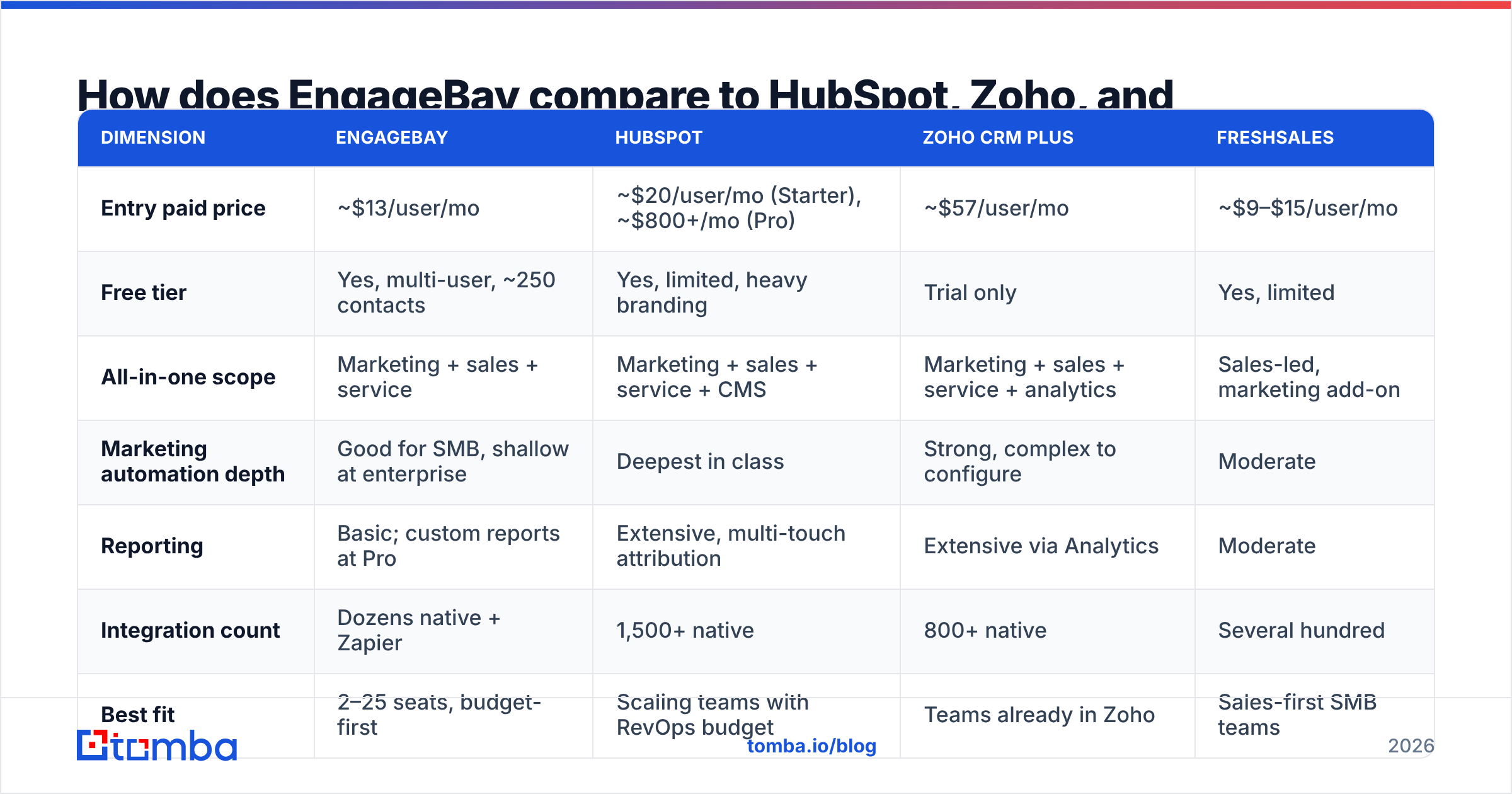
How does EngageBay compare to HubSpot, Zoho, and Freshsales?#
The comparison that matters is not feature checkboxes — it is cost at your actual team size against the depth you actually need.
| Dimension | EngageBay | HubSpot | Zoho CRM Plus | Freshsales |
|---|---|---|---|---|
| Entry paid price | ~$13/user/mo | ~$20/user/mo (Starter), ~$800+/mo (Pro) | ~$57/user/mo | ~$9–$15/user/mo |
| Free tier | Yes, multi-user, ~250 contacts | Yes, limited, heavy branding | Trial only | Yes, limited |
| All-in-one scope | Marketing + sales + service | Marketing + sales + service + CMS | Marketing + sales + service + analytics | Sales-led, marketing add-on |
| Marketing automation depth | Good for SMB, shallow at enterprise | Deepest in class | Strong, complex to configure | Moderate |
| Reporting | Basic; custom reports at Pro | Extensive, multi-touch attribution | Extensive via Analytics | Moderate |
| Integration count | Dozens native + Zapier | 1,500+ native | 800+ native | Several hundred |
| Best fit | 2–25 seats, budget-first | Scaling teams with RevOps budget | Teams already in Zoho | Sales-first SMB teams |
Read the table this way: EngageBay wins on price per seat and loses on ecosystem. If your growth plan involves hiring a RevOps person in 18 months and wiring six systems together, HubSpot's pricing pain buys you an escape hatch EngageBay does not have. If your growth plan is "ship more campaigns with the same four people," the escape hatch is a cost you never use.
Worth noting for anyone already partway through a decision: switching CRMs is not a pricing decision, it is a data migration project. Budget two to six weeks of someone's attention regardless of which direction you move.
What does EngageBay not give you?#
Contact data. This is the gap that quietly determines whether the subscription pays for itself.
EngageBay stores, segments, scores, and automates against contacts you already have. It does not find the VP of Engineering at a 200-person logistics company, does not tell you her work email, and does not confirm that the address still routes. Neither do HubSpot Starter, Zoho CRM, or Freshsales at comparable tiers — this is a category-wide boundary, not an EngageBay flaw.
Which means your real 2026 stack cost is:
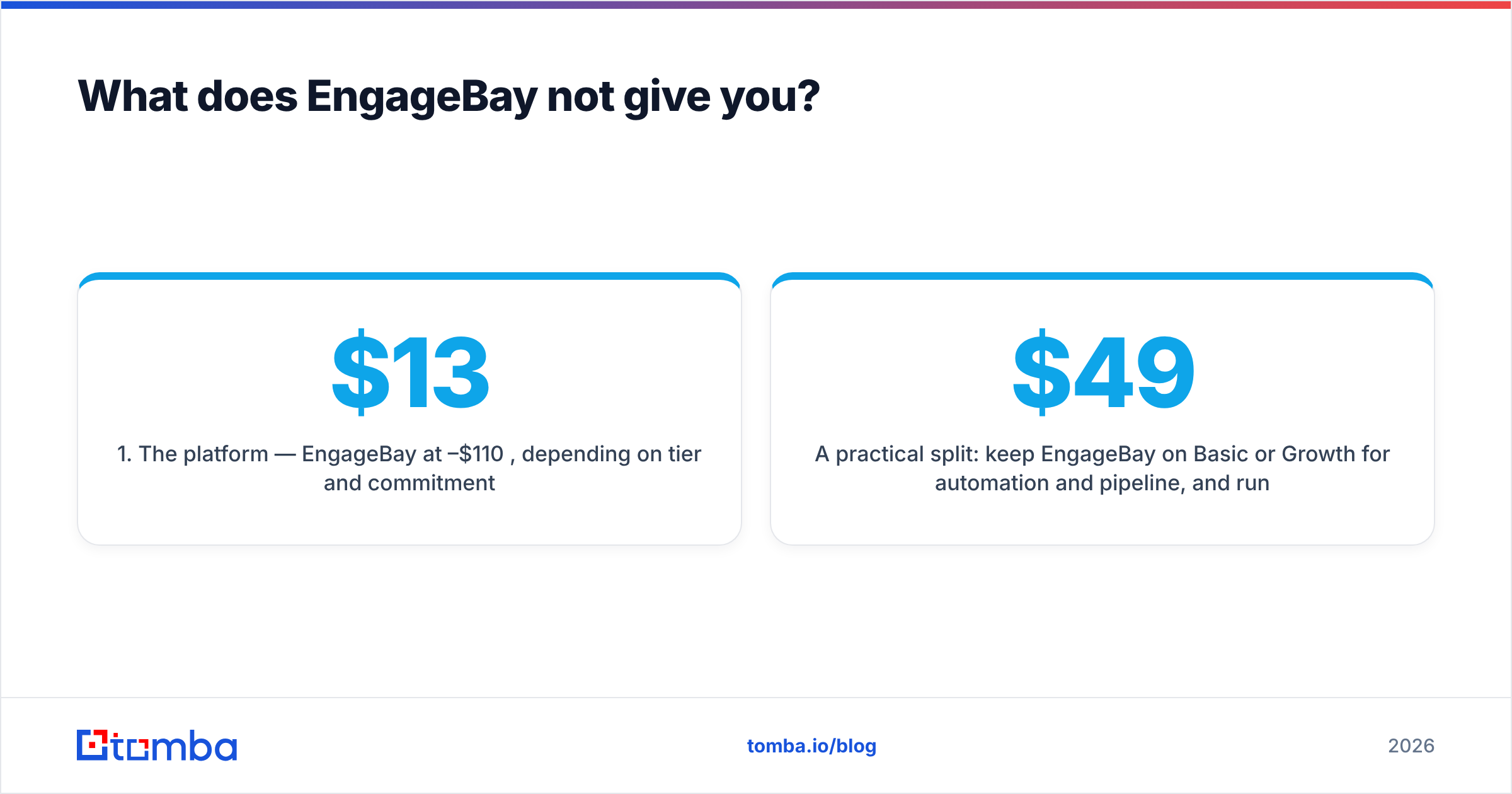
- The platform — EngageBay at $13–$110 per seat, depending on tier and commitment.
- The data layer — a source of verified B2B emails and direct numbers, priced per lookup or per credit.
- The verification layer — bounce protection before send, which is either bundled into the data layer or bought separately.
- The sending infrastructure — warmed domains and inboxes if you are doing genuine cold outbound rather than marketing to an opted-in list.
Teams that budget only for line 1 end up with a beautifully organised database of 300 contacts and no pipeline. Teams that get line 2 right can often run a cheaper platform tier, because the value moved to the data.
A practical split: keep EngageBay on Basic or Growth for automation and pipeline, and run contact acquisition through a dedicated tool. Tomba pricing starts free at 25 searches a month and moves to $49/mo at Starter, $99/mo at Growth, and $249/mo at Pro — flat platform pricing, not per seat, which changes the arithmetic once your team passes five people. Pushing results into the CRM is a one-time wiring job; the same pattern works for a HubSpot integration if you end up switching platforms later.
Is EngageBay worth it in 2026?#
Yes — for a specific shape of team, and no for everyone else. Here is the honest breakdown by scenario.
Buy EngageBay if:
- You have 2–15 users and are currently paying for three separate tools that barely talk to each other.
- Your marketing is opt-in and list-based rather than cold outbound.
- Nobody on the team wants to own a Zapier graph with 40 zaps in it.
- You can commit annually — the monthly rate erodes the value argument significantly.
Skip EngageBay if:
- You need multi-touch attribution or revenue reporting your CFO will accept without a spreadsheet rebuild.
- Your team is already 20+ seats, where per-user pricing catches up to HubSpot faster than the marketing suggests.
- Your integration list includes three or more niche tools with no native connector.
- Your actual bottleneck is finding qualified contacts, not managing them. Fix that first; the CRM choice matters less than you think.
The pragmatic middle path most SMB teams land on: start on the free plan to validate the workflow, move to Basic annually once you have real contacts flowing, and only jump to Growth when a named automation you cannot build otherwise justifies the 4x jump. Do not buy Pro on day one for the SLA — buy it when downtime actually costs you something measurable.
One last caution on the biennial discount. A 30% saving is genuinely good, and a two-year commitment to a platform you have run for three weeks is genuinely risky. Take the annual rate first. If you are still happy at renewal, the biennial offer will still be there.
Where should you spend the money instead?#
If your EngageBay evaluation is really a question about pipeline, start upstream. A CRM full of contacts you cannot reach is an expensive filing cabinet.
Tomba Email Finder finds verified professional email addresses by domain, name, or company — with a free tier at 25 searches a month so you can test accuracy against your own target accounts before paying anything. Pair it with domain search to map an entire company's contactable team in one pass, then push the verified records into whichever CRM you land on. Whether that CRM ends up being EngageBay, HubSpot, or a spreadsheet for another quarter, the data layer is the part that actually produces revenue.
Run 25 free searches on your five best-fit accounts today. If the emails land, the platform decision gets a lot easier — and a lot cheaper.
Related guides#
// get started
Find, verify and enrich your first contacts today
Start on the free plan with 25 searches a month, then scale when your team is ready.
Free plan · No credit card required · GDPR & CCPA
// about the author