Enrich Layer Pricing 2026: Reviews, Pros, Cons, Real Costs
Enrich Layer bills in credits, not contacts — and that one detail decides whether your bill lands at $49 or $900. Here's how the pricing model really works, what reviewers praise and complain about, and when a flat-rate email finder is the cheaper call.
TL;DR
- Enrich Layer (the rebrand of Proxycurl) sells credits, not contacts. One credit is not one enriched lead — a single workflow can burn 3-15 credits per person.
- The listed entry price looks cheap. The effective cost per usable record is what you should budget against, and it is usually 3-6x the sticker math.
- It is an API-first product. There is no real UI, no CRM sync out of the box, and no non-technical path. If nobody on your team writes code, this is the wrong tool.
- Reviewers consistently praise LinkedIn profile depth and API reliability; they consistently complain about credit burn, email-endpoint hit rates, and unused credits expiring.
- If your actual job is "get verified work emails for a list of people or domains," a flat-rate email finder at $49/mo is cheaper and simpler than metered profile enrichment.
What is Enrich Layer, and what happened to Proxycurl?#
Enrich Layer is a B2B data API that returns structured people and company profiles — job title, employment history, education, skills, company headcount, funding, and (through separate endpoints) work emails and phone numbers. It is the same product formerly sold as Proxycurl; the company rebranded and moved to enrichlayer.com, keeping the endpoint structure largely intact.
The mental model matters more than the feature list. Think of Enrich Layer less like a contact database you search, and more like a vending machine you send coins to. You do not browse aisles. You send an identifier — a LinkedIn profile URL, a company domain, a name-plus-company pair — and you get a JSON blob back. Every pull costs coins.
That design has a real audience: engineering teams building enrichment into their own product, data teams hydrating a warehouse, and GTM engineers wiring waterfalls. It has an equally real anti-audience: SDRs, founders doing their own prospecting, and anyone who expected a search box.
Two consequences follow directly from the vending-machine model, and both shape the pricing conversation:
- You pay on request, not on result. A lookup that returns nothing useful still moves the counter in most metered enrichment APIs. Always confirm current failed-lookup behavior in the vendor's own docs before you budget.
- Cost scales with curiosity. Wanting "just the email" is cheap. Wanting profile + company + email + phone for the same person is four calls, and the multiplier is where budgets break.
How does Enrich Layer pricing actually work?#
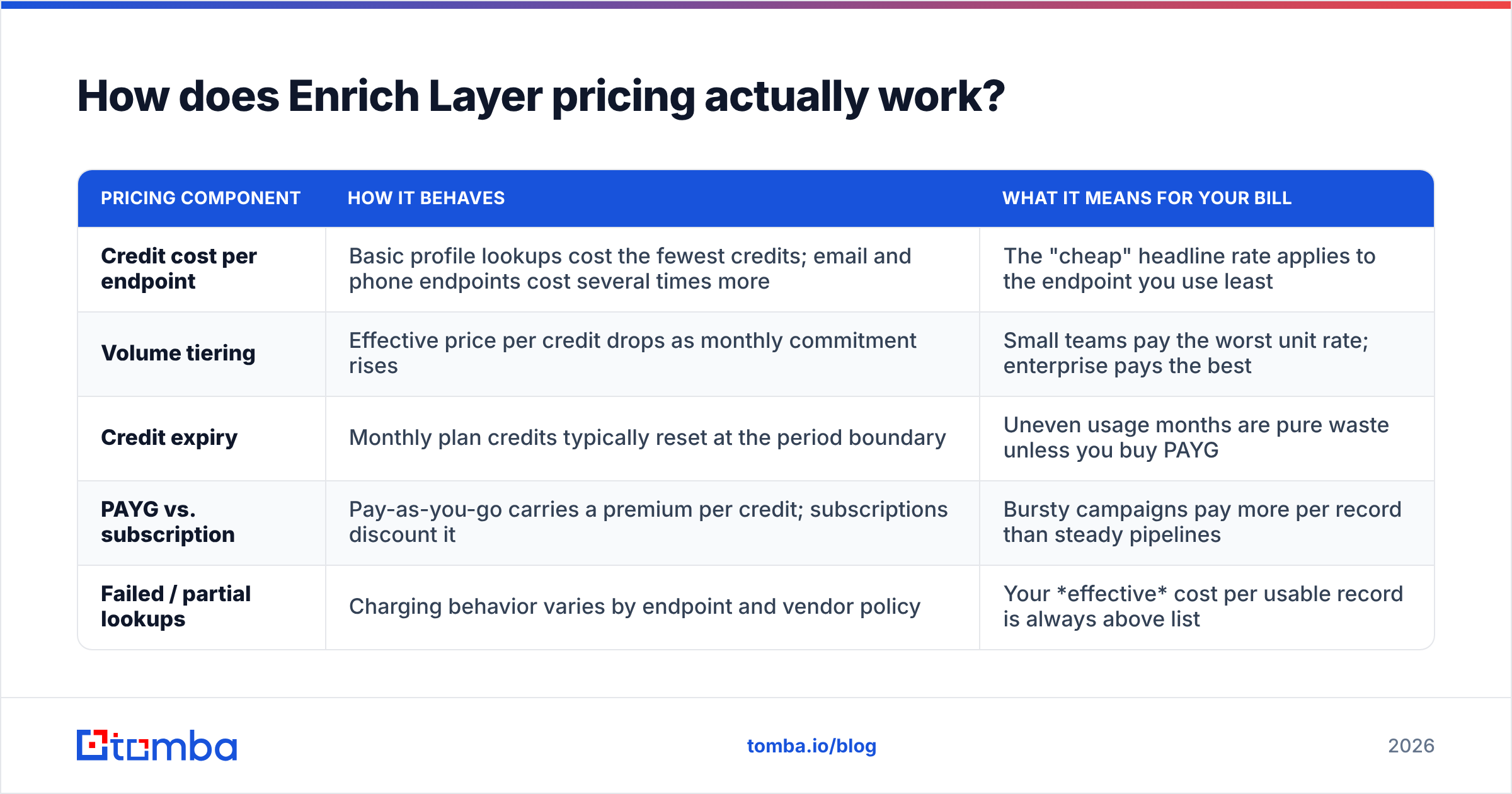
Enrich Layer prices on a credit system with tiered volume discounts, plus a pay-as-you-go option for small or bursty usage. The structure is consistent across most of the enrichment-API category, and it has four moving parts.
| Pricing component | How it behaves | What it means for your bill |
|---|---|---|
| Credit cost per endpoint | Basic profile lookups cost the fewest credits; email and phone endpoints cost several times more | The "cheap" headline rate applies to the endpoint you use least |
| Volume tiering | Effective price per credit drops as monthly commitment rises | Small teams pay the worst unit rate; enterprise pays the best |
| Credit expiry | Monthly plan credits typically reset at the period boundary | Uneven usage months are pure waste unless you buy PAYG |
| PAYG vs. subscription | Pay-as-you-go carries a premium per credit; subscriptions discount it | Bursty campaigns pay more per record than steady pipelines |
| Failed / partial lookups | Charging behavior varies by endpoint and vendor policy | Your effective cost per usable record is always above list |
Because published tiers change, treat any number you read in a blog post — including this one — as a starting point, not a quote. Pull the live figures from the vendor's own pricing page before you commit a budget line. What does not change is the shape of the cost, and the shape is what burns teams.
Here is the arithmetic that catches people. Say you want an enriched contact record: name, title, company, verified work email. That is typically a profile call plus an email call. If the profile call is 1 credit and the email endpoint is meaningfully more expensive, your single "contact" is not 1 credit — it is several. Multiply by a 40% miss rate on hard-to-find emails, and the cost per record you can actually mail is roughly double again.

Run that math on 5,000 target contacts and the difference between "the plan I bought" and "the plan I needed" is usually one full tier.
What are the real hidden costs in Enrich Layer pricing?#
Sticker price is the easy part. These five line items are the ones that show up in month two.
- Multi-endpoint stacking. Profile, company, email, and phone are separate calls. A "complete" record is rarely one credit — budget for the full chain, not the cheapest link.
- Miss-rate inflation. If an email endpoint returns nothing for 30-40% of a list — normal for any provider on long-tail SMB or non-US domains — your cost per deliverable address rises by that same proportion.
- Verification is a separate job. Enrichment APIs return an address; they do not guarantee it will land. You still need email verification before a send, and that is either another vendor bill or another credit line.
- Engineering time. No UI means someone builds the queue, the retry logic, the dedupe, the rate-limit backoff, and the CRM writeback. Two engineering days at loaded cost can exceed a year of a $49/mo tool.
- Expired credits. Subscription credits that reset monthly punish seasonal outbound. If you do three big campaigns a year and nothing in between, you are paying twelve months for three months of value.
None of these are dishonest pricing. They are simply what metered API pricing does when it meets real GTM workflows, and they are why "cheap per credit" and "cheap per meeting booked" are unrelated statements.
What do Enrich Layer reviews say — pros and cons?#
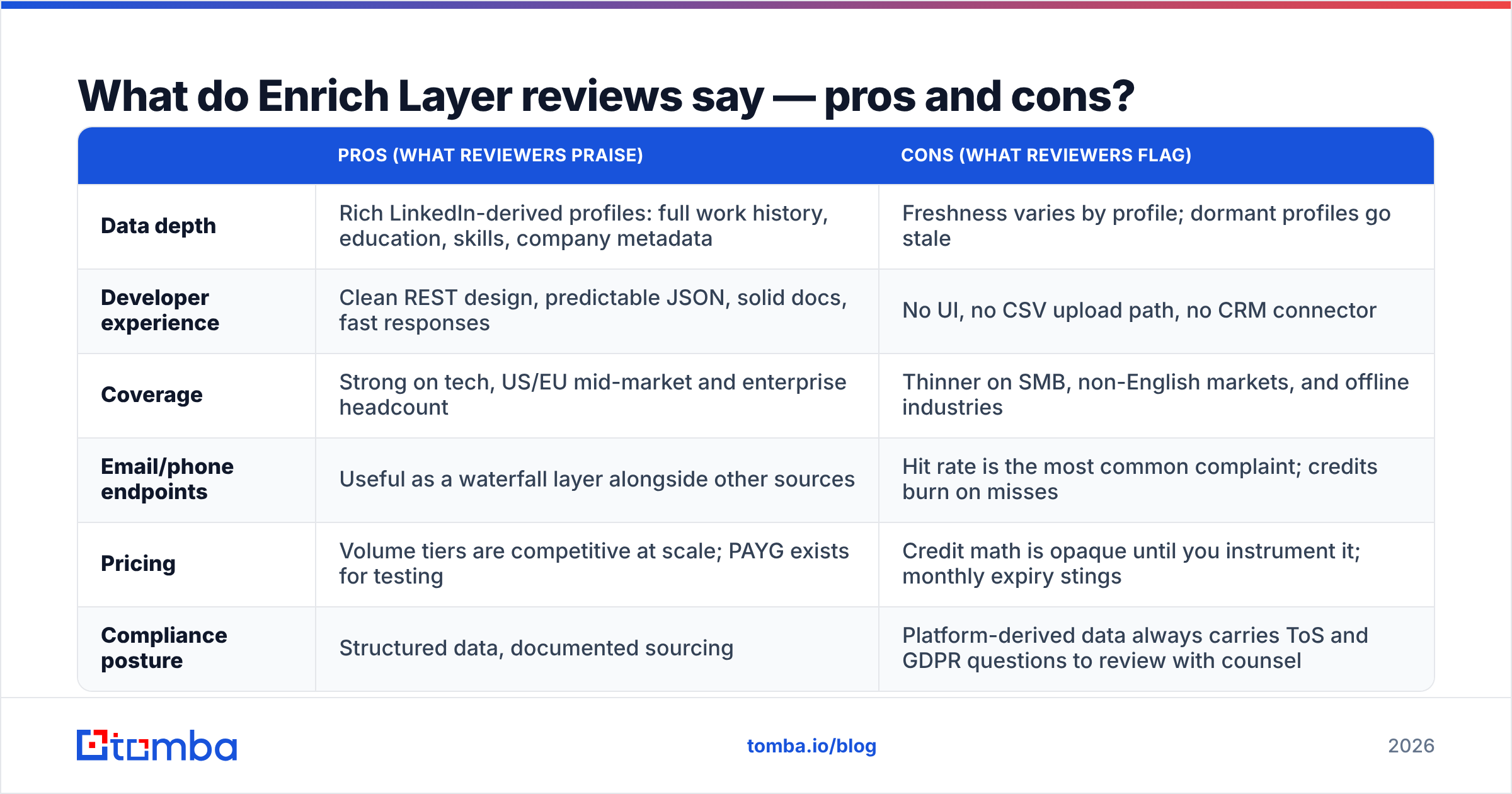
Pulling from public review patterns on G2 and developer communities, sentiment splits cleanly along the technical/non-technical line.
| Pros (what reviewers praise) | Cons (what reviewers flag) | |
|---|---|---|
| Data depth | Rich LinkedIn-derived profiles: full work history, education, skills, company metadata | Freshness varies by profile; dormant profiles go stale |
| Developer experience | Clean REST design, predictable JSON, solid docs, fast responses | No UI, no CSV upload path, no CRM connector |
| Coverage | Strong on tech, US/EU mid-market and enterprise headcount | Thinner on SMB, non-English markets, and offline industries |
| Email/phone endpoints | Useful as a waterfall layer alongside other sources | Hit rate is the most common complaint; credits burn on misses |
| Pricing | Volume tiers are competitive at scale; PAYG exists for testing | Credit math is opaque until you instrument it; monthly expiry stings |
| Compliance posture | Structured data, documented sourcing | Platform-derived data always carries ToS and GDPR questions to review with counsel |
That last row deserves its own paragraph. Any product built on public-profile data sits in a contested area — LinkedIn's own User Agreement restricts automated collection, and EU-facing outbound adds a lawful-basis question on top. This is not a reason to avoid enrichment tools; it is a reason to have your legal team read the DPA and sourcing documentation of whichever vendor you pick, and to prefer providers that publish where their data comes from.
Is Enrich Layer worth it for your team?#
Conclusion first: yes if you are building a product or a pipeline, no if you are working a list.
Enrich Layer earns its price when:
- You have engineers and the enrichment call lives inside your own application or warehouse.
- You need deep profile attributes — tenure, seniority progression, skills, headcount trajectory — not just a mailbox.
- Your volume is high and steady enough to sit in a discounted tier and consume the credits you buy.
- You are running a waterfall and Enrich Layer is one layer among three or four, called only when cheaper layers miss.
It is the wrong purchase when:
- Your success metric is verified work emails per dollar. Then you are paying profile-API prices for a commodity you can buy flat-rate.
- Nobody on the team writes code. There is no meaningful self-serve path.
- Your usage is spiky. Expiring monthly credits are a tax on seasonality.
- You need phone numbers as a primary channel — dedicated B2B phone number sources generally outperform enrichment-API phone endpoints on both hit rate and cost.

How does Enrich Layer compare to the alternatives in 2026?#
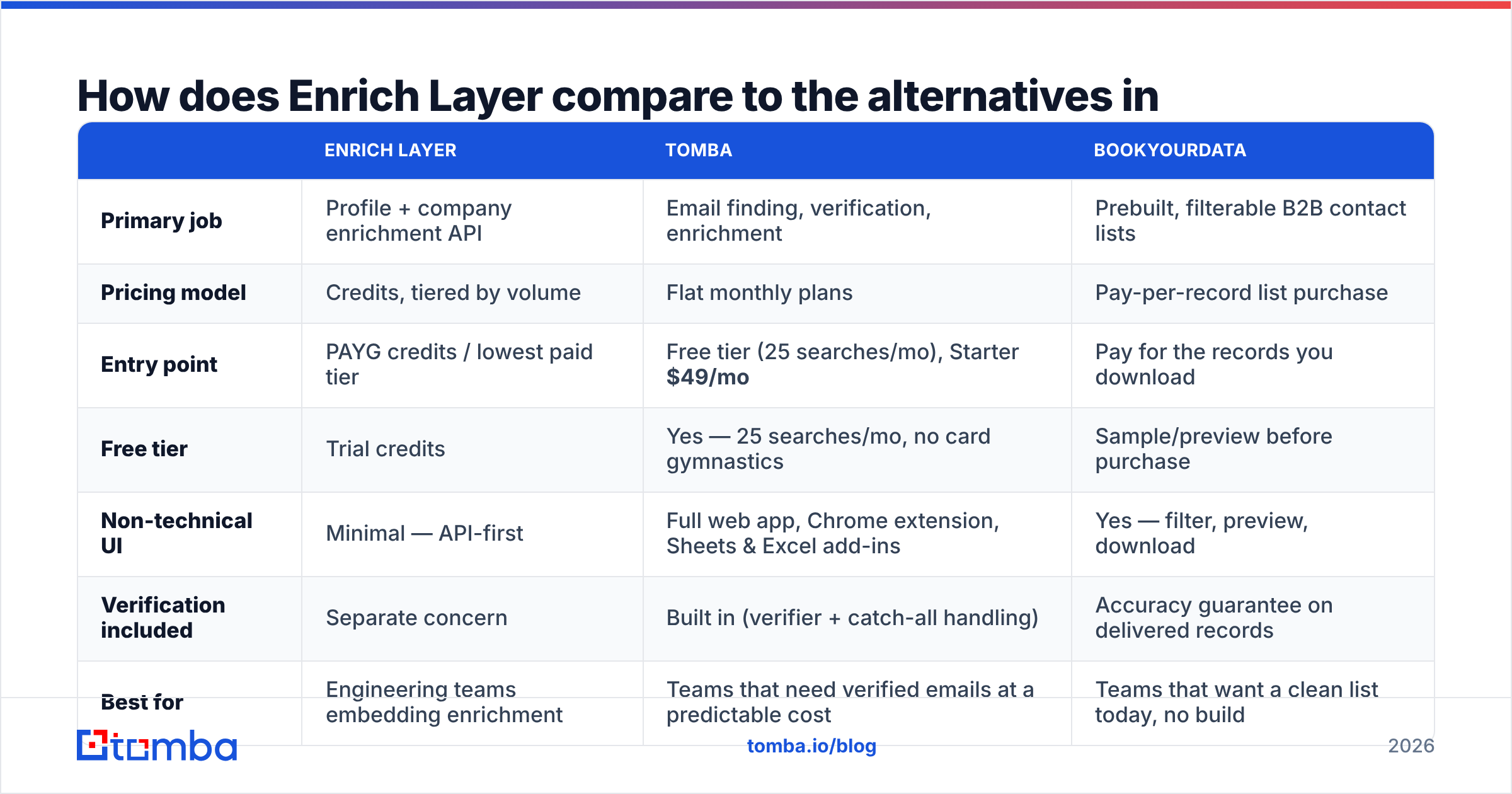
Three genuinely different purchase shapes compete here, and picking the wrong shape costs more than picking the wrong vendor inside a shape.
| Enrich Layer | Tomba | BookYourData | |
|---|---|---|---|
| Primary job | Profile + company enrichment API | Email finding, verification, enrichment | Prebuilt, filterable B2B contact lists |
| Pricing model | Credits, tiered by volume | Flat monthly plans | Pay-per-record list purchase |
| Entry point | PAYG credits / lowest paid tier | Free tier (25 searches/mo), Starter $49/mo | Pay for the records you download |
| Free tier | Trial credits | Yes — 25 searches/mo, no card gymnastics | Sample/preview before purchase |
| Non-technical UI | Minimal — API-first | Full web app, Chrome extension, Sheets & Excel add-ins | Yes — filter, preview, download |
| Verification included | Separate concern | Built in (verifier + catch-all handling) | Accuracy guarantee on delivered records |
| Best for | Engineering teams embedding enrichment | Teams that need verified emails at a predictable cost | Teams that want a clean list today, no build |
| Weak spot | Credit burn, no UI, engineering overhead | Not a full profile-graph API | Static purchase, less fit for continuous enrichment |
BookYourData is worth a serious look if what you actually want is a filtered, ready-to-mail list rather than a pipeline — buying records outright removes the entire credit-forecasting problem, and the accuracy guarantee is a real risk transfer.
Tomba is the fit when the recurring job is finding and verifying work emails at a cost you can put in a spreadsheet. The plan ladder is flat and legible: Free (25 searches/mo), Starter $49/mo, Growth $99/mo, Pro $249/mo, Enterprise custom — full details on Tomba pricing. No credit-per-endpoint arithmetic, no separate verification vendor, and both a UI for the SDR and an email finder API for the engineer.
For teams currently paying enrichment-API rates just to resolve LinkedIn profiles into mailboxes, the LinkedIn finder does that specific job directly, and data enrichment covers the firmographic fill-in around it.
How should you evaluate any credit-based pricing model?#
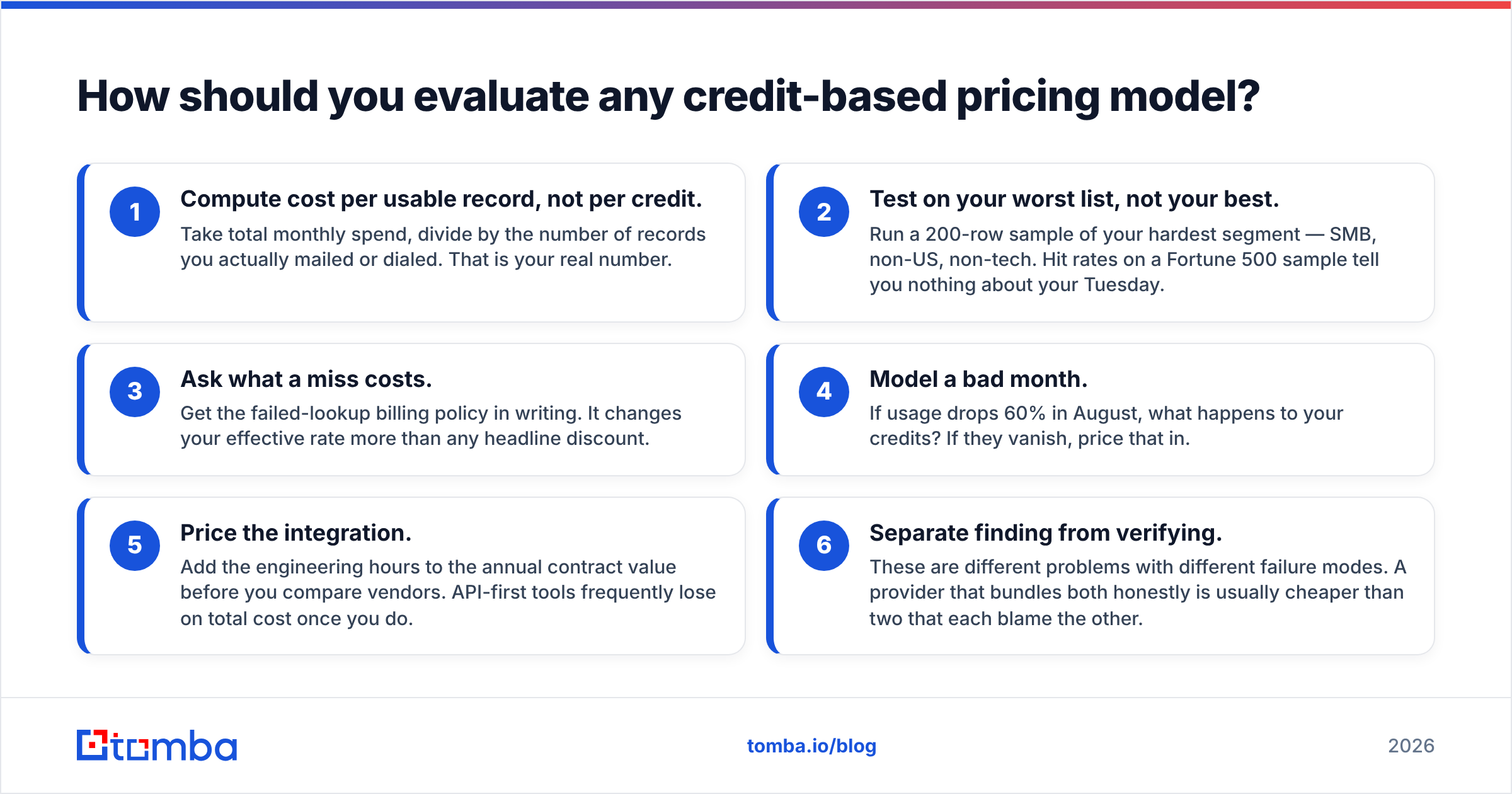
Use this checklist before you sign anything metered — it applies to Enrich Layer, Clearbit, People Data Labs, and every provider in the category:
- Compute cost per usable record, not per credit. Take total monthly spend, divide by the number of records you actually mailed or dialed. That is your real number.
- Test on your worst list, not your best. Run a 200-row sample of your hardest segment — SMB, non-US, non-tech. Hit rates on a Fortune 500 sample tell you nothing about your Tuesday.
- Ask what a miss costs. Get the failed-lookup billing policy in writing. It changes your effective rate more than any headline discount.
- Model a bad month. If usage drops 60% in August, what happens to your credits? If they vanish, price that in.
- Price the integration. Add the engineering hours to the annual contract value before you compare vendors. API-first tools frequently lose on total cost once you do.
- Separate finding from verifying. These are different problems with different failure modes. A provider that bundles both honestly is usually cheaper than two that each blame the other.
Run those six on your own data and the Enrich Layer decision usually answers itself: it is a strong engineering tool with pricing built for engineering-scale, steady consumption, and a poor fit for anyone whose job is simply to reach more of the right people this quarter.
Where should you start?#
If your requirement is "verified work emails, predictable bill, usable by everyone on the team," start with the Tomba Email Finder. The free tier gives you 25 searches a month to test against your own hardest list — no credit tables to decode, no per-endpoint math, and verification built into the same workflow rather than billed as a second product. Run the same 200 rows through it that you ran through your enrichment API, compare cost per deliverable address, and let the two numbers decide.
Related guides#
Ready to find emails that actually work?
Join 150,000+ professionals who stopped guessing and started sending. Free credits on signup — no credit card required.
Get the Tomba newsletter
Practical outbound tactics and product updates — once every two weeks.
About the author