9 Best Enzo Dialer Alternatives for Outbound Teams in 2026
Enzo Dialer covers the basics, but it is not the right fit for every outbound team. Here are nine alternatives compared on dialing mode, list price, CRM depth, and the data quality that actually drives connect rates.
TL;DR
- Enzo Dialer is a cloud calling tool aimed at outbound and call-center teams. It handles power/auto dialing and CRM logging, but pricing is quote-based and the ecosystem is thinner than the big platforms.
- The best replacement depends on one question: do you need more dials per hour (parallel dialers), deeper CRM workflow (Kixie, Close), or cheaper per-seat telephony (CloudTalk, JustCall)?
- Parallel dialers like Orum and Nooks can 3-5x conversations per rep, but they cost far more per seat and punish bad data harder than any other category.
- No dialer fixes a bad list. Wrong numbers burn connect rate, spike spam-likely flags, and make every tool in this comparison look broken.
- Fix the data layer first (verified emails, validated direct dials, enriched job titles), then pick the dialer that matches your motion.
What is Enzo Dialer and who actually uses it?#
Enzo Dialer sits in the cloud-telephony category: a browser or softphone-based dialer that queues a call list, auto-dials through it, drops voicemails, and writes call outcomes back to a CRM. That is the same job description as roughly forty other products, which is exactly why "enzo dialer alternatives" is a search people run before they sign anything.
The teams that land on it are usually one of three shapes:
- Small outbound SDR teams (3-15 reps) who outgrew manual clicking in the CRM and want power dialing without an enterprise contract.
- Agency or BPO call floors running high-volume campaigns where cost per seat matters more than integration depth.
- Insurance, solar, home-services, and staffing teams dialing purchased lists where compliance and local presence matter.
The reason people shop around is rarely "it doesn't dial." It is usually one of: pricing isn't published so budgeting is painful, the integration list is short compared to Aircall or Kixie, reporting is thinner than a RevOps lead wants, or the team realizes the bottleneck was never the dialer — it was the list.
One honest caveat before you read the table: Enzo Dialer does not publish standard per-seat pricing publicly at the time of writing, so treat any number you see quoted online as a sales-motion estimate, not a rate card. Ask for it in writing.
What should you actually compare when replacing a dialer?#
Most comparison posts list features. Features are the least useful axis, because every dialer in 2026 has click-to-call, local presence, voicemail drop, and a CRM sync. Compare these five instead:
- Dialing mode. Click-to-call, power (one line, auto-advance), predictive (algorithmic pacing), and parallel (3-10 simultaneous lines with AI answer detection). This single choice changes your cost per seat by 5x.
- Connect rate protection. Does the vendor rotate numbers, monitor spam-likely flags, register you for STIR/SHAKEN attestation, and handle branded caller ID? Ask specifically — "local presence" alone is not the same thing.
- CRM write-back depth. Two-way sync of dispositions, call recordings, and custom fields — or a one-way activity log you can't report on. Test this on your own CRM instance in trial, not the vendor's demo org.
- Conversation intelligence. Transcription, talk-ratio, keyword alerts, objection tracking. In 2026 this is table stakes for coaching, but quality varies enormously.
- Data quality at the input. Whether your numbers are direct dials, switchboards, or dead. Nothing else on this list moves the needle as much.
That last point deserves its own section, and it comes later. First, the shortlist.
Which Enzo Dialer alternatives are worth shortlisting in 2026?#
Here are the nine that consistently show up in evaluations, with published list prices where the vendor publishes them. Prices are per user per month on annual billing and change often — verify before you commit.
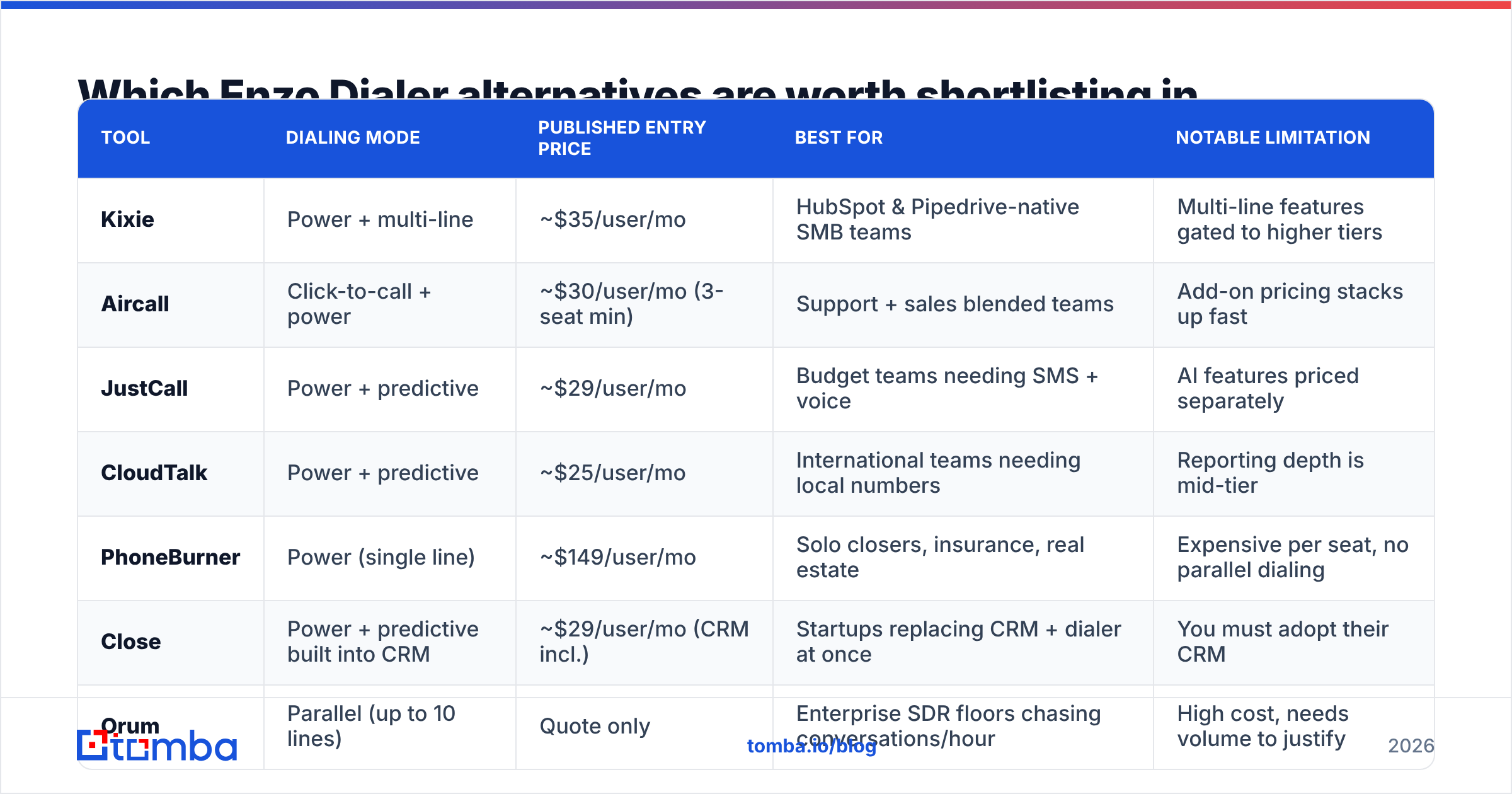
| Tool | Dialing mode | Published entry price | Best for | Notable limitation |
|---|---|---|---|---|
| Kixie | Power + multi-line | ~$35/user/mo | HubSpot & Pipedrive-native SMB teams | Multi-line features gated to higher tiers |
| Aircall | Click-to-call + power | ~$30/user/mo (3-seat min) | Support + sales blended teams | Add-on pricing stacks up fast |
| JustCall | Power + predictive | ~$29/user/mo | Budget teams needing SMS + voice | AI features priced separately |
| CloudTalk | Power + predictive | ~$25/user/mo | International teams needing local numbers | Reporting depth is mid-tier |
| PhoneBurner | Power (single line) | ~$149/user/mo | Solo closers, insurance, real estate | Expensive per seat, no parallel dialing |
| Close | Power + predictive built into CRM | ~$29/user/mo (CRM incl.) | Startups replacing CRM + dialer at once | You must adopt their CRM |
| Orum | Parallel (up to 10 lines) | Quote only | Enterprise SDR floors chasing conversations/hour | High cost, needs volume to justify |
| Nooks | Parallel + AI coaching | Quote only | Teams that want dialer + coaching in one | Newer stack, contract-heavy |
| RingCentral | Click-to-call + contact center | ~$30/user/mo | Companies standardizing all telephony | Sales-specific features feel bolted on |
A few observations that the table alone doesn't show.
Kixie is the default swap for teams leaving a mid-market dialer with a HubSpot or Pipedrive stack. The CRM write-back is genuinely two-way, and the connect-rate tooling (number rotation, spam monitoring) is more aggressive than most peers. Check current tiers on Kixie's site — they restructure packaging roughly annually.
Aircall is the safest choice if your phone system serves both sales and support. It has the deepest app marketplace in the category. The trade-off is that outbound power dialing is a lighter feature than it is at Kixie or JustCall. See aircall.io for current plan breakdowns.
PhoneBurner looks wildly overpriced next to $29/seat competitors until you understand who buys it: single-line, human-paced dialing with zero connection delay, which matters enormously in industries where a half-second of dead air kills the call. If you dial consumers, that half-second is the product.
Orum and Nooks are a different category entirely. Parallel dialing means one rep runs 5-10 simultaneous outbound lines, an AI filters out voicemails and IVRs, and the rep is bridged only into live humans. Real teams report 3-5x conversations per hour. They also report that the tool amplifies whatever is wrong with the list — dial 500 bad numbers in an hour instead of 100 and you have simply automated your failure rate.
Is a parallel dialer better than a power dialer?#
Only if your list is clean and your total addressable market is large enough to burn through.
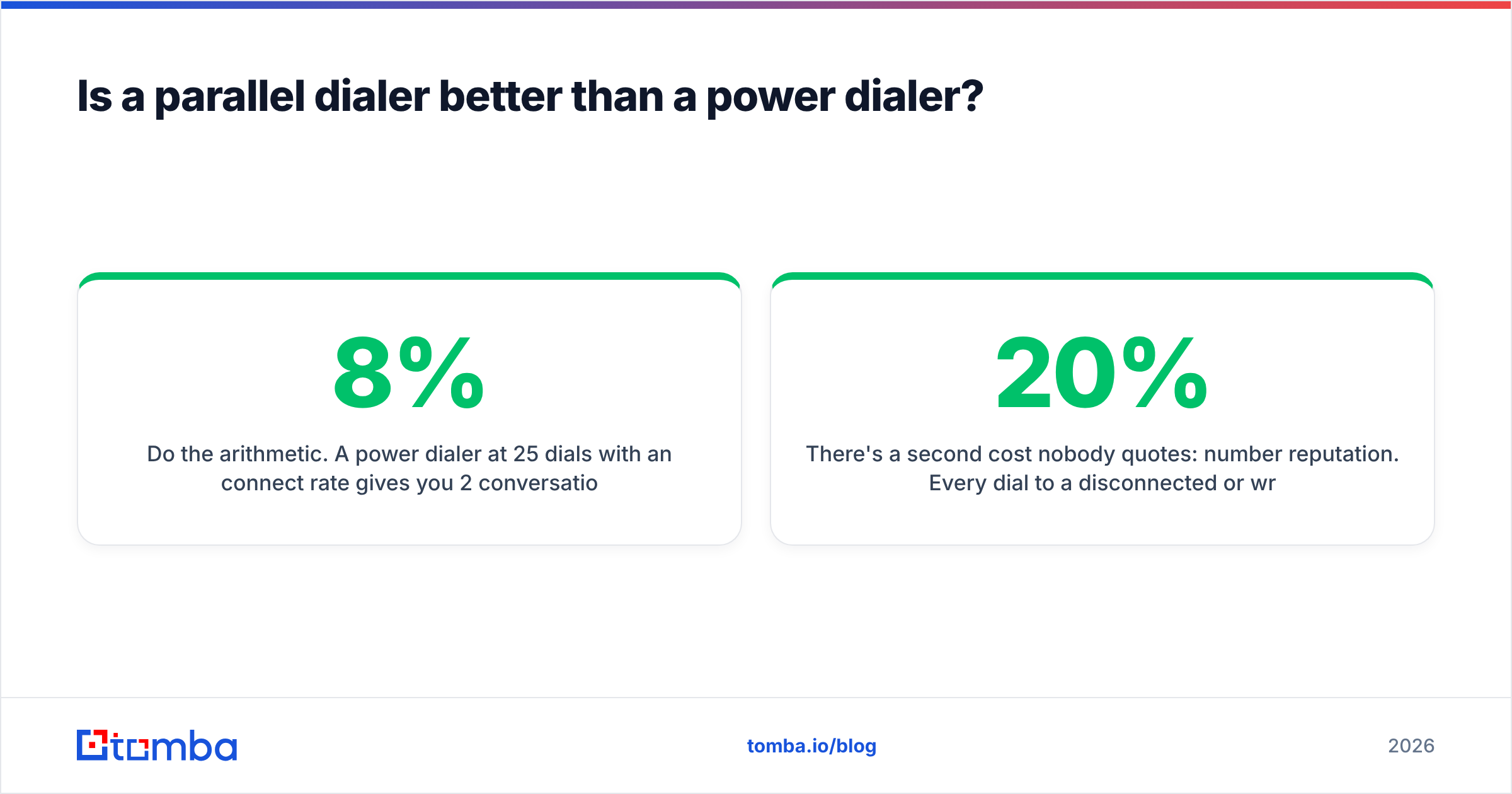
Do the arithmetic. A power dialer at 25 dials/hour with an 8% connect rate gives you 2 conversations per hour. A parallel dialer at 120 dials/hour with a 5% connect rate (parallel usually connects slightly worse due to the bridge delay) gives you 6. Triple the conversations, roughly triple-to-quadruple the seat cost, and roughly five times the list consumption.
That last number is what kills parallel-dialer rollouts. If your ICP is 4,000 accounts, a two-rep parallel setup will exhaust it in weeks and then start re-dialing burned contacts. Parallel dialing is a TAM-hungry motion. Power dialing suits narrow, high-ACV territories where you'd rather research 30 accounts well than blast 300.
There's a second cost nobody quotes: number reputation. Every dial to a disconnected or wrong number nudges your carrier reputation down. At 120 dials/hour, a 20% bad-number rate means 24 reputation hits per rep per hour. Within a month your outbound numbers get flagged spam-likely, your connect rate collapses, and you will blame the dialer.
How much does bad data cost you on any dialer?#
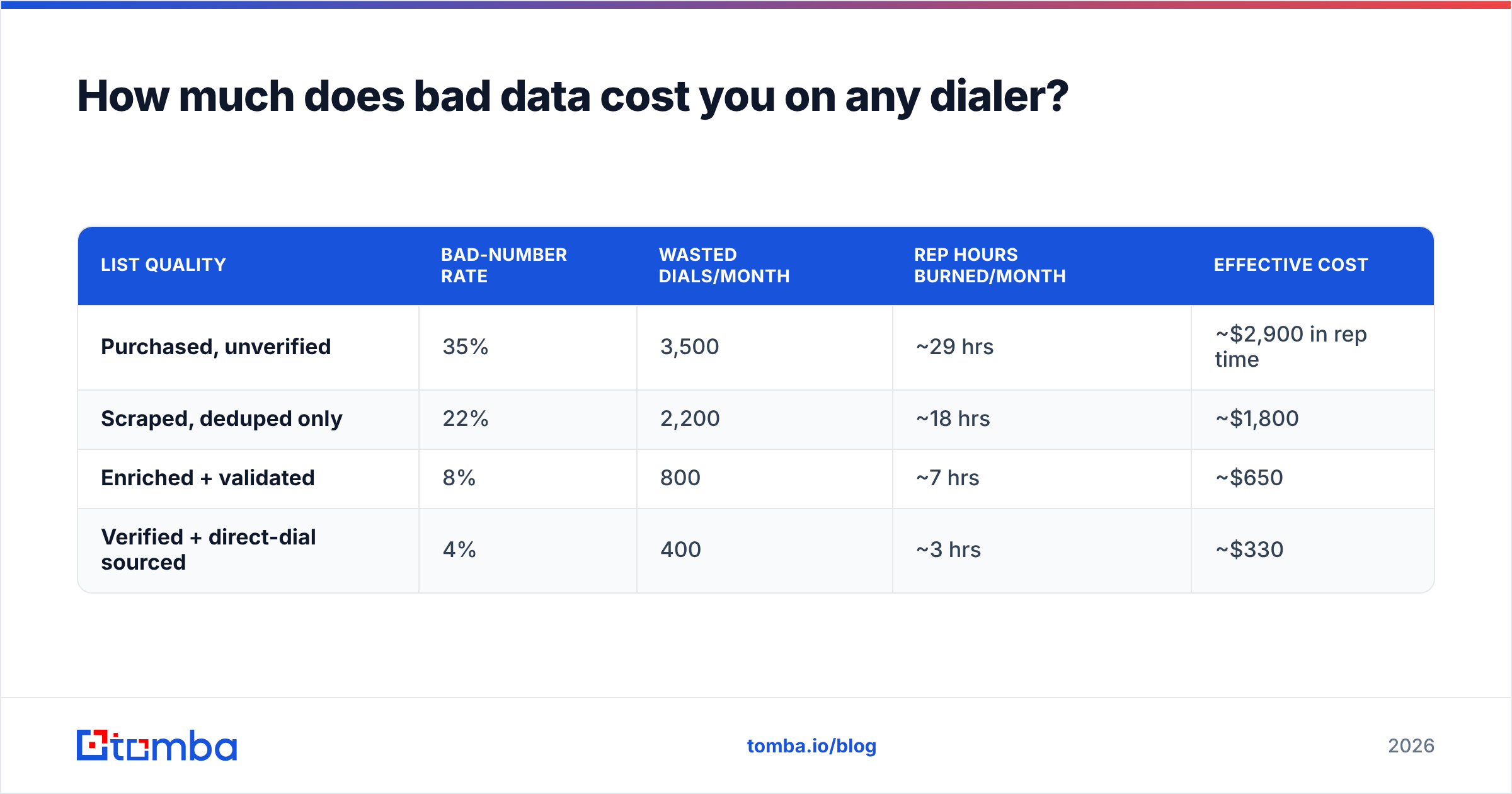
More than the software. Here's a rough model for a 5-rep team running 100 dials per rep per day, 20 working days:
| List quality | Bad-number rate | Wasted dials/month | Rep hours burned/month | Effective cost |
|---|---|---|---|---|
| Purchased, unverified | 35% | 3,500 | ~29 hrs | ~$2,900 in rep time |
| Scraped, deduped only | 22% | 2,200 | ~18 hrs | ~$1,800 |
| Enriched + validated | 8% | 800 | ~7 hrs | ~$650 |
| Verified + direct-dial sourced | 4% | 400 | ~3 hrs | ~$330 |
(Assumes a fully loaded rep cost of $100/hour and 2 minutes per wasted dial including logging and mental reset.)
The gap between row one and row four is over $2,500 a month for a five-person team — more than most of the dialers in this comparison cost. And that ignores the compounding reputation damage.
This is why the sequence matters: source, validate, then dial. A phone validator run before the list enters your dialer catches disconnected and invalid lines cheaply. Pairing that with B2B phone numbers sourced as direct dials rather than switchboard lines is the single highest-leverage change most outbound teams can make, and it's independent of which vendor you pick.

Which alternative fits your team size and motion?#
Use this as a decision shortcut rather than reading nine vendor sites.
- Under 5 reps, tight budget, CRM already chosen: JustCall or CloudTalk. You get power dialing and SMS for roughly $25-29/seat and you can leave in a month.
- 5-25 reps on HubSpot or Pipedrive: Kixie. The CRM depth pays for the price delta within a quarter.
- Blended sales + support desk: Aircall or RingCentral. One phone system, one bill, one admin.
- Startup replacing CRM and dialer simultaneously: Close. Bundling avoids an integration project you don't have engineers for.
- Consumer-facing, high-empathy calls (insurance, mortgage, health): PhoneBurner. Pay for the zero-delay connect.
- 25+ SDRs, large TAM, dedicated ops person: Orum or Nooks — but only after you've fixed data hygiene, because parallel dialing multiplies list quality in both directions.
Two more filters worth applying before you sign. First, read recent reviews on G2 filtered to the last six months only; dialer quality shifts fast with carrier relationships, and a 2023 review tells you nothing about 2026 call quality. Second, insist on a trial with your own list and your own CRM sandbox. Vendor demo environments are tuned; yours is not.
What does a complete outbound calling stack look like?#
The dialer is one of four layers, and it is not the layer most teams under-invest in.
- Targeting layer. Firmographic and technographic filters that define who is worth a dial at all. Get this wrong and everything downstream is efficient waste.
- Data layer. Verified emails, validated direct dials, current job titles. This is where contact enrichment belongs — filling gaps in the CRM before the record ever reaches a rep's queue.
- Execution layer. The dialer itself, plus email sequencing. This is the layer everyone shops for.
- Intelligence layer. Call recording, transcription, disposition analytics, and the feedback loop back into layers one and two.
The mistake pattern is predictable: teams spend three weeks evaluating layer three, sign a contract, and route a stale CSV into it. Six weeks later the connect rate is 4%, the reps have stopped logging dispositions honestly, and someone starts a new search for dialer alternatives.
Reverse it. Spend a week on the data layer. Run your existing list through an email verifier and a phone validation pass, drop everything that fails, and only then measure your baseline connect rate. You will get a much more honest read on whether the dialer was ever the problem — and if you're piping lists programmatically, the Tomba API handles the validation step inside your existing workflow rather than as a manual CSV round-trip.
If you're also running the email side of the sequence — and almost every outbound team in 2026 is multichannel — cross-reference vendor claims against category data on Capterra before you assume a dialer's email features replace a dedicated sequencer. They usually don't.
What's the honest verdict on switching away from Enzo Dialer?#
Switch if you have a concrete, measurable complaint: you need parallel dialing and it isn't offered, your CRM sync is one-way and blocks reporting, or the quoted renewal is out of line with the $25-35 per-seat market rate for comparable power dialing.
Don't switch because connect rates are low. That is a data problem in the overwhelming majority of cases, and migrating dialers costs you two to four weeks of rep productivity, a number-porting window, and a fresh round of carrier reputation building on new lines. You will have paid all of that to keep dialing the same bad list.
The teams that get the biggest lift from a dialer migration are the ones who fix the input first, establish a real baseline, and then choose the tool that matches their actual motion — narrow and high-touch, or wide and high-volume. Those two motions want opposite products, and the reason so many dialer evaluations end in buyer's remorse is that nobody made that call before opening the pricing page.
Before you evaluate a single dialer, fix what goes into it. Tomba's email finder sources verified professional email addresses by name, domain, or company — and pairs with phone finding and validation so your reps queue direct dials and live inboxes instead of switchboards and bounces. Start free with 25 searches a month, or check Tomba pricing — Starter is $49/mo, Growth $99/mo, and Pro $249/mo. Clean data first, then pick your dialer.
Related guides#
Ready to find emails that actually work?
Join 150,000+ professionals who stopped guessing and started sending. Free credits on signup — no credit card required.
Get the Tomba newsletter
Practical outbound tactics and product updates — once every two weeks.
About the author