Exact Data vs FindThatLead in 2026: Which B2B Data Wins?
One sells you a static list. The other finds emails on demand. We break down sourcing, accuracy, pricing, and bounce risk so you know which model actually fits your 2026 outbound motion.
Exact Data vs FindThatLead is really one choice: buy a static list, or find emails on demand. Here is the short version.
TL;DR
- They are not the same kind of product. Exact Data is a US list broker that sells you records. FindThatLead is a self-serve tool that finds and verifies emails on demand.
- Buy a list for postal, phone, and SMB reach at volume. Buy a finder when you already know the companies. You just need current work emails for named people.
- The accuracy gap is a freshness gap. A bought file is a snapshot. A finder looks the address up when you ask. Job changes run 20-25% a year, and that churn kills static lists.
- Neither tool removes your own check. Run every address through a verifier before it touches your sending domain.
- The price models do not line up. Exact Data charges per record with order minimums. FindThatLead charges monthly for credits. Compare cost per delivered, verified contact, not per row.
Exact Data vs FindThatLead: what are these tools?#
They solve different problems. Most head-to-head posts skip that part.
Exact Data is a Chicago-based data compiler and list broker. You describe an audience: SIC code, employee count, region, revenue band, or consumer traits. They quote you a file. It arrives as a CSV, or goes straight to your ESP or direct-mail vendor.
The catalog covers business records, consumer records, postal addresses, phone numbers, and specialty files. It works like a media buy. You scope, you get a count, you pay, you receive.
FindThatLead is a Spanish SaaS tool built for the opposite workflow. You start with a domain, a name, or a LinkedIn profile. It returns a work email plus a confidence signal.
It also bundles a domain search, a lead filter, a Chrome extension, a bulk CSV processor, and a light cold-email sender.
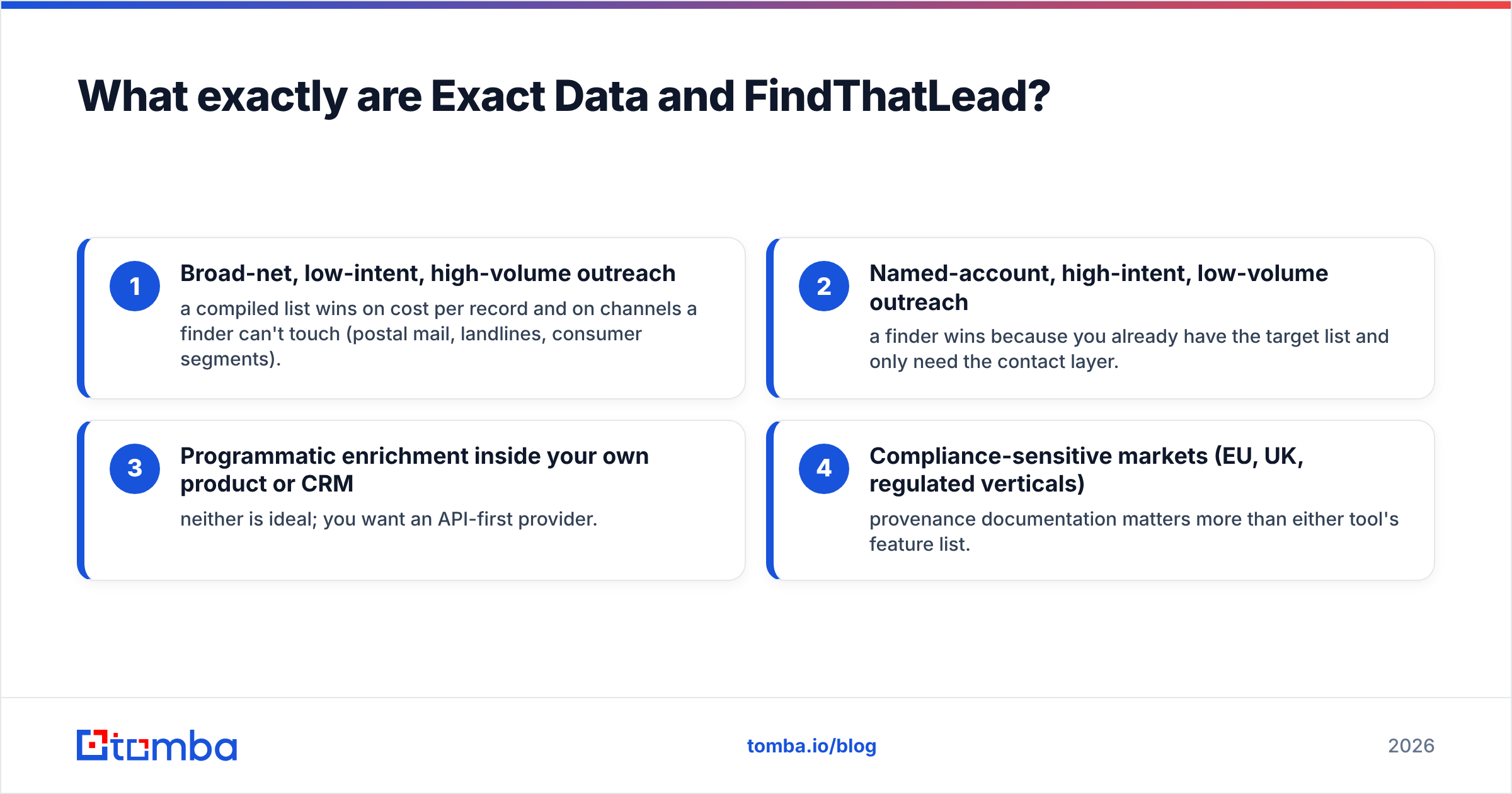
So the real question behind Exact Data vs FindThatLead is not which vendor is better. It is which model your pipeline needs:
- Broad, low-intent, high-volume outreach. A compiled list wins on cost per record. It also reaches channels a finder cannot touch, like postal mail and landlines.
- Named-account, high-intent outreach. A finder wins. You already have the target list and only need the contact layer.
- Enrichment inside your own product or CRM. Neither fits well. You want an API-first provider.
- Regulated or EU/UK markets. Proof of where the data came from matters more than any feature list.

How do Exact Data and FindThatLead source contacts?#
Exact Data compiles. It pulls from public filings, business registrations, phone directories, survey data, subscription files, and co-op databases. Then it cleans the result.
Compiled data has one big edge: coverage of firms with no real web presence. Think of a local HVAC contractor with a one-page site and a Facebook page. That business shows up in a compiled file. It never shows up in a web-crawling finder.
FindThatLead resolves. It takes a name plus a domain, or a LinkedIn URL. It matches the company email pattern, then checks the candidate address.
Most modern finders share that design, including Tomba's email finder and the pattern layer behind domain search. Coverage leans toward firms with a real site, staff on LinkedIn, and a steady email format. In short: tech, SaaS, agencies, and mid-market B2B.
Here is the practical result. Compiled data starts aging the day it is cut. Resolved data ages from the second you query it. For a plumbing list, that is fine. The shop phone rarely changes. For a VP of Marketing at a 200-person SaaS firm, a nine-month-old record is a coin flip.
Exact Data vs FindThatLead: which is more accurate in 2026?#
Take no vendor's accuracy number at face value. That includes Tomba's. Self-reported rates cover the records the vendor already feels sure about. Those are the ones that would have worked anyway.
Here is the honest framing.
- Exact Data's accuracy depends on the order. A tight postal file of licensed contractors in Ohio will perform well. A file of "marketing decision makers at 50-500 employee firms" bought for cold email will not. Email is the field that decays fastest, and bad email hurts you the most.
- FindThatLead's accuracy depends on the pattern. When a firm uses
first.last@domain.comand has three public addresses to confirm it, results are strong. When the format is random or role-based, or the domain is catch-all, confidence drops. You then get guesses dressed up as findings.

Catch-all domains are where most finders quietly fail. The server accepts every address. So a simple SMTP check returns "valid" for asdfgh@company.com.
Any tool that calls catch-alls deliverable will inflate its own stat and your bounce rate at the same time. Test it yourself. Send 200 known catch-all domains through each tool and see what comes back. That test separates marketing copy from engineering. A dedicated catch-all verifier exists for this reason.

One habit matters more than the vendor choice: treat every acquired address as unverified until your own tool says otherwise. Run the Exact Data file or the FindThatLead export through an independent email verifier before import. It takes 20 minutes. It protects a sending domain you spent months warming.
Exact Data vs FindThatLead: price and features compared#
The pricing models do not line up, so read this as a structural view rather than a quote. Both vendors negotiate and change prices. Confirm current numbers before you commit.
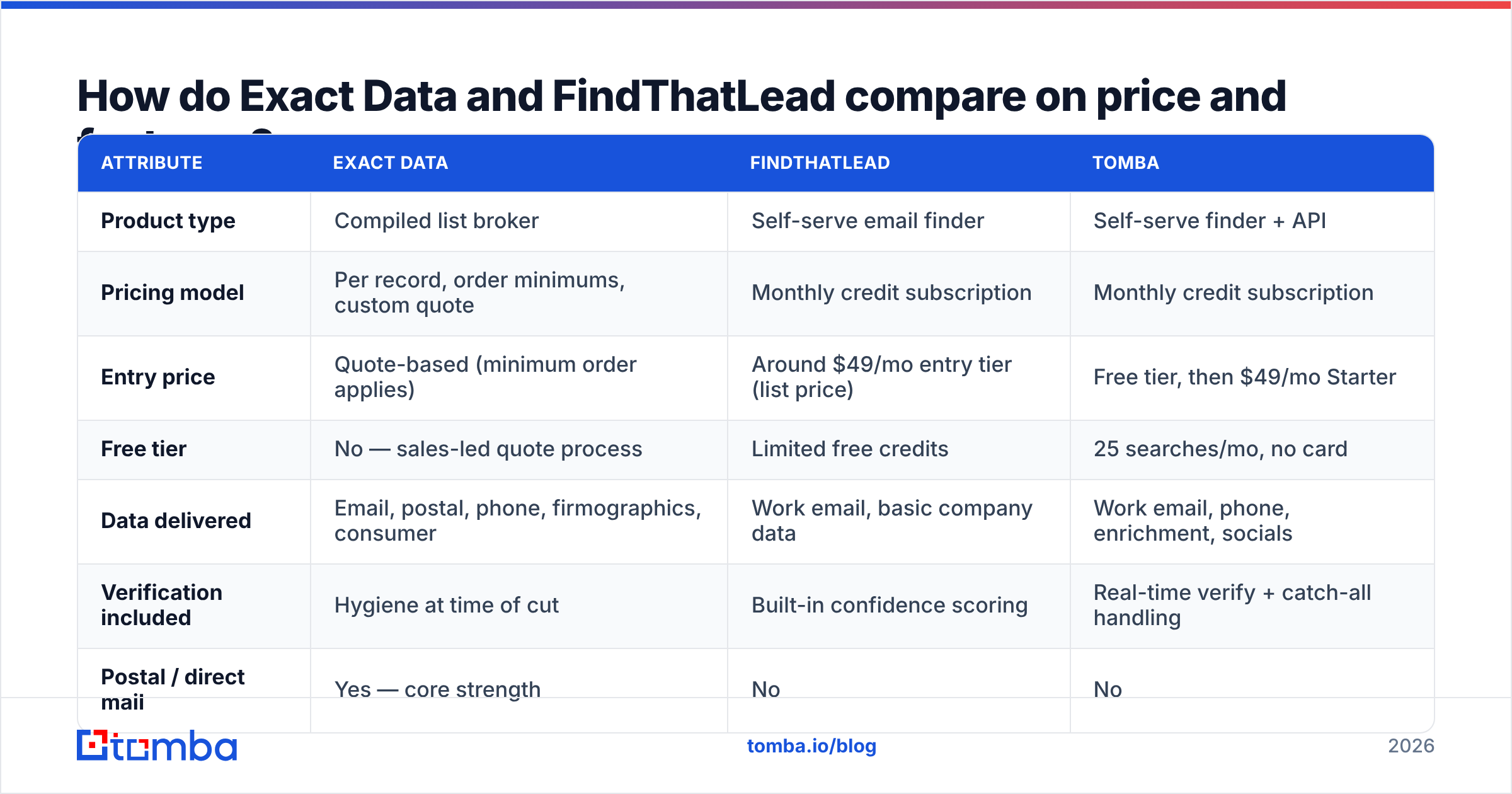
| Attribute | Exact Data | FindThatLead | Tomba |
|---|---|---|---|
| Product type | Compiled list broker | Self-serve email finder | Self-serve finder + API |
| Pricing model | Per record, order minimums, custom quote | Monthly credit subscription | Monthly credit subscription |
| Entry price | Quote-based (minimum order applies) | Around $49/mo entry tier (list price) | Free tier, then $49/mo Starter |
| Free tier | No — sales-led quote process | Limited free credits | 25 searches/mo, no card |
| Data delivered | Email, postal, phone, firmographics, consumer | Work email, basic company data | Work email, phone, enrichment, socials |
| Verification included | Hygiene at time of cut | Built-in confidence scoring | Real-time verify + catch-all handling |
| Postal / direct mail | Yes — core strength | No | No |
| Consumer (B2C) data | Yes | No | No |
| API access | Limited / delivery-oriented | Yes | Yes, API-first with CLI and MCP |
| Best fit | High-volume multichannel campaigns | SMB and agency prospecting | Dev teams and ops-led enrichment |
| Time to first contact | Days (quote → delivery) | Minutes | Minutes |

Two points matter more than the sticker price.
Order minimums change the math. A few cents per record looks unbeatable. Then you learn you must buy 10,000 records to clear the minimum, and you only needed 1,200. Work out the cost per usable record instead.
Credits are not contacts. With finders, a search that returns nothing can still burn a credit. Bulk jobs in low-coverage sectors eat a month's allowance fast. Ask about the refund-on-miss rule. It is the gap between a $49 plan and a real $120 plan.
Tomba's pricing runs Free (25 searches), Starter at $49/mo, Growth at $99/mo, and Pro at $249/mo. Ask the same question there: what happens to a credit when the search misses?
Which tool should your team pick?#
Match the tool to the motion, not to the feature grid.
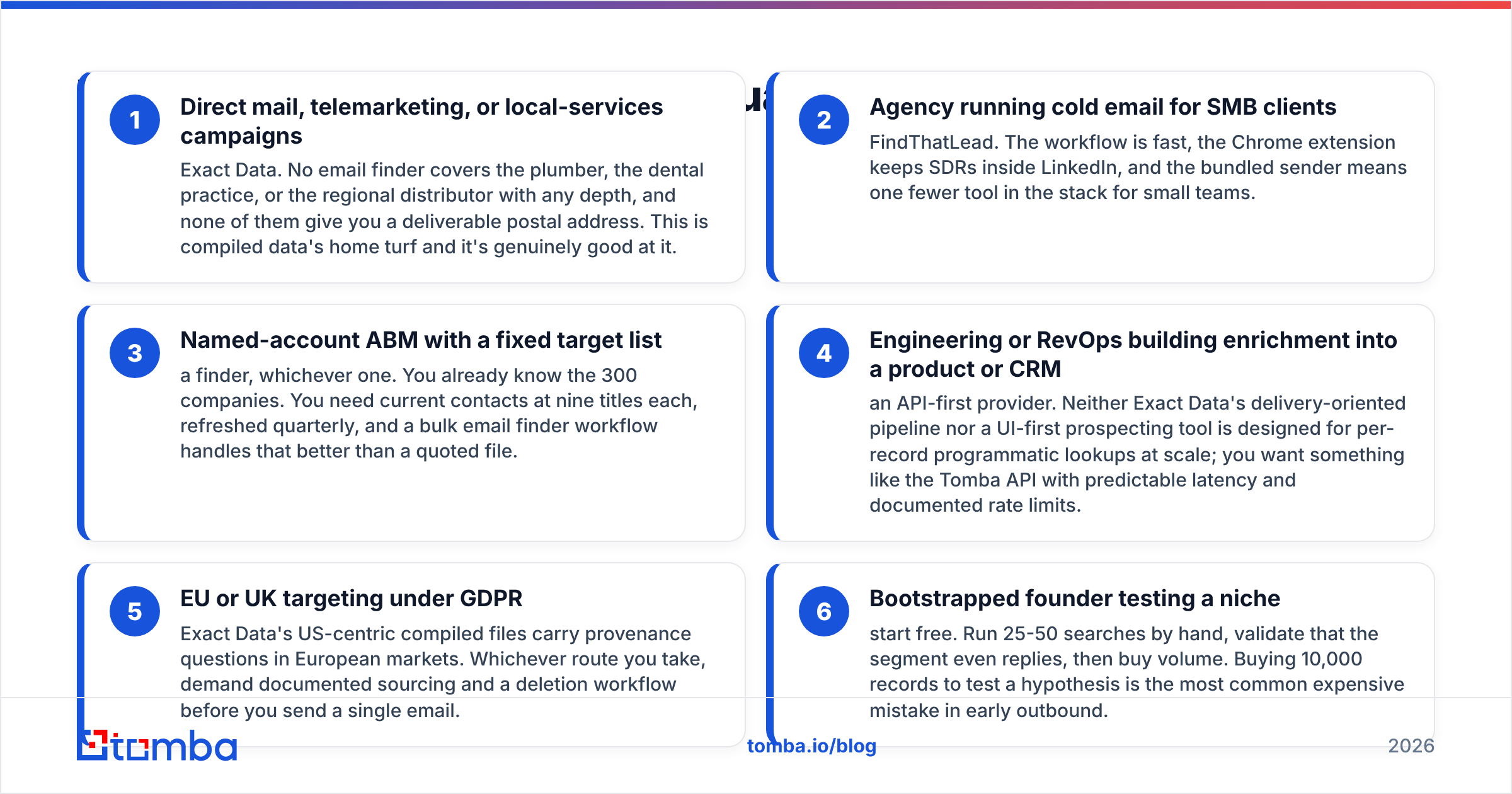
- Direct mail, phone, or local-services campaigns. Pick Exact Data. No finder covers the plumber, the dental practice, or the regional distributor with any depth. None of them give you a mailing address. This is compiled data's home turf.
- Agency running cold email for SMB clients. Pick FindThatLead. The workflow is fast, the Chrome extension keeps reps inside LinkedIn, and the built-in sender means one less tool.
- Named-account ABM with a fixed list. Pick a finder, either one. You know the 300 firms. You need current contacts at nine titles each, refreshed each quarter. A bulk email finder handles that better than a quoted file.
- Engineering or RevOps building enrichment. Pick an API-first provider. Neither a delivery pipeline nor a UI-first tool suits per-record lookups at scale. The Tomba API gives you steady latency and documented rate limits.
- EU or UK targeting under GDPR. US compiled files raise sourcing questions in Europe. Ask for documented provenance and a deletion workflow before you send anything.
- Bootstrapped founder testing a niche. Start free. Run 25-50 searches by hand. Check that the segment even replies, then buy volume. Buying 10,000 records to test a hunch is the classic early mistake.
So the Exact Data vs FindThatLead answer is a segment answer, not a scoreboard answer.
What do buyers complain about?#
Review patterns on G2 tell you more than any vendor page. The complaints cluster by category.
For compiled list sellers, three themes repeat. Email delivery falls short of postal accuracy. There is no self-serve preview before you buy. And the sales cycle feels heavy when you only want 500 records.
None of that is really a data-quality knock. It is the model. You are buying a media product, and media products come with minimums and a rep.
For self-serve finders, the themes are different. Credits burn on low-coverage searches. Results wobble on non-US or non-English domains. Confidence scores do not map cleanly to real bounce rates. Again, that is the model. Probabilistic matching has a tail.
The mature move is to stop hunting for a vendor with zero complaints. Build a pipeline that survives the failure mode of whichever one you pick:
- Buy from the source that fits the segment
- Dedupe and normalize first
- Verify with a separate tool, not the one you bought from
- Send catch-alls to their own low-volume sequence
- Track bounce rate by source
Almost nobody does that last step. It is the only way to answer "which is more accurate" for your list instead of for a vendor's deck.
Is there a third option?#
Maybe. If you need B2B work emails for named people at firms with a website, the choice is not binary.
Tomba sits in the same category as FindThatLead. It leans harder into the API and the verify layer: real-time lookup, explicit catch-all handling, data enrichment, and a free tier. You can test coverage on your real target list before you pay anything.
That is the honest scope. Tomba does not sell postal addresses. It carries no consumer files. It will not replace Exact Data for a mail drop to 40,000 SMBs. If that is your motion, buy the list.
If your motion is finding current work emails for people you already named, a finder with strong verification is cheaper and faster.
Here is a fair test, in order. Build a 100-row list of firms you actually sell to. Run it through each tool's free or trial tier. Send the results through a neutral verifier. Then compare verified deliverable addresses per dollar. That number decides it. The rest is positioning.
Ready to test coverage on your own list?#
You do not have to settle Exact Data vs FindThatLead on paper. Start with the Tomba Email Finder free tier: 25 searches a month, no card required. Upload a slice of your real target accounts and see what comes back. Compare it against the quote or plan you are weighing. If coverage holds on your segment, Starter at $49/mo scales it. If it does not, you learned that for free instead of after a minimum order.
Related guides#
Ready to find emails that actually work?
Join 150,000+ professionals who stopped guessing and started sending. Free credits on signup — no credit card required.
Get the Tomba newsletter
Practical outbound tactics and product updates — once every two weeks.
About the author