Exellius vs Mailcleanup (2026): Which B2B Email Tool Wins?
One tool finds contacts, the other cleans your list. Here is an honest breakdown of Exellius vs Mailcleanup — data coverage, verification depth, pricing models, and when a single hybrid platform beats running both.
TL;DR
- They are not the same category. Exellius is positioned as a B2B contact-discovery and prospecting platform; Mailcleanup is an email verification and list-hygiene service. Comparing them head-to-head only makes sense if you are deciding where your next $100/month goes.
- If you have no list yet, a verifier is useless. Discovery comes first. If you already bought or scraped 50,000 contacts and your bounce rate is climbing, hygiene comes first.
- Running both means two subscriptions, two credit pools, and two APIs — plus a manual CSV handoff between them that eats junior-SDR hours every week.
- Verification depth matters more than raw list size. SMTP-level checks, catch-all handling, and role-account flags are what actually protect your sender reputation.
- A hybrid platform (find + verify + enrich in one API) is usually cheaper than two point tools once you cross roughly 5,000 contacts a month.
What are Exellius and Mailcleanup, exactly?#
Start with the honest framing: these two products solve adjacent problems, not the same problem.
Exellius sits on the discovery side. Its pitch is finding B2B contact data — work emails, company-level records, and prospect lists you can push into outbound. You give it a company, a domain, or a set of filters, and it returns people you could email. The value is coverage: how many of your target accounts return a usable contact.
Mailcleanup sits on the hygiene side. Its pitch is taking a list you already own and telling you which addresses are deliverable, which will hard-bounce, which are role accounts (info@, sales@), and which sit on catch-all domains where a definitive answer is impossible. The value is protection: how much of your sender reputation survives the next send.
That distinction drives the entire buying decision. Nobody "wins" a finder-versus-verifier fight in the abstract. What you are really asking is: given my current pipeline, which gap costs me more revenue this quarter?
A useful test: pull your last 5,000 sent emails. If your bounce rate is under 2% but you ran out of prospects three weeks into the quarter, you have a discovery problem. If you have 80,000 contacts sitting in a CRM and your bounce rate crossed 5%, you have a hygiene problem — and Google and Microsoft's 2024 bulk-sender rules made that problem materially more expensive.
How do Exellius and Mailcleanup actually differ?#
Here is the structural comparison. Feature availability and packaging change often on both sides, so treat this as a shape-of-the-product map and confirm specifics on each vendor's current pricing page before you commit.
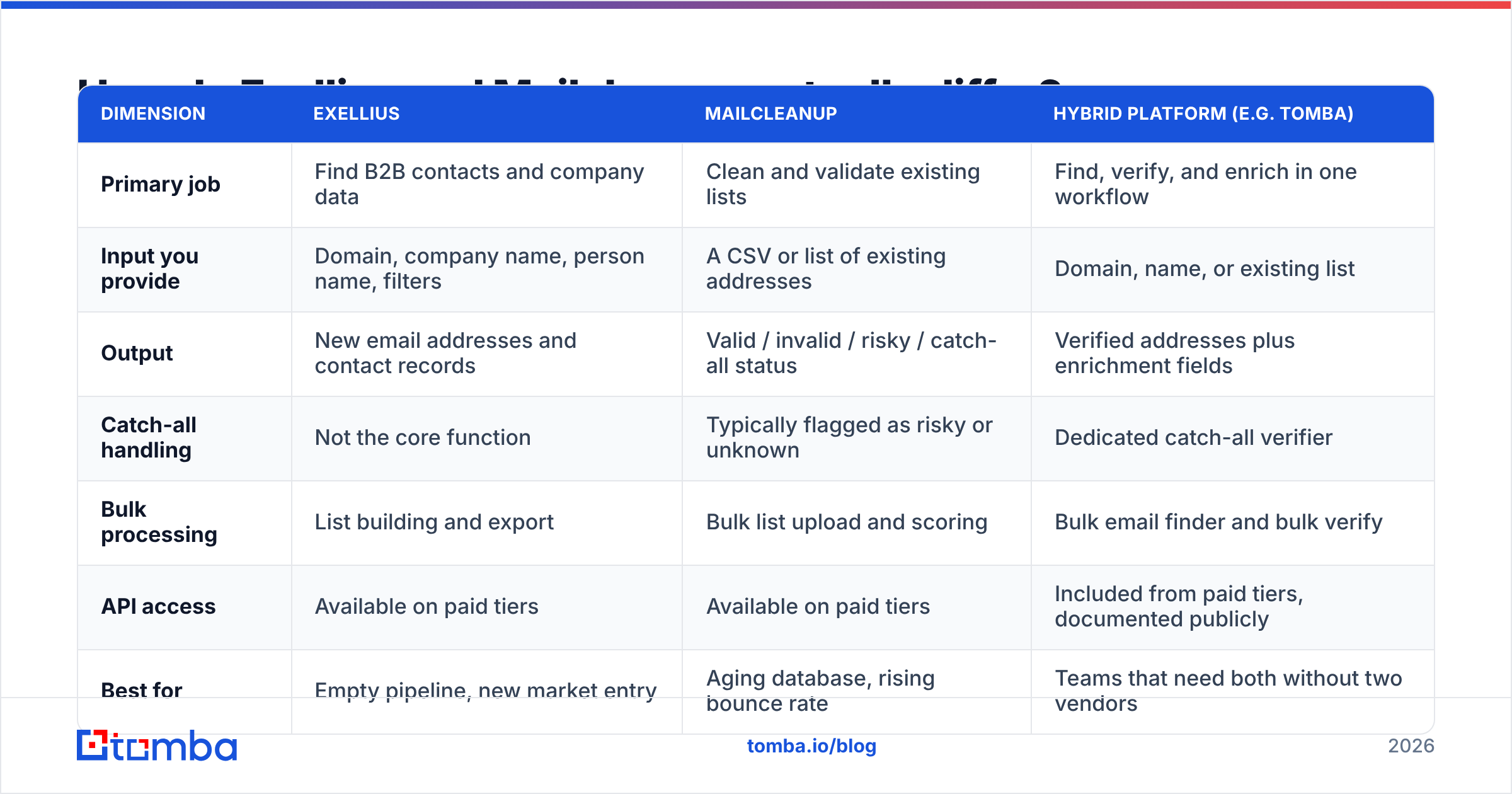
| Dimension | Exellius | Mailcleanup | Hybrid platform (e.g. Tomba) |
|---|---|---|---|
| Primary job | Find B2B contacts and company data | Clean and validate existing lists | Find, verify, and enrich in one workflow |
| Input you provide | Domain, company name, person name, filters | A CSV or list of existing addresses | Domain, name, or existing list |
| Output | New email addresses and contact records | Valid / invalid / risky / catch-all status | Verified addresses plus enrichment fields |
| Catch-all handling | Not the core function | Typically flagged as risky or unknown | Dedicated catch-all verifier |
| Bulk processing | List building and export | Bulk list upload and scoring | Bulk email finder and bulk verify |
| API access | Available on paid tiers | Available on paid tiers | Included from paid tiers, documented publicly |
| Best for | Empty pipeline, new market entry | Aging database, rising bounce rate | Teams that need both without two vendors |
| Solves the other half? | No — you still need verification | No — you still need discovery | Yes |
The pattern that matters: each column has a hole the other fills. Exellius does not meaningfully protect your domain reputation. Mailcleanup does not put a single new prospect in your sequence. If you buy one, you have half a workflow.
Which one has better data accuracy?#
Accuracy means two different things here, and conflating them is the most common mistake buyers make.
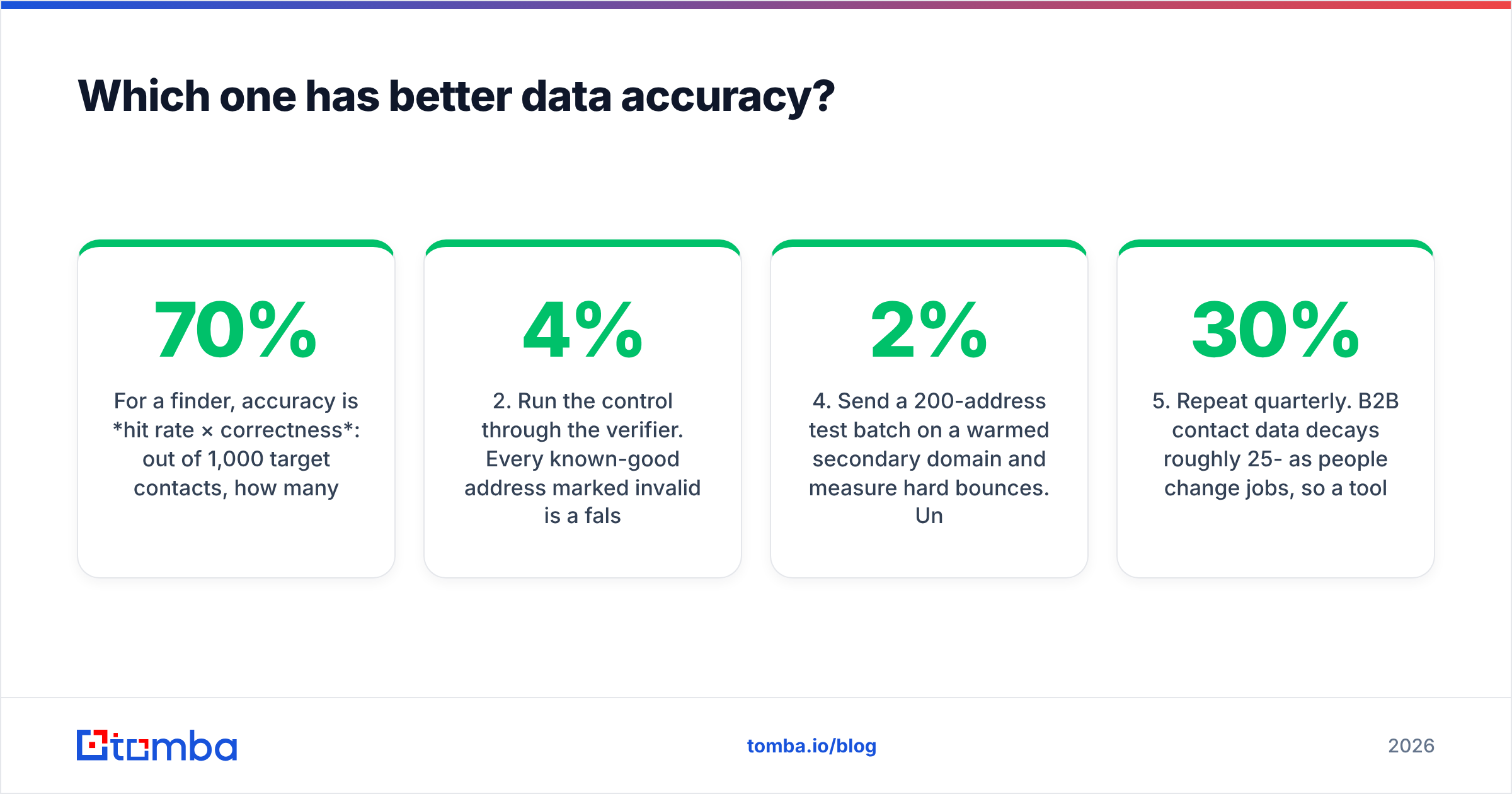
For a finder, accuracy is hit rate × correctness: out of 1,000 target contacts, how many addresses come back, and how many of those actually land. A tool that returns 900 addresses with 70% deliverability is worse than one returning 600 at 96%, because every bounce compounds against your sender reputation.
For a verifier, accuracy is false-negative and false-positive rate: how often it marks a good address invalid (lost revenue you never see) and how often it passes a dead address (a bounce you do see). Vendors advertise the second number and stay quiet about the first.

How to test either one without taking marketing copy at face value:
- Build a 200-row control list from your own CRM — contacts you have already emailed successfully in the last 90 days, plus 30 addresses you know are dead (people who left, domains that shut down).
- Run the control through the verifier. Every known-good address marked invalid is a false negative. More than 3-4% and the tool is quietly deleting pipeline.
- Run a domain sample through the finder. Take 50 companies you sell to. Count how many return at least one decision-maker email. That is your real hit rate, not the vendor's.
- Send a 200-address test batch on a warmed secondary domain and measure hard bounces. Under 2% is healthy; over 4% and you are burning your domain.
- Repeat quarterly. B2B contact data decays roughly 25-30% per year as people change jobs, so a tool that tested well 18 months ago is not the same tool today.
Do this before committing to an annual contract. Both vendors publish trial credits precisely because buyers who test tend to convert; use that to your advantage rather than trusting a G2 star rating in isolation. Peer reviews on G2 are useful for support responsiveness and billing complaints, less useful for accuracy claims, since almost nobody who writes a review ran a control test.
How does pricing compare?#
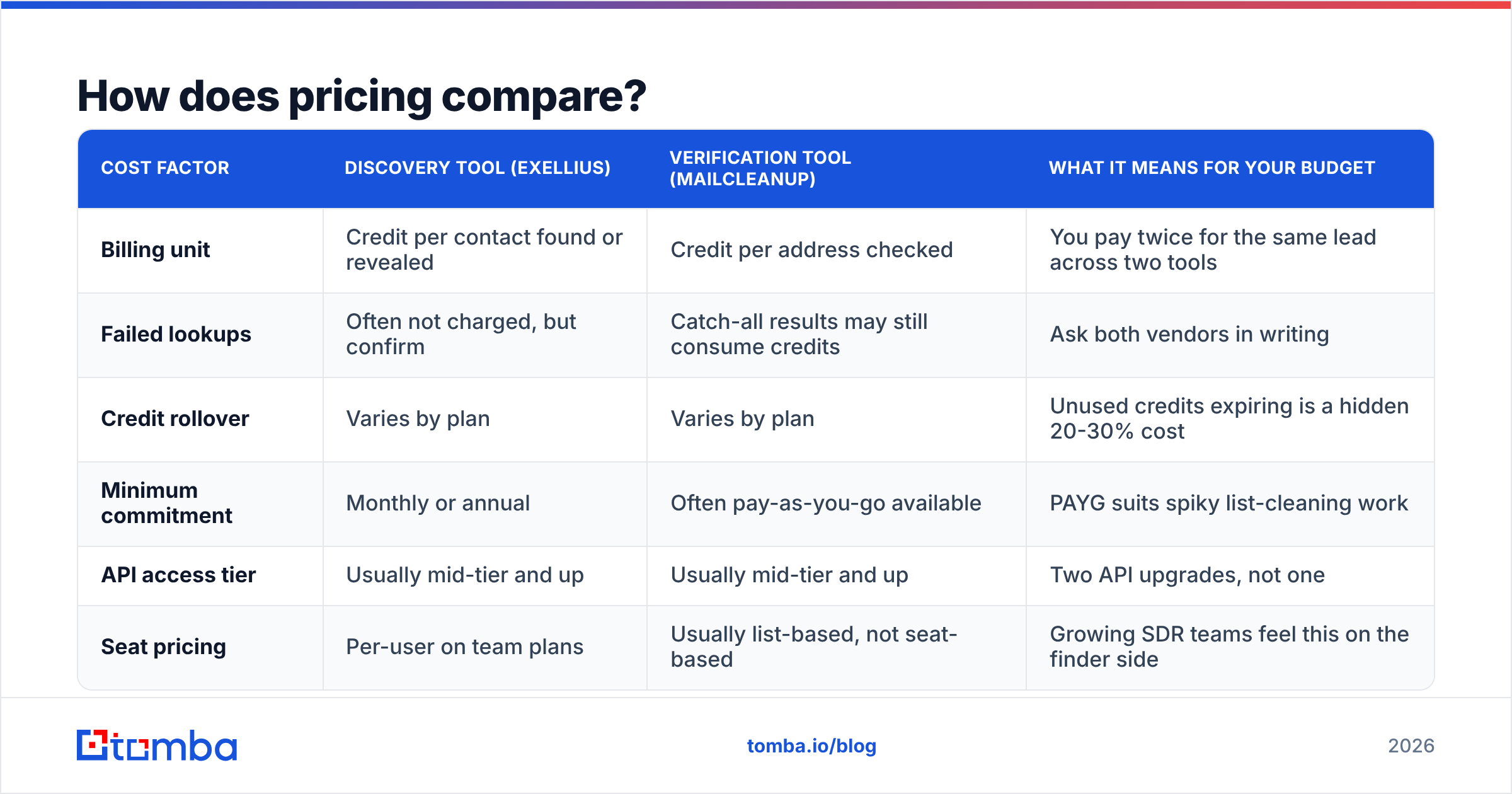
Both vendors publish credit-based plans, and both change them, so I will not invent numbers for either. What you can compare reliably is the pricing model, because that is what determines your true cost per contact.
| Cost factor | Discovery tool (Exellius) | Verification tool (Mailcleanup) | What it means for your budget |
|---|---|---|---|
| Billing unit | Credit per contact found or revealed | Credit per address checked | You pay twice for the same lead across two tools |
| Failed lookups | Often not charged, but confirm | Catch-all results may still consume credits | Ask both vendors in writing |
| Credit rollover | Varies by plan | Varies by plan | Unused credits expiring is a hidden 20-30% cost |
| Minimum commitment | Monthly or annual | Often pay-as-you-go available | PAYG suits spiky list-cleaning work |
| API access tier | Usually mid-tier and up | Usually mid-tier and up | Two API upgrades, not one |
| Seat pricing | Per-user on team plans | Usually list-based, not seat-based | Growing SDR teams feel this on the finder side |
For reference on the hybrid side, Tomba pricing runs a free tier at 25 searches/month, Starter at $49/mo, Growth at $99/mo, Pro at $249/mo, and custom Enterprise — with finding and verification drawing from the same account rather than two separate wallets.
The arithmetic that decides it: add both subscriptions, then add the operational cost of the handoff. If an SDR exports a CSV from the finder, uploads it to the verifier, waits, downloads, dedupes, and re-imports to the CRM twice a week, that is roughly 4-6 hours a month of work nobody put on the invoice. At a loaded SDR cost, the handoff alone often exceeds the price gap between two point tools and one platform.

Do you actually need both tools?#
Sometimes yes. Here are the four situations where running Exellius and Mailcleanup side by side is defensible:
- You inherited a large legacy database. Hundreds of thousands of rows from years of trade shows and gated content, never validated. A dedicated verification vendor with pay-as-you-go pricing is a clean one-time spend, and you keep your finder separate.
- Your discovery need is niche. If one vendor has unusually strong coverage in your specific vertical or geography, keep it for that even if the rest of your stack lives elsewhere. Coverage in a narrow ICP beats generalist coverage every time.
- Compliance or procurement forces separation. Some enterprise security reviews prefer a verification vendor that never sees your outbound prospecting logic, and vice versa.
- You are mid-contract. Do not eat a termination fee to consolidate. Consolidate at renewal.
And here is when running both is waste: you are a team of one to ten, sending under 20,000 emails a month, and your workflow is domain → find contacts → verify → sequence. That is one linear pipeline. Splitting it across two vendors adds cost, latency, and a CSV step that will eventually corrupt a column.
Which should you pick for your use case?#
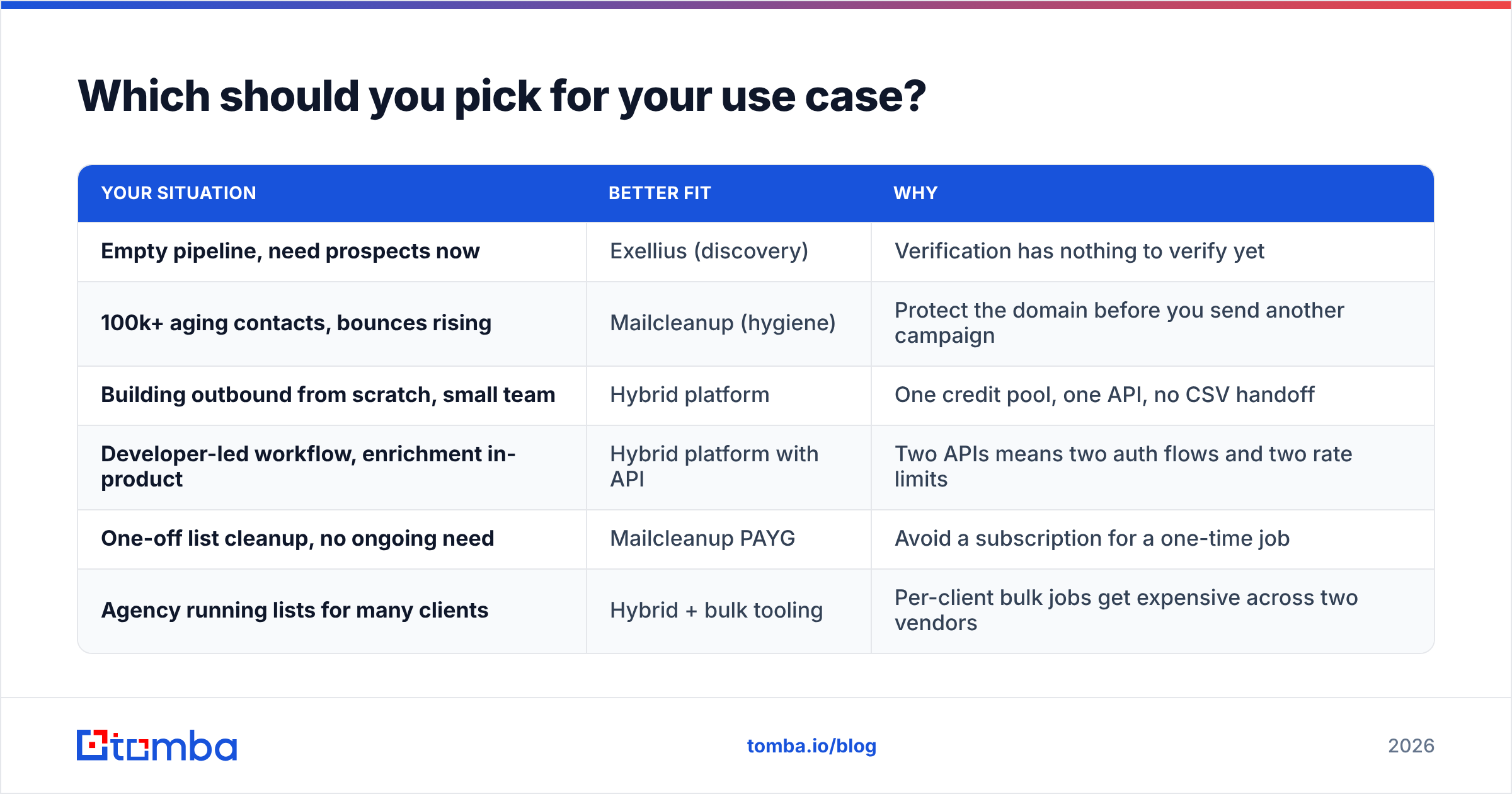
| Your situation | Better fit | Why |
|---|---|---|
| Empty pipeline, need prospects now | Exellius (discovery) | Verification has nothing to verify yet |
| 100k+ aging contacts, bounces rising | Mailcleanup (hygiene) | Protect the domain before you send another campaign |
| Building outbound from scratch, small team | Hybrid platform | One credit pool, one API, no CSV handoff |
| Developer-led workflow, enrichment in-product | Hybrid platform with API | Two APIs means two auth flows and two rate limits |
| One-off list cleanup, no ongoing need | Mailcleanup PAYG | Avoid a subscription for a one-time job |
| Agency running lists for many clients | Hybrid + bulk tooling | Per-client bulk jobs get expensive across two vendors |
A note on the middle rows, because that is where most readers land. If you are building outbound and you need both halves, look at what a single platform gives you beyond price: an email finder and an email verifier that share one account mean a found address can be verified in the same call, before it ever reaches your sequencing tool. No export. No stale intermediate file. No 8% of your list silently going out unverified because someone skipped a step on a Friday.
What about alternatives that do both?#
The find-plus-verify category has consolidated hard since 2023. Reasonable options depending on your priorities:
- Tomba — email finder plus verifier, domain search, catch-all verification, phone lookup, and enrichment on one API. Free tier is 25 searches/month, which is enough to run the control test described earlier.
- BookYourData — a strong option when you want a purchased, pre-verified B2B list rather than running discovery yourself. Different buying motion: you pick filters and download contacts with a deliverability guarantee, which suits teams that want volume up front rather than a per-lookup workflow.
- Apollo / ZoomInfo tier — full sales-engagement suites. Good if you want sequencing and dialing in the same tool; expensive and heavy if you only want data.
- Standalone verifiers (ZeroBounce, Bouncer, NeverBounce) — best-in-class hygiene, still no discovery.
Whichever direction you go, judge the finalist on three things you can measure: hit rate on your own ICP, false-negative rate on your known-good control list, and total monthly cost including the handoff labor. Vendor comparison charts on Capterra and G2 will not answer any of the three.
Frequently asked questions#
Is Exellius or Mailcleanup better for cold email? Neither alone. Cold email needs both discovery and verification. If you must start with one, start with discovery — you cannot clean a list you do not have. Then add verification before your first real send, not after.
Can I skip verification if my finder claims verified emails? Only if the finder documents how it verifies and gives you a confidence score per address. "Verified" with no methodology usually means a syntax and MX check, which catches typos but not departed employees. Ask what happens on catch-all domains — the answer tells you how serious the verification layer is.
How often should I re-verify my database? Every 90 days for actively emailed segments, every 6 months for dormant ones. B2B data decay is roughly 2-3% per month, so a year-old list is meaningfully degraded even if it was perfect at import.
Does bad data really hurt deliverability that much? Yes. Mailbox providers treat hard bounces as a spam signal. Sustained bounce rates above 2-3% push you toward the spam folder for the addresses that are valid, which is the expensive part — you lose the good contacts, not just the dead ones.
The practical next step#
If you are choosing between Exellius and Mailcleanup, you are choosing between two halves of one job. Run the 200-row control test on both, price out the handoff labor honestly, and then ask whether a single platform closes the gap for less.
If it does, start with the Tomba Email Finder. The free tier gives you 25 searches a month — enough to run the exact accuracy test in this post against your own ICP before you spend a dollar. Find the address, verify it in the same call, push it to your CRM, and skip the CSV round trip entirely. If you outgrow the free tier, Starter is $49/mo and the credits cover finding and verifying from one pool.
Test it against your own control list. That is the only benchmark that counts.
Related guides#
Ready to find emails that actually work?
Join 150,000+ professionals who stopped guessing and started sending. Free credits on signup — no credit card required.
Get the Tomba newsletter
Practical outbound tactics and product updates — once every two weeks.
About the author