Exellius vs Wiza: B2B Contact Data Compared for 2026
One sells you a managed, custom-built contact list. The other exports emails and phones straight out of LinkedIn Sales Navigator. Here is how Exellius and Wiza actually differ on sourcing, accuracy, pricing, and the workflow you end up living with.
TL;DR
- Exellius and Wiza are not the same category of product. Exellius Systems is a managed B2B data provider — you brief them, they build and deliver a list. Wiza is a self-serve tool that turns LinkedIn and Sales Navigator searches into exportable emails and phone numbers.
- Pick Exellius when you need a bespoke list built to a hard ICP definition, you have budget for a quoted project, and you would rather buy an outcome than run a workflow.
- Pick Wiza when your prospecting already lives in Sales Navigator, you want credits on a card today, and you need contacts in hours rather than after a scoping call.
- Neither replaces verification. Any list — bought, scraped, or enriched — decays roughly 2–3% per month. Re-verify before every send, not once at import.
- The cheapest path for most teams is a self-serve API/finder layer (Tomba starts free, then $49/mo) plus a verification pass, with a managed provider reserved for niches public data does not cover.
What are Exellius and Wiza, exactly?#
Exellius Systems sells data as a service. You describe the audience — industry, headcount, geography, tech stack, job function, sometimes intent signals — and their team assembles a contact file against that brief, typically with a human QA layer and a delivery SLA. Pricing is quote-based and usually scoped per project or per record. There is no button you click at 11pm to get 500 emails.
Wiza sells speed on top of LinkedIn. You run a Sales Navigator search, hit export, and Wiza resolves the profiles into work emails, personal emails, and (on higher tiers) direct dials. It ships a Chrome extension, a CRM push, and a credit-based plan you can start on your own card. Its official site is wiza.co, and its category peers on G2 sit in the sales-intelligence bucket alongside Apollo, Lusha, and ContactOut.
That difference — bought outcome vs operated workflow — drives every other comparison in this post. If you skip it, you will end up comparing a price per record against a price per seat and concluding nothing useful.

How do Exellius and Wiza source their data?#
Sourcing is where accuracy is won or lost, so it is worth being precise about what each side is actually doing.
- Exellius — brief-driven compilation. Public web sources, licensed datasets, and researcher effort are combined against your specific criteria. Because a human is in the loop for at least part of the build, coverage in awkward niches (regional manufacturers, non-English markets, roles with no LinkedIn presence) tends to be better than a pure scraper.
- Wiza — profile resolution from LinkedIn. The input is a LinkedIn or Sales Navigator search result. Wiza matches those profiles to email addresses and phones from its own data layer and validates before charging you for a "valid" result. Coverage is therefore bounded by who is on LinkedIn and how complete their profile is.
- Pattern inference vs record lookup. Tools in Wiza's category lean on company email patterns (first.last@, f.last@) plus verification. Managed providers lean on record-level sourcing. Pattern inference is fast and cheap; record sourcing is slower and better for edge cases.
- Verification timing. Wiza verifies at export time, which is why its "valid only" billing works. A managed list is verified at build time — which can be weeks before you actually send. Read that sentence twice, because it is the single most common reason a purchased list underperforms.
- Compliance posture. Both should give you GDPR/CCPA answers in writing. Scraping-adjacent tools also live under LinkedIn's user agreement, which restricts automated collection — worth knowing before you standardise your whole motion on one extension.
How much do Exellius and Wiza cost?#
This is where a straight comparison gets uncomfortable, because one vendor publishes numbers and the other does not.
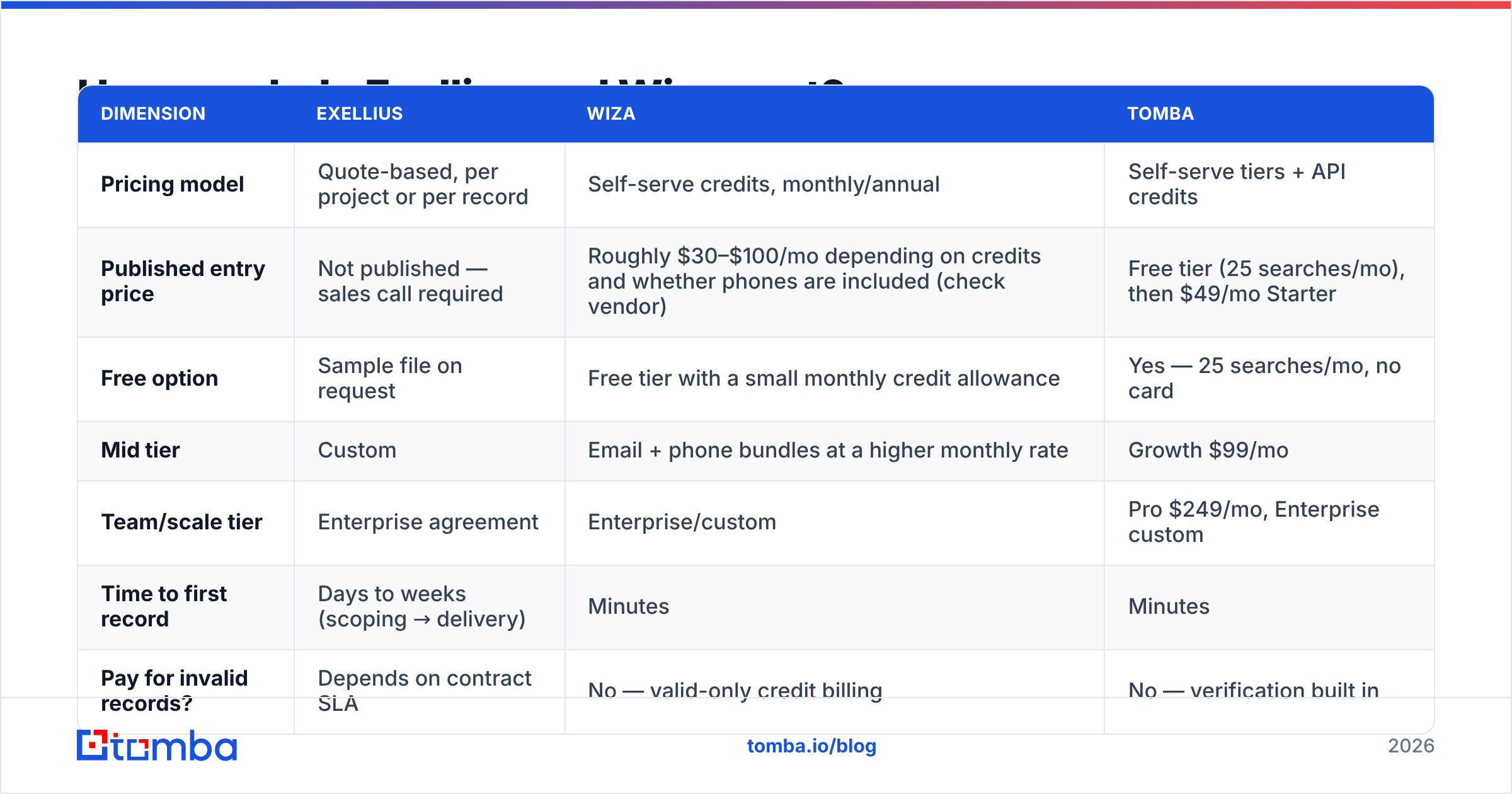
| Dimension | Exellius | Wiza | Tomba |
|---|---|---|---|
| Pricing model | Quote-based, per project or per record | Self-serve credits, monthly/annual | Self-serve tiers + API credits |
| Published entry price | Not published — sales call required | Roughly $30–$100/mo depending on credits and whether phones are included (check vendor) | Free tier (25 searches/mo), then $49/mo Starter |
| Free option | Sample file on request | Free tier with a small monthly credit allowance | Yes — 25 searches/mo, no card |
| Mid tier | Custom | Email + phone bundles at a higher monthly rate | Growth $99/mo |
| Team/scale tier | Enterprise agreement | Enterprise/custom | Pro $249/mo, Enterprise custom |
| Time to first record | Days to weeks (scoping → delivery) | Minutes | Minutes |
| Pay for invalid records? | Depends on contract SLA | No — valid-only credit billing | No — verification built in |
Two honest notes on that table. First, published vendor pricing moves; treat the numbers as "as listed at the time of writing" and confirm on the vendor's own page before you budget. Second, a quote-based provider is not automatically more expensive. For a 2,000-record list in a niche where public data is thin, a managed build can beat burning 8,000 credits on a tool that returns 40% coverage. The failure mode is paying enterprise rates for records you could have found with a domain search in an afternoon.
Which one gives you better data accuracy?#
Accuracy claims in this category are close to meaningless without a definition. "98% accurate" usually means of the records we chose to return, which quietly ignores coverage — the share of your target list the tool found anything for at all. A tool that returns 30% of your list at 98% accuracy is worse for pipeline than one returning 70% at 92%.

Here is how the two typically behave in practice:
- Wiza is strong on accuracy for LinkedIn-present prospects in tech, SaaS, and North American mid-market, because those profiles are complete and the underlying company patterns are well-known. It degrades on people with sparse profiles, on very small companies, and on regions where LinkedIn adoption is low.
- Exellius is strong precisely where Wiza degrades, because a researcher can go find a record that no automated pattern would produce. It is weaker on freshness: a list built in March and sent in June is a June-quality list, not a March one.
- Both will hand you catch-all domains, which neither an SMTP ping nor a naive verifier can conclusively resolve. If a meaningful share of your ICP sits behind catch-all servers, you need a dedicated catch-all verifier in the chain regardless of which vendor you pick.
The practical test: take 100 accounts you already know well — ideally accounts where you have a confirmed contact — and run both providers against them. Measure coverage, bounce rate after your own verification, and role accuracy (did the title match reality). That three-number scorecard settles more arguments than any vendor deck.
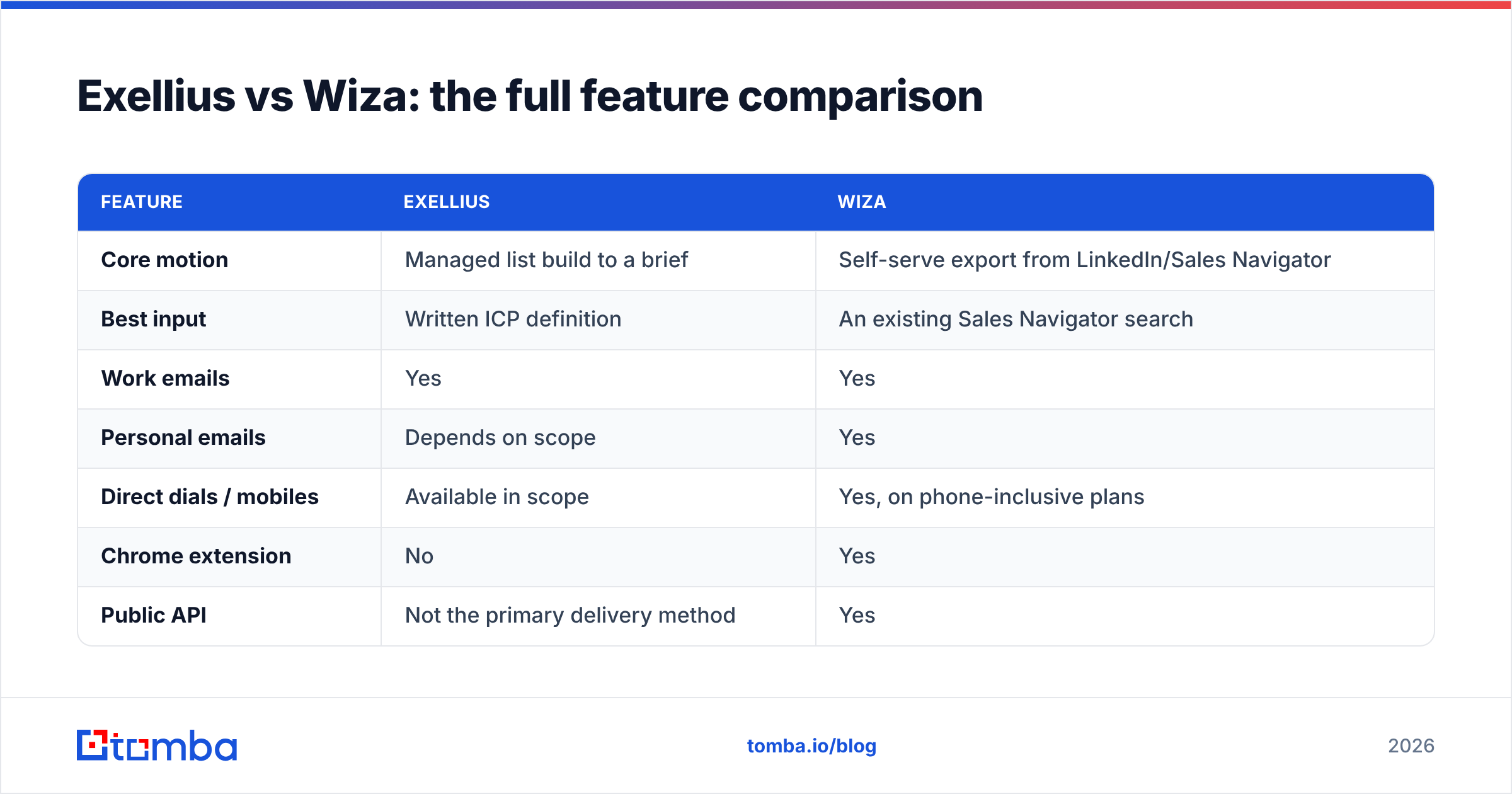
Exellius vs Wiza: the full feature comparison#

| Feature | Exellius | Wiza |
|---|---|---|
| Core motion | Managed list build to a brief | Self-serve export from LinkedIn/Sales Navigator |
| Best input | Written ICP definition | An existing Sales Navigator search |
| Work emails | Yes | Yes |
| Personal emails | Depends on scope | Yes |
| Direct dials / mobiles | Available in scope | Yes, on phone-inclusive plans |
| Chrome extension | No | Yes |
| Public API | Not the primary delivery method | Yes |
| CRM push | Via delivered file / integration work | Native pushes to common CRMs |
| Bulk enrichment of your own CSV | Yes, as a project | Yes, credit-metered |
| Intent / firmographic layering | Yes, part of the brief | Limited to LinkedIn filters |
| Turnaround | Days to weeks | Minutes |
| Contract commitment | Typically annual or per project | Monthly, cancellable |
| Who it fits | Enterprise ABM, niche verticals, regulated markets | SDR teams, agencies, founder-led sales |
The row that matters most for day-to-day operators is turnaround. Outbound is an iteration game: you write a hypothesis about a segment, test 200 sends, and learn within a week. A vendor whose cycle time is two weeks per list cannot support that loop. A vendor whose cycle time is two minutes can — as long as its coverage in your segment holds up.
Who should choose Exellius?#
Choose the managed route when at least two of these are true:
- Your ICP is not well represented in public data. Regional distributors, family-owned manufacturers, healthcare practice owners, non-English markets — segments where LinkedIn profiles are thin.
- You need fields no tool exposes. Equipment installed, licence renewal dates, franchise ownership, procurement calendar. These come from research, not from an API.
- Procurement wants one invoice and an SLA. A signed data agreement with accuracy guarantees is a legitimate reason to pay more.
- Volume is lumpy. You need 5,000 records twice a year, not 500 a week. Paying monthly seats for that is waste.
What to negotiate before signing: a paid pilot of 200–500 records, a replacement clause for records that bounce above an agreed threshold, delivery format (CSV plus a mapping doc, not a PDF), and a freshness date per record so you know what you are actually holding.
Who should choose Wiza?#
Choose the self-serve route when:
- Sales Navigator is already your prospecting surface. If your reps build lists there anyway, Wiza removes the copy-paste step and nothing else changes.
- You need contacts today. No scoping call, no procurement, no waiting.
- Your ICP is tech-forward and LinkedIn-dense. SaaS, agencies, ecommerce, professional services in English-speaking markets.
- You want to fail fast on segments. Cheap credits make experimentation affordable, which is worth more than a perfect list.
What to watch: credit burn on low-coverage segments, plan tier gating for phone data, and export limits per search. If you find yourself buying credits mid-month to finish one campaign, model the annual cost honestly before renewing — and look at what a bulk email finder plus an API workflow would cost for the same volume.

What are the alternatives to Exellius and Wiza?#
Most teams evaluating this matchup are really asking "what is the cheapest reliable way to get accurate B2B contacts into my sequencer." Some options worth putting on the shortlist:
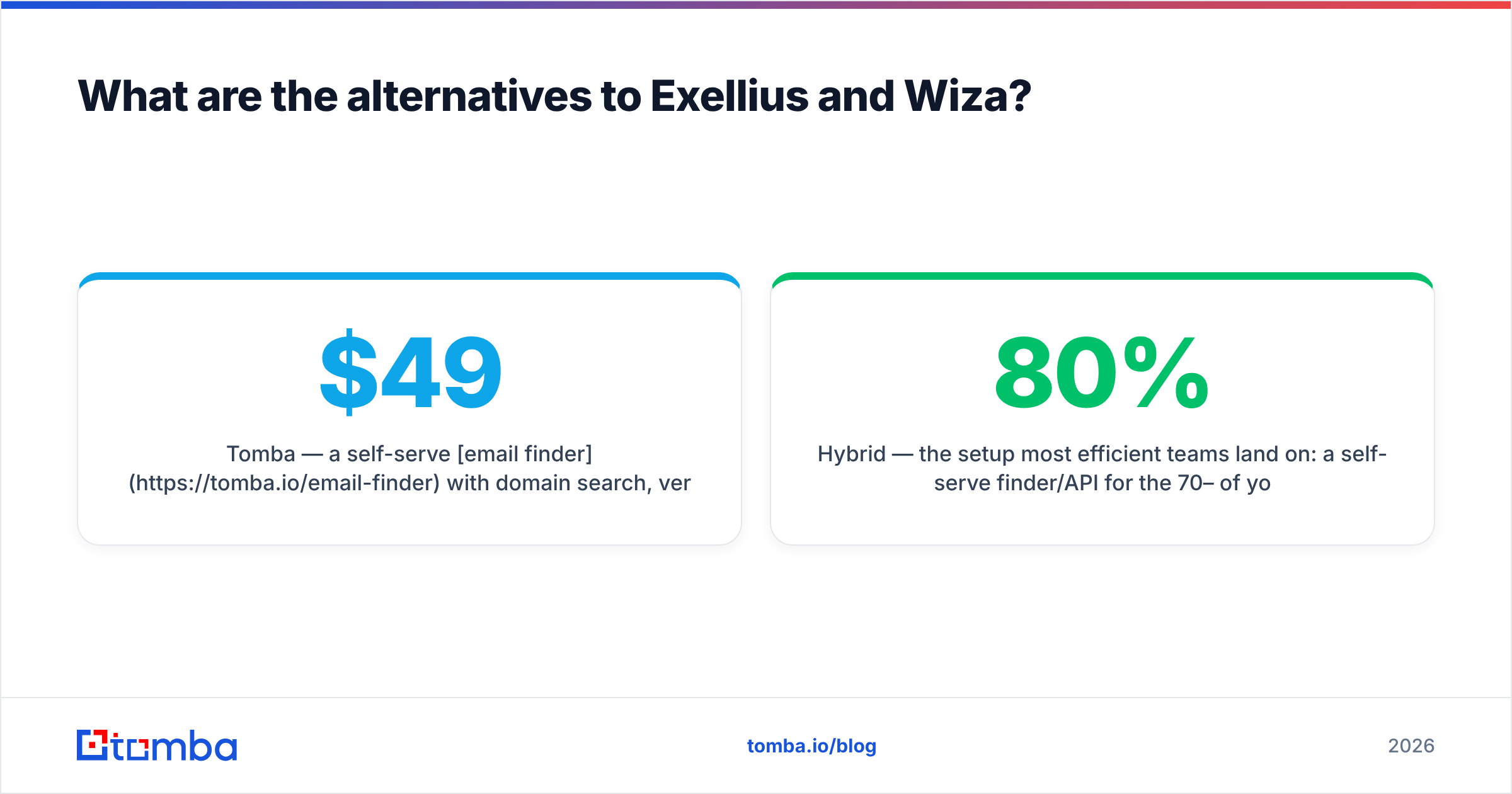
- Tomba — a self-serve email finder with domain search, verification, catch-all handling, and a documented API. Free tier at 25 searches/mo, Starter at $49/mo, Growth at $99/mo, Pro at $249/mo. Best fit when you want programmatic enrichment rather than a shopping cart of lists. See Tomba pricing for the current breakdown.
- BookYourData — a well-regarded pay-as-you-go B2B list marketplace with an accuracy guarantee. A strong option when you want to buy a defined list outright without a monthly subscription or a sales cycle, and it competes credibly with managed providers on turnaround.
- Apollo, Lusha, ContactOut — the broad sales-intelligence field. Deep databases bundled with sequencing, at the cost of paying for a suite when you may only need data.
- Hybrid — the setup most efficient teams land on: a self-serve finder/API for the 70–80% of your ICP that public data covers, plus one managed purchase per year for the niche segment nothing automated can reach.
There is no prize for buying one product. There is a prize for having a verified, deduplicated, current list at send time.
How should you actually run the test?#
Do not evaluate on vendor demos. Run this in a week:
- Freeze a 100-account sample from your real ICP, including 20 accounts you consider hard (small, regional, or non-English).
- Request the same list from both — a paid pilot from Exellius, a credit batch from Wiza. Same input criteria, same fields.
- Measure coverage first. Records returned ÷ accounts requested. This number is usually the tiebreaker, and it is the number vendors publish least.
- Re-verify everything yourself with an independent email verifier before any of it touches your sending domain. Note how many "valid" records fail on the second pass.
- Send a controlled 200-contact test and record bounce rate, reply rate, and how many replies say "wrong person."
- Compute cost per positive reply, not cost per record. That is the only number your CFO will care about in Q3.
Run the same test again in six months. Data vendors change suppliers, and a provider that won your bake-off in January can lose it by July without telling you.
The bottom line on Exellius vs Wiza#
Exellius wins on bespoke coverage; Wiza wins on speed and cost of iteration. If your ICP is niche, regulated, or offline-heavy and you can absorb a quoted project, the managed route is the honest answer. If you are running outbound at pace and your buyers live on LinkedIn, self-serve credits will beat a scoping call every time.
But for the large middle — teams that need reliable work emails at predictable cost, pushed into a CRM or a sequencer without a procurement cycle — neither category is quite the right shape. That is the gap Tomba's Email Finder is built for: search by domain, name, or company, verify in the same pass, and pull it all through the Tomba API so enrichment happens inside your own workflow instead of inside someone else's dashboard. Start on the free tier with 25 searches a month, benchmark it against whatever quote or credit pack is on your desk, and let the coverage numbers decide.
Related guides#
Ready to find emails that actually work?
Join 150,000+ professionals who stopped guessing and started sending. Free credits on signup — no credit card required.
Get the Tomba newsletter
Practical outbound tactics and product updates — once every two weeks.
About the author