How to Find Peoples Email Addresses in 2026: A Complete Guide
Eight proven methods to find people's email addresses, ranked by accuracy, cost, and how long they take. Includes a tool comparison, verification steps, and the legal rules you need to follow.
Need to find peoples email addresses without wrecking your sender reputation? This guide ranks the eight methods that still work in 2026, and shows which ones to skip.
TL;DR
- The fastest reliable path is a domain-based lookup. Get the company domain, run it through an email finder, then verify before you send.
- Manual methods (Google operators, Twitter/X bios, GitHub commits, WHOIS) still work and cost nothing. But they take 5-15 minutes per contact and fail on large enterprises.
- Guessing patterns like
first.last@company.comis right about 60-70% of the time. That is not good enough. A 30% bounce rate will burn your sending domain in a week. - Verification is not optional. Any method that skips SMTP-level validation hands you a list that looks fine and performs terribly.
- Budget expectation: free tools handle 20-50 lookups a month. Paid tools start around $39-$79/mo for 500-1,000 credits.
What does it actually mean to find someone's email?#
Finding someone's professional email is closer to detective work than a database lookup. You are combining three things: a name, a company, and a pattern. Think of it like knowing someone lives on Oak Street and their apartment number follows the building's numbering scheme. You do not need a directory if you understand the system.
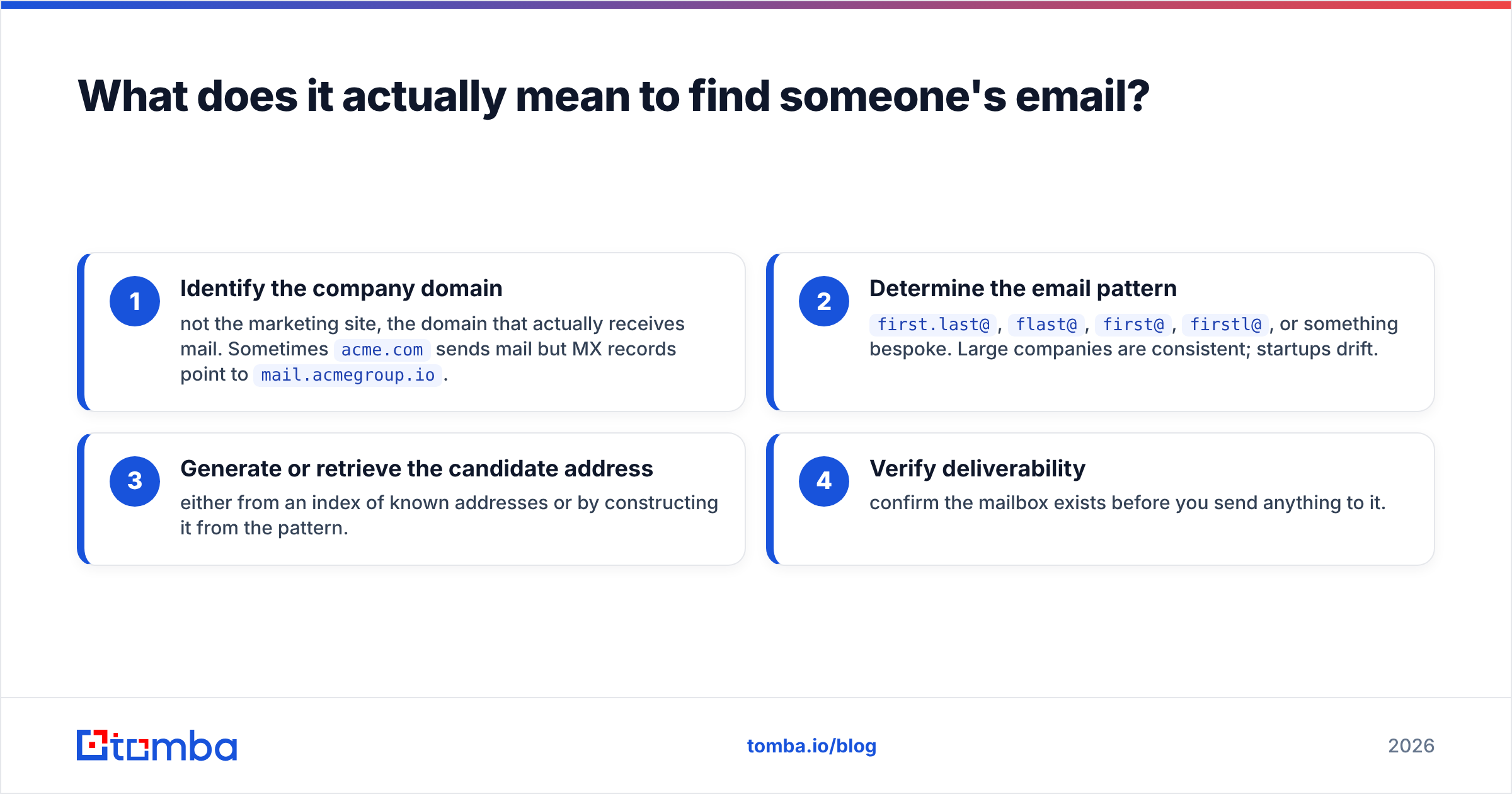
Every company uses a naming convention for its email addresses. Once you know the convention and the person's name, you can construct the address. The job breaks into four steps:
- Identify the company domain — not the marketing site, the domain that actually receives mail. Sometimes
acme.comsends mail but MX records point tomail.acmegroup.io. - Determine the email pattern —
first.last@,flast@,first@,firstl@, or something bespoke. Large companies are consistent; startups drift. - Generate or retrieve the candidate address — either from an index of known addresses or by constructing it from the pattern.
- Verify deliverability — confirm the mailbox exists before you send anything to it.
Skip step four and you have a guess, not an address. That distinction is what separates a 2% bounce rate from a 25% one.

Which methods actually work to find peoples email?#
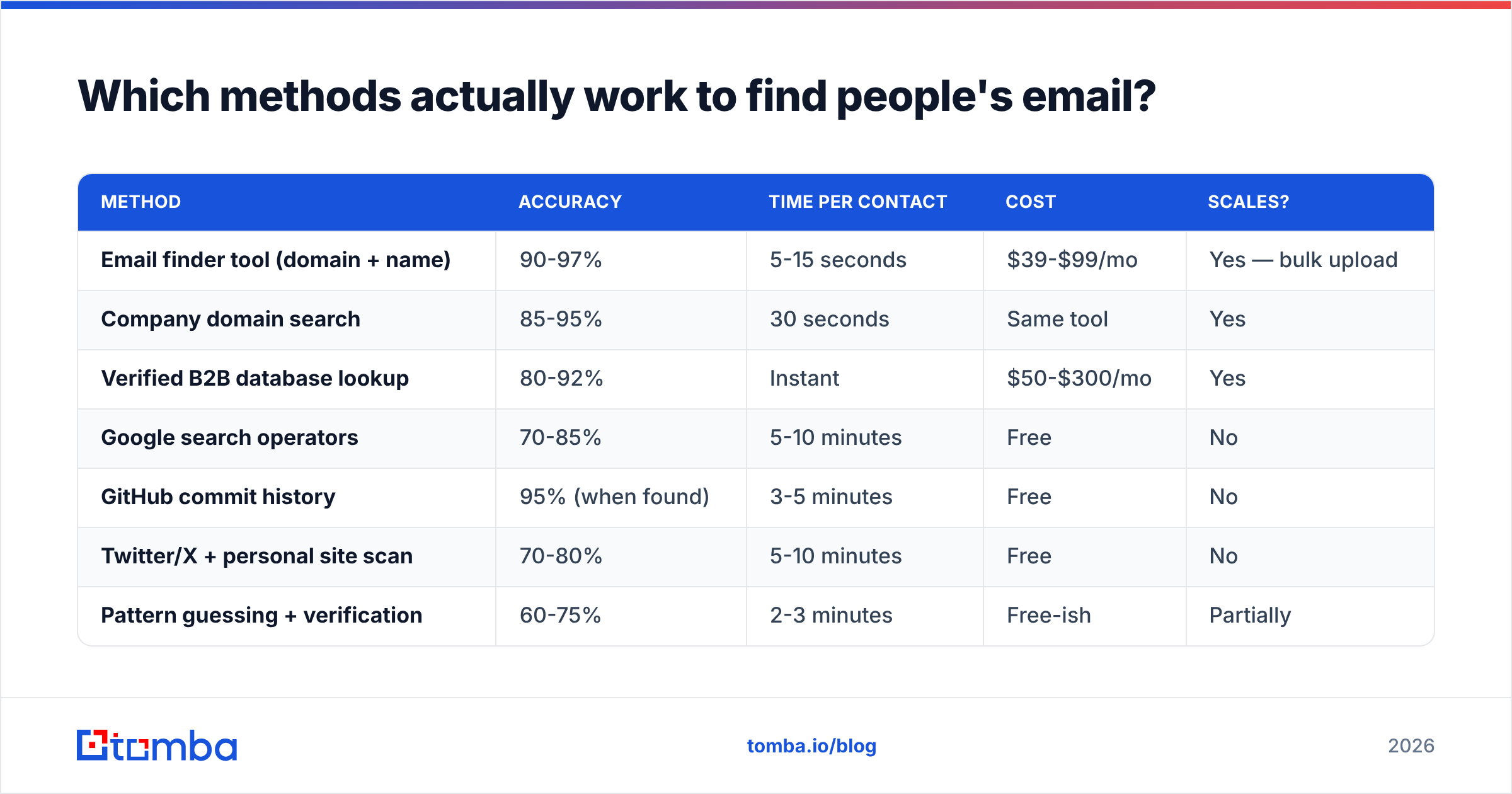
Here are the eight approaches worth your time, ranked by how reliably they produce a working address. Everything else is either slow, illegal in some places, or produces data you will regret: bought scraped lists, cold LinkedIn DMs, "verified" CSV dumps from marketplaces.
| Method | Accuracy | Time per contact | Cost | Scales? |
|---|---|---|---|---|
| Email finder tool (domain + name) | 90-97% | 5-15 seconds | $39-$99/mo | Yes — bulk upload |
| Company domain search | 85-95% | 30 seconds | Same tool | Yes |
| Verified B2B database lookup | 80-92% | Instant | $50-$300/mo | Yes |
| Google search operators | 70-85% | 5-10 minutes | Free | No |
| GitHub commit history | 95% (when found) | 3-5 minutes | Free | No |
| Twitter/X + personal site scan | 70-80% | 5-10 minutes | Free | No |
| Pattern guessing + verification | 60-75% | 2-3 minutes | Free-ish | Partially |
| WHOIS / DNS records | 40-60% | 2 minutes | Free | No |
Method 1: Use an email finder (the default)#
An email finder takes a first name, last name, and company domain and returns the most probable address with a confidence score. Under the hood it does two things. First, it checks an index of addresses already seen in public sources. When there is no direct hit, it infers the company's pattern from other addresses at that domain and applies it to your target.
The confidence score matters more than the address. A 97% score means the exact address has been observed and validated. A 72% score means the tool inferred a pattern and is guessing intelligently. Treat anything below 85% as a candidate that needs separate verification.
Method 2: Search the whole domain first#
If you do not have a specific person yet — you know you want "someone in RevOps at Acme" — start with domain search instead. You get every publicly known address at the domain, usually with job titles attached. That is faster than finding names on LinkedIn first and looking each one up. It also reveals the company's pattern immediately, which makes later lookups at that domain trivial.
Method 3: Google search operators#
Free, slow, and surprisingly effective for people with a public footprint. The operators that still work in 2026:
- Exact-pattern search:
"john.smith@acme.com"— sometimes it is just sitting in a PDF. - Domain-scoped:
site:acme.com "@acme.com"— surfaces team pages and press contacts. - Name plus at-sign:
"John Smith" "@acme.com"— catches conference speaker bios and slide decks. - Document types:
filetype:pdf "@acme.com"— investor decks and whitepapers leak contact lists constantly. - Adjacent platforms:
site:github.com "John Smith" acme— see method 4.
This works well for founders, engineers, journalists, and academics. It fails almost entirely for enterprise mid-level managers, who have no public footprint at all.
Method 4: GitHub commit history#
Every Git commit carries the author's email in its metadata. If your target has ever pushed public code, their address is retrievable. Append .patch to any commit URL on GitHub and read the From: header. Accuracy is near-perfect when it works, because you are reading an address the person set up themselves.
Caveat: many developers use GitHub's noreply privacy address now, and plenty commit with a personal Gmail rather than a work address. Useful for technical outreach, useless for CFOs.
Method 5: Personal sites, newsletters, and author bylines#
Writers, consultants, and anyone selling something usually publish a contact address somewhere. Check the site footer, the /about page, the newsletter's unsubscribe footer (often a real reply-to address), and podcast show notes. For content and PR outreach, an author finder pulls the address behind a byline straight from the article URL. That beats hunting through a masthead by hand.
Method 6: Pattern guessing plus verification#
If you know one address at a company, you know the pattern for most of the company. Feed a name into an email permutator to generate the 10-15 plausible variants, then verify each one and keep the survivor.
This is the classic free approach and it does work. But only because the verification step does the heavy lifting. Guessing alone gets you to roughly 60-75%. Guessing plus SMTP verification gets you to the same 90%+ a paid tool delivers, at the cost of far more of your time.
Method 7: WHOIS and DNS records#
For small businesses and independently registered domains, WHOIS still occasionally exposes an admin contact. GDPR-era redaction killed most of this for EU registrants, and privacy proxies cover the rest, so the hit rate is low. Worth 90 seconds on a small target, worth zero on anything enterprise.
Method 8: Just ask#
Underrated. A LinkedIn connection request with a one-line note — "working on X, would love to send you the teardown, what's the best address?" — converts better than people expect. The address you get is guaranteed correct and implicitly permissioned. It does not scale past a handful of high-value targets, which is exactly when you should use it.
Why does verification matter more than finding?#
Because mailbox providers judge you on bounce rate, not effort. Google and Yahoo's bulk sender requirements made that formal. Sustained bounce rates above 2-3% get your mail routed to spam or rejected outright, and the damage to sender reputation takes weeks to repair.
Run the numbers. Send 1,000 emails from a list built by pattern-guessing at 70% accuracy and you generate 300 hard bounces. That single send can put a new domain into a hole it never climbs out of. The same 1,000 contacts, verified first, produce maybe 20 bounces and no reputation damage.
A proper email verifier runs four checks in sequence:
- Syntax — is it a structurally valid address? Catches typos and malformed entries.
- Domain and MX — does the domain exist and does it have mail servers configured? Catches dead companies and typo'd domains.
- SMTP handshake — does the server acknowledge that specific mailbox? This is the check that actually matters.
- Risk flags — is it a role account (
info@,sales@), a disposable address, or a known spam trap?
The awkward case is catch-all domains. They accept mail to any address, so they return "valid" for everything, including nonsense. Roughly one in five B2B domains is set up this way. A dedicated catch-all verifier uses secondary signals — historical engagement, pattern confidence, cross-source confirmation — to sort real mailboxes from the accept-anything noise. Without that, catch-alls are the single biggest source of silent list rot.

Which email finder tool should you use?#
The market is crowded. The differences that matter are accuracy on your specific segment, how credits are counted, and whether verification is bundled or billed separately. That last one catches people out. A tool that charges one credit to find and another to verify is effectively double its advertised price.

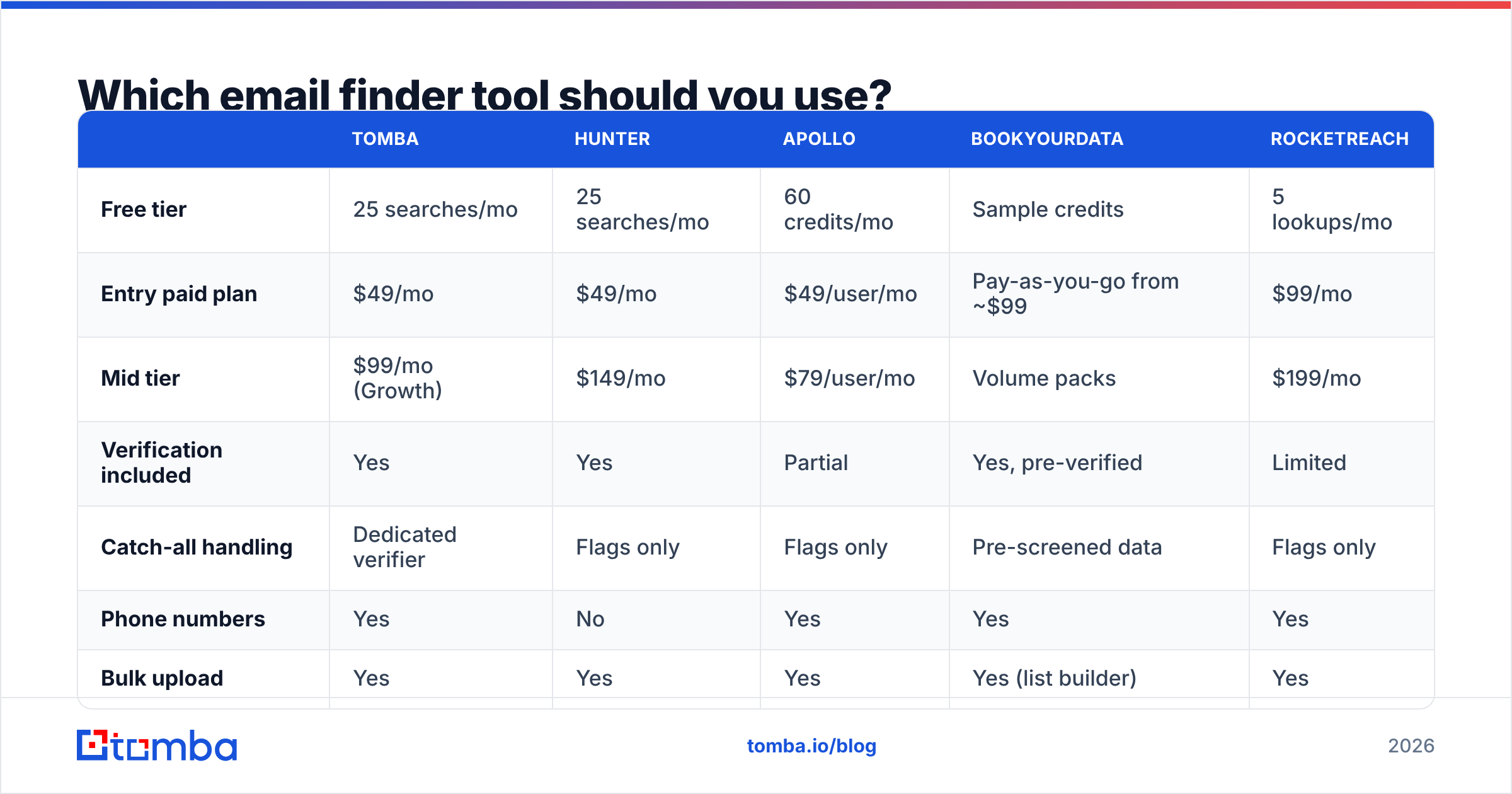
Here is how the main options compare on the attributes that affect cost per usable contact:
| Tomba | Hunter | Apollo | BookYourData | RocketReach | |
|---|---|---|---|---|---|
| Free tier | 25 searches/mo | 25 searches/mo | 60 credits/mo | Sample credits | 5 lookups/mo |
| Entry paid plan | $49/mo | $49/mo | $49/user/mo | Pay-as-you-go from ~$99 | $99/mo |
| Mid tier | $99/mo (Growth) | $149/mo | $79/user/mo | Volume packs | $199/mo |
| Verification included | Yes | Yes | Partial | Yes, pre-verified | Limited |
| Catch-all handling | Dedicated verifier | Flags only | Flags only | Pre-screened data | Flags only |
| Phone numbers | Yes | No | Yes | Yes | Yes |
| Bulk upload | Yes | Yes | Yes | Yes (list builder) | Yes |
| API access | All paid plans | All paid plans | Higher tiers | Yes | Higher tiers |
| Best for | Domain-first prospecting + verification in one place | Simple domain lookups | All-in-one sequencing | Pre-built verified lists by industry | Recruiting and personal contacts |

A few honest notes on that table.
Apollo bundles sequencing and a CRM. If you want one tool for the whole outbound motion, it is a reasonable single purchase. But per-seat pricing gets expensive fast on a growing team.
BookYourData works differently from the rest. Instead of looking up contacts one at a time, you filter a pre-verified database by industry, title, and geography and buy the list outright. That suits campaigns where you need volume in a defined segment rather than specific named people.
RocketReach indexes personal addresses well. That is why recruiters like it and B2B marketers find it noisy.
Tomba's pricing runs Free (25 searches/mo), Starter $49/mo, Growth $99/mo, Pro $249/mo, and Enterprise custom. Verification and catch-all handling are included rather than metered separately.
The practical argument for it is workflow. Domain search, finder, verifier, and enrichment sit in one credit pool, so you are not reconciling three vendors' credit definitions at the end of the month. Check G2 if you want third-party review data across the category rather than any one vendor's claims.
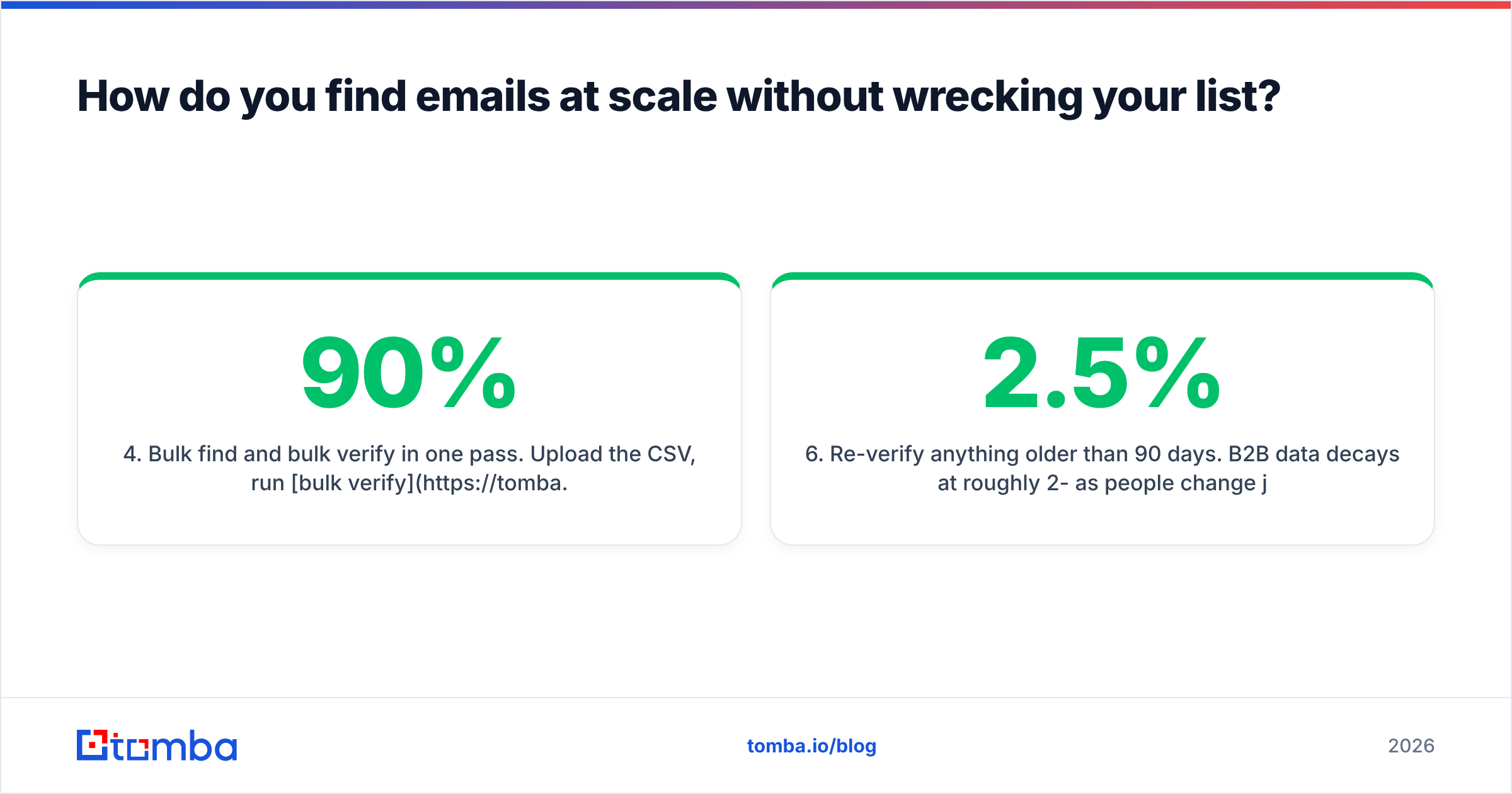
How do you find emails at scale without wrecking your list?#
Past a few dozen contacts, the manual methods stop being viable and process becomes the constraint. To find peoples email addresses in bulk without shredding your list quality, use a workflow that holds up:
- Build the account list first, not the contact list. Decide which 200 companies matter. Contact discovery is cheap once the account is qualified.
- Run domain search per account. One lookup returns everyone publicly known at the domain, plus the pattern.
- Filter to roles, not individuals. Pull the three titles that matter at each account.
- Bulk find and bulk verify in one pass. Upload the CSV, run bulk verify, and drop anything below your confidence floor. Set it at 90% for cold outbound, 80% for low-risk campaigns.
- Deduplicate before import. The same person shows up twice more often than you would think. A remove duplicates pass saves an embarrassing double-send.
- Re-verify anything older than 90 days. B2B data decays about 2-2.5% per month as people change jobs.
For engineering-driven workflows, the Tomba API does all of the above programmatically. There are add-ins for Google Sheets if your team lives in spreadsheets rather than a CRM.
Is it legal to find someone's email address?#
Short answer: finding a business email address is legal in most places. What you do with it is where the rules bite.
Under GDPR (EU/UK), a business email tied to a named person is personal data. You can process it under legitimate interest for B2B outreach. But you need to document that assessment, identify yourself clearly, say where you got the data if asked, and honor deletion requests immediately. Role accounts like info@ sit in a softer category. Nothing about GDPR bans cold B2B email. It bans doing it carelessly.
Under CAN-SPAM (US), cold email is legal outright. The requirements are practical: no deceptive headers or subject lines, a valid physical postal address in the message, a working unsubscribe link, and opt-outs honored within 10 business days.
Canada's CASL is the strict one. It requires consent, express or implied, before commercial email. Implied consent covers published business addresses relevant to the recipient's role, but the window is limited and the penalties are severe. Research it properly before running Canadian campaigns.
Two rules keep you clear anywhere. Only contact people whose job makes your message relevant, and make opting out effortless. The ICO's guidance on direct marketing is the clearest official reference if you want primary sources.
What mistakes cost people the most?#
Sending without verifying. Covered above, still the number one killer. The finding step feels like the work. The verification step is what decides whether the work mattered.
Treating role accounts as leads. info@, contact@, and sales@ go to a shared inbox nobody owns. They inflate your list size and depress every metric you care about. Filter them out.
Ignoring the confidence score. Tools give you a number for a reason. Sending to everything a finder returns, including the 60% guesses, is choosing to bounce.
Buying lists instead of building them. Purchased lists are shared across every buyer, decayed on arrival, and often assembled without any lawful basis. A pre-verified database from a reputable vendor, filtered to your segment, is a different thing. That is a data product with a maintained pipeline behind it. A $200 CSV of "5 million B2B contacts" from a marketplace is not.
Scaling volume instead of relevance. Finding 10,000 addresses is easy now. Finding the 200 people who should actually hear from you is what determines response rate. More addresses will not fix a message nobody wants.
Forgetting the technical side. Perfect list, broken authentication, zero delivery. Check your SPF, DKIM, and DMARC records before the first send. A SPF checker takes thirty seconds and prevents a whole class of failure that has nothing to do with your data.
Where should you start?#
If you need one contact, spend ten minutes on Google operators and a personal site check. Free is fine at that volume. If you need fifty a week, manual research already costs more in salaried hours than any tool costs in subscription fees.
The practical starting point: pick one target account, run a domain search on it, and verify the three addresses you care about. Ten minutes tells you whether the pattern holds and what your real hit rate looks like. Once you trust the workflow, scale it.
That is the whole job. Find peoples email addresses, verify them before you send, and spend the time you saved on a message worth reading.
Ready to find emails that actually work?
Join 150,000+ professionals who stopped guessing and started sending. Free credits on signup — no credit card required.
Get the Tomba newsletter
Practical outbound tactics and product updates — once every two weeks.
About the author