Finderio vs SellHack in 2026: Which Email Finder Wins?
Finderio bundles email lookup into a 50-app suite. SellHack lives inside your LinkedIn tab. We compare accuracy, credit math, verification depth and real monthly cost to show which one belongs in your stack in 2026.
TL;DR
- Finderio (finder.io, part of the 500apps suite) is a bulk-first email finder and verifier. Its selling point is the bundle: you pay one seat price and get dozens of unrelated business apps alongside the email tools.
- SellHack is a browser-extension-first prospecting tool. Its selling point is speed on LinkedIn profiles and small, cheap credit packs that suit solo sellers.
- Neither tool is built for high-volume, API-driven enrichment. Finderio's depth depends on the suite; SellHack's depth depends on you sitting in a browser tab.
- On price-per-verified-contact, cheap credits are a trap. A $19/mo plan that returns 40% unverifiable addresses costs more than a $49/mo plan that returns clean data.
- If your workflow is API, bulk CSV, or CRM-triggered rather than manual clicking, a dedicated provider like Tomba is a closer fit than either.
What are Finderio and SellHack, actually?#
They solve the same surface problem — get a work email for a person you found on LinkedIn or a company site — but they come at it from opposite ends.
- Finderio (finder.io) — A web app for domain search, single-contact lookup, bulk CSV upload and verification. It ships as part of the 500apps bundle, so the pricing conversation is really about the whole suite, not about email data.
- SellHack — A Chrome extension plus a light web dashboard. You browse a LinkedIn profile, click the button, and it attempts to surface an email (and sometimes a phone). Bulk exists but is secondary.
- Pattern engines vs. sourced records — Both lean heavily on pattern inference (first.last@, f.last@, firstl@) plus verification. Neither publicly positions itself as a large proprietary contact database the way Apollo or ZoomInfo does.
- Verification depth — Finderio bundles a verifier; SellHack does a check before returning a result. Neither markets a full catch-all verifier workflow, which is where most cold-email bounce risk actually hides.
- Who they're for — Finderio suits someone already buying the 500apps suite. SellHack suits a solo AE or recruiter living inside LinkedIn who wants the cheapest possible per-lead cost.
That framing matters, because most "Finderio vs SellHack" comparisons stop at feature checkboxes. The real question is which failure mode you can live with.
Which one finds more valid emails?#
Short answer: expect both to land in the same broad band — good on mid-size companies with predictable email patterns, weak on enterprises with non-obvious formats and on domains that accept everything.
Pattern-based finders share the same ceiling. If a company uses first.last@domain.com, any competent tool will resolve it. The differentiation shows up in three places:
- Catch-all domains. A domain configured to accept all mail returns "valid" for anything. Tools that mark these as deliverable inflate their accuracy stats and hand you bounces. Ask any vendor how they label catch-alls before you trust a hit rate.
- Role and alias addresses.
info@,sales@,careers@are technically valid and commercially useless. Some tools count them as finds. - Stale records. A contact who left 14 months ago still verifies as deliverable at some companies. Freshness beats raw volume.

The practical move: never trust a published accuracy number, including ours. Take 50 contacts you already have confirmed emails for, run them through each tool's free tier, and measure three things — hit rate, false-positive rate, and how many returns were role addresses. That test takes 20 minutes and beats any review site.
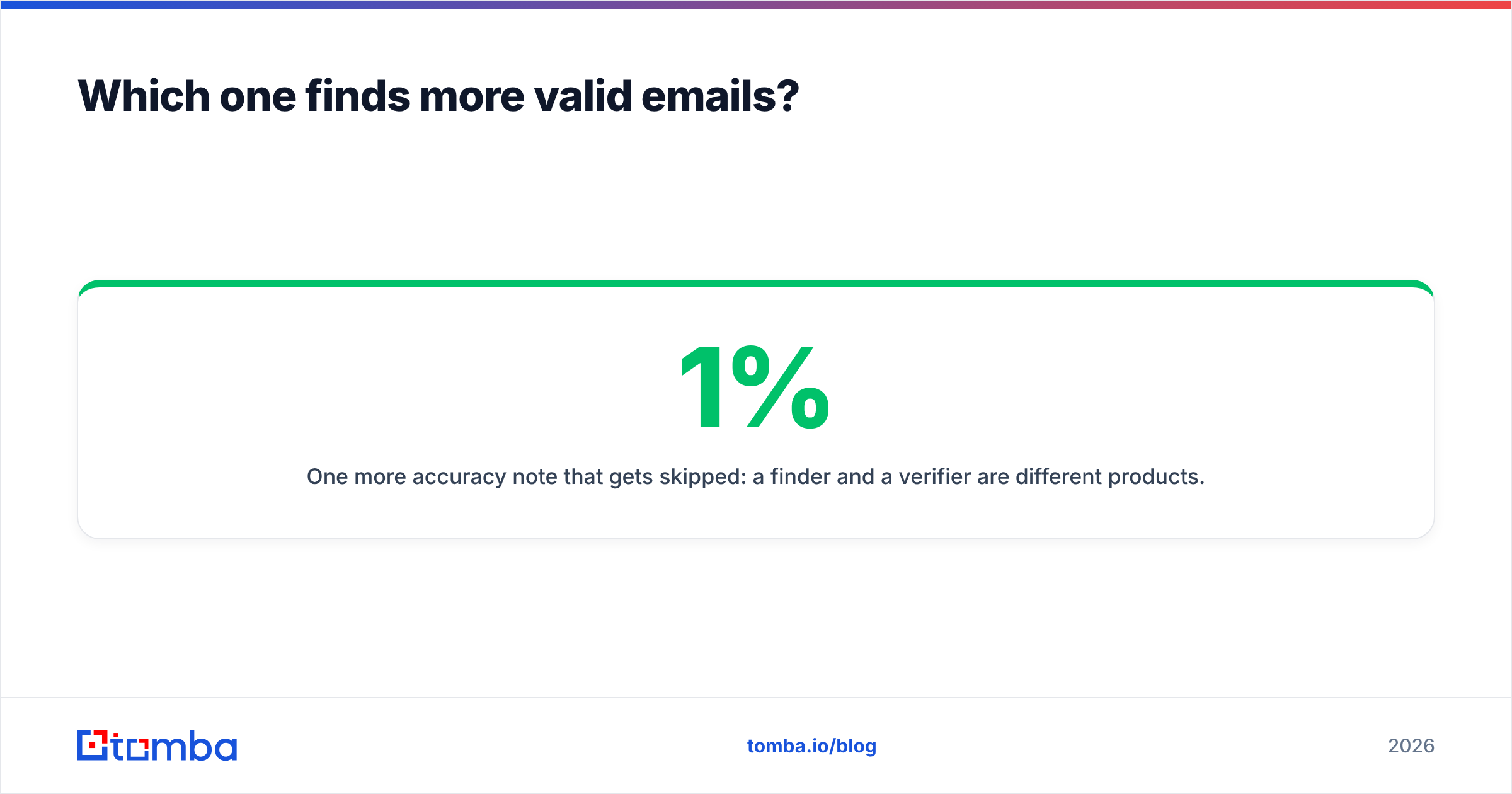
One more accuracy note that gets skipped: a finder and a verifier are different products. Even when a finder returns a confident result, running it through a dedicated email verifier before it hits your sequencer is the difference between a 1% bounce rate and a 6% one. Anything above 3% starts damaging sender reputation, and reputation damage is far more expensive than credits.
How do Finderio and SellHack compare feature by feature?#
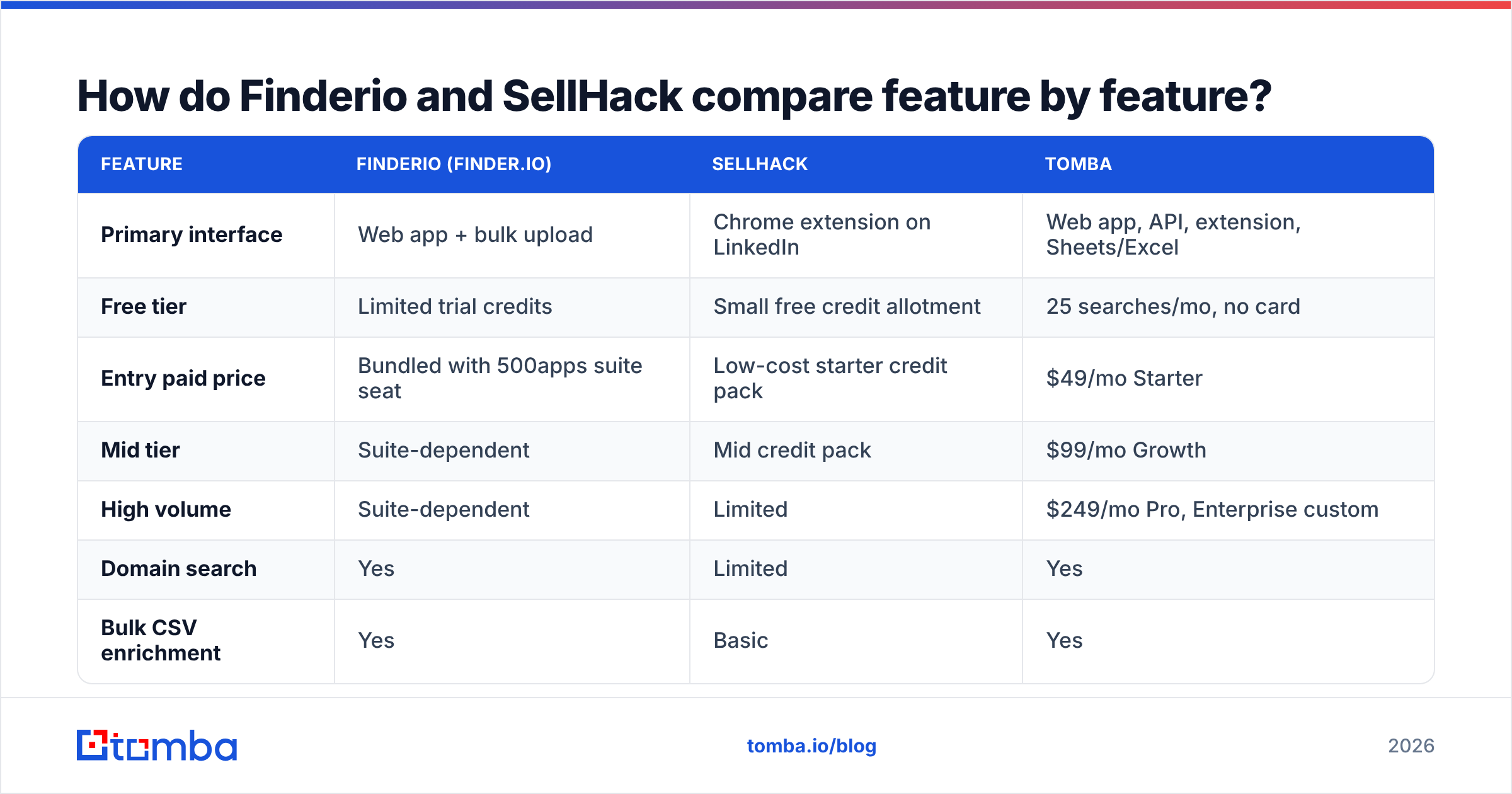
Here is the head-to-head. Pricing moves — verify the current numbers on each vendor's page before you commit, since both have restructured plans in the past.
| Feature | Finderio (finder.io) | SellHack | Tomba |
|---|---|---|---|
| Primary interface | Web app + bulk upload | Chrome extension on LinkedIn | Web app, API, extension, Sheets/Excel |
| Free tier | Limited trial credits | Small free credit allotment | 25 searches/mo, no card |
| Entry paid price | Bundled with 500apps suite seat | Low-cost starter credit pack | $49/mo Starter |
| Mid tier | Suite-dependent | Mid credit pack | $99/mo Growth |
| High volume | Suite-dependent | Limited | $249/mo Pro, Enterprise custom |
| Domain search | Yes | Limited | Yes |
| Bulk CSV enrichment | Yes | Basic | Yes |
| Email verification | Included | Basic check on find | Dedicated verifier + catch-all handling |
| Catch-all handling | Not clearly documented | Not clearly documented | Dedicated catch-all verifier |
| Public API | Available | Limited | Full REST API + CLI + MCP |
| Phone numbers | No | Some records | Yes, via phone finder |
| Native CRM integrations | Suite-internal | Basic export | HubSpot, Salesforce, Pipedrive, Zapier, Make |
| Best for | Existing 500apps customers | Solo LinkedIn prospectors | Teams needing programmatic, verified data |

Two things jump out of that grid.
First, Finderio's value proposition is the bundle, not the data. If you genuinely use the other apps in the suite, the email finder is nearly free marginal cost — that's a real argument. If you don't, you're paying a suite price for one tool and inheriting a suite's roadmap priorities for the feature you care about.
Second, SellHack's value proposition is the click. It removes friction at the exact moment you're looking at a prospect. That's genuinely useful for a rep doing 30 manual touches a day. It's the wrong shape entirely for anyone enriching 5,000 rows overnight.
How does the pricing actually work out per verified contact?#
Sticker price is the wrong metric. What matters is cost per usable contact — verified, non-role, currently employed.
Run the math like this:
- Step 1: Take the monthly plan cost and divide by credits included. That's your nominal cost per lookup.
- Step 2: Multiply credits by your measured hit rate (from the 50-contact test above). A 65% hit rate on 1,000 credits is 650 addresses.
- Step 3: Subtract role addresses and catch-alls you can't confirm. Often another 10–20%.
- Step 4: Divide plan cost by what's left. That's your true cost per usable contact.
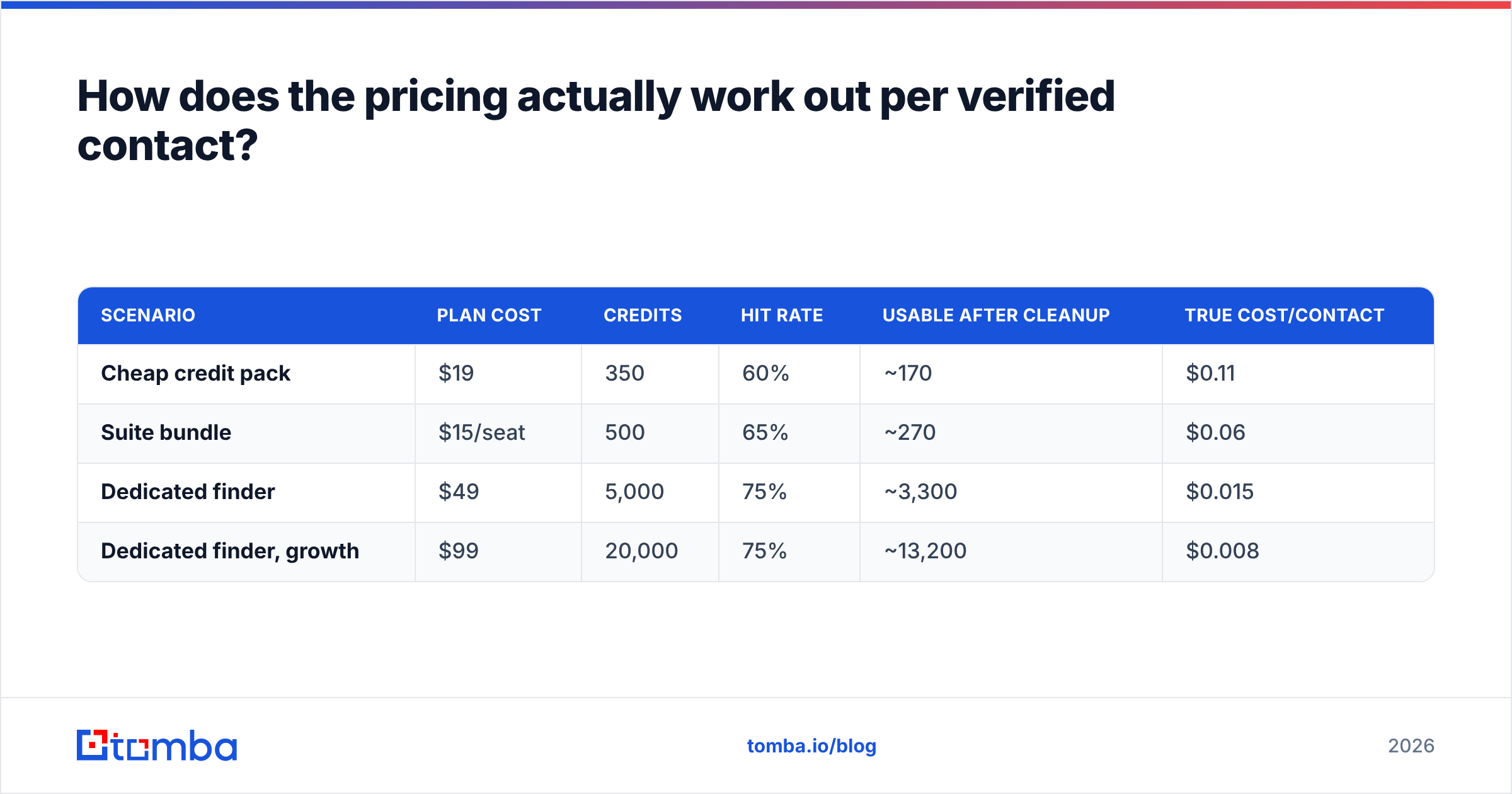
A concrete illustration with round numbers:
| Scenario | Plan cost | Credits | Hit rate | Usable after cleanup | True cost/contact |
|---|---|---|---|---|---|
| Cheap credit pack | $19 | 350 | 60% | ~170 | $0.11 |
| Suite bundle | $15/seat | 500 | 65% | ~270 | $0.06 |
| Dedicated finder | $49 | 5,000 | 75% | ~3,300 | $0.015 |
| Dedicated finder, growth | $99 | 20,000 | 75% | ~13,200 | $0.008 |
The numbers are illustrative, not vendor-published — plug in your own test results. But the shape holds across every benchmark we've run: volume plans from dedicated data vendors beat cheap credit packs on cost per usable contact, often by 5–10x. Cheap packs only win when your monthly volume is genuinely tiny (under ~100 lookups), in which case a free tier probably covers you anyway.
Check Tomba pricing against whatever Finderio and SellHack are quoting today, then rerun the four steps. If a vendor won't publish credit counts, treat that as data.
What does the day-to-day workflow look like?#
This is where the two tools diverge hardest, and it's the deciding factor for most teams.
SellHack's loop: open LinkedIn → search → open profile → click extension → copy email → paste into CRM or sequencer. Fast per contact, but linear. Twenty contacts is fine. Two hundred is a bad afternoon. There's no meaningful way to make it run without you.
Finderio's loop: upload a CSV of names and domains → wait → download enriched file → import. Better for volume, worse for the moment-of-intent workflow. And because it lives in a broad suite, integrations tend to point inward toward other 500apps products rather than outward to the CRM and sequencer you already run.
The loop most teams actually want in 2026: a trigger fires (new lead in CRM, new form fill, new list from a scraper) → enrichment happens automatically via API → verified contacts land in the sequencer → invalid ones get flagged and never sent. No human clicking at all.
That third pattern is why API coverage matters more than UI polish. If you're wiring enrichment into RevOps automation, a tool without a documented, rate-limit-transparent API is a dead end regardless of how nice its extension feels. It's also why bulk email finder throughput and CRM-native integrations end up mattering more than the raw find rate on any single lookup.
Where does each tool break down?#
Honest failure modes, because every tool has them.
Finderio's weak points:
- The email product competes for roadmap attention with dozens of sibling apps. Feature velocity on data quality specifically has been modest.
- Suite pricing means your email data cost is entangled with software you may not use.
- Catch-all and role-address labeling isn't clearly documented, so you're verifying blind.
SellHack's weak points:
- Extension-first means browser-bound. Any workflow that should run at 3 a.m. can't.
- Credit packs are small; scaling past a few hundred contacts a month gets awkward fast.
- LinkedIn's tolerance for scraping extensions has tightened repeatedly. Any tool whose core value depends on a third-party UI carries platform risk you don't control.
And the shared weak point: neither is positioned as an enrichment platform. If you eventually want phone numbers, job-change signals, technographics, or website visitor reveal, you'll be buying a second vendor anyway. Two subscriptions to do one job is the most common way outbound stacks quietly bloat.
Which should you pick in 2026?#
Decide by workflow, not by feature count.
- Pick SellHack if you're a solo seller or recruiter, your volume is under ~200 contacts a month, and every prospect is someone you personally looked at on LinkedIn first. The per-click experience is its genuine strength.
- Pick Finderio if you already pay for the 500apps suite. The marginal cost argument is real and you shouldn't buy a duplicate tool for the sake of it.
- Pick neither if your enrichment needs to run automatically, at volume, or inside a CRM workflow. Both tools force a human into the loop at a point where a human adds nothing.
For that third case, look at a dedicated provider. Tomba sits there deliberately: domain search for mapping a company's contacts, a separate email verifier with explicit catch-all handling, bulk processing, and a full REST API with CLI and MCP access so enrichment runs without anyone opening a tab. The free tier is 25 searches a month, Starter is $49/mo, Growth $99/mo, and Pro $249/mo — enough headroom to test properly before committing.
How should you run the comparison yourself?#
Don't take anyone's word for it, including this post. Do this:
- Build a 50-row truth set. Contacts whose real email you already know — customers, past colleagues, inbound leads who replied.
- Sign up for every free tier. Finderio, SellHack, Tomba, and any fourth option on your list.
- Run the same 50 rows through each. Record found/not-found and correct/incorrect separately.
- Flag role addresses and catch-alls manually. Use a free email checker to sanity-check anything a vendor marked deliverable.
- Compute true cost per usable contact. Use the four-step formula above.
- Test the integration you'll actually use. If it's an API, make a real call. If it's a Sheets add-on, enrich a real sheet. UI demos hide integration pain.
You can cross-check vendor claims against public review data on G2 and read each product's own documentation directly — finder.io and SellHack both publish current plan details, and those pages are more current than any comparison article, this one included.
The bottom line#
Finderio and SellHack are both legitimate tools with narrow ideal customers: one is a bundle play, the other is a browser-extension play. Neither is built for the enrichment pattern most outbound teams converged on in 2026 — automated, verified, API-triggered, and CRM-native.
If your workflow is manual and low-volume, pick whichever of the two fits your habits and move on; the difference won't decide your quarter. If your workflow involves lists, triggers, or more than a few hundred contacts a month, start with the Tomba Email Finder free tier — 25 searches, no card — run it against your own truth set alongside both alternatives, and let cost per verified contact make the call instead of cost per credit.
Related guides#
Ready to find emails that actually work?
Join 150,000+ professionals who stopped guessing and started sending. Free credits on signup — no credit card required.
Get the Tomba newsletter
Practical outbound tactics and product updates — once every two weeks.
About the author