Finderio vs Skrapp: Which Email Finder Wins in 2026?
Finderio bundles email lookup into a 50-app suite. Skrapp lives inside LinkedIn. We tested how each one handles accuracy, credits, and bulk work — and where a dedicated finder beats both.
Finderio vs Skrapp is a choice between a bundle and a browser extension. Finderio ships inside a 50-app suite. Skrapp lives on top of LinkedIn. This guide compares both on accuracy, credits, bulk work, and API access — and shows where a dedicated finder beats them both.
TL;DR
- Finderio (finder.io) sits inside the 500apps suite. The per-seat price is low. It only pays off if you want the other 49 apps too. As a standalone email finder, it is thin.
- Skrapp is a LinkedIn-first tool. Its Chrome extension is fast if you prospect inside Sales Navigator lists. Email quality on mid-market SaaS domains is decent.
- Neither tool is strong on verification depth. Catch-all handling, SMTP-level checks, and role-account filters are weak on both. That is where deals leak.
- Cost per verified contact tells a different story. Past ~2,000 lookups a month, a dedicated finder with a real API usually beats both.
- Pick Skrapp for LinkedIn-only sourcing. Pick Finderio if you already pay for 500apps. Pick a dedicated finder like Tomba Email Finder when accuracy and API access decide the outcome.
What are Finderio and Skrapp, exactly?#
They solve the same problem from opposite directions.
Finderio is the email-finding module inside 500apps. The suite sells ~50 business apps for one per-seat price. You get domain search, email finder, and basic verification. You also get a CRM, a helpdesk, project management, and a long tail of tools you may never open. The pitch is consolidation: one vendor, one invoice, one login.
Skrapp is a focused prospecting tool built around LinkedIn. Its core surface is a Chrome extension for LinkedIn and Sales Navigator. You scrape a search page or a company page into a list, with emails attached. There is also a domain search and a bulk uploader. But the extension is the product people pay for.
That difference in origin explains almost every trade-off below. Finderio optimises for breadth of tooling. Skrapp optimises for one workflow and runs it without friction.

Finderio vs Skrapp: how do they compare feature by feature?#
Here is the head-to-head. A dedicated finder sits in the third column, so you can see what a specialist buys you.
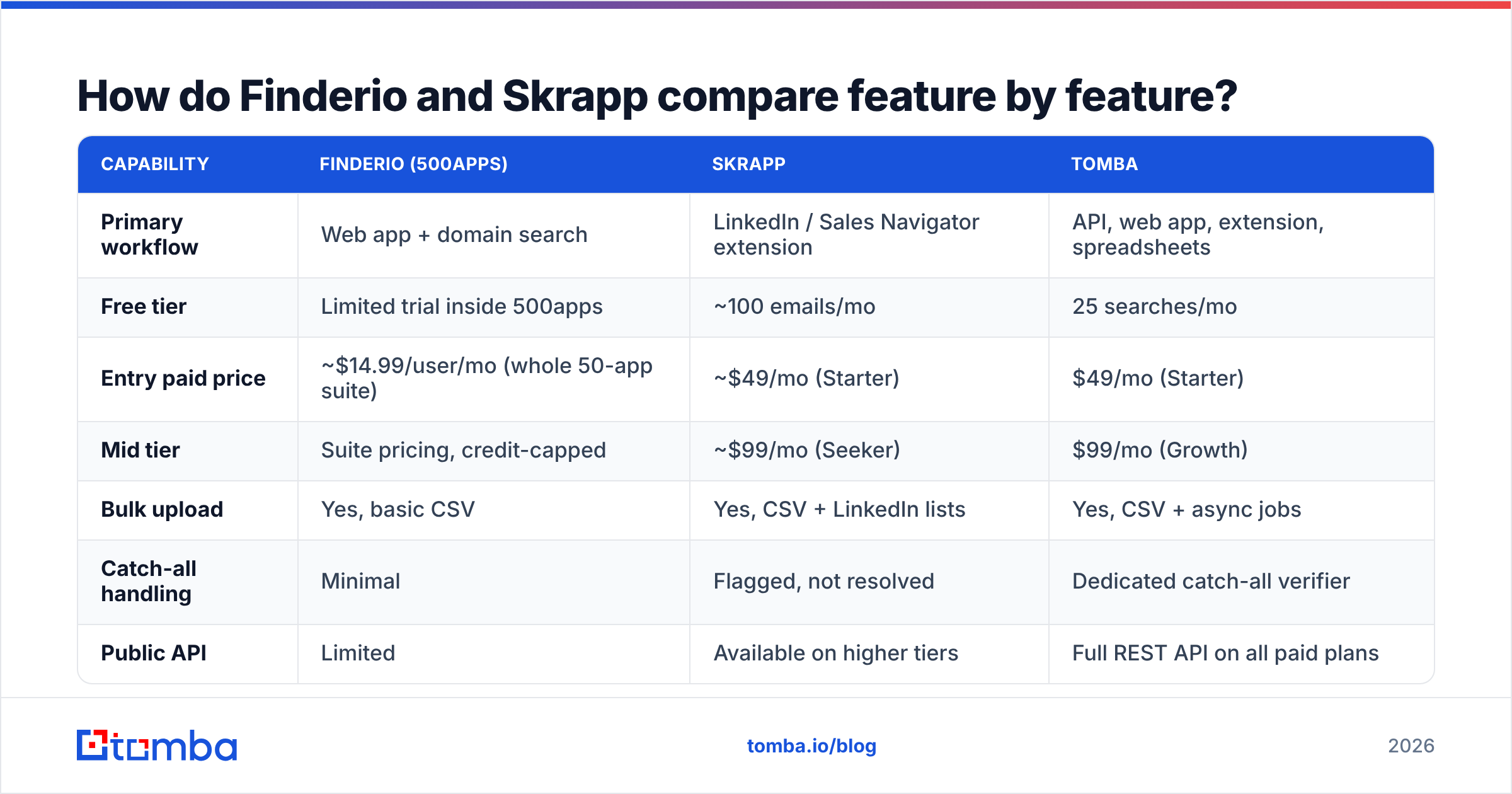
| Capability | Finderio (500apps) | Skrapp | Tomba |
|---|---|---|---|
| Primary workflow | Web app + domain search | LinkedIn / Sales Navigator extension | API, web app, extension, spreadsheets |
| Free tier | Limited trial inside 500apps | ~100 emails/mo | 25 searches/mo |
| Entry paid price | ~$14.99/user/mo (whole 50-app suite) | ~$49/mo (Starter) | $49/mo (Starter) |
| Mid tier | Suite pricing, credit-capped | ~$99/mo (Seeker) | $99/mo (Growth) |
| Bulk upload | Yes, basic CSV | Yes, CSV + LinkedIn lists | Yes, CSV + async jobs |
| Catch-all handling | Minimal | Flagged, not resolved | Dedicated catch-all verifier |
| Public API | Limited | Available on higher tiers | Full REST API on all paid plans |
| Native spreadsheet add-ons | No | No | Google Sheets + Excel |
| Phone numbers | Via other suite apps | No | Yes |
| Best for | Teams already on 500apps | LinkedIn-led outbound | Accuracy-critical, API-driven teams |
Two things stand out. First, Finderio's price looks low only because you buy a suite. Measured per email found, it is not much cheaper. Second, Skrapp's entry price is competitive. But it scales in fixed credit blocks, which punishes spiky months.
Finderio vs Skrapp: which one is more accurate?#
Accuracy is the only metric that survives a real campaign. It splits into two questions vendors love to blur. Hit rate is the share of names that come back with an email. Precision is the share of those emails that actually deliver.
Skrapp posts a solid hit rate on LinkedIn-sourced contacts at companies with 50–1,000 employees. That is the data it collects most. It gets weaker on small local businesses, on non-Latin-alphabet domains, and on companies that publish no staff at all. Finderio's coverage is broader but shallower. You get a pattern-based guess more often. That lifts the hit rate and quietly drags precision down.
That gap matters more than any feature checkbox. A tool that returns firstname.lastname@domain.com for every query has a 100% hit rate and a terrible bounce rate. Ask each vendor what happens on a catch-all domain. Listen for "we flag it" versus "we resolve it". Flagging is easy. Resolving needs infrastructure.

If you inherit lists from either tool, run them through a separate email verifier first. Do it before they touch your sending domain. Those 20 minutes cost less than repairing sender reputation after a 12% bounce run.
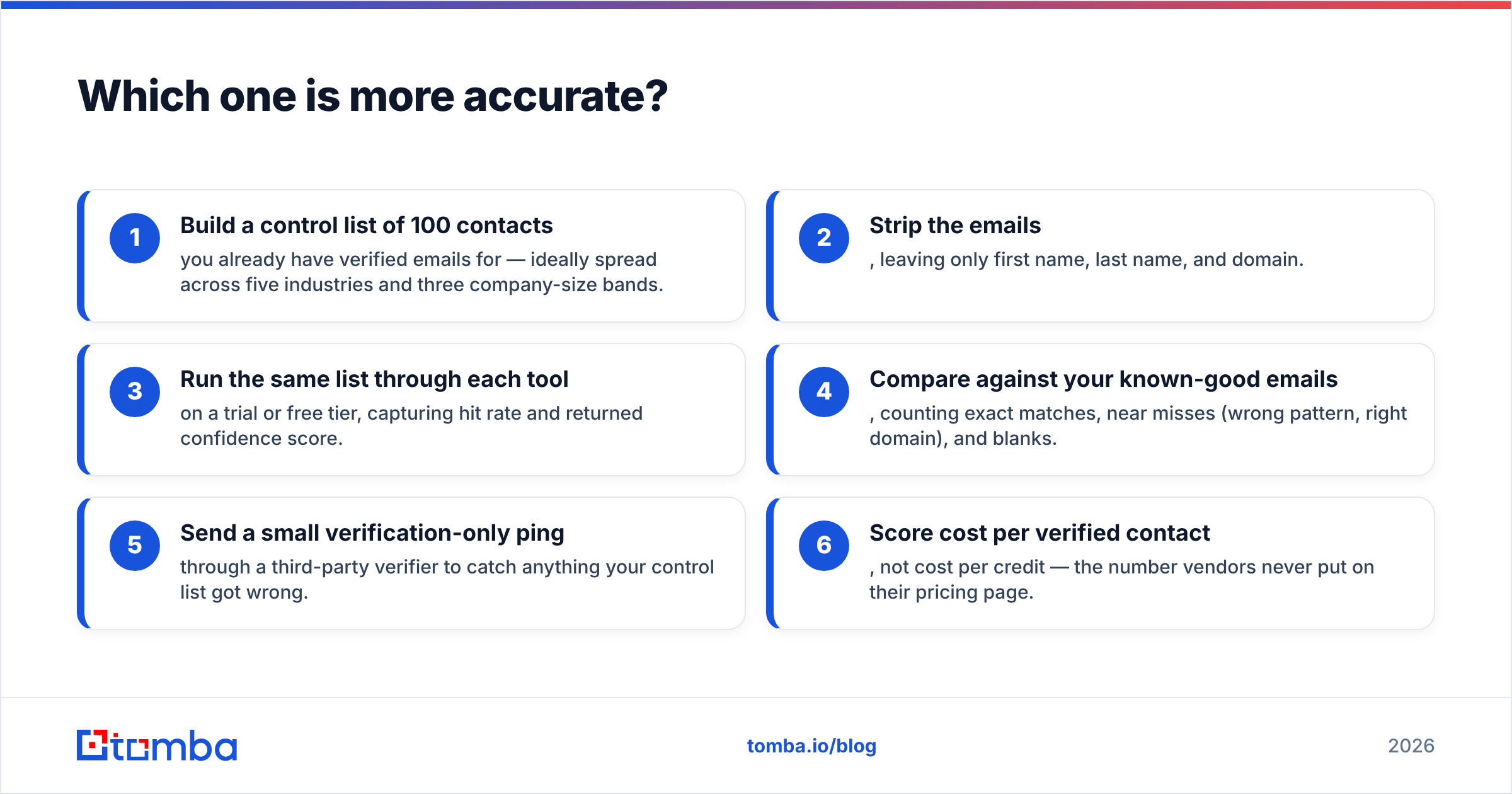
How to run your own accuracy test in an afternoon:
- Build a control list of 100 contacts with emails you have already verified. Spread them across five industries and three company-size bands.
- Strip the emails. Leave only first name, last name, and domain.
- Run the same list through each tool on a trial or free tier. Capture hit rate and the returned confidence score.
- Compare against your known-good emails. Count exact matches, near misses (wrong pattern, right domain), and blanks.
- Send a verification-only ping through a third-party verifier. It catches anything your control list got wrong.
- Score cost per verified contact, not cost per credit. Vendors never put that number on a pricing page.
Almost nobody runs this test. That is why almost everybody overpays.
Is Skrapp better than Finderio for LinkedIn prospecting?#
Yes, and it is not close.
Skrapp was built for one motion: open Sales Navigator, filter to 400 people, export the list. The extension handles pagination, dedupes as it goes, and pushes results into a named list you can export later. If that is 80% of how your SDRs source, Skrapp removes real friction.
Finderio has no comparable LinkedIn surface. You copy names into a web form or build a CSV by hand. A five-minute job turns into an hour.
The catch with any LinkedIn-scraping workflow is durability. LinkedIn restricts automated collection. Extensions break after platform updates. Heavy scraping also puts your personal account at risk. Treat extension-based sourcing as a channel that can go dark overnight, and keep a domain-based fallback. A LinkedIn finder that resolves profile URLs server-side is a safer long-term bet than one driving your logged-in browser session.
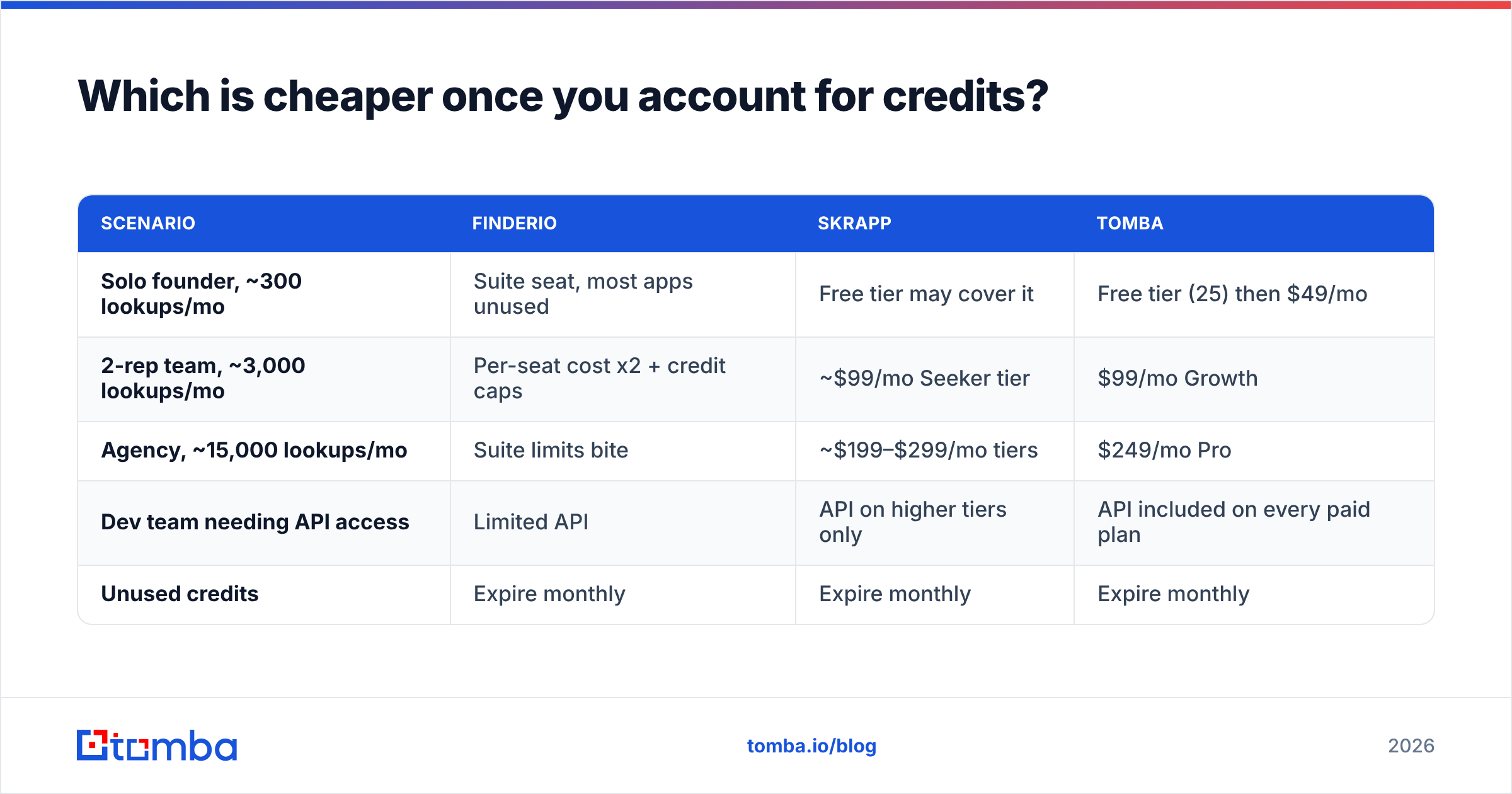
Which is cheaper once you account for credits?#
Sticker price and real price split fast here.
| Scenario | Finderio | Skrapp | Tomba |
|---|---|---|---|
| Solo founder, ~300 lookups/mo | Suite seat, most apps unused | Free tier may cover it | Free tier (25) then $49/mo |
| 2-rep team, ~3,000 lookups/mo | Per-seat cost x2 + credit caps | ~$99/mo Seeker tier | $99/mo Growth |
| Agency, ~15,000 lookups/mo | Suite limits bite | ~$199–$299/mo tiers | $249/mo Pro |
| Dev team needing API access | Limited API | API on higher tiers only | API included on every paid plan |
| Unused credits | Expire monthly | Expire monthly | Expire monthly |
Three cost traps show up with all three vendors:
- Failed searches. Ask if a lookup that returns nothing still burns a credit. Policies differ. At scale this is a 10–20% swing.
- Verification double-charging. Some tools charge one credit to find an address and another to verify it. Budget for both.
- Seat-based inflation. Finderio's per-user model is fine at three users. It hurts at fifteen, even though the per-seat number looks small.
You can sanity-check the third column against the published Tomba pricing: Free (25 searches/mo), Starter $49/mo, Growth $99/mo, Pro $249/mo, Enterprise custom.
What does the comparison look like across the wider market?#
Neither tool exists in a vacuum. Buyers who weigh Finderio vs Skrapp usually have Hunter, Apollo, Findymail, or a verification specialist on the same shortlist. Category position matters more than any single feature.

The market splits four ways:
- Suite plays (Finderio, Apollo) — email finding is one tab among many. Handy, rarely best at any single job.
- Channel specialists (Skrapp, Wiza) — strong inside one sourcing channel, brittle outside it.
- Data specialists (Tomba, Hunter, Findymail) — deep on discovery plus verification, API-first, priced per lookup.
- Curated databases (BookYourData and similar) — you buy pre-built, pre-verified lists instead of running lookups. Different model, and a good fit when you want volume without an enrichment pipeline.
Spend an hour on G2's lead intelligence category before you commit. Look for complaints that repeat. Repeated complaints are signal. One-off rants are not.
When should you pick each tool?#
Choose Finderio if: you already pay for 500apps, your lookup volume is modest, and vendor consolidation matters more than the last five points of accuracy. Check current terms on finder.io first, since suite packaging changes.
Choose Skrapp if: your sourcing runs through LinkedIn and Sales Navigator, your reps live in the browser, and you do not need programmatic access. Verify the tier limits on skrapp.io, because credit blocks move.
Choose a dedicated finder if: any of these apply —
- You need an API to enrich records in your product, CRM, or data warehouse instead of exporting CSVs.
- You send enough volume that bounce rate threatens deliverability. You need catch-all resolution, not catch-all flagging.
- You source from multiple channels — job boards, conference sites, podcast guest lists, article bylines — not just LinkedIn.
- You want spreadsheet-native workflows so ops people can enrich without engineering help.
- You run regular list hygiene and want bulk verification next to discovery in one bill.
That last cluster is where bulk email finder workflows earn their keep. Upload 5,000 rows. Get back found-and-verified in one pass, with the catch-all cases resolved rather than dumped in an "unknown" bucket you deal with later.
What do most buyers get wrong in this comparison?#
They optimise for the wrong stage of the funnel.
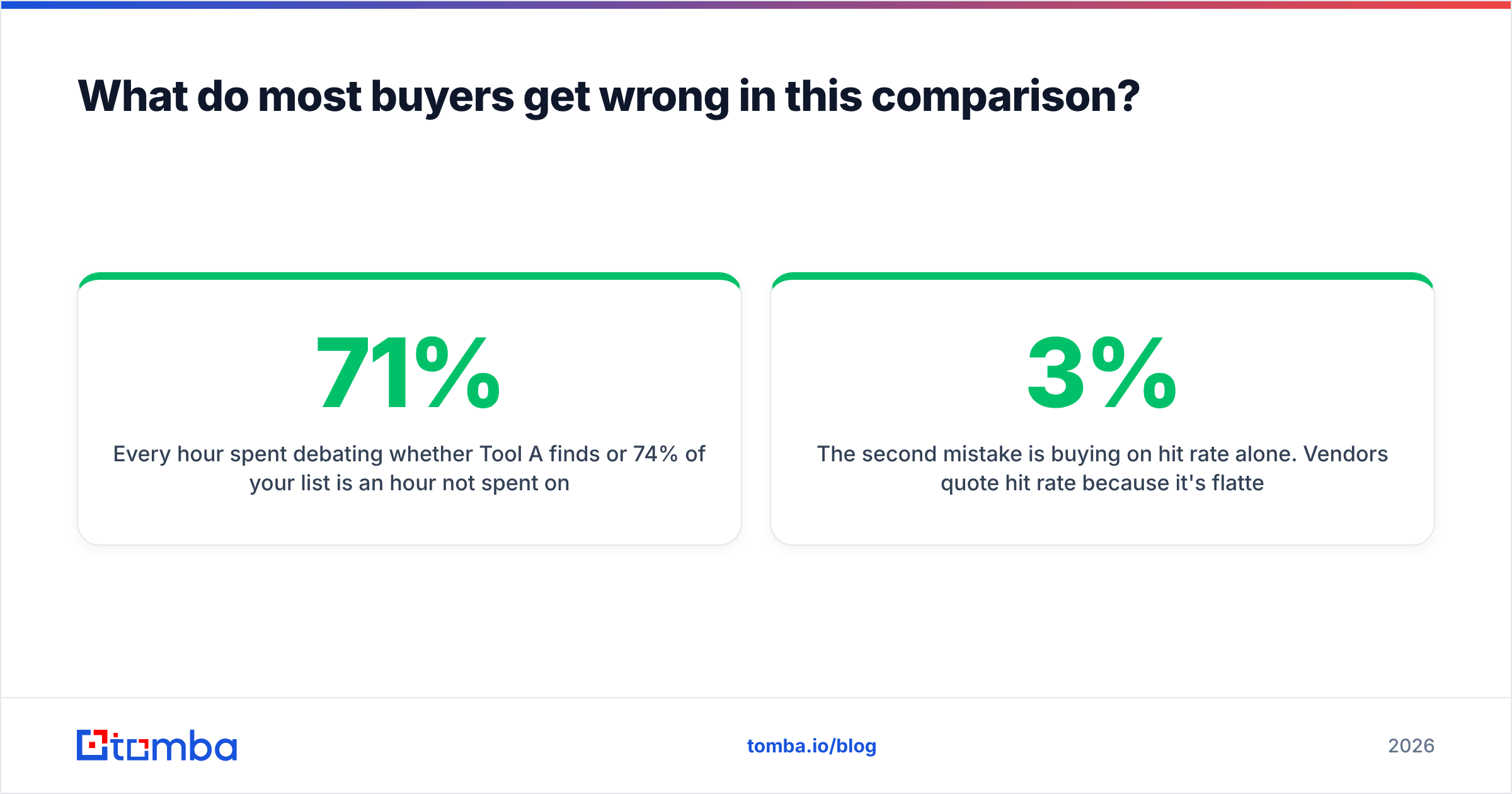
Every hour spent arguing over 71% versus 74% coverage is an hour not spent on targeting and message relevance. Those two move reply rate. A 3% coverage gap costs you a handful of contacts. A bad ICP costs you the whole campaign.
The second mistake is buying on hit rate alone. Vendors quote hit rate because it flatters them and is hard to check. Precision is the share of returned emails that actually deliver. It protects your domain. It also separates a pattern-guessing tool from a data-backed one. If your bounce rate creeps above 3%, mailbox providers start treating your domain as suspect. Extra contacts will not save you from the spam folder. So email deliverability is not background context here. It is the constraint the whole decision sits inside.
The third mistake is ignoring exit cost. Ask before you sign. Can you export your full contact history? Is there an API to pull it? What happens to your lists if you downgrade? Suite products are easy to enter and awkward to leave.
The verdict#
For LinkedIn-native teams, Skrapp wins the Finderio vs Skrapp match-up. It is faster, more focused, and closer to how SDRs actually work. For teams already inside the 500apps ecosystem, Finderio is a reasonable default. Outside those two cases, both are compromises. One is a suite module. The other is a single-channel tool. Neither treats verification as a first-class problem.
If accuracy, catch-all resolution, and API access decide your pipeline, run a 100-contact bake-off against a dedicated tool before you renew. Start with the Tomba Email Finder on the free tier — 25 searches, no card. Score it the way this post describes: cost per verified contact, not cost per credit. If it does not win on your own list, you have a solid reason to stay put. That beats guessing.
Related guides#
Ready to find emails that actually work?
Join 150,000+ professionals who stopped guessing and started sending. Free credits on signup — no credit card required.
Get the Tomba newsletter
Practical outbound tactics and product updates — once every two weeks.
About the author