FindThatLead vs Gazelle: Which B2B Prospecting Tool Wins
FindThatLead sells outbound volume. Gazelle sells company intelligence. They barely compete on the same job — and picking the wrong one costs you a quarter. Here is the honest breakdown, plus pricing, accuracy, and when neither is the right call.
FindThatLead vs Gazelle looks like a head-to-head. It is not one. The two tools solve different problems, and the wrong pick can cost you a quarter.
TL;DR
- These tools do different jobs. FindThatLead is a cold-outreach stack: find emails, build lists, send sequences. Gazelle is a company-intelligence database. It was built for economic development, site selection, and account research — not for blasting a 5,000-contact sequence.
- FindThatLead wins on speed to first email. Self-serve signup. Published pricing. A Chrome extension and a built-in sender. You can be prospecting in ten minutes.
- Gazelle wins on company depth. It tracks growth signals, parent-subsidiary trees, and financial data across millions of companies. But it is quote-only, annual, and priced for teams, not solo SDRs.
- Neither is a great pure email finder. Say your bottleneck is verified emails at scale. Then a dedicated finder plus verifier beats both on cost per usable contact.
- Decision rule: picking accounts → Gazelle. Working accounts → FindThatLead. Reaching people inside those accounts without bouncing → a dedicated finder like Tomba.
FindThatLead vs Gazelle: what does each one actually do?#
They get compared because both sell "B2B data." That is where the similarity ends.
FindThatLead is a Spain-based lead-generation platform launched in 2015. The core loop is simple. Give it a domain or a LinkedIn profile, and it hands back a business email. Push that email into a list. Then run a cold sequence from inside the same tool. It bundles an email finder, a bulk "Prospector" search by role and location, a verifier, a Chrome extension, and a sender. It is self-serve, credit-based, and priced for small teams.
Gazelle is a company-intelligence platform. It is aimed at economic development agencies, site-selection consultants, commercial real estate, and enterprise account teams. It indexes millions of companies with firmographics, financials, growth signals, ownership structures, and location data. AI scoring sits on top of that. It flags which companies are likely to grow or move. Contact emails do exist in the product. But they are a supporting field, not the headline.
Read that again, because it decides everything downstream. FindThatLead answers "how do I email this person?" Gazelle answers "which companies should I care about?"
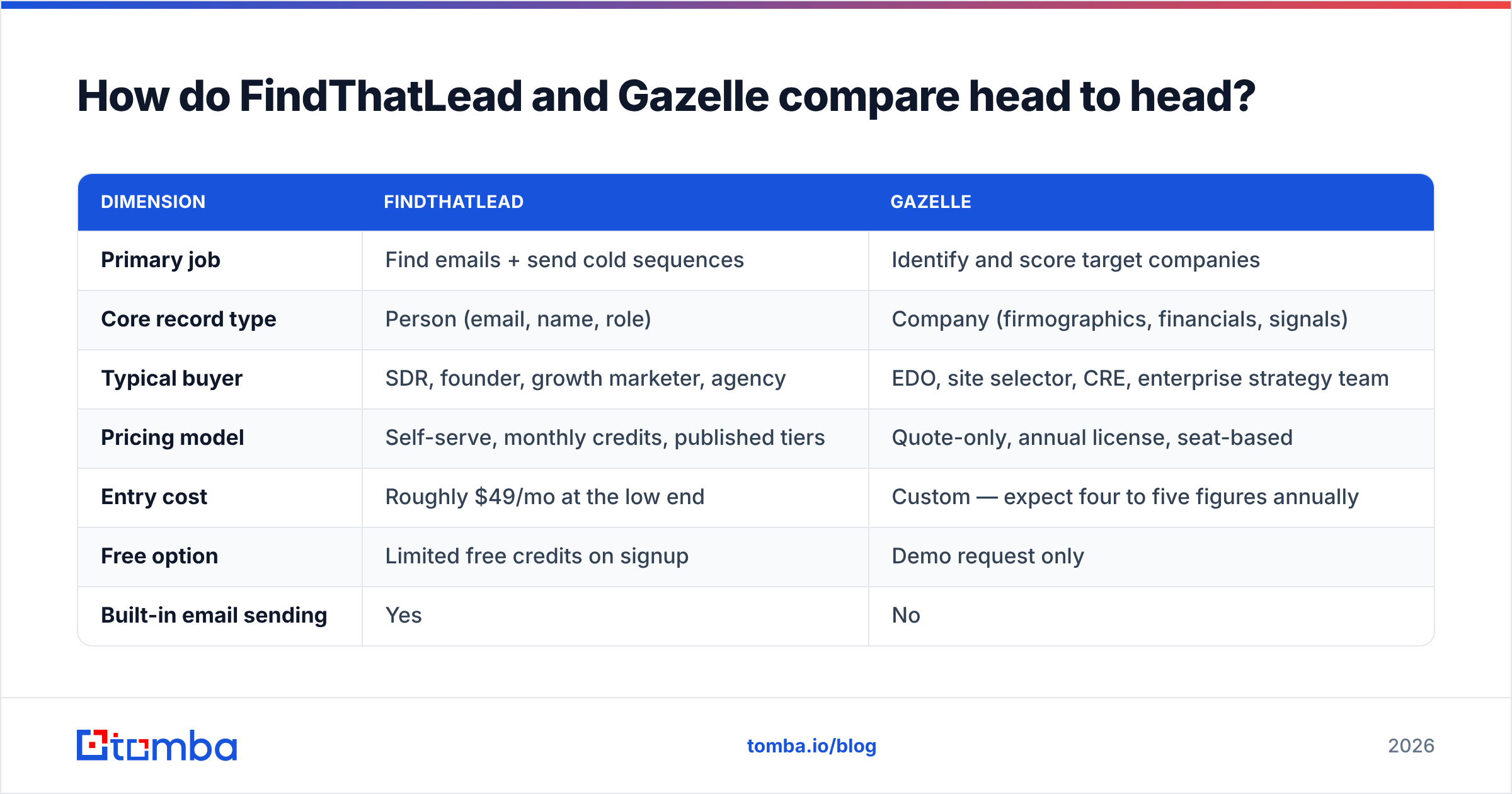
FindThatLead vs Gazelle head to head#
| Dimension | FindThatLead | Gazelle |
|---|---|---|
| Primary job | Find emails + send cold sequences | Identify and score target companies |
| Core record type | Person (email, name, role) | Company (firmographics, financials, signals) |
| Typical buyer | SDR, founder, growth marketer, agency | EDO, site selector, CRE, enterprise strategy team |
| Pricing model | Self-serve, monthly credits, published tiers | Quote-only, annual license, seat-based |
| Entry cost | Roughly $49/mo at the low end | Custom — expect four to five figures annually |
| Free option | Limited free credits on signup | Demo request only |
| Built-in email sending | Yes | No |
| Chrome extension | Yes | No (web app + exports) |
| Email verification | Included, basic | Not the product's focus |
| API | Yes | Yes, on enterprise agreements |
| Data refresh cadence | Continuous, crowd + crawl | Periodic, curated + licensed sources |
| Best geography coverage | Global, strongest in EU/US SMB | Strong North America, expanding global |
| Learning curve | Low — an afternoon | Moderate — it is a research tool |
Pricing on both sides moves. Treat the numbers above as directional. Confirm them on each vendor's own pricing or demo page before you sign anything annual.

What does FindThatLead actually do well?#
Three things, and they are real.
- Time to first send. Sign up and install the extension. Pull emails off a LinkedIn search or a domain. Then launch a sequence, all without a sales call. A founder testing whether a segment even replies will care about that more than data depth.
- Bulk domain-to-email workflows. Upload a CSV of company domains and get back role-based contacts. This is the workhorse feature, and it is built well.
- Price predictability at small scale. Credits are credits. You know what a month costs.
Where it gets weaker:
- Verification is basic, not best-in-class. Users often report high bounce rates on unverified exports. That gets worse outside the US and on catch-all domains. Sending from a domain you care about? Run a second verification pass before the first send.
- Catch-all handling. A large share of B2B domains are catch-all. The mail server accepts everything and tells you nothing. Tools that mark those "valid" are guessing. A dedicated catch-all verifier is the difference between a 2% bounce rate and a 12% one.
- All-in-one tax. The built-in sender is fine at small volume. But if you already run Instantly, Smartlead, or Salesloft, you are paying for a sending layer you will never open.
Where does Gazelle actually fit?#
Gazelle is not competing for your SDR seat budget. It competes for the research budget.
The classic use case is an economic development agency with one question. Which companies in this industry are expanding, have foreign parents, are hiring, and might open a facility in our region? That question needs company-level intelligence. Headcount trends, capital investment signals, ownership trees, industry codes. Not a list of emails.
The same shape of question shows up in enterprise B2B:
- Territory planning. Which 400 accounts in this vertical can actually afford our $80k product?
- Account prioritization. Which of our 2,000 named accounts show growth signals this quarter?
- Market sizing. How many companies match this profile, by region?
If those are your questions, Gazelle earns its price. But say your question is "get me the VP of Ops' email at these 300 accounts." Then you are buying a research platform to do a lookup job, and the cost per contact will be absurd.
The friction is procurement. Quote-only, annual, seat-based licensing means a demo, a security review, and a budget cycle. Check current user reviews on G2 before you assume the coverage matches your target region. The North American depth is stronger than the rest.
FindThatLead vs Gazelle: how accurate is the data?#
Accuracy means two different things here. Mixing them up is the most common buying mistake.
For a company database like Gazelle, accuracy means this: is the record current and correctly attributed? A wrong employee count or a stale parent-company link poisons a whole territory plan. Curated, licensed data tends to be right but late. A company that restructured last month may not show it for a quarter.
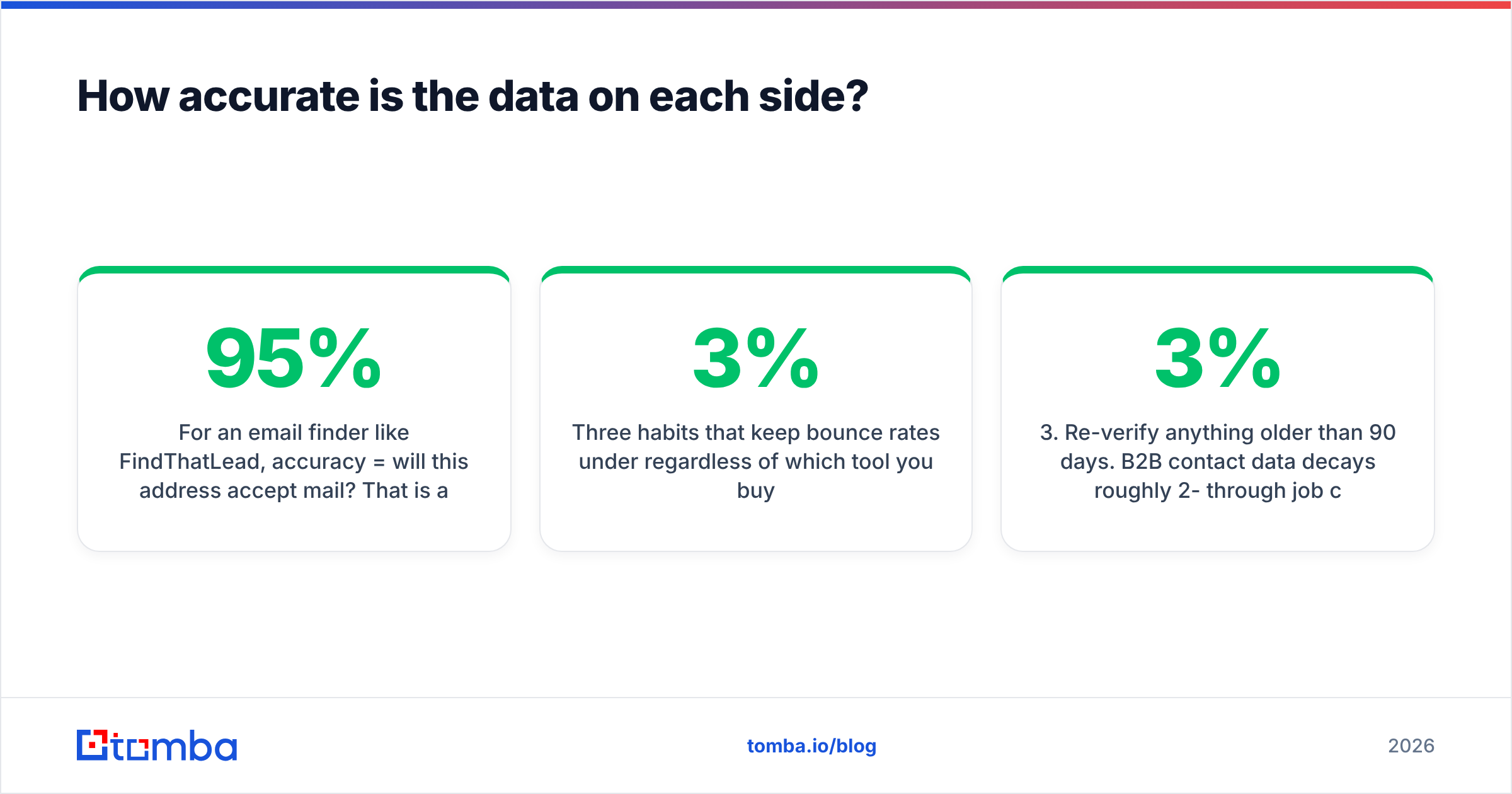
For an email finder like FindThatLead, accuracy means this: will the address accept mail? That is a yes-or-no claim, and you can test it. It is also where most tools quietly fall short of their marketing. A vendor claiming "95% accuracy" is usually measuring pattern-match confidence, not delivered mail.

One test cuts through every vendor claim. Take 100 contacts you already know are good — past customers, current pipeline, your own team. Run them through the tool. Measure recall: how many did it find, and how many did it get right? Then run 100 unknowns and check the bounce rate on a small send. Ten minutes of that beats a week of reading feature pages.
Three habits keep bounce rates under 3%, whichever tool you buy:
- Never send on an unverified export. Run every list through a dedicated email verifier first, even if the finder says it already verified.
- Segment catch-all domains. Do not treat them as valid or invalid. Treat them as a separate, lower-priority tier with a warmed-up sending domain.
- Re-verify anything older than 90 days. B2B contact data decays roughly 2-3% per month from job changes alone.
FindThatLead vs Gazelle: what does each one cost?#

Here is the honest cost picture. These are the three realistic options for a team that needs verified B2B emails.
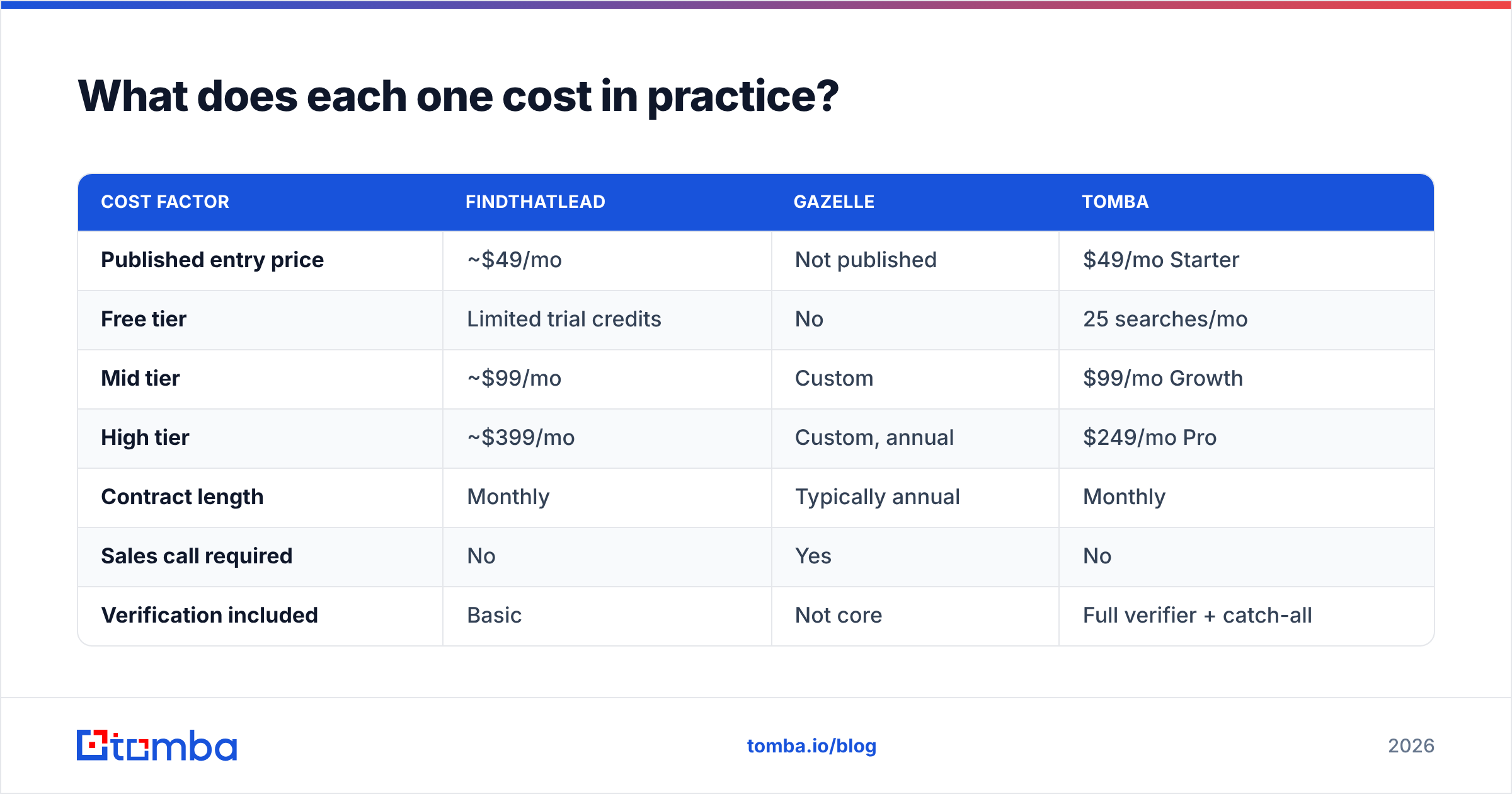
| Cost factor | FindThatLead | Gazelle | Tomba |
|---|---|---|---|
| Published entry price | ~$49/mo | Not published | $49/mo Starter |
| Free tier | Limited trial credits | No | 25 searches/mo |
| Mid tier | ~$99/mo | Custom | $99/mo Growth |
| High tier | ~$399/mo | Custom, annual | $249/mo Pro |
| Contract length | Monthly | Typically annual | Monthly |
| Sales call required | No | Yes | No |
| Verification included | Basic | Not core | Full verifier + catch-all |
| API access | Yes | Enterprise only | All paid plans |
The pattern is clear. FindThatLead and Tomba compete on open, self-serve, monthly pricing. Gazelle is a different purchase category. Compare it against ZoomInfo's intelligence tier or a market-research subscription, not against a $49 email finder.
Model one number before you commit: cost per usable contact, not cost per credit. A tool at $0.02/credit with a 30% bounce rate costs more than one at $0.04/credit with a 3% bounce rate. The bounces also cost you sender reputation. And email deliverability damage is far more expensive to repair than to avoid.

FindThatLead vs Gazelle: which one should you pick?#
Run this list top to bottom. Stop at the first match.
- You need to decide which companies to target, and you have a real budget. → Gazelle. No self-serve email finder gives you growth signals and ownership trees.
- You already know your accounts and want emails plus a light sender in one tool. → FindThatLead. The all-in-one is genuinely handy at low volume.
- You already have a sequencer and only need clean contacts feeding it. → Neither. Buy a dedicated finder and verifier. Skip the bundled sending layer you will not use.
- You need contacts programmatically, inside your product, CRM, or workflows. → A finder with a real API on every paid plan. Enterprise-gated APIs are a non-starter for most engineering teams.
- You are testing whether a segment works at all, this week, on a $0 budget. → Start with a free tier and 25 lookups before you commit to anything annual.
Most teams reading a "FindThatLead vs Gazelle" comparison land on option 3 or 4. That is why this comparison so often ends with "actually, neither."
What is the third option most teams end up on?#
Say the job is verified business emails at a predictable cost, wired into the tools you already run. Then the shortlist narrows to dedicated email-finding infrastructure.
That is the gap Tomba fills. The email finder turns a name and domain into a verified address. Domain search returns every discoverable contact at a company, with role and confidence scoring. The verifier handles catch-all domains explicitly, and it runs before anything reaches your sequencer. Tomba pricing is published: a free tier at 25 searches/month, $49/mo Starter, $99/mo Growth, $249/mo Pro, custom Enterprise. No demo call to see a number.
For volume work, the bulk email finder takes a CSV in and gives a verified CSV out. For engineering teams, the Tomba API ships on every paid plan, not behind an enterprise contract. That matters if you enrich signups in real time rather than running batch exports.
One thing should be clear: Tomba does not replace Gazelle. If you need expansion signals and parent-subsidiary trees for site selection, buy the research platform. Tomba solves the layer underneath. Once you know the account, how do you reach the human without burning your domain?
FAQ#
Is FindThatLead better than Gazelle? Wrong question. FindThatLead is better at getting emails and sending cold outreach. Gazelle is better at telling you which companies deserve outreach. Teams with real budget sometimes run both.
How does the FindThatLead vs Gazelle decision usually go? It goes by job, not by feature count. Pick Gazelle to choose accounts. Pick FindThatLead to work them. Pick a dedicated finder to reach the people inside them.
Can Gazelle replace an email finder? Not reliably. Contact data exists in the platform. But coverage and verification depth do not match a purpose-built finder, and the per-contact math is wrong.
Does FindThatLead verify emails well enough to send without a second check? In our experience, no. Not on catch-all-heavy lists or non-US domains. Run a second verification pass. Verification always costs less than a damaged sender reputation.
What about pricing changes? Both vendors adjust pricing. Confirm on the vendor's own page before you buy. The figures here are directional as of 2026.
Which is cheaper for a two-person startup? FindThatLead, or a dedicated finder on a self-serve monthly plan. Gazelle's annual, quote-based model is not built for that buyer.
The bottom line#
FindThatLead vs Gazelle is not really a competition. They are adjacent layers of the same funnel. Buy Gazelle when the hard problem is which accounts. Buy FindThatLead when the hard problem is send something today. Buy neither when the hard problem is verified contact data at scale, feeding a stack you already own.
If that last one is you, start with Tomba Email Finder. The free tier gives you 25 searches a month. That is enough to run the 100-contact recall test above against your own known-good list, before you spend a dollar. Test it against whatever you use now. Compare bounce rates on a small send. Let the numbers decide instead of the feature pages.
Related guides#
Ready to find emails that actually work?
Join 150,000+ professionals who stopped guessing and started sending. Free credits on signup — no credit card required.
Get the Tomba newsletter
Practical outbound tactics and product updates — once every two weeks.
About the author