FindThatLead vs HitHorizons: Which B2B Data Tool Wins?
One tool hands you verified work emails, the other hands you 80M+ European company records pulled from official registries. Here is how FindThatLead and HitHorizons actually differ, and which one belongs in your outbound stack in 2026.
FindThatLead vs HitHorizons looks like a fair fight. It is not. One tool finds work emails. The other maps European company registries. This guide shows what each one does, what it costs, and which gap it fills in your outbound stack.
TL;DR
- They are not really competitors. FindThatLead is a prospecting and email-finding tool. HitHorizons is a European company-data search engine built on official business registers. FindThatLead vs HitHorizons is contact data against registry data.
- Pick FindThatLead if your bottleneck is "I have a company, I need the decision-maker's email, and I want to send a sequence today."
- Pick HitHorizons if your bottleneck is "I need to know which European companies exist, plus their legal data, industry codes, and size bands."
- Pricing models differ. FindThatLead sells monthly credits for contact discovery. HitHorizons sells data access: free web search first, then paid API or data packages priced by volume.
- Most teams need both layers. Target by firmographics first. Find contacts second. A dedicated email finder with enrichment attached covers the second half for less.
What are FindThatLead and HitHorizons, exactly?#
FindThatLead is a Barcelona-built B2B prospecting suite. The core loop is simple. Give it a domain, a name, or a set of filters. It returns work email addresses. Around that core it adds a lead search (filter by industry, location, and role), a bulk CSV processor, an email verifier, a Chrome extension for LinkedIn (Scrab.in), and a light cold-email sender. So you can go from list to campaign without leaving the tab.
HitHorizons solves a different problem. It pulls company records from official European business registers and commercial sources into one searchable index. That is roughly 80 million companies across 50+ European countries. A profile gives you the registration number, legal form, registered address, national ID and VAT numbers, NACE industry code, revenue and headcount bands, and group structure where available.
Read those two paragraphs again and the split is obvious. FindThatLead answers who do I email at this company. HitHorizons answers does this company exist, what is it legally, and how big is it. One is contact data. The other is entity data.
So the real question in FindThatLead vs HitHorizons is not which tool is better. It is which layer of your data problem is broken right now.

FindThatLead vs HitHorizons: how do they compare feature by feature?#
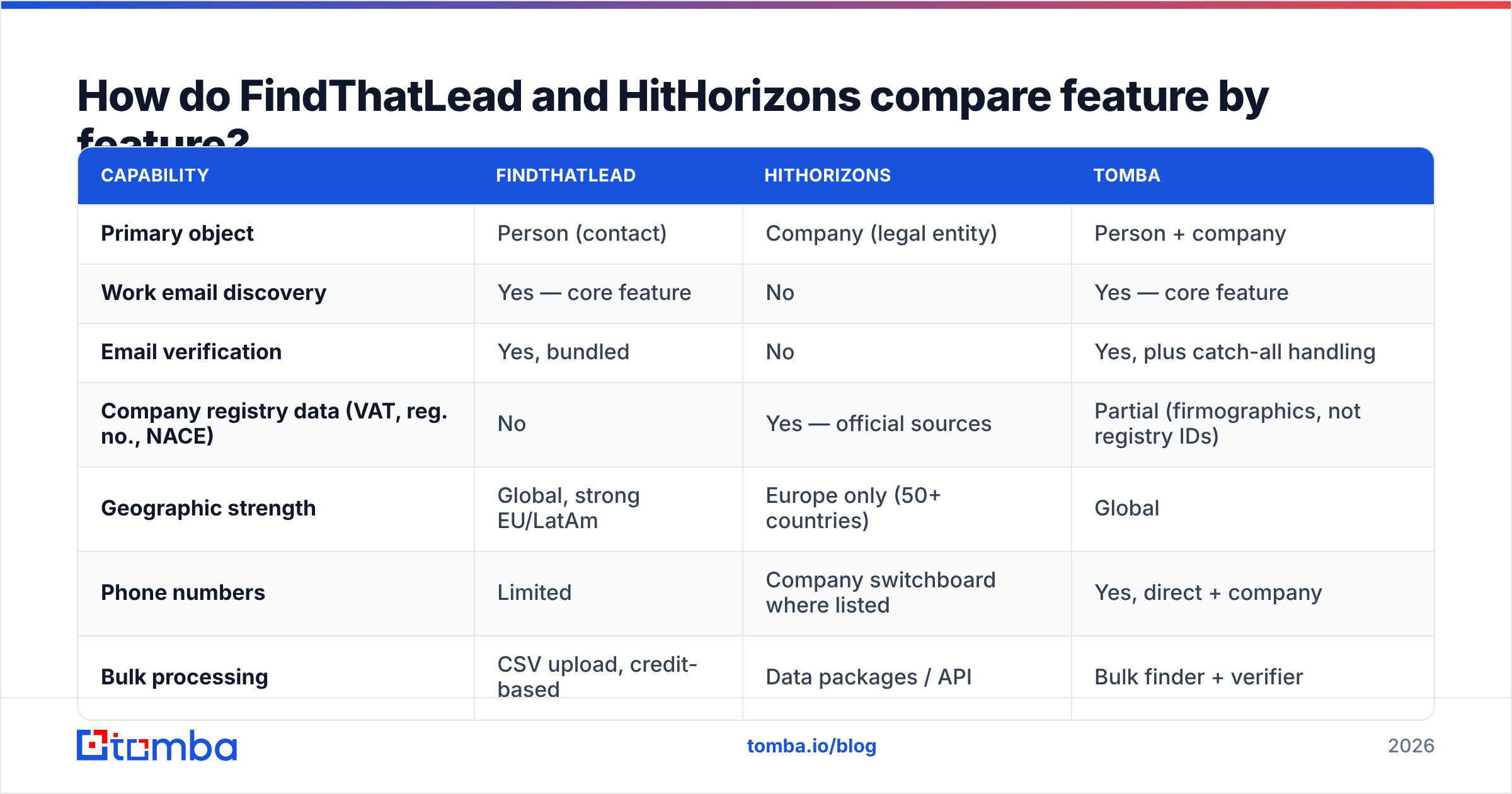
Here is the head-to-head on the things that change your workflow. Tomba sits in the third column because it falls between the two. It is contact-first like FindThatLead, with the enrichment and API depth data buyers expect.
| Capability | FindThatLead | HitHorizons | Tomba |
|---|---|---|---|
| Primary object | Person (contact) | Company (legal entity) | Person + company |
| Work email discovery | Yes — core feature | No | Yes — core feature |
| Email verification | Yes, bundled | No | Yes, plus catch-all handling |
| Company registry data (VAT, reg. no., NACE) | No | Yes — official sources | Partial (firmographics, not registry IDs) |
| Geographic strength | Global, strong EU/LatAm | Europe only (50+ countries) | Global |
| Phone numbers | Limited | Company switchboard where listed | Yes, direct + company |
| Bulk processing | CSV upload, credit-based | Data packages / API | Bulk finder + verifier |
| Built-in cold email sender | Yes | No | No (integrates instead) |
| API access | Yes | Yes, credit-based | Yes, documented REST API |
| Free tier | Limited trial credits | Free web search, limited detail | 25 searches/mo |
| Entry paid price | ~$49/mo range | Quote / package based | $49/mo Starter |
| Best for | SDRs building send-ready lists | Analysts, compliance, market mapping | Outbound teams needing accurate emails at scale |
Two caveats before you screenshot that table. First, both vendors change prices. Check FindThatLead's plans and HitHorizons' data packages before you budget. Second, "no email discovery" on HitHorizons is not a flaw. It is a choice. Registry data and personal contact data sit on different legal footings under GDPR, and HitHorizons stays on the entity side of that line.
FindThatLead vs HitHorizons: what data does each one return?#
This is where most comparison posts get lazy. The record shapes are different. That difference decides where each tool sits in your pipeline.
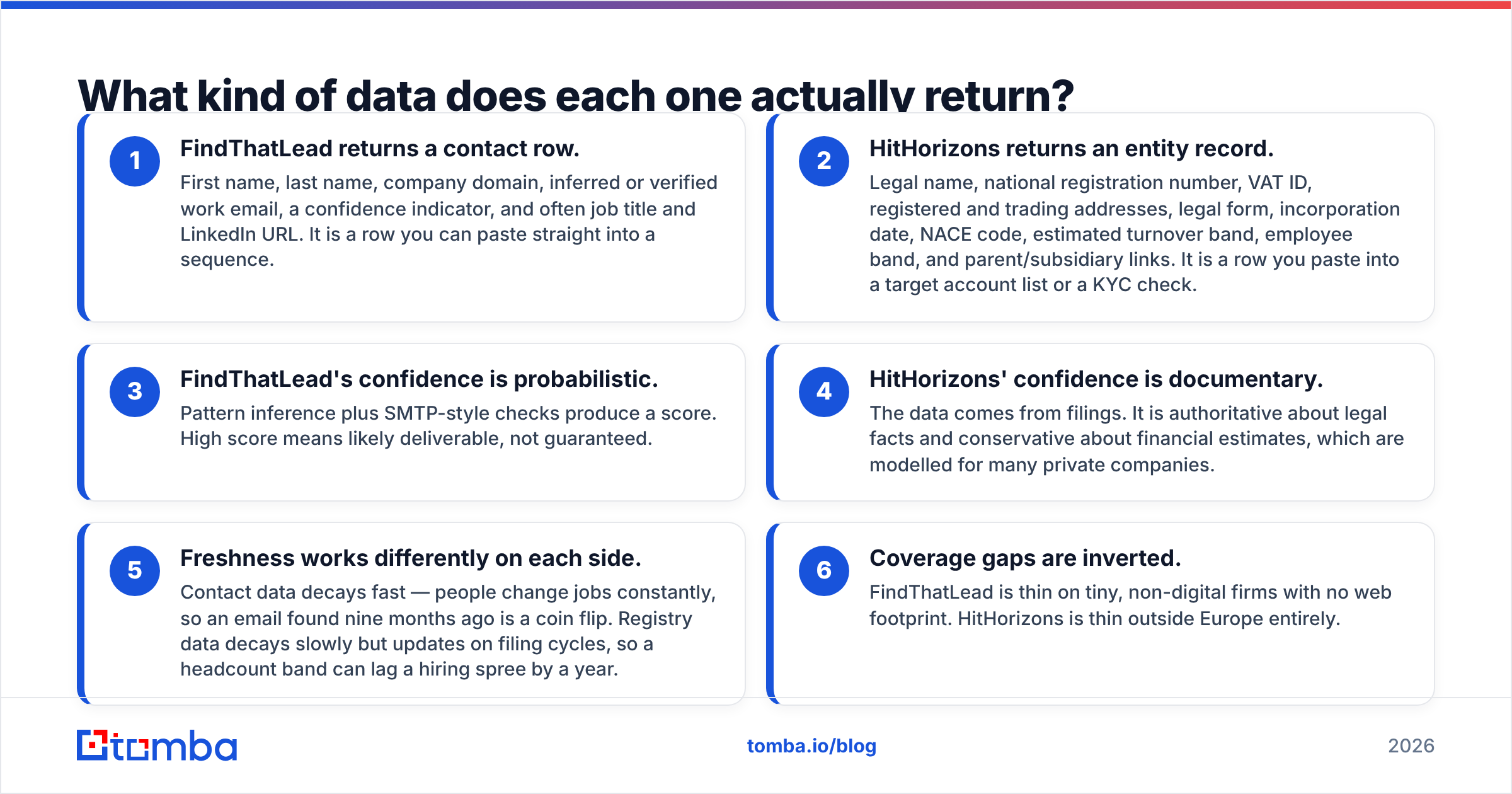
- FindThatLead returns a contact row. First name, last name, company domain, inferred or verified work email, a confidence score, and often job title and LinkedIn URL. It is a row you can paste straight into a sequence.
- HitHorizons returns an entity record. Legal name, national registration number, VAT ID, registered and trading addresses, legal form, incorporation date, NACE code, turnover band, employee band, and parent or subsidiary links. It is a row you paste into a target account list or a KYC check.
Confidence also means two different things here, and that matters more than any feature list.
- FindThatLead's confidence is a probability. Pattern guessing plus SMTP-style checks produce a score. A high score means likely to deliver, not guaranteed.
- HitHorizons' confidence is documentary. The data comes from filings. It is solid on legal facts and careful with financial estimates, which are modelled for many private firms.
- Freshness works differently on each side. Contact data decays fast, because people change jobs all the time. An email found nine months ago is a coin flip. Registry data decays slowly, but it updates on filing cycles, so a headcount band can lag a hiring spree by a year.
- Coverage gaps are inverted. FindThatLead is thin on tiny, non-digital firms with no website. HitHorizons is thin outside Europe entirely.
If you remember one line from this post, make it this one. Registry data tells you who to target. Contact data tells you how to reach them. Neither replaces the other.
Is FindThatLead accurate enough for cold outbound in 2026?#
Yes, with the same asterisk that applies to every email finder, including ours.
Any tool that finds work emails does three things. It crawls public sources. It guesses the company's email pattern. Then it checks the address at the mail-server level. FindThatLead does all three and gives you a confidence score. Users report solid hit rates on mid-market SaaS and agency targets with clean websites. Results are weaker on large enterprise domains that block harvesting. They are weaker again on catch-all servers, where any check is a guess by design.
That catch-all problem matters, because it is where finder tools quietly split. A catch-all domain accepts every address it is offered. A naive verifier then marks everything "valid." Some tools report those as deliverable and let your bounce rate find the truth. Others flag them as risky and stop. A few run extra signals to resolve them, which is the job of a dedicated catch-all verifier. If much of your list sits on catch-all servers, ask each vendor how they handle it. Do that before you compare headline accuracy numbers.
One rule holds for every vendor: never send to an unverified list. Find contacts in one tool. Then push the output through a separate email verifier before it touches your sending domain. Two independent checks on the same address is cheap insurance. It also protects the sender reputation you spent months building.
Is HitHorizons worth paying for if you already have a contact database?#
Yes, in three cases. No, otherwise.
Yes, if you sell into Europe and need exact legal entities. Think financial services, insurance, logistics, compliance software, or anything with a KYC step. You need the registration number and VAT ID, not a marketing guess. A contact database says "Acme GmbH, ~200 employees." A registry tells you which of the four Acme GmbH entities in Germany signs the contracts.
Yes, if you are sizing a market rather than working a list. Market sizing in Europe is painful with US-centric databases. They under-count private, Mittelstand-style firms. Registry data covers those firms far better.
Yes, if data provenance matters to your legal team. "Sourced from official business registers" survives a procurement review. "Sourced from our own web crawl" invites more questions.
No, if you are an SDR who needs 200 emails this week. You will get a tidy list of companies and no way to contact anyone at them. That is not what HitHorizons is for.
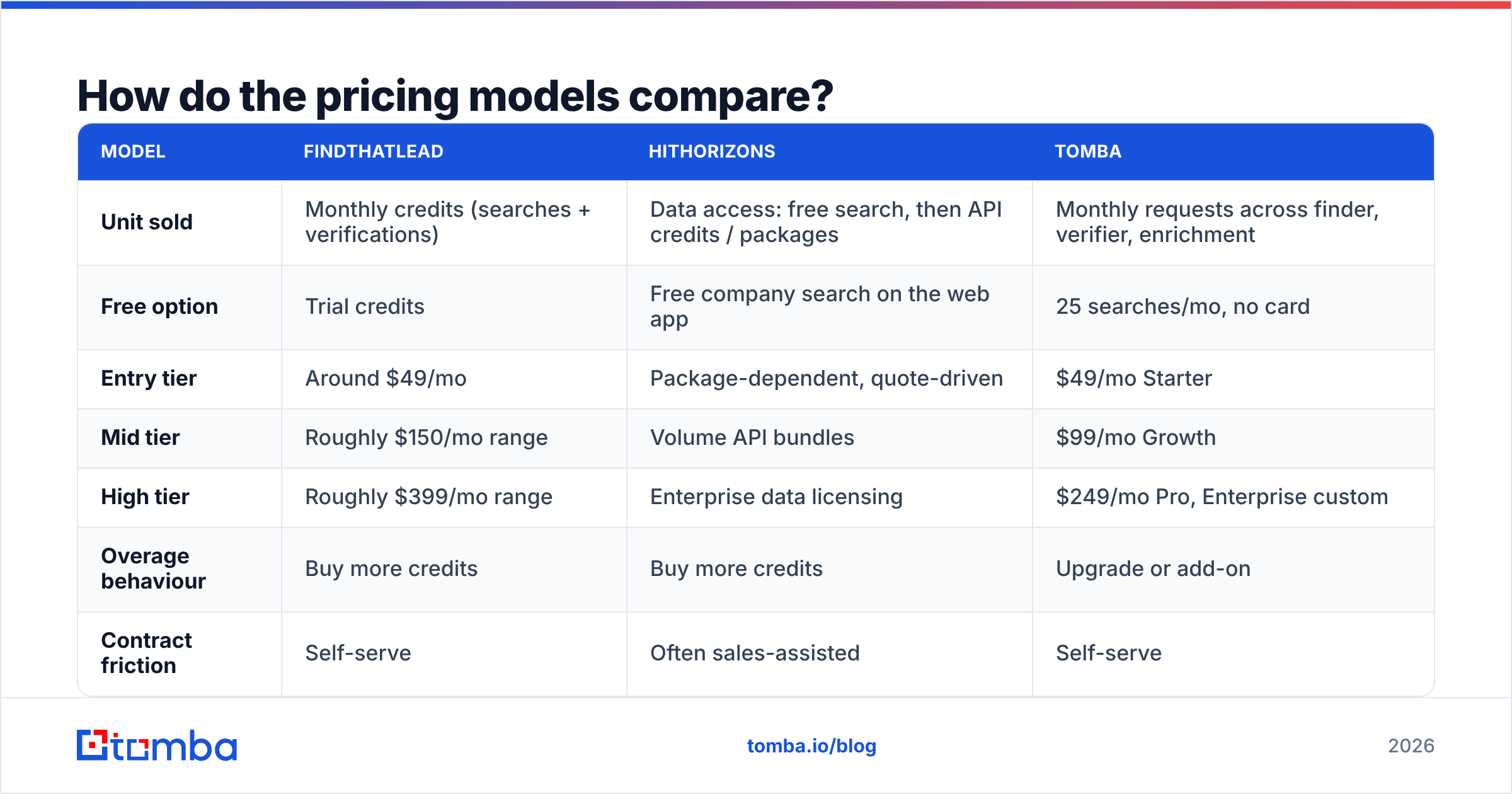
FindThatLead vs HitHorizons pricing: how do the models compare?#
The two pricing models do not line up. That is the most useful thing to know.
| Model | FindThatLead | HitHorizons | Tomba |
|---|---|---|---|
| Unit sold | Monthly credits (searches + verifications) | Data access: free search, then API credits / packages | Monthly requests across finder, verifier, enrichment |
| Free option | Trial credits | Free company search on the web app | 25 searches/mo, no card |
| Entry tier | Around $49/mo | Package-dependent, quote-driven | $49/mo Starter |
| Mid tier | Roughly $150/mo range | Volume API bundles | $99/mo Growth |
| High tier | Roughly $399/mo range | Enterprise data licensing | $249/mo Pro, Enterprise custom |
| Overage behaviour | Buy more credits | Buy more credits | Upgrade or add-on |
| Contract friction | Self-serve | Often sales-assisted | Self-serve |
Check current numbers on each vendor's page before you commit. The FindThatLead and HitHorizons figures above are ranges, not quotes. Tomba's numbers are exact and published on the Tomba pricing page.
Here is the structural point. FindThatLead and Tomba are self-serve credit products. You can start on a Tuesday afternoon. HitHorizons acts more like a data vendor. Its free web search is genuinely useful for one-off lookups, but bulk or API access means a sales conversation. Budget your time for that.
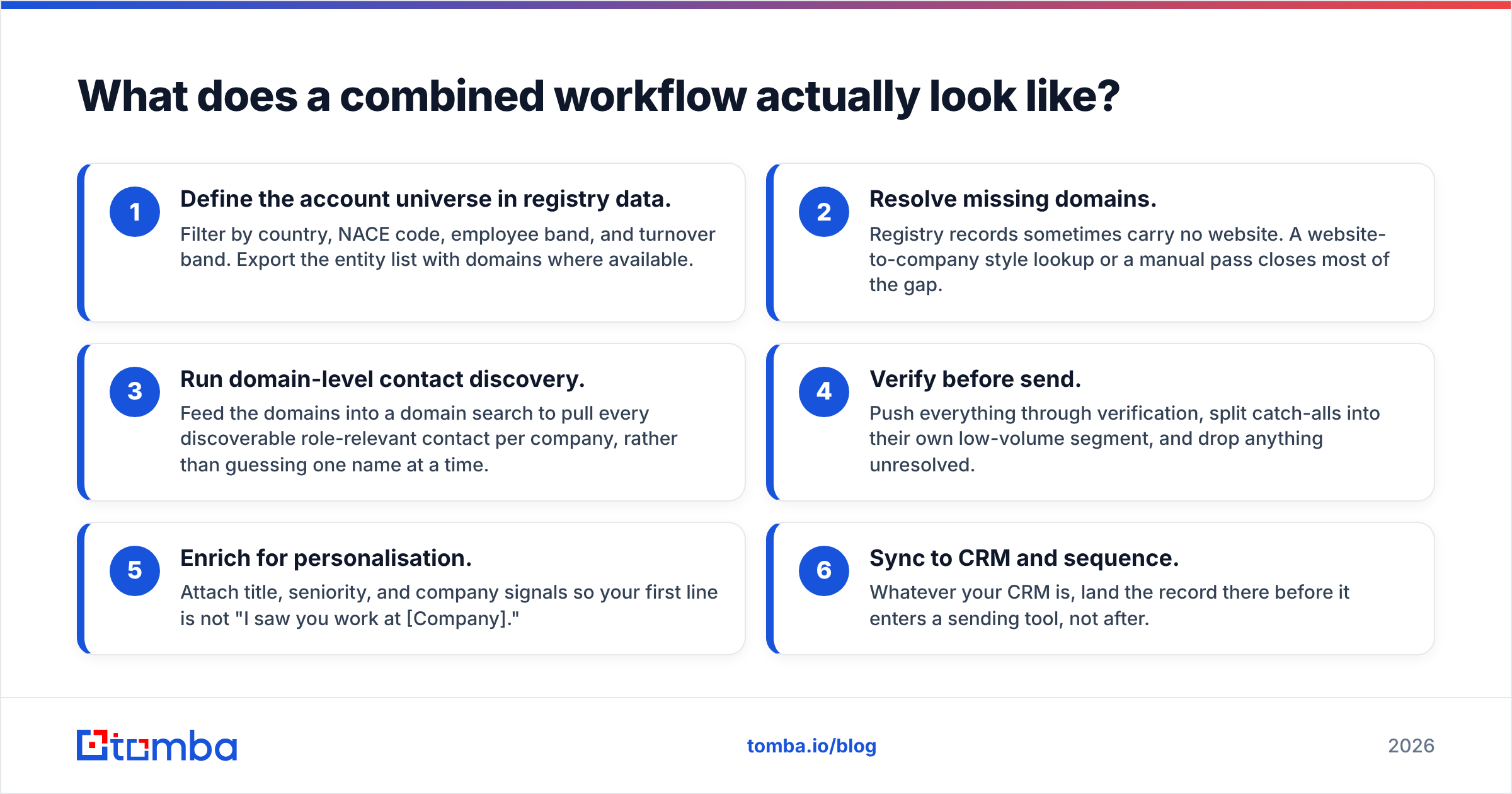
What does a combined FindThatLead vs HitHorizons workflow look like?#
If you sell into Europe and need both layers, run this order:
- Define the account universe in registry data. Filter by country, NACE code, employee band, and turnover band. Export the list with domains where you have them.
- Fill in the missing domains. Registry records often carry no website. A website-to-company lookup or a quick manual pass closes most of the gap.
- Run domain-level contact discovery. Feed the domains into a domain search. You get every relevant role at each company, instead of guessing one name at a time.
- Verify before you send. Run everything through verification. Put catch-alls in their own small segment. Drop anything you cannot resolve.
- Enrich for personalisation. Attach title, seniority, and company signals, so your first line is not "I saw you work at [Company]."
- Sync to CRM, then sequence. Whatever your CRM is, land the record there first, not after the send.
Steps 1 and 2 are the HitHorizons half. Steps 3 to 5 are the FindThatLead half. That second half is where a specialist finder tends to win, because contact discovery is the whole product, not one feature out of six.
Which should you choose?#
Here is the FindThatLead vs HitHorizons decision in three short calls.
Choose FindThatLead if you are a small outbound team and want finding, verifying, and sending in one subscription. It suits global or LatAm and EU mid-market work, and it gets you to a first campaign fast. The built-in sender is a real perk if you do not own a sequencing tool yet.
Choose HitHorizons if you are an analyst or a RevOps lead mapping European territories. Same answer if you work in a regulated space where registry-grade IDs are non-negotiable. Do not buy it expecting to email anyone.
Choose a dedicated email finder if your only real problem is contact accuracy and volume, and sequencing and CRM are already sorted. Bundled suites spread their engineering across six features. A focused finder spends it all on match rate, catch-all resolution, and API uptime. If you are weighing this against other prospecting suites, the Apollo alternative breakdown covers the same trade-off from another angle.
Whatever you pick, cross-check it against real reviews on G2 instead of vendor landing pages. Match-rate claims are marketing until someone else's list repeats them.
Frequently asked questions#
Does HitHorizons provide email addresses? Not personal work emails for decision-makers. You may find a general company contact that was filed publicly. It is not a contact-discovery product.
Can FindThatLead replace a European company database? No. Its firmographic filters help you build a list, but they are not registry-sourced and carry no legal identifiers.
Is one more GDPR-safe than the other in FindThatLead vs HitHorizons? They have different risk surfaces, so it is not a ranking. Registry data on legal entities is usually lower-risk than personal contact data. If you process personal data for outbound, your legitimate-interest assessment and opt-out handling matter more than the vendor you picked.
What is the cheapest way to test both approaches? Use HitHorizons' free web search on 20 target accounts. Then run those domains through a free-tier finder. Within an hour you will know which layer is your real bottleneck.
Start with the layer that is actually broken#
Most teams who compare FindThatLead vs HitHorizons find they were never choosing between two products. They were choosing between better targeting and better reach. Fix targeting with registry data. Fix reach with a finder built for match rate.
If reach is your gap, start with the Tomba Email Finder. The free tier gives you 25 searches a month with no card. Starter is $49/mo. Every result runs through verification and catch-all handling before it reaches your export. Point it at 25 of your hardest target domains and compare the hit rate with your current tool. That test is more honest than any comparison table, including this one.
Related guides#
Ready to find emails that actually work?
Join 150,000+ professionals who stopped guessing and started sending. Free credits on signup — no credit card required.
Get the Tomba newsletter
Practical outbound tactics and product updates — once every two weeks.
About the author