FindThatLead vs Kitt AI: Which Prospecting Tool Wins?
FindThatLead finds and exports leads. Kitt AI tries to run the outreach for you. Here is how the two actually compare on data quality, control, pricing, and who should pick which in 2026.
TL;DR
- FindThatLead is a lead-search platform: domain scraping, email finding, list building, and a basic sender. You stay in control of the list and the copy.
- Kitt AI sits in the "AI SDR agent" category: you describe an ICP, it assembles prospects and drafts and sequences the outreach with minimal human input.
- They are not really the same product. One is a data tool with sending bolted on; the other is an automation layer that assumes the data underneath it is good.
- If your bounce rate is the problem, neither category fixes it by itself — you need a verification step in the pipeline regardless of which you buy.
- Best fit: FindThatLead for hands-on SMB prospecting, Kitt AI for teams who want volume without headcount, and a dedicated finder/verifier like Tomba underneath either one for clean data and API access.
Most "FindThatLead vs Kitt AI" searches come from the same moment: you have a list-building problem, you have seen two tools that both promise leads, and the pricing pages do not explain why one costs three times the other. This breakdown fixes that. Pricing and feature details reflect what each vendor published at the time of writing — always re-check the vendor's own page before you buy, because both companies iterate fast.
What is FindThatLead?#
FindThatLead is a Spanish-built B2B prospecting platform that has been around since 2015. Its core loop is search, extract, export, send.
The pieces you actually use:
- Domain search — paste a company website, get the contacts it can associate with that domain, with role and confidence indicators.
- Lead search / Prospector — filter by industry, location, job title, and company size to build a list from scratch rather than from a domain you already know.
- Chrome extension — pull contact data while you browse LinkedIn or a company site.
- Email verification — a built-in check that removes obviously dead addresses before export.
- Scrab.in / sender module — light LinkedIn automation and cold-email sending so you do not immediately need a separate sequencer.
The philosophy is manual-first. You decide who goes on the list, you write the copy, and the tool handles the grunt work of finding addresses. That is a strength if you have a narrow ICP and a strong point of view about messaging. It is a bottleneck if you need 5,000 contacts a month and you are the only person doing outbound.
What is Kitt AI?#
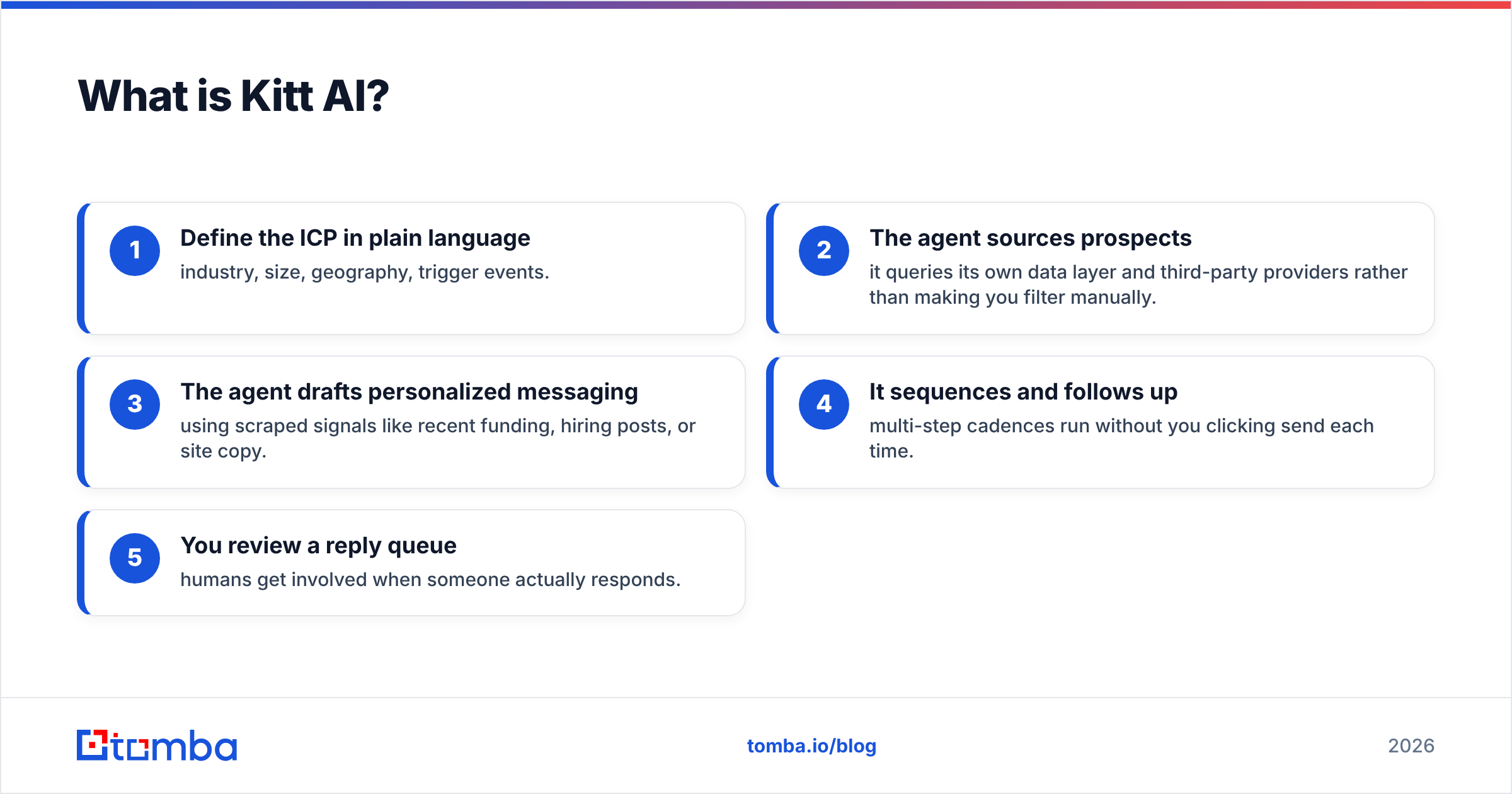
Kitt AI belongs to the newer "autonomous SDR" wave: instead of giving you a search interface, it asks you to describe the customer you want and then executes the pipeline for you.
The typical Kitt-style workflow:
- Define the ICP in plain language — industry, size, geography, trigger events.
- The agent sources prospects — it queries its own data layer and third-party providers rather than making you filter manually.
- The agent drafts personalized messaging — using scraped signals like recent funding, hiring posts, or site copy.
- It sequences and follows up — multi-step cadences run without you clicking send each time.
- You review a reply queue — humans get involved when someone actually responds.
That is a genuinely different value proposition. You are not buying a database with a UI; you are buying delegated labor. The trade-off is transparency. When an AI agent picks the prospects and writes the emails, you have less visibility into where a bad contact came from and less control over how your brand sounds in someone's inbox.
How do FindThatLead and Kitt AI compare head-to-head?#
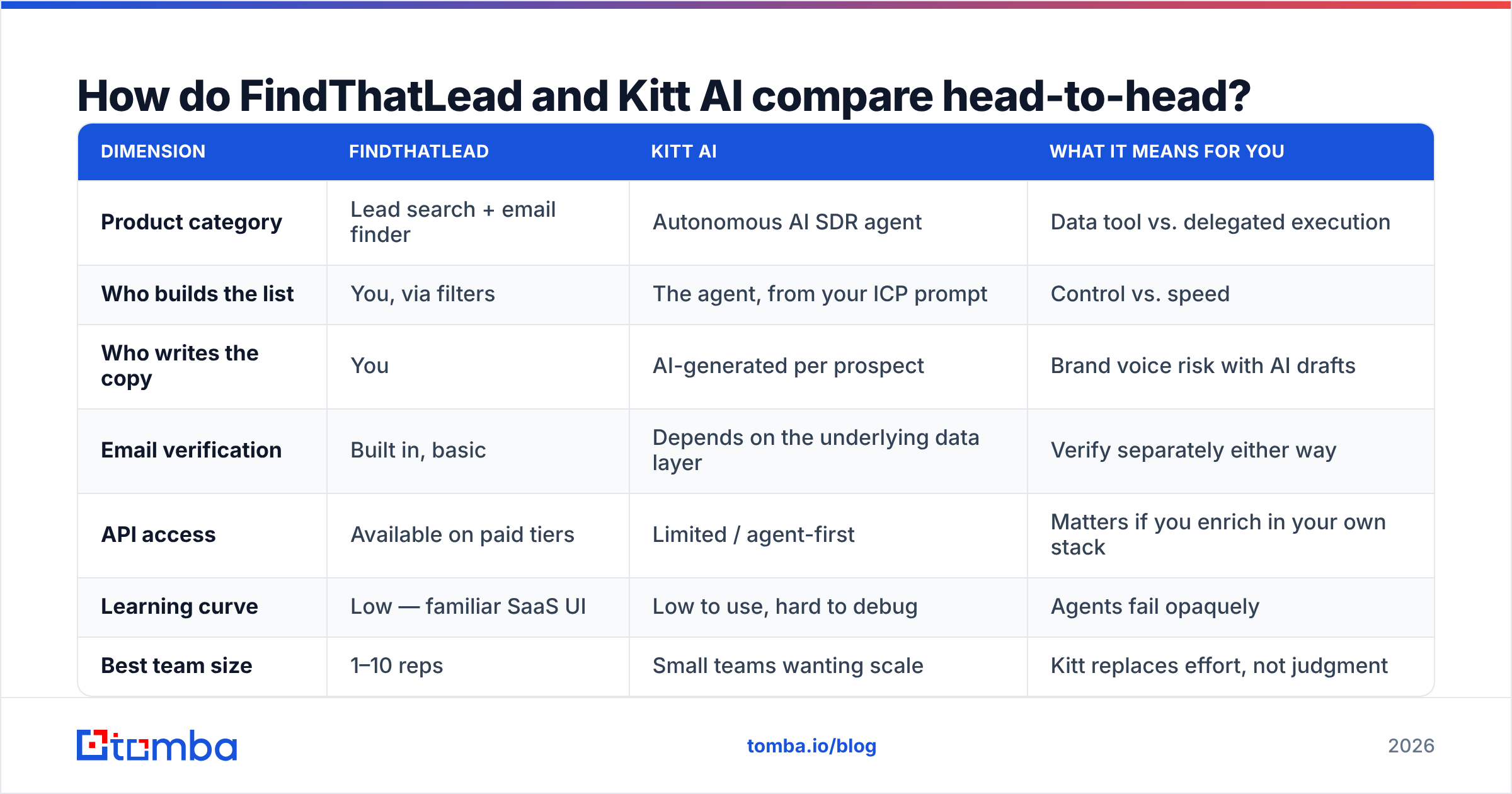
| Dimension | FindThatLead | Kitt AI | What it means for you |
|---|---|---|---|
| Product category | Lead search + email finder | Autonomous AI SDR agent | Data tool vs. delegated execution |
| Who builds the list | You, via filters | The agent, from your ICP prompt | Control vs. speed |
| Who writes the copy | You | AI-generated per prospect | Brand voice risk with AI drafts |
| Email verification | Built in, basic | Depends on the underlying data layer | Verify separately either way |
| API access | Available on paid tiers | Limited / agent-first | Matters if you enrich in your own stack |
| Learning curve | Low — familiar SaaS UI | Low to use, hard to debug | Agents fail opaquely |
| Best team size | 1–10 reps | Small teams wanting scale | Kitt replaces effort, not judgment |
| Typical entry price | ~$49/mo listed | Higher, usage-based | AI execution costs more per seat |
The table above hides the most important distinction, so let me say it plainly: FindThatLead sells you inputs, Kitt AI sells you outcomes. Tools that sell outcomes are only as good as the inputs they quietly buy on your behalf, and you rarely get to inspect those inputs.
Which one finds more valid emails?#
Neither vendor publishes an independently audited accuracy figure, which is itself informative. In practice, three things determine how many of your emails land:
- Coverage — does the provider have any record for this person at this domain?
- Freshness — was that record confirmed this quarter or in 2022?
- Verification depth — did anyone actually check the mailbox exists, and did the tool handle catch-all domains honestly?

FindThatLead's built-in verification catches syntax errors and dead domains. It is weaker on catch-all domains, where the mail server accepts everything and a naive checker reports "valid" for addresses that will bounce. That single blind spot is responsible for a large share of unexplained bounce rates in SMB outbound. If a meaningful chunk of your ICP sits on Microsoft 365 tenants configured as catch-all, run those addresses through a dedicated catch-all verifier before you send.
Kitt-style agents have the opposite failure mode. Because sourcing is automated, a single bad ICP interpretation can push hundreds of loosely-matched contacts into a live sequence before you notice. The agent is confident, the send volume is real, and your domain reputation absorbs the cost. Whatever you use as the sourcing layer, put an email verifier between the list and the sender.
A practical benchmark: if your bounce rate is above 3%, the problem is your data, not your copy. Above 5%, mailbox providers start throttling you and no amount of AI personalization will save the campaign.
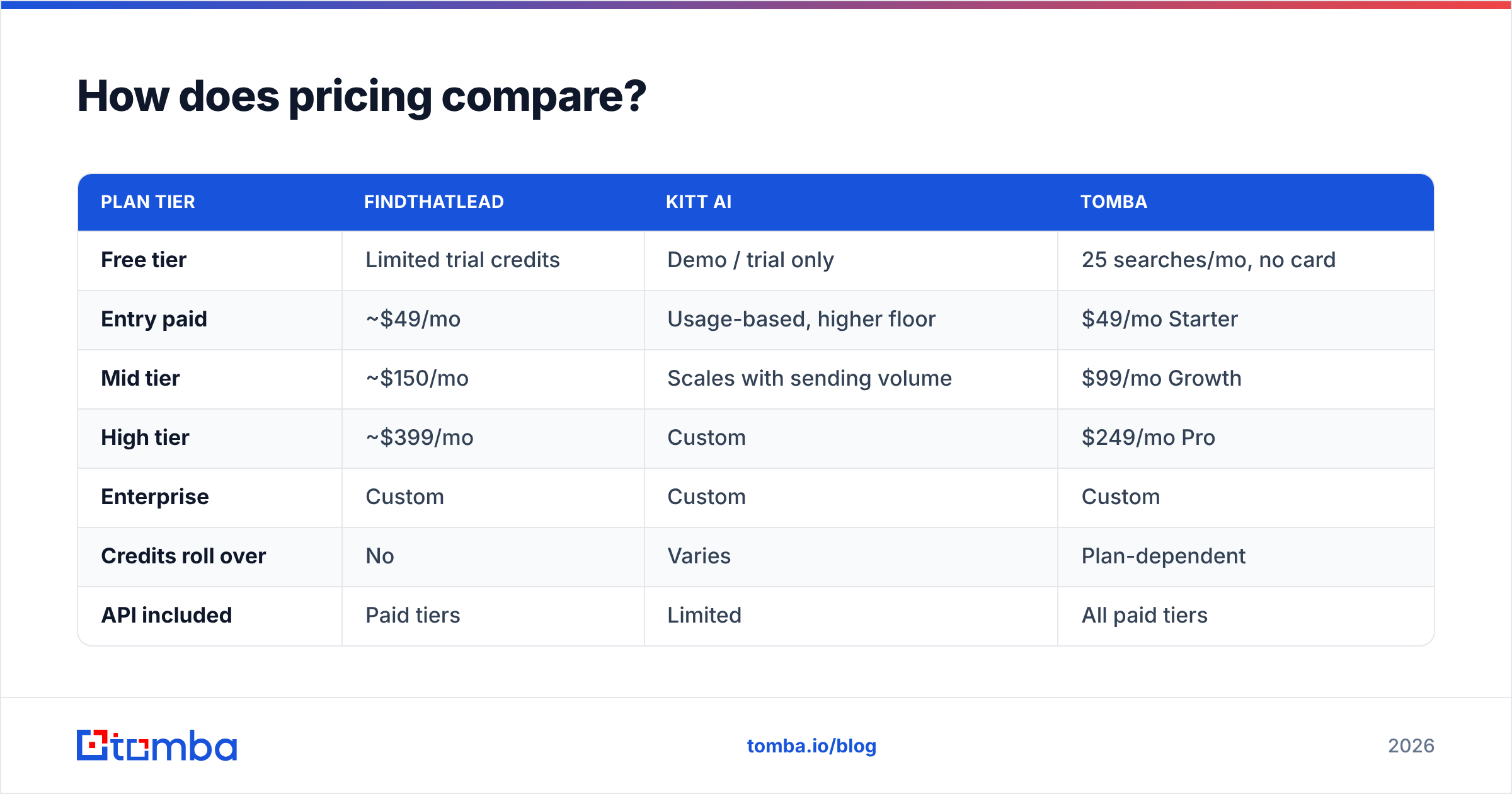
How does pricing compare?#
| Plan tier | FindThatLead | Kitt AI | Tomba |
|---|---|---|---|
| Free tier | Limited trial credits | Demo / trial only | 25 searches/mo, no card |
| Entry paid | ~$49/mo | Usage-based, higher floor | $49/mo Starter |
| Mid tier | ~$150/mo | Scales with sending volume | $99/mo Growth |
| High tier | ~$399/mo | Custom | $249/mo Pro |
| Enterprise | Custom | Custom | Custom |
| Credits roll over | No | Varies | Plan-dependent |
| API included | Paid tiers | Limited | All paid tiers |
Two pricing traps worth naming.
Trap one: credits that expire monthly. If you prospect in bursts — a conference push, a product launch, a quarterly ABM sprint — a plan that resets unused credits every 30 days costs far more per usable contact than the sticker price suggests. Model your real usage curve, not your average.
Trap two: bundled sending. When a tool bundles data and sending, you cannot swap out the weak half. If FindThatLead's data is good for your niche but its sender is thin, you are paying for a sender you will not use. If Kitt's sequencing is excellent but its data misses your vertical, you are paying premium rates for contacts you could have sourced cheaper. Unbundling — a dedicated finder plus a dedicated sequencer — usually wins on both cost and quality once you are past 2,000 contacts a month. Compare the numbers against Tomba pricing before you commit to an annual contract with either.

Who should choose FindThatLead?#
Pick FindThatLead if most of these describe you:
- You sell into SMBs in Europe or LATAM. FindThatLead's coverage skews stronger there than many US-centric databases.
- You want to see every contact before it enters a sequence. Manual review is a feature, not friction, when your average deal size is five figures.
- You are a solo founder or a two-person team. The all-in-one bundle means one subscription instead of three.
- Your volume is modest. Under roughly 1,000 contacts a month, the bundled model is economical.
- You already have your messaging dialed in. You do not need an AI to write the email; you need addresses.
Where it disappoints: bulk workflows, API-first teams, and anyone who needs enrichment beyond email — firmographics, technographics, or phone numbers. If phone coverage matters to your motion, you will end up adding a phone finder regardless.
Who should choose Kitt AI?#
Pick a Kitt-style AI SDR if:
- You have pipeline targets but no headcount. The whole pitch is replacing hours of manual work.
- Your ICP is broad and repeatable. Agents perform best when "good fit" is easy to describe and there are thousands of matches.
- Your deal size tolerates lower personalization quality. AI-written first touches are competent, rarely excellent.
- You have someone to babysit it. Reviewing what the agent sourced and sent in week one is non-negotiable.
- You can absorb a higher cost per contact. You are paying for execution, not just data.
Where it disappoints: regulated industries, enterprise ABM with named accounts, and any motion where a mis-targeted email damages a relationship. Autonomous agents are bad at knowing when not to send.

What do reviewers actually say?#
Skip vendor marketing and read the review sites. On G2 and Capterra, the recurring themes for tools in the FindThatLead category are consistent: praise for ease of use and price, complaints about data gaps in specific verticals and about credits burning on failed searches. For AI SDR agents, the pattern is praise for time saved and complaints about generic personalization and opaque sourcing.
Also check the vendor's own documentation before you buy — findthatlead.com publishes its plan structure openly, and any AI agent vendor that will not show you where its contact data originates should be treated with suspicion. Data provenance is a real question in 2026, not a compliance footnote. HubSpot's own sales research has been consistent for years on the same point: response rates track data quality far more tightly than they track copy cleverness.
How does deliverability change the answer?#
This is the section most comparison posts skip, and it is the one that decides whether either tool pays for itself.
Both products can put emails in a queue. Neither guarantees those emails reach an inbox. The controllables:
- Bounce rate under 2% — achieved through verification, not hope. Run every list through a verifier immediately before send, not at export time weeks earlier.
- Authenticated sending domains — SPF, DKIM, and DMARC configured correctly on a secondary domain, never your primary.
- Warmed mailboxes — new sending accounts need weeks of ramp before they carry real volume.
- Volume discipline — an AI agent that can send 2,000 emails a day will happily do so and torch your domain in a fortnight.
- List hygiene over time — B2B contact data decays roughly 2–3% per month as people change jobs.
That last point is why a standalone data layer matters. Re-verifying a saved list quarterly through bulk verification costs a fraction of what a burned domain costs, and it works the same way whether your sender is FindThatLead, Kitt, or something you built yourself.
What is the honest verdict?#
There is no single winner because they solve different problems.
- Choose FindThatLead if you want a cheap, controllable, all-in-one prospecting tool and your volume is modest. It is a reasonable first paid tool for a founder-led sales motion.
- Choose Kitt AI if your constraint is human hours rather than budget, your ICP is broad, and you will actually supervise the agent's output.
- Choose neither as your data layer if you are building anything programmatic. Both bundle data into a workflow; if you need contacts inside your CRM, your product, or a script, you want an API and per-call verification, not a UI.
The pattern that works for most teams past the first ten customers is a split stack: a dedicated finder and verifier for data, a dedicated sequencer for sending, and a clear verification gate between them. It costs marginally more in subscriptions and dramatically less in wasted sends.
Where does Tomba fit in this comparison?#
Tomba is deliberately the data layer, not the whole funnel. If you use FindThatLead, Tomba's domain search covers the gaps in verticals where FindThatLead's index is thin. If you run an AI SDR agent, Tomba verifies what the agent sourced before anything hits a mailbox. And if you are engineering-led, the Tomba API gives you find-and-verify as a single call inside your own pipeline instead of a CSV round trip.
Pricing is straightforward: a free tier with 25 searches a month, Starter at $49/mo, Growth at $99/mo, Pro at $249/mo, and custom Enterprise. No sending bundled in, because sending is not the hard part — the addresses are.
Start with the data. Run your next target list through the Tomba Email Finder, verify it before it enters whichever sequencer you have chosen, and measure your bounce rate against last month's. If the number drops, you have found where the real problem was — and you can pick between FindThatLead and Kitt AI on workflow preference instead of on a hope that either one will fix your data for you.
Related guides#
Ready to find emails that actually work?
Join 150,000+ professionals who stopped guessing and started sending. Free credits on signup — no credit card required.
Get the Tomba newsletter
Practical outbound tactics and product updates — once every two weeks.
About the author