FindThatLead vs Market Location (2026): Which Data Wins?
One is a self-serve email finder, the other is a UK B2B data house that sells lists by quote. Here is how FindThatLead and Market Location actually compare on accuracy, cost, speed and legal risk in 2026.
TL;DR
- FindThatLead and Market Location are not really competitors. FindThatLead is a self-serve prospecting tool that finds and sends; Market Location is a UK-focused B2B data house that licenses lists under contract.
- Pick FindThatLead if you want to search a domain, pull emails, and start sending the same afternoon with no sales call.
- Pick Market Location if you need UK company universe coverage with firmographics, telephone, and postal data for multi-channel campaigns, and you can live with a quote-based buying cycle.
- Both models share the same failure point: data decays. Neither replaces a verification step before you press send.
- If you mostly need accurate B2B email addresses on demand, a dedicated finder plus verifier stack (Tomba starts at $49/mo after a free tier) is usually cheaper than either.
What are FindThatLead and Market Location?#
They sit at opposite ends of the B2B data market, and that is the whole story.
FindThatLead is a Spanish-built prospecting platform. You give it a domain, a name, or a LinkedIn URL, and it returns business email addresses. It bundles a Chrome extension, a lead search by role and location, a scoring/verification step, and a cold email sender so you can go from list to sequence inside one login. It is credit-based, self-serve, and priced publicly.
Market Location is a UK B2B data provider with roots in direct marketing. Instead of a search box, you get a data specification: SIC codes, employee bands, turnover bands, geography, decision-maker job function. They compile and telephone-verify records, then license them to you for a defined campaign or a rolling term. Pricing is quoted per record and per usage rights.
Here is what that difference actually means when you are the one buying:
- Buying motion — FindThatLead is a credit card and a signup form. Market Location is a scoping call, a spec, and a contract. One takes ten minutes, the other takes a week or two.
- Data shape — FindThatLead returns contact-level results as you search. Market Location delivers a company-level universe with contacts attached, sized to your filters.
- Channel coverage — FindThatLead is email-first. Market Location carries postal addresses and switchboard/direct telephone data, which matters if you run direct mail or a calling team.
- Geography — FindThatLead is global but thin in places. Market Location is deep in the UK and effectively absent outside it.
- Usage rights — Self-serve tools let you export and reuse freely. Licensed lists usually come with defined-use terms, and you should read them before you load anything into your CRM permanently.

How do FindThatLead and Market Location compare head-to-head?#
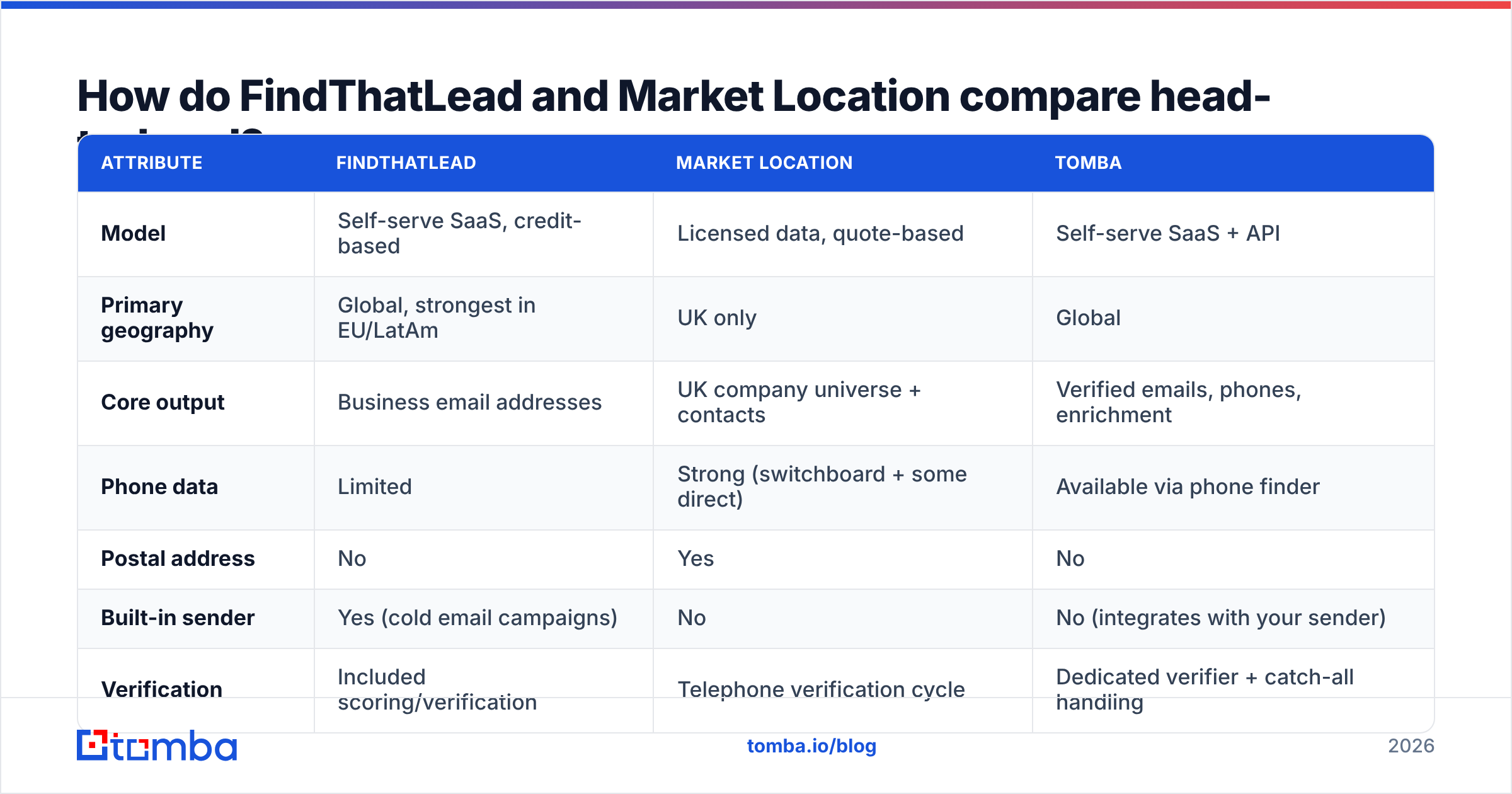
The table below is the short version. Details on pricing and accuracy follow.
| Attribute | FindThatLead | Market Location | Tomba |
|---|---|---|---|
| Model | Self-serve SaaS, credit-based | Licensed data, quote-based | Self-serve SaaS + API |
| Primary geography | Global, strongest in EU/LatAm | UK only | Global |
| Core output | Business email addresses | UK company universe + contacts | Verified emails, phones, enrichment |
| Phone data | Limited | Strong (switchboard + some direct) | Available via phone finder |
| Postal address | No | Yes | No |
| Built-in sender | Yes (cold email campaigns) | No | No (integrates with your sender) |
| Verification | Included scoring/verification | Telephone verification cycle | Dedicated verifier + catch-all handling |
| Free tier | Limited trial credits | No | 25 searches/mo |
| Entry price | Roughly $49/mo published tiers | Quote only, typically four figures | $49/mo Starter |
| API access | Yes | Data delivery, not a live API | Full REST API |
| Time to first lead | Minutes | Days to weeks | ance Minutes |
| Best for | Founders, SDRs, agencies | UK multi-channel campaigns | Email-led outbound at any scale |

One row deserves a caveat: "entry price." FindThatLead publishes tiers and changes them periodically, so treat any figure you read in a blog post (including this one) as directional and confirm on their pricing page. Market Location does not publish rates at all, which is normal for compiled-data licensing but makes budget planning harder.
Which one has better data accuracy?#
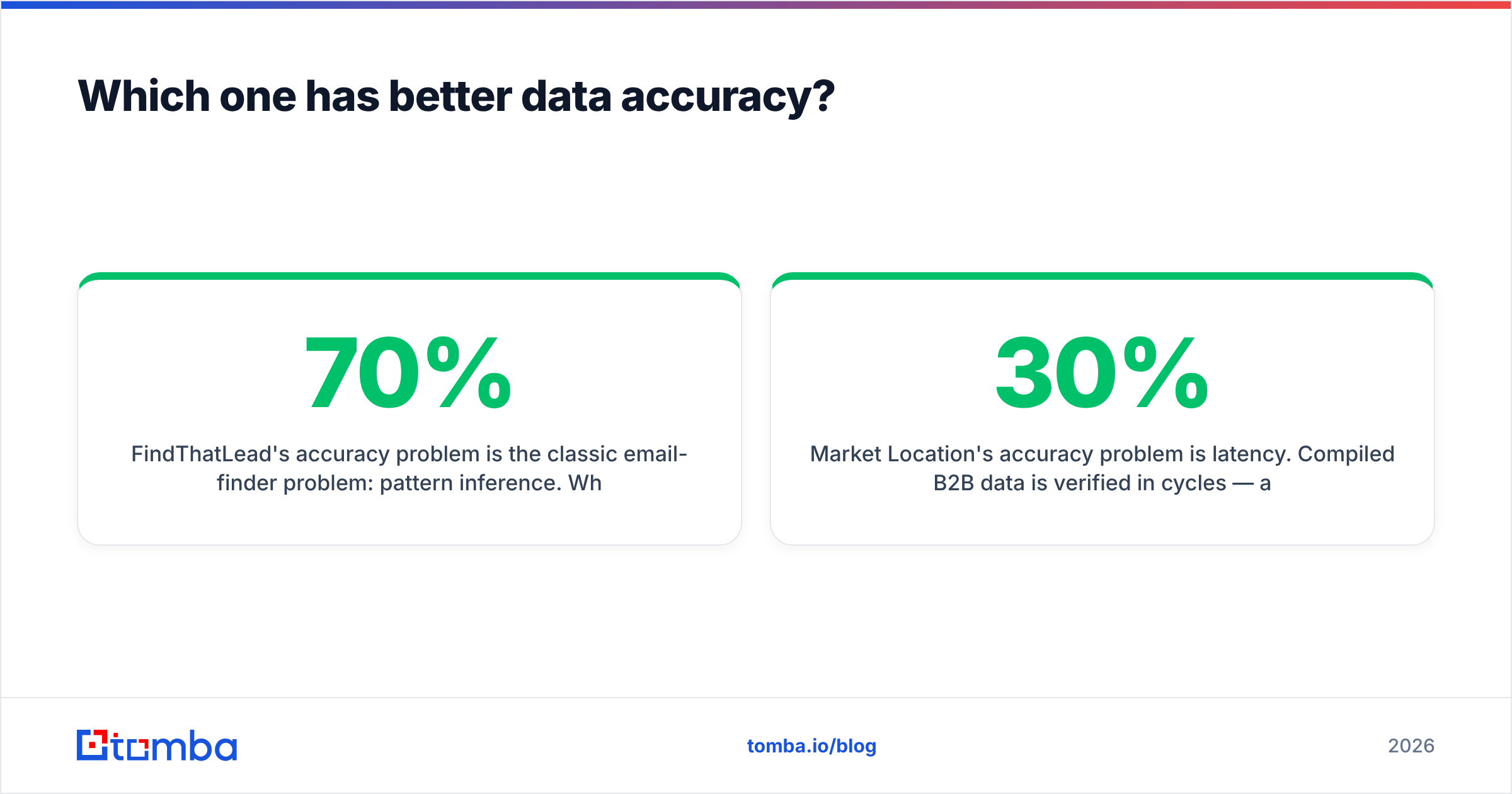
Neither wins outright, because they fail in different directions.
FindThatLead's accuracy problem is the classic email-finder problem: pattern inference. When a tool cannot confirm an address, it can guess a format (first.last@, f.last@, firstlast@) and score the guess. Guesses land at maybe 60-70% on domains with clean, consistent patterns, and much worse on companies that use nicknames, middle initials, or acquired-brand domains. If you send to unverified guesses at volume, your bounce rate climbs, and your sender reputation follows it down.
Market Location's accuracy problem is latency. Compiled B2B data is verified in cycles — a record touched by a telephone verification team in Q1 is not re-touched until its next cycle. Between cycles, people leave. Industry churn estimates on B2B contact records have hovered around 25-30% a year for a decade, and that has not improved in the era of hybrid work. A UK list that was 95% accurate on delivery day can be 80% accurate eight months later, and the license does not refresh itself.

The practical answer for both: run every address through an email verifier before it enters a sequence, not after. Verification costs a fraction of a cent per record. A hard bounce costs you domain reputation, and reputation is the one asset in cold outbound you cannot buy back.
Watch the catch-all problem too. A large share of enterprise domains accept every address at the SMTP layer, so a simple ping returns "valid" for addresses that will silently vanish. That is where a catch-all verifier earns its keep — it applies additional signals rather than shrugging and marking the record "risky."
What does each actually cost in practice?#
Compare cost per usable contact, not headline price. A cheap list with 30% dead records is more expensive than a mid-priced source at 95% deliverable, once you count the bounces, the wasted sequence slots, and the domain warm-up you will redo.
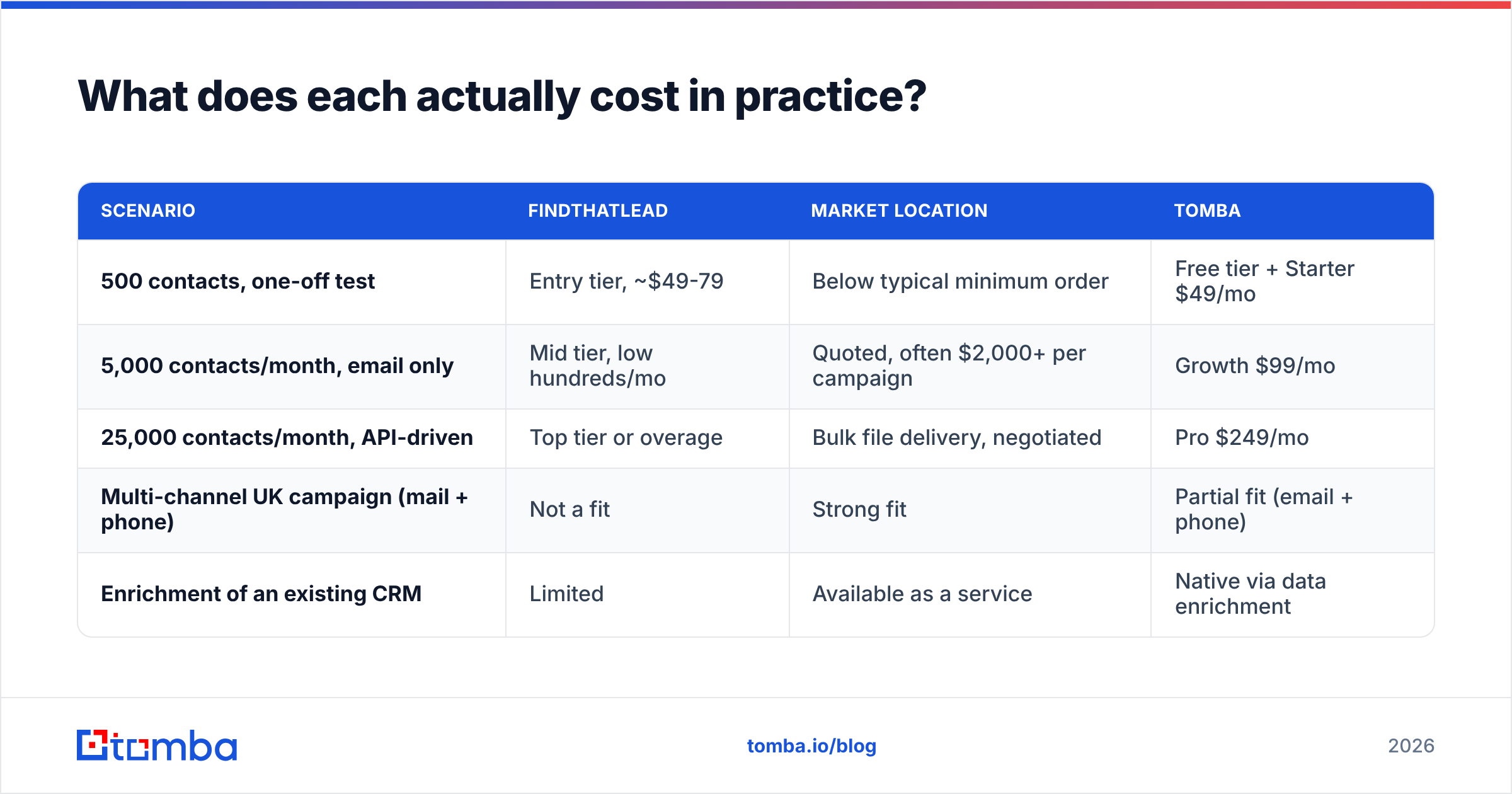
| Scenario | FindThatLead | Market Location | Tomba |
|---|---|---|---|
| 500 contacts, one-off test | Entry tier, ~$49-79 | Below typical minimum order | Free tier + Starter $49/mo |
| 5,000 contacts/month, email only | Mid tier, low hundreds/mo | Quoted, often $2,000+ per campaign | Growth $99/mo |
| 25,000 contacts/month, API-driven | Top tier or overage | Bulk file delivery, negotiated | Pro $249/mo |
| Multi-channel UK campaign (mail + phone) | Not a fit | Strong fit | Partial fit (email + phone) |
| Enrichment of an existing CRM | Limited | Available as a service | Native via data enrichment |
Two buying traps worth naming. First, credit rollover: some self-serve tools expire unused credits monthly, which quietly converts a $99 plan into a $99 plan you used 40% of. Second, list minimums: data houses frequently set a floor of several thousand records or a minimum spend, so a 400-contact pilot is not on the menu.
Tomba's structure is deliberately boring by comparison — a free tier at 25 searches a month, then $49, $99, and $249 tiers with an Enterprise option. You can see the full breakdown on the Tomba pricing page.

Who should choose FindThatLead?#
Choose it when speed and self-service matter more than depth.
- You are a founder or a two-person SDR team. No procurement, no data spec, no minimum order. You search, you export, you send.
- You want find-and-send in one tool. The built-in campaign sender removes a vendor from your stack. That is genuinely useful early, and genuinely limiting later, when you want a real sequencer with deliverability controls.
- Your ICP is European or LatAm SMB. Coverage there is respectable relative to US-first tools.
- You test a lot of segments. Credit-based search rewards experimentation in a way a fixed list purchase does not.
Where it gets uncomfortable: enterprise domains with unusual email conventions, and any workflow where you need contact data pushed into systems continuously rather than pulled ad hoc. Check recent G2 reviews for current sentiment on credit consumption and support responsiveness before committing to an annual plan.
Who should choose Market Location?#
Choose it when the campaign is UK-based and multi-channel.
- You are running direct mail. Almost no self-serve email tool carries clean postal data. Market Location does.
- You need a company universe, not a contact search. "Every manufacturing firm in the West Midlands with 50-250 employees" is a spec, not a search query. Data houses answer specs.
- You have a calling team. Telephone-verified switchboard data with named decision-makers still beats scraped alternatives for UK SMB calling.
- You need documented provenance. Under UK GDPR and PECR, B2B marketing has more latitude than B2C, but you still need a lawful basis and a suppression process. A licensed provider gives you a paper trail and screening against the Corporate Telephone Preference Service. A scraped export gives you nothing.
That last point is the strongest argument for the data-house model, and it is why regulated industries keep buying lists even when a $49 tool exists.
Is there a better third option for email-led outbound?#
If your outbound is email-first and global, a dedicated finder plus verifier stack usually beats both.
The logic is straightforward. FindThatLead bundles sending, which you probably already pay for elsewhere. Market Location bundles postal and telephone data, which you may not use at all. Both bundles cost money. If the only thing you need is an accurate work email attached to a name and a domain, buy that directly.
That is where Tomba's email finder fits: search by person, by domain, or in bulk; verify in the same workflow; then push the result into your own sequencer through the API, Chrome extension, Google Sheets add-on, or a CRM integration. Domain search returns every published address on a company domain with a confidence score, which is often faster than guessing at individual names.
For UK list buying specifically, it is also fair to name BookYourData as a credible middle path — pay-as-you-go verified B2B contact data with a published accuracy guarantee and no contract cycle. If you want list economics without a procurement process, it is worth a look alongside Market Location.
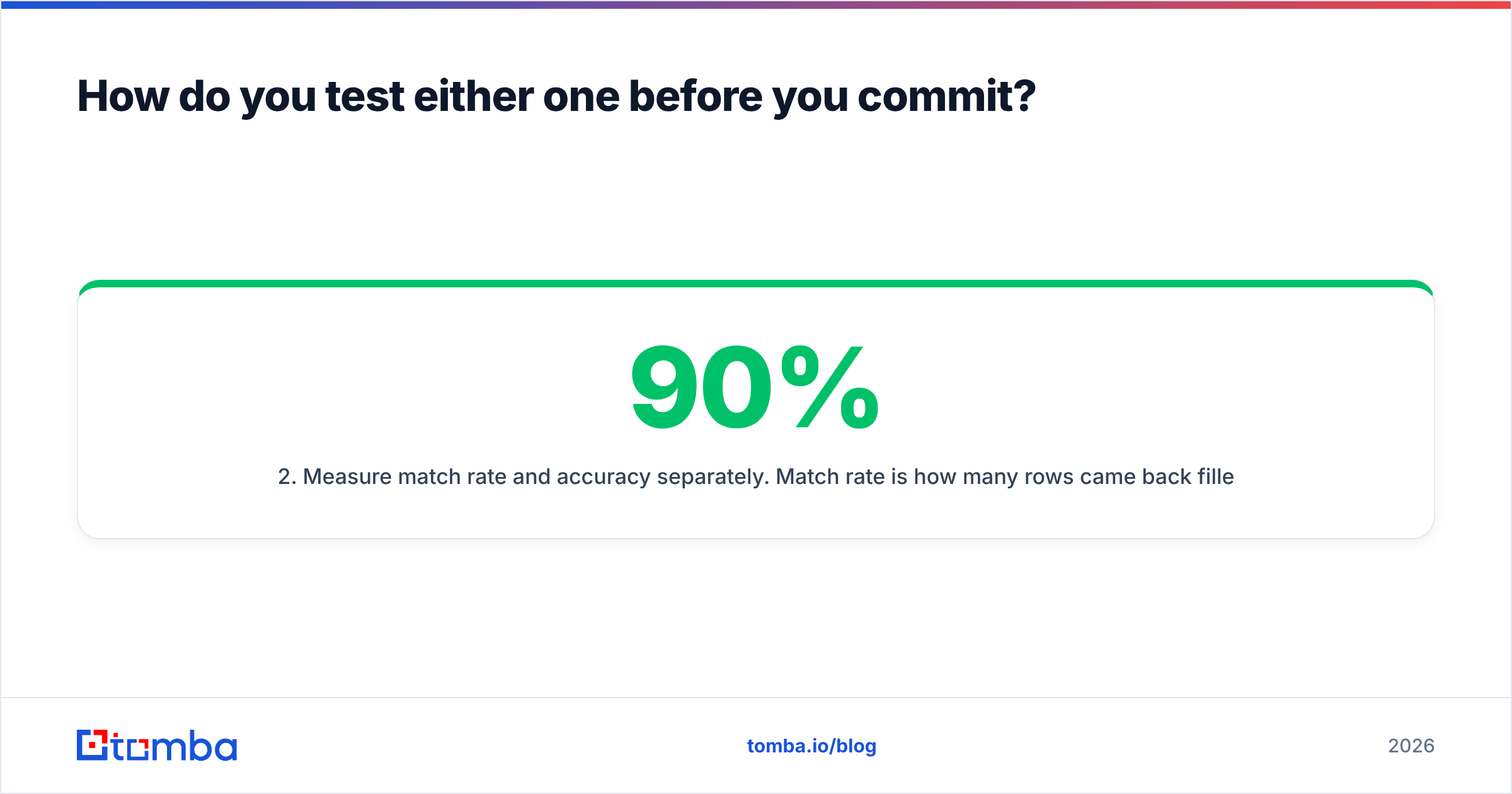
How do you test either one before you commit?#
Run the same five-step evaluation on any data source. It takes an afternoon and saves you a quarter.
- Build a 100-row truth set. Pick companies you already have confirmed contacts for. Strip the emails. Ask each vendor to fill them back in.
- Measure match rate and accuracy separately. Match rate is how many rows came back filled. Accuracy is how many of those were correct. A 90% match rate at 65% accuracy is worse than a 60% match rate at 97%.
- Verify independently. Do not accept the vendor's own confidence score as proof. Run the output through a neutral verifier and count the invalids, the unknowns, and the catch-alls.
- Check the hard cases. Include three or four large enterprises, two acquired brands still on legacy domains, and two non-English-market companies. This is where every provider's real ceiling shows.
- Price the winner per usable contact. Divide total cost by verified-deliverable records, not by records delivered. Then compare.
Do this before you sign an annual contract or a data license, and the FindThatLead vs Market Location question answers itself with your own numbers rather than someone else's marketing page.
What is the verdict?#
FindThatLead wins on speed, price transparency, and self-service. Market Location wins on UK depth, channel breadth, and compliance documentation. They are not substitutes, and any post that declares a single winner is selling you something.
The honest recommendation: if your motion is email-led outbound to a global or non-UK ICP, skip the bundle and buy accurate emails directly. If your motion is a UK multi-channel campaign with mail and phone, a licensed data house is the right shape of purchase, and Market Location is a reasonable shortlist entry.
Ready to test the email-first path? Start with the Tomba Email Finder — 25 free searches a month, no card, with verification built into the same workflow so nothing untested reaches your sending domain. If it holds up on your truth set, plans start at $49/mo and scale to a full API when your volume does.
Related guides#
Ready to find emails that actually work?
Join 150,000+ professionals who stopped guessing and started sending. Free credits on signup — no credit card required.
Get the Tomba newsletter
Practical outbound tactics and product updates — once every two weeks.
About the author