FindThatLead vs OutboundView: Which Fits Your Pipeline?
One is a self-serve prospecting tool you run yourself. The other is a done-for-you outbound agency on a retainer. Here's how FindThatLead and OutboundView actually compare, and when neither is the right call.
TL;DR
- FindThatLead and OutboundView are not competitors in the normal sense. One is self-serve prospecting software you operate; the other is an outsourced outbound agency that operates on your behalf.
- FindThatLead is cheap, fast to start, and puts you in control of data quality. You still need a sender, a sequencer, and someone to write and reply.
- OutboundView sells outcomes — meetings booked — with a human team, but on a retainer plus ramp period, and the knowledge stays with the vendor.
- The real cost gap is roughly two orders of magnitude: a few hundred dollars a year versus a five-figure annual retainer. That only matters if your ACV justifies it.
- Most teams under $50K ACV get better ROI from a clean data stack plus one in-house SDR than from an agency. Verification is where both models quietly fail.
Why are these two tools compared at all?#
Because the question behind the search isn't "which product has more features." It's "should I buy the machine or rent the operator?"
FindThatLead sits in the data-and-outreach software bucket: you pay a monthly fee, get credits, look up email addresses, push them into a campaign, and press send. OutboundView sits in the services bucket: an agency that builds lists, writes sequences, runs SDR and appointment-setting motions, and hands you calendar invites.
So the comparison is really a build-vs-buy decision dressed up as a tool comparison. Get the framing right and the answer usually falls out in ten minutes.
Here's the thing most vendor pages won't tell you: both models rest on the same foundation. Neither works if the contact data is wrong. An agency with a bad list burns your domain reputation on your behalf, at a higher hourly rate.
What is FindThatLead, and what does it actually do?#
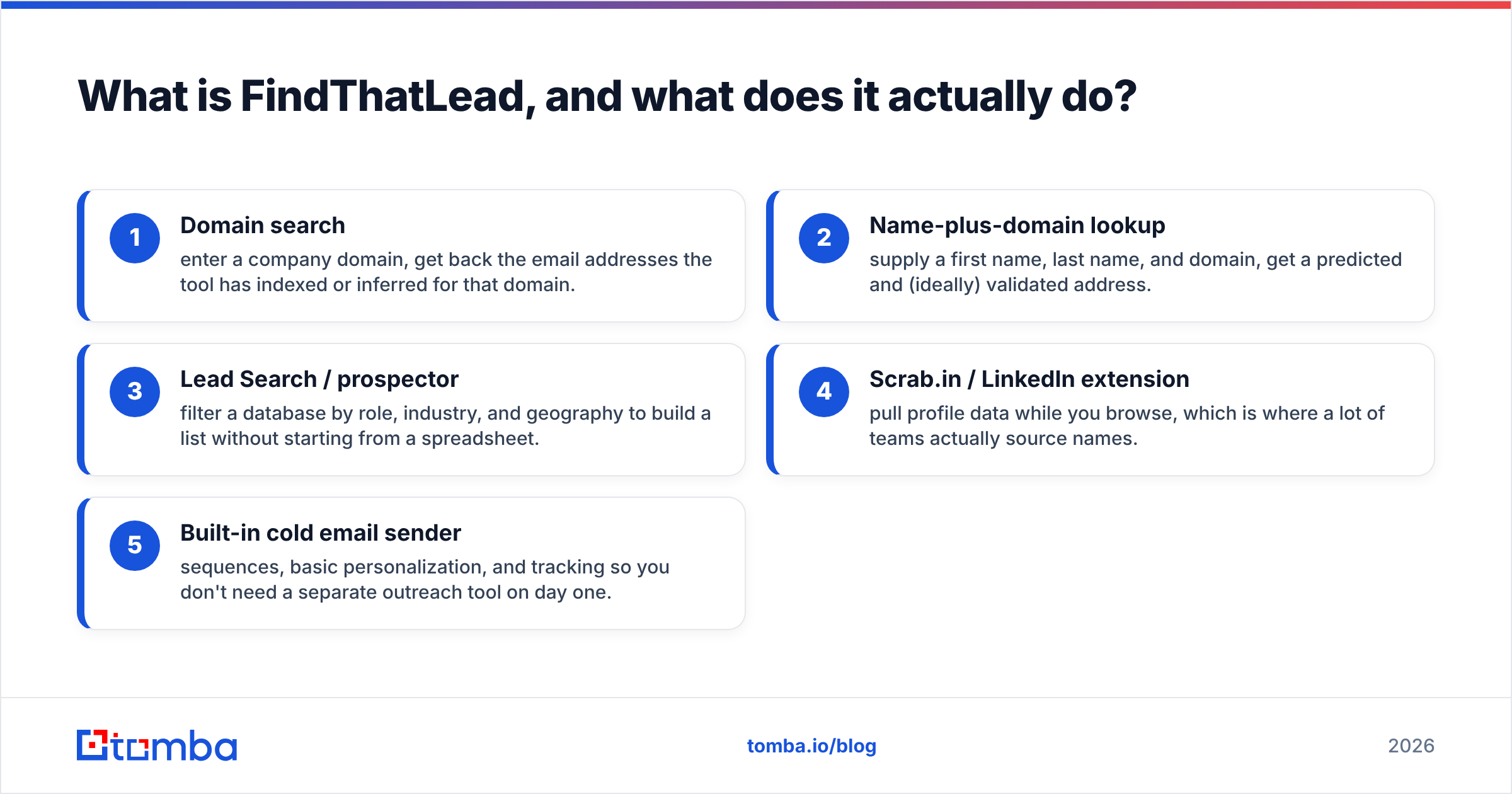
FindThatLead is a Spanish-built B2B prospecting suite. Its core loop is straightforward:
- Domain search — enter a company domain, get back the email addresses the tool has indexed or inferred for that domain.
- Name-plus-domain lookup — supply a first name, last name, and domain, get a predicted and (ideally) validated address.
- Lead Search / prospector — filter a database by role, industry, and geography to build a list without starting from a spreadsheet.
- Scrab.in / LinkedIn extension — pull profile data while you browse, which is where a lot of teams actually source names.
- Built-in cold email sender — sequences, basic personalization, and tracking so you don't need a separate outreach tool on day one.
That last point is the honest differentiator versus a pure email finder. FindThatLead bundles sending. That's convenient for a solo founder and a liability at scale, because bundling sending with finding means your deliverability is tied to a vendor whose primary competence is data, not inbox placement.
The catch that shows up in user reviews on G2 and Capterra with some regularity: credit consumption and result quality vary a lot by region and company size. European SMB coverage tends to be stronger than US enterprise. If your ICP is 500+ headcount North American SaaS, run a sample before committing to an annual plan.
What is OutboundView, and who is it for?#
OutboundView is a US-based outbound agency. The offering is people plus process: they research accounts, build target lists, write and test messaging, run cold email and cold calling, and book qualified meetings into your reps' calendars. Some engagements include SDR team consulting or "build it and hand it over" programs rather than pure outsourcing.
The pitch is simple and legitimate: hiring, training, and retaining an SDR takes six months and often fails. An agency has already done that. You skip the ramp and pay a retainer instead of salary, benefits, tooling, and management time.
The trade-offs are equally real:
- Retainers are quoted, not published. Appointment-setting engagements in this category typically land in the mid-four to low-five figures per month, with three- to six-month minimums. Get the actual quote; don't budget from a blog post — including this one.
- Ramp is not instant. Expect four to eight weeks before meetings appear at a steady rate. Messaging iteration takes cycles.
- Learning leaves with the vendor. When the contract ends, so does the playbook, unless you contracted specifically for enablement.
- Meeting quality is the whole game. "Meetings booked" is easy to hit and easy to game. Insist on a definition tied to your qualification criteria, and measure opportunities created, not calendar invites.
FindThatLead vs OutboundView: how do they compare head to head?#
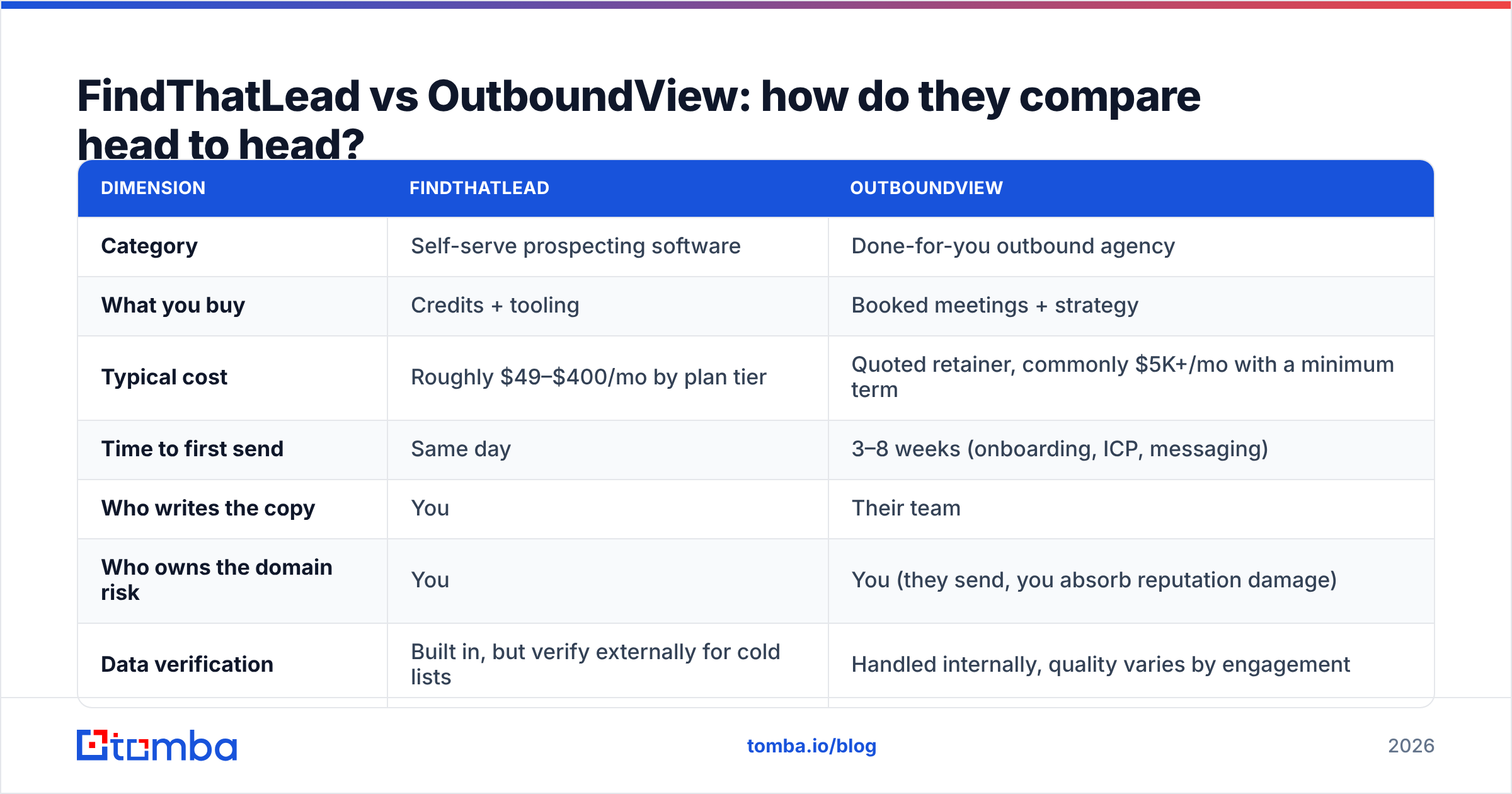
| Dimension | FindThatLead | OutboundView |
|---|---|---|
| Category | Self-serve prospecting software | Done-for-you outbound agency |
| What you buy | Credits + tooling | Booked meetings + strategy |
| Typical cost | Roughly $49–$400/mo by plan tier | Quoted retainer, commonly $5K+/mo with a minimum term |
| Time to first send | Same day | 3–8 weeks (onboarding, ICP, messaging) |
| Who writes the copy | You | Their team |
| Who owns the domain risk | You | You (they send, you absorb reputation damage) |
| Data verification | Built in, but verify externally for cold lists | Handled internally, quality varies by engagement |
| Scales by | Adding credits | Adding headcount / expanding retainer |
| Knowledge retention | Stays in-house | Stays with the agency unless contracted otherwise |
| Best fit ACV | Under $25K | $25K+ with a defined enterprise ICP |
Read that table as a fork, not a scoreboard. If your average contract value is $6,000 and your sales cycle is three weeks, a $5,000/month retainer needs to produce roughly ten closed deals a month just to justify itself before you've paid a rep. If your ACV is $80,000 and one closed deal pays for a year of the retainer, the math flips completely.
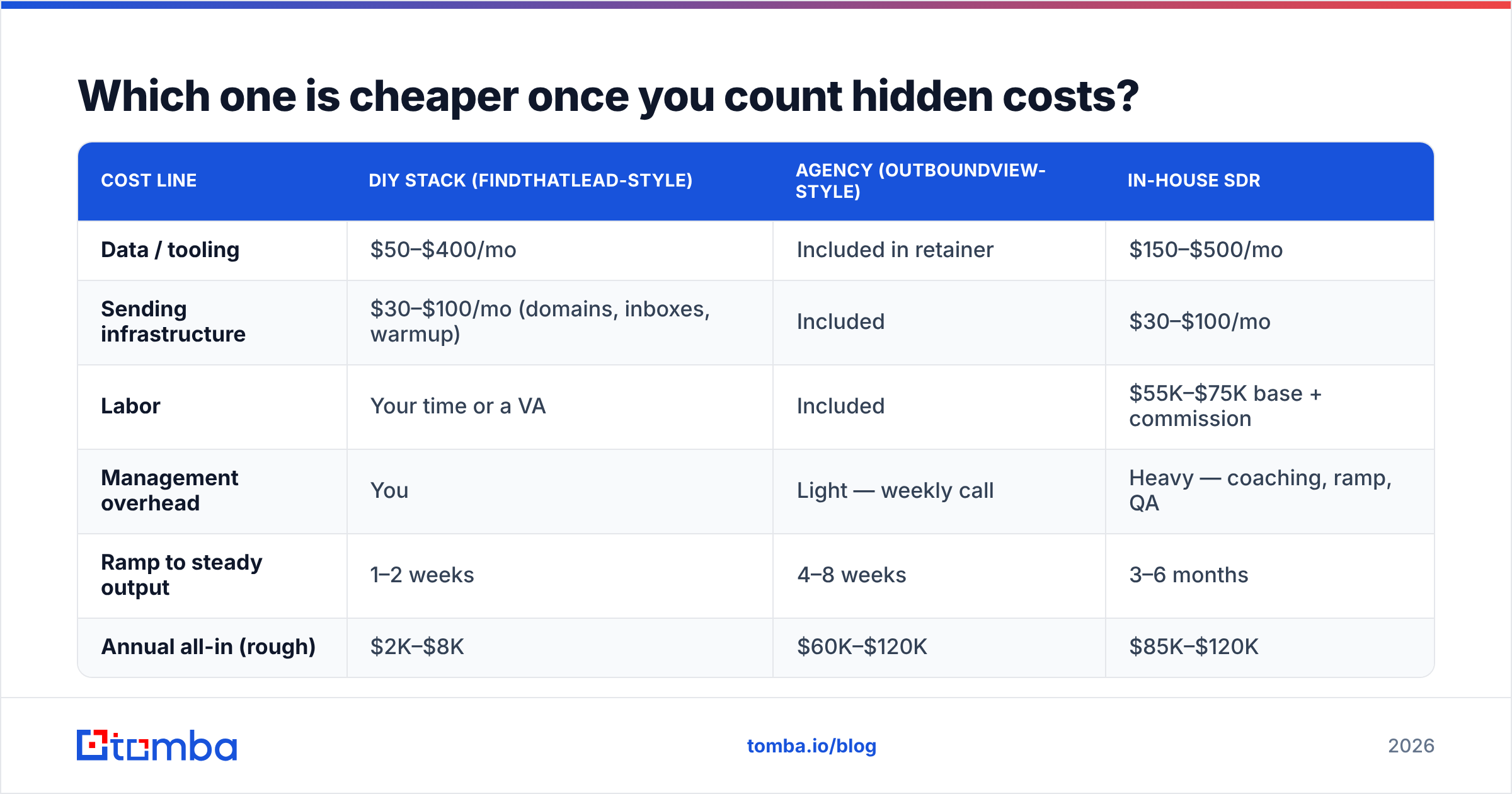
Which one is cheaper once you count hidden costs?#
Software looks cheaper until you price the labor it assumes. Agencies look expensive until you price the SDR you'd otherwise hire.
| Cost line | DIY stack (FindThatLead-style) | Agency (OutboundView-style) | In-house SDR |
|---|---|---|---|
| Data / tooling | $50–$400/mo | Included in retainer | $150–$500/mo |
| Sending infrastructure | $30–$100/mo (domains, inboxes, warmup) | Included | $30–$100/mo |
| Labor | Your time or a VA | Included | $55K–$75K base + commission |
| Management overhead | You | Light — weekly call | Heavy — coaching, ramp, QA |
| Ramp to steady output | 1–2 weeks | 4–8 weeks | 3–6 months |
| Annual all-in (rough) | $2K–$8K | $60K–$120K | $85K–$120K |
The DIY column assumes someone in your company will actually do the work. That's the assumption that breaks. A founder who books three hours a week for outbound will underperform an agency and an SDR both — not because the software is bad, but because outbound rewards consistency more than cleverness.
The honest heuristic: if nobody on your team will own outbound as a named responsibility with weekly numbers, don't buy software. Buy the agency, or don't do outbound yet.
Where does data quality actually break down?#
This is where both models leak, and where the comparison gets interesting.
Any email finder — FindThatLead, its competitors, or the pattern-guessing script your intern wrote — produces three classes of result: confirmed valid, pattern-inferred, and catch-all. The first is safe. The second is a guess with a confidence score attached. The third is a domain that accepts everything at the SMTP layer, so a "valid" response means nothing.
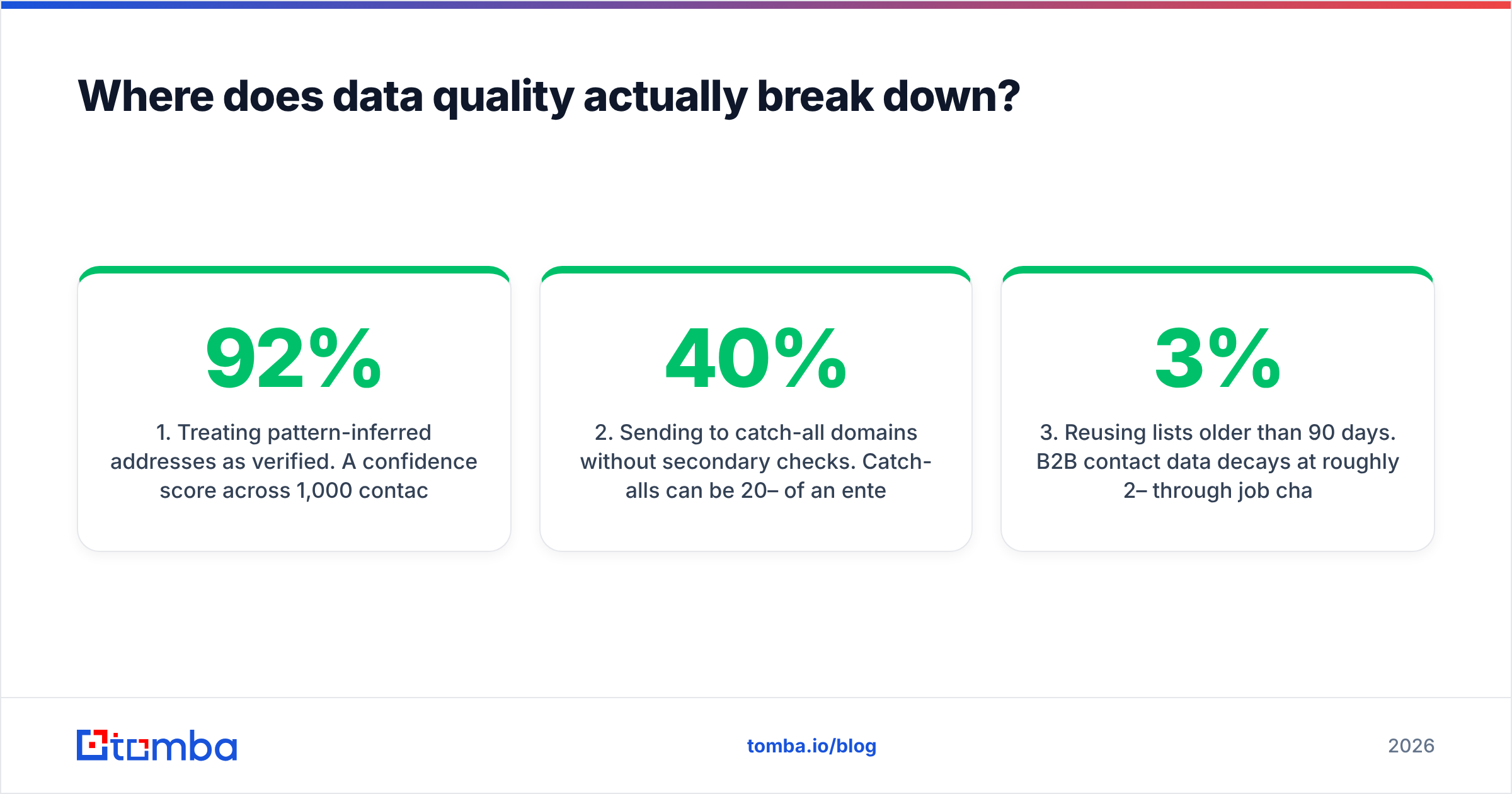
Most bounce disasters trace to the same three mistakes:
- Treating pattern-inferred addresses as verified. A 92% confidence score across 1,000 contacts still means roughly 80 bounces. Two consecutive sends at that rate and your domain reputation is measurably damaged.
- Sending to catch-all domains without secondary checks. Catch-alls can be 20–40% of an enterprise list. They need a catch-all verifier, not a standard syntax-and-MX check.
- Reusing lists older than 90 days. B2B contact data decays at roughly 2–3% per month through job changes alone. A six-month-old list is meaningfully worse than a fresh one.
An agency doesn't magically solve this. It just moves the failure behind a wall where you can't inspect it. Ask any outbound vendor two questions before signing: what's your measured bounce rate across the last three clients, and what verification layer sits between list build and first send? A vendor that answers with a number and a tool name is doing the work. A vendor that answers with "we use premium data sources" is not.

Running verification as a separate step — independent of whoever built the list — is the single highest-leverage control you have. A dedicated email verifier run before every campaign costs a fraction of a credit per contact and prevents the one failure mode that's expensive to reverse.
Can you run a hybrid instead of choosing?#
Yes, and it's what most teams between 10 and 100 employees converge on after a year of trial and error.
The structure looks like this:
- Own the data layer. Keep contact discovery and verification in-house, on your own account, with your own credits. Lists you own are an asset. Lists an agency owns are not.
- Own the domain and inboxes. Never let a vendor send from infrastructure you don't control. Buy your own secondary domains, warm them yourself, and grant access rather than handing over ownership.
- Rent the labor, not the strategy. Use an agency or contractor for volume execution — list expansion, first-touch sends, call blocks — while your team keeps ICP definition and messaging.
- Automate the boring middle. Enrichment, deduplication, and CRM sync should run without a human. A bulk email finder or an API call inside your workflow removes the copy-paste layer where most data rot begins.
That structure costs less than a full agency retainer, retains the playbook, and keeps you from rebuilding from zero when a contract ends.
Which should you choose in 2026?#
Pick FindThatLead-style software if: you're pre-Series A, your ACV is under $25K, someone will own outbound as a real job, and you want the messaging learnings to stay in the building.
Pick OutboundView-style agency support if: your ACV clears $25K, you have a defined enterprise ICP, you need pipeline within a quarter, and you'd rather spend management attention elsewhere. Contract for enablement, not just meetings, so you keep something when it ends.
Pick neither yet if: you can't name your ICP in one sentence, or you haven't closed five deals through any channel. Outbound amplifies product-market fit. It doesn't create it.
And regardless of which side you land on, treat contact data as infrastructure rather than a feature of whatever tool you happened to buy. The list is what compounds. The sender, the sequencer, and the agency are all replaceable.
What should you check before you commit?#
- Run a 50-contact sample through any finder against your actual ICP before buying an annual plan. Coverage by region and company size varies more than marketing pages suggest.
- Ask agencies for a bounce-rate number and a verification tool name, in writing.
- Confirm who owns the sending domains, the CRM records, and the list at contract end.
- Compare per-verified-contact cost, not per-credit cost. A cheap credit that returns a guess isn't cheap.
- Budget for re-verification every 90 days on any list you plan to reuse.
If you want the data layer to be the part you never worry about, start there. Tomba's Email Finder covers domain search, name lookup, and pattern detection with verification built into the same call, so you're not stitching two vendors together to answer one question. The free tier gives you 25 searches a month to test coverage against your own ICP, and paid plans start at $49/mo with Growth at $99/mo — see Tomba pricing for the full breakdown. Sample your list first, then decide whether you're buying the machine or renting the operator.
Related guides#
Ready to find emails that actually work?
Join 150,000+ professionals who stopped guessing and started sending. Free credits on signup — no credit card required.
Get the Tomba newsletter
Practical outbound tactics and product updates — once every two weeks.
About the author