FindThatLead vs Prosperfleet Valgen: 2026 Honest Comparison
One of these tools has a decade of public track record. The other has almost no verifiable footprint. Here's how to run the comparison honestly — and what to do when a vendor won't publish its pricing, accuracy method, or data sources.
TL;DR
- FindThatLead is a real, decade-old vendor with a public product, published plans, and thousands of third-party reviews you can read before you pay.
- Prosperfleet Valgen has almost no verifiable public footprint — no published pricing page we could confirm, no documented data sources, no independent review volume. That is a finding, not a feature.
- Never buy an email finder on brand claims. Run the same 300-contact bake-off against every vendor and compare bounce rate, hit rate, and cost per valid email.
- Tomba is the transparency benchmark here: $49/mo Starter, 25 free searches monthly, published data sourcing, and an open API you can test before committing.
- If a vendor won't show you pricing, sourcing, or a free test, treat it as a red flag — not as an enterprise-grade mystique.
What are FindThatLead and Prosperfleet Valgen?#
Start with the honest version, because it saves you an hour.
FindThatLead is a Spanish-built B2B prospecting suite that has been around since roughly 2015. Its core is an email finder plus a domain-level "lead search," bolted to a Chrome extension, a bulk CSV processor, and a light cold-email sender called Scrab.in / Email Sender depending on which era of the product you land on. You can look it up yourself at findthatlead.com and read the review volume on G2. Whether you like it or not, it exists, it has a paper trail, and its claims are falsifiable.
Prosperfleet Valgen is the harder half of this comparison. When we went looking for the things a buyer needs — a published pricing table, documented data sources, an API reference, independent review volume on G2 or Capterra, a coverage or accuracy methodology — we could not verify them. That does not automatically mean the tool is bad. New vendors and regional players launch constantly, and some are excellent before anyone writes about them. But it does mean you cannot compare it on specs, because there are no confirmable specs. You can only compare it on evidence you generate yourself.
So this post does two things: it gives you a real read on FindThatLead, and it gives you a repeatable framework for evaluating any low-footprint vendor — including Prosperfleet Valgen — without taking a sales rep's word for anything.

Why does a missing pricing page matter so much?#
Because in the email data category, opacity almost always costs you money in one of four ways.
- Credit definitions get creative. Some vendors charge a credit for a search, not a found email. Run 1,000 lookups with a 45% hit rate and you paid for 1,000 while receiving 450. Published pricing forces vendors to define this in writing.
- Verification is billed separately. A finder that returns an address but charges again to confirm it is deliverable effectively doubles the unit cost. If the pricing page doesn't exist, you find this out on invoice two.
- Accuracy claims are unfalsifiable. "99% accurate" means nothing without a stated method: was that measured on catch-all domains? On Fortune 500 targets only? Against a hand-labeled sample? Vendors who publish their data sources are the ones willing to be checked.
- Contracts replace self-serve. No pricing page usually means "talk to sales," which usually means annual commitment before you've validated a single list. That is the opposite of how you should buy data.
This is why our comparison table below scores transparency as a first-class attribute rather than a footnote. It's the single best predictor of whether your cost per valid contact will match your forecast.
How do you evaluate an email finder you've never heard of?#
Run this five-step bake-off. It takes about two hours and costs nothing if the vendor offers a trial. If they don't offer a trial, that's step zero and it already answered the question.
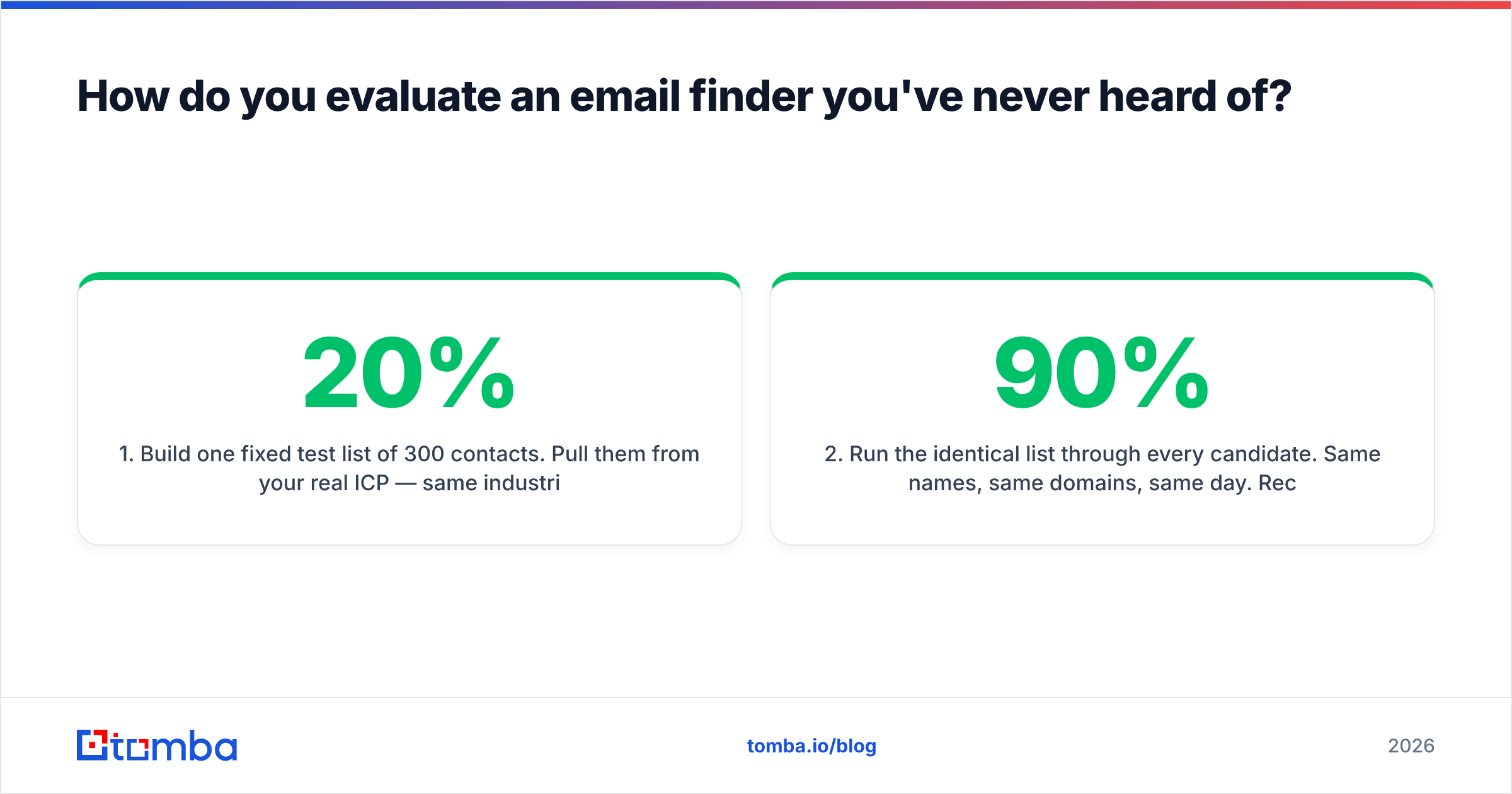
- Build one fixed test list of 300 contacts. Pull them from your real ICP — same industries, same company sizes, same regions you actually sell into. Include a deliberate 20% slice of small companies and non-US domains, because that's where every provider's coverage collapses and where averages hide the truth.
- Run the identical list through every candidate. Same names, same domains, same day. Record the hit rate (how many addresses came back at all) separately from the accuracy rate (how many survived verification). A tool that returns 90% of your list with 60% accuracy is worse than one returning 65% at 96%.
- Verify with a neutral third party. Don't let the finder grade its own homework. Push all output through an independent email verifier and count hard bounces, catch-alls, and role accounts separately. Catch-all domains are the classic place inflated accuracy numbers hide.
- Compute cost per valid email, not cost per credit. Take the plan price, divide by the number of addresses that came back and passed verification. This one number reorders most vendor shortlists immediately.
- Stress the integration path. Can you get results into your CRM without a human touching a CSV? Is there a documented REST API, a bulk endpoint, a Sheets or Excel add-in? Data you can't move is data you won't use.
Any vendor — FindThatLead, Prosperfleet Valgen, Tomba, or the next tool a LinkedIn ad shows you — either survives this or doesn't. It's the only comparison that generalizes.
How accurate is FindThatLead in practice?#
FindThatLead's accuracy is respectable for mid-market US and European SaaS targets and noticeably weaker on small companies, agencies, and domains with catch-all mail servers. That pattern is normal for pattern-plus-verification engines: they infer likely formats (first.last@, f.last@, first@) from a domain's known addresses, then attempt SMTP-level validation to confirm which one accepts mail.
The limitation is structural. When a domain accepts every address sent to it — a catch-all configuration — SMTP probing cannot distinguish a real mailbox from a typo. Vendors then either return the guess anyway (inflating hit rate, torching your bounce rate) or suppress it (protecting your domain, lowering apparent coverage). Ask any vendor which choice they made. FindThatLead leans toward returning results with a confidence score; Tomba runs a dedicated catch-all verifier so those domains get resolved rather than gambled on.

For Prosperfleet Valgen, there is no published methodology to evaluate. If a rep quotes you an accuracy figure, ask three questions before believing it: what sample was it measured on, was verification included in the measurement, and how are catch-all domains counted? A vendor with a real number answers in one sentence. A vendor without one changes the subject to features.
FindThatLead vs Prosperfleet Valgen vs Tomba: how do they compare?#
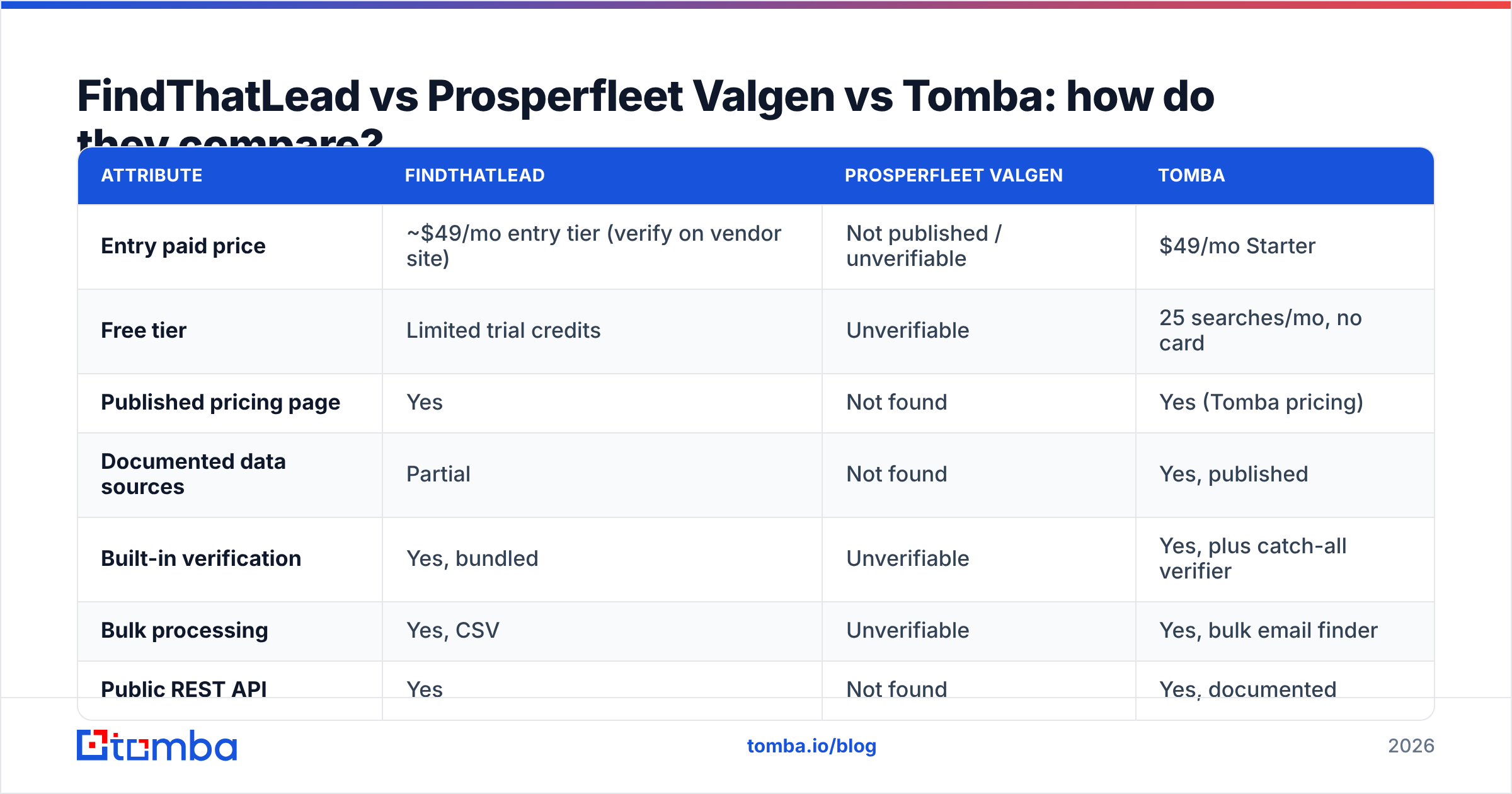
Here's the side-by-side. Where a value is unverifiable, we say so rather than guessing — that's the point of the exercise.
| Attribute | FindThatLead | Prosperfleet Valgen | Tomba |
|---|---|---|---|
| Entry paid price | ~$49/mo entry tier (verify on vendor site) | Not published / unverifiable | $49/mo Starter |
| Free tier | Limited trial credits | Unverifiable | 25 searches/mo, no card |
| Published pricing page | Yes | Not found | Yes (Tomba pricing) |
| Documented data sources | Partial | Not found | Yes, published |
| Built-in verification | Yes, bundled | Unverifiable | Yes, plus catch-all verifier |
| Bulk processing | Yes, CSV | Unverifiable | Yes, bulk email finder |
| Public REST API | Yes | Not found | Yes, documented |
| Chrome extension | Yes | Unverifiable | Yes |
| Independent review volume | High (G2, Capterra) | Minimal | High |
| Cold-email sending built in | Yes | Unverifiable | No (integrates instead) |
| Best for | All-in-one prospect + send on a budget | Unproven — pilot only | Accuracy-first sourcing and enrichment at scale |

Two honest notes on that table. First, FindThatLead's pricing has moved several times over the years and varies by annual-versus-monthly and by region, so treat the number as a starting point and confirm on their site before budgeting. Second, "Not found" in the Prosperfleet Valgen column is an evidence statement about public information, not an accusation. If they publish a pricing page and an API doc tomorrow, that column changes.
What does each one actually cost you per valid email?#
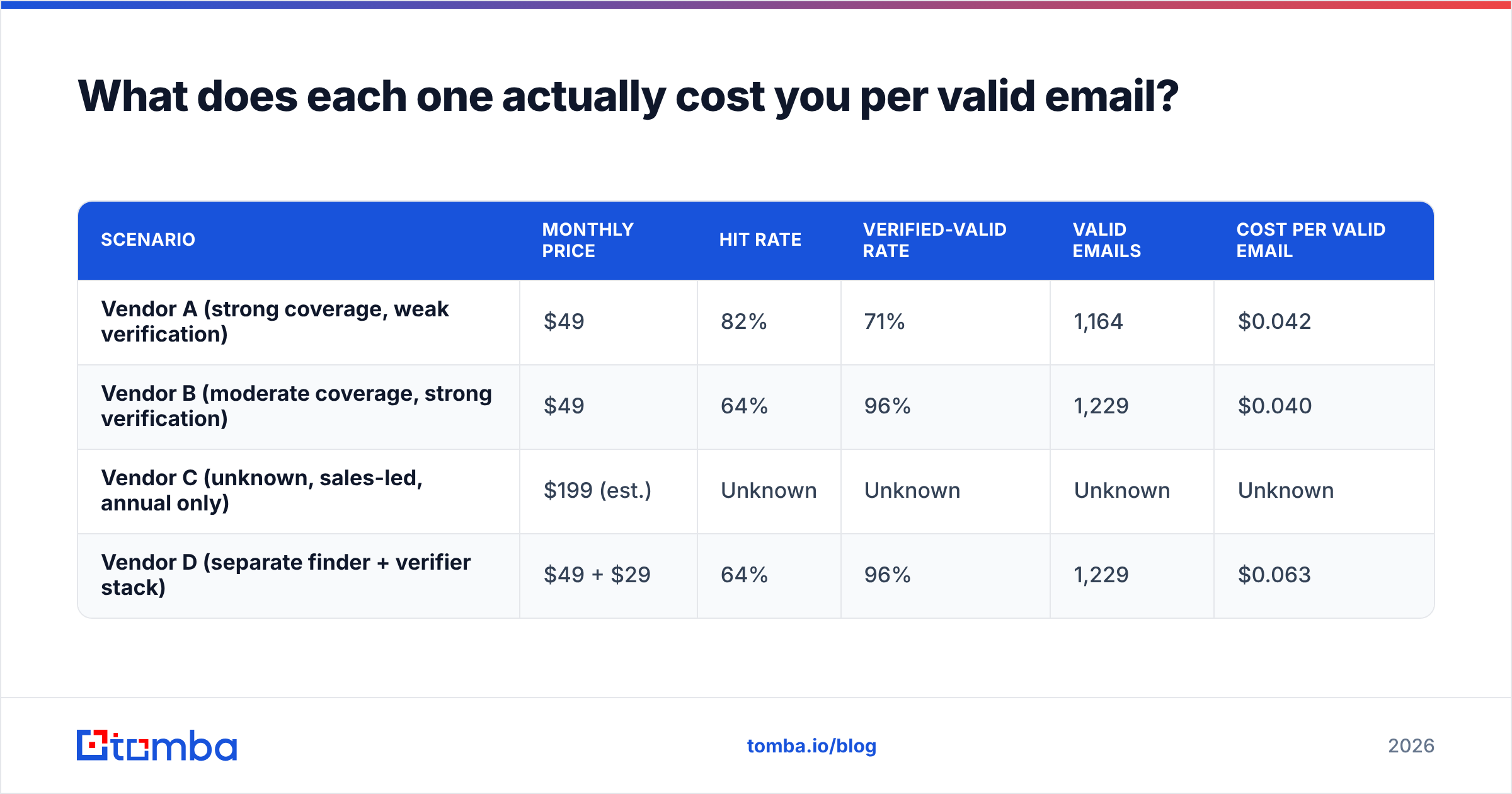
Price per month is the wrong unit. Here's the arithmetic that matters, using a 2,000-lookup month as the reference.
| Scenario | Monthly price | Hit rate | Verified-valid rate | Valid emails | Cost per valid email |
|---|---|---|---|---|---|
| Vendor A (strong coverage, weak verification) | $49 | 82% | 71% | 1,164 | $0.042 |
| Vendor B (moderate coverage, strong verification) | $49 | 64% | 96% | 1,229 | $0.040 |
| Vendor C (unknown, sales-led, annual only) | $199 (est.) | Unknown | Unknown | Unknown | Unknown |
| Vendor D (separate finder + verifier stack) | $49 + $29 | 64% | 96% | 1,229 | $0.063 |
Notice what happens. Vendor A looks better on the marketing page — 82% coverage! — and lands in the same place as Vendor B on valid contacts, while sending you 338 more addresses that will bounce. Bounces are not free: they damage sender reputation, which suppresses inbox placement on the mail that would have converted. And Vendor C, the one you can't model, is the one most likely to blow the budget, because you commit before you measure.
If your provider bundles verification with finding, you're in the Vendor B shape. If you're stitching two tools together, you're in Vendor D and paying a stack tax. That's the practical argument for a single platform where the email finder and the verifier share the same pipeline.
Which one should you actually pick?#
Choose FindThatLead if you want one cheap tool that finds prospects and sends the sequence, you sell primarily to European or US mid-market SaaS, and you're comfortable with a moderate bounce rate in exchange for breadth. It's a reasonable solo-founder and small-agency choice. Its weakness is depth: coverage on long-tail domains and non-Western regions thins out, and the sending side is basic next to dedicated sequencers.
Consider Prosperfleet Valgen only as a pilot, and only under conditions: get a written credit definition, a free or refundable trial of at least 300 lookups, and confirmation that unfound searches are not billed. Run the five-step bake-off above. If they refuse any of those three, you have your answer — not because the product is necessarily bad, but because you have no way to know, and unknowable risk on your core data layer is not worth a discount.
Choose Tomba if accuracy and predictability rank above bundled sending. You get 25 free searches monthly to test before paying, $49/mo Starter, $99/mo Growth, $249/mo Pro, and published sourcing so the accuracy claims are checkable. Domain search handles company-wide sweeps, the catch-all verifier resolves the domains that break other tools, and the API, Sheets add-on, and CRM integrations mean nothing gets stuck in a CSV.
A note on stacking: these aren't mutually exclusive. Plenty of teams run a broad finder for volume and route every result through a stricter verifier before it touches a sequencer. That costs a little more per contact and saves a lot more in deliverability.
What questions should you ask before you sign anything?#
- Does a search that returns no email consume a credit? Get it in writing.
- Is verification included, or billed separately at a second rate?
- How are catch-all domains handled — returned, suppressed, or separately verified?
- Where does the data come from, and when was this record last refreshed?
- Is there a documented API and a bulk endpoint, or is the only path a manual CSV?
- What's the refund or downgrade policy in month one, before I've validated the data?
- Can I export everything I've found if I leave?
Any vendor that answers all seven clearly deserves your trial. Any vendor that answers three deserves your skepticism, regardless of how the logo looks.
Ready to run the bake-off?#
Don't decide FindThatLead vs Prosperfleet Valgen from a blog post — including this one. Build your 300-contact test list, run it through every candidate on the same day, and let cost per valid email pick the winner.
Start the comparison with a free baseline: the Tomba Email Finder gives you 25 searches per month with no card required, bundled verification so your hit rate and accuracy rate come from the same pipeline, and published data sourcing so you can check the claims instead of trusting them. If it wins your bake-off, Starter is $49/mo. If it doesn't, you've lost nothing but two hours — and you'll finally know which vendor's numbers were real.
Related guides#
Ready to find emails that actually work?
Join 150,000+ professionals who stopped guessing and started sending. Free credits on signup — no credit card required.
Get the Tomba newsletter
Practical outbound tactics and product updates — once every two weeks.
About the author