FindThatLead vs Techsalerator: Which B2B Data Tool Wins in 2026?
FindThatLead sells self-serve prospecting seats. Techsalerator sells bulk data licenses. They barely compete on the same axis — here's which one actually fits your outbound motion, and where a cheaper third option beats both.
TL;DR
- FindThatLead is a self-serve prospecting tool: search by domain or LinkedIn, get emails, push to a built-in cold email sender. Entry pricing starts around $49/mo for a few thousand credits.
- Techsalerator is a bulk data vendor: you request a dataset (by geography, industry, firmographics), get a quote, and receive a file or API feed. There is no meaningful free tier and no self-serve dashboard experience.
- They are not really competitors. One sells seats, the other sells datasets. Picking wrong means either paying five figures for data you'll never dial, or manually scraping when you needed 400,000 rows.
- On verified email accuracy, neither publishes independently audited catch-all handling. That's the number that actually determines your bounce rate.
- If you want per-contact accuracy with API access and predictable pricing, a focused email finder like Tomba ($49/mo Starter, 25 free searches) covers the same job for most SMB and mid-market teams.

What is FindThatLead and who actually uses it?#
FindThatLead is a Barcelona-built prospecting suite that has been around since roughly 2015. Its pitch is end-to-end: find the lead, verify the email, write the sequence, send it — all inside one dashboard.
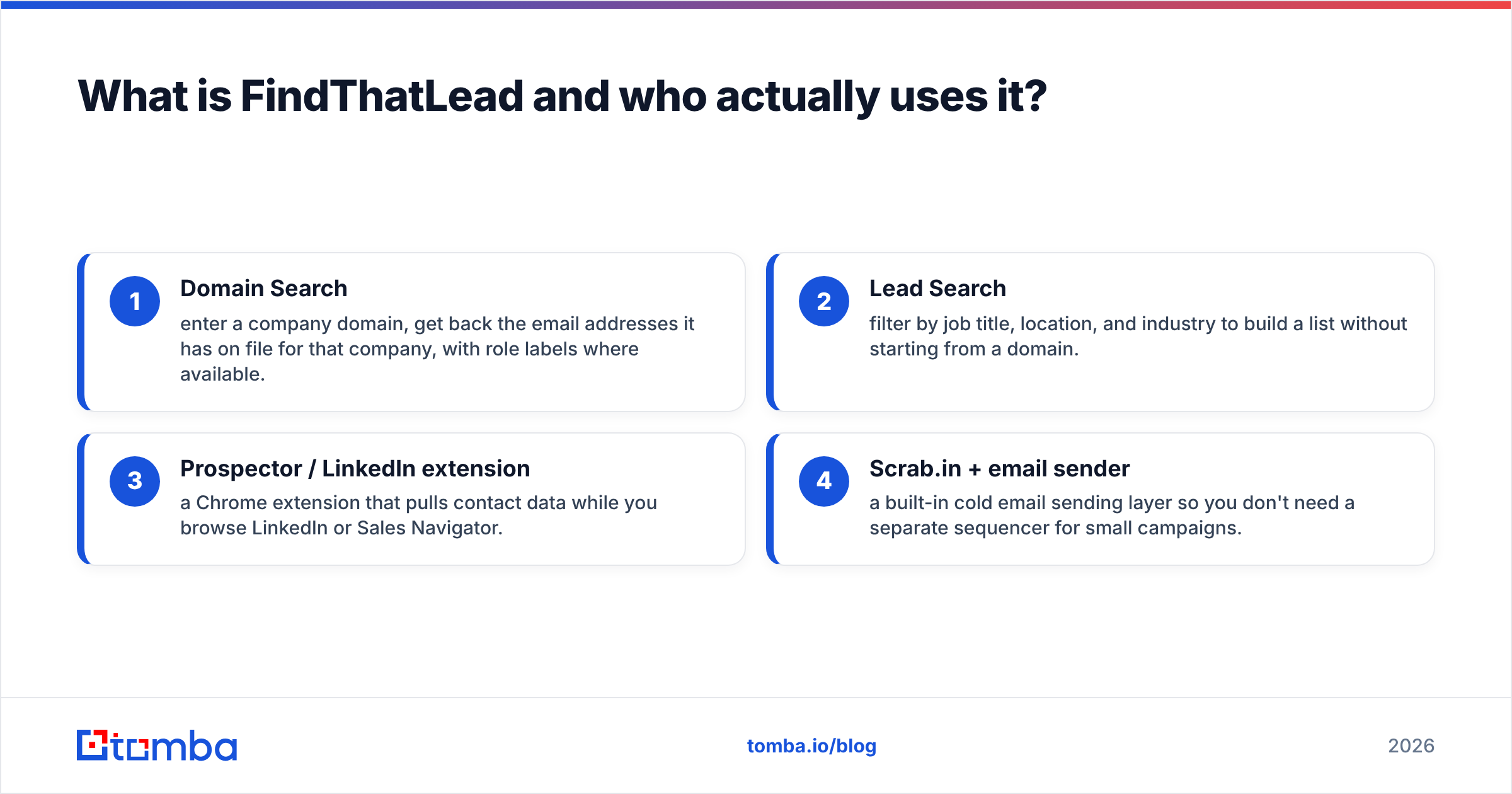
The product surface breaks into four pieces:
- Domain Search — enter a company domain, get back the email addresses it has on file for that company, with role labels where available.
- Lead Search — filter by job title, location, and industry to build a list without starting from a domain.
- Prospector / LinkedIn extension — a Chrome extension that pulls contact data while you browse LinkedIn or Sales Navigator.
- Scrab.in + email sender — a built-in cold email sending layer so you don't need a separate sequencer for small campaigns.
The typical FindThatLead buyer is a solo founder, an agency doing lead gen for clients, or a two-to-five person SDR team. They want volume in the low thousands per month and they don't want to stitch together four tools.
Where it strains: the built-in sender is basic compared to a dedicated platform, and credits burn fast because a search that returns nothing still consumes budget on some plans. Check the current terms on findthatlead.com before committing annually — plan structures there have changed more than once.
What is Techsalerator and why is it priced so differently?#
Techsalerator is a data licensing company, not a prospecting app. You describe the dataset you need — say, all manufacturing companies in Southeast Asia with 50–500 employees, including decision-maker contacts — and they scope, quote, and deliver it.
That model changes everything downstream:
- Delivery is a file (CSV, JSON, Parquet) or an API/S3 feed, not a dashboard you log into daily.
- Pricing is quote-based. Deals commonly land in the thousands to tens of thousands depending on record count, geography, and refresh cadence.
- Coverage is the selling point: Techsalerator markets datasets across most countries and a very wide set of verticals, including consumer and firmographic data that prospecting tools don't touch.
- Buyers are data teams, market researchers, ABM programs at enterprises, and companies feeding an internal CRM or data warehouse.
If your requirement sentence starts with "I need a list of 300,000 companies in..." Techsalerator is the correct category. If it starts with "I need the email for this VP of Ops," it is dramatically the wrong tool.
One honest caveat: bulk data licensing is the hardest category to evaluate before purchase. You rarely get a meaningful sample, and accuracy claims are self-reported. Vendors like G2 carry limited review volume for licensing companies compared to SaaS tools, so peer validation is thin.
FindThatLead vs Techsalerator: how do they compare head to head?#
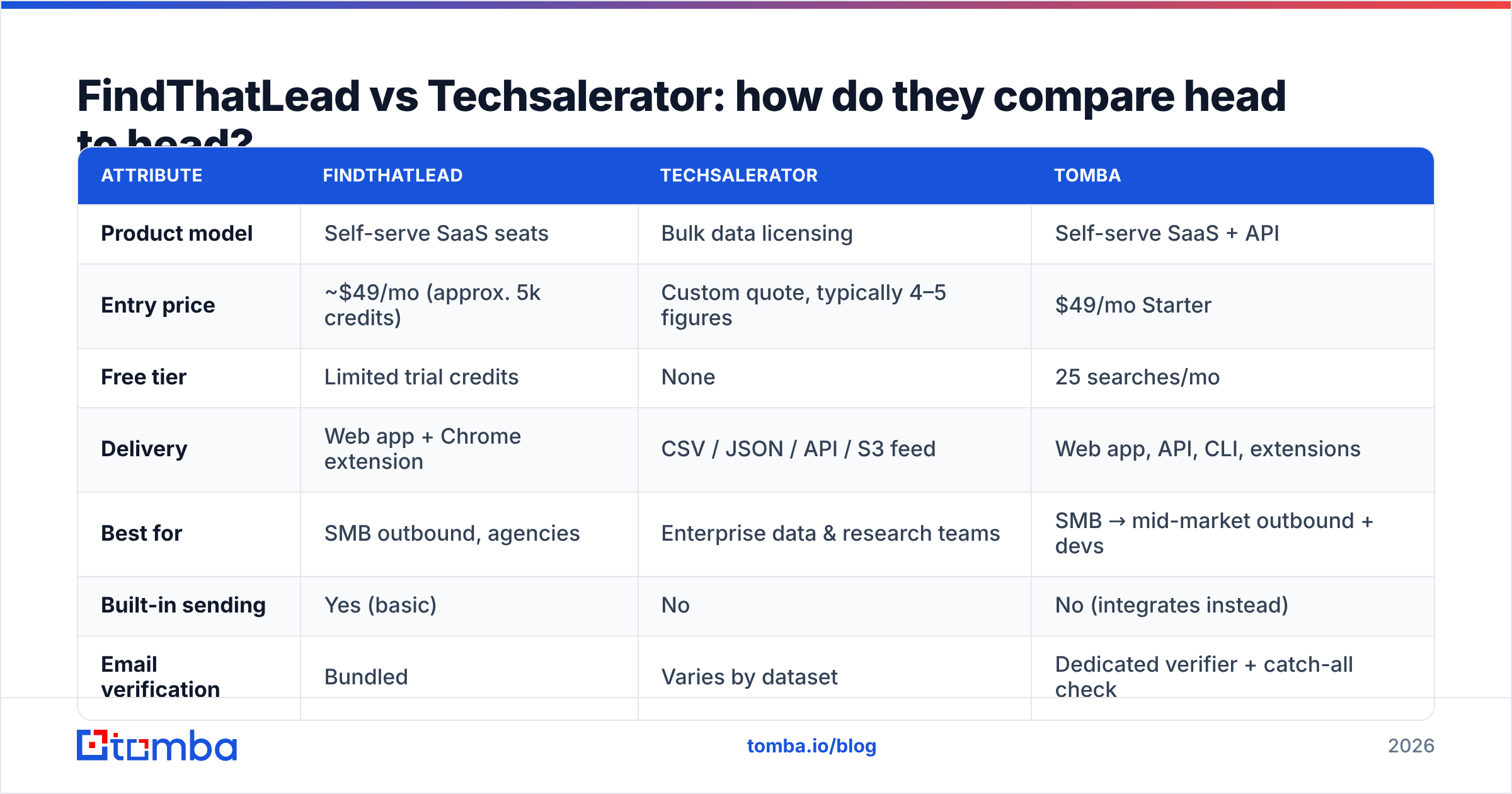
| Attribute | FindThatLead | Techsalerator | Tomba |
|---|---|---|---|
| Product model | Self-serve SaaS seats | Bulk data licensing | Self-serve SaaS + API |
| Entry price | ~$49/mo (approx. 5k credits) | Custom quote, typically 4–5 figures | $49/mo Starter |
| Free tier | Limited trial credits | None | 25 searches/mo |
| Delivery | Web app + Chrome extension | CSV / JSON / API / S3 feed | Web app, API, CLI, extensions |
| Best for | SMB outbound, agencies | Enterprise data & research teams | SMB → mid-market outbound + devs |
| Built-in sending | Yes (basic) | No | No (integrates instead) |
| Email verification | Bundled | Varies by dataset | Dedicated verifier + catch-all check |
| API access | Yes, on higher tiers | Yes, feed-based | Yes, all paid tiers |
| Time to first contact | Minutes | Days to weeks (scoping + quote) | Minutes |
| Geographic depth | Strong EU/LatAm/US | Very broad, 100+ markets | Broad, domain-driven |
Read that table as a fork, not a scoreboard. The row that decides your purchase is "Time to first contact." A team that needs to send this week cannot wait on a data-licensing scoping call. A team building a territory model for next fiscal year should not be scraping LinkedIn one profile at a time.
Where each one genuinely wins#
- FindThatLead wins when you need speed, low commitment, and a single login. Agencies running campaigns for eight clients get real value from having search and sending in one place.
- Techsalerator wins when volume and coverage breadth are the constraint — non-US markets, unusual verticals, or a data warehouse that needs a scheduled feed rather than manual exports.
- Neither wins when your actual problem is per-contact precision at moderate volume. That's the gap where a focused finder + verifier stack, or a peer like BookYourData for curated purchased lists, tends to fit better.
Which one is more accurate on email data?#
Accuracy is the only metric that touches revenue, and it's the one both vendors describe most vaguely.
Three questions decide real-world accuracy, and you should ask them of any vendor:
- How is a "verified" email defined? SMTP handshake only? Or SMTP plus pattern confidence plus a recency signal? A vendor that counts syntax validation as verification will hand you a 12% bounce rate.
- How are catch-all domains handled? Roughly a third of B2B domains accept everything at the MX layer, so a naive SMTP check returns "valid" for every guess. If the vendor has no separate catch-all verifier logic, treat catch-all rows as unverified.
- How old is the record? B2B contact data decays around 25–30% per year — a figure repeatedly cited in CRM hygiene research from vendors including HubSpot. A dataset licensed once and never refreshed is a depreciating asset.
FindThatLead bundles verification into its credits, which is convenient but makes it hard to see whether a given address was SMTP-confirmed or pattern-inferred. Techsalerator's accuracy varies by dataset — a US firmographic file and a niche APAC contact file are not the same product quality, and the quote rarely separates them.
The safe pattern regardless of source: run every list through an independent email verifier before it touches your sending domain. Buying data and verifying data should be two different vendors for the same reason auditors aren't employees.

What does each one actually cost at real volume?#
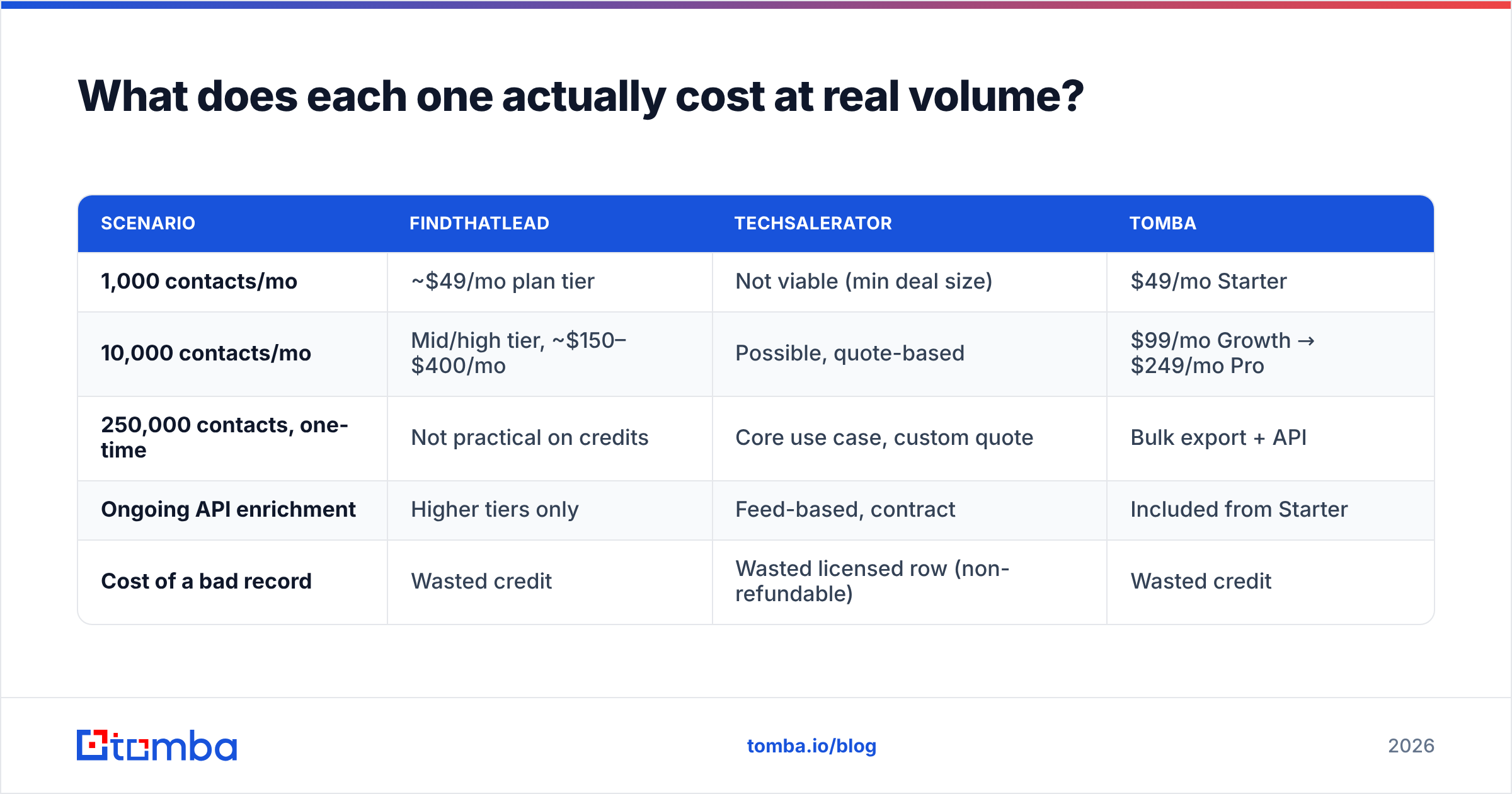
Sticker price hides the real number. Model it per usable contact instead.
| Scenario | FindThatLead | Techsalerator | Tomba |
|---|---|---|---|
| 1,000 contacts/mo | ~$49/mo plan tier | Not viable (min deal size) | $49/mo Starter |
| 10,000 contacts/mo | Mid/high tier, ~$150–$400/mo | Possible, quote-based | $99/mo Growth → $249/mo Pro |
| 250,000 contacts, one-time | Not practical on credits | Core use case, custom quote | Bulk export + API |
| Ongoing API enrichment | Higher tiers only | Feed-based, contract | Included from Starter |
| Cost of a bad record | Wasted credit | Wasted licensed row (non-refundable) | Wasted credit |
Two cost traps show up constantly:
- The credit-burn trap (FindThatLead-style). If failed lookups consume credits, your effective cost per usable contact can run 30–60% above the advertised rate. Always divide plan cost by verified deliverable contacts, not by credits.
- The shelf-data trap (licensing-style). Buying 400,000 records when your team can work 3,000 a month means 97% of the purchase decays before anyone touches it. Buy for the next two quarters of capacity, not for the org chart's ambition.
Compare that against transparent per-seat Tomba pricing — Free (25 searches), Starter $49/mo, Growth $99/mo, Pro $249/mo, Enterprise custom — where the unit is a search and the ceiling is knowable before you sign.

How do you choose between them for your team?#
Work through these in order. The first one that matches is your answer.
- Do you need more than 100,000 records at once? → Techsalerator, or another licensing vendor. Self-serve credit tools cannot serve this economically.
- Do you need data in a warehouse or on a scheduled feed? → Techsalerator. Dashboard tools export; they don't pipe.
- Do you need to start sending this week with no procurement cycle? → FindThatLead or Tomba. Anything quote-based adds weeks.
- Do you want find + verify + send in one login and accept "good enough" sending? → FindThatLead.
- Do you already have a sequencer (Instantly, Smartlead, Outreach) and just need clean contacts feeding it? → A dedicated finder. Pay for data quality, not a bundled sender you'll disable in month two.
- Do you need developer access — API, CLI, MCP, or a spreadsheet add-on? → Check API tier gating carefully. This is where bundled suites usually upsell.
Point 5 deserves emphasis because it's the most common mismatch. Teams buy an all-in-one, discover the sending layer lacks inbox rotation or proper warmup controls, migrate sending to a specialist — and then keep paying suite pricing for what is now just a lookup tool.
What are the best alternatives to both?#
The FindThatLead-vs-Techsalerator framing is narrow. The realistic shortlist:
- Tomba — email finder, domain search, verifier, catch-all handling, phone finder, and enrichment, with an email finder API, CLI, Chrome extension, and Sheets/Excel add-ins. Predictable per-seat pricing and a genuine free tier.
- Apollo — huge database plus sequencing, but the data quality-per-dollar argument gets weaker as you scale seats. See our take on Apollo alternatives.
- BookYourData — pay-as-you-go curated B2B lists with an accuracy guarantee. A strong fit when you want a bounded one-time list without a licensing contract, and a genuinely credible option in this category.
- Clearbit / enrichment-first vendors — best when you already have domains or emails and need firmographic context on top. See Clearbit alternatives.
- Standalone verifiers — if your only pain is bounce rate, a verifier plus your existing source beats replacing the source.
A practical hybrid many teams land on: license or purchase a broad list once for TAM mapping, then use a per-contact finder to get fresh, verified emails for the accounts you actually work this quarter. The license gives you the map; the finder gives you the addresses that still exist.

What should you test before you commit?#
Run the same 50-contact benchmark against every vendor on your shortlist. Not a demo — your own list.
- Pick 50 real target accounts across your ICP, including at least 10 non-US domains and 10 companies under 50 employees. Those two segments break most databases.
- Request or generate the emails from each vendor for the same 50.
- Run all results through one neutral verifier so the scoring is consistent.
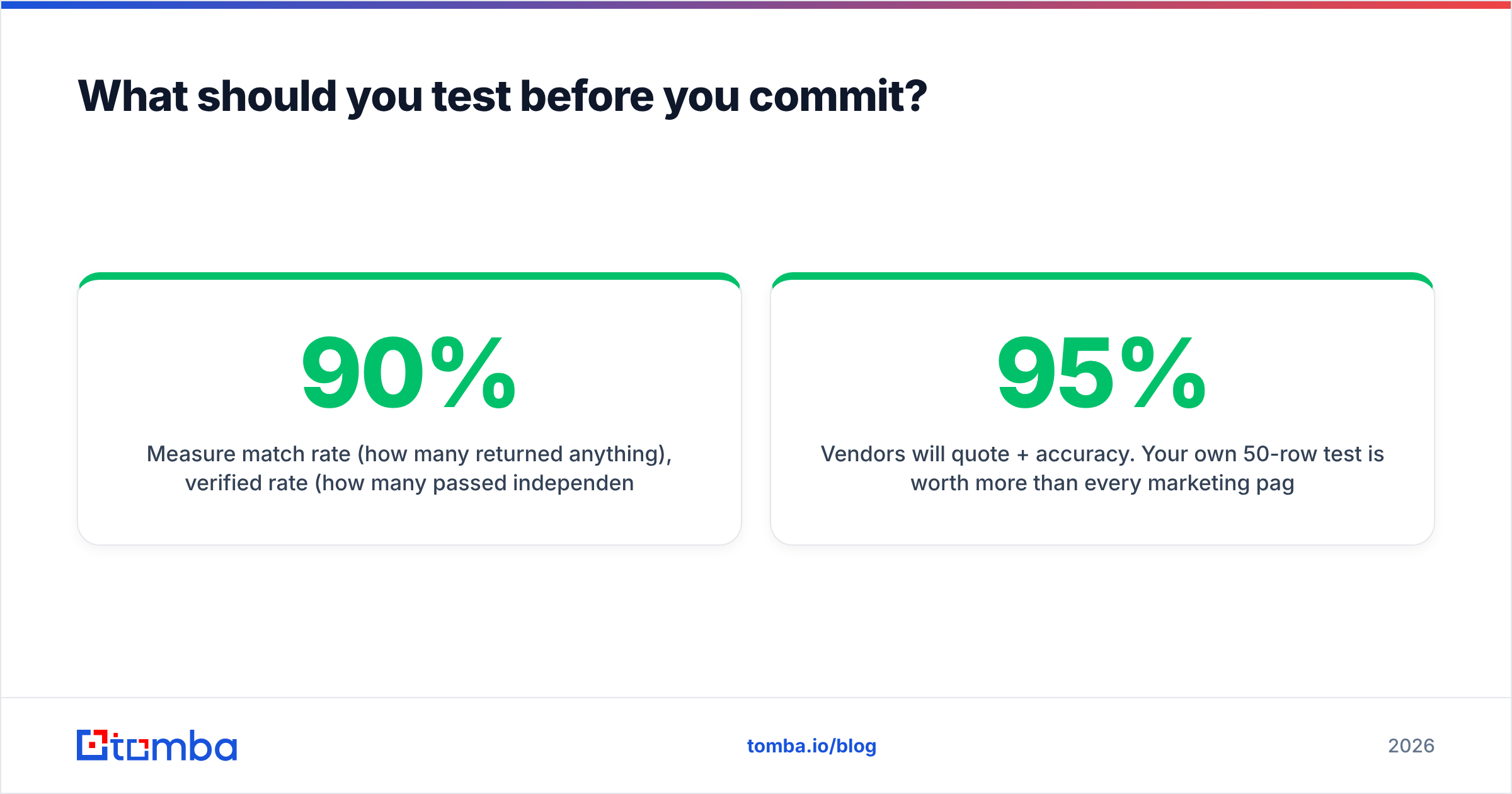
- Measure match rate (how many returned anything), verified rate (how many passed independent verification), and catch-all rate (how many are unknowable). Report all three separately — a 90% match rate with 40% catch-all is a 50% tool.
- Then send to a 100-contact subset and record the actual bounce rate after 48 hours. That number ends every argument.
Vendors will quote 95%+ accuracy. Your own 50-row test is worth more than every marketing page in the category, including this one. Independent review aggregators like Capterra help with usability signals but can't validate data freshness for your specific ICP.
The bottom line#
FindThatLead and Techsalerator solve different problems that happen to share the phrase "B2B data." Choose FindThatLead if you're a small team that wants speed and a single login. Choose Techsalerator if you're licensing volume for a warehouse or a research program and have procurement time to spend.
Choose neither if what you actually need is per-contact precision at sane pricing with developer access — which describes most outbound teams between 2 and 50 people.
Start with the Tomba Email Finder. Twenty-five free searches a month, no card required, so you can run the 50-contact benchmark above before you spend anything. If it wins your test, Starter is $49/mo with API access included from day one — and if it doesn't, you've lost nothing but an afternoon and gained a benchmark you can point at every vendor that calls you next quarter.
Related guides#
Ready to find emails that actually work?
Join 150,000+ professionals who stopped guessing and started sending. Free credits on signup — no credit card required.
Get the Tomba newsletter
Practical outbound tactics and product updates — once every two weeks.
About the author