FindThatLead vs UpLead 2026: Which B2B Data Tool Wins?
FindThatLead sells cheap bulk prospecting. UpLead sells verified database access at a premium. We compare pricing, accuracy, credit rules, and exports to show which one actually fits your outbound motion.
FindThatLead vs UpLead comes down to one trade: cheap volume or verified data. FindThatLead pulls emails from lists you already have. UpLead sells searchable access to a 160M-contact database. Below we compare price, accuracy, credit rules, and exports so you can pick in one sitting.
TL;DR
- FindThatLead is the budget bulk-prospecting play: domain scraping, LinkedIn extraction, and a built-in cold email sender starting around $49/mo. Volume is generous, verification is shallow.
- UpLead is the verified-database play: 160M+ contacts, 50+ filters, real-time email verification at export, starting around $99/mo per seat. Precision is good, credits burn fast.
- If you want lists you can filter by firmographics, UpLead wins. If you want cheap volume plus sending in one tab, FindThatLead wins.
- Both charge you for credits whether or not the record is usable — read the credit-refund policy before you commit annually.
- A third path most teams miss: use an API-first email finder at $49/mo and keep your sequencer separate. Tooling stays modular, and you stop paying database rent for contacts you never touch.
FindThatLead vs UpLead: what are they, actually?#
They solve the same headline problem — get verified B2B contact data into a sequence — but from opposite directions.
FindThatLead is a Spanish-built prospecting suite that starts from inputs you already have. You feed it a domain, a name, a LinkedIn URL, or a scraped list, and it returns emails. Its Prospector tool lets you filter by location, industry, and job title, and its Scrapper pulls contacts from LinkedIn search results. Crucially, it ships a cold email sender, so a solo founder can go from list to first touch without a second subscription.
UpLead starts from a database you don't own yet. You search 160M+ contacts across 50+ filters — revenue, headcount, tech stack, intent signals, department — build a segment, and export it. Every email is verified in real time at the moment of export, and UpLead publicly claims 95%+ accuracy with credit refunds on bounces.
That difference in starting point drives everything else: pricing model, credit consumption, and who each tool is actually built for.

How do FindThatLead and UpLead compare on price and features?#
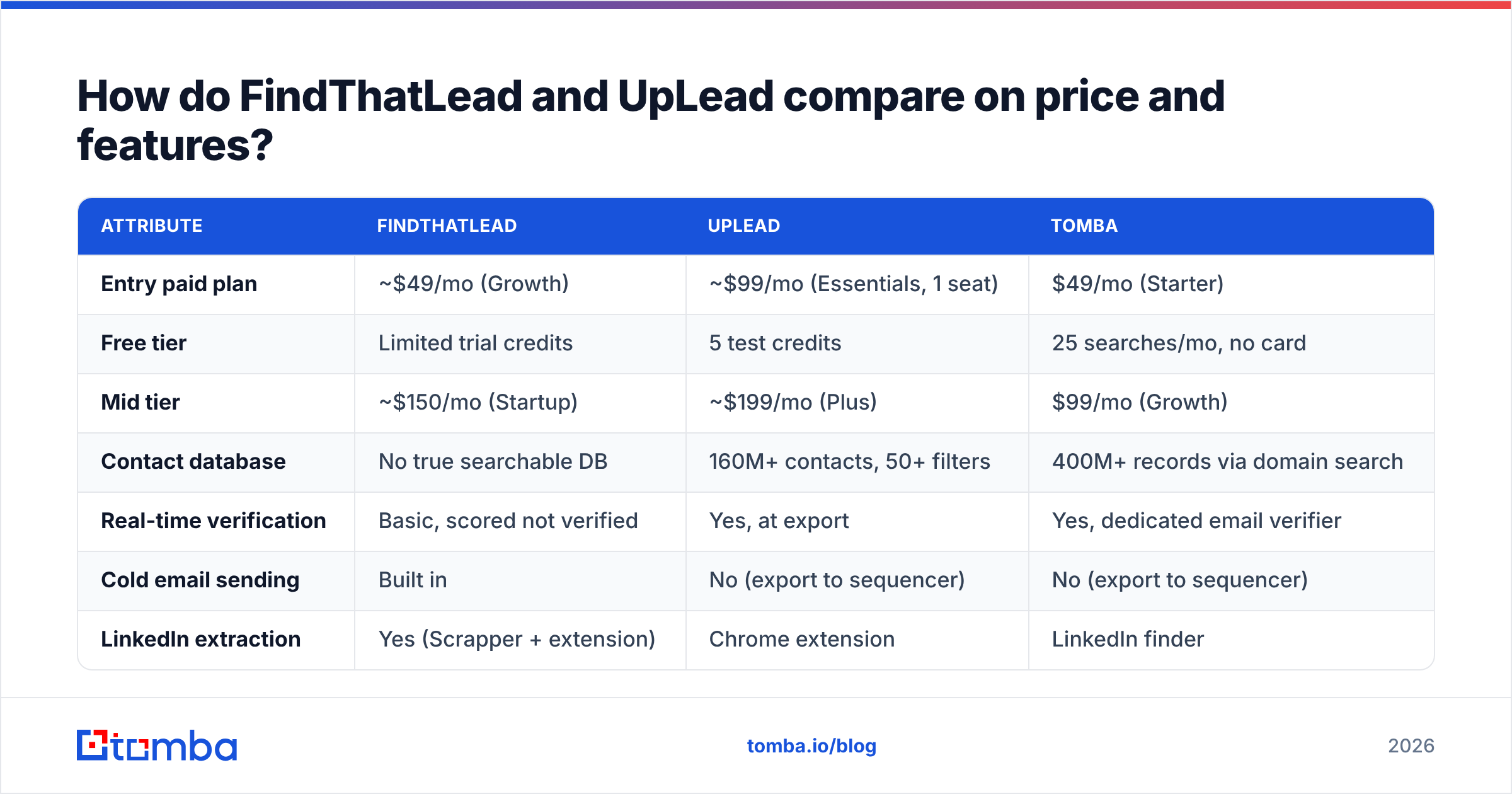
Prices below reflect publicly listed monthly plans as of early 2026. Both vendors discount annual billing by roughly 20-40%, and both gate certain features (API, integrations, team seats) behind higher tiers.
| Attribute | FindThatLead | UpLead | Tomba |
|---|---|---|---|
| Entry paid plan | ~$49/mo (Growth) | ~$99/mo (Essentials, 1 seat) | $49/mo (Starter) |
| Free tier | Limited trial credits | 5 test credits | 25 searches/mo, no card |
| Mid tier | ~$150/mo (Startup) | ~$199/mo (Plus) | $99/mo (Growth) |
| Contact database | No true searchable DB | 160M+ contacts, 50+ filters | 400M+ records via domain search |
| Real-time verification | Basic, scored not verified | Yes, at export | Yes, dedicated email verifier |
| Cold email sending | Built in | No (export to sequencer) | No (export to sequencer) |
| LinkedIn extraction | Yes (Scrapper + extension) | Chrome extension | LinkedIn finder |
| Phone numbers | Limited | Mobile direct dials on higher tiers | Phone finder add-on |
| API access | Yes, higher tiers | Yes, Professional tier | Yes, all paid tiers |
| Credit rollover | No | No | No |
| Bounce credit refund | Case-by-case | Documented policy | Invalid results not charged |
The pricing gap is the first fork in the road. UpLead's entry plan costs about double FindThatLead's, and it is priced per seat. A three-person SDR pod on UpLead Essentials is a ~$300/mo line item before you send a single email. FindThatLead's seats cost less, but the data is thinner. Your SDRs spend the savings on manual checks.
Check the current Tomba pricing if you want a third reference point — the tier structure is flat-rate rather than per-seat, which changes the math for teams of three or more.
FindThatLead vs UpLead: which has better data accuracy?#
UpLead, on the specific metric of email validity at export. FindThatLead, on coverage of long-tail domains you already know about.
Here is why both statements are true at once.
UpLead runs a verification check the instant you export a contact. If the mailbox fails, you are not charged. That makes the accuracy claim credible — the vendor eats the cost of its own bad records. The tradeoff is coverage. UpLead's database is curated. If your target is a 12-person agency in Lisbon that nobody has indexed, it is likely not there at all. High precision, narrower recall.
FindThatLead inverts that. Give it a domain and a name, and its pattern-matching engine will build and score candidate addresses even for obscure companies. That helps when you work from a scraped list of niche targets. But "scored" is not "verified." User reports on G2 and Capterra flag bounce rates on FindThatLead exports as the top complaint. The tool is not broken. A confidence score is a probability, not a proof.
The practical consequence: whichever tool you pick, do not send straight from a raw export. Run the list through a dedicated verification layer first. A separate email verification pass costs cents per record. It protects the asset that actually matters — your sending domain's sender reputation.

One more accuracy variable nobody prices in: catch-all domains. Roughly a third of mid-market B2B domains accept all inbound mail at the SMTP layer, so standard verification returns "unknown." UpLead marks these. FindThatLead often scores them as valid. If your ICP skews toward companies running Microsoft 365 with catch-all enabled, you need a catch-all verifier whichever platform you buy.
How do the credit systems differ, and where do you lose money?#
Credits are where comparison-shopping usually goes wrong, because the unit is not the same across vendors.
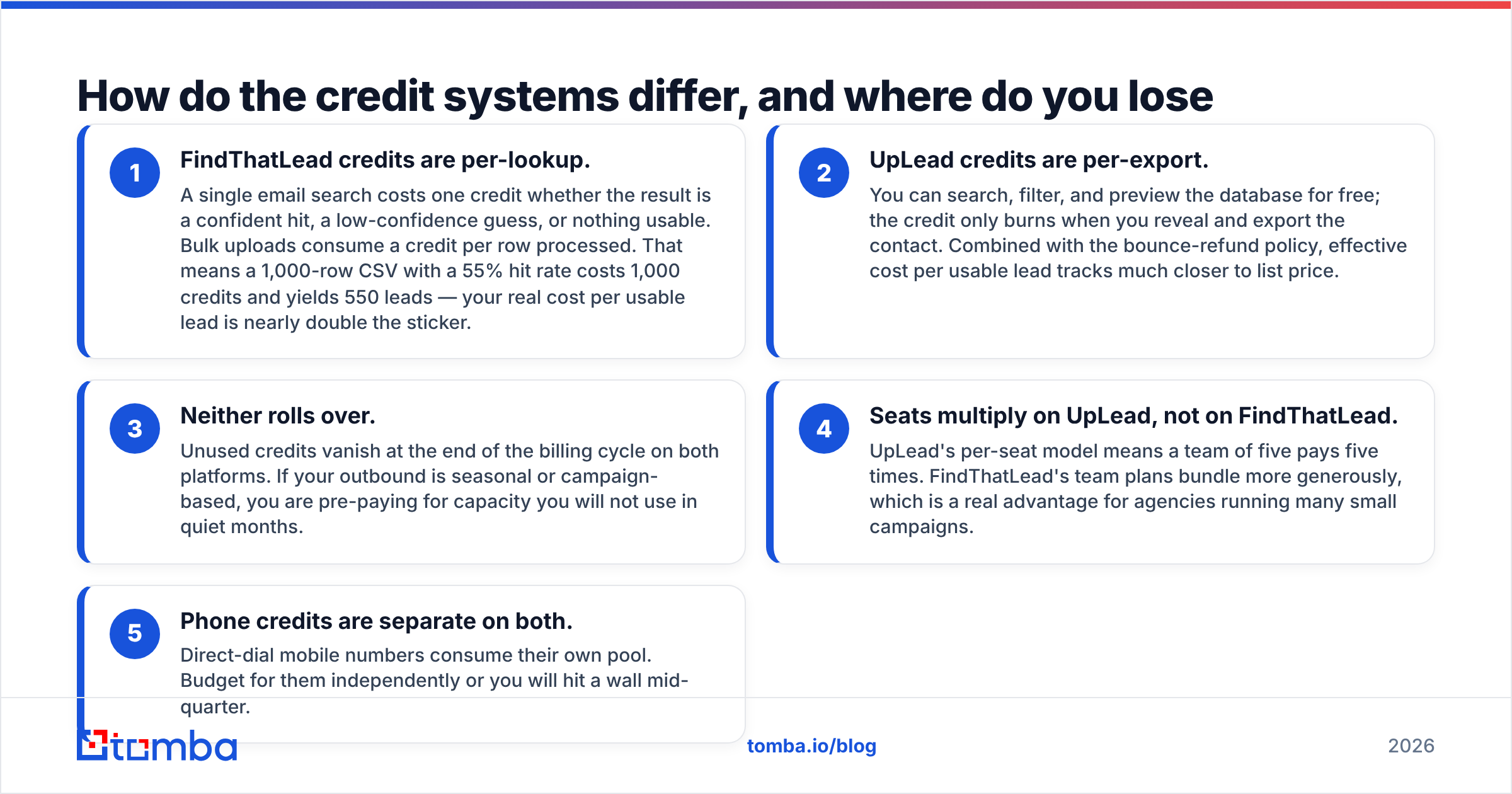
- FindThatLead credits are per-lookup. One search costs one credit. It does not matter if the result is a strong hit, a weak guess, or nothing at all. Bulk uploads burn a credit per row. A 1,000-row CSV with a 55% hit rate costs 1,000 credits and returns 550 leads. Your real cost per usable lead is close to double the sticker price.
- UpLead credits are per-export. You can search, filter, and preview the database for free. The credit only burns when you reveal and export the contact. Add the bounce-refund policy, and cost per usable lead tracks close to list price.
- Neither rolls over. Unused credits vanish at the end of the billing cycle on both platforms. If your outbound is seasonal or campaign-based, you pre-pay for capacity you will not use.
Two more line items catch teams out after they sign.
- Seats multiply on UpLead, not on FindThatLead. UpLead's per-seat model means a team of five pays five times. FindThatLead bundles team plans more generously, which is a real advantage for agencies running many small campaigns.
- Phone credits are separate on both. Direct-dial mobile numbers use their own pool. Budget for them on their own or you will hit a wall mid-quarter.
Run the arithmetic on cost per usable, verified lead, not cost per credit. On that measure, FindThatLead's headline discount narrows a lot and sometimes disappears.
Who should choose FindThatLead?#
Pick FindThatLead if three or more of these describe you:
- You already have target lists. You scrape, you buy, you export from LinkedIn Sales Navigator, and you need enrichment rather than discovery.
- You want sending bundled. One subscription covering finding plus sending is genuinely simpler for a solo founder or two-person team.
- Your ICP is long-tail. Small agencies, local businesses, regional SaaS — the companies missing from curated databases.
- Budget is the binding constraint. At roughly half UpLead's entry price, FindThatLead buys you volume to experiment with.
- You accept a verification step. You are willing to run exports through a separate validation pass before sending.
Where FindThatLead frustrates people: the UI shows its age, support response times are inconsistent, and the bundled sender is functional but nowhere near what a dedicated sequencer gives you in deliverability controls, inbox rotation, or reply detection.
Who should choose UpLead?#
Pick UpLead if these are true:
- You need discovery, not enrichment. You know the ICP but not the companies. UpLead's 50+ filters let you build "Series B fintechs in EMEA, 50-200 headcount, using Segment" in a couple of minutes.
- Data quality is a compliance or brand issue. Regulated industries, enterprise ABM, or any motion where a bounce costs you more than a credit.
- You have a real sequencer already. Instantly, Smartlead, Outreach, Salesloft — UpLead is a data source, not a sending platform, and that separation is a feature.
- Intent data matters. Higher UpLead tiers surface buying-intent signals that FindThatLead simply does not offer.
- Your team is small but well-funded. Per-seat pricing punishes headcount, so a two-person team with budget gets the best ratio.
Where UpLead frustrates people: the per-seat cost scales badly, credits do not roll over, and the technographic filters are less complete than what a dedicated intent platform provides. Several teams end up paying for UpLead and a separate enrichment tool, which defeats the consolidation argument.

Is there a better third option?#
For a large share of teams, yes — and it comes down to what you are actually renting.
UpLead's price is mostly database rent. You pay for standing access to 160M records, and you use a few thousand. FindThatLead's price is mostly volume, and you pay in verification labor. If your workflow is "I have a list of target companies, get me the right people at each one," you are overpaying under both models.
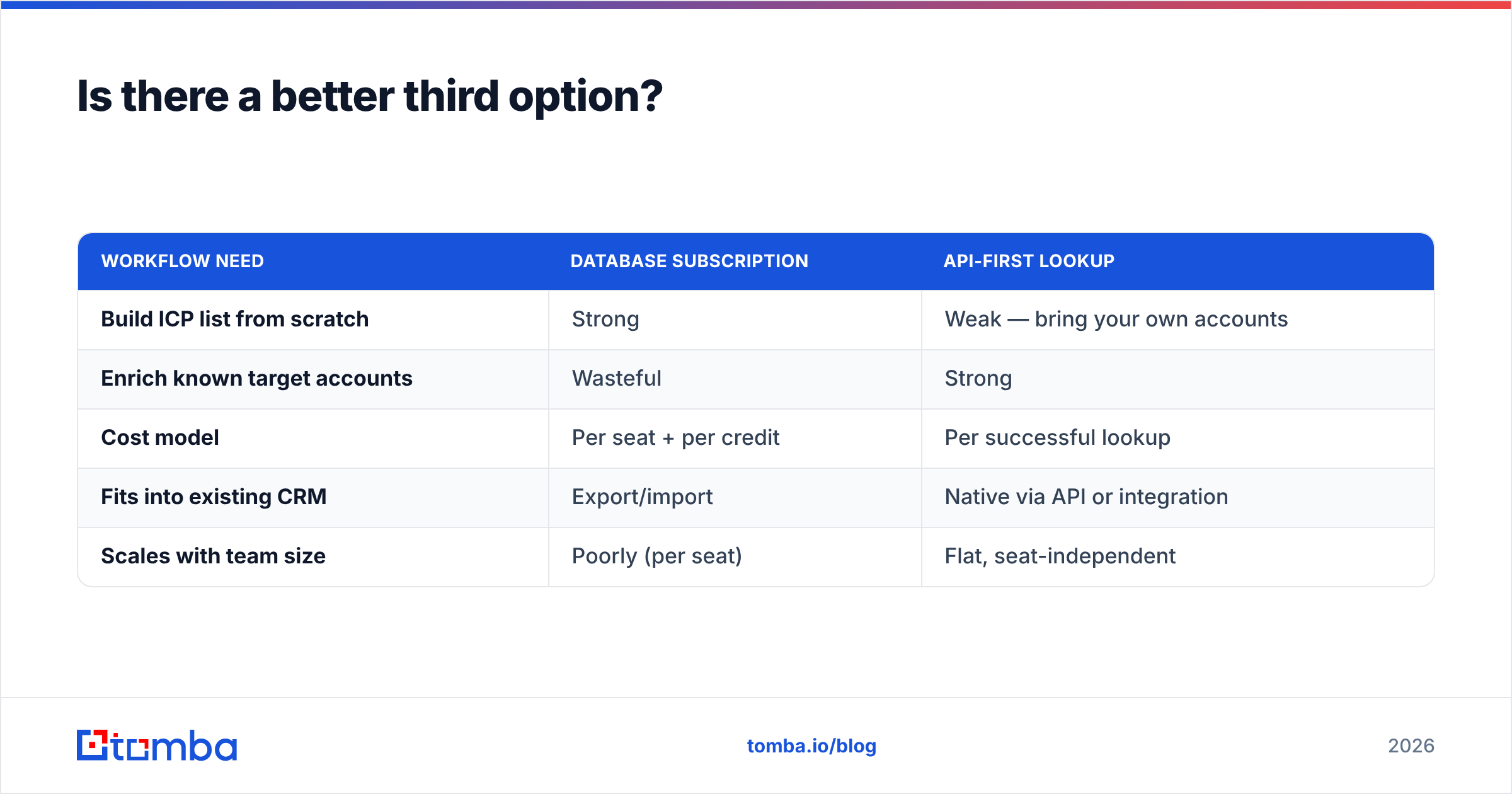
That third path is API-first, on-demand lookup. You keep your target-account list wherever it lives — CRM, spreadsheet, warehouse — and call for contact data only when you need it. Practically:
| Workflow need | Database subscription | API-first lookup |
|---|---|---|
| Build ICP list from scratch | Strong | Weak — bring your own accounts |
| Enrich known target accounts | Wasteful | Strong |
| Cost model | Per seat + per credit | Per successful lookup |
| Fits into existing CRM | Export/import | Native via API or integration |
| Scales with team size | Poorly (per seat) | Flat, seat-independent |
That is the shape of Tomba's approach. Domain search returns every discoverable address at a company along with its pattern. Verification runs as a first-class step, not a marketing claim. The Tomba API plugs into whatever you already run — HubSpot, Salesforce, Sheets, or your own pipeline. Pricing is flat-rate: $49/mo Starter, $99/mo Growth, $249/mo Pro. A free tier gives you 25 searches a month, so you can test accuracy on your own list before you commit.
Note that this is not a like-for-like replacement for UpLead's discovery filters. If you genuinely need to find companies you have never heard of by revenue band and tech stack, a database product is the right tool. If you already know who you want to reach — which is true for most account-based motions — the database is a very expensive index.
What should you check before buying either one?#
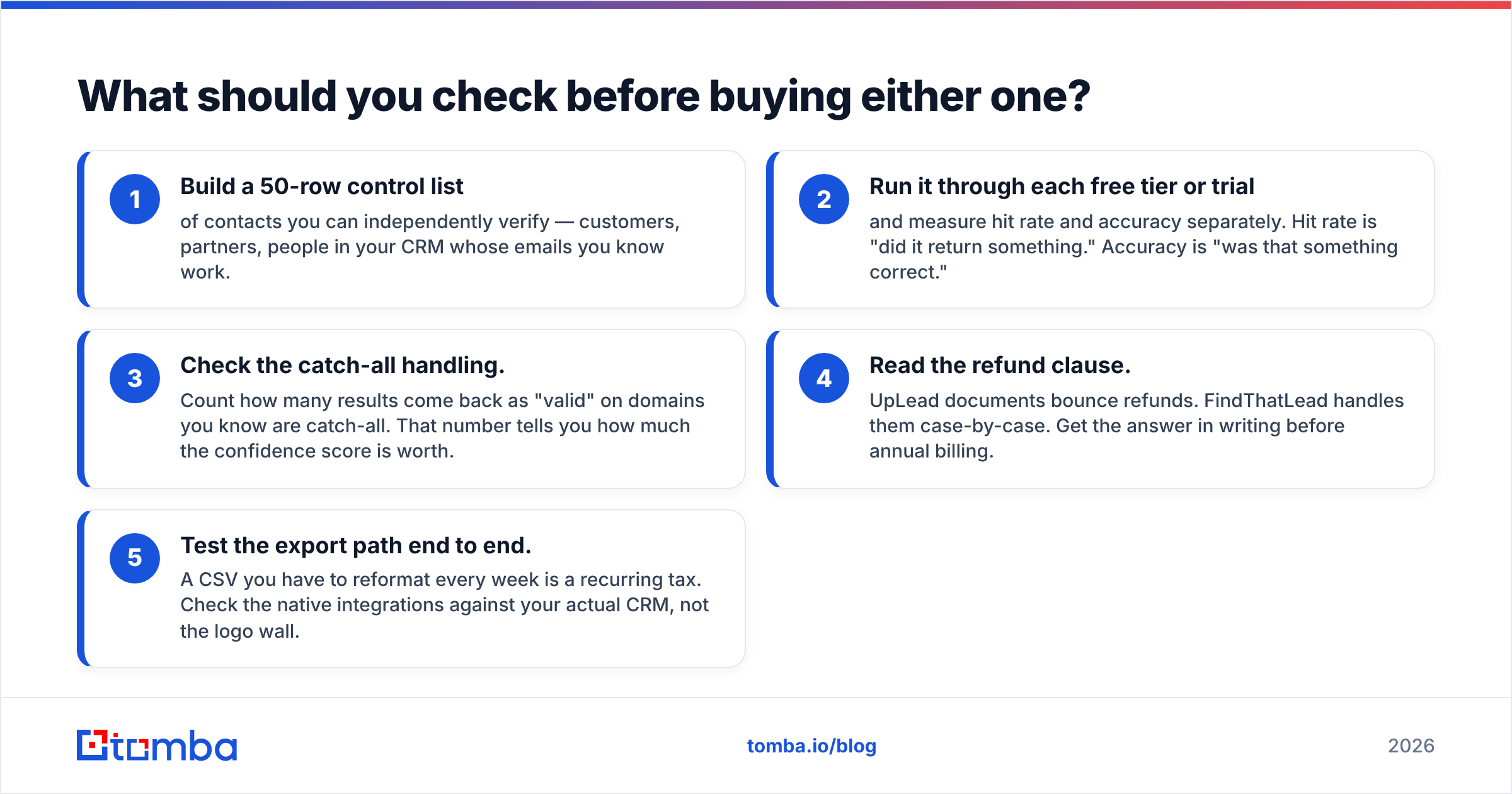
Run this test before signing anything, especially annual:
- Build a 50-row control list of contacts you can independently verify — customers, partners, people in your CRM whose emails you know work.
- Run it through each free tier or trial and measure hit rate and accuracy separately. Hit rate is "did it return something." Accuracy is "was that something correct."
- Check the catch-all handling. Count how many results come back as "valid" on domains you know are catch-all. That number tells you how much the confidence score is worth.
- Read the refund clause. UpLead documents bounce refunds. FindThatLead handles them case-by-case. Get the answer in writing before annual billing.
- Test the export path end to end. A CSV you have to reformat every week is a recurring tax. Check the native integrations against your actual CRM, not the logo wall.
Do this with 50 records and you will learn more in an hour than any comparison post — including this one — can tell you.
The verdict#
UpLead wins on data quality and discovery. FindThatLead wins on price and bundled sending. Neither wins on cost per verified lead once you account for seats, credit burn, and the verification pass you will need either way.
The FindThatLead vs UpLead call gets simple once you name your constraint. Choose UpLead when a bounce is expensive and your team is small. Choose FindThatLead when you already have lists and budget is tight.
If you are open to a third option, start with the free tier of the Tomba Email Finder — 25 searches a month, no card required. Run your 50-row control list through it alongside the other two. Compare hit rate and accuracy on your own ICP, and let the data decide instead of the pricing page. If the numbers hold up, $49/mo flat with no per-seat multiplier beats either alternative on cost curve, and the API drops straight into your existing stack.
Related guides#
Ready to find emails that actually work?
Join 150,000+ professionals who stopped guessing and started sending. Free credits on signup — no credit card required.
Get the Tomba newsletter
Practical outbound tactics and product updates — once every two weeks.
About the author