Findymail vs Findthatlead: Which Email Finder Wins in 2026?
Findymail sells verified-only B2B emails. FindThatLead sells volume plus outreach. We compare accuracy, credit rules, pricing, and API depth to show which one actually fits your pipeline in 2026.
Findymail vs FindThatLead is a choice between two different bets. Findymail sells only emails it can verify. FindThatLead sells volume plus a built-in sender. This guide compares both on hit rate, credits, price, and API depth.
TL;DR
- Findymail is a verified-only email finder. It will not return an address it cannot check. Bounce rates stay low, but hit rates drop on small or unusual domains.
- FindThatLead is a volume-first platform. Lead search, domain scraping, LinkedIn extraction, and a cold email sender all ship in one subscription.
- Pricing is not comparable at face value. Findymail starts near $49/mo for 1,000 verified emails. FindThatLead's Growth plan is about $49/mo for 5,000 credits. Those credits also cover unverified results.
- Pick Findymail if deliverability is your bottleneck. Pick FindThatLead if you need one tool to find and send. Pick a third option (Tomba, Hunter, Apollo) if you need deeper API access, catch-all handling, or multi-seat data rules.
- Neither tool publishes an audited accuracy number. Test both on 100 of your accounts before you sign an annual deal.
What are Findymail and FindThatLead?#
Both are B2B email finders. They were built to solve different halves of the same problem.
Findymail launched as a reaction to bounce-heavy databases. Every email it returns has been verified. It does not charge you for the ones it cannot verify. That single rule shapes the product. The tool is narrow, the integrations point at outbound senders (Lemlist, Instantly, Smartlead, Clay), and the pitch is simple: your bounce problem is over.
FindThatLead took the opposite route. One subscription covers prospect search, domain-based lead scraping, a LinkedIn extension, an email verifier, and a native cold email sender (Scrab.in / Cold Email Sender). It reads more like a light sales suite than a pure lookup tool.
That difference matters more than any feature checklist. Findymail is a component. FindThatLead is a stack. If you already run Instantly or Smartlead, half of FindThatLead's value is duplicated on day one.

Findymail vs FindThatLead: how do they compare head-to-head?#
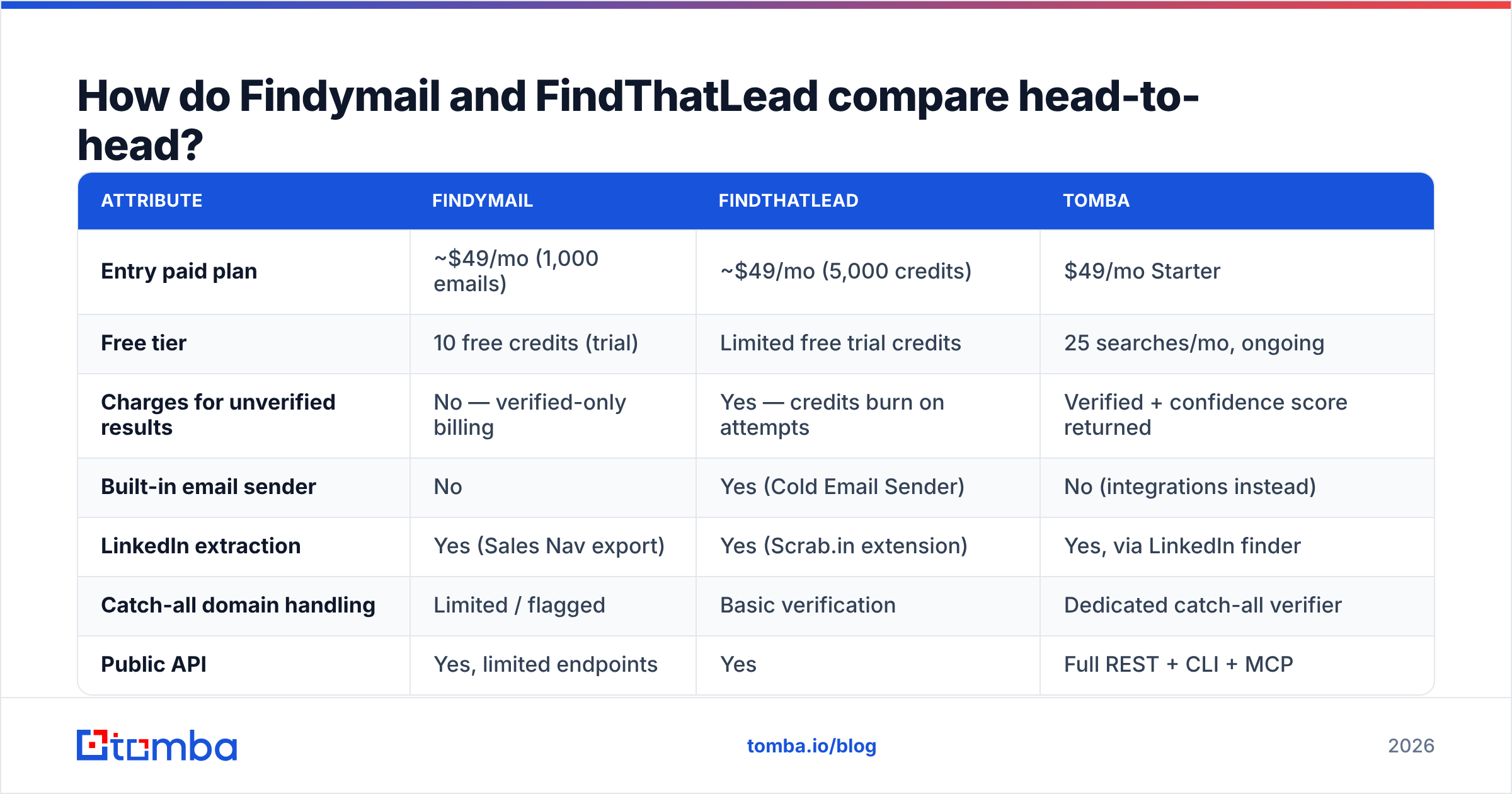
Here is the practical comparison. These are the fields that change your cost per booked meeting, not the marketing bullet list.
| Attribute | Findymail | FindThatLead | Tomba |
|---|---|---|---|
| Entry paid plan | ~$49/mo (1,000 emails) | ~$49/mo (5,000 credits) | $49/mo Starter |
| Free tier | 10 free credits (trial) | Limited free trial credits | 25 searches/mo, ongoing |
| Charges for unverified results | No — verified-only billing | Yes — credits burn on attempts | Verified + confidence score returned |
| Built-in email sender | No | Yes (Cold Email Sender) | No (integrations instead) |
| LinkedIn extraction | Yes (Sales Nav export) | Yes (Scrab.in extension) | Yes, via LinkedIn finder |
| Catch-all domain handling | Limited / flagged | Basic verification | Dedicated catch-all verifier |
| Public API | Yes, limited endpoints | Yes | Full REST + CLI + MCP |
| Bulk enrichment | Yes (CSV) | Yes (CSV + search) | Yes, bulk email finder |
| Phone numbers | No | No | Yes, phone finder |
| Best fit | Deliverability-first outbound | Solo founders, all-in-one | Dev teams + data ops |
Read the third row twice. It is the biggest cost difference between the two tools, and pricing pages almost never show it.
Which one is more accurate?#
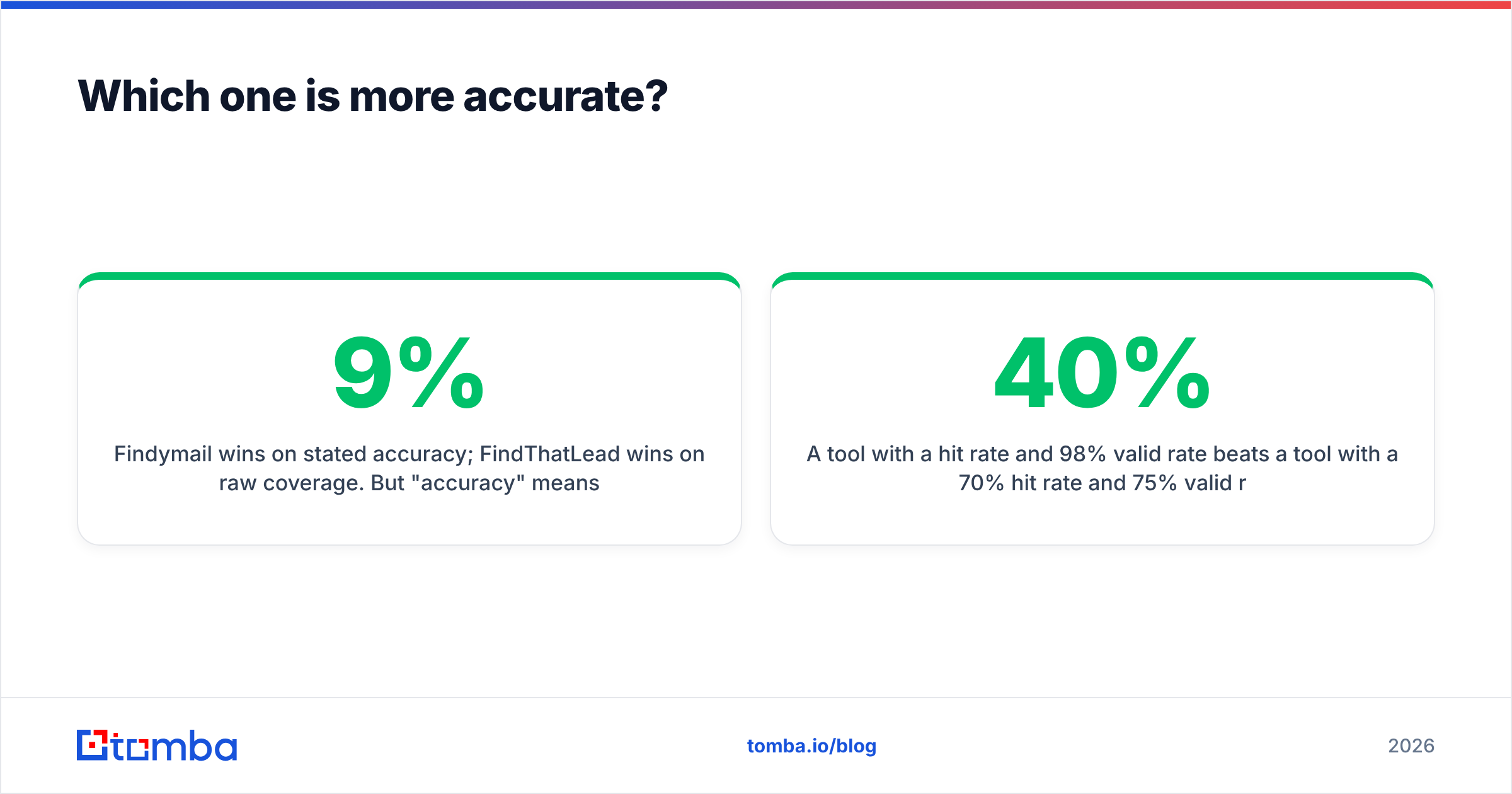
Findymail wins on stated accuracy. FindThatLead wins on raw coverage. But accuracy means two different things here. Mixing them up is how teams end up with a 9% bounce rate on a list they were told was clean.
Two metrics matter:
Hit rate — of 1,000 prospects you submit, how many come back with any email at all. FindThatLead usually returns more, because it will hand you a guessed address flagged as risky.
Valid rate — of the emails returned, how many actually accept mail. Findymail pushes this number up by holding back anything it cannot confirm.
Do the math. A tool with a 40% hit rate and a 98% valid rate beats a tool with a 70% hit rate and a 75% valid rate. Bounces do not just waste one lead. They damage the sending domain behind your whole campaign. Google and Yahoo wrote this into their bulk sender rules in 2024: spam complaints above 0.3% get you throttled, and hard bounces feed the same score. Microsoft tightened its Outlook.com limits in 2025.
So here is the honest framing. Findymail's caution is a feature, not a flaw — if your buyers sit on well-known company domains. Sell into SMBs, agencies, or regional firms with odd mail setups and the withheld results turn into a real coverage gap. You will end up paying for a second tool anyway.
FindThatLead's looser approach works too. But route every export through a separate email verifier before it reaches your sequencer. Budget for that step. Do not assume the built-in check matches a dedicated SMTP-level pass.
How does pricing really compare?#
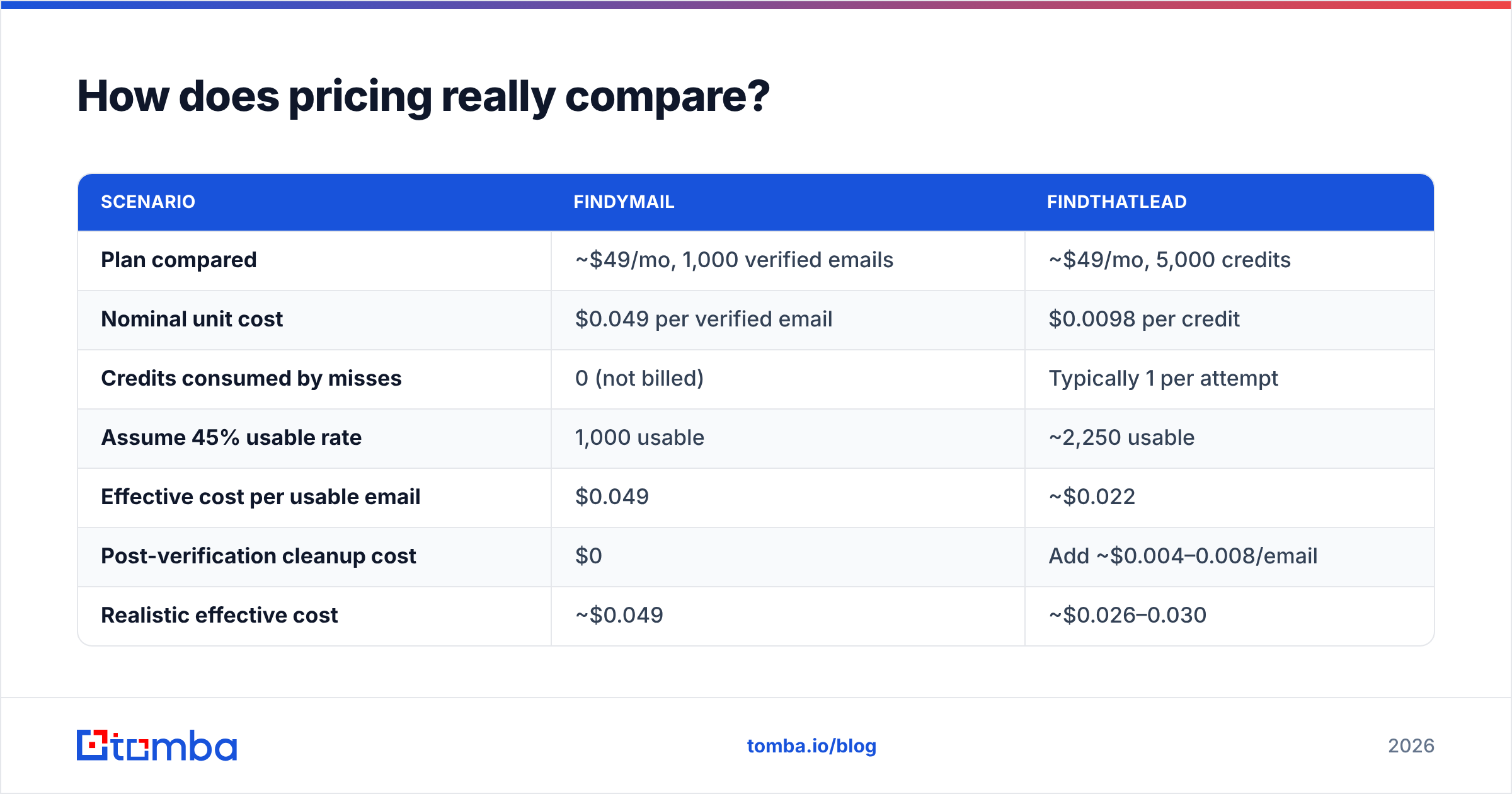
Compare cost per usable email, not cost per credit.
| Scenario | Findymail | FindThatLead |
|---|---|---|
| Plan compared | ~$49/mo, 1,000 verified emails | ~$49/mo, 5,000 credits |
| Nominal unit cost | $0.049 per verified email | $0.0098 per credit |
| Credits consumed by misses | 0 (not billed) | Typically 1 per attempt |
| Assume 45% usable rate | 1,000 usable | ~2,250 usable |
| Effective cost per usable email | $0.049 | ~$0.022 |
| Post-verification cleanup cost | $0 | Add ~$0.004–0.008/email |
| Realistic effective cost | ~$0.049 | ~$0.026–0.030 |
FindThatLead is still cheaper per usable address at volume. That is the honest read. What the table leaves out is your time: exporting, verifying, re-importing, and matching the results back up. If one person spends three hours a week on that loop, the savings are gone at any normal salary.
Two more pricing traps:
Annual lock-in. Both push discounted annual plans. Do not sign one before you run a real 100-account test.
Credit rollover. Neither tool is generous. Unused credits do not pile up forever, so buying a big plan for later is usually waste.
For reference, Tomba pricing runs Free (25 searches/mo), Starter $49/mo, Growth $99/mo, Pro $249/mo, and Enterprise custom. Verification is included rather than sold as an add-on. Ask any vendor the same three questions: what burns a credit, what rolls over, and what verification costs.
Which integrates better with your existing stack?#
FindThatLead if you have no stack. Findymail if you already have one.
Findymail's integration list reads like an outbound engineer's toolkit: Lemlist, Instantly, Smartlead, Clay, HubSpot, Zapier, and a plain API. It is built to sit under someone else's sending setup. That is exactly right when you have picked a sequencer and you are not switching.
FindThatLead's integrations are thinner. The product assumes you will send from inside it. That is handy for a solo founder doing 200 emails a week. It becomes a problem at 5,000 a month, when you need mailbox rotation, warmup schedules, and reply detection that dedicated senders have spent years refining.
If you are engineering-led, ask a harder question: can you call this from your own pipeline? Findymail's API exists, but it is deliberately narrow. FindThatLead's API works, but the docs are thin. Teams that enrich inside a job queue, a Postgres trigger, or an internal CRM sync usually want something like the Tomba API. It exposes finder, verifier, domain search, and enrichment as separate endpoints instead of one big search call.

What do real users complain about?#
Pull the review sites and the patterns repeat. On G2 and Capterra, the same themes show up:
Findymail complaints
- Coverage gaps on non-US and smaller-company domains
- Price feels high when you search a lot and find a little
- Thin reporting — you cannot easily see why a lookup failed
FindThatLead complaints
- Bounce rates higher than expected when results are used as-is
- UI and support lag behind newer rivals
- Credit use is confusing; users report burn with no results
Shared complaints
- Neither publishes a third-party accuracy audit
- Both make annual-plan refunds hard
- Job-change data updates slower than at dedicated enrichment vendors
None of this rules either tool out. It is the normal shape of this category. But it tells you where to spend your evaluation time: test coverage on your buyers, and watch credit use in week one.
When should you pick a third option instead?#
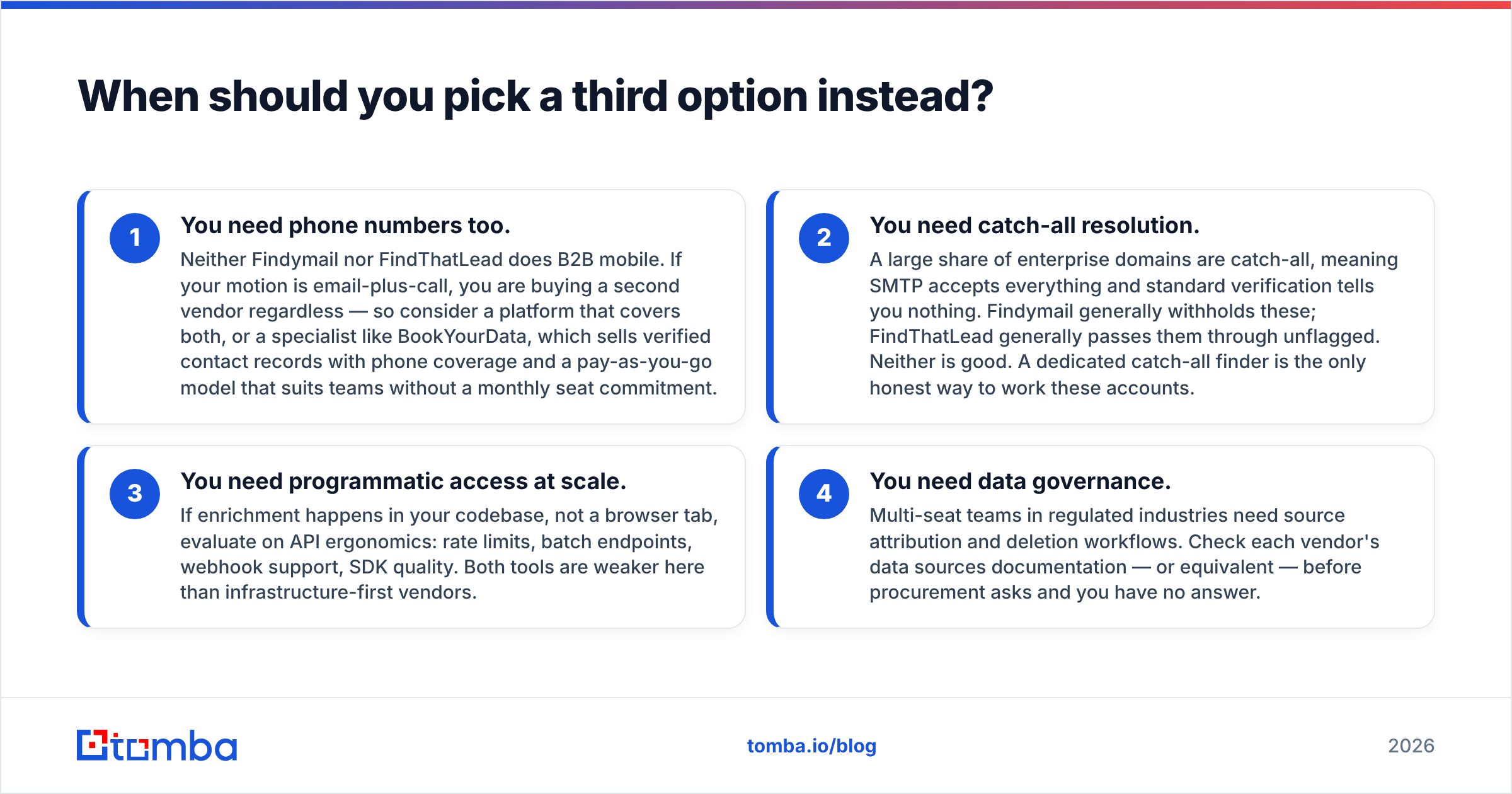
In four cases, neither tool is the right answer.
You need phone numbers too. Neither tool does B2B mobile. If you email and call, you are buying a second vendor either way. Look at a platform that covers both, or a specialist like BookYourData. It sells verified contact records with phone coverage on a pay-as-you-go plan, which suits teams that do not want a monthly seat.
You need catch-all resolution. Many enterprise domains are catch-all: the server accepts every address, so normal verification tells you nothing. Findymail usually withholds these. FindThatLead usually passes them through unflagged. Neither is good. A dedicated catch-all finder is the only honest way to work these accounts.
You need programmatic access at scale. If enrichment happens in your code, not a browser tab, judge the API itself: rate limits, batch endpoints, webhooks, SDK quality. Both tools are weaker here than infrastructure-first vendors.
You need data governance. Multi-seat teams in regulated industries need source records and deletion workflows. Check each vendor's data sources page before procurement asks and you have no answer.
What is the fastest way to decide?#
Run this test. It takes about ninety minutes, and it beats any comparison article — including this one.
Build a 100-row sample from your real target list. Same industries, same company sizes, same countries you sell into. Not a clean list of Fortune 500 domains.
Run it through both tools on free or entry-tier credits. Record the hit rate for each.
Verify every returned address with a neutral third-party checker, not the vendor's own. People skip this step. It is the only one that gives you an honest valid rate.
Compute cost per usable email: plan cost divided by usable emails returned. Include the credits burned on misses.
Send 50 real emails from a warmed spare domain and count the bounces. Predictions and reality drift apart more than vendors admit.
Check API speed and error handling if you plan to automate. A four-second response time breaks batch jobs that a demo never reveals.
Whichever tool wins that test wins for your buyers. Results really do differ by segment. Teams selling into US SaaS often see Findymail lead. Teams selling into European SMB often see the reverse.
The verdict on Findymail vs FindThatLead#
Findymail is the better tool if deliverability is your constraint. FindThatLead is the better tool if budget and consolidation are. There is no universal winner. Any article that names one is selling something.
Findymail's verified-only billing is well designed. It removes a real class of waste. Its weakness is coverage on the long tail, plus a price that stings when hit rates dip.
FindThatLead gives you more surface area for the same money. It works well as a first tool for a founder-led motion. Its weakness: search, verification, and sending are each fine rather than best in class. You will outgrow at least one of them.
Still torn on Findymail vs FindThatLead? If you want Findymail's rigor with FindThatLead's coverage and an API you can build on, that is the gap Tomba was made for. Start on the free tier — 25 searches a month, no card — and run the same 100-account test against the Tomba Email Finder. If the hit rate and valid rate beat what you measured elsewhere, you have your answer in data instead of marketing copy.
Related guides#
Ready to find emails that actually work?
Join 150,000+ professionals who stopped guessing and started sending. Free credits on signup — no credit card required.
Get the Tomba newsletter
Practical outbound tactics and product updates — once every two weeks.
About the author