Findymail vs Go4database: Which B2B Data Tool Wins in 2026?
Findymail sells verified email lookups by the credit. Go4database sells bulk contact lists by the record. We compare accuracy, pricing, compliance risk, and which one actually fits modern outbound in 2026.
Findymail vs Go4database is a choice between two data models, not two versions of the same tool. One checks each email at the moment you ask for it. The other sells you a file and leaves the checking to you. Here is how the two compare on accuracy, price, and compliance risk.
TL;DR
- Findymail and Go4database are not the same category. Findymail is a real-time email finder sold by credit. Go4database is a bulk list vendor that sells pre-built contact files by the record.
- Findymail wins on freshness and bounce rate. Data verified at lookup beats a file scraped months ago.
- Go4database wins on raw volume per dollar — if you accept unverifiable provenance and heavy list hygiene before you send.
- Compliance is the real dividing line. Purchased lists carry GDPR and CAN-SPAM exposure that credit-based lookup of public business emails largely avoids.
- Our pick for 2026: a real-time finder plus a verification layer. Tomba's email finder starts at $49/mo with a free 25-search tier, and its email verifier handles the hygiene step Go4database leaves to you.
What are Findymail and Go4database, exactly?#
They solve the same surface-level problem — "I need email addresses for people I want to sell to" — using opposite architectures.
Findymail is a lookup engine. You give it a name and a company domain, or a LinkedIn URL. It returns a single email address it has just checked. Nothing is stored and resold as a pre-built file. Its pitch, per findymail.com, is bounce-rate-first: every email is verified before it leaves the API, and it credits you back for anything that bounces. It plugs into Lemlist, Instantly, Clay, and HubSpot. It is popular with agencies running high-volume cold email who got burned by bad data.
Go4database is a list broker. You buy a segment — "US healthcare CIOs", "UK SaaS founders", "manufacturing decision-makers in DACH" — and you receive a file. The file holds names, titles, companies, emails, and often phone numbers and mailing addresses. Pricing is per record, in bulk, and the unit cost drops as the list size climbs. There is no API-first workflow. It is a purchase, a download, and then your problem.
Think of it as fishing versus buying frozen fish. Findymail hands you a rod and tells you exactly where the fish are right now. Go4database hands you a crate that was packed at some point and labeled "fresh." One of those has a shelf-life question you cannot answer by looking at the box.

Findymail vs Go4database: how do they compare head to head?#
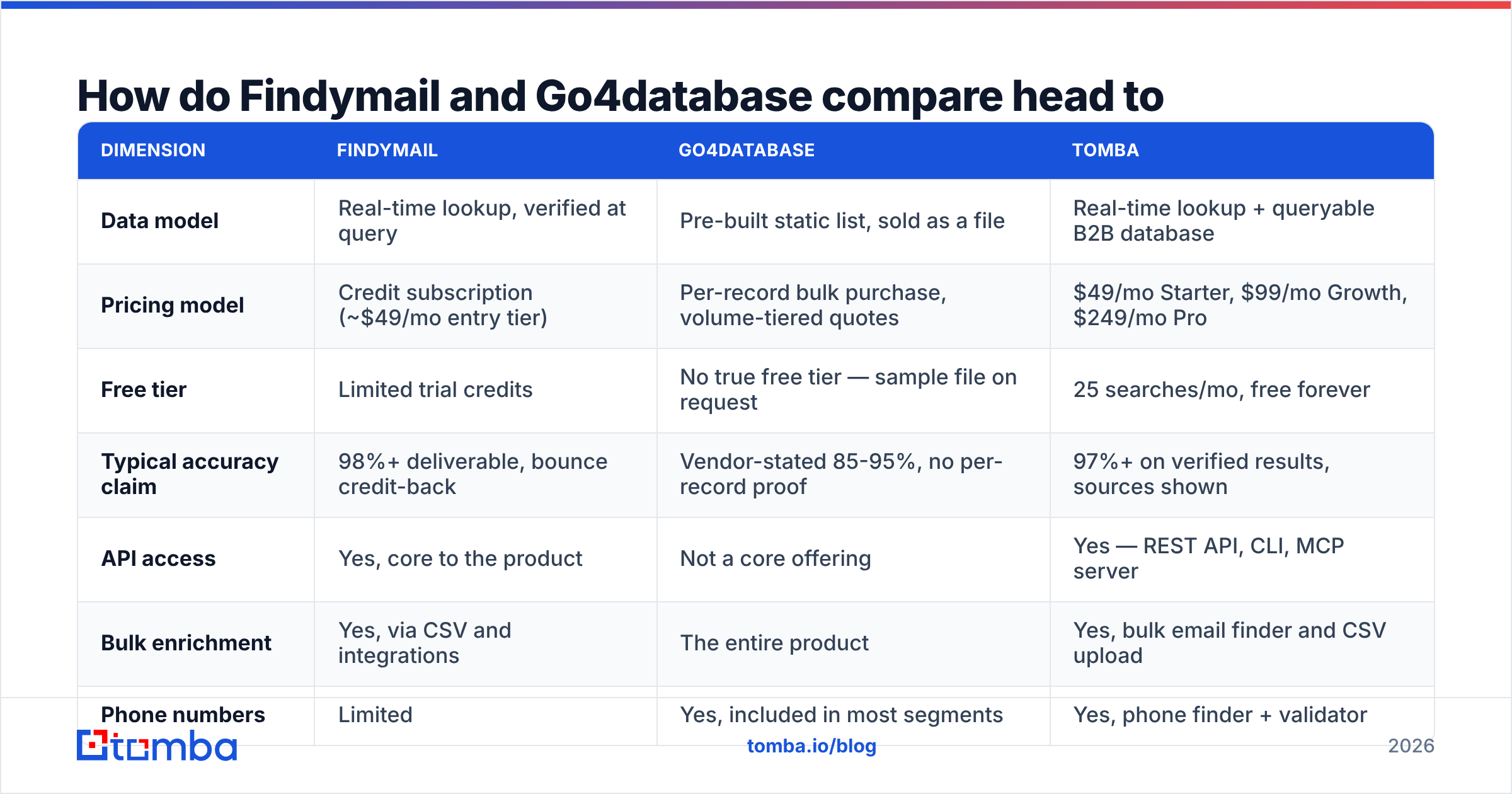
| Dimension | Findymail | Go4database | Tomba |
|---|---|---|---|
| Data model | Real-time lookup, verified at query | Pre-built static list, sold as a file | Real-time lookup + queryable B2B database |
| Pricing model | Credit subscription (~$49/mo entry tier) | Per-record bulk purchase, volume-tiered quotes | $49/mo Starter, $99/mo Growth, $249/mo Pro |
| Free tier | Limited trial credits | No true free tier — sample file on request | 25 searches/mo, free forever |
| Typical accuracy claim | 98%+ deliverable, bounce credit-back | Vendor-stated 85-95%, no per-record proof | 97%+ on verified results, sources shown |
| API access | Yes, core to the product | Not a core offering | Yes — REST API, CLI, MCP server |
| Bulk enrichment | Yes, via CSV and integrations | The entire product | Yes, bulk email finder and CSV upload |
| Phone numbers | Limited | Yes, included in most segments | Yes, phone finder + validator |
| Catch-all handling | Flagged, partial resolution | Usually unflagged in the file | Dedicated catch-all verifier |
| Compliance posture | Public-source, request-scoped | Buyer assumes provenance risk | Documented data sources |
| Best for | Targeted outbound, agencies, Clay users | Very large untargeted campaigns, direct mail | Teams wanting lookup + verification in one stack |
The table makes the trade obvious. Findymail optimizes for precision per contact. Go4database optimizes for contacts per dollar. Those are different businesses wearing similar marketing copy.
Is bulk-purchased data actually cheaper?#
On the invoice, yes. In practice, usually no. The math is not close once you price in the cleanup.
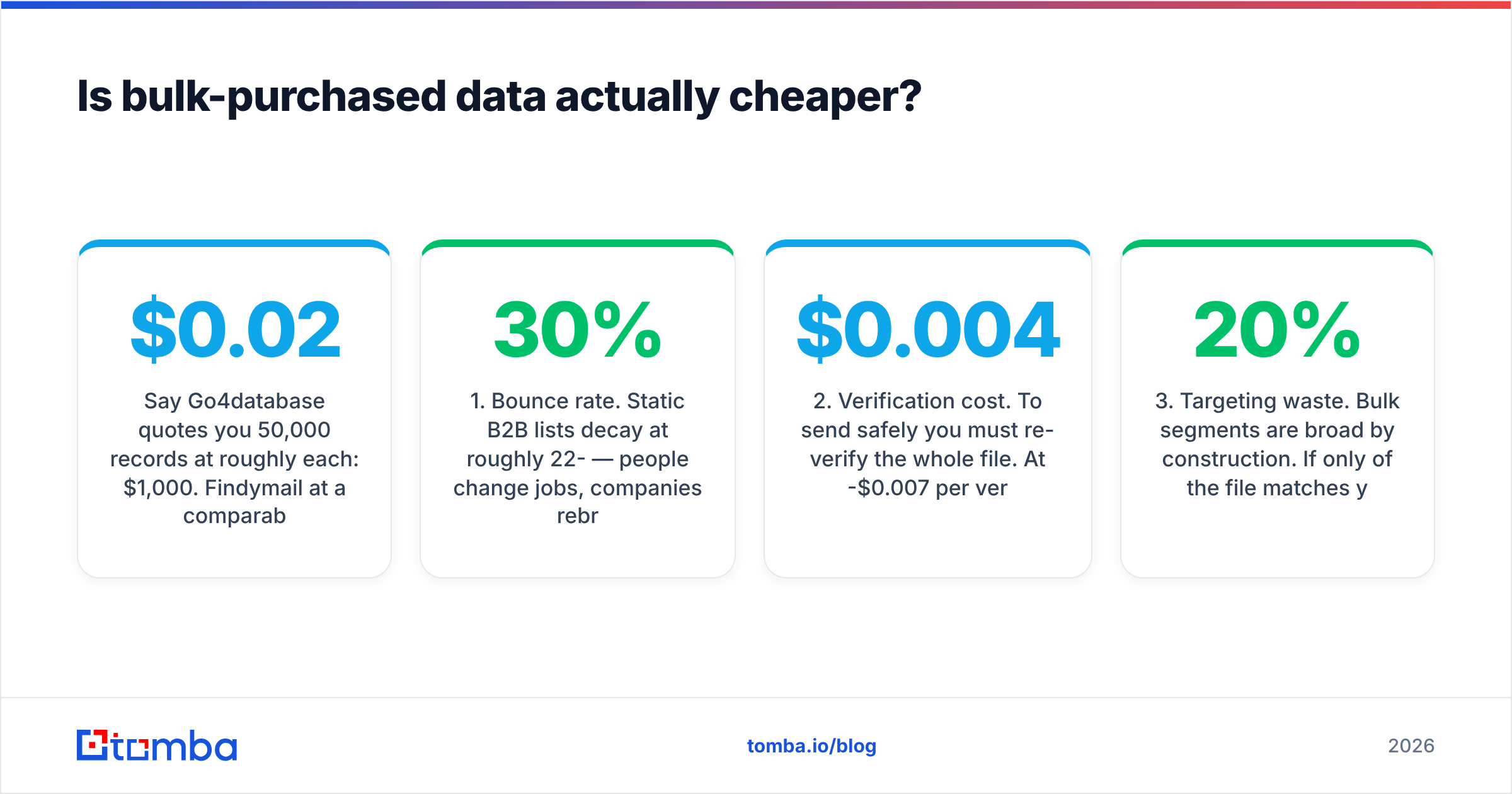
Say Go4database quotes you 50,000 records at roughly $0.02 each: $1,000. Findymail at a comparable tier gets you maybe 10,000-15,000 verified lookups for a few hundred dollars. Raw volume looks like a landslide.
Now apply reality:
- Bounce rate. Static B2B lists decay at roughly 22-30% per year. People change jobs, companies rebrand, domains migrate. A list packed 9 months ago is already ~20% dead on arrival. That is 10,000 of your 50,000 records.
- Verification cost. To send safely you must re-verify the whole file. At $0.004-$0.007 per verification, that is another $200-$350 — and you will pay it again next quarter.
Two more costs land after that, and neither one shows up on the quote.
- Targeting waste. Bulk segments are broad by construction. If only 20% of the file matches your actual ICP, your usable pool is 8,000-10,000 records, not 50,000.
- Domain damage. Blast a 15% bounce list through a fresh sending domain and your sender reputation takes a hit. Repairing it costs weeks of warmup. Google and Yahoo's bulk-sender rules — documented in Google's sender guidelines — put the hard spam-complaint ceiling at 0.3%. Bad data blows through that fast.
Run those four adjustments and the $1,000 file becomes ~$1,300 for ~9,000 usable, targeted, deliverable contacts. That is $0.14 per usable contact. It is no longer meaningfully cheaper than credit-based lookup, and you carry all the risk.
Where bulk genuinely wins: direct mail, event invite lists, TAM sizing, and channel partner mapping. Anything where a wrong address costs you a stamp instead of a domain reputation.
Which one has better data accuracy?#
Findymail, by architecture. Not because its engineers are smarter. Checking an address at query time is simply a better position than checking it at pack time.
Here is what to actually check, in any vendor comparison:
- Verification timestamp. Ask "when was this specific record last checked?" Findymail's answer is "seconds ago." A list broker's honest answer is "when we compiled the segment." If a vendor cannot give you a per-record timestamp, treat the accuracy claim as marketing.
- Catch-all disclosure. Roughly 15-20% of business domains are catch-all. They accept everything at the SMTP layer, so a naive checker marks them valid. Use a catch-all finder to separate genuinely deliverable from merely accepted.
- Role-account ratio. info@, sales@, and support@ are cheap to harvest and terrible to email. High role-account density is the classic fingerprint of a scraped list.
Three more checks matter just as much:
- Pattern-only guesses. Some tools return
first.last@domain.comwithout ever confirming it exists. Cross-check against a company email pattern tool and reject anything unconfirmed. - Source attribution. Can the vendor tell you where a record came from? Public web, opt-in registration, partner network, or "acquired dataset"? The last one is where GDPR problems live.
- Bounce guarantee. Findymail credits bounces back. Most list brokers offer a replacement-record policy instead, which is not the same thing. You get more of the same data, not your money back.
Go4database is not uniquely bad here. It is typical of the list-broker category. If you buy from any bulk vendor, budget for the email verification pass as a mandatory step, not an optional one.
What about compliance and GDPR risk?#
This is where the two models genuinely diverge, and it deserves more than a footnote.
Under GDPR, the lawful basis most B2B outbound relies on is legitimate interest. That requires you to document what data you hold, where it came from, and why processing it is proportionate. The ICO's guidance on direct marketing is explicit: buying a list does not transfer the seller's compliance onto you. You remain the controller.
- Real-time lookup (Findymail, Tomba): you request one business contact at a time, from public professional sources, for a documented commercial purpose. The processing is narrow and auditable. You can honor a deletion request because you know exactly what you fetched and when.
- Bulk purchase (Go4database and peers): you now hold tens of thousands of personal data records whose provenance you did not observe. If a subject asks how you got their address, "we bought a file" is a weak answer in front of a regulator. You also inherit any consent defects in the source data.
For US-only outbound, CAN-SPAM is far more permissive. Bulk lists are legal to buy and send to, provided you honor opt-outs and identify yourself. The risk there is deliverability, not legal exposure. For EU, UK, or Canadian (CASL) targets, the calculus flips hard.
Practical rule: if more than a quarter of your target market sits in the EU or UK, the bulk-file model creates paperwork you probably do not want to file.

When should you choose each one?#
Choose Findymail if:
- You run targeted outbound where each contact matters — ABM, agency campaigns, founder-led sales.
- You already live in Clay, Lemlist, Instantly, or Smartlead and want a drop-in enrichment source.
- Deliverability is your bottleneck and you have burned domains on bad data before.
- You need fewer than ~20,000 contacts a month and would rather pay per correct answer.
Choose Go4database if:
- You need very large volumes for direct mail, events, or market sizing where a bad record costs a postage stamp.
- You are targeting industries or regions with thin online footprints, where real-time lookup coverage genuinely drops.
- Your campaign is US-only and you have an in-house verification pipeline already running.
- You need appended fields — mailing address, employee count, SIC codes — that a pure email finder does not carry.
Choose neither if: you want lookup and verification and bulk processing in one contract instead of stitching two vendors together. That is the gap Tomba fills. The email finder, verifier, domain search, and catch-all handling sit on the same credit pool, with Tomba pricing starting at $49/mo Starter, $99/mo Growth, and $249/mo Pro. Compare that against a finder subscription plus a separate verification subscription plus a list purchase.
Worth noting: BookYourData occupies interesting middle ground if you want bulk-style purchasing with real-time verification attached. It offers pay-as-you-go credits, no subscription lock-in, and per-record verification at the point of download. If Go4database's volume model appeals but its verification story worries you, that is a reasonable third option to price out.
How do you actually test them before committing?#
Do not take anyone's accuracy number, including ours. Run a controlled bake-off. It takes an afternoon.
- Build a 100-contact control set. Pick real prospects across your actual ICP: a spread of company sizes, at least three countries, and a mix of common and unusual surnames. Include five people you can independently confirm.
- Run the same 100 through each vendor. Findymail via API or CSV. Go4database via a sample-file request against the same criteria. Add a third finder as a control.
- Measure four things, not one: hit rate, accuracy against your known-good five, catch-all share, and role-account share. A 90% hit rate with 40% catch-alls is worse than a 65% hit rate that is all confirmed.
The last two steps are the ones that decide it:
- Send a 50-contact smoke test. Same copy, same sending domain and warmup state, split evenly. Measure hard bounces at 48 hours. This is the only number that predicts what happens at scale.
- Price the winner at your real volume. Vendors price nonlinearly. The tool that wins at 500 contacts/month can lose badly at 10,000.
If you want a zero-cost baseline for step 1, the free email checker and email permutator let you sanity-check formats before you spend a credit anywhere.
One caution on step 4: run it from a domain you are willing to lose. Comparing data vendors by sending to unverified addresses on your primary domain is how teams end up doing 6 weeks of warmup to fix a 2-day experiment.
What is the verdict for 2026?#
Findymail wins for most modern outbound teams. The deliverability environment has tightened faster than list-broker data quality has improved. Google and Yahoo's 2024 bulk-sender rules, plus Microsoft's 2025 tightening, made bounce and complaint rates a hard gate rather than a soft signal. Real-time verification is no longer a nice-to-have. It is the price of getting into the inbox at all.
Go4database still has a legitimate job, but it is narrower than its pricing page suggests: high-volume, low-precision, US-focused, non-email-primary use cases where you own the hygiene step. Buy it for a direct mail campaign or a TAM model. Do not buy it as your cold email source and expect to skip verification.
For most teams, the Findymail vs Go4database question resolves to neither one alone. You want lookup precision at the top of the funnel and verification as a permanent standing process, not a one-time cleanup. Splitting that across two vendors doubles your contracts and leaves gaps at the seam. Catch-all domains are the obvious example: a finder says "found," a verifier says "unknown," and nobody resolves it.
That is the case for consolidating. Tomba's email finder returns confirmed addresses with source attribution. The verifier and catch-all verifier resolve the ambiguous 15-20% that breaks other stacks. Data enrichment fills the firmographic fields you would otherwise buy a separate list for. All on one credit pool, all through one API, starting free with 25 searches a month and $49/mo when you outgrow it.
Start with the free tier, run the 100-contact bake-off above against whatever you use today, and let the bounce numbers decide. That is a better basis for a data decision than any comparison post, including this one.
Related guides#
Ready to find emails that actually work?
Join 150,000+ professionals who stopped guessing and started sending. Free credits on signup — no credit card required.
Get the Tomba newsletter
Practical outbound tactics and product updates — once every two weeks.
About the author