Findymail vs Null Bounce (2026): Which Email Tool Wins?
Findymail finds addresses. Null Bounce checks whether they land. Here is an honest breakdown of accuracy, pricing models, catch-all handling, and which one your outbound stack actually needs in 2026.
TL;DR
- Findymail and Null Bounce are not really competitors. Findymail is an email finder (it produces addresses); Null Bounce sits in the email verification category (it tells you whether an address will bounce).
- If your list is empty, a verifier gives you nothing to verify. If your list is bought, scraped, or six months old, a finder alone will not save your sender reputation.
- Findymail's pull is its bounce guarantee and LinkedIn/Sales Navigator export workflow. Null Bounce's pull is cheap, single-purpose credit-based verification.
- Buying both usually costs more than one platform that does finding, verifying, and catch-all resolution on the same credit pool.
- Our pick for most B2B teams under 50 seats: run a combined finder + verifier so you pay once per contact instead of twice.
What are Findymail and Null Bounce, and why are people comparing them?#
The short answer: people search "findymail vs null bounce" because both tools show up when you Google how to stop cold emails from bouncing, and the category pages lump them together. But they solve two different halves of the same problem.
Think of it like hiring a courier. Findymail is the researcher who works out the recipient's street address from a name and a company. Null Bounce is the dispatcher who calls ahead to check somebody still lives there. You can hire either one. Neither one on its own gets the parcel delivered reliably.
That distinction matters because it changes the buying question. You are not asking "which tool is better." You are asking "which gap in my pipeline is costing me more right now — missing contacts, or bad contacts?"
What does Findymail actually do?#
Findymail is a B2B email finder built primarily around LinkedIn and Sales Navigator workflows. The core loop is: point it at a list of people or companies, get back work email addresses, push them into your sequencer.
What it is known for:
- LinkedIn and Sales Navigator exports. You can export a saved search or a list and get enriched emails back, which is the reason most of its users signed up.
- A bounce guarantee. Findymail markets verified-only results and does not bill you for addresses it cannot validate. That is a real differentiator against finders that happily charge for guesses.
- Credit-based pricing on found emails. You pay per successfully found and verified address, not per lookup attempted.
- CRM and sequencer integrations. Standard connections into the usual outbound stack.
What it is not: a standalone list-hygiene tool. If you arrive with a CSV of 40,000 addresses from a trade show and want to know which ones are dead, that is not what Findymail is optimised for.
What does Null Bounce actually do?#
Null Bounce belongs to the email verification bucket — the same shelf as ZeroBounce, Bouncer, DeBounce, and Clearout. The job of every tool on that shelf is identical in outline:
- Syntax check — is the address even well-formed?
- Domain and MX check — does the domain exist and accept mail?
- SMTP handshake — does the receiving server acknowledge that specific mailbox?
- Risk classification — is it a role account (info@, sales@), a disposable address, a spam trap candidate, or a catch-all domain where the server says yes to everything?
- Verdict — valid, invalid, risky, or unknown.
A verifier's value is entirely in step 4 and 5. Anyone can run an SMTP ping. The difference between a good verifier and a mediocre one is what it does with catch-all domains and how honestly it labels "unknown" instead of quietly calling it "valid" to make the report look good.
One caveat worth stating plainly: Null Bounce is a smaller, less publicly documented vendor than the household names in this category. Pricing pages and accuracy claims from small verifiers change often and are rarely independently audited. Before you commit budget, pull the current numbers from the vendor directly and cross-check user reviews on G2's email verification category rather than trusting a blog table — including this one.
Findymail vs Null Bounce: how do they compare feature by feature?#
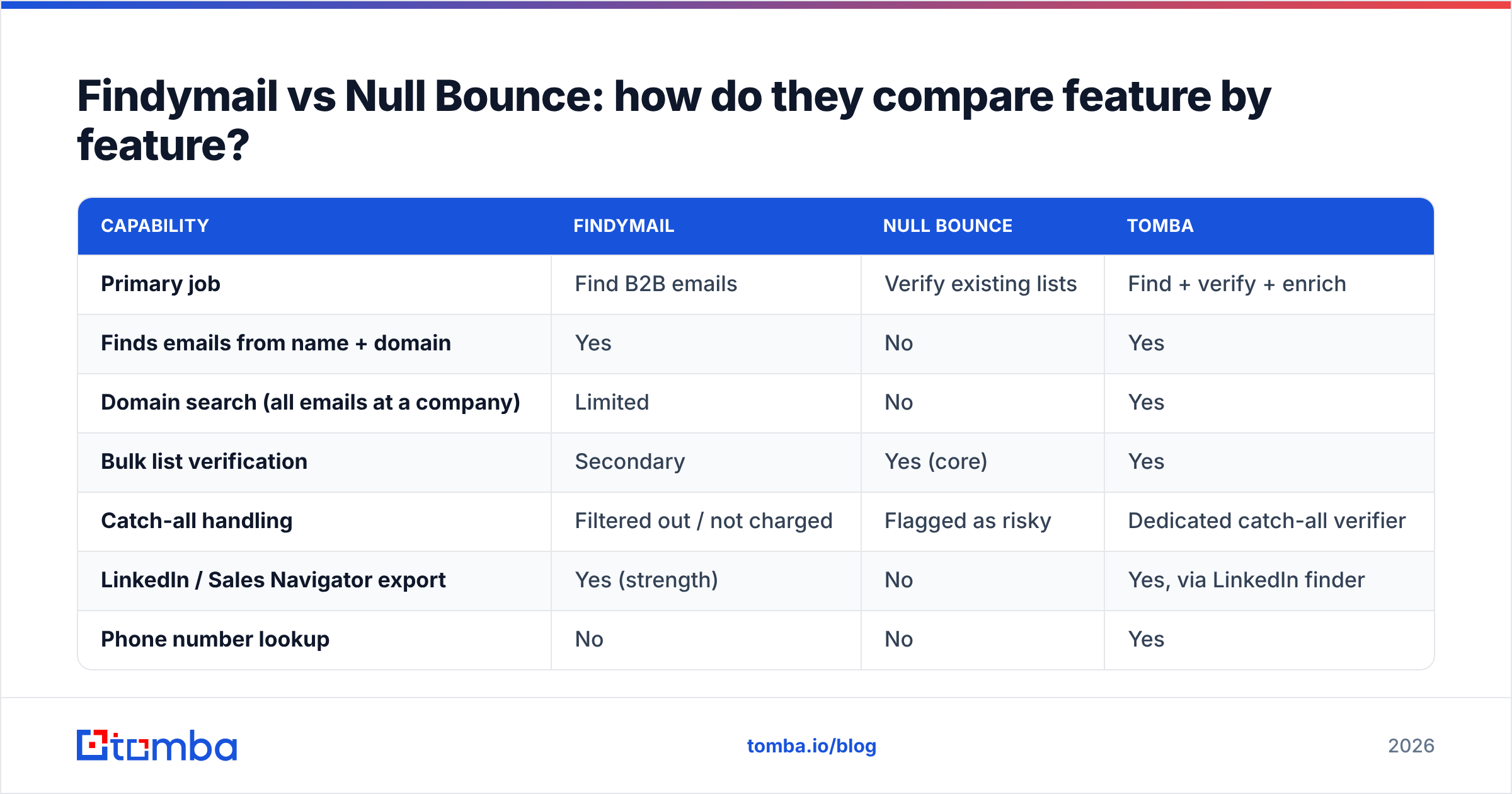
Here is the honest side-by-side, with Tomba included because the "do I need two tools?" question is the real decision underneath this comparison.

| Capability | Findymail | Null Bounce | Tomba |
|---|---|---|---|
| Primary job | Find B2B emails | Verify existing lists | Find + verify + enrich |
| Finds emails from name + domain | Yes | No | Yes |
| Domain search (all emails at a company) | Limited | No | Yes |
| Bulk list verification | Secondary | Yes (core) | Yes |
| Catch-all handling | Filtered out / not charged | Flagged as risky | Dedicated catch-all verifier |
| LinkedIn / Sales Navigator export | Yes (strength) | No | Yes, via LinkedIn finder |
| Phone number lookup | No | No | Yes |
| Public API | Yes | Yes | Yes, plus CLI and MCP |
| Spreadsheet add-ons | Limited | Limited | Excel, Google Sheets, Airtable |
| Free tier | Trial credits | Trial credits | 25 searches/mo, ongoing |
| Entry paid price | ~$49/mo (check current) | Credit packs (check current) | $49/mo Starter |
Two things fall out of that table.
First, the overlap between Findymail and Null Bounce is genuinely small. Findymail verifies what it finds, but it does not want your 40,000-row legacy CSV. Null Bounce cleans your legacy CSV but cannot create a single new contact.
Second, if you buy both, you are paying twice for verification — once inside Findymail's per-email price and once at Null Bounce's per-check price.
Which one is more accurate, and how would you even know?#
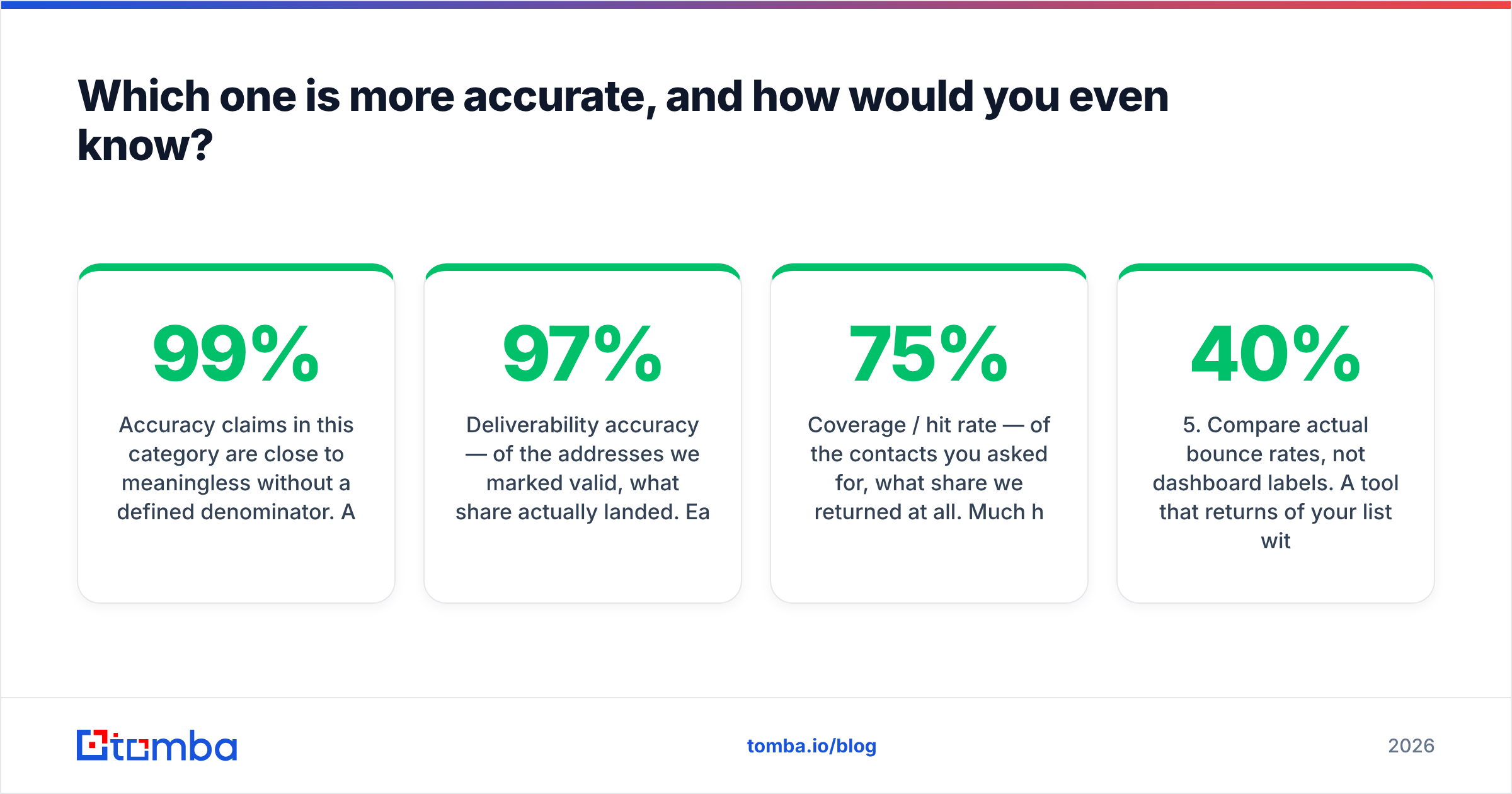
Accuracy claims in this category are close to meaningless without a defined denominator. A vendor claiming "99% accuracy" is usually measuring one of three different things:
- Deliverability accuracy — of the addresses we marked valid, what share actually landed. Easy to hit 97%+ by refusing to guess.
- Coverage / hit rate — of the contacts you asked for, what share we returned at all. Much harder. Good finders land in the 55–75% range on typical B2B lists, and anyone claiming 95% coverage is counting pattern guesses.
- Classification accuracy — of everything we labelled, how often the label was right, including the "risky" and "unknown" buckets.
Findymail's bounce guarantee is effectively a bet on the first metric, achieved partly by declining to return uncertain addresses. That is a defensible product choice and it protects your sender reputation — but it means your coverage number will look lower than a tool that returns guesses.

The only benchmark that matters is your own. Run this test before you buy anything:
- Build a 200-row control list from your actual ICP, not a vendor's sample. Mix company sizes and countries.
- Run it through every tool on trial credits on the same day, same list, no manual cleanup.
- Record three numbers per tool: found rate, verified-valid rate, and unknown/catch-all rate.
- Send a real campaign from a warmed domain to each result set, in equal-sized batches.
- Compare actual bounce rates, not dashboard labels. A tool that returns 40% of your list with a 1% bounce may beat one that returns 70% with an 8% bounce — or it may not, depending on how much you value volume.
- Check the cost per landed email, not the cost per credit. This is the only pricing number that survives contact with reality.
If a vendor's trial does not let you run that test, that is information too. For context on why bounce management matters at the infrastructure level, the bounce message fundamentals are worth ten minutes.
What does each one cost once you add it up?#
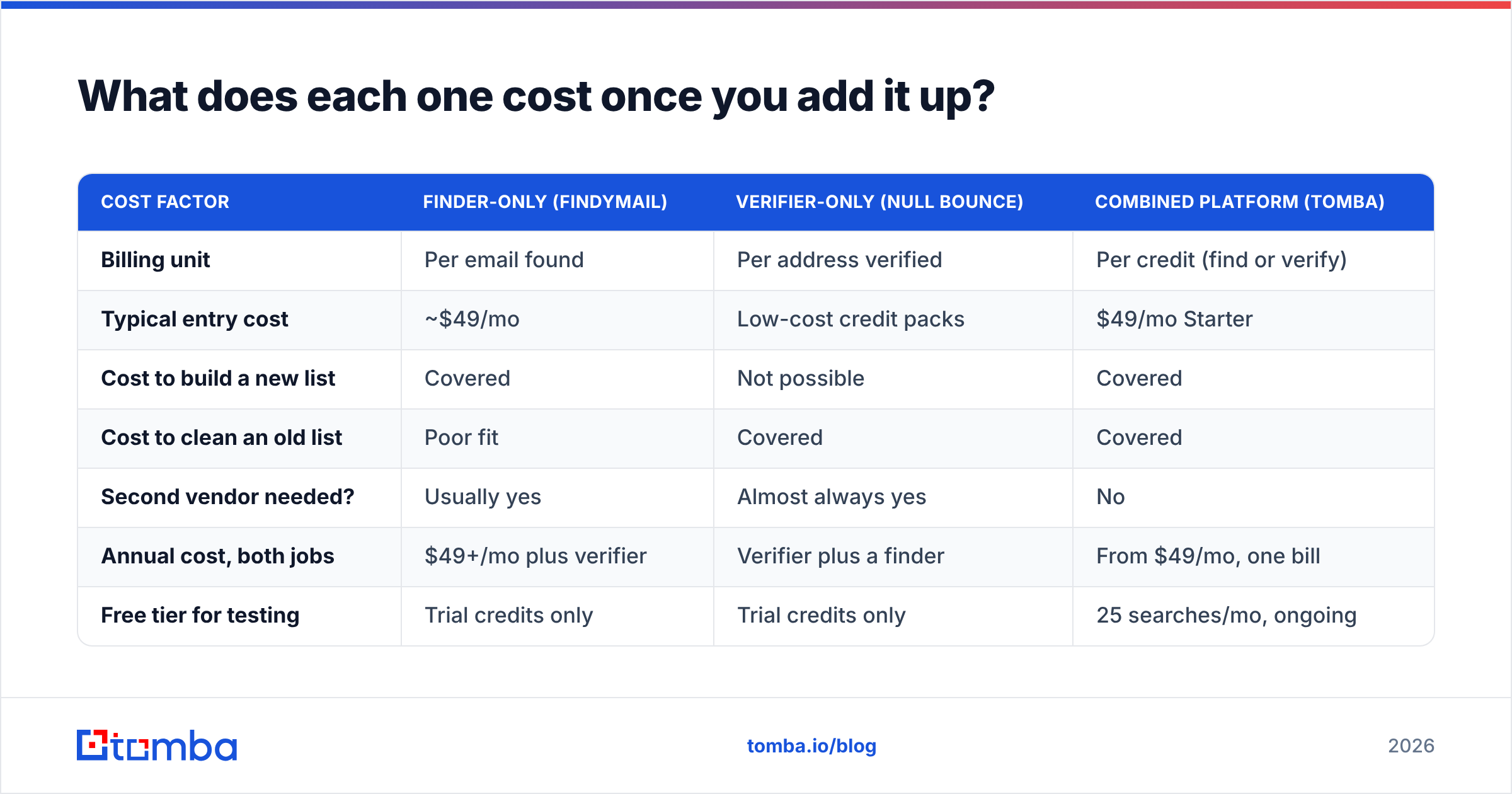
Pricing in this category is deliberately hard to compare because the units differ: Findymail bills per found email, verifiers bill per address checked, and platform tools bill per credit that covers both.
| Cost factor | Finder-only (Findymail) | Verifier-only (Null Bounce) | Combined platform (Tomba) |
|---|---|---|---|
| Billing unit | Per email found | Per address verified | Per credit (find or verify) |
| Typical entry cost | ~$49/mo | Low-cost credit packs | $49/mo Starter |
| Cost to build a new list | Covered | Not possible | Covered |
| Cost to clean an old list | Poor fit | Covered | Covered |
| Second vendor needed? | Usually yes | Almost always yes | No |
| Annual cost, both jobs | $49+/mo plus verifier | Verifier plus a finder | From $49/mo, one bill |
| Free tier for testing | Trial credits only | Trial credits only | 25 searches/mo, ongoing |
Tomba's published tiers are Free (25 searches/mo), Starter $49/mo, Growth $99/mo, Pro $249/mo, and Enterprise custom — the full breakdown lives on the Tomba pricing page. The point is not that one is cheapest per credit; it is that a two-vendor stack has a floor that a one-vendor stack does not.
Also budget for the invisible cost: two dashboards, two API keys, two rate limits, and a manual CSV shuttle between them. At ten hours a month of ops time, that is often larger than either subscription.
Do you need a finder, a verifier, or both?#
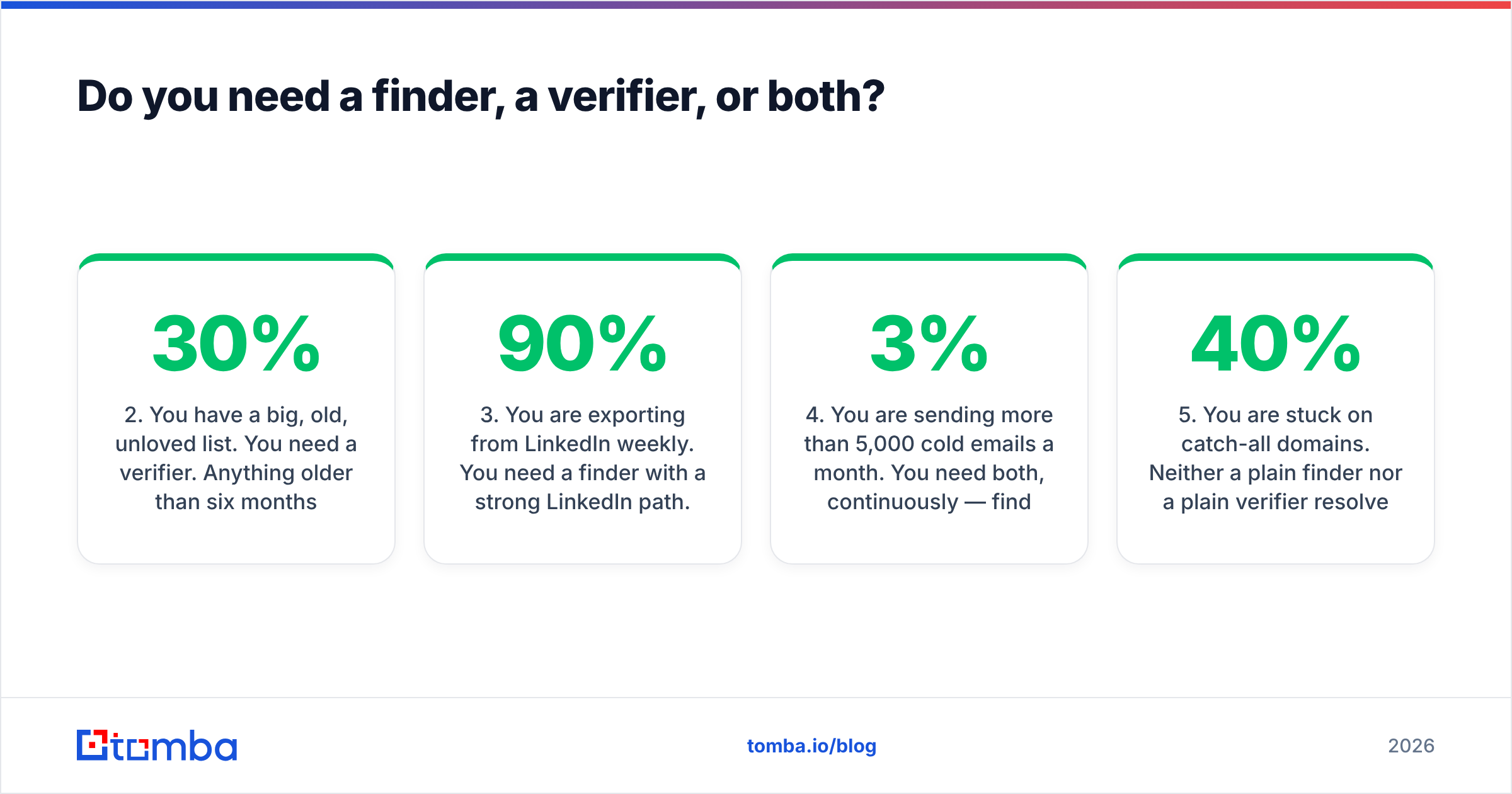
Use this as the decision rule:
- You have zero contact data. You need a finder. A verifier has nothing to work on. Start with an email finder or a domain search to build the list first.
- You have a big, old, unloved list. You need a verifier. Anything older than six months has drifted — B2B contact data decays roughly 20–30% a year through job changes alone.
- You are exporting from LinkedIn weekly. You need a finder with a strong LinkedIn path. This is Findymail's home turf, and it is worth the money if that is 90% of your motion.
- You are sending more than 5,000 cold emails a month. You need both, continuously — find, verify, then re-verify before every send. Bounce rate above 3% is where inbox placement starts collapsing.
- You are stuck on catch-all domains. Neither a plain finder nor a plain verifier resolves these well. You need a catch-all verifier that goes beyond the SMTP handshake, because catch-all domains are 20–40% of enterprise lists.
- You are enriching inside a CRM or spreadsheet. You need API and add-on coverage more than you need a marginally better hit rate. Check integration lists before pricing.

Where does Tomba fit in this comparison?#
Honestly: Tomba is the answer to "I don't want to buy two tools," not the answer to "I need the single best LinkedIn export." If Sales Navigator scraping is the whole job, Findymail is purpose-built for it and does it well.
Where a combined platform wins is everything around that one workflow:
- One credit pool covers finding and verifying, so you stop paying twice per contact.
- Domain search returns every discoverable address at a company plus the pattern, which is faster than looking people up one at a time.
- Bulk processing handles the legacy-CSV job that finder-first tools treat as an afterthought — see bulk email finder.
- Standalone verification via the email verifier means you can clean lists you sourced anywhere, including from Findymail.
- Distribution everywhere — API, CLI, Chrome extension, Google Sheets, Excel, Airtable, HubSpot, Salesforce — so the data lands where your team already works.
If you are specifically evaluating a swap, the Findymail alternative breakdown covers the migration details.
What is the verdict on Findymail vs Null Bounce?#
There is no single winner because they are not playing the same game.
- Choose Findymail if your bottleneck is finding contacts, your motion runs through LinkedIn, and you want the vendor to eat the cost of unverifiable results.
- Choose Null Bounce if you already have volume and your bottleneck is list hygiene — and verify its current pricing and accuracy claims directly, since it is a smaller vendor with less public track record than the category leaders.
- Choose neither, and consolidate, if you are doing both jobs monthly. Two subscriptions plus manual CSV handoffs is the most expensive way to solve a problem one tool already solves.
The measurable outcome to optimise is cost per landed reply, not cost per credit. Run the 200-row test above, send the real campaign, and let your own bounce log pick the winner.
Ready to stop paying two vendors for one workflow? Start with the Tomba Email Finder on the free tier — 25 searches a month, no card — and run your control list against it before you renew anything. Find, verify, and resolve catch-alls on the same credits, from $49/mo when you outgrow free.
Related guides#
Ready to find emails that actually work?
Join 150,000+ professionals who stopped guessing and started sending. Free credits on signup — no credit card required.
Get the Tomba newsletter
Practical outbound tactics and product updates — once every two weeks.
About the author