Findymail vs Salesbot (2026): Which One Should You Buy?
Findymail finds and verifies B2B email addresses. Salesbot automates the conversation after the contact exists. Here is the honest breakdown of which one your outbound motion actually needs in 2026 — and when you need neither.
TL;DR
- Findymail is a contact-data tool: it finds and verifies B2B email addresses so your sequences have somewhere to land. Salesbot is a conversation tool: an AI/rule-driven bot that handles replies, chat, and routing after a contact already exists.
- Comparing them head-to-head is like comparing a well to a faucet. Most teams that ask "Findymail vs Salesbot" actually need both layers — or a single provider that covers the data layer more cheaply.
- Findymail's published pricing starts around $49/mo and scales by credits, which gets expensive fast once you go past a few thousand lookups a month.
- Salesbot-style tools are usually bundled into a CRM seat (Kommo's Salesbot is the best-known example) rather than sold standalone, so the real cost is per-user, not per-credit.
- If your bottleneck is "I don't have enough verified contacts," fix the data layer first. Bots amplify whatever list you feed them — including a bad one.
What Are Findymail and Salesbot, Exactly?#
They live on different floors of the same building.
Findymail (findymail.com) is a B2B email-finding and verification service. You give it a name plus a company domain, a LinkedIn URL, or a Sales Navigator export, and it returns a business email address with a verification status attached. Its main selling point has always been the verification step: Findymail markets itself around not returning addresses it cannot confirm, which keeps bounce rates low at the cost of lower raw coverage.
Salesbot is a different animal, and the name is genuinely ambiguous — which is part of why this comparison confuses people. The best-known product carrying the name is Kommo's Salesbot, a no-code conversational bot builder inside the Kommo CRM that answers inbound messages across WhatsApp, Instagram, Telegram, and web chat, qualifies the person, and pushes the lead into a pipeline stage. Other vendors ship things called "salesbot" or "AI SDR bot" with roughly the same job description: automate the back-and-forth, not the sourcing.
So the honest framing of Findymail vs Salesbot is this:
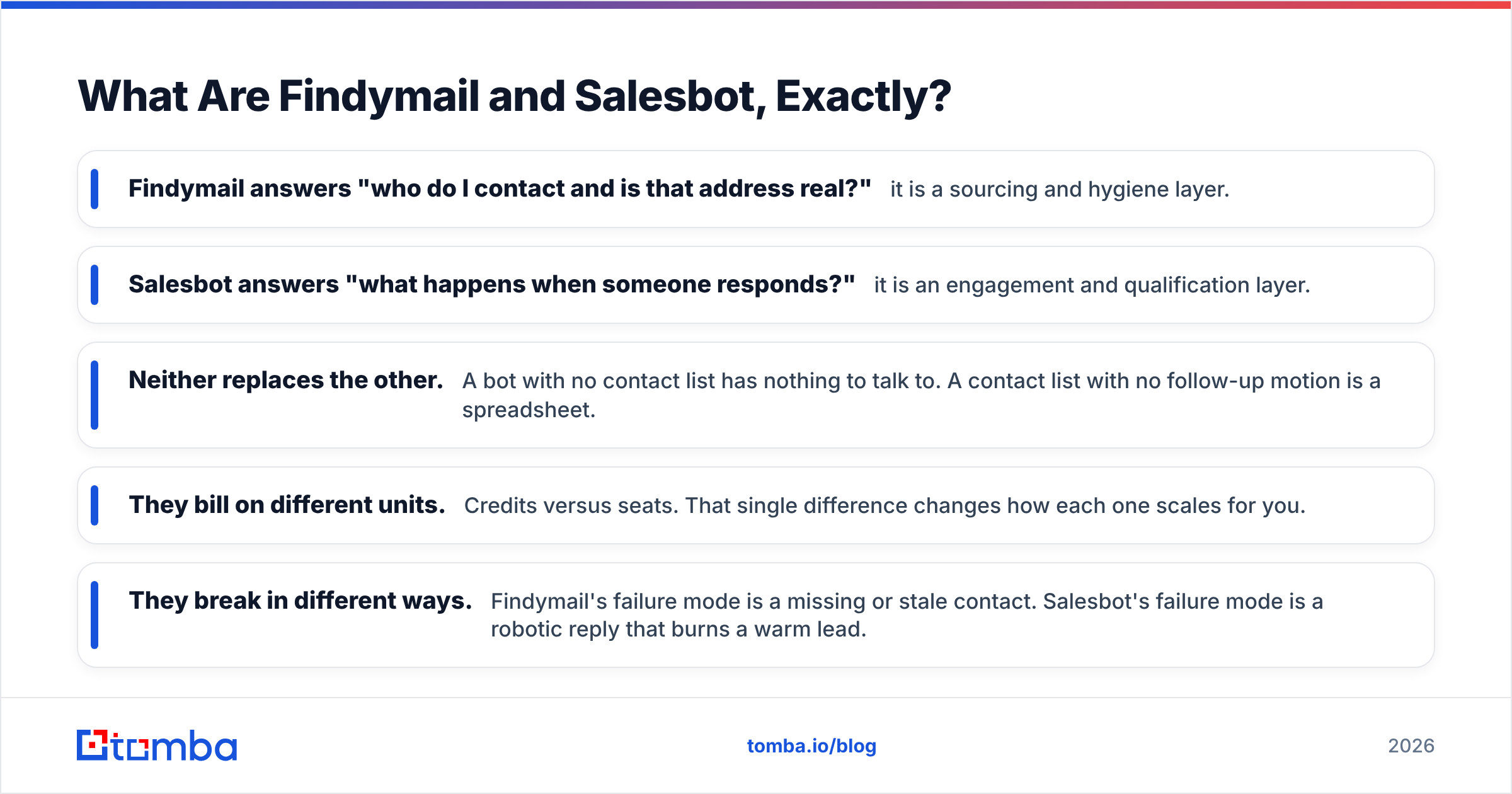
- Findymail answers "who do I contact and is that address real?" — it is a sourcing and hygiene layer.
- Salesbot answers "what happens when someone responds?" — it is an engagement and qualification layer.
- Neither replaces the other. A bot with no contact list has nothing to talk to. A contact list with no follow-up motion is a spreadsheet.
- They bill on different units. Credits versus seats. That single difference changes how each one scales for you.
- They break in different ways. Findymail's failure mode is a missing or stale contact. Salesbot's failure mode is a robotic reply that burns a warm lead.
Findymail vs Salesbot: How Do They Compare Head-to-Head?#
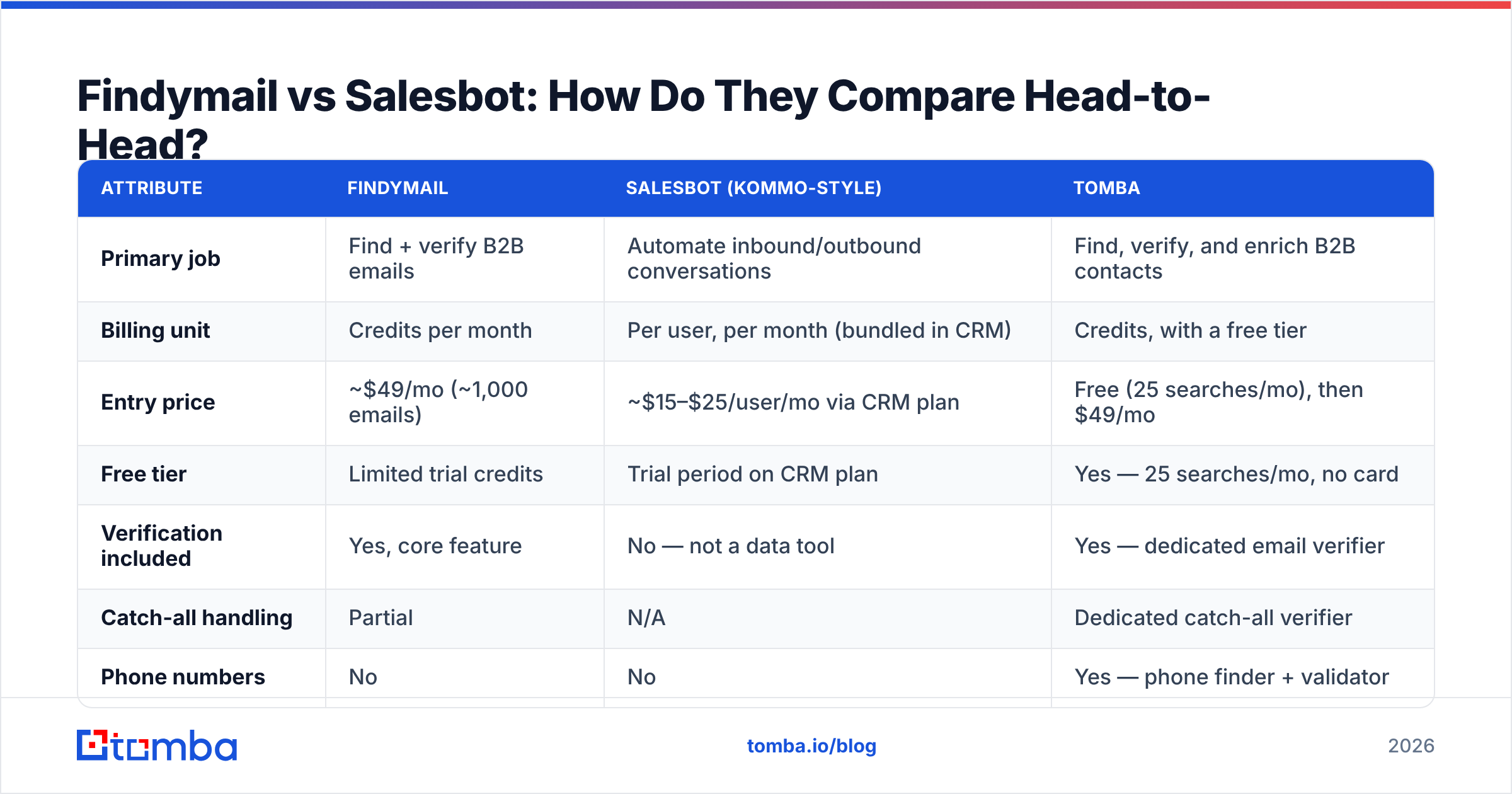
Here is the practical side-by-side. Prices reflect publicly listed plans at the time of writing — always confirm on the vendor's own pricing page before you commit, because both categories reprice frequently.
| Attribute | Findymail | Salesbot (Kommo-style) | Tomba |
|---|---|---|---|
| Primary job | Find + verify B2B emails | Automate inbound/outbound conversations | Find, verify, and enrich B2B contacts |
| Billing unit | Credits per month | Per user, per month (bundled in CRM) | Credits, with a free tier |
| Entry price | ~$49/mo (~1,000 emails) | ~$15–$25/user/mo via CRM plan | Free (25 searches/mo), then $49/mo |
| Free tier | Limited trial credits | Trial period on CRM plan | Yes — 25 searches/mo, no card |
| Verification included | Yes, core feature | No — not a data tool | Yes — dedicated email verifier |
| Catch-all handling | Partial | N/A | Dedicated catch-all verifier |
| Phone numbers | No | No | Yes — phone finder + validator |
| Bulk enrichment | Yes (CSV) | No | Yes — bulk finder and verifier |
| API access | Yes | Webhooks/CRM API | Yes — full REST API, CLI, MCP |
| Best for | Founders and small teams doing LinkedIn-led outbound | Inbound-heavy teams on chat channels | Teams that need one data layer across finding, verifying, and enriching |
The table makes the real decision obvious: if the row you care about is "find emails," Salesbot is not in the running at all. If the row you care about is "reply to WhatsApp leads at 2am," Findymail is not in the running. The overlap is close to zero.
What Does Findymail Actually Do Well?#
Findymail earns its reputation on three things.
Bounce discipline. It verifies before it returns. If your cold email domain has already been through one blacklisting incident, a provider that says "no result" instead of guessing is worth real money. A 1% bounce rate versus a 6% bounce rate is the difference between a healthy sending domain and a dead one — Google and Yahoo's bulk sender requirements made that unforgiving.
LinkedIn and Sales Navigator workflows. Findymail's export tooling for Sales Navigator lists is genuinely convenient. You build a list in Navigator, export, and get enriched contacts back without stitching three tools together. If your entire prospecting motion begins in LinkedIn, that is a real time saver.
Simplicity. There is no bloated platform to learn. It does one job.
The trade-offs are equally clear. Coverage is deliberately conservative, so you will get fewer results per 100 prospects than a broader provider — you pay for that precision in list size. Credits are consumed quickly at scale, and the jump from the entry tier to mid tiers is steep. And it stops at email: no phone numbers, no firmographic enrichment, no visitor identification. Most teams end up buying a second data tool within a year, which is the exact moment the per-credit math stops looking cheap.
If you have already hit that wall, it is worth reading our breakdown of what a Findymail alternative needs to cover before you migrate.
What Does Salesbot Actually Do Well?#
Salesbot-class tools shine in one specific scenario: you have more inbound conversations than humans to handle them.
A bot that instantly answers a WhatsApp inquiry, asks three qualifying questions, checks a calendar, and drops the lead into the right pipeline stage will beat a human rep who replies four hours later. Speed-to-lead research has been consistent on this for over a decade — response within five minutes dramatically outperforms response within an hour. A bot never sleeps and never takes Friday off.
Where these tools disappoint is outbound. A conversational bot cannot source a prospect, cannot tell you whether an address is deliverable, and cannot enrich a company record. Feed it a list of 5,000 guessed email patterns and it will faithfully burn your sending reputation at machine speed. That is the core asymmetry in the Findymail vs Salesbot debate: automation multiplies your data quality, in whichever direction that quality points.
The second disappointment is tone. Buyers in 2026 are extremely good at spotting a bot. If your Salesbot handles the first three messages of a high-ACV enterprise conversation, you have optimised for response time and lost on trust. Use bots where volume is high and deal size is low; use humans where the reverse is true.
How Much Does Each One Really Cost?#
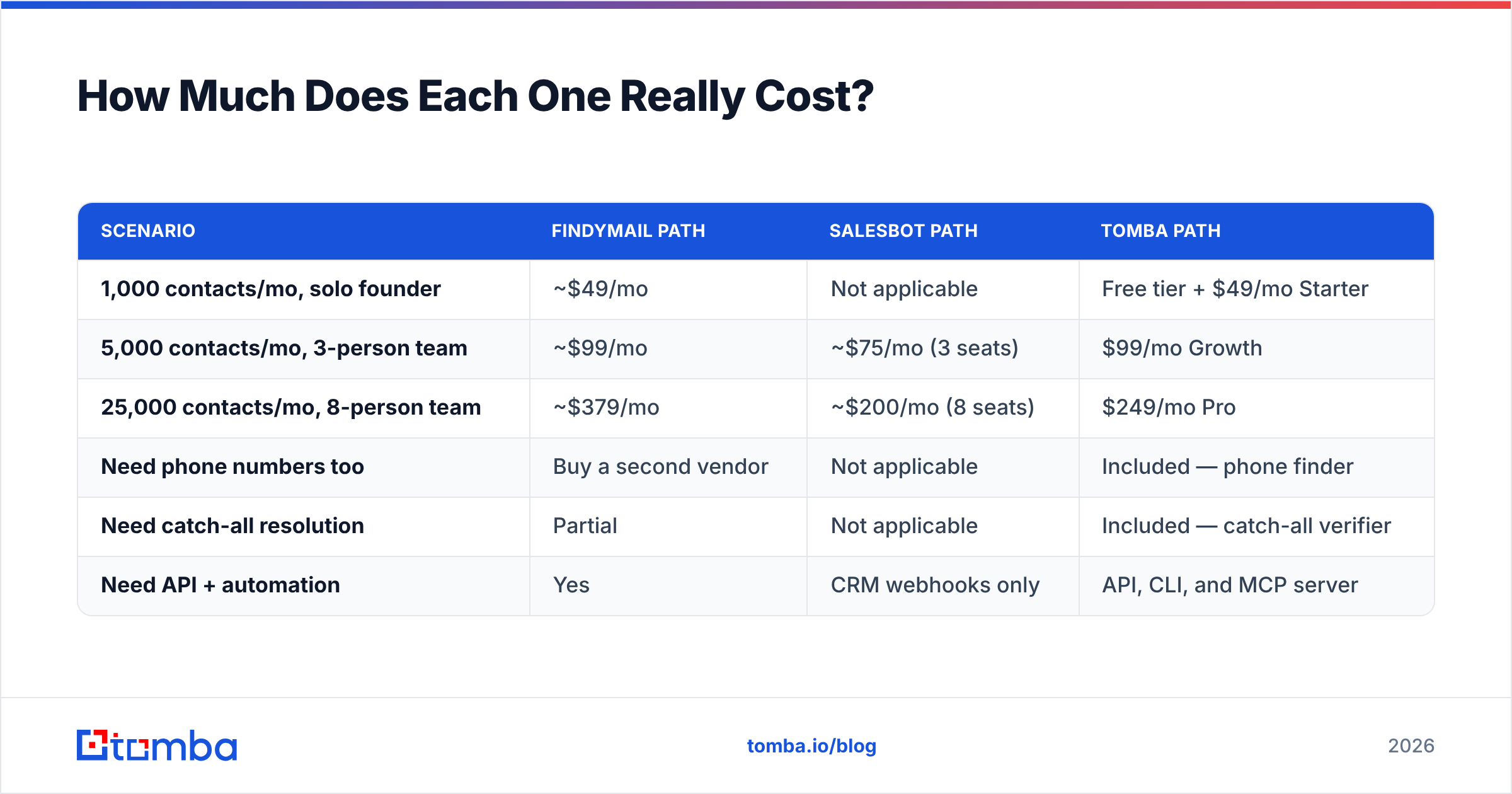
The sticker price is not the cost. The cost is price divided by usable output.
| Scenario | Findymail path | Salesbot path | Tomba path |
|---|---|---|---|
| 1,000 contacts/mo, solo founder | ~$49/mo | Not applicable | Free tier + $49/mo Starter |
| 5,000 contacts/mo, 3-person team | ~$99/mo | ~$75/mo (3 seats) | $99/mo Growth |
| 25,000 contacts/mo, 8-person team | ~$379/mo | ~$200/mo (8 seats) | $249/mo Pro |
| Need phone numbers too | Buy a second vendor | Not applicable | Included — phone finder |
| Need catch-all resolution | Partial | Not applicable | Included — catch-all verifier |
| Need API + automation | Yes | CRM webhooks only | API, CLI, and MCP server |
Two things fall out of this. First, seat-based pricing and credit-based pricing cross over at different team sizes — a 12-person team on a bot pays more than a 2-person team, while credit tools do not care how many people log in. Second, the moment you need a second data capability (phones, catch-all domains, firmographics), a single-purpose email tool starts stacking subscriptions. Check the full Tomba pricing breakdown against your actual monthly volume rather than against a competitor's headline number.

Which One Fits Your Outbound Motion?#
Pick by bottleneck, not by feature count.
- You have a list problem. You know exactly who to sell to but cannot reach them. Buy a data tool — Findymail, Tomba, or a comparable provider. A bot solves nothing here.
- You have a response problem. Leads come in through chat and social DMs and go cold before a rep sees them. Buy a Salesbot-class tool inside your CRM. More contacts will not fix a response lag.
- You have both. This is most teams past ten people. Buy the data layer first — it is the input to everything downstream, and a bad list makes every other investment look broken.
- You have a deliverability problem. Bounces above 3%, spam placement climbing, replies flat. Neither tool is your answer alone; you need verification hygiene at the top and a warmed sending domain at the bottom. Run your existing list through an email verifier before you buy anything new.
- You have a coverage problem. You are finding 40% of your target accounts and want 70%. That is a data-source question. Look at how each vendor sources and refreshes contacts, and test both against the same 200-row control list before signing.
- You have a routing problem. Data is fine, replies are fine, but leads sit unassigned. That is CRM configuration, not a purchase.
The single most useful exercise: take 200 real prospects from your ICP, run them through each candidate tool, and measure two numbers — match rate and bounce rate on send. Vendor-published accuracy claims are marketing. Your control list is evidence. Independent review aggregators like G2 are useful for spotting recurring complaints, but they will not tell you how a tool performs on your specific vertical.
Is There a Better Way to Cover Both Layers?#
For the data half of the stack, the answer for most teams is consolidation.
Findymail does email finding well and nothing else. Salesbot does conversation well and nothing else. That leaves you assembling three or four subscriptions to cover finding, verifying, catch-all resolution, phone numbers, and enrichment — each with its own credit pool that you never fully consume.
Tomba collapses the data layer into one account. The email finder handles name-plus-domain lookups and bulk jobs; domain search pulls every public address at a company; the catch-all verifier resolves the domains that most tools return as "unknown"; the phone finder adds mobile numbers for multichannel sequences. Everything is reachable through the same Tomba API, a CLI, and an MCP server if your team is wiring agents into the workflow — so the same credits serve the Chrome extension, your Google Sheet, and your production enrichment job.
To be fair to both tools in this comparison: if your entire motion is 500 Sales Navigator exports a month and you already love the workflow, Findymail is a perfectly reasonable purchase. And if you are drowning in inbound WhatsApp chats, a Salesbot inside your CRM will pay for itself in a quarter. The mistake is buying one expecting it to do the other's job.
What Should You Do Next?#
Start where the leverage is. Verified contacts are the input to every sequence, every bot conversation, and every pipeline forecast you build on top of them — get that layer right and everything downstream gets easier. Get it wrong and you are automating waste.
Run your next 25 prospects through the Tomba Email Finder on the free tier, compare the match rate and bounce rate against whatever you use today, and let the numbers pick your stack. No card required, and if the results do not beat your current tool, you have lost nothing but ten minutes.
Related guides#
Ready to find emails that actually work?
Join 150,000+ professionals who stopped guessing and started sending. Free credits on signup — no credit card required.
Get the Tomba newsletter
Practical outbound tactics and product updates — once every two weeks.
About the author