Findymail vs Snappy Leads (2026): Which Email Finder Wins?
Findymail and Snappy Leads both promise verified B2B emails from LinkedIn and domains. We break down credits, accuracy, exports, and API depth — plus when a third option is the cheaper call.
Findymail vs Snappy Leads is a choice about how you build lists, not about which brand looks better. One is a full platform. The other is a fast browser extension. Here is the short version.
TL;DR
- Findymail is the more mature, more integrated tool: strong LinkedIn and Sales Navigator list enrichment, a real API, native CRM and sequencer connections, and a bounce guarantee on verified results.
- Snappy Leads is the lighter, cheaper entry point: a Chrome extension plus bulk search, aimed at solo founders and small SDR teams who want contacts fast without a platform commitment.
- On credit economics, both charge per successful find — but the differences show up in what counts as "successful," whether verification burns extra credits, and what happens to catch-all domains.
- If your workflow is domain-first (find everyone at 300 target companies) rather than LinkedIn-first, neither is the obvious pick — a domain search tool with a proper API usually costs less per usable contact.
- Test both on the same 100-row list. Aggregate accuracy claims mean nothing until they're run against your ICP, your geography, and your company-size band.
Findymail vs Snappy Leads: what are these tools?#
Both are B2B email-finding tools. You give them a person and a company, they return a business email address, and they charge you a credit when they find one.
Think of it like two locksmiths on the same street. One has a big van, a full key-cutting rig, and a receptionist who books you into your calendar app. The other works out of a backpack, gets to your door in ten minutes, and charges less. Neither is wrong — you're choosing based on how many doors you need opened per month and whether you want the paperwork handled.
Findymail launched with a specific promise: emails that don't bounce. Its pitch centres on verified-only delivery, native exports from LinkedIn Sales Navigator lists and Apollo searches, and integrations that push contacts straight into Lemlist, Instantly, Smartlead, HubSpot, and Pipedrive. It has an API, a Zapier presence, and a credit model where you're charged only for emails it actually finds.
Snappy Leads positions itself further down-market: a browser extension that reveals emails and phone numbers on LinkedIn profiles, plus bulk search and enrichment. The value proposition is speed and price — get contacts without onboarding a full sales-intelligence platform.
The overlap is large. The differences that matter are credit accounting, catch-all handling, export freedom, and how deep the API goes.
Findymail vs Snappy Leads: features and price compared#
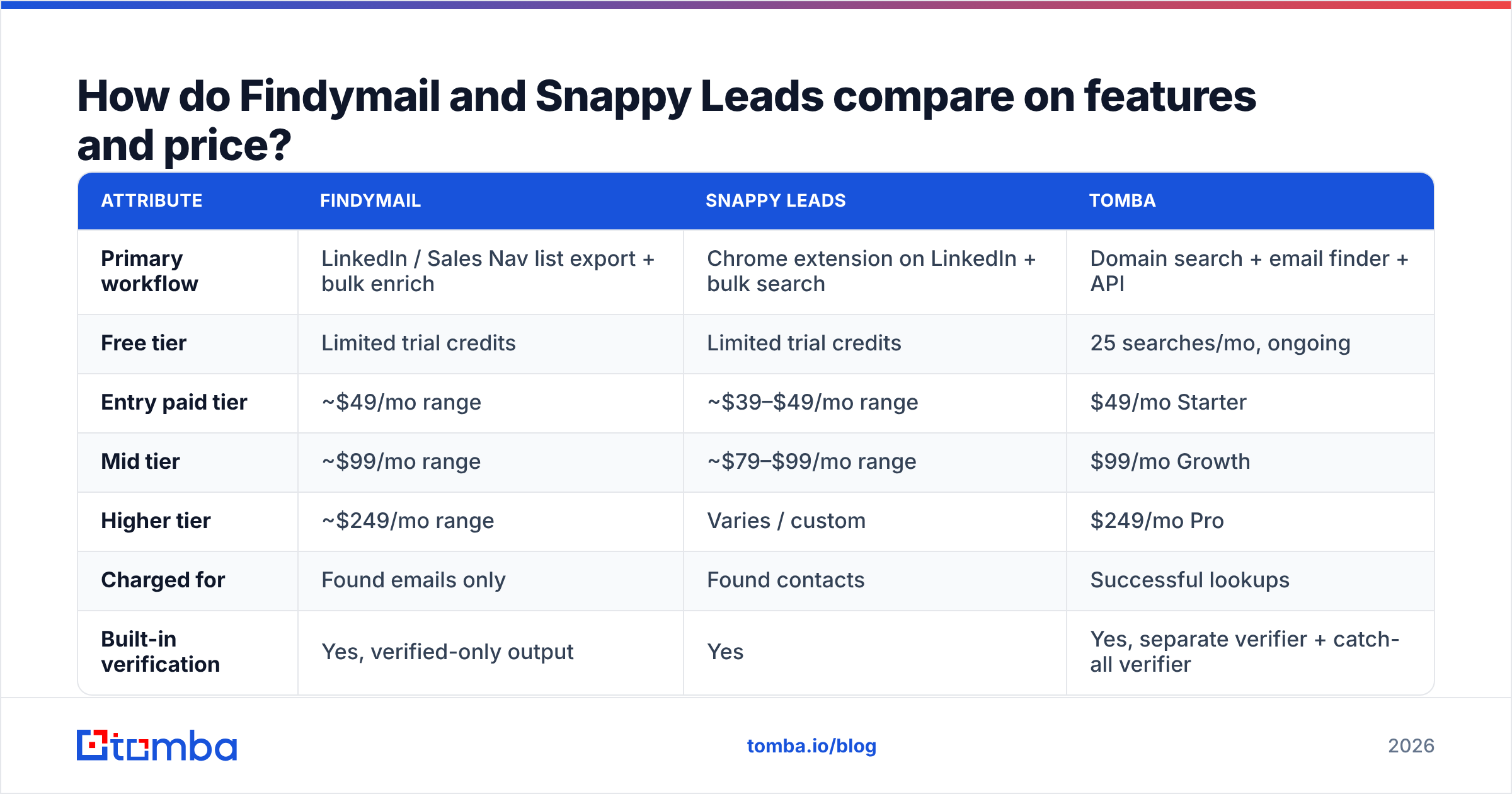
Pricing changes often in this category. Treat the table below as a structural comparison. Check the current numbers on each vendor's pricing page before you buy. Entry tiers cluster around $39–$99 a month and shift every quarter.
| Attribute | Findymail | Snappy Leads | Tomba |
|---|---|---|---|
| Primary workflow | LinkedIn / Sales Nav list export + bulk enrich | Chrome extension on LinkedIn + bulk search | Domain search + email finder + API |
| Free tier | Limited trial credits | Limited trial credits | 25 searches/mo, ongoing |
| Entry paid tier | ~$49/mo range | ~$39–$49/mo range | $49/mo Starter |
| Mid tier | ~$99/mo range | ~$79–$99/mo range | $99/mo Growth |
| Higher tier | ~$249/mo range | Varies / custom | $249/mo Pro |
| Charged for | Found emails only | Found contacts | Successful lookups |
| Built-in verification | Yes, verified-only output | Yes | Yes, separate verifier + catch-all verifier |
| Phone numbers | Limited / partner data | Yes | Yes, phone finder + validator |
| Public API | Yes | Limited | Yes, full REST API + CLI + MCP |
| Spreadsheet add-ins | CSV workflows | CSV workflows | Google Sheets, Excel, Airtable |
| Best for | SDR teams running LinkedIn lists | Solo founders, small teams | Domain-first prospecting and dev-driven pipelines |
The row that decides most purchases is "charged for." A tool that bills only on a successful find sounds generous. But the word "successful" is doing heavy lifting. Say a catch-all domain returns a guessed address marked "risky" and you still get billed. Your real cost per usable contact can be double the sticker rate.

Which one is more accurate?#
Neither vendor's headline accuracy number should change your decision on its own. Here's why.
Every email finder publishes a hit rate and a bounce rate. Both come from the vendor's own sample. That sample leans toward the segments where the tool is strong: US and Western European SaaS firms with 50–500 staff, high LinkedIn use, and simple email patterns like first@ or first.last@. Run the same tool against Japanese manufacturers, German Mittelstand firms, or US health systems and the hit rate drops hard.

What actually drives accuracy differences between tools:
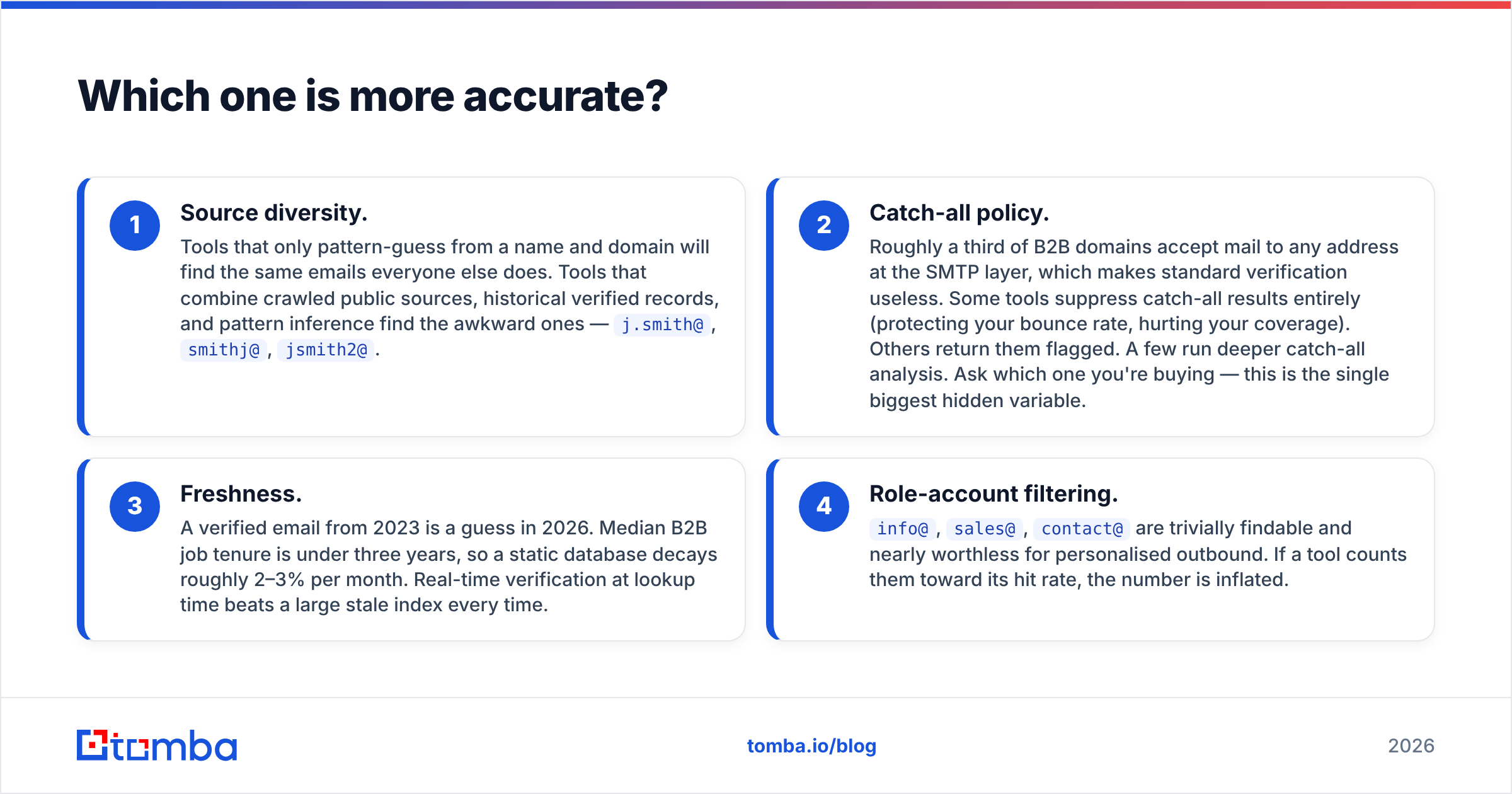
- Source diversity. Tools that only pattern-guess from a name and domain will find the same emails everyone else does. Tools that combine crawled public sources, historical verified records, and pattern inference find the awkward ones —
j.smith@,smithj@,jsmith2@. - Catch-all policy. About a third of B2B domains accept mail to any address, which makes normal verification useless. Some tools hide catch-all results, protecting your bounce rate but cutting your coverage. Others return them with a flag. A few dig deeper. Ask which one you are buying — this is the biggest hidden variable in the category.
Two more factors decide the rest:
- Freshness. A verified email from 2023 is a guess in 2026. Median B2B job tenure is under three years, so a static database decays roughly 2–3% per month. Real-time verification at lookup time beats a large stale index every time.
- Role-account filtering.
info@,sales@,contact@are trivially findable and nearly worthless for personalised outbound. If a tool counts them toward its hit rate, the number is inflated.
Findymail leans on point 2. It returns verified emails only, and that is the core of its bounce guarantee. The trade-off is coverage: fewer results per list, but safer ones to mail. Snappy Leads is more permissive. It returns more rows with more risk attached, which suits people who run their own verification pass anyway.
Want to see that catch-all layer in practice? A dedicated catch-all verifier tells you whether a domain is truly accept-all or just set up badly. That one distinction is worth more than any vendor's accuracy chart.
How should you actually run the comparison?#
Do not trust anyone's benchmark, including this article's framing. Run your own in about two hours.
- Build a control list of 100 contacts. Pull them from closed-won accounts or people you've already emailed successfully. You know the ground-truth answer for every row, which is the entire point.
- Strip the emails out. Leave first name, last name, company domain, and LinkedIn URL.
- Run the identical file through each tool on its free tier or trial. Same rows, same order, same day.
- Score four numbers per tool: hit rate (rows returned), precision (returned emails that match ground truth), catch-all share (rows flagged risky), and credits consumed.
- Compute cost per verified correct email, not cost per credit. Take the monthly price and divide by correct results at your observed rates. That number is often 2–4x the advertised per-credit cost, and it is the only figure that maps to your CAC.
- Repeat with a hard list — 50 contacts outside your usual geography or industry. This is where tools separate.
That last step exposes more than any feature matrix. A tool that scores 78% on your comfortable segment and 31% on your expansion segment is a tool you'll outgrow the moment you move upmarket or into a new region.
Is Findymail better than Snappy Leads for LinkedIn prospecting?#
For LinkedIn-native workflows, Findymail is the stronger product — and the price difference reflects it.
The concrete advantages: bulk export from Sales Navigator searches without manual scraping, integrations that hand off directly to Lemlist, Instantly, and Smartlead, and an API that lets you wire enrichment into your own stack. If your SDRs live inside Sales Navigator and your sequencer is one of the big three, Findymail removes real steps from the day.
Snappy Leads wins on friction and price at the individual level. A founder doing 30 targeted touches a week doesn't need a bulk pipeline; they need a browser extension that surfaces an email while they're already reading the profile. Paying triple for orchestration you won't use is a bad trade.
Both tools share one structural weakness: LinkedIn-first prospecting caps your coverage at whoever keeps a LinkedIn profile. In North American tech, that is almost everyone. In manufacturing, logistics, European mid-market, and most of APAC, LinkedIn use drops sharply. A profile-driven tool then has nothing to return.
That's the case for keeping a domain search tool in the stack alongside either one. Feed it a company domain and it returns the email addresses associated with that organisation plus the detected naming pattern, no profile required. For account-based motions where you're targeting 200 named companies rather than 2,000 named people, domain-first is faster and cheaper per contact.

What do real users say, and where do both tools fall short?#
Cross-check both on G2 before you buy. The gap in review volume alone tells you something: Findymail has far more reviews than Snappy Leads, and a longer public track record.
Recurring complaints across the category, both tools included:
- Credits expiring monthly. Unused credits usually vanish at renewal. If your prospecting is lumpy — heavy in Q1, light in Q3 — you're paying for capacity you can't bank.
- Coverage cliffs outside the US and Western Europe. Almost universal in this category and rarely disclosed up front.
- Catch-all ambiguity. Results marked "risky" or "unknown" still cost credits at most vendors, and buyers frequently discover this after their first invoice.
- Support latency on lower tiers. Both tools route entry-plan users to email-only support; response times stretch during busy periods.
- Export restrictions. Some plans throttle CSV export volume or gate API access behind higher tiers, which matters if you're building anything programmatic.
None of these are dealbreakers. They're the reason you run the 100-row test before you sign an annual contract.
Is there a better-value alternative for 2026?#
Depends entirely on where your prospecting starts.
If you start from a LinkedIn list, Findymail is well-matched and Snappy Leads is the budget version of the same idea. Pick based on volume and whether you need the sequencer integrations.
If you start from a company list — a target account list, a conference attendee export, a set of domains from a funding database — a domain-first email finder will beat both on cost per contact, because it isn't paying a scraping tax to reach the profile first.

This is where Tomba fits into the comparison honestly. It is built domain-first rather than profile-first. Give it a company domain and a name, and it resolves the address from the detected company pattern plus its own verified records, then runs verification before returning a result.
The free tier is 25 searches a month, ongoing — not a 7-day trial. So a 100-row control test costs you nothing across four sessions. Paid plans start at $49/mo (Starter), $99/mo (Growth), and $249/mo (Pro), with Enterprise pricing on request.
Four things set it apart from both tools here. A full REST API, plus CLI and MCP server access, on standard plans rather than enterprise-only. Native Google Sheets and Excel add-ins for people who never leave a spreadsheet. A standalone email verifier so you can clean lists sourced from anywhere. And explicit catch-all handling instead of a silent flag.
If you're weighing Findymail on its own, the Findymail alternative breakdown covers the migration path in more detail.
What Tomba doesn't do: it's not a Sales Navigator list-export machine. If your entire motion is "scrape a Sales Nav search, enrich, sequence," Findymail's native handoff is smoother, and that's worth paying for.
Which should you choose?#
Run the Findymail vs Snappy Leads decision in one pass:
- Sales Nav lists are your primary input, team of 3+, sequencer already chosen → Findymail.
- Solo or two-person team, under 500 lookups a month, price-sensitive → Snappy Leads.
- Account-based motion, domain lists, or you're wiring enrichment into your own product or CRM via API → a domain-first finder like Tomba.
- Non-US, non-tech, or heavily catch-all target market → test all three on the hard list before committing to any of them, because coverage will decide this, not features.
The mistake to avoid is buying on the advertised per-credit price. Two tools at $0.03 a credit can differ by 3x in real cost. Role accounts, catch-all rows, wrong-person matches, and bounces that hurt your sender reputation all eat into the number. Cost per usable, verified, correct contact is the only metric worth tracking.
Get the comparison data yourself#
Build the 100-row control list, run it through all three, and score cost per verified correct email. Two hours of work, and you'll never have to read another vendor comparison for this category again.
Start with the Tomba Email Finder — the 25 free monthly searches are enough to score a meaningful sample of your own list before you spend anything, and the same account gives you access to domain search, verification, and the API so you can test the whole workflow rather than one endpoint.
Related guides#
Ready to find emails that actually work?
Join 150,000+ professionals who stopped guessing and started sending. Free credits on signup — no credit card required.
Get the Tomba newsletter
Practical outbound tactics and product updates — once every two weeks.
About the author