Findymail vs Startup Tracker: Which B2B Data Tool Wins in 2026?
Findymail finds verified emails for accounts you already picked. Startup Tracker tells you which startups just raised. Here is which one actually belongs in your stack in 2026 — and when you need both.
TL;DR
- Findymail is an email-finding and verification tool. Startup Tracker is a funding-and-company-signal database. They are not the same category, and most "vs" pages get this wrong.
- Buy Startup Tracker (or a similar signal feed) if your bottleneck is who to contact. Buy Findymail if your bottleneck is how to reach them.
- Findymail's pitch is bounce-guaranteed verification and Sales Navigator export. Startup Tracker's pitch is fresh funding rounds, headcount jumps, and tech-stack triggers.
- Priced honestly, a signal database plus a finder runs $100–$250/mo for a small team. A single unified platform with a real API — like Tomba at $49/mo Starter — often covers the finding half for less.
- The real decision is architecture, not features: do you want two narrow tools you can swap out, or one enrichment layer your CRM writes into?
What is Findymail and what does it actually do?#
Findymail is a B2B email finder built around one promise: the emails it returns will not bounce. It sits in the "prospecting data" layer of your stack — you give it a name and a company (or a LinkedIn Sales Navigator list), and it returns a verified work email.
Its most-used features in practice:
- LinkedIn and Sales Navigator export — scrape a saved search into a clean CSV with emails attached, without the usual copy-paste ritual.
- Bounce guarantee — Findymail refunds or re-credits emails that bounce, which is a commercial promise more than a technical one.
- CSV enrichment — upload a list of names + domains, get emails back in bulk.
- Native integrations — pushes into Lemlist, Instantly, HubSpot, and Zapier without a middleware layer.
- Credit-based pricing — you burn a credit per found email, not per search attempt.
What Findymail does not do: tell you which companies to target. It assumes you already have a list. That assumption is exactly where Startup Tracker enters.
What is Startup Tracker and who is it for?#
Startup Tracker is a company-signal product. Instead of answering "what's this person's email?", it answers "which companies just did something that makes them buyable?" — raised a Series A, doubled headcount in a quarter, opened a new office, or added a tool to their stack.
The typical Startup Tracker user is an SDR lead or founder selling into early-stage companies, where a funding round is the single strongest buying trigger available. If you sell recruiting services, dev shops, fractional CFO work, HR software, or infrastructure, a fresh $8M seed round is the closest thing to an intent signal you will get for free-ish money.
Its data model is company-first: rounds, investors, headcount deltas, industries, geographies. Contact data, where present, is thinner and less consistently verified than a dedicated finder's — which is normal for the category. Crunchbase and similar funding databases have the same shape: excellent on companies, uneven on individual inboxes.
Findymail vs Startup Tracker: how do they compare head to head?#
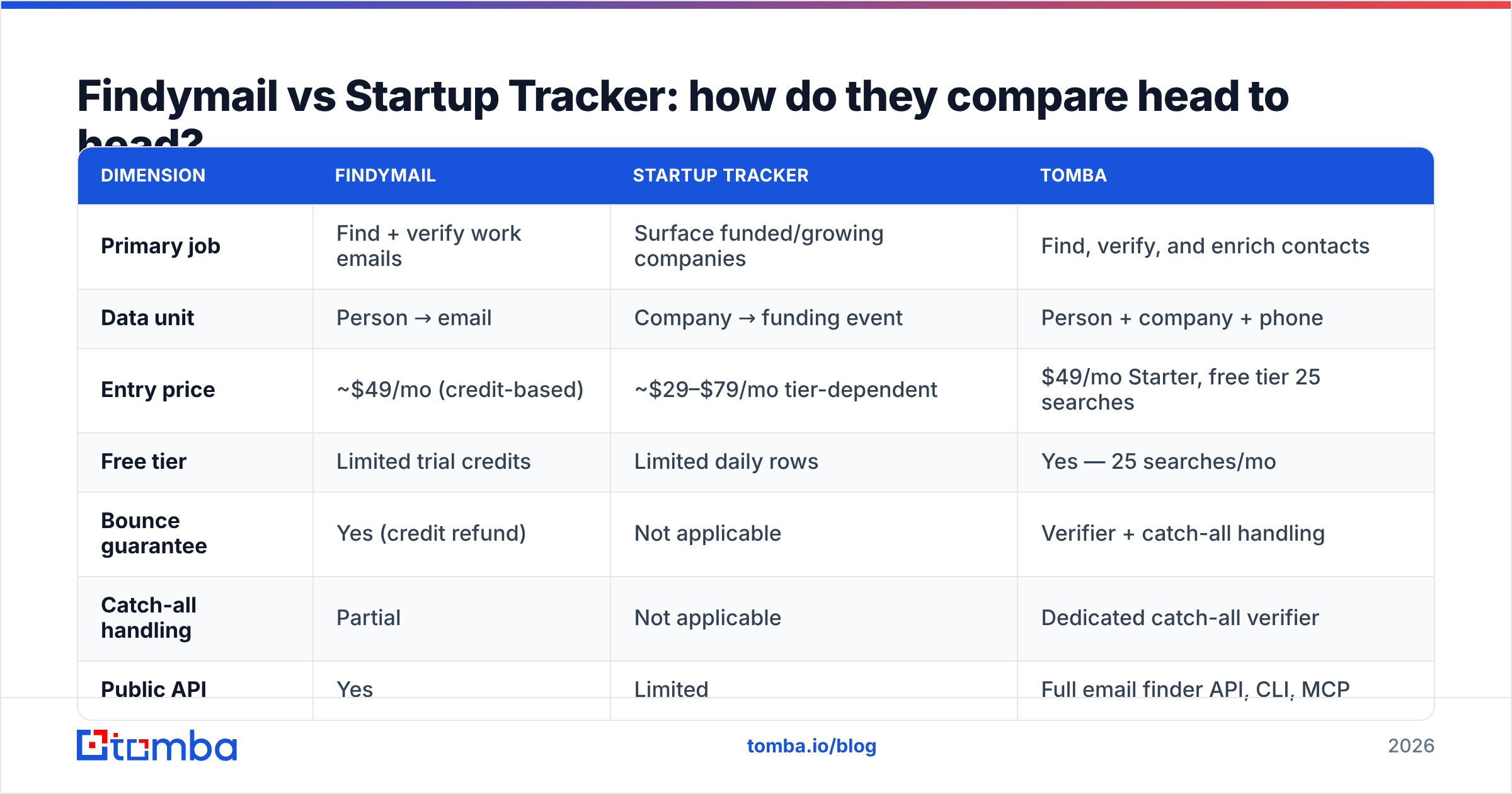
Here is the honest side-by-side. Prices move; check each vendor's page before you buy.
| Dimension | Findymail | Startup Tracker | Tomba |
|---|---|---|---|
| Primary job | Find + verify work emails | Surface funded/growing companies | Find, verify, and enrich contacts |
| Data unit | Person → email | Company → funding event | Person + company + phone |
| Entry price | ~$49/mo (credit-based) | ~$29–$79/mo tier-dependent | $49/mo Starter, free tier 25 searches |
| Free tier | Limited trial credits | Limited daily rows | Yes — 25 searches/mo |
| Bounce guarantee | Yes (credit refund) | Not applicable | Verifier + catch-all handling |
| Catch-all handling | Partial | Not applicable | Dedicated catch-all verifier |
| Public API | Yes | Limited | Full email finder API, CLI, MCP |
| LinkedIn workflow | Strong (Sales Nav export) | Weak | LinkedIn finder + extension |
| Funding/trigger data | No | Core product | Company enrichment, no funding feed |
| Best for | Reaching a known list | Building the list | Running both in one pipeline |
Read that table twice. The row that matters is "primary job." One tool builds the list, the other reaches it. Framing them as competitors is like comparing a map to a car.
Which one should you buy first?#
Buy the one that fixes your actual bottleneck. Run this diagnostic on your last 30 days of outbound:
- You have 2,000 target accounts and 400 usable emails → your bottleneck is contact data. Findymail or a finder-first platform is the buy.
- You have 90 great emails and no idea who to add next month → your bottleneck is account discovery. Startup Tracker or a funding feed is the buy.
- Your bounce rate is above 4% → stop everything and fix verification first. No amount of new accounts survives a burned sending domain. Start with an email verifier and a warmup pass.
- Your reply rate is under 1% with clean data → neither tool helps. Your problem is messaging or targeting fit, and buying data will just scale the failure.
- You already have both, and nothing connects them → your bottleneck is plumbing. An API-first layer beats a third UI.
Most teams under 10 reps guess wrong here. They buy a signal database because funding rounds feel exciting, then discover they still cannot reach the VP of Engineering at the company that just raised. The signal was never the hard part — the inbox was.
How accurate is the data on each side?#
Accuracy means different things per category, and vendors exploit the ambiguity.
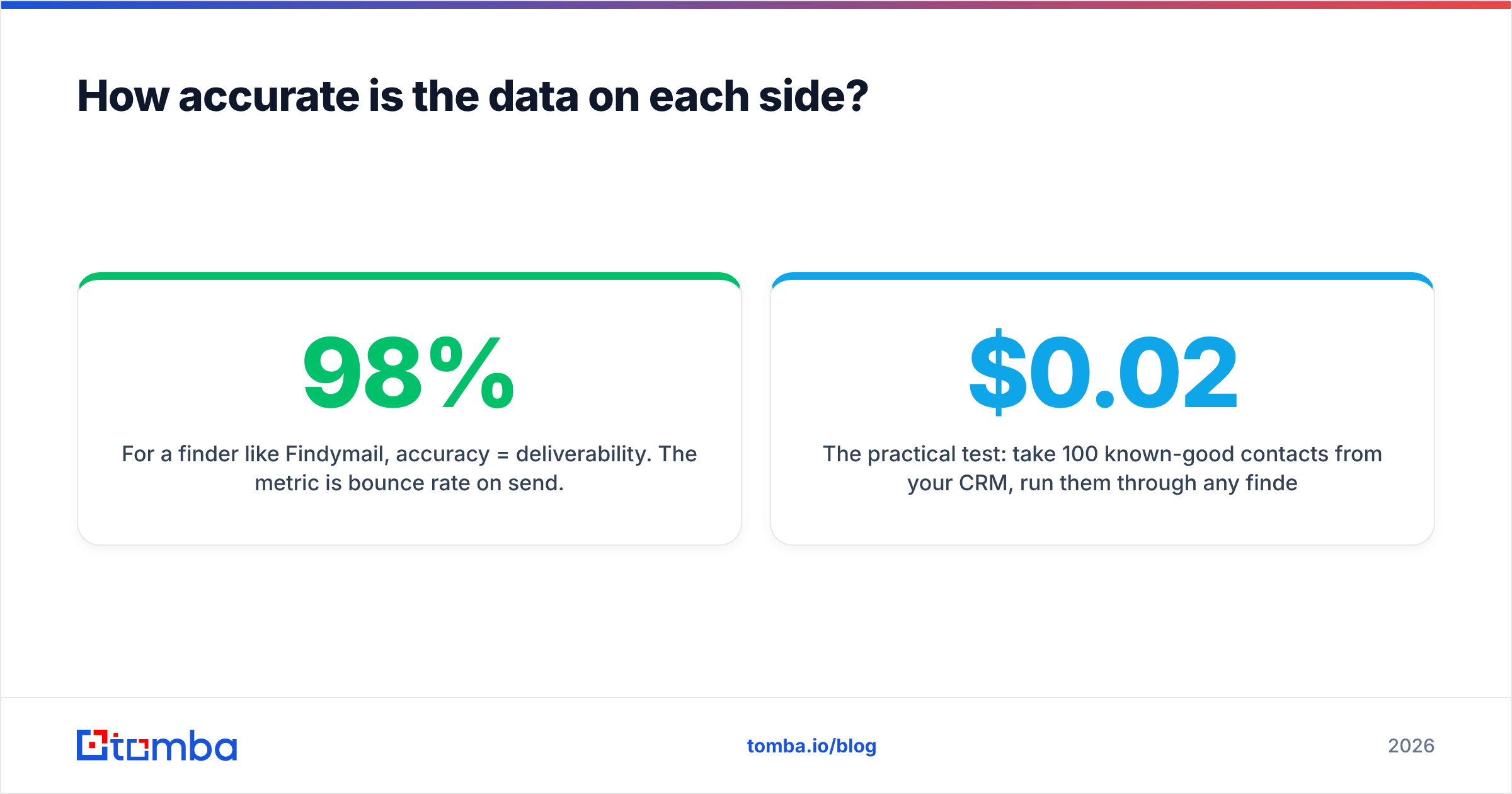
For a finder like Findymail, accuracy = deliverability. The metric is bounce rate on send. A well-run finder lands in the 95–98% deliverable range on standard corporate domains, and drops hard on catch-all domains where SMTP gives no honest answer. Anyone claiming 99%+ across all domain types is either excluding catch-alls from the denominator or guessing patterns and calling it verified.
For a signal database like Startup Tracker, accuracy = freshness and completeness. Did the Series B show up within 48 hours of the announcement, or three weeks later when every competitor already emailed? Is the headcount number pulled live or cached from last quarter? A funding database that is 10 days stale is worth roughly nothing in a market where 40 vendors watch the same TechCrunch feed.

The practical test: take 100 known-good contacts from your CRM, run them through any finder, and measure three numbers — found rate, bounce rate, and cost per deliverable email. That last one is the only number that matters, and it is almost never the one on the pricing page. A tool at $0.02/credit with a 55% found rate is more expensive than one at $0.04/credit with a 90% found rate.
For a fuller methodology on where contact data comes from and why sources differ, see where Tomba gets data.
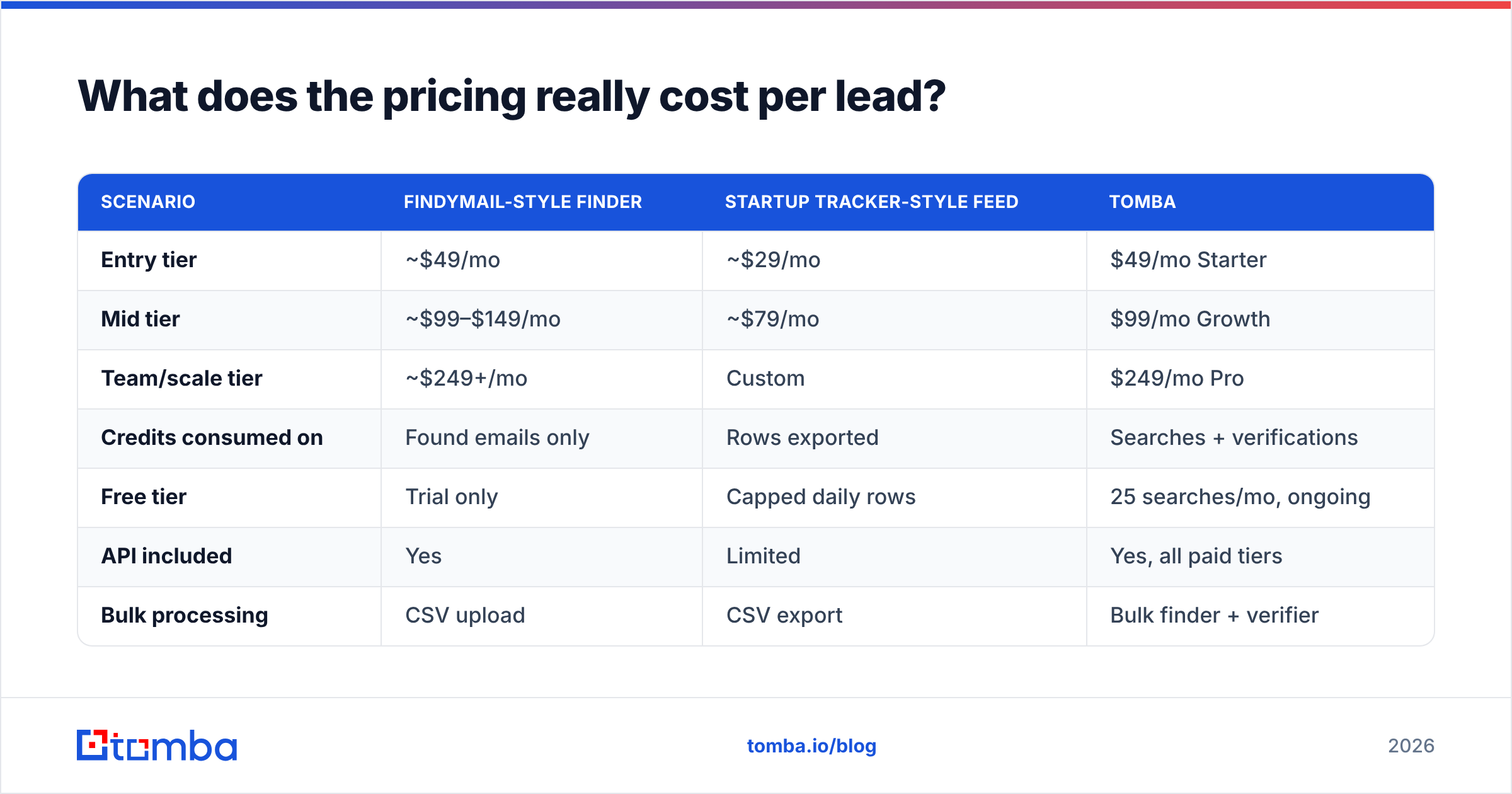
What does the pricing really cost per lead?#
Credit math is where "cheap" tools get expensive.
| Scenario | Findymail-style finder | Startup Tracker-style feed | Tomba |
|---|---|---|---|
| Entry tier | ~$49/mo | ~$29/mo | $49/mo Starter |
| Mid tier | ~$99–$149/mo | ~$79/mo | $99/mo Growth |
| Team/scale tier | ~$249+/mo | Custom | $249/mo Pro |
| Credits consumed on | Found emails only | Rows exported | Searches + verifications |
| Free tier | Trial only | Capped daily rows | 25 searches/mo, ongoing |
| API included | Yes | Limited | Yes, all paid tiers |
| Bulk processing | CSV upload | CSV export | Bulk finder + verifier |
| Overage behavior | Buy top-up packs | Tier upgrade | Top-up or upgrade |
Two traps to check before you sign anything:
- Credit rollover. Most credit-based tools expire unused credits monthly. If your outbound is seasonal, you are paying for capacity you burn in Q4 and waste in Q1.
- Per-seat multipliers. A $49 plan for one rep is a $245 plan for five. Compare on total team cost, not sticker price.
If you are stacking both categories, budget realistically: a funding feed plus a finder plus a sequencer lands most 3-person teams at $200–$400/mo before anyone sends a single email.
Can you replace both with one platform?#
Partially — and you should be skeptical of anyone who says "completely."
What one platform can absorb: finding, verification, catch-all checks, phone numbers, company enrichment, and CRM sync. These are all the same underlying problem — resolving an identity to reachable contact details — and splitting them across three vendors creates reconciliation work with no upside. This is where contact enrichment as a single layer genuinely wins.
What one platform usually cannot absorb: proprietary funding and trigger feeds. Startup Tracker's value is a curated, fast-updating event stream. General-purpose data platforms treat funding as a stale attribute on a company record, not as an event you can subscribe to. If triggers drive your motion, keep a specialist.
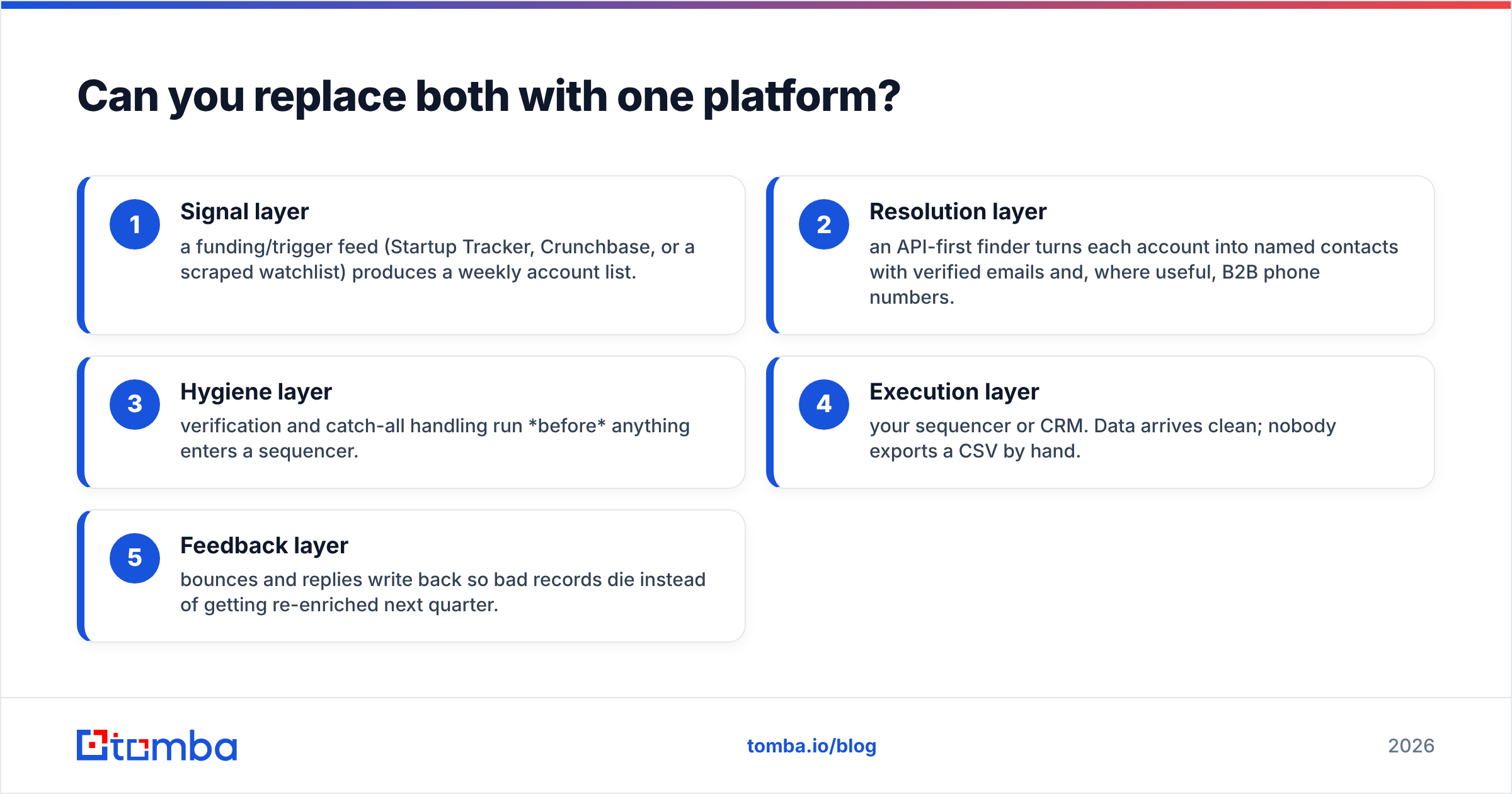
The realistic 2026 architecture for most B2B teams looks like this:
- Signal layer — a funding/trigger feed (Startup Tracker, Crunchbase, or a scraped watchlist) produces a weekly account list.
- Resolution layer — an API-first finder turns each account into named contacts with verified emails and, where useful, B2B phone numbers.
- Hygiene layer — verification and catch-all handling run before anything enters a sequencer.
- Execution layer — your sequencer or CRM. Data arrives clean; nobody exports a CSV by hand.
- Feedback layer — bounces and replies write back so bad records die instead of getting re-enriched next quarter.
Steps 2 and 3 should be one vendor with one API key. That is the consolidation worth doing. Step 1 stays specialist. Anyone selling you a single tool for all five is selling a roadmap.
For teams that live in spreadsheets, the same pipeline works with a Google Sheets add-on instead of code — paste domains in column A, get verified contacts in column C.
How do the alternatives stack up?#
Neither tool exists in a vacuum. On the finder side, the practical shortlist in 2026 includes Findymail, Hunter, Apollo, Prospeo, and Tomba. On the signal side, Crunchbase, PitchBook, and a long tail of niche trackers. Peer review sites like G2 are useful for spotting churn complaints, less useful for accuracy claims — vendors solicit reviews from happy users by construction.

If you are specifically evaluating Findymail against other finders, the Findymail alternative breakdown covers the credit model and API differences in more depth. Worth noting: some list vendors, like BookYourData, take a different approach entirely — selling pre-built verified lists by job title and geography rather than resolving contacts on demand. That model suits teams who want volume without building a pipeline, and it is a legitimate third path rather than a worse version of either tool here.
What is the verdict?#
Startup Tracker and Findymail are complements, not competitors — and if you can only afford one, buy the one matching your bottleneck.
- Sell into recently-funded startups, and funding timing is your whole edge? Start with the signal feed.
- Already know your ICP accounts and just cannot reach the humans? Start with the finder.
- Running both and drowning in CSVs? Consolidate the finding and verification half into one API-first tool and keep the signal feed specialist.
The most common expensive mistake is buying a signal database to fix a deliverability problem. Fresh accounts do not improve a 12% bounce rate — they just give you more addresses to burn your domain on. Fix hygiene first, then scale discovery.
Whichever direction you go, the resolution layer is the part you will call thousands of times a month, so it should be the part with a real API, honest catch-all handling, and predictable pricing. Tomba's Email Finder covers that layer with a free tier of 25 searches/mo to test against your own known-good contacts, $49/mo Starter when you are ready, and an API, CLI, and Chrome extension so the same data reaches your CRM without a single manual export. Run 100 of your existing CRM contacts through it, measure cost per deliverable email, and let that number pick your stack instead of a pricing page.
Related guides#
Ready to find emails that actually work?
Join 150,000+ professionals who stopped guessing and started sending. Free credits on signup — no credit card required.
Get the Tomba newsletter
Practical outbound tactics and product updates — once every two weeks.
About the author