Findymail vs Tomba (2026): Which Email Finder Wins?
Findymail and Tomba both promise verified B2B emails, but they price, verify, and scale very differently. Here's the honest breakdown of coverage, cost per usable contact, and which one fits your workflow.
Findymail vs Tomba comes down to one trade-off. One tool does a single job well. The other covers a whole data stack. Here is the short version.
TL;DR
- Findymail is a lean, verify-first email finder. It is built around Sales Navigator lists. It does one job, and it does it cleanly.
- Tomba is a wider data platform. You get an email finder, a verifier, domain search, catch-all checks, phone data, and enrichment. One API, one credit pool.
- On plain B2B domains, find rates are closer than either site claims. The real gap shows up in catch-all handling, API depth, and cost per usable contact.
- Entry prices are close. Tomba starts at $49/mo and adds a free 25-search tier. Findymail's entry plan sits in the same range, but it bundles fewer tools.
- Pick Findymail if you live in Sales Navigator exports. Pick Tomba if you want one credit pool for find, verify, and enrich, plus an API, a CLI, and an MCP server.
Findymail vs Tomba: what are they, exactly?#
Both tools answer one question. What is this person's work email? But they started from different places.
Findymail grew out of the accuracy problem in bulk B2B lists. Its pitch is simple. Every email it returns is checked first. If it cannot check one, it hands the credit back. That rule shapes the whole product. It stays narrow, and it leans hard on the LinkedIn export path.
Tomba started from search. Its core is the email finder. Around it sits a wider stack: domain search to map every public address at a company, an email verifier for clean-up passes, and a catch-all verifier for the domains most tools skip. Phone data and enrichment ride along. All of it runs on one credit balance and one API key.
That split — narrow and strict against broad and flexible — is the whole Findymail vs Tomba story. Everything below follows from it.

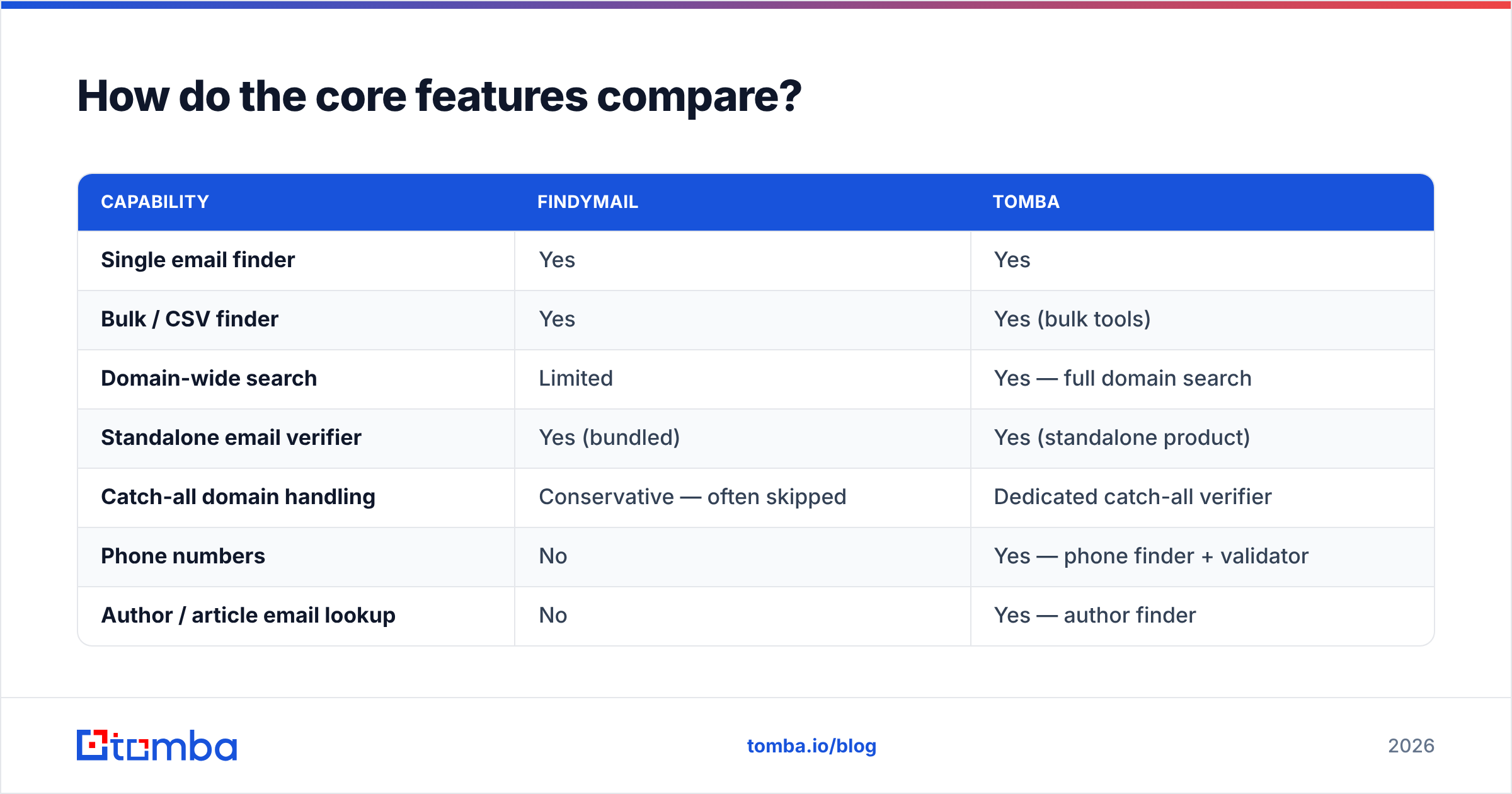
Findymail vs Tomba: how do the core features compare?#
| Capability | Findymail | Tomba |
|---|---|---|
| Single email finder | Yes | Yes |
| Bulk / CSV finder | Yes | Yes (bulk tools) |
| Domain-wide search | Limited | Yes — full domain search |
| Standalone email verifier | Yes (bundled) | Yes (standalone product) |
| Catch-all domain handling | Conservative — often skipped | Dedicated catch-all verifier |
| Phone numbers | No | Yes — phone finder + validator |
| Author / article email lookup | No | Yes — author finder |
| Reverse email lookup | No | Yes |
| Public REST API | Yes | Yes — documented, versioned |
| CLI / MCP server | No | Yes — CLI and MCP for AI agents |
| Chrome extension | Yes | Yes |
| Free tier | Trial credits | 25 searches/mo, ongoing |
| Entry paid plan | ~$49/mo range | $49/mo Starter |
The table shows the shape. Findymail wins on focus. Tomba wins on range. Neither one is better by default. That is the core of the Findymail vs Tomba split: focus against reach. It depends on your outbound motion. Do you need one input, an email? Or several — email, phone, company context, and verify status?
Findymail vs Tomba accuracy: which one wins?#
Accuracy is the wrong single metric, and both vendors know it. What you really want is usable contacts per dollar. That breaks into three numbers.
- Find rate — of the names you send, how many come back with an address?
- Valid rate — of those, how many actually accept mail?
- Charge policy — do you pay for the misses?
Findymail pushes hard on numbers two and three. It hides results it cannot verify, and it refunds the credit. Bounce rates stay low. Raw find rate drops on hard domains. Is your ICP full of small firms, agencies, or catch-all domains? Then you will see gaps.
Tomba pushes on number one. Then it hands you the tools to judge number two. Every result carries a confidence score and a source trail. You can see where the data comes from instead of trusting a yes-or-no verdict. The Findymail vs Tomba gap is widest on catch-all domains. Most finders return nothing there, or a guess. Tomba runs extra checks instead.

The practical result is short. Findymail hands you a shorter, cleaner list. Tomba hands you a longer list with grades on it. Does your team load raw results straight into a sequencer? Then Findymail's strict default protects you. Do you run any clean-up step at all? Then Tomba's extra volume turns into more meetings.
Buyer reviews on G2 show the same split. Findymail reviews cluster around low bounces and small lists. Tomba reviews cluster around coverage and API range. Read both groups before you pick. They describe real trade-offs, not noise.
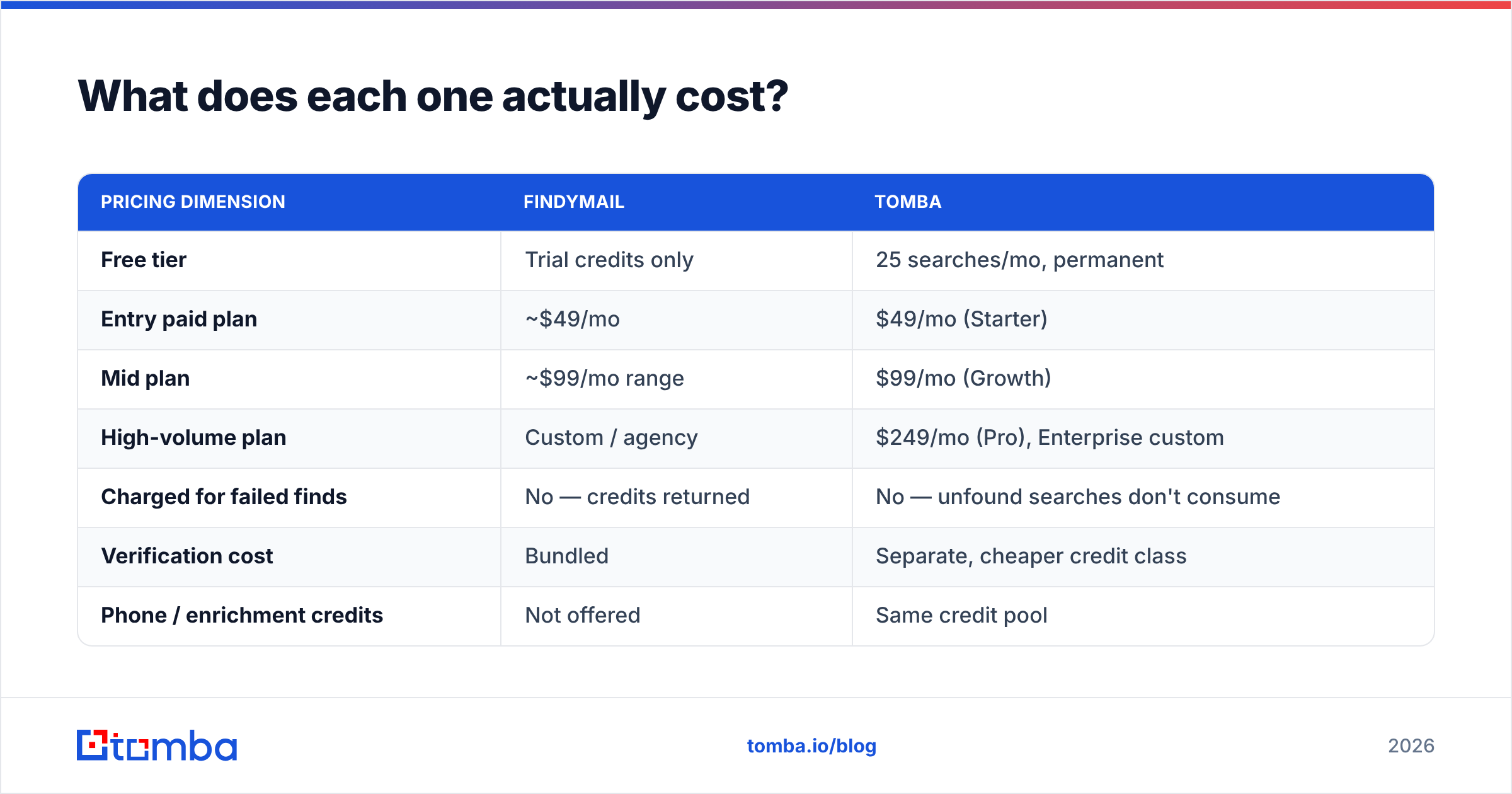
Findymail vs Tomba pricing: what does each one cost?#
Sticker price misleads here, because credit models differ. Here is the comparison on the axes that move your bill.
| Pricing dimension | Findymail | Tomba |
|---|---|---|
| Free tier | Trial credits only | 25 searches/mo, permanent |
| Entry paid plan | ~$49/mo | $49/mo (Starter) |
| Mid plan | ~$99/mo range | $99/mo (Growth) |
| High-volume plan | Custom / agency | $249/mo (Pro), Enterprise custom |
| Charged for failed finds | No — credits returned | No — unfound searches don't consume |
| Verification cost | Bundled | Separate, cheaper credit class |
| Phone / enrichment credits | Not offered | Same credit pool |
| API access on entry plan | Yes | Yes |
| Annual discount | Yes | Yes — see Tomba pricing |
Two things matter more than the headline price.
First, credit class. Tomba prices verify credits apart from search credits, and they cost less. B2B data decays about 25–30% a year. So the smart pattern is simple: find once, then re-check each quarter. With Tomba you re-check at a fraction of finder cost. With bundled models, every clean-up pass burns full-price credits.
Second, tool count. Say you pay Findymail for emails, plus a verifier, plus a phone provider. Compare the whole stack, not one line item. Three $49 tools cost $147 a month. Tomba's $99 Growth plan covers the same three jobs from one balance. So your Findymail vs Tomba bill depends on how many tools you fold in. That math only works if you need all three. If you only need emails, you are paying for reach you will not use.
Is the API and automation story different?#
Yes. This is where the two products split most.
Findymail ships a solid REST API for search and verify. It is enough to wire into a Clay table, an n8n flow, or a small script. For most sales teams, that covers the job.
Tomba treats code access as a core product:
- REST API — the Tomba API covers every product under one key: finder, verifier, domain search, catch-all, phone, and enrichment. Rate limits are published, and SDKs ship with it.
- CLI — the Tomba CLI pipes a CSV of domains through find and verify. No code needed. It is handy for one-off ops work.
- MCP server — the Tomba MCP turns lookups into tools an AI agent can call. Building agent workflows in Claude? This drops a whole layer of glue.
- Spreadsheet add-ins — Google Sheets, Excel, and Airtable for non-coders.
- Native CRM syncs — HubSpot, Salesforce, Pipedrive, plus Zapier and Make.
Does your enrichment live in a RevOps pipeline? Then that reach adds up fast. Is it one person exporting lists on Friday? Then it is overkill, and you can ignore it.
Which one fits your workflow better?#
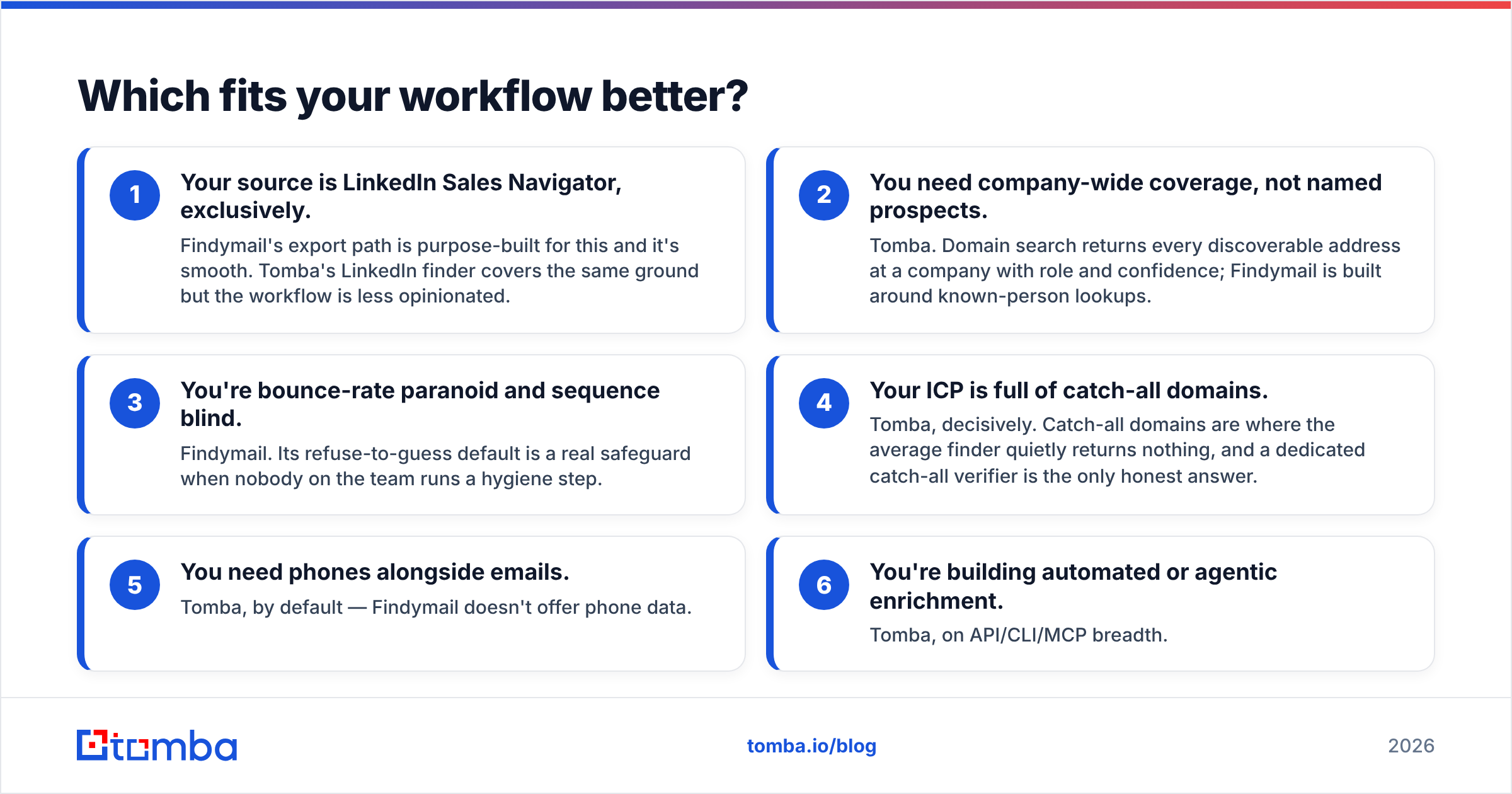
Most Findymail vs Tomba decisions come down to six questions. Here is the guide, minus the vendor spin.
- You only use LinkedIn Sales Navigator. Findymail. Its export path is built for that, and it is smooth. Tomba's LinkedIn finder does the same job with fewer rails.
- You want whole-company coverage, not named people. Tomba. Domain search returns every address it can find, with role and confidence. Findymail is built around known people.
- You fear bounces and skip clean-up. Findymail. Its refuse-to-guess default is a real guard rail.
- Your ICP is full of catch-all domains. Tomba, clearly. Most finders go quiet there. A dedicated catch-all verifier is the honest answer.
- You need phones next to emails. Tomba. Findymail has no phone data.
- You are building agent-driven enrichment. Tomba, on API, CLI, and MCP reach.
There is a third option worth naming. Maybe your problem is net-new volume, not resolving names you already have. Then neither finder is the main tool. A prebuilt list like BookYourData or Tomba's own B2B database solves list building. A finder then mops up the long tail. Plenty of teams run both. That is sound design, not waste.
How to run a fair Findymail vs Tomba test#
Do not trust either vendor's find-rate claim. That includes the ones above. Run your own Findymail vs Tomba test in an afternoon.
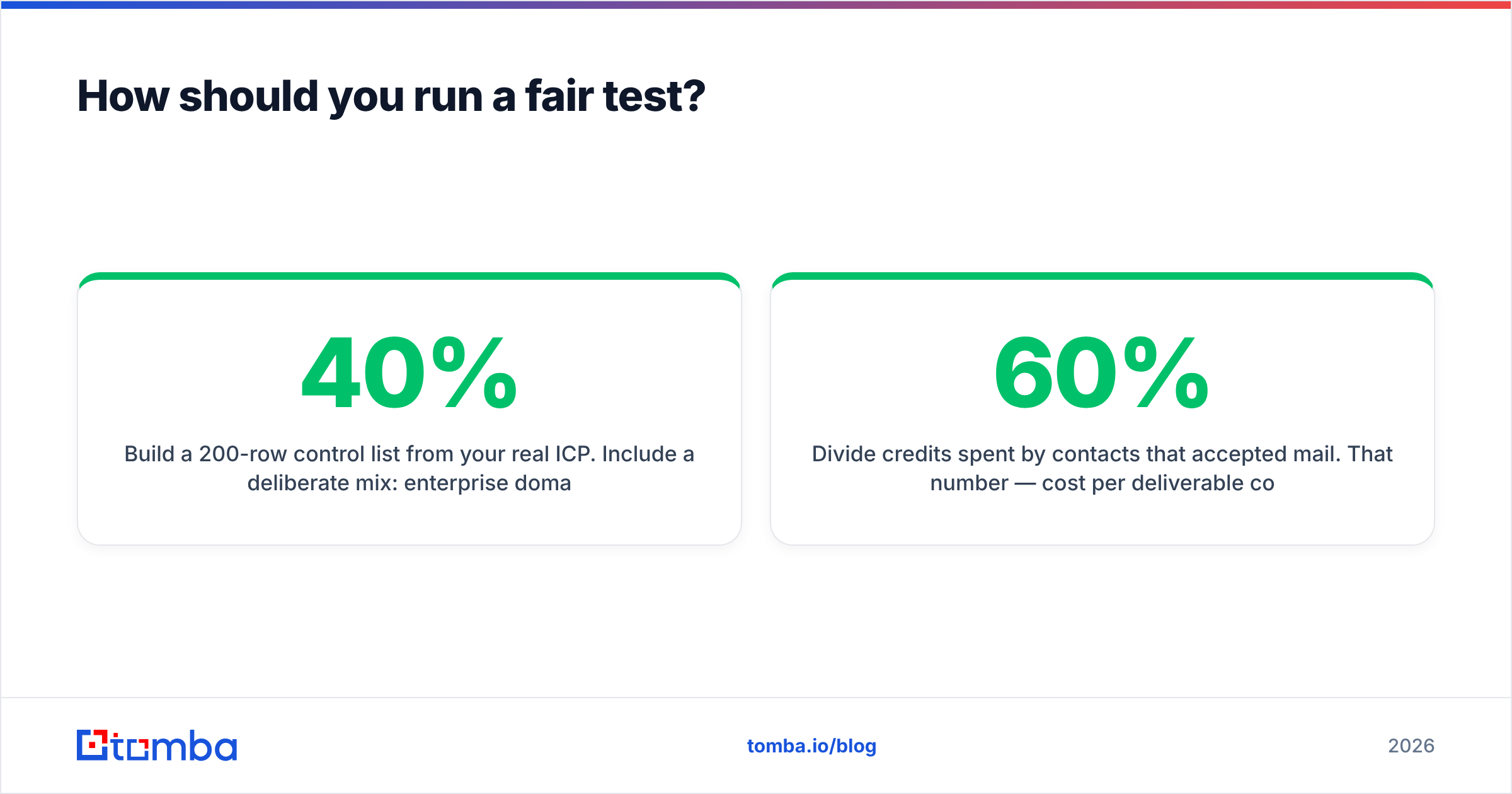
- Build a 200-row control list from your real ICP. Mix it on purpose: 40% enterprise domains, 40% SMB, 20% known catch-all domains. A skewed list picks a skewed winner.
- Send the same list to both tools. Same names, same domains, same order.
- Count four columns: found, valid, catch-all, and not found. Keep catch-all separate. That is the bucket where the tools truly disagree.
- Mail 100 contacts from each set. Same mailbox, same copy, same weekday. Check hard bounces at 72 hours.
- Divide credits spent by contacts that accepted mail. That is your cost per deliverable contact, and it is the only score that counts. A 60% find rate with near-zero bounces beats an 85% rate that burns your domain.
One caveat on the bounce test. Your sender reputation and setup shift the result on their own. Check that SPF, DKIM, and DMARC are clean first. HubSpot's deliverability docs cover the basics. Otherwise you will blame the data for a setup problem, then switch tools for nothing.
Findymail vs Tomba: the honest verdict#
Findymail is the better single-purpose tool. Tomba is the better platform.
Is your whole need "turn a LinkedIn list into verified emails"? Then Findymail is clean and focused. Its credit-refund policy is genuinely buyer-friendly. There is no case for buying tools you will not touch.
Is your need wider? Think company-wide discovery, catch-all answers, cheap repeat checks, phone numbers, enrichment, and a real API to automate on. Tomba covers more ground at a similar entry price. The math tips further once you would otherwise pay for two or three tools.
Avoid one mistake: do not pick on find-rate screenshots. Both vendors can build a test list they win. Run your own 200 rows, measure cost per deliverable contact, and let your ICP settle the Findymail vs Tomba call.

Ready to benchmark it yourself?#
Your own data settles Findymail vs Tomba faster than any review. Start with the Tomba Email Finder free tier — 25 searches a month, no card. Run your control list against the tool you use today. Feed the same names and domains into both. Then compare found-and-deliverable counts, not raw find rates. If Tomba wins on your ICP, the $49/mo Starter plan picks up where the free tier stops. The same credits also cover verify, domain search, and enrichment as your workflow grows.
Related guides#
Ready to find emails that actually work?
Join 150,000+ professionals who stopped guessing and started sending. Free credits on signup — no credit card required.
Get the Tomba newsletter
Practical outbound tactics and product updates — once every two weeks.
About the author