Findymail vs UpLead: Which Email Finder Wins in 2026?
Findymail and UpLead solve the same problem from opposite ends: one is a bounce-obsessed finder, the other a searchable B2B database. Here is how they compare on accuracy, credits, and real cost per usable email.
TL;DR
- Findymail is a finder-and-verifier built around one promise: don't send bounces. You bring the list (usually from LinkedIn or Sales Navigator), it returns verified addresses and refunds credits on bad ones.
- UpLead is a searchable B2B contact database. You don't bring the list, you build it inside their 155M+ contact index using firmographic and technographic filters, then reveal contacts with credits.
- Pricing shape differs more than price. Findymail sells email volume in a self-serve tier that starts around $49/mo. UpLead sells seats plus credits, with entry plans commonly quoted near $99/mo and credits that expire monthly.
- Neither is a full stack. Findymail has thin firmographic data. UpLead's database goes stale in fast-moving segments and credits burn fast on wide searches.
- If you want both sides — pattern-based finding, verification, domain search, and enrichment on one API — a platform like Tomba at $49/mo Starter covers the same ground without seat math.
What are Findymail and UpLead, actually?#
They get compared constantly, but they're different categories of product wearing similar marketing.
Findymail is a finder. Its core loop assumes you already know who you want to reach. You export a LinkedIn Sales Navigator search, drop a CSV of names and companies, or hit the API, and Findymail resolves work emails and verifies them before returning. The company built its reputation on a bounce guarantee: if a returned email bounces, you get the credit back. That's a narrow product with a sharp edge.
UpLead is a database. Its core loop assumes you don't know who you want yet. You open a search panel, filter by industry, headcount, revenue, location, job title, technologies used, and intent signals, then reveal contacts one credit at a time. UpLead advertises 155M+ contacts across 200+ countries and a 95% accuracy guarantee backed by real-time verification at the moment of reveal.
That distinction drives everything else in this comparison. Findymail answers "what's this person's email?" UpLead answers "who should I be emailing?"
How do Findymail and UpLead find emails?#
The mechanics matter because they determine where each tool fails.
- Findymail — resolution on demand. It takes an identity (name + company or LinkedIn URL) and works out the address using pattern inference, proprietary sources, and live validation. Nothing is pre-stored waiting for you; the lookup happens when you ask.
- UpLead — reveal from an index. The contact already exists in UpLead's database. Your credit unlocks it, and UpLead runs a verification check at reveal time so you're not paying for a record that decayed since it was collected.
- Findymail's input dependency. Its accuracy is tied to input quality. Feed it a stale LinkedIn export with a person who changed jobs six months ago and it will confidently resolve an address at the old employer.
- UpLead's coverage dependency. If a company or persona isn't in the index — common with sub-20-employee firms, non-US SMBs, and newly funded startups — no filter combination will conjure it.
- Both hit the catch-all wall. Domains configured to accept all mail can't be validated by SMTP alone. Findymail is generally conservative here; UpLead marks what it can't confirm. If catch-alls are a big share of your TAM, you'll want a dedicated catch-all verifier regardless of which you pick.

Which one is more accurate?#
Neither vendor's headline number means what you think it means, and they're not measuring the same thing.
Findymail's guarantee is about deliverability of what it returns. It withholds addresses it can't validate and refunds credits for bounces. That produces a low bounce rate almost by construction — but it's paired with a lower hit rate. Findymail routinely returns nothing for 20-40% of a mid-market list, and "no result" doesn't cost you a credit, which is fair but also means your list shrinks.
UpLead's 95% accuracy claim is about records in the database being correct at reveal time. That's a different denominator. Because you only reveal what's already indexed, your bounce rate on revealed contacts is typically good, but your coverage is capped by the index itself.
The practical framing:
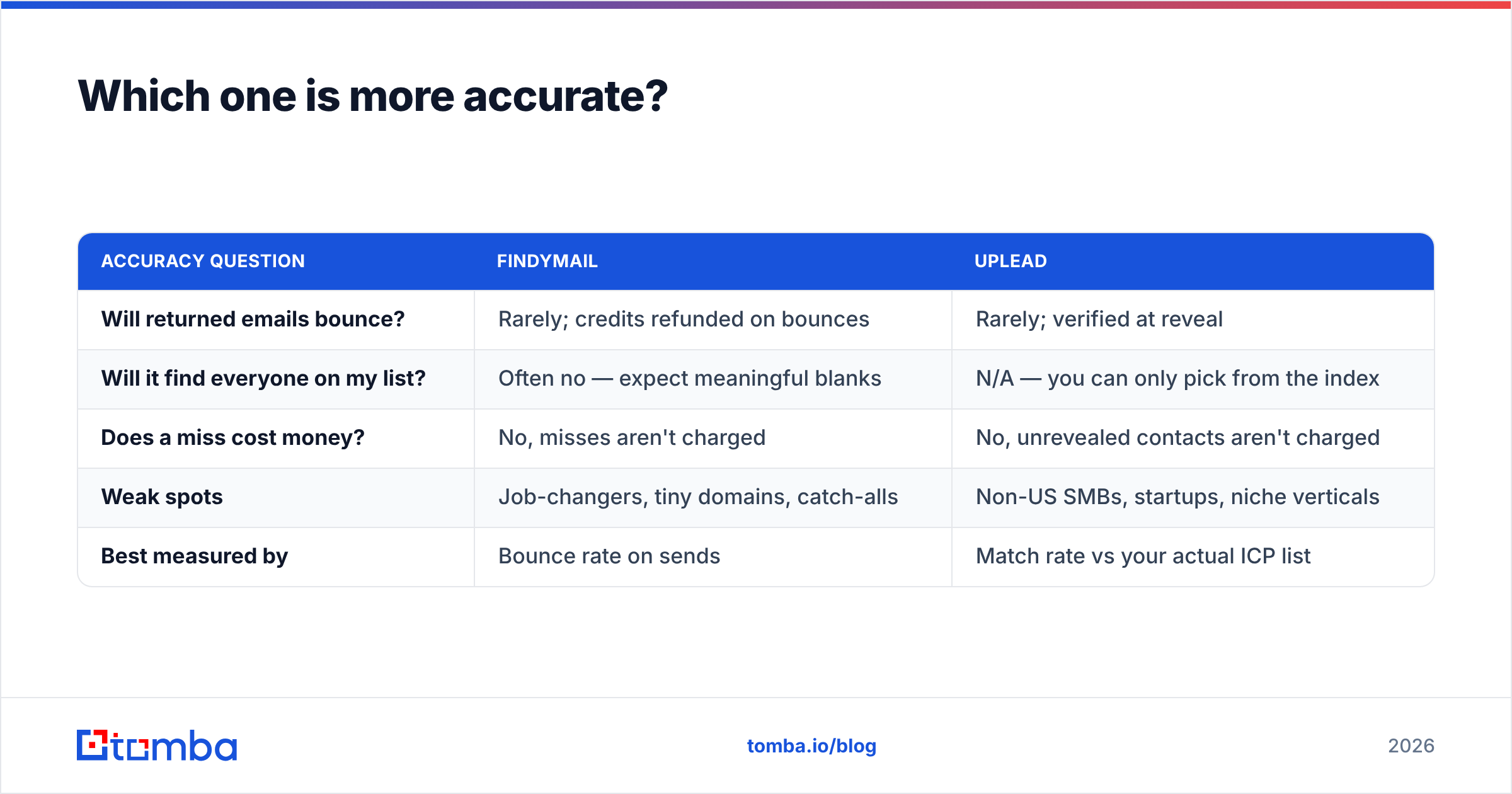
| Accuracy question | Findymail | UpLead |
|---|---|---|
| Will returned emails bounce? | Rarely; credits refunded on bounces | Rarely; verified at reveal |
| Will it find everyone on my list? | Often no — expect meaningful blanks | N/A — you can only pick from the index |
| Does a miss cost money? | No, misses aren't charged | No, unrevealed contacts aren't charged |
| Weak spots | Job-changers, tiny domains, catch-alls | Non-US SMBs, startups, niche verticals |
| Best measured by | Bounce rate on sends | Match rate vs your actual ICP list |
Measure both on cost per usable, non-bouncing contact in your ICP, not on vendor percentages. Run the same 200-row list through both trials and count what survives. That's the only benchmark that transfers to your segment.

How do Findymail and UpLead pricing compare?#
Pricing is where the two diverge hardest, and where most buyers make the wrong call by comparing sticker prices instead of unit economics.
Findymail sells email volume. Plans scale by how many verified emails you pull per month, with self-serve entry around $49/mo and higher tiers stepping up volume. Teams generally share the workspace rather than paying per head.
UpLead sells credits plus seats. Entry plans are commonly quoted near $99/mo with a modest monthly credit allowance, stepping to roughly $199/mo for a larger bucket, then custom pricing above that. Credits typically don't roll over on lower tiers, and additional users are a line item. A five-person SDR team on UpLead is a materially different invoice than a five-person team on Findymail.
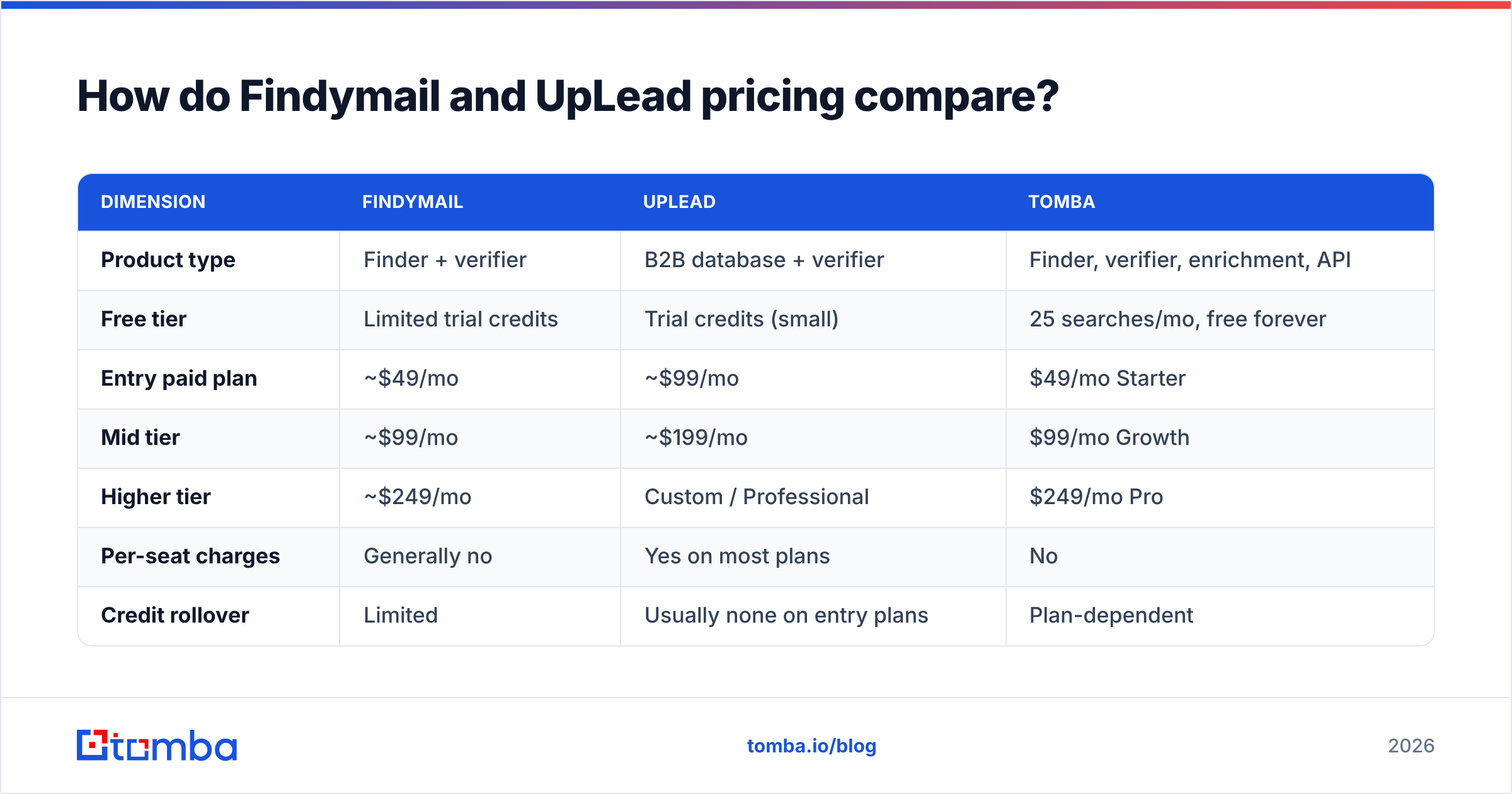
| Dimension | Findymail | UpLead | Tomba |
|---|---|---|---|
| Product type | Finder + verifier | B2B database + verifier | Finder, verifier, enrichment, API |
| Free tier | Limited trial credits | Trial credits (small) | 25 searches/mo, free forever |
| Entry paid plan | ~$49/mo | ~$99/mo | $49/mo Starter |
| Mid tier | ~$99/mo | ~$199/mo | $99/mo Growth |
| Higher tier | ~$249/mo | Custom / Professional | $249/mo Pro |
| Per-seat charges | Generally no | Yes on most plans | No |
| Credit rollover | Limited | Usually none on entry plans | Plan-dependent |
| Prospect search by filters | No | Yes (core feature) | Domain search + database |
| Bulk CSV processing | Yes | Yes (export) | Yes, via bulk tools |
| Public API | Yes | Yes | Yes, first-class |
Vendor pricing moves. Treat every number above as a starting point and confirm on each vendor's page before you buy; the structural difference (volume vs seats-plus-credits) is what stays true.

The math that actually decides it: if you already have 3,000 target accounts and just need addresses, volume pricing wins. If you have a fuzzy ICP and need to discover 3,000 accounts, you're paying for the database whether you like it or not.
What does the feature-by-feature comparison look like?#
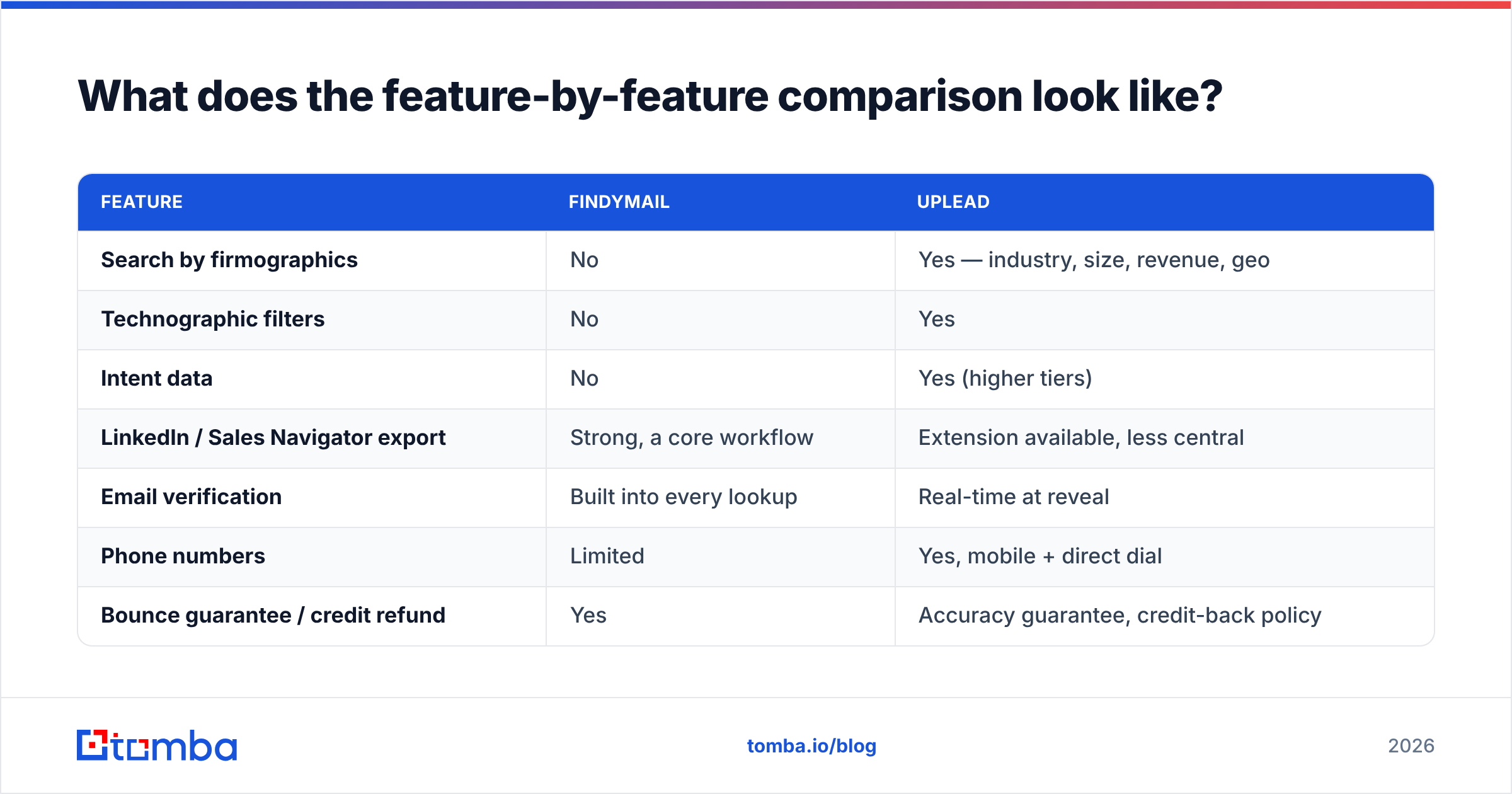
| Feature | Findymail | UpLead |
|---|---|---|
| Search by firmographics | No | Yes — industry, size, revenue, geo |
| Technographic filters | No | Yes |
| Intent data | No | Yes (higher tiers) |
| LinkedIn / Sales Navigator export | Strong, a core workflow | Extension available, less central |
| Email verification | Built into every lookup | Real-time at reveal |
| Phone numbers | Limited | Yes, mobile + direct dial |
| Bounce guarantee / credit refund | Yes | Accuracy guarantee, credit-back policy |
| CRM integrations | Solid mainstream set | Broad — Salesforce, HubSpot, Pipedrive, more |
| API quality | Clean, developer-friendly | Available, more enterprise-shaped |
| Best for | Known-list resolution at volume | Net-new prospect discovery |
Who should choose Findymail?#
Pick Findymail if these describe you:
- You live in Sales Navigator. Your prospecting starts with a saved search, not a filter panel. Findymail's export-to-verified-email path is the shortest one on the market for that workflow.
- Bounce rate is your top KPI. If your domains are precious and you're rebuilding sender reputation, a tool that withholds uncertain results is worth the lower hit rate.
- You're a small team. No per-seat charges means three SDRs cost the same as one.
- You want a simple API. Findymail's endpoints are easy to wire into a script or an internal enrichment job.
Skip it if you need to discover accounts you've never heard of, or if you need phone numbers and firmographic depth in the same record.
Who should choose UpLead?#
Pick UpLead if:
- Your ICP is still being defined. Filter-driven search is genuinely useful when you're testing which segments respond.
- You sell to US mid-market and enterprise. That's where UpLead's coverage is strongest and freshest.
- You need technographics or intent. Knowing a company runs a specific stack is a legitimate outbound hook that Findymail simply doesn't provide.
- You want contacts to land in the CRM with full firmographic context, not just an email string.
Skip it if your team is large enough that seat charges balloon, if your targets are non-US SMBs, or if you already have your list and just need addresses — you'd be renting a database you barely search.

Where do both tools leave gaps?#
Three gaps show up in almost every teardown, and they're worth budgeting for.
1. Catch-all domains. Roughly a fifth of B2B domains accept all mail. Findymail tends to drop them; UpLead flags them. Either way, you're leaving real prospects unaddressed unless you layer a catch-all-capable tool. A dedicated email verifier with catch-all logic recovers a meaningful slice of a list that both tools would otherwise write off.
2. Data decay. Gartner and other analysts have long put B2B data decay in the 25-30% annual range, and job-change velocity in tech has only made it worse. Findymail resolves against whatever identity you feed it, so a stale input produces a confidently wrong output. UpLead re-verifies at reveal but can't re-verify a record it never collected. Re-enrich quarterly or accept drift.
3. Single-vendor coverage ceilings. No provider covers every region and company size. Teams running serious volume usually waterfall: try provider A, fall back to provider B for misses, verify everything at the end. That's cheaper than it sounds when misses are free, and it's the main reason API-first tools with clean bulk processing win on total cost.
Is there a better option than either?#
Sometimes the honest answer to a versus post is "the framing is wrong." If what you need is a finder and a verifier and enrichment on a single billing line, buying a database subscription to get an email finder is overkill, and buying a pure finder means bolting on verification separately.
That's the slot Tomba sits in. Email finder, domain search, verifier, catch-all handling, phone finder, and enrichment run on one API and one credit pool, with a free tier of 25 searches/mo and paid plans at $49 Starter, $99 Growth, and $249 Pro — no per-seat tax. See Tomba pricing for the current breakdown. It doesn't try to be a filterable 155M-record database, so if net-new discovery is your primary job, UpLead still has an argument. But for the "I have the list, get me clean addresses at volume" job — the job most outbound teams actually have — a unified finder-plus-verifier is the cheaper unit.
Whatever you shortlist, check current reviews on G2 for your specific segment. Coverage complaints cluster by region and company size, and that pattern is more useful than an overall star rating.
How should you run the trial?#
Don't evaluate on features. Evaluate on one list.
- Build a 200-row control list from your real CRM: names, companies, domains. Include your hardest segment, not your easiest.
- Run it through both trials the same week, so index freshness is comparable.
- Count three numbers per tool: match rate (how many returned anything), verified rate (how many came back confidently valid), and bounce rate after a real send.
- Divide plan cost by usable contacts. That's your true cost per contact, and it's frequently 2-4x the sticker math.
- Test the API, not just the UI, if any part of your workflow is automated. UI-only evaluation hides rate limits and payload gaps you'll hit in month two.
Teams that run this five-step test almost never regret the purchase. Teams that buy on a demo often do.
The verdict#
Findymail wins on cost per verified email when you already have your list. Volume pricing, no seat tax, a bounce guarantee, and a LinkedIn-native workflow make it the efficient pick for teams whose prospecting starts elsewhere.
UpLead wins on discovery. If you need to find accounts before you find people — with technographics, intent, and firmographics attached — a finder can't substitute for a database, and UpLead's is solid in US mid-market.
Neither wins on breadth per dollar. If your requirement list includes finding, verifying, catch-all handling, and enrichment, you're going to end up paying two vendors.
Start free with the Tomba Email Finder — 25 searches a month, no card, and the same API that powers domain search, verification, and enrichment. Run your 200-row control list through it alongside Findymail and UpLead, compare cost per usable contact, and let the numbers pick your stack.
Related guides#
Ready to find emails that actually work?
Join 150,000+ professionals who stopped guessing and started sending. Free credits on signup — no credit card required.
Get the Tomba newsletter
Practical outbound tactics and product updates — once every two weeks.
About the author