Findymail vs Warpleads: Which B2B Lead Tool Wins in 2026?
Findymail sells verified accuracy. Warpleads sells volume. We break down pricing, export limits, data coverage, and which one actually fits your outbound motion in 2026.
TL;DR
- Findymail is an accuracy-first email finder built around LinkedIn and Sales Navigator exports, with verification baked into every credit. You pay per verified email, not per attempt.
- Warpleads is a volume-first lead database that leans on unlimited or high-ceiling exports. You pay for reach and filter down afterwards.
- They are not really the same product. Findymail answers "what is this specific person's email?" Warpleads answers "give me 10,000 people who look like my ICP."
- Cost per usable contact matters more than sticker price. A cheap unlimited export with 30% bounce risk is more expensive than a $49/mo tool that only bills verified hits.
- Most teams running serious outbound end up with a database for discovery plus a dedicated finder/verifier layer for accuracy — which is where an API-first option like Tomba fits.
What are Findymail and Warpleads, actually?#
Short version: Findymail is a finder, Warpleads is a database. Everything else follows from that.
Findymail (findymail.com) launched as a reaction to a specific complaint — that email finders were charging for guesses. Its pitch is that every email it returns has been verified, and you are not billed for a credit when it fails to find someone. The workflow centers on LinkedIn: you push a Sales Navigator list, a CSV, or a set of company domains into it, and get back verified addresses. It has integrations with the usual sequencers and a Chrome extension for one-off lookups.
Warpleads (warpleads.com) is positioned differently. It sells access to a large prospect database with export limits that are either unlimited or very generous depending on plan, plus an on-demand enrichment path for lists you bring yourself. The value proposition is scale: filter by industry, title, geography, company size, export, load into your sequencer, send.
That difference in DNA explains almost every trade-off below. A finder optimizes for precision on a known target. A database optimizes for recall across an unknown universe.

How do Findymail and Warpleads compare head to head?#
Here is the practical comparison. Pricing tiers move around — always confirm on each vendor's own page before you buy — but the structural differences are stable.
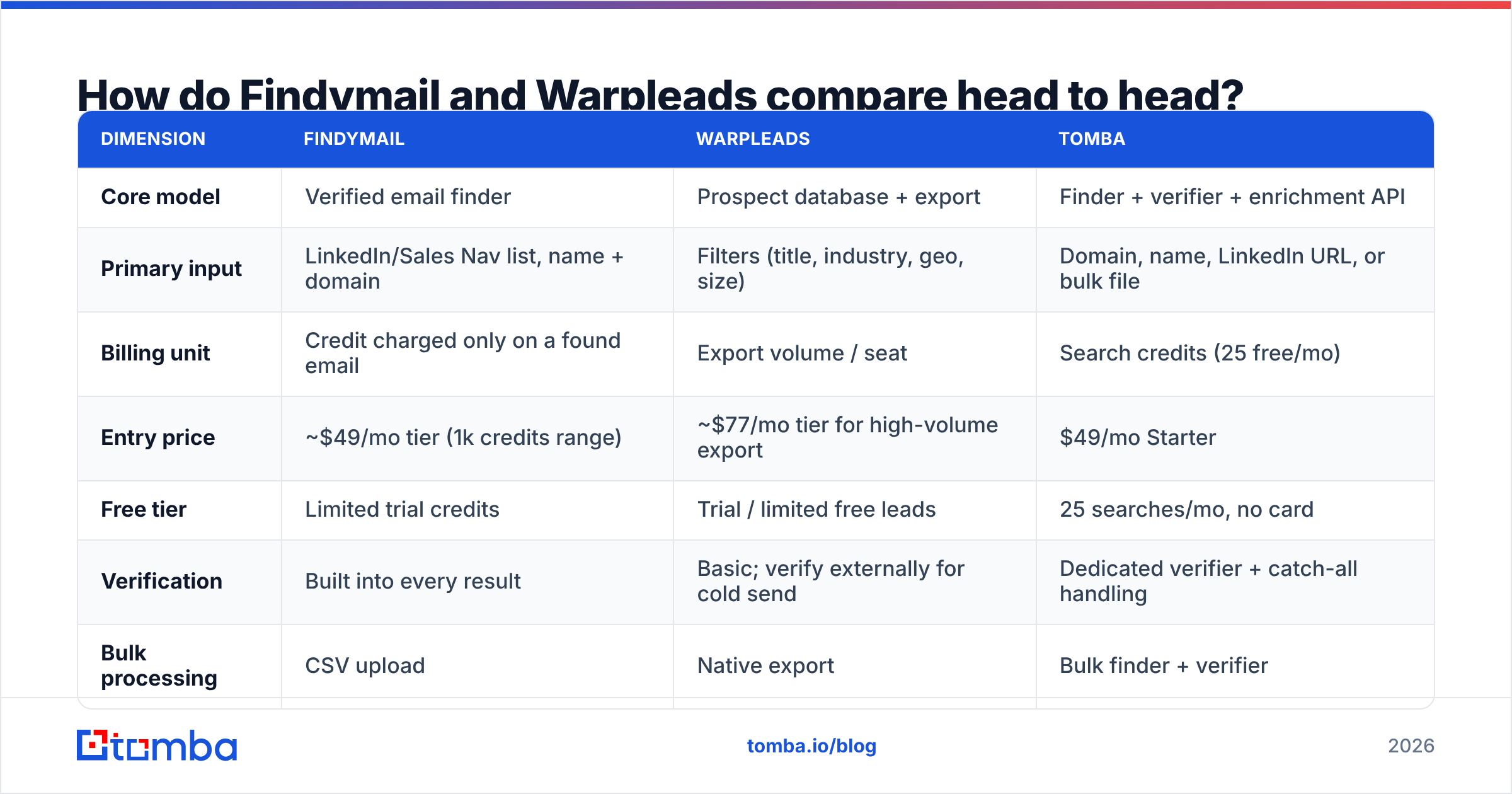
| Dimension | Findymail | Warpleads | Tomba |
|---|---|---|---|
| Core model | Verified email finder | Prospect database + export | Finder + verifier + enrichment API |
| Primary input | LinkedIn/Sales Nav list, name + domain | Filters (title, industry, geo, size) | Domain, name, LinkedIn URL, or bulk file |
| Billing unit | Credit charged only on a found email | Export volume / seat | Search credits (25 free/mo) |
| Entry price | ~$49/mo tier (1k credits range) | ~$77/mo tier for high-volume export | $49/mo Starter |
| Free tier | Limited trial credits | Trial / limited free leads | 25 searches/mo, no card |
| Verification | Built into every result | Basic; verify externally for cold send | Dedicated verifier + catch-all handling |
| Bulk processing | CSV upload | Native export | Bulk finder + verifier |
| API | Yes | Limited | Full REST API, CLI, MCP server |
| Best for | Precision on named prospects | Top-of-funnel list building | Teams that need both, programmatically |
The row that decides most purchases is billing unit. Findymail's "only pay for found emails" model is genuinely different from credit-burn pricing, and if your lists are messy it can save real money. Warpleads' export-heavy model is cheaper per row but shifts the verification burden — and the bounce risk — onto you.
Which one is more accurate?#
Findymail wins on accuracy per contact. Warpleads wins on contacts per dollar. Both statements can be true at once, and confusing them is how teams end up with a burned sending domain.
Accuracy in this category is not one number. There are three distinct failure modes:
- Not found — the tool returns nothing. Wasted time, but harmless.
- Found but wrong — the tool returns a plausible pattern (
first.last@company.com) that nobody reads. This is the expensive one: it bounces, it hits your sender reputation, and it can cost you the whole domain. - Found, deliverable, wrong person — a shared alias, a departed employee, or a role account. It accepts mail and never converts.
Findymail's architecture attacks failure mode 2 directly by verifying before returning. Database products like Warpleads are structurally more exposed to failure mode 3, because a large static database ages: roughly a quarter to a third of B2B contact data decays every year as people change jobs. That is not a knock on any specific vendor — it is physics for anyone maintaining a snapshot of the labor market.

The practical takeaway: whatever database you export from, run the list through an independent email verifier before it touches your sequencer. Treat vendor-supplied "verified" flags as a hint, not a guarantee — especially on catch-all domains, where a naive SMTP check accepts everything and tells you nothing.
What does each one actually cost per usable lead?#
Sticker price is the wrong metric. Model it as cost per usable contact:
Cost per usable contact = (plan price ÷ contacts obtained) ÷ (1 − bounce rate) ÷ ICP match rate
Run two realistic scenarios for a team sending 3,000 cold emails a month.
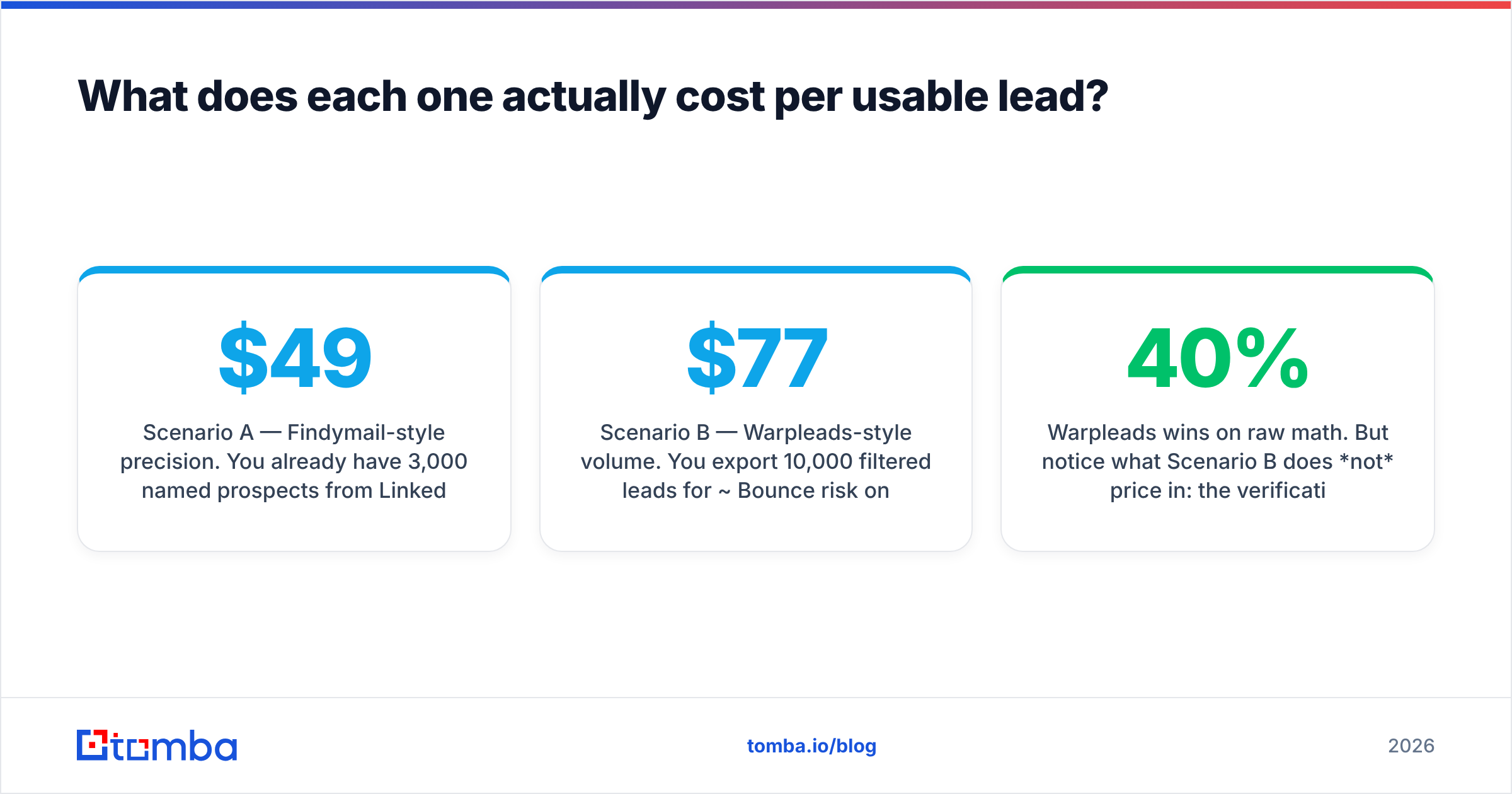
Scenario A — Findymail-style precision. You already have 3,000 named prospects from LinkedIn. At a ~$49/mo tier with 1,000 credits, you need a higher tier or top-ups for 3,000. Say ~$100/mo effective. Find rate ~70% (2,100 emails), bounce ~2%, ICP match ~95% because you hand-picked the list. Usable contacts: roughly 1,955. Cost per usable contact: about $0.051.
Scenario B — Warpleads-style volume. You export 10,000 filtered leads for ~$77/mo. Bounce risk on unverified export data is realistically 8–15% for cold B2B; call it 10%. ICP match after your own filtering, say 60% — database filters are coarser than a hand-built list. Usable contacts: roughly 5,400. Cost per usable contact: about $0.014.
Warpleads wins on raw math. But notice what Scenario B does not price in: the verification pass you must run on 10,000 records, the SDR hours spent filtering 40% junk, and the deliverability cost of a 10% bounce rate if you skip verification. Add a verification layer at typical rates and the gap narrows considerably — and the bounce risk drops to something your inbox provider will tolerate.
Rule of thumb:
- Under 1,000 prospects/month, high ACV, named accounts → precision tooling wins. The list is small; every wrong email is expensive.
- Over 5,000 prospects/month, low ACV, wide ICP → volume tooling wins, provided you bolt on verification.
- Both → that is most teams past seed stage, and it is why the "vs" framing breaks down.
Which fits your outbound motion better?#
Pick by motion, not by feature list.
- Account-based, named-list outbound. You know exactly who you want. Findymail's model — pay only for what it finds, verified — maps cleanly. Warpleads is overkill and its filters will not surface the 40 specific people on your target list any faster than LinkedIn will.
- Spray-and-refine SDR pods. You need 10,000 new names a month and you will learn who converts from response data. Warpleads' export ceiling is the point. Budget separately for verification.
- Product-led / self-serve motion. You mostly need enrichment on inbound signups, not net-new discovery. Neither tool is ideal; you want a data enrichment endpoint you can call on signup.
- Agency running many client ICPs. Volume plus flexibility. Export-heavy plans plus a per-client verification step is the standard stack.
- Engineering-led growth (RevOps building pipelines). You want an API, not a UI. Check whether the vendor's API is a first-class product or an afterthought — this is where Warpleads is weakest and where an email finder API with documented rate limits, a CLI, and an MCP server earns its keep.
- Recruiting or partnerships. You are hunting individuals across companies, often with only a LinkedIn URL. A LinkedIn finder style workflow beats database filters every time.

Where do both tools fall short?#
Neither product covers the whole job, and both are honest about roughly where their edges are.
Findymail's limits. It is a finder, not a discovery engine. If you do not already know who you are targeting, it cannot build the list for you — you still need LinkedIn, Sales Navigator, or a database upstream. Credit ceilings on lower tiers get tight fast at real outbound volume, and phone numbers are not the focus.
Warpleads' limits. Big database, coarse filters. Titles are notoriously inconsistent across companies ("Head of Growth" vs "Growth Lead" vs "VP Demand Gen"), so filter-based ICP targeting always leaks. Data freshness on any static database is the perpetual question. And unlimited-export pricing tends to correlate with lighter verification — which means the true cost includes a verification vendor.
What both under-serve:
- Catch-all domains. A large share of enterprise domains accept all mail. Standard SMTP verification returns "valid" for every address on them, which is worthless. You need dedicated catch-all verification logic to get a real risk score.
- Phone data. If your motion includes calling, you will be adding a phone finder regardless of which of these two you choose.
- Programmatic bulk workflows. Uploading CSVs by hand does not scale past a few thousand rows a week. Bulk processing plus an API is the difference between a tool and infrastructure.

How should you evaluate them before you buy?#
Do not trust vendor accuracy claims — including ours. Run a controlled bake-off. It takes an afternoon.
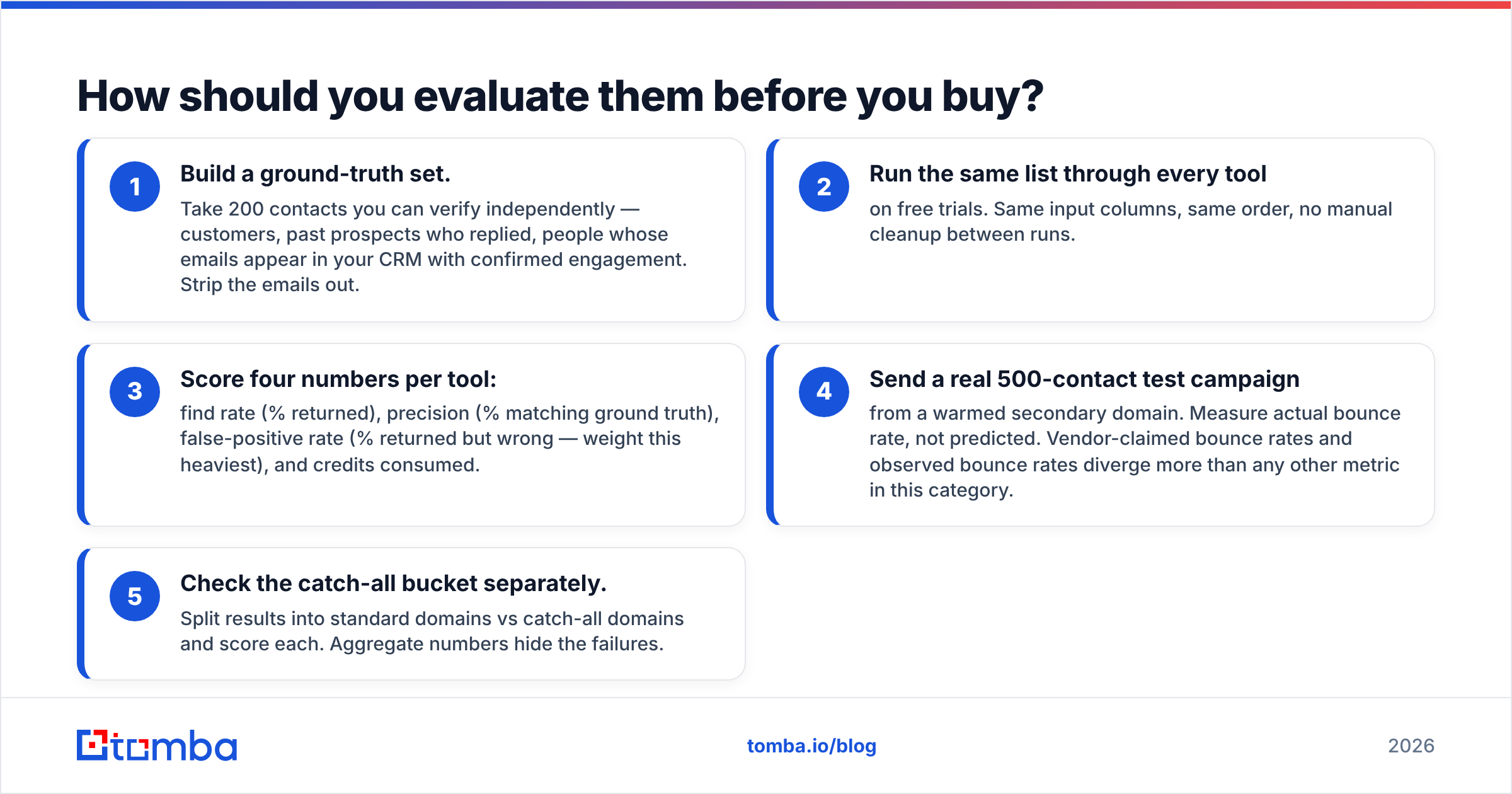
The 200-contact test:
- Build a ground-truth set. Take 200 contacts you can verify independently — customers, past prospects who replied, people whose emails appear in your CRM with confirmed engagement. Strip the emails out.
- Run the same list through every tool on free trials. Same input columns, same order, no manual cleanup between runs.
- Score four numbers per tool: find rate (% returned), precision (% matching ground truth), false-positive rate (% returned but wrong — weight this heaviest), and credits consumed.
- Send a real 500-contact test campaign from a warmed secondary domain. Measure actual bounce rate, not predicted. Vendor-claimed bounce rates and observed bounce rates diverge more than any other metric in this category.
- Check the catch-all bucket separately. Split results into standard domains vs catch-all domains and score each. Aggregate numbers hide the failures.
Cross-check what you find against third-party review volume on G2 — not the star ratings, which are gameable, but the recency and specificity of complaints. Look for patterns around data freshness and support responsiveness, the two things a trial will not reveal.
One more evaluation note: read the export and cancellation terms. Some database vendors restrict what you may do with exported records, or bill annually with limited refund windows. That is a contract question, not a product question, and it bites teams that skipped it.
What is the verdict on Findymail vs Warpleads?#
Choose Findymail if your lists are already built, your ACV is high enough that a single wrong email costs more than a credit, and you want verification you do not have to think about. Its pay-for-found model is genuinely aligned with your interests.
Choose Warpleads if you need net-new volume at the top of the funnel, your ICP is broad enough that filter-based targeting works, and you have — or will buy — a verification step before anything sends. The unit economics are strong as long as you do not pretend the verification cost is zero.
Choose neither exclusively if you are past the experimentation stage. The mature stack is discovery (a database or LinkedIn) → finding (a precision finder) → verification (an independent verifier) → enrichment → sequencer. Trying to collapse all five into one vendor is how teams end up locked into whichever layer that vendor happens to be weakest at.
If the layer you keep patching is finding and verifying — the part where wrong data quietly destroys your deliverability — that is worth solving properly. The Tomba Email Finder covers domain search, name-based lookup, LinkedIn resolution, bulk processing, catch-all handling, and verification behind one REST API, with a free tier of 25 searches a month and no card required. Paid plans start at $49/mo (Starter), with Growth at $99/mo and Pro at $249/mo — see Tomba pricing for the full breakdown. Run the 200-contact test above against whatever you are using today, and let the bounce rate decide.
Related guides#
Ready to find emails that actually work?
Join 150,000+ professionals who stopped guessing and started sending. Free credits on signup — no credit card required.
Get the Tomba newsletter
Practical outbound tactics and product updates — once every two weeks.
About the author