Findymail vs Xverify (2026): Which Email Tool Should You Buy?
Findymail finds emails. Xverify checks them. Comparing the two only makes sense once you know which half of the problem you actually have — here's the honest breakdown, with pricing math for both.
TL;DR
- Findymail and Xverify are not really competitors. Findymail finds B2B email addresses (LinkedIn, Sales Navigator, domain lookups). Xverify validates email addresses you already have, plus phones and postal addresses.
- If your list is empty, Xverify does nothing for you. If your list came from a trade show badge scan or a five-year-old CRM export, Findymail does very little for you.
- Findymail sits around $49/mo entry-level for roughly 1,000 credits; Xverify is volume-priced per verification, in the fraction-of-a-cent range once you're buying tens of thousands.
- Running both means two contracts, two credit systems, two APIs, and a hand-off step where records leak.
- Most teams under 50k contacts/month are better served by one vendor that does find + verify + catch-all on the same credit pool. That's the case we make for Tomba below — with the caveats stated plainly.
What is Findymail, and what does it actually do?#
Findymail is a B2B email finder built around one workflow: you have a list of people (usually from LinkedIn Sales Navigator, Apollo exports, or a CSV of names + companies), and you need work email addresses for them. It sells itself on two things — verified-only output, and LinkedIn/Sales Navigator export that survives scraping limits.
The pitch is "we only charge you for emails we're confident in." Findymail runs its own validation before returning a result, so the credit burn is supposed to track usable contacts rather than guesses. In practice that means:
- Input is a person, not a mailbox. Name + company domain, or a LinkedIn profile URL.
- Output is a single best email, not a permutation list — no
j.smith@,john.s@,jsmith@shotgun to sort through yourself. - Bulk enrichment via CSV is the primary interface for most users; the API and Zapier/Make hooks cover the rest.
- Credits are consumed on success, which is the fairest model in this category and worth real money at scale.
What Findymail does not do: clean a list you already own. Feed it 40,000 addresses from a lapsed newsletter and there's no product surface for that job.
What is Xverify, and where does it fit?#
Xverify is a data hygiene company. Email verification is the flagship, but the platform also covers phone validation, postal address standardization, and IP/geo checks. Its natural home is the top of a signup form — real-time API calls that reject gmial.com typos and disposable domains before a junk record ever hits your database.
Xverify's checks stack roughly like this: syntax → domain/MX record → disposable and role-account detection → mailbox-level SMTP probe → typo correction suggestions. Batch upload handles the historical cleanup; the real-time API handles the ongoing prevention.
The difference in mental model matters more than any feature table. Findymail is a prospecting cost — you spend to create pipeline. Xverify is an insurance cost — you spend to protect email deliverability and your sender reputation. Different budgets, often different owners inside the company.

Findymail vs Xverify: how do they compare head to head?#
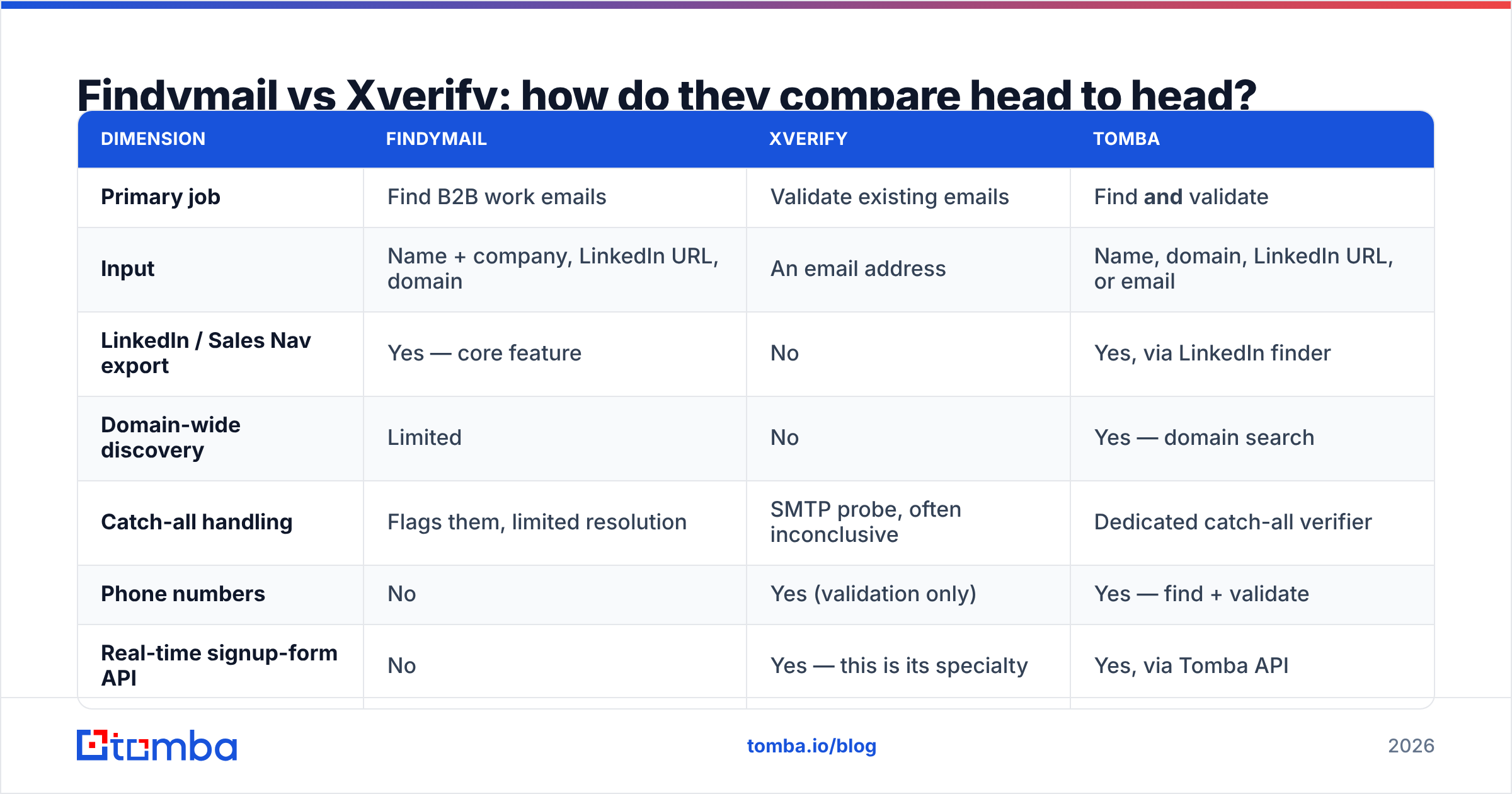
| Dimension | Findymail | Xverify | Tomba |
|---|---|---|---|
| Primary job | Find B2B work emails | Validate existing emails | Find and validate |
| Input | Name + company, LinkedIn URL, domain | An email address | Name, domain, LinkedIn URL, or email |
| LinkedIn / Sales Nav export | Yes — core feature | No | Yes, via LinkedIn finder |
| Domain-wide discovery | Limited | No | Yes — domain search |
| Catch-all handling | Flags them, limited resolution | SMTP probe, often inconclusive | Dedicated catch-all verifier |
| Phone numbers | No | Yes (validation only) | Yes — find + validate |
| Real-time signup-form API | No | Yes — this is its specialty | Yes, via Tomba API |
| Entry price | ~$49/mo, ~1,000 credits | Volume-based, per verification | Free tier (25/mo), then $49/mo |
| Credit model | Charged on success | Charged per check | Pooled across all tools |
| Best for | Outbound SDR teams | Marketing DBs, signup forms | Teams doing both |
Read the table as a Venn diagram with almost no overlap. The only shared column is "does this address exist," and even there they arrive from opposite directions: Findymail verifies what it just generated, Xverify verifies what you handed it.
Which one is more accurate?#
This question has no single answer, because they're measured on different metrics.
Findymail is measured on hit rate and false-positive rate. Hit rate is what percentage of your input rows come back with an email. False positives are addresses returned as valid that bounce. Findymail's verify-before-return design keeps false positives low; the trade-off shows up as a lower hit rate on hard segments — small companies with no web presence, non-English domains, or people whose employer just rebranded.
Xverify is measured on catch rate and false-negative rate. How many bad addresses does it flag, and how often does it kill a perfectly good one? For email verification vendors, the false-negative side is the expensive failure: marking a real customer "invalid" and suppressing them costs revenue silently.
Both categories hit the same wall: catch-all domains. When a mail server accepts every address at the domain, SMTP tells you nothing. Findymail flags these and generally won't charge you. Xverify returns "accept-all" or "unknown" and leaves the decision to you. Neither resolves the underlying question — which is why a catch-all finder that does pattern inference across a domain's known-good addresses is a genuinely different capability, not a rebranded SMTP check.
If you want third-party signal instead of vendor claims, cross-reference reviews on G2's email verification category — filter to reviewers at your company size, because accuracy on a 200-employee SaaS list looks nothing like accuracy on a 5-person-agency list.

What does each one actually cost you?#
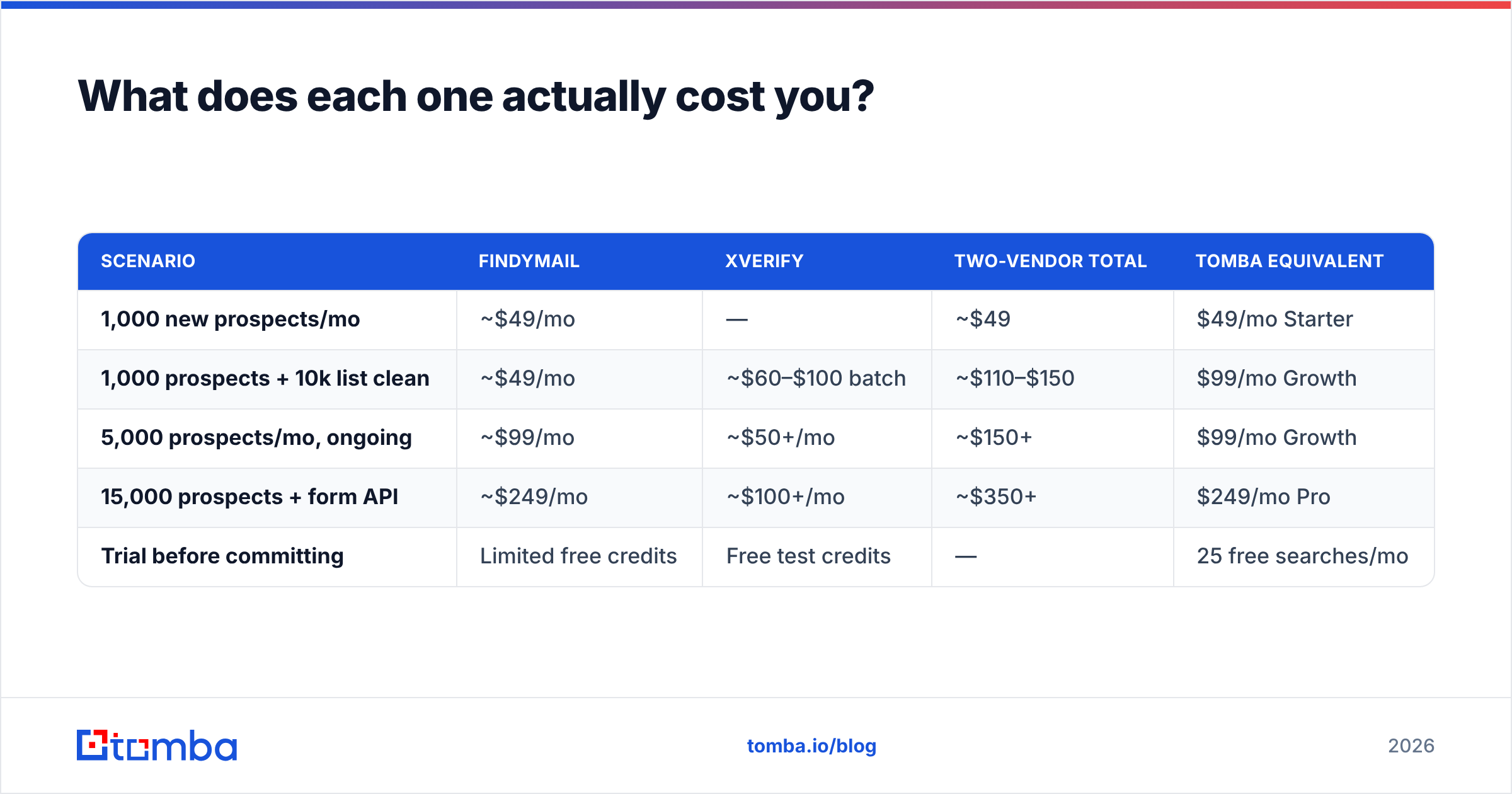
Pricing on both platforms moves, so treat these as shapes rather than quotes — check each vendor's page before you sign.
| Scenario | Findymail | Xverify | Two-vendor total | Tomba equivalent |
|---|---|---|---|---|
| 1,000 new prospects/mo | ~$49/mo | — | ~$49 | $49/mo Starter |
| 1,000 prospects + 10k list clean | ~$49/mo | ~$60–$100 batch | ~$110–$150 | $99/mo Growth |
| 5,000 prospects/mo, ongoing | ~$99/mo | ~$50+/mo | ~$150+ | $99/mo Growth |
| 15,000 prospects + form API | ~$249/mo | ~$100+/mo | ~$350+ | $249/mo Pro |
| Trial before committing | Limited free credits | Free test credits | — | 25 free searches/mo |
Two things the table hides.
First, stranded credits. Two vendors means two buckets that expire on two dates. A month where you prospect heavily but clean nothing wastes the verification bucket, and vice versa. A single pooled balance — the model behind Tomba pricing — absorbs that variance without you forecasting.
Second, integration tax. Every hand-off between vendors is code someone owns: mapping fields, retry logic on rate limits, reconciling two "status" vocabularies (valid / ok / deliverable / accept_all are four words for a moving target). At ten thousand records a month, that's an afternoon. At a million, it's a maintained service.
When should you pick Findymail?#
Pick Findymail when all of the following are true:
- LinkedIn is your list source. Sales Navigator exports are Findymail's home turf, and the LinkedIn workflow is more polished than most general-purpose finders.
- You don't own a large existing database. No legacy list means no cleanup job, so the verification gap never bites.
- You want success-only billing. If your ICP is hard to enrich, paying only for hits is a real hedge against credit waste.
- Volume is modest and predictable. Under a few thousand lookups a month, single-purpose tools stay cheap and simple.
Skip it if you need domain-wide discovery ("give me everyone in marketing at these 300 companies"), phone numbers, or website visitor identification. Those are adjacent jobs Findymail deliberately doesn't chase.
When should you pick Xverify?#
Pick Xverify when:
- You have a signup form or lead-gen form and want junk rejected at entry. Real-time API validation at the point of capture is worth more than any downstream cleanup.
- You're inheriting a database. Acquisitions, agency handovers, and old marketing automation instances all arrive dirty. Batch verification pays for itself in one avoided suspension.
- You need more than email. Phone and postal validation in the same account is a genuine differentiator against pure email-verification vendors.
- Compliance and bounce thresholds are your problem. Marketing ops teams answering to an ESP's 2% bounce cap need a defensible hygiene process, not a best-effort one.
Skip it if your actual bottleneck is "we don't have enough contacts." No verification tool creates a prospect.
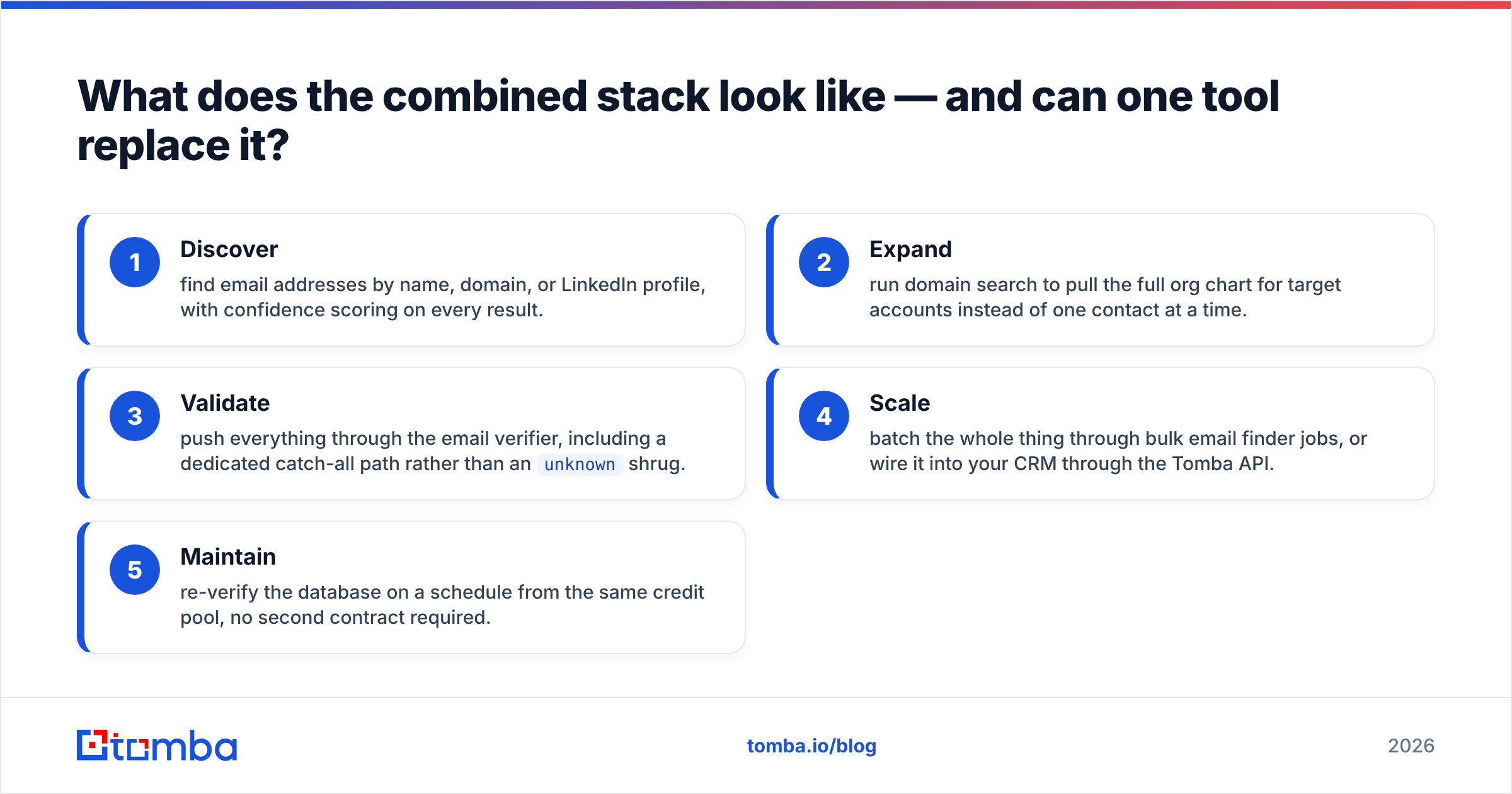
What does the combined stack look like — and can one tool replace it?#
The honest picture: the two-vendor stack works. Plenty of teams run a finder and a verifier and are perfectly happy. The argument for consolidating isn't that the stack is broken, it's that the seams cost more than they look like they do.
Here's what the same pipeline looks like consolidated:
- Discover — find email addresses by name, domain, or LinkedIn profile, with confidence scoring on every result.
- Expand — run domain search to pull the full org chart for target accounts instead of one contact at a time.
- Validate — push everything through the email verifier, including a dedicated catch-all path rather than an
unknownshrug. - Scale — batch the whole thing through bulk email finder jobs, or wire it into your CRM through the Tomba API.
- Maintain — re-verify the database on a schedule from the same credit pool, no second contract required.
One credit balance, one status vocabulary, one support thread when something breaks at 2am.
To be fair about the trade-offs: if your only workflow is Sales Navigator exports and nothing else, a specialist like Findymail will feel more tailored on that one path. If you need postal address standardization alongside email, Xverify covers ground Tomba doesn't. And if you'd rather buy pre-verified lists outright than build them, BookYourData is a well-regarded option in that adjacent lane. Consolidation is a default, not a law.
How should you actually decide?#
Run this in an afternoon, not a quarter:
- Take 200 real rows from your ICP — not a vendor's sample file, not your easiest accounts.
- Run them through each candidate's free tier. Findymail, Xverify, and Tomba's free tier (25 searches/mo) all let you test without a card conversation.
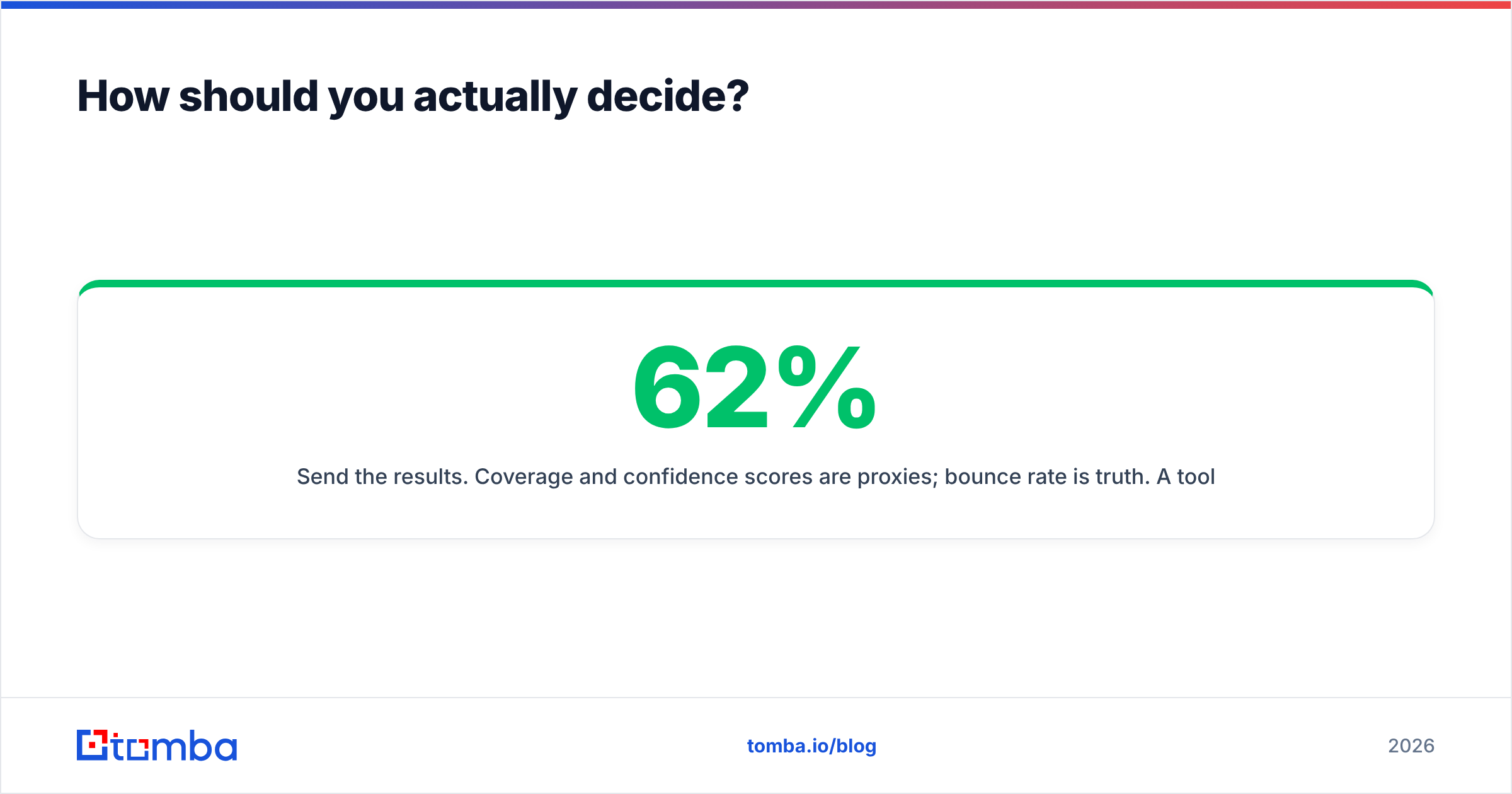
- Send the results. Coverage and confidence scores are proxies; bounce rate is truth. A tool with 62% coverage and a 0.8% bounce rate beats 85% coverage at 4%.
- Price the winner at 12x your current volume. Every vendor is cheap at trial scale. Check the tier you'll be in next year.
- Count the integration steps. If the answer involves a nightly CSV someone downloads by hand, that's a recurring cost you haven't budgeted.
The team that wins isn't the one with the best tool. It's the one that measured on its own data instead of on a landing page.
Ready to test it on your own list?#
Start with the Tomba Email Finder — find work emails by name, domain, or LinkedIn profile, verify them in the same pass, and resolve catch-all domains instead of guessing. The free tier gives you 25 searches a month with no card, Starter is $49/mo, and every credit works across finding, verifying, and enrichment from one balance. Run your 200-row test today and let the bounce rate pick the winner.
Related guides#
Ready to find emails that actually work?
Join 150,000+ professionals who stopped guessing and started sending. Free credits on signup — no credit card required.
Get the Tomba newsletter
Practical outbound tactics and product updates — once every two weeks.
About the author