Five9 Pricing Reviews Pros and Cons: 2026 Buyer Guide
Five9 lists from around $119 per seat and climbs to $229 for the top tier — but the sticker price is the smallest part of the bill. Here's the honest breakdown of costs, contract traps, and where Five9 genuinely wins.
Looking for Five9 pricing reviews pros and cons in one place? Here is the short version. List prices are public. The real bill is not. And the reviews agree on why.
TL;DR
- Five9 list pricing starts around $119 per user/month for Digital and Core. The Ultimate bundle runs about $229 per user/month. Almost nobody pays list. Annual terms and seat volume move the number.
- The sticker price is the smallest line on the invoice. Telephony usage, professional services, AI add-ons, and WFO modules routinely add 30–60% on top of seat cost.
- Reviewers consistently praise uptime, IVR flexibility, and CRM integrations. They consistently complain about support escalations, admin complexity, and rigid contract terms.
- Five9 is a strong fit for 50+ agent contact centers with real routing complexity. It is overkill for a 6-rep outbound SDR team.
- Whatever dialer you pick, it only performs as well as the contact data feeding it. Bad numbers waste licensed seats faster than any pricing tier.
What is Five9 and who actually buys it?#
Five9 is a cloud contact center platform. Analysts call this CCaaS. It swaps the phone system in a call center for a browser-based agent desktop. You also get an IVR builder, routing across voice, email, chat, SMS and social, quality management, and a growing layer of AI agents and real-time assist.
Think of it like leasing a fully fitted commercial kitchen instead of buying a stove. You get everything — ventilation, dishwashing, compliance, staff scheduling — priced per station, per month. That's fantastic if you're running a restaurant. It's an expensive way to make toast.
The buyer profile splits cleanly:
- Inbound support centers (50–5,000 agents) — Five9's core market. Skills-based routing, callback queues, and WFM integrations are the reason they sign.
- Blended outbound teams — collections, insurance renewals, healthcare scheduling. The predictive dialer and TCPA-oriented compliance controls carry the deal.
- Enterprises standardizing on Salesforce or ServiceNow — the CRM adapters are genuinely deep. That is the most common reason Five9 beats a cheaper competitor.
- Regulated industries — HIPAA, PCI-DSS, SOC 2 requirements filter out most low-cost dialers immediately.
- Small SDR teams (under 15 reps) — the group most likely to regret the purchase. Per-seat CCaaS pricing rarely pencils out when your workflow is "call a list, log it in the CRM."
If you're in group 5, read the cost section closely before you take the demo.
How much does Five9 cost in 2026?#
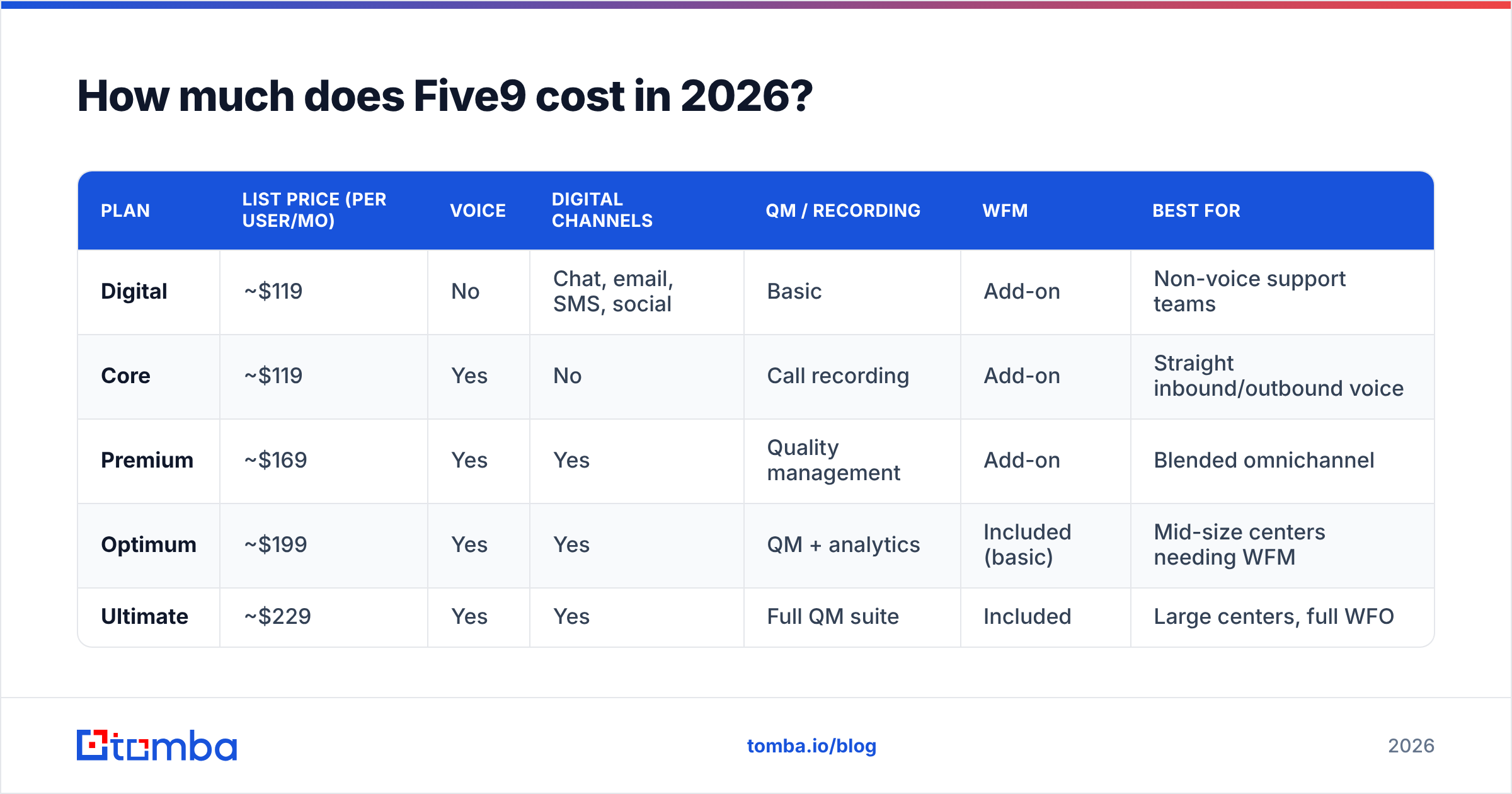
Five9 posts tiered per-seat pricing on its own pricing page. Every serious buyer still ends up on a sales call for a real quote. The posted tiers have been stable for a while:
| Plan | List price (per user/mo) | Voice | Digital channels | QM / recording | WFM | Best for |
|---|---|---|---|---|---|---|
| Digital | ~$119 | No | Chat, email, SMS, social | Basic | Add-on | Non-voice support teams |
| Core | ~$119 | Yes | No | Call recording | Add-on | Straight inbound/outbound voice |
| Premium | ~$169 | Yes | Yes | Quality management | Add-on | Blended omnichannel |
| Optimum | ~$199 | Yes | Yes | QM + analytics | Included (basic) | Mid-size centers needing WFM |
| Ultimate | ~$229 | Yes | Yes | Full QM suite | Included | Large centers, full WFO |
Treat those numbers as an anchor, not a quote. Three things move them:
- Term length. Three-year commitments commonly land 15–25% below list. Month-to-month is rarely offered, and it costs a lot more.
- Seat count. Discounts get real above roughly 100 seats. Below 25 seats you usually pay close to list.
- Named vs. concurrent seats. Named seats bill every person who might log in. Concurrent seats bill only the people logged in at the same time. For teams with heavy shift overlap, that swap can cut spend 20–40%. Ask for it by name. Sales will not always offer it.
What's not in the sticker price?#
This is where Five9 reviews get sharp. The per-seat line is only the entry fee. The invoice has more rooms.
The three that hit first:
- Telephony usage. Bundled minutes exist, but outbound-heavy teams blow past them. Per-minute overage and toll-free termination are separate line items. Model this at your real dial volume, not your average.
- Implementation and professional services. An IVR redesign, CRM adapter setup, and historical data migration are quoted as a project. Five-figure setup fees are normal for mid-market rollouts.
- AI add-ons. Agent assist, AI summarization, and virtual agents are billed by usage on top of the seat. This is the fastest-growing surprise on renewal invoices in 2026.
The three that show up later:
- WFM and advanced analytics. Included at the top tiers, an add-on below them. If you picked Premium because it looked adequate, check whether you just re-bought WFM separately.
- Overage on concurrent seats. If you license concurrency and blow through it in peak season, the true-up terms matter. Read that clause.
- Early termination. Multi-year CCaaS contracts are hard to exit mid-term. Budget for the full term, or negotiate an out before you sign.
A 100-seat Premium rollout with modest AI use lands well above the headline $169 × 100. Build your business case on the loaded number.
What do Five9 reviews actually say?#
Scores on G2's Five9 review pages and Gartner's CCaaS peer reviews sit in the low-to-mid 4 out of 5 range. The praise comes with caveats. The same themes repeat, which is what makes them useful.
What reviewers praise:
- Reliability. Voice quality and uptime draw fewer complaints than most rivals. For a contact center, this is the whole ballgame.
- Routing and IVR depth. Complex skills-based routing, callbacks, and multi-step flows work without custom development.
- CRM integration quality. The Salesforce and ServiceNow adapters get cited again and again — screen pops, click-to-dial, and activity logging that actually works.
- Reporting granularity. Supervisors get the queue-level and agent-level metrics they expect, with real-time dashboards.
- Scalability. Adding seats for seasonal peaks is fast, once the contract allows it.
What reviewers criticize:
- Support escalation. The most common complaint by a wide margin. Tier-1 answers fast. Hard problems take several rounds to reach someone who can fix them.
- Admin learning curve. The admin console is powerful and unfriendly. Most teams hand it to one or two in-house specialists. That creates key-person risk.
- Contract inflexibility. Cutting seats mid-term is hard. Teams that over-bought during a growth phase report paying for empty licenses.
- Add-on sprawl. "We thought we bought the whole thing" shows up often enough to be a pattern, not an outlier.
- Reporting customization. Standard reports are strong. Custom reporting often means exports and outside BI tools.
None of this is a deal-breaker. It is the normal shape of a mature enterprise platform: deep features, real day-to-day overhead.
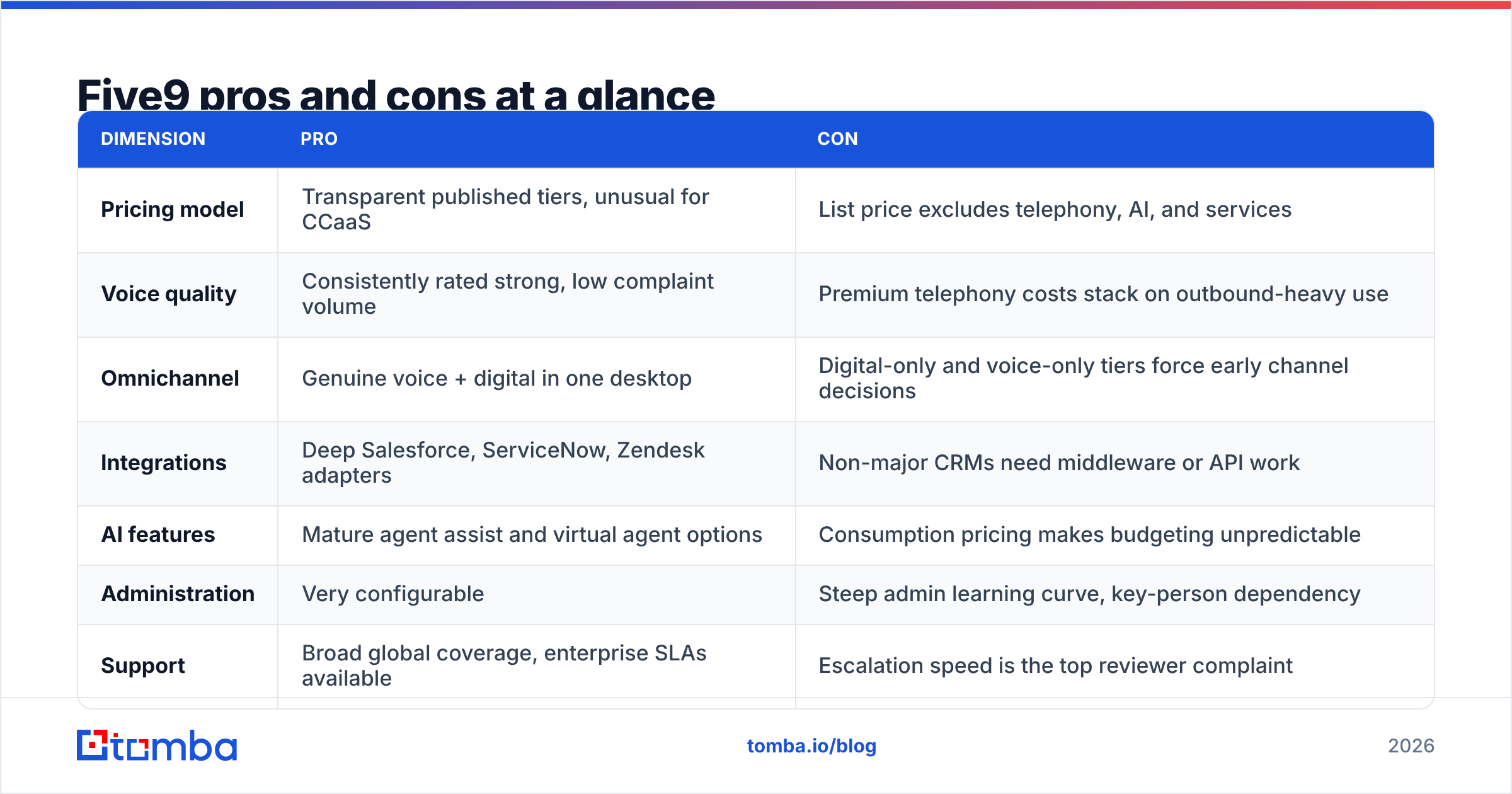
Five9 pricing reviews pros and cons at a glance#
| Dimension | Pro | Con |
|---|---|---|
| Pricing model | Transparent published tiers, unusual for CCaaS | List price excludes telephony, AI, and services |
| Voice quality | Consistently rated strong, low complaint volume | Premium telephony costs stack on outbound-heavy use |
| Omnichannel | Genuine voice + digital in one desktop | Digital-only and voice-only tiers force early channel decisions |
| Integrations | Deep Salesforce, ServiceNow, Zendesk adapters | Non-major CRMs need middleware or API work |
| AI features | Mature agent assist and virtual agent options | Usage-based pricing makes budgeting unpredictable |
| Administration | Very configurable | Steep admin learning curve, key-person dependency |
| Support | Broad global coverage, enterprise SLAs available | Escalation speed is the top reviewer complaint |
| Contracts | Volume discounts are real | Cutting seats mid-term is hard; plan the exit before signing |
How does Five9 compare to other contact center platforms?#
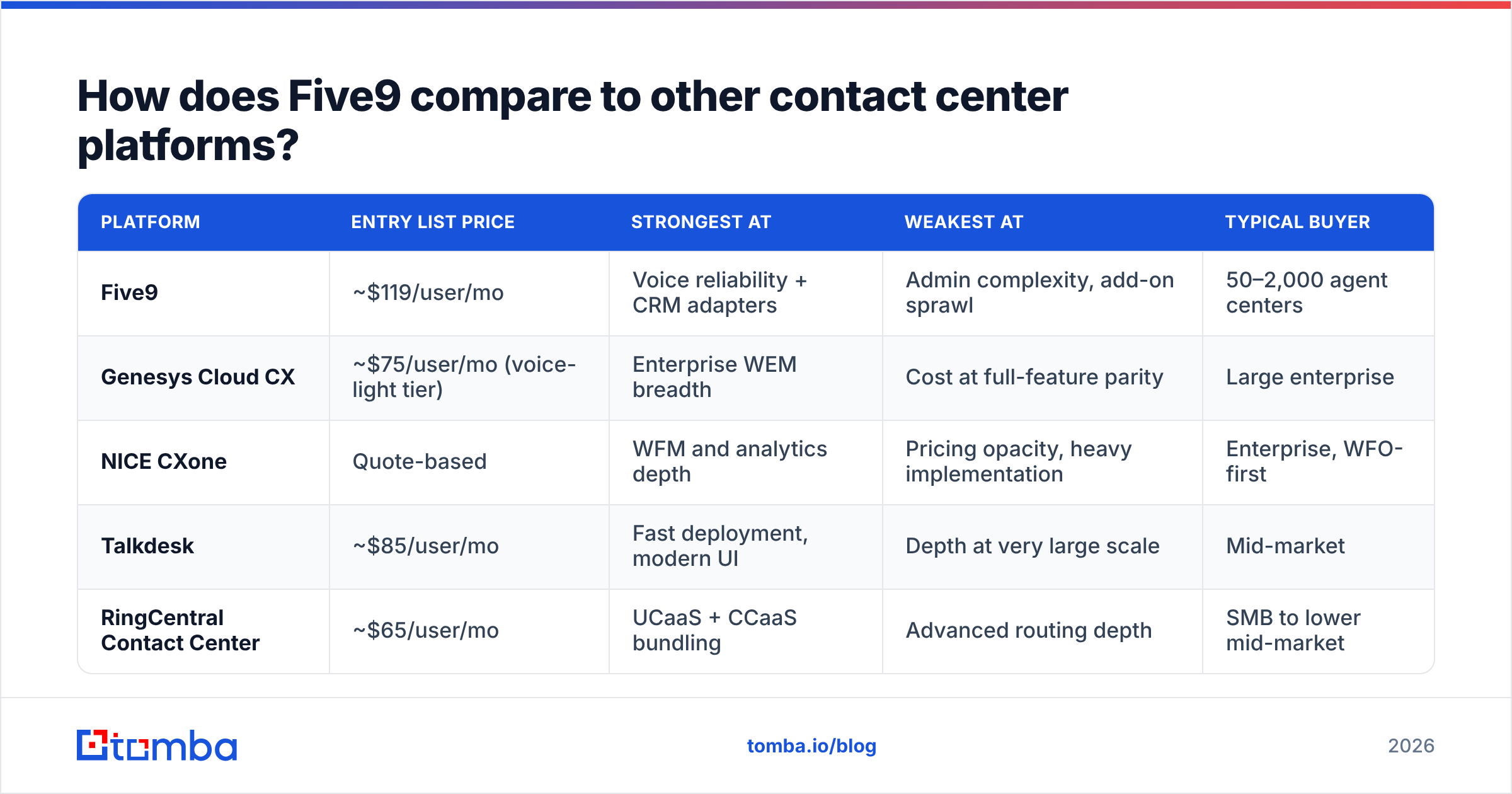
| Platform | Entry list price | Strongest at | Weakest at | Typical buyer |
|---|---|---|---|---|
| Five9 | ~$119/user/mo | Voice reliability + CRM adapters | Admin complexity, add-on sprawl | 50–2,000 agent centers |
| Genesys Cloud CX | ~$75/user/mo (voice-light tier) | Enterprise WEM breadth | Cost at full-feature parity | Large enterprise |
| NICE CXone | Quote-based | WFM and analytics depth | Pricing opacity, heavy implementation | Enterprise, WFO-first |
| Talkdesk | ~$85/user/mo | Fast deployment, modern UI | Depth at very large scale | Mid-market |
| RingCentral Contact Center | ~$65/user/mo | UCaaS + CCaaS bundling | Advanced routing depth | SMB to lower mid-market |
The honest summary: Five9 sits in the reliability lane, not the cheap lane. If price is your first filter, RingCentral or Talkdesk win the spreadsheet. If a dropped call costs you a customer, the Five9 premium is easy to defend.

Is Five9 worth it for your team?#
Run these five checks before you sign anything.
- Count your real routing complexity. If a call plan fits on one whiteboard, you do not need enterprise IVR. Complexity is the feature you are paying for.
- Model loaded cost per seat, not list. Start with the tier price. Add telephony at your real dial volume. Add setup fees spread over the contract term. Add the AI usage you expect. Compare that number across vendors.
- Ask for concurrent licensing in writing. For shift-based teams this is the single largest lever on total spend.
- Stress-test the support path. Ask one question: what is the escalation SLA on a P2, and who owns it? Get the answer in the contract, not the deck.
- Check your CRM. If you run Salesforce or ServiceNow, adapter quality is a real tiebreaker. If you run something niche, price the integration work honestly.
For a 6–15 person outbound team, the answer is usually no. A lighter dialer plus disciplined sales automation does the job for a fraction of the seat cost. You also skip the three-year commitment.
What makes any dialer pay for itself?#
The data feeding it. This is the part that gets skipped in every CCaaS evaluation, and it quietly wrecks the ROI model.
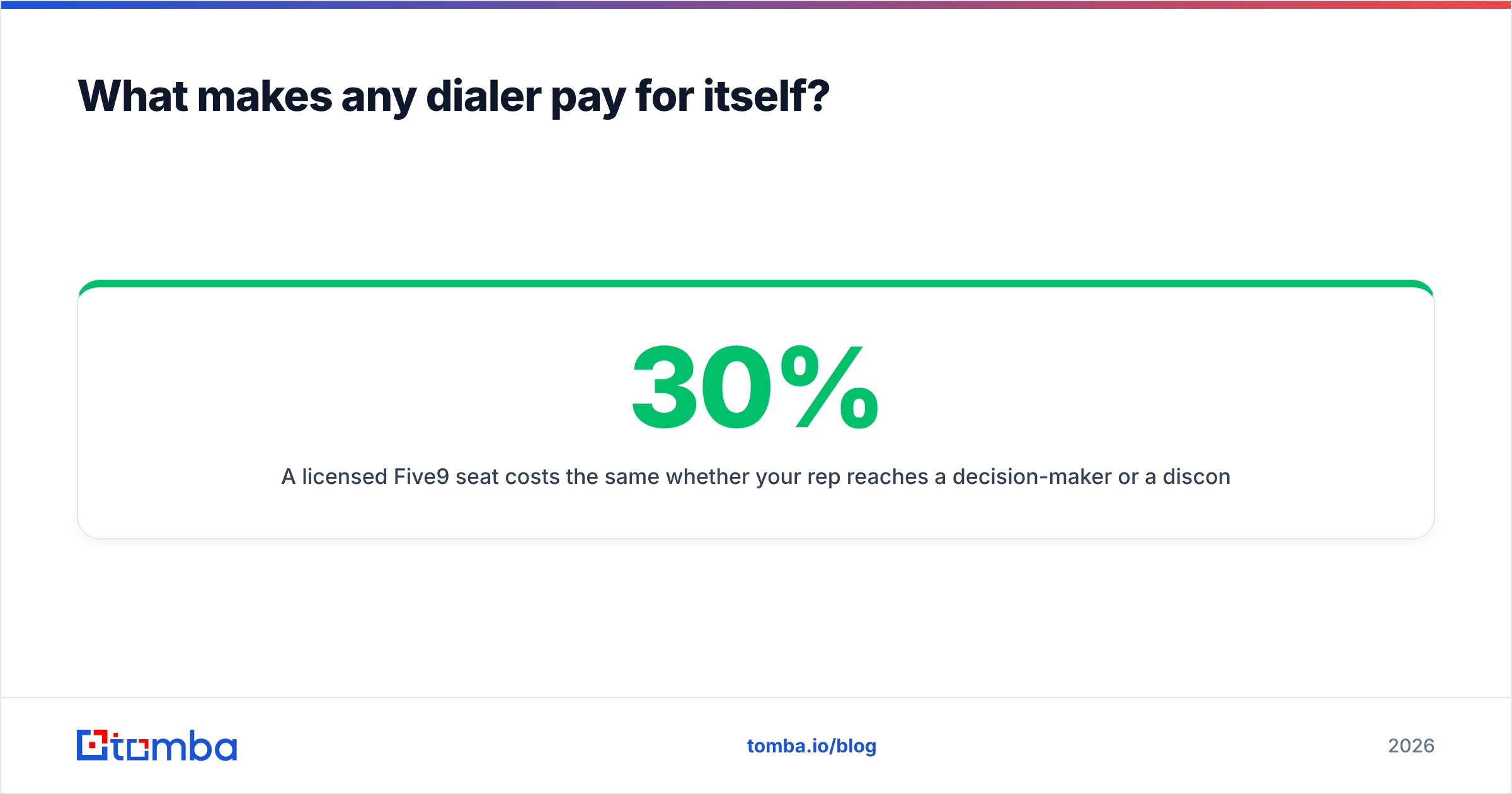
A licensed Five9 seat costs the same whether your rep reaches a decision-maker or a dead number. Say 30% of your outbound list is stale. You are no longer running a $199/seat contact center. You are running a $284/seat one, and a third of the output is dial tone. Connect rate and list quality feed straight into cost per conversation.
Three fixes, in order of impact:
- Verify numbers before they enter the dialer. A phone validator pass on an imported list removes dead and invalid numbers before they burn agent minutes.
- Enrich thin records. Half your CRM rows probably have a company and a name but no direct line. Data enrichment fills the gaps so routing rules have something to work with.
- Pair voice with a verified email channel. Most B2B sequences that work run on more than one channel. Reaching a prospect who ignored two calls often takes one accurate email — and that means a verified address, not a guess.
That last point matters more than it sounds. Your dialer handles voice. It does not build the list. If you source direct-dial numbers, a dedicated phone finder beats whatever contact records shipped with your CRM, and it costs a rounding error against a per-seat CCaaS contract.
What's the final verdict on Five9 pricing?#
Five9 is fairly priced for what it is: a mature, reliable, integration-rich contact center platform built for teams with real operational complexity. The reviews back that up. Sum up the Five9 pricing reviews pros and cons this way. The pros — uptime, routing depth, CRM adapters — are genuine and hard to copy cheaply. The cons — slow escalations, admin overhead, add-on sprawl, rigid contracts — are just as genuine and entirely predictable.
So the real question is not "is Five9 good." It is "do I have enough complexity to justify enterprise CCaaS." Above 50 agents with multi-skill routing and a Salesforce backbone: yes, and negotiate hard on term length and concurrency. Below 15 reps running plain outbound: almost certainly not. Spend the money on data quality and a lighter stack instead.
Before you commit to a per-seat contract, make sure the contact data flowing into it is worth the seats. Tomba's Email Finder finds and verifies professional email addresses by domain, name, or company — so every prospect your dialer touches also has a working email channel behind it. Start free with 25 searches a month, or check Tomba pricing. The $49/mo Starter plan costs less than a quarter of one Five9 Ultimate seat, and it fixes the input side that no dialer tier can solve on its own.
Related guides#
Ready to find emails that actually work?
Join 150,000+ professionals who stopped guessing and started sending. Free credits on signup — no credit card required.
Get the Tomba newsletter
Practical outbound tactics and product updates — once every two weeks.
About the author