Flowlu Pricing Reviews Pros and Cons: A 2026 Breakdown
Flowlu bundles CRM, projects, invoicing and knowledge base into one flat-rate subscription. Here is what it really costs in 2026, what reviewers complain about, and when a cheaper stack beats it.
Flowlu pricing reviews pros and cons, in one place: what each plan costs, where the user caps bite, and what buyers say after a year of use. Here is the short version first.
TL;DR
- Flowlu sells flat-rate plans with hard user caps, not per-seat pricing. That is cheap at 8 or 16 users. It gets expensive the day you hire user number 9 or 17.
- Entry pricing runs from $39/mo (Team, 8 users) to $299/mo (Enterprise, unlimited users) on monthly billing. Annual billing cuts roughly 25–35% off. There is a genuinely usable free plan for 2 users.
- Reviewers on G2 and Capterra praise the breadth: CRM, projects, invoices, knowledge base, and finance in one login. They criticize depth. Reporting, email sync, and mobile are the recurring complaints.
- Flowlu is a business-operations suite that happens to include a CRM. It is not a prospecting or data platform: it stores contacts, it does not find them.
- Best fit: agencies, consultancies, and small service businesses billing projects. Worst fit: outbound SDR teams who need sequencing, dialers, and enriched contact data.
What is Flowlu, and who is it actually for?#
Flowlu is an all-in-one business management platform. Think of it less as a CRM and more as an operating system for a small services firm. Opportunities and pipelines sit on one side. Project tasks and time tracking sit in the middle. Invoices, estimates, and cash-flow reports sit on the other end. There is also a knowledge base, an agile board, and a client portal.
The mental model that helps: most tools are a specialist — a scalpel. Flowlu is a Swiss Army knife. Every blade works. No blade is the best version of that blade you can buy. Whether that is a bargain or a compromise depends on how many blades you open each week.
That framing matters for pricing. Flowlu does not charge you per blade. It charges you per plan, with a ceiling on how many people can hold the knife.
Who it fits well:
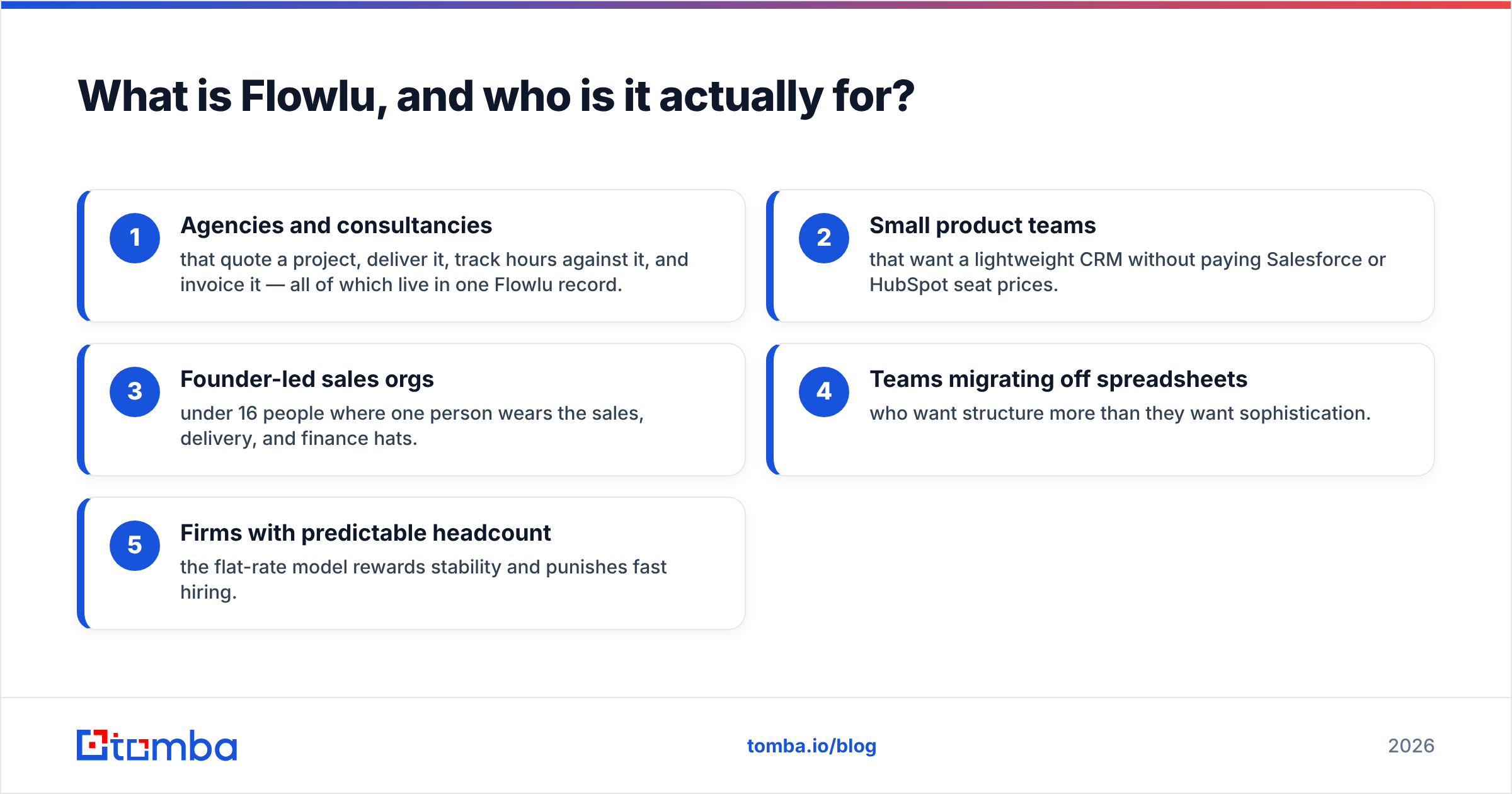
- Agencies and consultancies that quote a project, deliver it, track hours against it, and invoice it — all of which live in one Flowlu record.
- Small product teams that want a lightweight CRM without paying Salesforce or HubSpot seat prices.
- Founder-led sales orgs under 16 people where one person wears the sales, delivery, and finance hats.
- Teams migrating off spreadsheets who want structure more than they want sophistication.
- Firms with predictable headcount — the flat-rate model rewards stability and punishes fast hiring.
Who it fits badly: high-volume outbound teams, anyone whose revenue depends on cold email deliverability infrastructure, and organizations that need deep custom reporting or a mature app marketplace.
How much does Flowlu cost in 2026?#
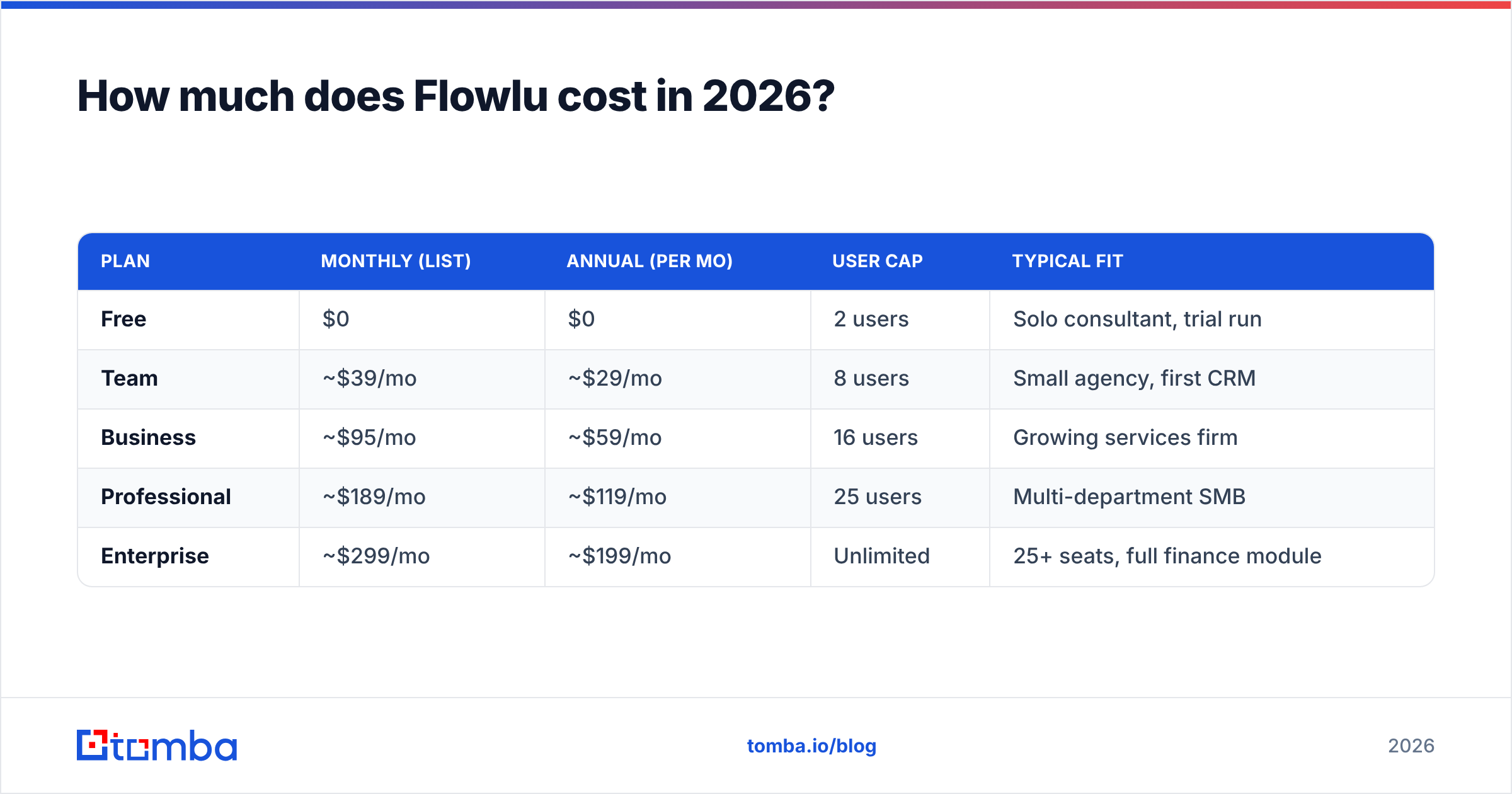
Flowlu publishes flat monthly prices per plan. Each plan has a maximum user count and a storage allowance. Prices below reflect list pricing at the time of writing. Always confirm current numbers on the official Flowlu pricing page, since vendors adjust tiers and caps more often than blog posts get updated.
| Plan | Monthly (list) | Annual (per mo) | User cap | Typical fit |
|---|---|---|---|---|
| Free | $0 | $0 | 2 users | Solo consultant, trial run |
| Team | ~$39/mo | ~$29/mo | 8 users | Small agency, first CRM |
| Business | ~$95/mo | ~$59/mo | 16 users | Growing services firm |
| Professional | ~$189/mo | ~$119/mo | 25 users | Multi-department SMB |
| Enterprise | ~$299/mo | ~$199/mo | Unlimited | 25+ seats, full finance module |
The headline math looks great. At 16 users, Business works out to roughly $3.70 per user per month on annual billing. Compare that to a mainstream per-seat CRM at $50–$100 per user per month. Flowlu looks like a rounding error.
The catch is the step function. Per-seat pricing scales smoothly: one more rep costs one more seat. Flat-rate pricing scales in cliffs. Your ninth user does not cost you $5. It costs you the jump from Team to Business, all at once, whether that ninth person is a full-time AE or a bookkeeper who logs in twice a month.
Wait — that image needs its real form:

What is gated behind higher tiers?#
Price is only half the story. The other half is which modules unlock where:
- Free — CRM basics, 2 users, minimal storage, no invoicing depth.
- Team — task management, project management, basic CRM automation, external users.
- Business — full finance module (invoices, expenses, cash flow), custom fields, more automation rules.
- Professional — advanced project accounting, more granular permissions, higher API limits.
- Enterprise — unlimited users, white-label options, full customization.
If you need invoicing and cash-flow reporting, you are realistically starting at Business, not Team. Most agencies evaluating Flowlu do need both. Budget accordingly. The advertised entry price is rarely the price a serious buyer pays. That is true of nearly every all-in-one suite, not a Flowlu-specific sin.
What do Flowlu reviews actually say?#
Aggregate review sentiment is genuinely positive. Flowlu holds strong ratings on both G2 and Capterra, usually in the 4.5–4.8 range across hundreds of reviews. That is not an accident. The product delivers an unusual amount of surface area for the money.
Most Flowlu pricing reviews pros and cons roundups stop at the star rating. Read past it and the themes get specific.
What reviewers repeatedly praise:
- Consolidation. Users describe cancelling three or four subscriptions after adopting it. That is the single most-cited benefit.
- Price-to-feature ratio. Especially from teams coming off per-seat tools.
- Onboarding speed. Most reviewers report being operational in days, not weeks.
- Responsive support. Commonly mentioned as better than expected for the price band.
What reviewers repeatedly criticize:
- Reporting depth. Custom reports are limited next to dedicated BI or a mature CRM report builder. Teams that need cohort or attribution analysis export to spreadsheets.
- Email integration. Two-way sync with Gmail and Outlook works, but a meaningful share of reviewers call it fragile.
- Mobile app. Consistently rated below the web app.
- Learning curve on the finance module. Project accounting is powerful and not self-explanatory.
- Integration marketplace. Thinner than HubSpot's or Zoho's. Zapier covers many gaps, but native connectors are limited.
None of those are dealbreakers for the core audience. All of them are dealbreakers for somebody. The honest read: Flowlu's ratings are high because its buyers self-select correctly. The people who need what it does not do mostly never buy it.
What are the real pros of Flowlu?#
1. One system of record for the full client lifecycle. Quote, project, timesheet, invoice, and payment all attach to the same account record. The alternative — CRM plus PM tool plus invoicing tool plus a sync layer — costs more in money and far more in reconciliation time.
2. Flat pricing removes seat anxiety. In per-seat tools, teams ration logins. Ops people share credentials. Contractors get left out. Flat pricing means everyone who should see the data can see the data, up to the cap.
3. Genuinely usable free tier. Two users, real CRM functionality, no time limit. That is more generous than most competitors' 14-day trials.
4. Project profitability is native. Time and money live in the same tool, so you can see margin per project without exporting anything. Very few tools in this price band do that.
5. Fast time-to-value. No implementation partner required. No six-week configuration project.
What are the real cons of Flowlu?#
1. The seat cliffs. Already covered, but worth restating: model your headcount 18 months out before you commit to a tier. Hitting a cap mid-quarter is an unbudgeted expense.
2. It is not a sales-engagement platform. No native sequencer worth the name, no dialer, no deliverability tooling. If your motion is outbound, Flowlu is where deals go after they exist. The finding, verifying, and sequencing happens elsewhere.
3. Reporting hits a wall. Fine for pipeline value and win/loss counts. Not fine for multi-touch attribution or forecast modeling. If your board asks for cohort analysis, you are exporting to a spreadsheet.
4. Empty-database problem. This is not unique to Flowlu, but nobody warns you about it. Companies buy a CRM expecting revenue and get a very organized void. A CRM is a filing cabinet. It does not manufacture the files.
5. Customization ceiling. Custom fields and basic automation, yes. Custom objects, complex approval routing, or deep API-driven workflows — you will hit limits faster than in an enterprise platform.
How does Flowlu compare to other CRM and project platforms?#
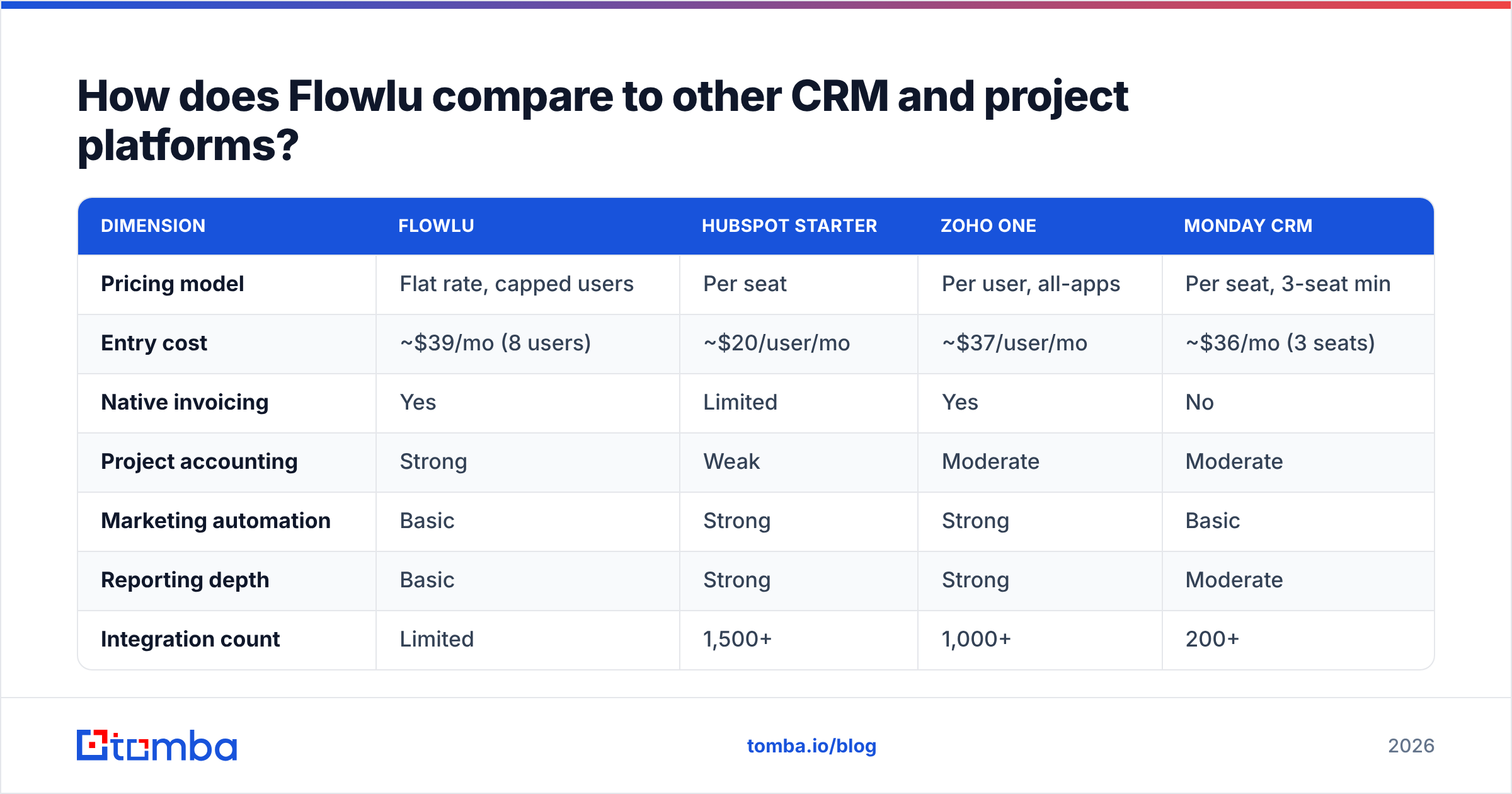
The comparison that matters is not feature-count. It is pricing model plus depth-versus-breadth.
| Dimension | Flowlu | HubSpot Starter | Zoho One | Monday CRM |
|---|---|---|---|---|
| Pricing model | Flat rate, capped users | Per seat | Per user, all-apps | Per seat, 3-seat min |
| Entry cost | ~$39/mo (8 users) | ~$20/user/mo | ~$37/user/mo | ~$36/mo (3 seats) |
| Native invoicing | Yes | Limited | Yes | No |
| Project accounting | Strong | Weak | Moderate | Moderate |
| Marketing automation | Basic | Strong | Strong | Basic |
| Reporting depth | Basic | Strong | Strong | Moderate |
| Integration count | Limited | 1,500+ | 1,000+ | 200+ |
| Best for | Services firms ≤25 seats | Inbound marketing teams | Multi-department SMB | Visual project-led teams |
Read the table this way. Flowlu wins decisively on cost per user at fixed headcount and on project-to-invoice continuity. It loses on marketing depth, reporting, and ecosystem. If your evaluation criteria are the first two, buy it. If they are the last three, look at HubSpot's CRM documentation or Zoho One instead and pay the per-seat premium.
One more comparison teams forget to run: Flowlu versus not buying an all-in-one at all. A focused CRM plus a focused data source plus a focused sequencer often costs less than the suite and performs better on each axis. Bundles win on convenience, not on capability.
Is Flowlu worth it for outbound sales teams?#
Partly. It is a fine place to manage outbound deals and a poor place to generate them.
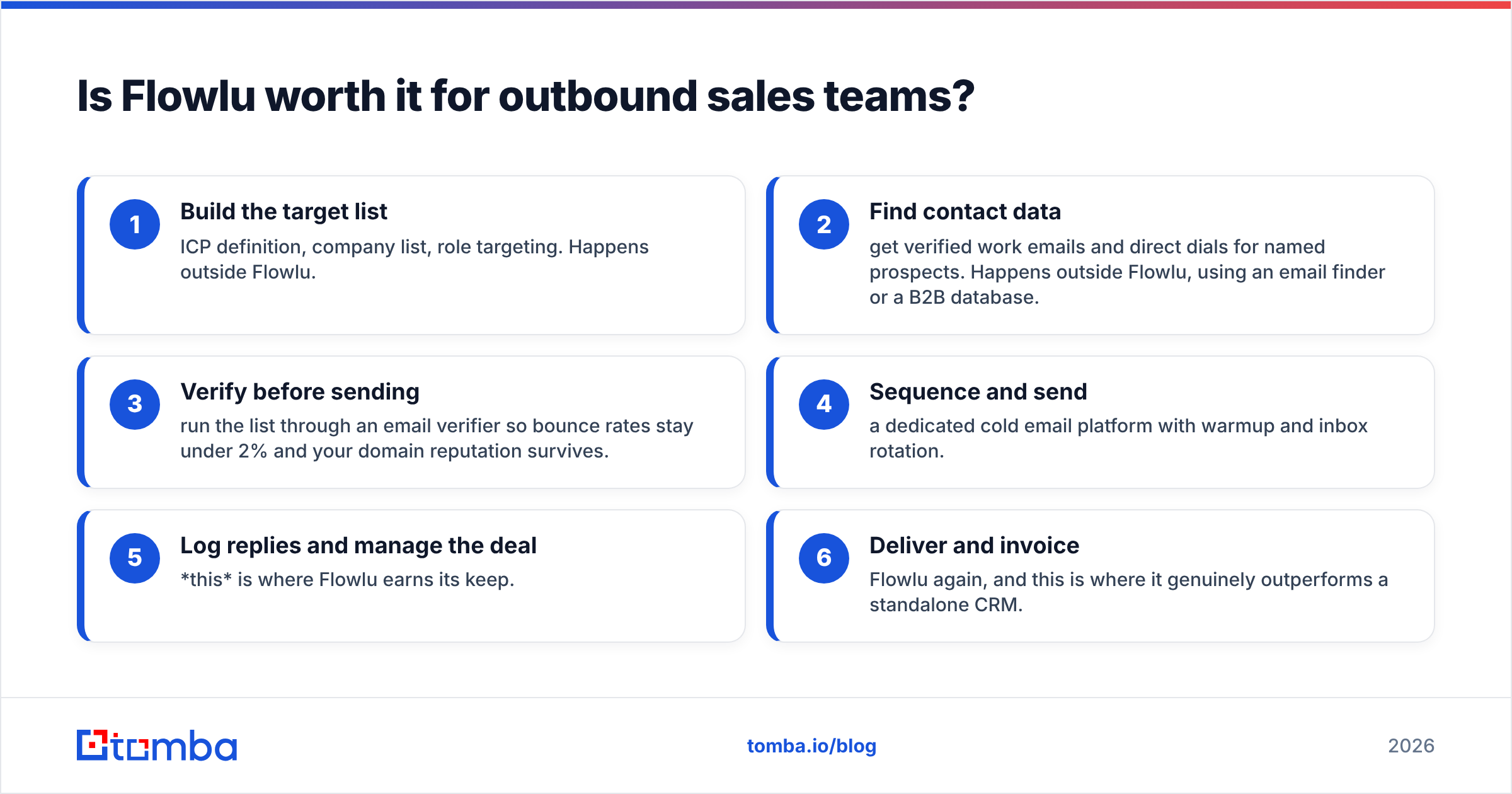
Here is the honest workflow split for a team running cold outbound with Flowlu as the CRM:
- Build the target list — ICP definition, company list, role targeting. Happens outside Flowlu.
- Find contact data — get verified work emails and direct dials for named prospects. Happens outside Flowlu, using an email finder or a B2B database.
- Verify before sending — run the list through an email verifier so bounce rates stay under 2% and your domain reputation survives.
- Sequence and send — a dedicated cold email platform with warmup and inbox rotation.
- Log replies and manage the deal — this is where Flowlu earns its keep.
- Deliver and invoice — Flowlu again, and this is where it genuinely outperforms a standalone CRM.
Steps 1 through 4 are the revenue-generating half of the machine, and Flowlu covers essentially none of them. That is not a criticism. It is scoping. Buying an operations suite and expecting pipeline is like buying a filing cabinet and expecting mail.
Correct form:

If you are running that split, budget for data separately. A CRM subscription and a contact-data subscription are different line items solving different problems. Skipping the second one is the most common reason a new CRM rollout produces nothing in quarter one.
Which Flowlu plan should you actually buy?#
Skip the decision paralysis. Four rules:
- Under 3 people, testing the concept — Free plan. Spend nothing until the workflow proves itself.
- Agency of 5–8, no invoicing needs yet — Team, annual billing. Roughly $29/mo is hard to argue with.
- You invoice clients from the tool — Business minimum. The finance module is the reason you are buying, and it is gated there.
- Headcount growing past 20 within a year — go straight to Professional or Enterprise. Paying the higher tier for six months is cheaper than two mid-year migrations plus the disruption.
And one anti-rule. Do not buy annual billing on your first purchase unless you have already run a 30-day pilot with real deals in the system. The discount is real. So is the risk of discovering the reporting limits in month two.
How do you keep a Flowlu CRM from becoming an expensive empty database?#
Three habits separate teams that get ROI from teams that churn in 90 days.
Populate before you configure. Teams spend three weeks designing custom fields on an empty database. Load 500 real contacts first. The right field structure becomes obvious once real data is in there.
Verify on entry, not on exit. Every contact that enters the CRM should already be verified. A record with a dead email is worse than no record. It inflates your pipeline counts and quietly damages email deliverability when someone sends to it six months later.
Enrich on a schedule. B2B contact data decays around 20–30% per year through job changes alone. A quarterly data enrichment pass on your active accounts keeps the CRM honest. Without it, year two of any CRM is mostly archaeology.
Automate the handoff. Whatever finds your contacts should push them into Flowlu without a CSV round-trip. Zapier or a direct API call both work. The point is that manual export-import is where data hygiene goes to die.
The verdict on Flowlu pricing reviews pros and cons#
Flowlu is one of the better-value business suites available to services firms under 25 seats. The flat-rate model is a real advantage if your headcount is stable. The project-to-invoice continuity is genuinely differentiated. Review sentiment backs both claims up. The limits — reporting depth, integration count, and the seat cliffs — are real but predictable, and they mostly bite teams that were the wrong fit to begin with.
The thing Flowlu cannot do, at any tier, is fill itself.
If you are standing up a CRM this quarter, solve the data problem in the same breath. Tomba's Email Finder finds verified professional email addresses by domain, name, or company. The free tier covers 25 searches a month, and paid plans start at $49/mo — see full Tomba pricing for the Growth and Pro tiers. Load a verified list into Flowlu on day one. Within a month you will know whether the CRM is the bottleneck or the pipeline is.
Related guides#
Ready to find emails that actually work?
Join 150,000+ professionals who stopped guessing and started sending. Free credits on signup — no credit card required.
Get the Tomba newsletter
Practical outbound tactics and product updates — once every two weeks.
About the author