Free Business Leads Database: What You Actually Get in 2026
Free lead databases promise millions of contacts and deliver a bounce rate that torches your domain. Here is what free tiers actually give you in 2026, where they break, and how to build a usable pipeline for close to nothing.
TL;DR
- A "free business leads database" is almost never a database you own. It's a metered free tier — 25 to 100 lookups a month — on top of a paid platform, and that's fine if you plan around it.
- The genuinely free sources (government registries, association directories, public filings) give you companies, not people. You still need an email step.
- Free scraped lists downloaded as CSVs are the expensive option: 15-40% of the addresses are dead, and a 12% bounce rate can cost you your sending domain for months.
- The workable 2026 stack is free company data + a metered free finder tier + verification before every send. That covers 200-400 usable contacts a month at $0.
- When you outgrow it, the cheapest honest step up is a per-credit finder starting around $49/mo — not a $500/mo all-in-one you'll use 8% of.
What is a free business leads database?#
The phrase covers four very different things, and conflating them is why most people end up disappointed.
1. Metered free tiers on commercial platforms. Tomba, Hunter, Apollo, RocketReach and others all give you a monthly allowance against their live index. You're not getting a database — you're getting a small number of queries against one. Quality matches the paid product; volume doesn't.
2. Public registries and open data. Company registration bodies, SEC EDGAR, OpenCorporates, local chamber directories. Genuinely free, genuinely unlimited, and genuinely missing every contact detail you need to actually reach someone.
3. Association and niche directories. Trade bodies, conference exhibitor lists, G2 category pages, Product Hunt. Excellent for building a targeted company list in a specific vertical. Zero email coverage.
4. "Free download" lead lists. A CSV of 500,000 contacts from a site you'd never heard of yesterday. These are recycled scrapes, often years old, frequently resold, and occasionally containing enough EU personal data to make your legal team unhappy.
Only categories 1-3 belong in a real workflow. Category 4 is the one that gets people blacklisted.

Why do free lead lists bounce so hard?#
Because B2B contact data decays faster than almost any other dataset you'll work with. The commonly cited figure across the industry is roughly 2-2.5% decay per month — people change jobs, companies rebrand, domains migrate, mailboxes get deprovisioned. Compound that and a list assembled 18 months ago is somewhere between 30% and 40% wrong before anyone has touched it.
That matters more in 2026 than it did in 2022. Google and Yahoo's bulk-sender requirements now put a hard spam-complaint ceiling on senders, and mailbox providers weight unknown-user bounces heavily when scoring a sending domain. The practical threshold most deliverability teams work to is under 2% bounce. A free scraped list will put you at four to eight times that on the first send.
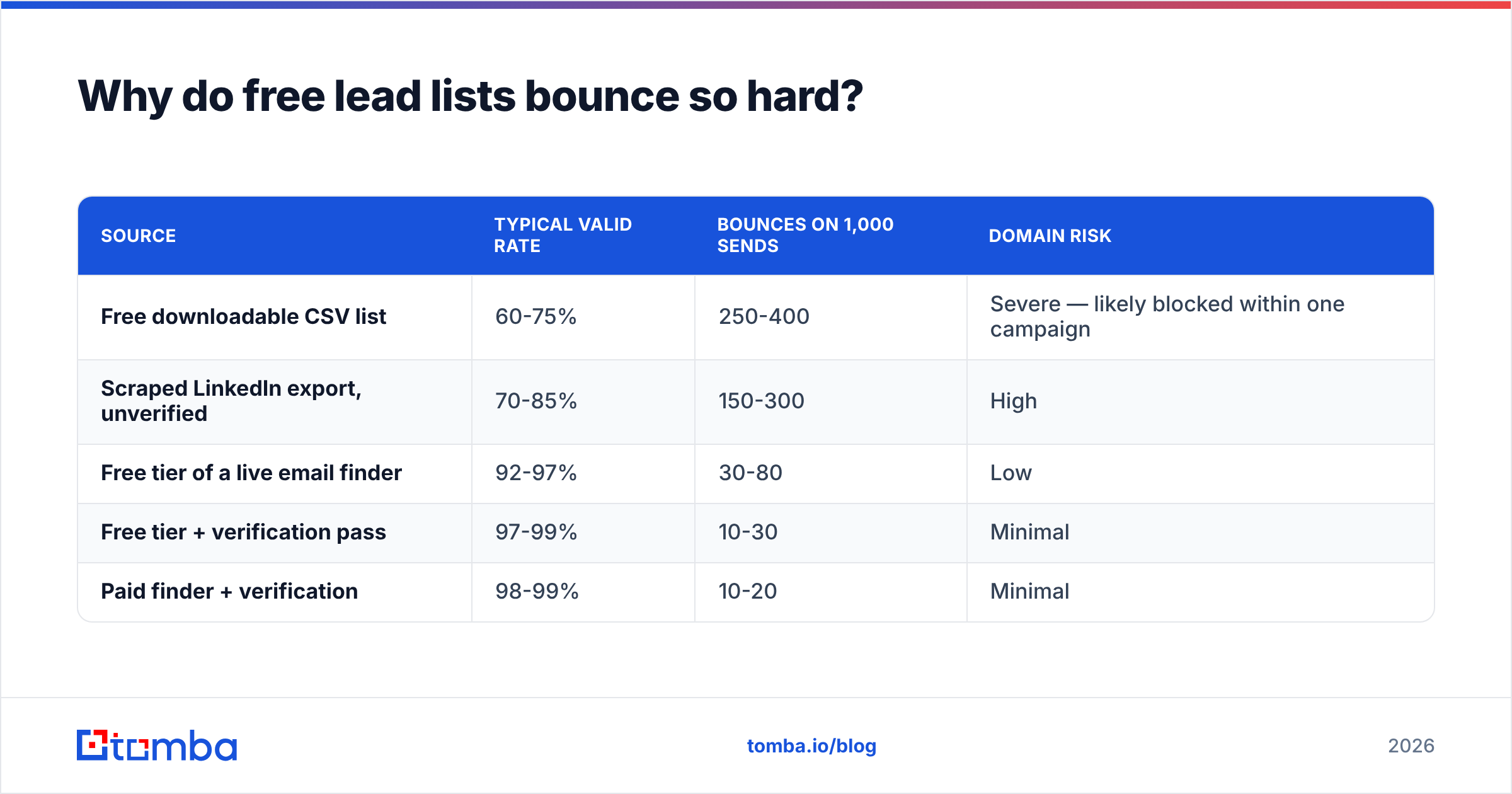
Here's what that looks like in numbers. Take 1,000 contacts:
| Source | Typical valid rate | Bounces on 1,000 sends | Domain risk |
|---|---|---|---|
| Free downloadable CSV list | 60-75% | 250-400 | Severe — likely blocked within one campaign |
| Scraped LinkedIn export, unverified | 70-85% | 150-300 | High |
| Free tier of a live email finder | 92-97% | 30-80 | Low |
| Free tier + verification pass | 97-99% | 10-30 | Minimal |
| Paid finder + verification | 98-99% | 10-20 | Minimal |
The gap between rows one and four costs you nothing in dollars. It costs about twenty minutes of process.
Run any list you didn't source yourself through an email verifier before it touches your sequencer. If the list arrives with a high proportion of role addresses (info@, sales@, contact@) and catch-all domains, that's a tell that it was generated by a pattern permutator rather than sourced and confirmed.
Which free business leads database sources actually work?#
Sorted by what they give you, not by how loudly they market themselves.
- Government and corporate registries — SEC EDGAR (US public filings), Companies House (UK), OpenCorporates (aggregated global). Free, authoritative, and the best source of firmographics: legal name, incorporation date, registered address, filings. No contacts.
- Review platforms — G2 and Capterra category pages are effectively segmented buyer lists. If you sell to companies using a specific tool, the reviewer base for that tool is your ICP, publicly listed.
- Job boards — a company posting three SDR roles is a company buying sales tooling. Job postings are the highest-intent free signal available, and they're indexed and searchable.
- Association and event directories — exhibitor lists, member directories, speaker rosters. Narrow, current, and rarely scraped to death because they're inconvenient to parse.
- Metered free finder tiers — the layer that turns everything above into something you can actually email. This is where the company-to-contact translation happens.
- Your own site traffic — the most underused free source. Anonymous visitors who already reached your pricing page convert at multiples of cold. Visitor identification turns a portion of that traffic into named companies.
The pattern to notice: free sources are excellent at company discovery and useless at person discovery. Every workable free stack is a company-data source glued to a contact-finding step.

How do the free tiers compare in 2026?#
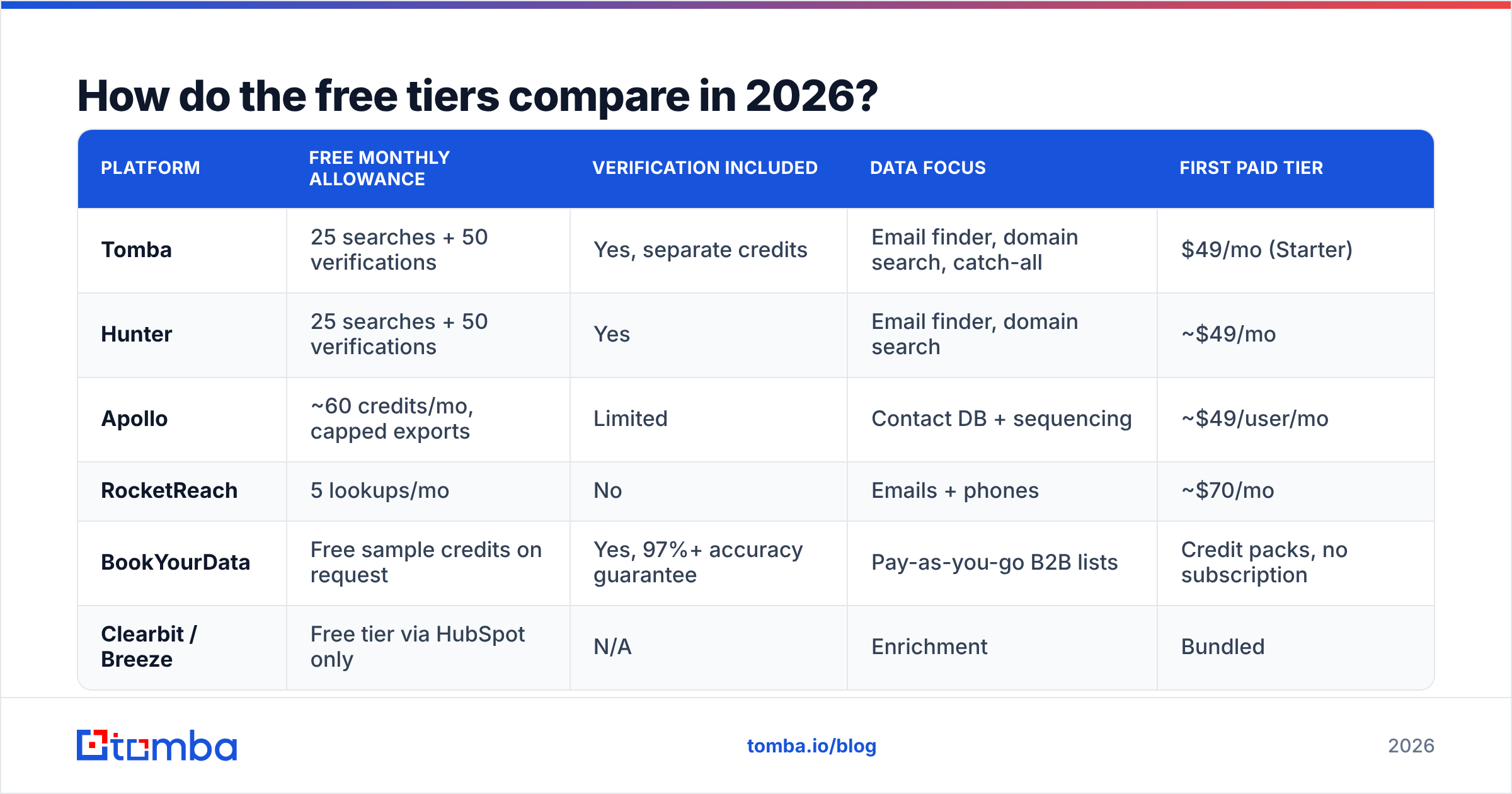
This is the layer that determines whether your free stack works. All figures below are the published free allowances at time of writing — check each vendor's pricing page before committing, since free tiers move.
| Platform | Free monthly allowance | Verification included | Data focus | First paid tier |
|---|---|---|---|---|
| Tomba | 25 searches + 50 verifications | Yes, separate credits | Email finder, domain search, catch-all | $49/mo (Starter) |
| Hunter | 25 searches + 50 verifications | Yes | Email finder, domain search | ~$49/mo |
| Apollo | ~60 credits/mo, capped exports | Limited | Contact DB + sequencing | ~$49/user/mo |
| RocketReach | 5 lookups/mo | No | Emails + phones | ~$70/mo |
| BookYourData | Free sample credits on request | Yes, 97%+ accuracy guarantee | Pay-as-you-go B2B lists | Credit packs, no subscription |
| Clearbit / Breeze | Free tier via HubSpot only | N/A | Enrichment | Bundled |
Two observations worth acting on.
First, allowances are per-account, not per-seat, on most free tiers. Three teammates on three free accounts is three times the volume — technically permitted by most terms, but check yours, and don't build a business process on it.
Second, "credits" mean different things. Apollo's credits are consumed by reveals and exports with monthly export caps that bite earlier than the credit count suggests. Tomba and Hunter meter searches and verifications separately, which is more predictable when you're planning a month. BookYourData sells credits outright with no subscription and an accuracy guarantee attached, which suits teams that need one clean list rather than an ongoing drip — a genuinely different model, and a good fit if your buying pattern is lumpy.

How do you build a working pipeline on free tiers?#
Five steps. Budget about three hours for the first run, forty minutes a week after that.
Step 1 — Define the company list before you touch any tool. Write down firmographics: employee range, industry, geography, and one trigger (hiring, funding, tech stack, recent review). Without a trigger you're just building a list, and untriggered lists are why free tiers feel useless — you burn 25 lookups on companies that had no reason to reply.
Step 2 — Harvest companies from free sources. Registry or review-platform data into a spreadsheet. Columns: company name, domain, employee count, trigger, trigger date. Aim for 60-100 companies. This step costs nothing but time and it's the step people skip.
Step 3 — Identify the right person per company. Not "the CEO." The person who owns the problem. LinkedIn's free search, the company's own team page, and podcast or webinar appearances all work. Two names per company gives you a fallback when the first doesn't land.
Step 4 — Find the addresses. This is where the metered tier gets spent, so spend it well. Use domain search to pull the company's email pattern first — one query returns the pattern plus known addresses, which is far more efficient than one lookup per person. Once you know a company uses first.last@, you can derive the rest and verify rather than search.
Step 5 — Verify everything, then send. Non-negotiable. Verification credits are cheaper than search credits everywhere, and a bounce costs more than either. Route catch-all domains through a catch-all verifier rather than guessing — catch-alls accept everything at SMTP and tell you nothing, so a naive verifier marks them valid and you find out the hard way.
That sequence yields roughly 200-400 verified contacts a month at $0, assuming you use pattern derivation rather than one search per person. It scales linearly with the free allowance and stops dead when you need volume.

When should you stop using free tiers?#
Three signals, any one of which means the math has flipped.
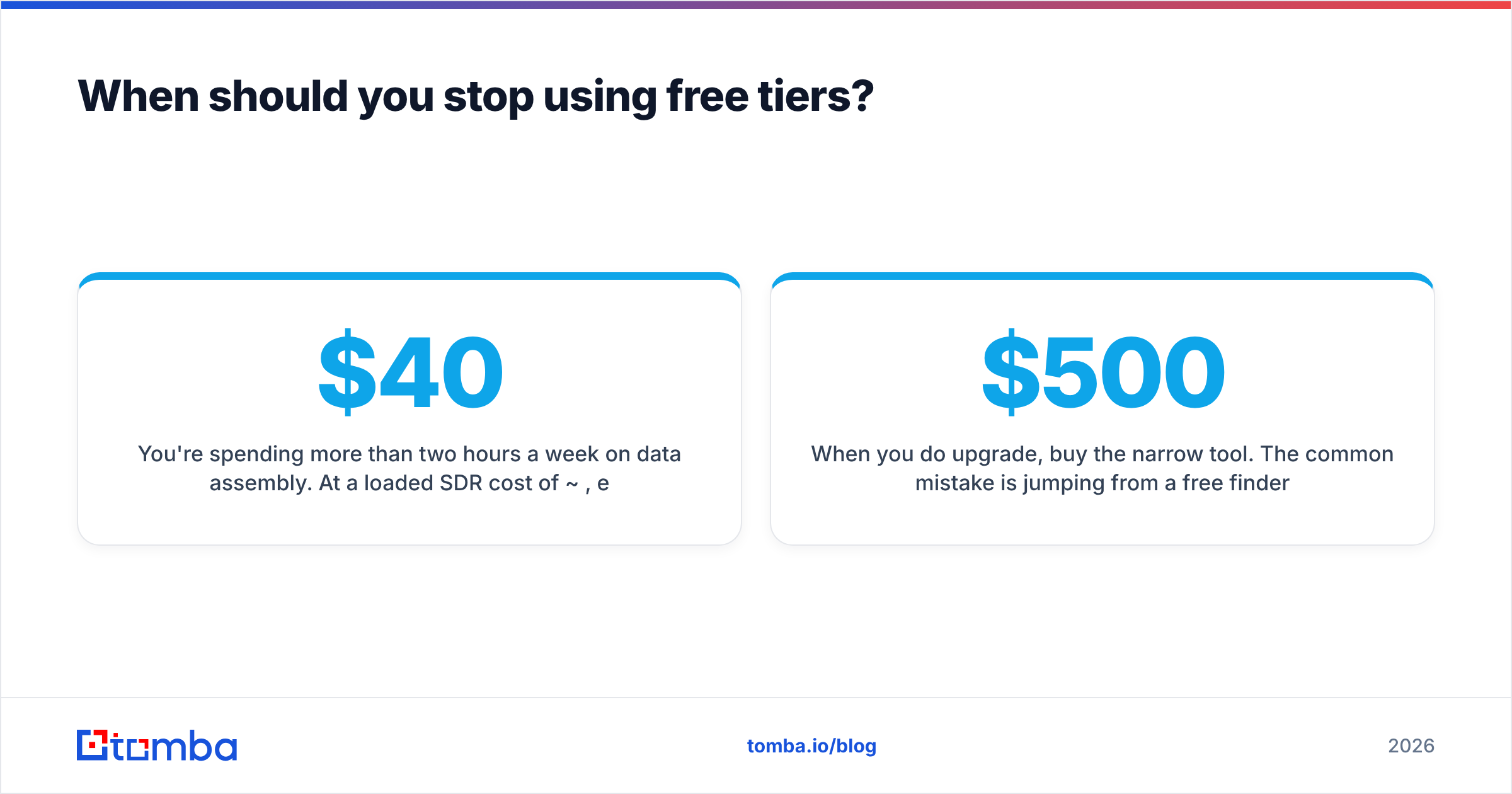
You're spending more than two hours a week on data assembly. At a loaded SDR cost of ~$40/hour, eight hours a month is $320 of labour to avoid a $49 subscription. That's not frugality.
You're rationing lookups. The moment you skip a good-fit prospect because you're saving credits for later in the month, the free tier is costing you pipeline. One closed deal covers a year of a starter plan in most B2B price bands.
You need bulk or API access. Free tiers are interactive by design. Enriching 2,000 rows or wiring lookups into your CRM needs bulk processing or an email finder API, and no free tier offers meaningful throughput on either.
When you do upgrade, buy the narrow tool. The common mistake is jumping from a free finder to a $500/mo all-in-one platform with sequencing, dialing, intent data and analytics, then using it exclusively as an email finder. Tomba pricing starts at $49/mo for Starter, $99/mo for Growth, and $249/mo for Pro — priced against the lookup volume you actually consume rather than a seat license for features you won't open. Check your own last-90-days usage before assuming you need the tier above.
What about the legal side of free lead data?#
Short version: the source matters more than the price.
Under GDPR, a business email address tied to an identifiable person is personal data. Legitimate interest can cover B2B outreach in the EU, but it requires that you can document where the data came from, that the contact is relevant to your product, and that opt-out is immediate and honoured. A CSV of unknown provenance fails the first test on its own — you cannot document a source you don't have.
CAN-SPAM in the US is more permissive on acquisition and strict on execution: accurate headers, no deceptive subject lines, a physical postal address, and a working unsubscribe processed within 10 business days. Nothing there prohibits cold B2B email.
The practical rule: use free sources that publish their provenance, and skip any list where you can't answer "where did this come from?" in one sentence. Vendors that document their data sources make that answer easy. Anonymous download links make it impossible.
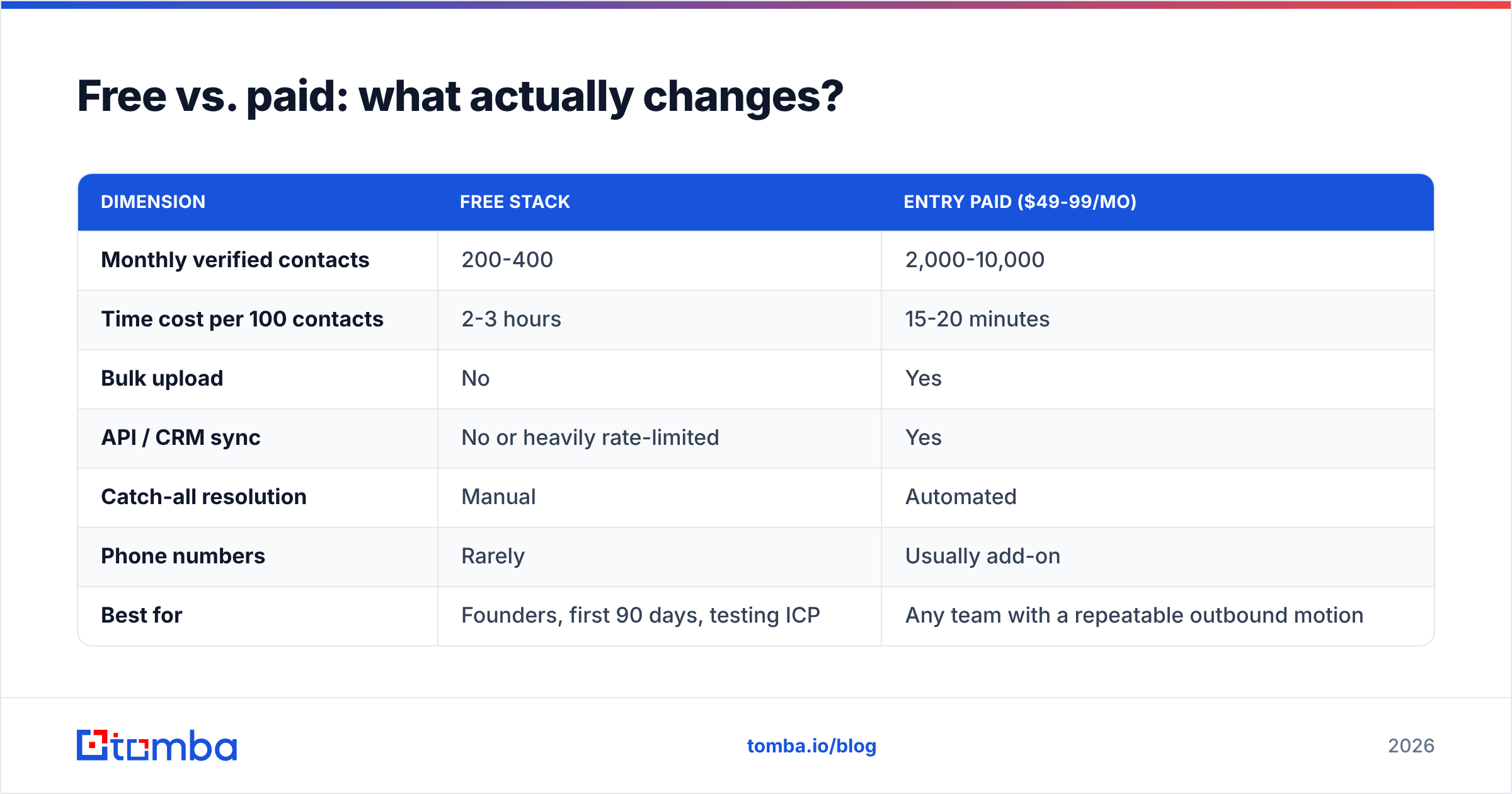
Free vs. paid: what actually changes?#
| Dimension | Free stack | Entry paid ($49-99/mo) |
|---|---|---|
| Monthly verified contacts | 200-400 | 2,000-10,000 |
| Time cost per 100 contacts | 2-3 hours | 15-20 minutes |
| Bulk upload | No | Yes |
| API / CRM sync | No or heavily rate-limited | Yes |
| Catch-all resolution | Manual | Automated |
| Phone numbers | Rarely | Usually add-on |
| Best for | Founders, first 90 days, testing ICP | Any team with a repeatable outbound motion |
The honest read: a free stack is a legitimate way to validate an ICP and book your first 20 meetings. It is not a way to run outbound at scale, and pretending otherwise burns SDR hours at a worse rate than the subscription you're avoiding.
Start with the free tier, keep the bounce rate low#
Build the company list from free public sources, then use a metered finder tier for the part free data can never give you — the actual person and the actual address. The Tomba Email Finder free plan covers 25 searches a month with no card required, which is enough to test whether your ICP responds before you commit a dollar. Pair it with domain search to pull email patterns in one query instead of burning a credit per contact, verify everything before it hits your sequencer, and upgrade only when you're rationing lookups on prospects you actually want to reach.
Free data is a starting point, not a strategy. The teams that make it work are the ones who treat verification as mandatory and the free tier as a runway, not a destination.
Related guides#
Ready to find emails that actually work?
Join 150,000+ professionals who stopped guessing and started sending. Free credits on signup — no credit card required.
Get the Tomba newsletter
Practical outbound tactics and product updates — once every two weeks.
About the author