Freshworks Pricing 2026: Reviews, Pros and Cons Explained
Freshworks looks cheap on the pricing page and gets expensive in the contract. Here is the real per-seat math, what reviewers praise, what they complain about, and when a lighter stack wins.
TL;DR
- Freshworks is not one product with one price. It is four priced separately — Freshsales (CRM), Freshdesk (support), Freshservice (ITSM), and Freshmarketer — and your real bill depends on which combination you sign.
- Entry pricing is genuinely low: Freshsales Growth starts around $9/user/month billed annually, Freshdesk Growth around $15/agent/month. Freshservice is the expensive one, starting near $19/agent/month and climbing past $100 at the top tier.
- The pros in reviews are consistent: fast setup, clean UI, strong value at the low end, decent support.
- The cons are also consistent: annual-billing pressure, Freddy AI sold as a per-seat add-on, bot sessions metered separately, and reporting that gets thin unless you are on Pro or Enterprise.
- Freshworks is a strong buy for 5–50 seat teams that want a working CRM this quarter. It is a weaker buy if your bottleneck is contact data quality, not software.
What is Freshworks, and what are you actually paying for?#
Freshworks is a publicly traded SaaS company that sells a suite of customer-facing tools rather than a single CRM. Think of it like a hardware store chain: the sign on the building is one brand, but you pay per aisle. You can read the corporate background on Wikipedia, but the part that matters for budgeting is the product split.
The four lines you will be quoted on:
- Freshsales — sales CRM with pipelines, sequences, call logging, and deal management. This is the product most people mean when they say "Freshworks pricing."
- Freshdesk — customer support ticketing, shared inbox, knowledge base, SLA management. Priced per agent.
- Freshservice — IT service management: asset tracking, change management, ITIL workflows. The most expensive line, and the one enterprise buyers usually land on.
- Freshmarketer — email marketing, journeys, and campaign automation, priced by contact volume rather than seats.
There is also Freddy AI, which is not a product tier but a layer sold across the suite — copilot features for agents, plus autonomous bot sessions that are metered.
The confusion in most "Freshworks is cheap" reviews comes from mixing these up. Freshsales Growth at $9/user/month is cheap. A Freshservice Pro deployment with Freddy AI for a 40-person IT org is not.
How much does Freshworks cost in 2026?#
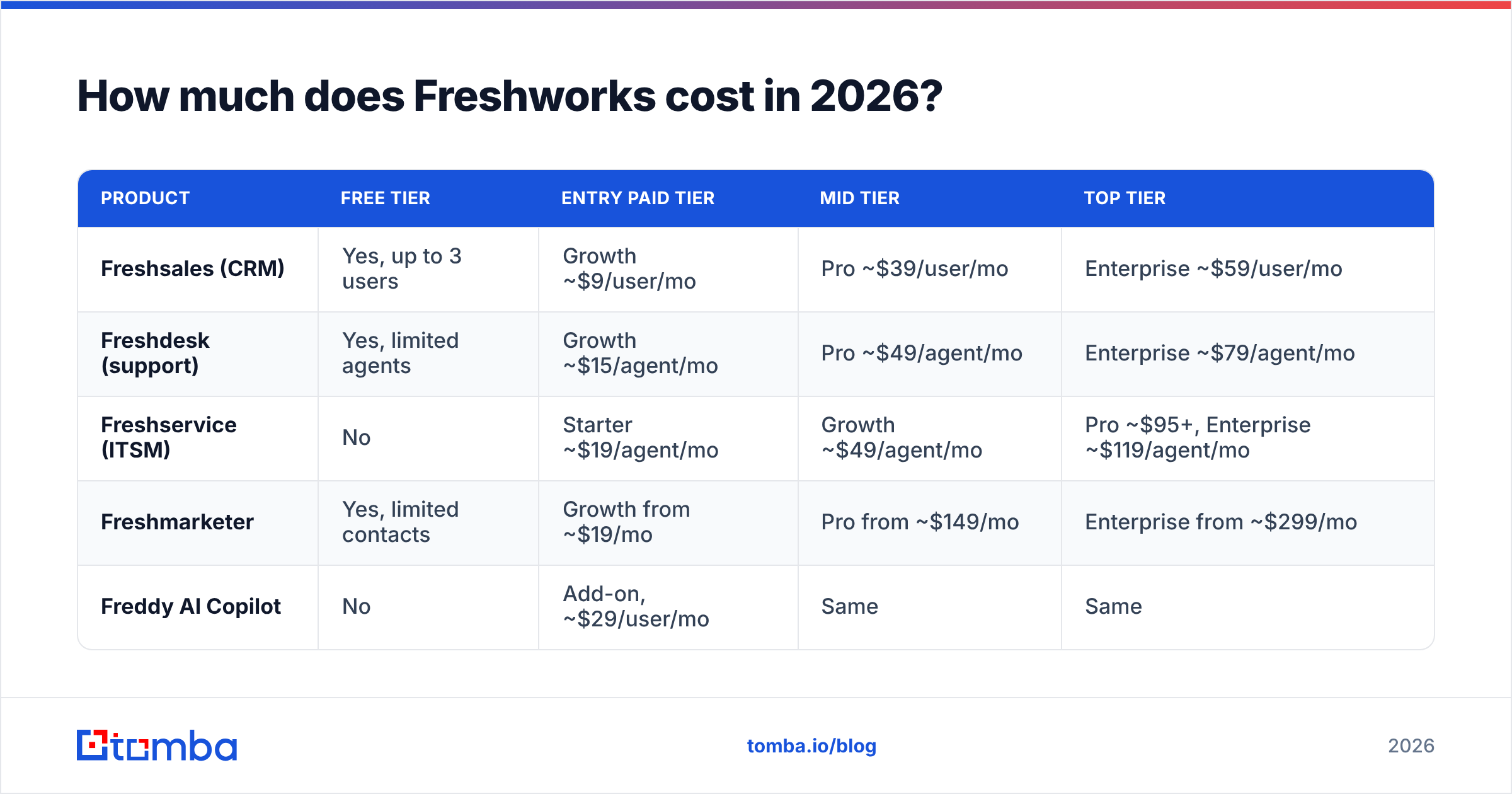
Below are list prices as published at the time of writing, billed annually. Monthly billing typically costs 20–25% more per seat, and Freshworks runs frequent promotional discounts, so always confirm against the official Freshworks pricing page before you budget.
| Product | Free tier | Entry paid tier | Mid tier | Top tier |
|---|---|---|---|---|
| Freshsales (CRM) | Yes, up to 3 users | Growth ~$9/user/mo | Pro ~$39/user/mo | Enterprise ~$59/user/mo |
| Freshdesk (support) | Yes, limited agents | Growth ~$15/agent/mo | Pro ~$49/agent/mo | Enterprise ~$79/agent/mo |
| Freshservice (ITSM) | No | Starter ~$19/agent/mo | Growth ~$49/agent/mo | Pro ~$95+, Enterprise ~$119/agent/mo |
| Freshmarketer | Yes, limited contacts | Growth from ~$19/mo | Pro from ~$149/mo | Enterprise from ~$299/mo |
| Freddy AI Copilot | No | Add-on, ~$29/user/mo | Same | Same |
Two things jump out of that grid.
First, the entry price is real, not bait. A four-person sales team on Freshsales Growth pays roughly $36/month. Compared with a HubSpot Sales Hub Professional seat or a Salesforce Sales Cloud seat, that is an order-of-magnitude difference in the same job category.
Second, the spread inside each product is enormous. Freshsales goes from $9 to $59 — a 6.5x jump — and Freshservice roughly 6x from Starter to Enterprise. The features that push teams up the ladder are predictable: custom reporting, sandbox environments, advanced permissions, workflow limits, and API rate ceilings.
What do the Freshsales tiers actually include?#
If you are evaluating Freshworks as a CRM, here is where the meaningful walls sit. This is the section to read twice, because the wall you hit determines your real price per seat.
- Free — contact and account management, built-in chat and email, mobile app. Capped at three users. Fine for a founder-led pipeline, useless past that.
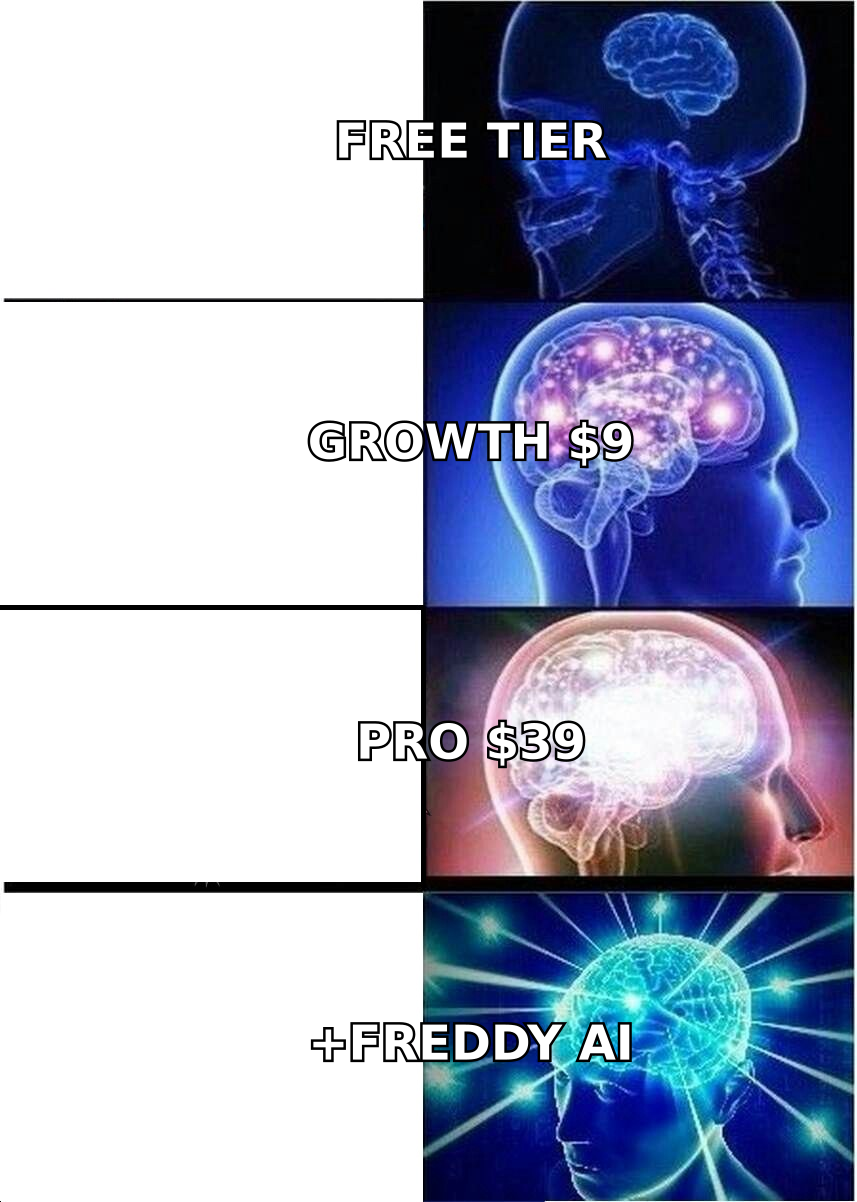
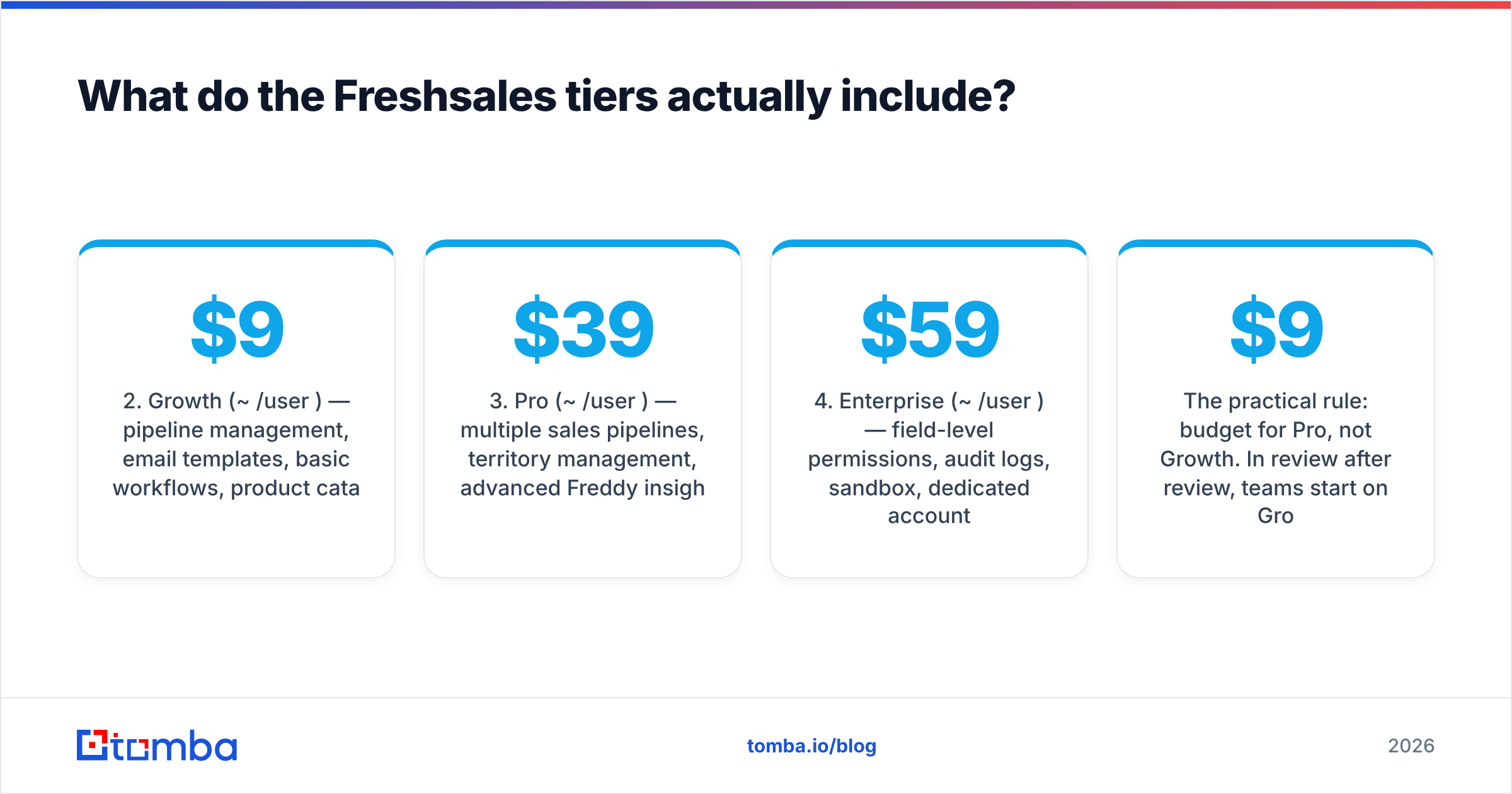
- Growth (~$9/user/mo) — pipeline management, email templates, basic workflows, product catalog, and a limited number of sequences per user per day. Good for a small team running one motion.
- Pro (~$39/user/mo) — multiple sales pipelines, territory management, advanced Freddy insights (deal scoring, forecasting), custom reports, and far higher automation limits. This is where most growing teams end up.
- Enterprise (~$59/user/mo) — field-level permissions, audit logs, sandbox, dedicated account manager, and the highest API limits. Priced for compliance requirements, not features you will use daily.
- Add-ons on top of any tier — extra workflow capacity, additional bot sessions, CPQ, and phone credits for the built-in dialer.
The practical rule: budget for Pro, not Growth. In review after review, teams start on Growth, hit the multi-pipeline or custom-report ceiling within two quarters, and upgrade. If you plan at $9 and land at $39, your forecast was wrong by 4x.
Where do the hidden costs come from?#
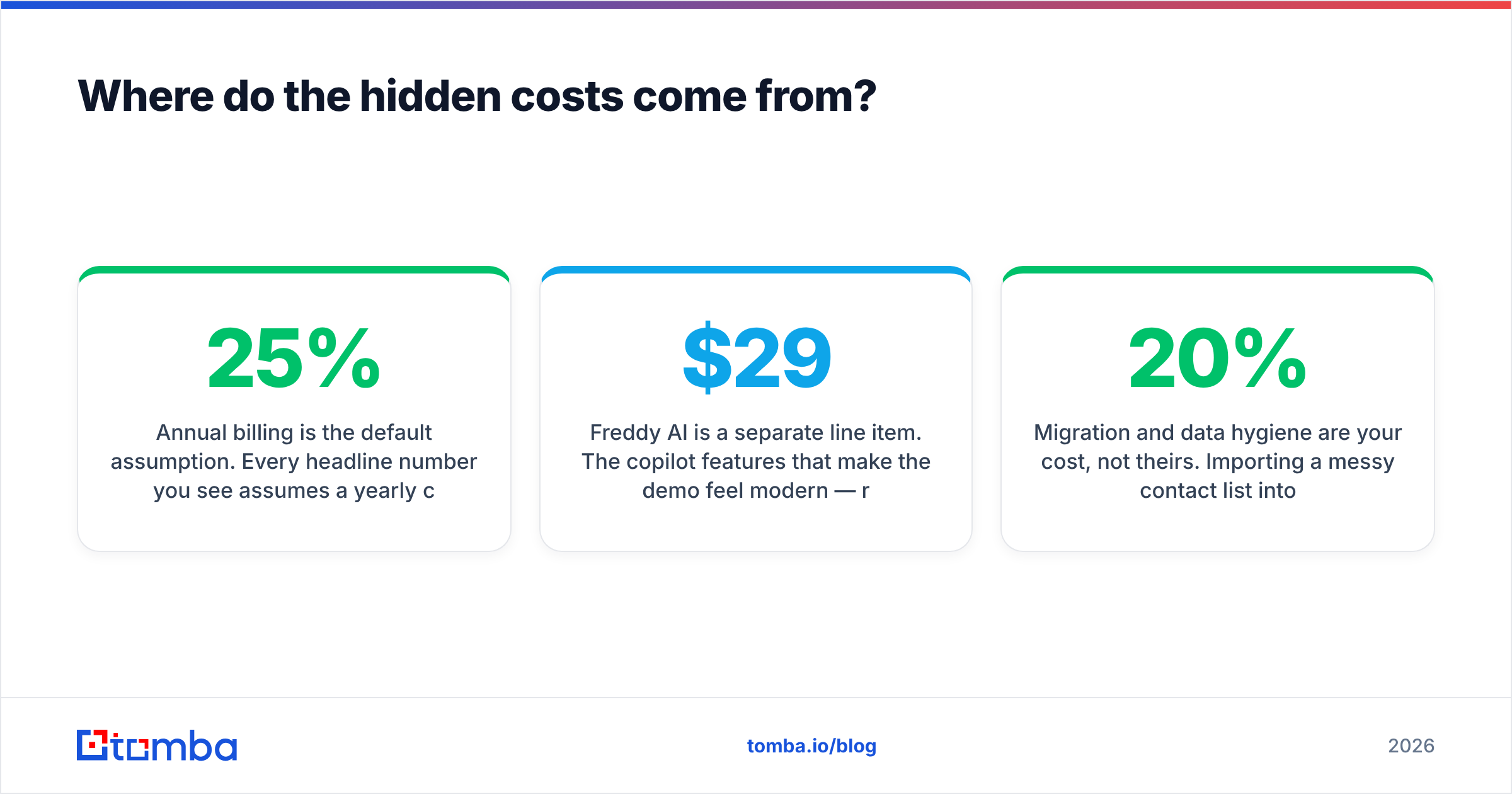
Freshworks is not deceptive about its pricing, but the sticker number is incomplete in four recurring ways.
Annual billing is the default assumption. Every headline number you see assumes a yearly commitment. Month-to-month is available and roughly 20–25% more expensive per seat. If cash flow matters more than the discount, price your first year at the monthly rate and stop comparing yourself to blog posts quoting the annual figure.
Freddy AI is a separate line item. The copilot features that make the demo feel modern — reply drafting, ticket summarization, call summaries — are generally sold as a per-user add-on rather than bundled into the tier you bought. At roughly $29/user/month, Freddy on top of Freshsales Growth more than quadruples your per-seat cost. Autonomous bot deflection is metered by session, which is genuinely usage-based: a viral support week costs more than a quiet one.
Agent seats are not free to reshuffle. Support tooling priced per agent creates a management overhead most teams underestimate. Seasonal support staffing, contractors, and part-time agents all consume seats, and mid-term downgrades are usually not prorated back to you.
Migration and data hygiene are your cost, not theirs. Importing a messy contact list into any CRM converts a data problem into a reporting problem. If 20% of your contact records have dead email addresses, your Freshworks pipeline reports will be confidently wrong. Running an email verifier pass before import is a couple of hours of work that protects every downstream metric.
What do reviewers actually praise?#
Aggregate review sentiment on G2 and similar sites is consistently positive on four points, and it is worth taking them seriously.
Time to value is short. Teams routinely report being live in days, not weeks. There is no implementation partner requirement, no mandatory certification, no six-figure onboarding SOW. For a 10-person team, that difference is worth more than any feature comparison table.
The interface is uncluttered. Reps adopt it. This is the most underrated line item in CRM economics — a $59/seat CRM that nobody updates costs infinitely more per useful record than a $9/seat CRM that everyone updates.
Support responsiveness is above average for the price band. Freshworks sells support software, and it shows in how they run their own support.
The free tiers are honest. Three users on Freshsales and a functional Freshdesk free plan are real evaluation environments, not 14-day countdown timers. You can test the actual product with actual data before spending anything.
What are the cons worth knowing before you sign?#
Reporting depth is tier-gated. Custom reports and forecasting live above the entry tier. If your first question every Monday is "show me pipeline by source, by rep, by segment," you are a Pro customer and Growth pricing is irrelevant to you.
The suite is loosely coupled. Freshsales, Freshdesk, and Freshservice share a design language and a login, but cross-product workflows are less seamless than the "unified platform" marketing implies. Buying three Freshworks products does not automatically give you one customer view.
Automation limits bite quietly. Workflow executions, sequence sends, and API calls all carry per-tier ceilings. Teams that automate aggressively hit these before they hit a feature wall, and the fix is an upgrade or an add-on.
Enterprise buyers eventually compare it upward. Analyst coverage of the CRM and service-management categories from firms like Gartner positions Freshworks as strong mid-market value rather than a top-end platform. If your requirements list includes deep territory hierarchies, complex CPQ, or a large partner ecosystem, expect the evaluation to drift toward heavier suites.

How does Freshworks pricing compare to the alternatives?#
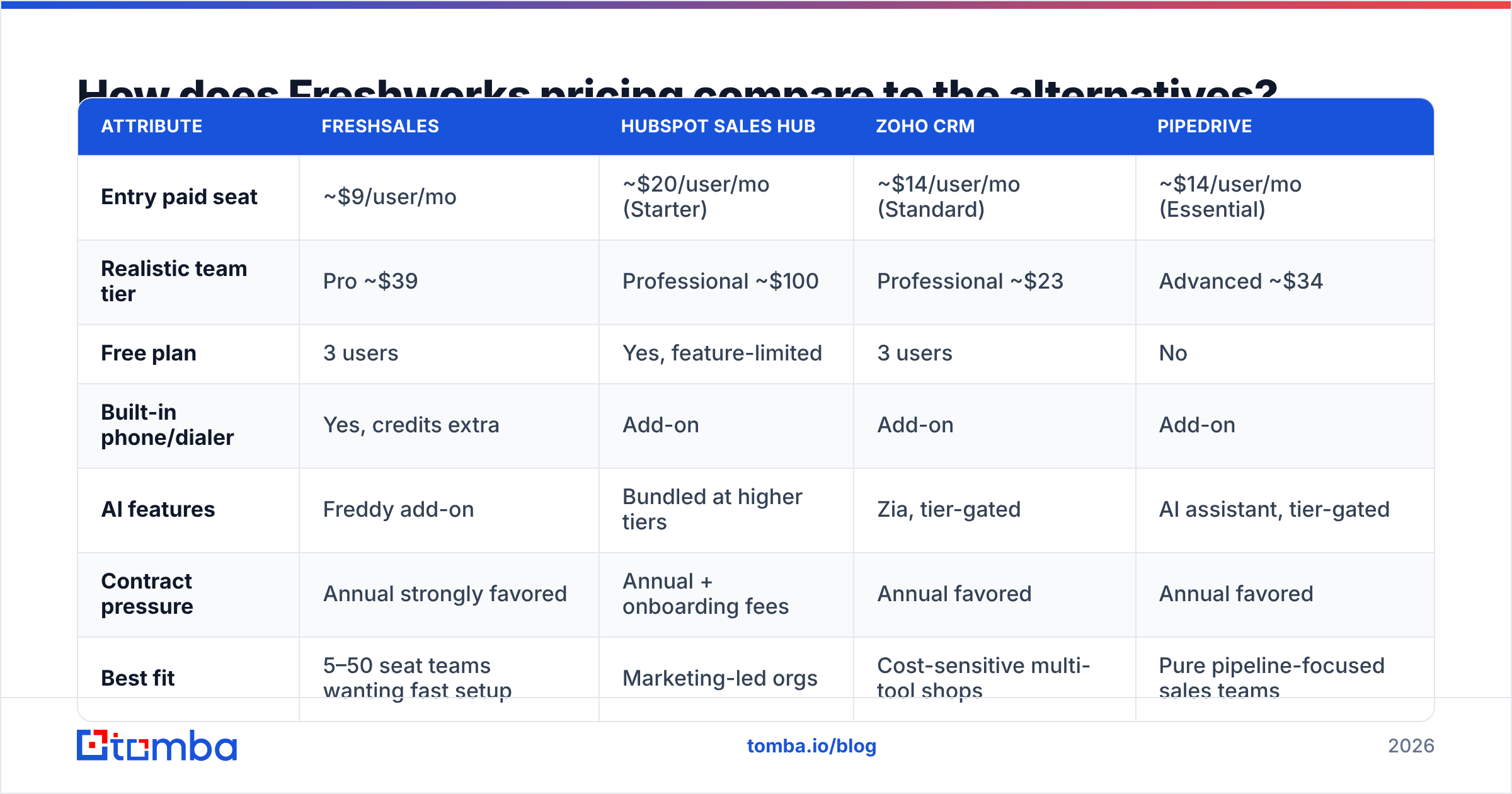
Direct list-price comparison at the tier most small sales teams actually buy:
| Attribute | Freshsales | HubSpot Sales Hub | Zoho CRM | Pipedrive |
|---|---|---|---|---|
| Entry paid seat | ~$9/user/mo | ~$20/user/mo (Starter) | ~$14/user/mo (Standard) | ~$14/user/mo (Essential) |
| Realistic team tier | Pro ~$39 | Professional ~$100 | Professional ~$23 | Advanced ~$34 |
| Free plan | 3 users | Yes, feature-limited | 3 users | No |
| Built-in phone/dialer | Yes, credits extra | Add-on | Add-on | Add-on |
| AI features | Freddy add-on | Bundled at higher tiers | Zia, tier-gated | AI assistant, tier-gated |
| Contract pressure | Annual strongly favored | Annual + onboarding fees | Annual favored | Annual favored |
| Best fit | 5–50 seat teams wanting fast setup | Marketing-led orgs | Cost-sensitive multi-tool shops | Pure pipeline-focused sales teams |
The honest read: Freshworks and Zoho fight for the value crown, Pipedrive wins on pipeline simplicity, and HubSpot wins when marketing and sales must share one database. Freshworks' edge is that it covers sales and support credibly under one vendor without the HubSpot price step.
Is Freshworks worth it for your team?#
Buy Freshworks if:
- You have 5–50 revenue or support seats and need something running this quarter.
- You want sales and support under one vendor without a platform-level contract.
- Your reps have rejected a heavier CRM before because of interface friction.
- You are cost-sensitive and can commit annually.
Look elsewhere if:
- You need deep, custom reporting on day one and cannot justify the Pro or Enterprise jump.
- Your GTM motion depends on tight marketing-sales attribution in a single object model.
- You have complex ITSM requirements at scale, where Freshservice's per-agent pricing compounds fast.
- Your actual bottleneck is not software at all.
That last one deserves its own section, because it is the most common misdiagnosis in CRM buying.
What does a CRM never fix?#
A CRM stores relationships. It does not create them. Teams frequently buy Freshworks, migrate 12,000 contacts, and discover three months later that pipeline did not move — because the underlying contact data was stale, incomplete, or wrong.
Three checks worth running before, not after, migration:
- Coverage. What percentage of your target accounts have a named, reachable contact at the right seniority? If it is under 60%, you are buying a database with holes in it. A domain search across your account list closes that gap faster than a CRM feature ever will.
- Validity. What percentage of stored addresses still resolve? Bounce rates above 3% damage sender reputation and quietly suppress every sequence you run from inside Freshsales.
- Enrichment depth. Do your records carry title, company size, and technology signals, or just name and email? Thin records make segmentation guesswork. Contact enrichment is what turns a list into a targeting system.
Fixing these before migration means your Freshworks reports describe reality. Fixing them after means re-importing everything and reconciling duplicates by hand.
What is the practical buying sequence?#
- Start free. Three Freshsales users and the Freshdesk free plan cost nothing and answer the adoption question honestly.
- Price the tier you will actually land on, not the one on the homepage. For most sales teams that is Pro.
- Quote Freddy AI separately and decide whether it earns $29/user/month against your current workflow. Often it does not in year one.
- Negotiate the annual commit. Freshworks discounts, particularly at renewal and particularly when a competitor evaluation is genuinely underway.
- Clean the data first. Verify and enrich before import so your first quarter of reporting is trustworthy.
Bottom line#
Freshworks pricing is one of the better value propositions in the mid-market — as long as you budget for the tier you will end up on rather than the one that gets quoted in listicles. The pros are real: fast deployment, high adoption, low entry cost. The cons are equally real: tier-gated reporting, AI sold separately, metered bot sessions, and annual-billing gravity.
Before you migrate a single record, make sure the records deserve migrating. Run your target accounts through the Tomba Email Finder to fill in missing decision-maker contacts, verify what you already have, and import a list that will make your new CRM's dashboards worth reading. Tomba starts free with 25 searches a month, and paid plans begin at $49/month — see Tomba pricing for the full breakdown, or wire it directly into your stack with the Tomba API.
Related guides#
Ready to find emails that actually work?
Join 150,000+ professionals who stopped guessing and started sending. Free credits on signup — no credit card required.
Get the Tomba newsletter
Practical outbound tactics and product updates — once every two weeks.
About the author